Welcome Guest ( Log In | Register )

83 Pages « < 22 23 24 25 26 > » Bottom

Outline · [ Standard ] · Linear+

Home Networking Ditch ONU, use GPON SFP on Business Grade Router, 2.5G ONU for Unifi & Maxis, NO NEED VLAN

views
     
ChenKaiWen
post Jun 4 2022, 10:58 PM

Casual
***
Junior Member
382 posts

Joined: May 2019


QUOTE(Anime4000 @ Jun 4 2022, 09:52 PM)
apparently not,

I just have extra speed on download, and upload is under 100Mbps, 90Mbps realtime

he got extra speed on both direction,
*
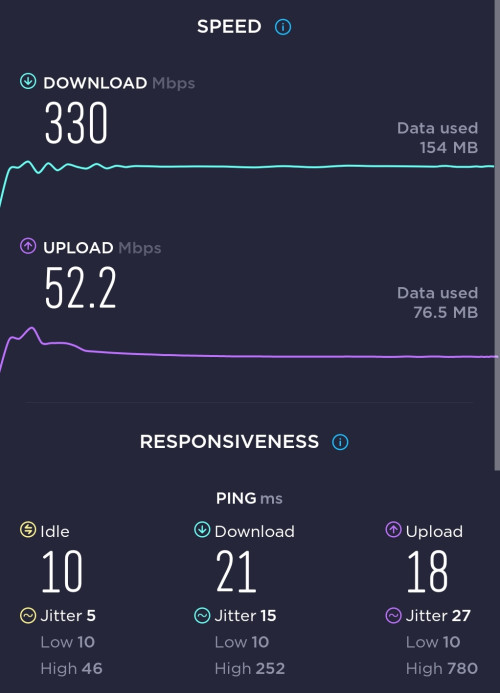
I'm on TM-Maxis too.
300mbps plan. And I get extra speed on both directions

user posted image
TSAnime4000
post Jun 5 2022, 01:46 AM

Look at all my stars!!
*******
Senior Member
2,399 posts

Joined: Jul 2009
From: /dev/null


QUOTE(ChenKaiWen @ Jun 4 2022, 10:58 PM)
I'm on TM-Maxis too.
300mbps plan. And I get extra speed on both directions

user posted image
*
nice, mine just download, haha
ChenKaiWen
post Jun 5 2022, 07:25 AM

Casual
***
Junior Member
382 posts

Joined: May 2019


QUOTE(Anime4000 @ Jun 5 2022, 01:46 AM)
nice, mine just download, haha
*
I did switch directly from TM to Maxis. All they changed was my ONU from unifi logo to TM logo. Maybe that could be the reason.
YoungMan
post Jun 5 2022, 10:59 AM

Look at all my stars!!
*******
Senior Member
6,818 posts

Joined: Oct 2008
From: Kuala Lumpur


QUOTE(ChenKaiWen @ Jun 4 2022, 11:58 PM)
I'm on TM-Maxis too.
300mbps plan. And I get extra speed on both directions

user posted image
*
This is on TM's ONU or custom GPON?

QUOTE(Anime4000 @ Jun 5 2022, 02:46 AM)
nice, mine just download, haha
*
Using Digi on TM infra, download max 99mbps and upload can go a bit beyond 50mbps. Using TM's ONU.

QUOTE(ChenKaiWen @ Jun 5 2022, 08:25 AM)
I did switch directly from TM to Maxis. All they changed was my ONU from unifi logo to TM logo. Maybe that could be the reason.
*
The new ZTE ONU?
ChenKaiWen
post Jun 5 2022, 11:24 AM

Casual
***
Junior Member
382 posts

Joined: May 2019


QUOTE(YoungMan @ Jun 5 2022, 10:59 AM)
This is on TM's ONU or custom GPON?
*
TM's ONU, HG8240H

Don't have the equipment for custom GPON
eric_tan
post Jun 5 2022, 07:19 PM

Getting Started
**
Junior Member
264 posts

Joined: Feb 2005


QUOTE(Anime4000 @ Apr 4 2022, 11:13 PM)
This my final verdict on xPON ONU SFP Stick

There are 3 SFP Stick can be use on TM Fiber
1. VSOL V2801F (Stock Firmware)
2. TWC GPON657 (C00R657V2801F_V1.9.0-220404.tar)
3. ODI DFP-34X-2C2 (M114_sfp_ODI_220304.tar)

RTL9601CI
1. VSOL V2801F
2. TWC GPON657

RTL9601D
1. ODI DFP-34X-2C2

Stick Setup
Mikrotik
1. Remove sfp1 or sfp-sfpplus1 from bridge
2. Add sfp1 or sfp-sfpplus1 IP Address 192.168.1.100/24
3. Add sfp1 or sfp-sfpplus1 into WAN Interface Group

Now you can access 192.168.1.1 via 192.168.88.0/24 network via NAT!!!

Default Password
VSOL V2801F
admin, stdONU101

TWC GPON657
admin, system

ODI DFP-34X-2C2
admin, admin
Setup for TM Fiber
Login into telnet via 192.168.1.1

Authentication:
CODE

flash set GPON_SN HWTC99887766
flash set GPON_PLOAM_FORMAT 1
flash set GPON_PLOAM_PASSWD 1234567890


Authorized Model:
CODE

flash set PON_VENDOR_ID HWTC
flash set HW_HWVER 168D.A
flash set OMCI_FAKE_OK 1


Reboot it!
CODE

reboot


Check OMCI VLAN
Login into telnet via 192.168.1.1

TM-Maxis Example:
CODE

# omcicli mib get 84
XXXXXXXXXXXXXXXXXXXXXXXXXXXXXXXXX
VlanTagFilterData
XXXXXXXXXXXXXXXXXXXXXXXXXXXXXXXXX
=================================
EntityID: 0x1202
FilterTbl[0]: PRI 0,CFI 0, VID 621
FwdOp:  0x10
NumOfEntries: 1
=================================
=================================
EntityID: 0x1203
FilterTbl[0]: PRI 0,CFI 0, VID 821
FwdOp:  0x10
NumOfEntries: 1
=================================
=================================
EntityID: 0x1204
FilterTbl[0]: PRI 0,CFI 0, VID 822
FwdOp:  0x10
NumOfEntries: 1
=================================
=================================
EntityID: 0x120b
FilterTbl[0]: PRI 0,CFI 0, VID 621
FilterTbl[2]: PRI 0,CFI 0, VID 821
FilterTbl[4]: PRI 0,CFI 0, VID 822
FwdOp:  0x10
NumOfEntries: 3
=================================
=================================
EntityID: 0xe102
FilterTbl[0]: PRI 0,CFI 0, VID 209
FwdOp:  0x10
NumOfEntries: 1
=================================
=================================
EntityID: 0xe10b
FilterTbl[0]: PRI 0,CFI 0, VID 209
FwdOp:  0x10
NumOfEntries: 1
=================================


2.5GbE Support
RB5009 did not support 2.5GbE via SFP!

Customer with 1Gbps subscription manage to get 1.7Gbps when using 2.5GbE Mode
https://www.speedtest.net/result/c/aabbfe75...c4-5fe4ca4d4999

Screenshot
ODI DFP-34X-2C2
[attachmentid=11129724]
[attachmentid=11129725]

TWC GPON657
[attachmentid=11129727]
[attachmentid=11129728]

More information can be found here: https://github.com/Anime4000/RTL9601C1

I spend my time on this since 2020!

I recommend ODI DFP-34X-2C2 because using newer SFP Body (less heat) and better SoC
*
Bro, any local "trusted" seller that sells the 3 xPON as you mentioned above?

YoungMan
post Jun 5 2022, 08:05 PM

Look at all my stars!!
*******
Senior Member
6,818 posts

Joined: Oct 2008
From: Kuala Lumpur


QUOTE(ChenKaiWen @ Jun 5 2022, 12:24 PM)
TM's ONU, HG8240H

Don't have the equipment for custom GPON
*
Means you are lucky because TM capped your port higher. For most users their port is capped at exact speed or slightly lower if you subscribe from other providers.
lwk523
post Jun 5 2022, 09:11 PM

Premium Q Trader
******
Senior Member
1,040 posts

Joined: Mar 2006


QUOTE(eric_tan @ Jun 5 2022, 07:19 PM)
Bro, any local "trusted" seller that sells the 3 xPON as you mentioned above?
*
Let me know if you need one unit ya .. I doing second batch for this month

Pm me smile.gif

TSAnime4000
post Jun 5 2022, 09:58 PM

Look at all my stars!!
*******
Senior Member
2,399 posts

Joined: Jul 2009
From: /dev/null


QUOTE(eric_tan @ Jun 5 2022, 07:19 PM)
Bro, any local "trusted" seller that sells the 3 xPON as you mentioned above?
*
You can order xPON ONU SFP from lwk523

QUOTE(YoungMan @ Jun 5 2022, 08:05 PM)
Means you are lucky because TM capped your port higher. For most users their port is capped at exact speed or slightly lower if you subscribe from other providers.
*
yea, I discover that Alcatel/Nokia OLT very mess and dumb, Huawei OLT better, high compatibility,
I wish if I could pump high power laser just to destroy TM OLT biggrin.gif
papyrous
post Jun 6 2022, 01:55 PM

Getting Started
**
Junior Member
214 posts

Joined: May 2017
QUOTE(lwk523 @ Jun 5 2022, 09:11 PM)
Let me know if you need one unit ya ..  I doing second batch for this month

Pm me  smile.gif
*
which one of the ones mentioned above are you selling?
aneip
post Jun 6 2022, 05:00 PM

Look at all my stars!!
*******
Senior Member
2,466 posts

Joined: Nov 2004


QUOTE(Anime4000 @ Jun 2 2022, 04:06 PM)
you have enter VS_AUTH_KEY after changing HW_HWVER and ELAN_MAC_ADDRESS ?

omcicli mib get command only works with ODI DFP-34X-2C2
*
Yup VS_AUTH_KEY updated. No reboot issue.

Noted on omcicli mib get.


rezzorix
post Jul 7 2022, 06:04 PM

Getting Started
**
Junior Member
98 posts

Joined: Nov 2021
So.. was busy in the past months since I first tried to get this done, but as of today I succeeded!
My TIME broadband is now running with ODI DFP-34X-2C2 (firmware version V1.0-220414) rclxms.gif

As base I used the very good guide from Anime4000 here: https:/-/github.com/Anime4000/RTL960x/blob/main/Docs/Setup_Stick.md

However, I was running into issues that kept me from succeeding right away.
A lot of reading later, I got it to work, so here in short the issues I ran into with solutions:

Issue: The OMCI_SW_VER1 and OMCI_SW_VER2 reset always to standard after a reboot.
Reason: bug in firmware

Solution: To avoid this and keep the version you need, set OMCI_OLT_MODE to 21, this is a bug exploit ensuring software version stays as set while all other settings function normal.
Note; same as OMCI_OLT_MODE 3 - you need to ensure adding all other available OMCI information.

Here is where I got this info from: https:/-/github.com/Anime4000/RTL960x/issues/30#issuecomment-1146604684

3x Issues: ONU state o5 but but no internet / router cannot establish PPPoE connection
[1] Reason: MAC Address / AUTH_KEY not correct
Solution: Dont change MAC Address & MAC_Key of your ODI ! If you changed it already, use the ones from that you hopefully backed-up.
Should you not have MAC_Key... well you are out of luck - have seen people struggling with getting it correct.

[2] Reason: vlan id not set
Solution: set vlan ID in webinterface -> Advance -> VLAN Settings
I tried VLAN ID 499 based on the post from hezaika earlier in this thread: https:/'/forum.lowyat.net/index.php?showtopic=4925452&view=findpost&p=104339195

[3] Reason: OMCI data not correct; especially OMCI_TM_OPT
Solution: flash set OMCI_TM_OPT 0


For the links above you need to remove the "-", I am a too junior member here to post external links rolleyes.gif

Aside from that I can only encourage everyone who runs into issue to also check the github issue pages of Anime4000 repositories - a lot info & links in there, too.

I hope the above helps someone - if you got questions please let me know.

Again thanks to everyone who participating and contributing, but especially Anime4000 for the great work being done thumbup.gif


rezzorix
post Jul 7 2022, 11:10 PM

Getting Started
**
Junior Member
98 posts

Joined: Nov 2021
Just a quick follow up question:

The CPU Usage of the stick as per webinterface is constantly at 100%.
Temperature over the past hours is between 62-64°C

Is that all normal, or anything to tweak to reduce this?
rezzorix
post Jul 7 2022, 11:14 PM

Getting Started
**
Junior Member
98 posts

Joined: Nov 2021
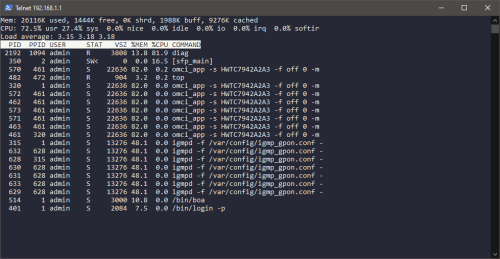
Just logged in via telnet and did run "top" - see screen.

user posted image

Seems like "diag" is putting a lot of stress on the CPU... can this process safely be killed?
TSAnime4000
post Jul 7 2022, 11:38 PM

Look at all my stars!!
*******
Senior Member
2,399 posts

Joined: Jul 2009
From: /dev/null


» Click to show Spoiler - click again to hide... «


Well done rezzorix rclxms.gif
2 years research on this stuff...

there is several thing to point out:
1. Reason: MAC Address / AUTH_KEY not correct
Answer:
» Click to show Spoiler - click again to hide... «


2. Reason: vlan id not set
» Click to show Spoiler - click again to hide... «


3. Reason: OMCI data not correct; especially OMCI_TM_OPT
» Click to show Spoiler - click again to hide... «


One more thing...

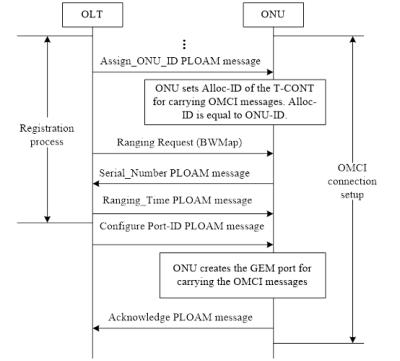
OMCC (ONT Management and Control Channel)
There is several version from 0x80 (128) - 0xB3 (179)

0x80 is commonly use,
0xA0 also used in some places

so far TM accept version 0x80 and 0xA0, still depending on OLT that are you on...

for TIME, 0x80 just works fine~ under Huawei OLT

OMCC is just like Dail-up handshake
Attached Image

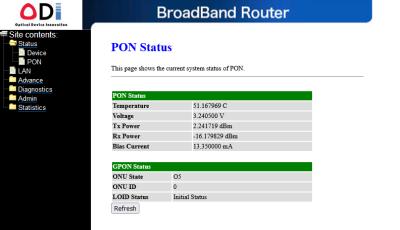
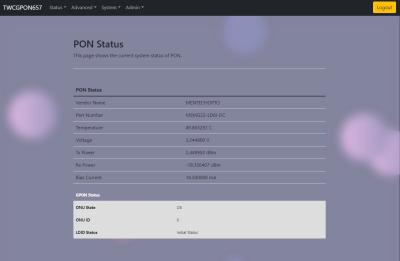
Temperature
No need to worry, RTL9601CI and RTL9601D can handle 80°C

This my stick right now:
Attached Image

Hezaika stick temp (TIME)
Attached Image

Stick CPU Usage
I strongly not to mess with stock processes, diag is require to run, usually force stick to accept unidentified OMCI by replying OK back to OLT

first 10minute usually high CPU usage, see in few hours... take note that RTL960x is very slow MIPS, once pon0 interface has been mapped to eth0, it run transparently, wont effect xPON speed
Gaara92
post Jul 8 2022, 08:22 AM

Herald
****
Junior Member
612 posts

Joined: Mar 2008


the experiment is still going on eh haha.. I am now using dark fiber for my resident, no need TM anymore. Pure speed 10Gbps straight to home, but limited in Cybjeraya area only tongue.gif
rezzorix
post Jul 8 2022, 04:55 PM

Getting Started
**
Junior Member
98 posts

Joined: Nov 2021
QUOTE(Gaara92 @ Jul 8 2022, 08:22 AM)
the experiment is still going on eh haha.. I am now using dark fiber for my resident, no need TM anymore. Pure speed 10Gbps straight to home, but limited in Cybjeraya area only tongue.gif
*
Poser flex.gif biggrin.gif
But congrats! smile.gif

Can you actually utilize all this bandwidth?
And if yes... for what if I may ask?
rezzorix
post Jul 9 2022, 12:50 PM

Getting Started
**
Junior Member
98 posts

Joined: Nov 2021

Thanks for the additional explanation Anime4000 smile.gif

Just reporting back; the stick has now an uptime of 48+ hours.
So far internet is working well - I do have the max TIME package with 1000/500 and speeds/ping/package loss etc. is as good as with the old ONU.

Only thing is that stick CPU still constantly at 100% and the temperature is still high between 62-65°C...
This is not impacting internet performance, but seeing that you guys are in high 40s or in around 50°C makes me wonder.

For OMCC version my stick is currently set to 0x80 and traffic management option 2.
I am not daring to touch it; stick is working at the moment and I dont really wanna mess up more unsure.gif
TSAnime4000
post Jul 9 2022, 04:16 PM

Look at all my stars!!
*******
Senior Member
2,399 posts

Joined: Jul 2009
From: /dev/null


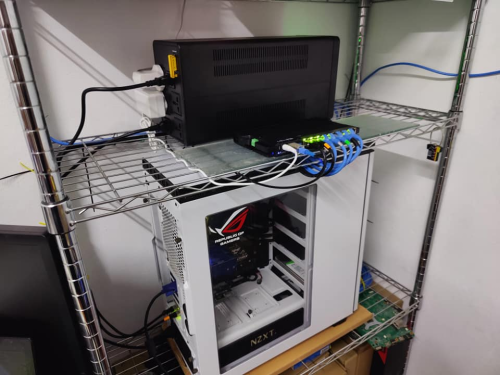
one little advantage using SFP ONU

one less adapter, go ease on UPS, no more AC to DC conversion loss at stock ONU
user posted image

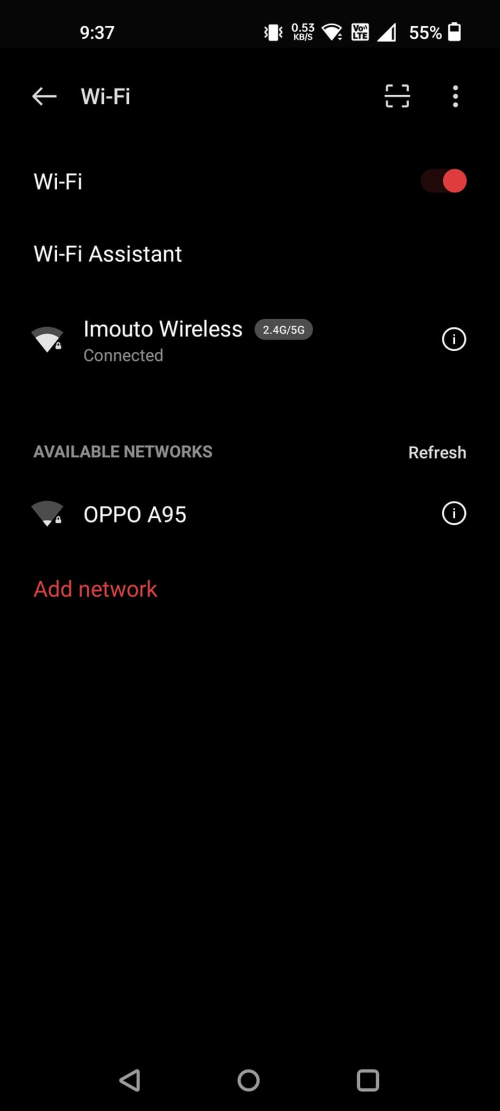
during blackout last, all neighborhood Wi-Fi died, only me remain online biggrin.gif
user posted image

UPS I bought is BVX1200LI-MS at CureComp Tech
RB5009 + Deco M4 = up time on UPS ~7 hours
RB5009 + Deco M4 + Ryzen 5 5600 Server ( Load average 1.06,1.15,1.21 ) = ~2.2 hours


This post has been edited by Anime4000: Jul 9 2022, 04:22 PM
rezzorix
post Jul 9 2022, 10:20 PM

Getting Started
**
Junior Member
98 posts

Joined: Nov 2021
Oh I have the same UPS smile.gif

And I have the same reason as you, the advantage of the SFP is 1 device less that uses a power adapter.

I have the following devices secured by UPS;

- RB5009 with SFP
- TP-LINK TL-SG108E
- NAS DS920+
- NAS DS214+
- 2x RPi0w
- RPi4
- LattePanda v1

However, I auto-shutdown all after 5 min. of power outage (using nut-client & nut-server / Network UPS Tools).

Mikrotik announced a new RB5009 version with PoE ON ALL PORTS.
That would free up at some more power adapters as I could have the 3 RPi and 1 Lattepanda powered with PoE.

83 Pages « < 22 23 24 25 26 > » Top
 

Change to:
| Lo-Fi Version
0.0217sec    0.54    6 queries    GZIP Disabled
Time is now: 15th December 2025 - 10:31 AM