Welcome Guest ( Log In | Register )

Outline · [ Standard ] · Linear+

Home Networking Ditch ONU, use GPON SFP on Business Grade Router, 2.5G ONU for Unifi & Maxis, NO NEED VLAN

views
     
thankyou
post Jun 26 2020, 07:00 PM

Regular
******
Senior Member
1,941 posts

Joined: Jan 2003
QUOTE(Anime4000 @ Jun 26 2020, 05:40 PM)
ah, need ask seller for WebUI
*
You can't use this unless you have SFP programmer... My ONU stick w/ web interface is otw... Will update once it's proven working....

If you can find MA5671A with programmer, this is the best in terms of compatibility...

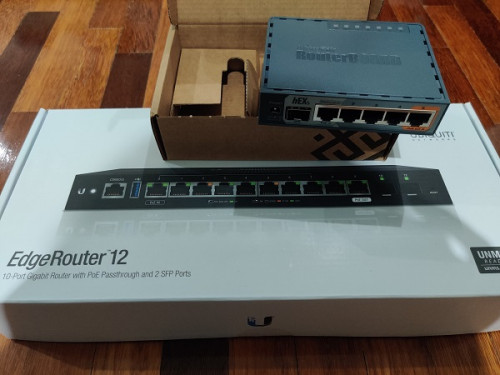
Just noticed you've gotten EdgeRouter 12, I've just gotten this as well! Definitely will update if it's compatible with the ONU Stick I ordered... Most likely compatible since it supports bridge and changeable LOID/GPON PN.

Costly experiment
user posted image

This post has been edited by thankyou: Jun 26 2020, 07:16 PM
thankyou
post Jun 26 2020, 08:07 PM

Regular
******
Senior Member
1,941 posts

Joined: Jan 2003
QUOTE(Anime4000 @ Jun 26 2020, 07:33 PM)
May I know which model ONU stick you bought? I wait you for testing, I in tight budget, just can't simply buy and failĀ  blush.gif
*
#Aliexpress MYR 208.80 25%OFF | GPON SFP ONU Stick With MAC SC Connector DDM pon module
https://a.aliexpress.com/_dTNv9ks

This is the stick... It's proven working with Mikrotik routers... That's the reason I get Hex S to test it out as well.

Ordered 2 weeks ago and still waiting...

This post has been edited by thankyou: Jun 26 2020, 08:08 PM
thankyou
post Jun 26 2020, 08:10 PM

Regular
******
Senior Member
1,941 posts

Joined: Jan 2003
QUOTE(miloaisdino @ Jun 25 2020, 03:44 PM)
iirc tm doesnt do auth based on gpon sn anymore. as long as the password is correct it should work
*
I don't think they ever authenticate with GPON SN or MAC as long as the password is correct. I've replace the ONU since 2012 and it was working all the while...
thankyou
post Jun 29 2020, 01:15 AM

Regular
******
Senior Member
1,941 posts

Joined: Jan 2003
It's going to be a long wait for my GPON Stick...

It has been the same status since 21st June...


QUOTE
Departed country of origin

2020-06-21 23:30:59 [GMT+8]

Shipment accepted by airline

2020-06-21 02:21:33 [GMT+8]


It seems forever now... biggrin.gif

Seems like the guy complain after few days of usage:

QUOTE
I wasn't happy long. .. The module worked for a couple of days, and then stopped establishing a connection with Olt. GPON state: Init state. Contacted the technical support of the provider, they reported that they do not even see authorization attempts. The configuration provider did not change. The ont provider from which the serial number for authorization was taken was connected without problems. Numerous reboot and reset to factory settings did not help. Apparently SFP module marriage. I will contact the seller.


This post has been edited by thankyou: Jun 29 2020, 01:16 AM
thankyou
post Jun 29 2020, 04:24 PM

Regular
******
Senior Member
1,941 posts

Joined: Jan 2003
QUOTE(Anime4000 @ Jun 29 2020, 11:18 AM)
oh wow, being stuck in shipping delivery.

if you got extra money, what about Ubiquiti UFiber Nano G:
https://community.ui.com/questions/UFiber-N...dc-cdbcf6939617

that ONT looks awesome to, can be powered by Passive PoE.
*
It should work but I'm more interested in All-In-One device... I'm currently upgrading switches to CRS309-1G-8S+IN so that's additional RM3k +- to spend including all the SPF modules.

Skipping Nano G smile.gif

This post has been edited by thankyou: Jun 29 2020, 04:24 PM
thankyou
post Jul 17 2020, 03:30 PM

Regular
******
Senior Member
1,941 posts

Joined: Jan 2003
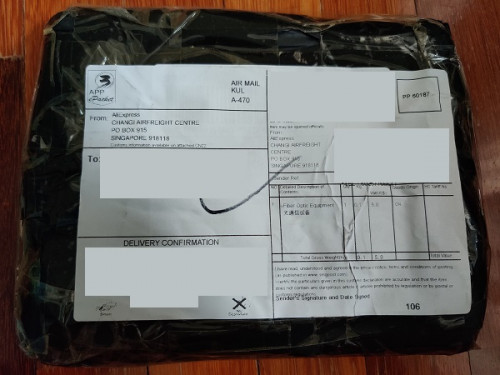
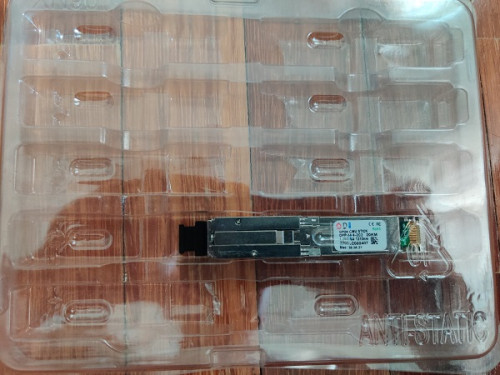
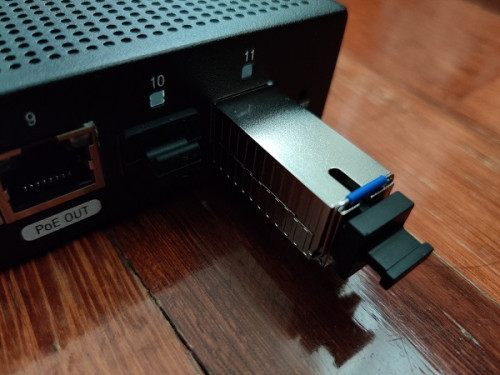
Finally it has arrived... I won't be replacing the router until midnight as there's other family members who are WFH.

user posted image
user posted image
user posted image
thankyou
post Jul 18 2020, 04:04 AM

Regular
******
Senior Member
1,941 posts

Joined: Jan 2003
It's working fine... ODI GPON Stick is compatible with EdgeRouter. I'm able to connect to Unifi with following configuration:

The configuration was tested on ER-12, will work with ER-4/ER-6P/ER-X-SFP

eth0-7 = switch0 (192.168.88.0/24)
eth8 = LAN2 (192.168.89.0/24)
eth11 = ODI GPON SFP

1) Plug-in ODI GPON Stick to eth11

2) create br0
CODE
Config Tree >> interfaces >> bridge


3) Back to Dashboard, bridge eth8 & eth11

4) Connect to eth8, change LAN IP -> 192.168.1.2/24

5) Open browser, connect to ODI GPON web interface
CODE
http://192.168.1.1
admin:admin
Telnet
root:PON521


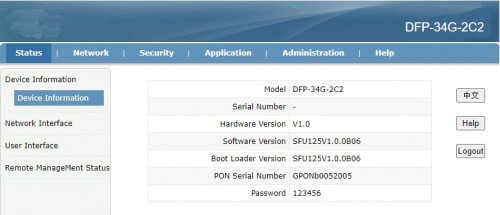
6) ODI GPON main page
user posted image

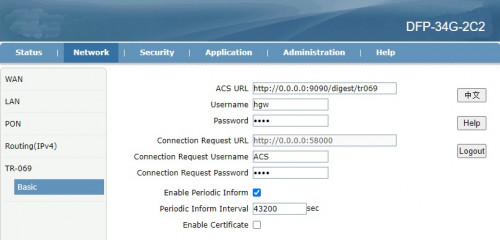
7) Update SN/Password
CODE
NETWORK >> PON


8) Just to be safe, nothing overwrites the ODI GPON Stick, I've changed TR-069 password as well.
» Click to show Spoiler - click again to hide... «


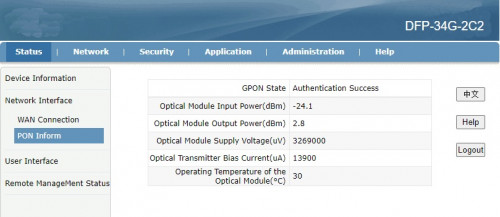
9) You should get the following status once GPON Stick is restarted.
» Click to show Spoiler - click again to hide... «


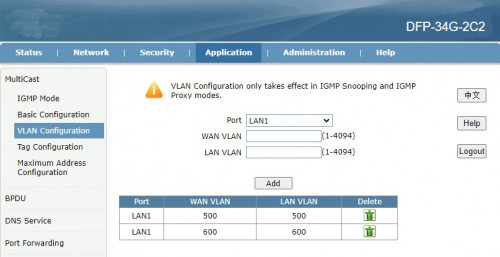
10) Make sure LAN1 (SFP -> ER) is tagged. Unifi 500/600
» Click to show Spoiler - click again to hide... «


Back to ER-12

11) Remove eth8/eth11 from br0 then disable br0 (Optional)

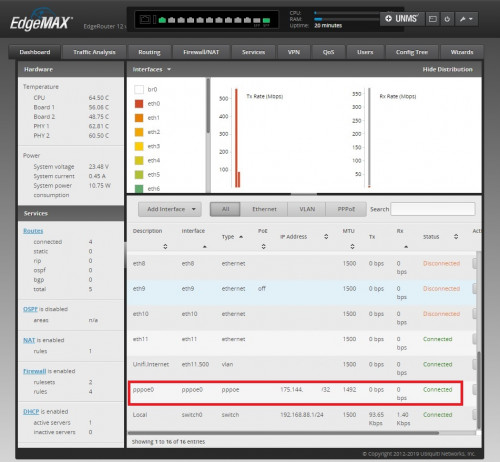
12) Create VLAN 500 on eth11 (SFP)

13) Create PPPoE, that's it!
user posted image

This post has been edited by thankyou: Jul 18 2020, 04:16 AM
thankyou
post Jul 18 2020, 12:01 PM

Regular
******
Senior Member
1,941 posts

Joined: Jan 2003
QUOTE(Azusa_San @ Jul 18 2020, 11:11 AM)
if we replace the ONT with GPON SFP, this means we cannot use the VOIP / unifi phone anymore?
*
You can with following:

1) if you know the SIP credential
2) SIP phone/adapter that uses RJ45
thankyou
post Jul 18 2020, 09:34 PM

Regular
******
Senior Member
1,941 posts

Joined: Jan 2003
QUOTE(aneip @ Jul 18 2020, 09:27 PM)
Can I know your original model of BTU? Or confirm compatible will all brand?
*
It's Huawei HG8240H, replace Huawei BTU is fine... No promise for any other models...
thankyou
post Jul 18 2020, 11:58 PM

Regular
******
Senior Member
1,941 posts

Joined: Jan 2003
QUOTE(Anime4000 @ Jul 18 2020, 07:50 PM)
Neat! Finally I can start saving some cash for this kind of setup!
Have you find that able to override OLT Speed Cap? Curious 3rd Party ONT able to override OLT settings
This make some serious Networking!
*
Any sample command or anything I can refer to regarding to the OMCI commands?
thankyou
post Jul 19 2020, 06:41 PM

Regular
******
Senior Member
1,941 posts

Joined: Jan 2003
QUOTE(asellus @ Jul 19 2020, 12:06 PM)
» Click to show Spoiler - click again to hide... «


Can you try measuring the temperature of SFP module when it is in use? Like with the temperature gun you can see nowadays in front of the shops and restaurants. Is the module too hot to be touched or not?
*
It's hot when I touch it... GPON web interface show it's 45-50c


Anime4000 aneip

Try not to order the GPON SFP yet. It's not that stable with my ER-12. somehow during the startup, the PPPoE did not managed to dial until I have to manually access to 192.168.1.1 web interface (just access will do), then ER-12 automatically connects to Internet somehow.

Not sure what happened as I'm not familiar with EdgeRouter. Will have to capture the logs to see what actually happened that time.

Revert back to TM router then everything resolve immediately. Tried rebooting both TM + ER-12 and PPPoE always managed to dial automatically without manual intervention. Unfortunately this is not happening to SFP GPON sad.gif


Will report again when I try with Mikrotik router.

This post has been edited by thankyou: Jul 19 2020, 06:41 PM
thankyou
post Jul 20 2020, 10:23 AM

Regular
******
Senior Member
1,941 posts

Joined: Jan 2003
QUOTE(Anime4000 @ Jul 19 2020, 07:59 PM)
I think 2 possible scenario regrading GPON SFP:
1. GPON SFP getting late power on, thus slow to being ready.
2. GPON SFP is slow to startup, ER-12 find that eth11 is not attached to any, thus PPPoE not execute.

since ER can access SSH, try put "some" script that keep reconnect pppd even eth11 not present/ready, I managed create one for VyOS to record every pppd request (Streamyx) for MCMC PDF Report Documentation
*
That's what I thought so too but I waited long enough actually, like few minutes but it PPPoE still "disconnect" status. the GPON SFP itself takes less than 1 minutes to reboot if you press the restart button on its webui.

As for SFP itself, ER-12 managed to detect the brand, status of the SFP upon ER-12 start up.
thankyou
post Jul 21 2020, 12:31 PM

Regular
******
Senior Member
1,941 posts

Joined: Jan 2003
QUOTE(cyborgclone @ Jul 21 2020, 10:59 AM)
@thankyou

Any updates on your project? Correct me if I am wrong, your testing with TM and Maxis fiber?

I am considering the ER-12 - EdgeRouter 12 too, with GPON SPF for Time.
Anyone has any experience with non-Time issued GPON SPF modem/adapter/card/router with Time?
Any information on Time ANU ANT Authentication/SIP/VoIP/VLAN Tagging would be great.
*
I didn't have time to re-test the GPON SFP. My family members make noise when I brought down the Internet for 4 hours on Sunday...

Yes, I'm testing on TM (Maxis) network specifically on Huawei ONU. Can't comment much on other networks due to lack of knowledge & environment to test.
thankyou
post Jul 21 2020, 02:04 PM

Regular
******
Senior Member
1,941 posts

Joined: Jan 2003
Tested ODI GPON SFP on Mikrotik hEX S and it worked perfectly fine. Unifi connected immediately during 1st configuration + boot up.

Tested cold boot for 5 times and no issue at all.

Last 3 tests with benchmark:
- Cold boot (power on)
- Time with stop watch

Ping Router (m:s.ms) Ping Google DNS (m:s.ms)
Test 1 0:42.2 0:50.0
Test 2 0:41.3 1:16.0
Test 3 0:43.3 0:54.3

So as you can see, the problem is really ER-12 but not the GPON SFP itself. Will have to find sometime to troubleshoot the issue on ER-12

This post has been edited by thankyou: Jul 21 2020, 02:06 PM
thankyou
post Jul 21 2020, 02:13 PM

Regular
******
Senior Member
1,941 posts

Joined: Jan 2003
QUOTE(aneip @ Jun 28 2020, 07:15 PM)
Is this for Huawei ONU? or now got universal ONU which can use all the places? My house use alcatel. love to use SFP if possible..
*
I have a friend who are staying at SS1 (Sea Park) and during March, his Alcatel ONU was struck by lightning through power adapter...

TM replaced a Huawei HG ONU for him. I think you should request for Huawei replacement as well!

Good luck! thumbsup.gif
thankyou
post Jul 23 2020, 02:49 PM

Regular
******
Senior Member
1,941 posts

Joined: Jan 2003
QUOTE(cyborgclone @ Jul 23 2020, 02:40 PM)
@thankyou
Any other GPON SFP ONU Stick would you suggest from that you picked up ? (https://a.aliexpress.com/_dTNv9ks) Wanna try to get from within peninsular.
What other combination of router and stick would you suggest? I only have used a Mikrotik RB2011UiAS-IN.
@thread
Does anyone else know someone has tried for all in one router/onu with Time ISP?
*
Apologies, I have very limited knowledge on TIME FTTH. Can you share the ONU provided to you? or it's just a media converter?

I think RB2011UiAS-IN is good enough for All-In-On solution! Mikrotik just work fine with this GPON Stick.
thankyou
post Jul 25 2020, 11:32 PM

Regular
******
Senior Member
1,941 posts

Joined: Jan 2003
QUOTE(aneip @ Jul 25 2020, 05:21 PM)
@thankyou do you able to get SIP info from the Huawei BTU? I got my BTU replaced, try to collect as much info as possible. Seems the password encrypted in backup file.. Current objective

1- use SFP
2- use unifi sip as trunk in 3cx server
*
I got the SIP credential on old HG850a configuration.

CODE
<VoiceProfileInstance InstanceID="2" DTMFMethod="RFC2833" PSTNFailOver="1" Region="CN" STUNServer="" X_ATP_STUNServerPort="5006" X_API_FaxOption="T.38 FAX" X_API_PSTNNUMBER="" X_API_AssignTransmitPriority="3" X_API_VoiceTOSPriority="184" X_API_VOIPNUMBER="" X_API_Supported2833FAX="0" X_ATP_Impedance="" X_ATP_FaxSpecification="1" X_ATP_ModemEventReportDelay="0" X_ATP_FaxNegoMode="1">
<SIP ProxyServer="" ProxyServerPort="5060" RegistrarServer="10.225.0.1" RegistrarServerPort="5060" UserAgentDomain="ims.tm.com.my" RegisterExpires="3600" RegisterRetryInterval="10" X_ATP_PrackSupport="1" X_ATP_UrgencyUsePriority="1" X_ATP_SessionExpires="1800" X_ATP_MinSessionExpires="90" X_ATP_SecondProxyServer="" X_ATP_SecondProxyServerPort="5060" X_ATP_SecondRegistrarServer="" X_ATP_SecondRegistrarServerPort="5060" X_ATP_SecondUserAgentDomain="huawei.com" X_ATP_HoldMethod="0" X_ATP_InterfaceName="" SIPEventSubscribeNumberOfElements="0" X_HW_BackRingPattern="4294967295" X_HW_SharpTransToASCIIEnable="0" X_HW_AutoActiveHoldSession="1" X_HW_SupportMultiMedia="1"/>
<Line NumberOfInstances="1">
<ObjExtention MaxInstanceNum="1"/>
<LineInstance InstanceID="1" Enable="Enabled" DirectoryNumber="+60171111111" Status="Disabled" CallState="Idle" X_ATP_SIPLocalPort="5068" X_ATP_OutgoingPhyList="0" X_ATP_IncomingPhyList="0" X_ATP_MWISubscribeURI="" X_ATP_NumberDisplayType="0" X_ATP_RegeditAction="0">
<CallingFeatures X_ATP_PrivacyLevel="6" CallWaitingEnable="1" MWIEnable="1" MaxSessions="2" X_ATP_EnableSharpKey="1" X_ATP_HotLineNumber=""/>
<SIP AuthUserName="+60171111111@ims.tm.com.my" AuthPassword="123456" ClipMode="1" X_ATP_PublicUserName=""/>
</LineInstance>


You can use the above settings as reference. As for SIP password, it's 6 digits... If you really can't get it, I suggest you can try brute force method. It should work...

Will try to extract the detail on newer BTU...
thankyou
post Jul 26 2020, 08:57 PM

Regular
******
Senior Member
1,941 posts

Joined: Jan 2003
QUOTE(aneip @ Jul 26 2020, 07:28 PM)
Also, from the Huawei config backup got the password. But it's encrypted.
*
Yes you're right... Tried to telnet to grab the password but H8240H is pretty much locked down.

One way is to use older BTU to obtain pass...
thankyou
post Jul 27 2020, 11:03 AM

Regular
******
Senior Member
1,941 posts

Joined: Jan 2003
QUOTE(Anime4000 @ Jul 26 2020, 11:39 PM)
I was trying to Cracking HG8240H5 via UART header, have missing 2 resistor, add 100Ohm and display but no input accept.

The hash is look like Base64 with B85 extension, example:
CODE
<X_HW_CLIUserInfo NumberOfInstances="1">
<X_HW_CLIUserInfoInstance InstanceID="1" Username="root" Userpassword="$211e$LpZ`P3NI3NC.+x025rO)GrxpQ!&gt;*Px,|#2q=Q|Y8F.)AEG&apos;]0\&quot;KFm4=e1lt5%&lt;g&quot;K6&apos;:&gt;D&amp;91HPei:4Y`!)3*52Q9U}XS9G$" UserGroup="" ModifyPWDFlag="0" EncryptMode="2" Salt="6545bfb1aa7bb6d13ca10c1c"/>
</X_HW_CLIUserInfo>


Look into hash:
CODE
$211e$LpZ`P3NI3NC.+x025rO)GrxpQ!&gt;*Px,|#2q=Q|Y8F.)AEG&apos;]0\&quot;KFm4=e1lt5%&lt;g&quot;K6&apos;:&gt;D&amp;91HPei:4Y`!)3*52Q9U}XS9G$


that have HTML Entity &gt &apos &quot &amp, decode HTML entity, get this Base64.B85:
CODE
$211e$LpZ`P3NI3NC.+x025rO)GrxpQ!>*Px,|#2q=Q|Y8F.)AEG']0\"KFm4=e1lt5%<g"K6':>D&91HPei:4Y`!)3*52Q9U}XS9G$


Beginning 2 character $2 is every hashed password= field.

To Generate Base64.B85 from a text pretty simple in python:
CODE
import base64
import hashlib

data = 'The quick brown fox jumped over the lazy dog.'
m = hashlib.md5(data.encode('ascii'))
h = base64.b16encode(m.digest())
b = base64.b85encode(m.digest())

print(h)
print(b)


When run, get this:
CODE

anime4000@umiko-ng:~$ python3 base85encode.py
b'5C6FFBDD40D9556B73A21E63C3E0E904'
b'TyOi`K-pDmbD|z&!{F%z'


Not sure how reverse.

Since we know CLI login root password is adminHW

Maybe can reverse encryption from known password?
*
It's a salted hash so I'm not sure if it's worth to work on it biggrin.gif
thankyou
post Jul 28 2020, 12:20 AM

Regular
******
Senior Member
1,941 posts

Joined: Jan 2003
QUOTE(cyborgclone @ Jul 27 2020, 06:14 PM)
@thankyou

user posted image
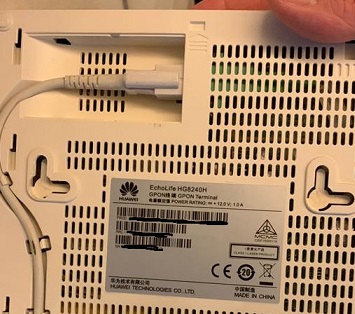
TIME FTTH - Huawei EchoLife HG8240H GPON Terminal

Looks like its the general one that everyone seems to have.
*
There's no problem replacing this ONU with the GPON Stick but you definitely need to know all the network detail.

Looking at Time Fibre Broadband thread, someone mentioned as below:

QUOTE
Anyway, the activation was a breeze. Just use PPPoE on your WiFi router or Laptop to establish the WAN link to TIME. No complicated VLAN setting like UNIFI.


It would be great if you can find a way to access to ONU to get all the detail.

This post has been edited by thankyou: Jul 28 2020, 12:24 AM

2 Pages  1 2 >Top
 

Change to:
| Lo-Fi Version
0.0714sec    0.95    7 queries    GZIP Disabled
Time is now: 9th December 2025 - 05:54 PM