

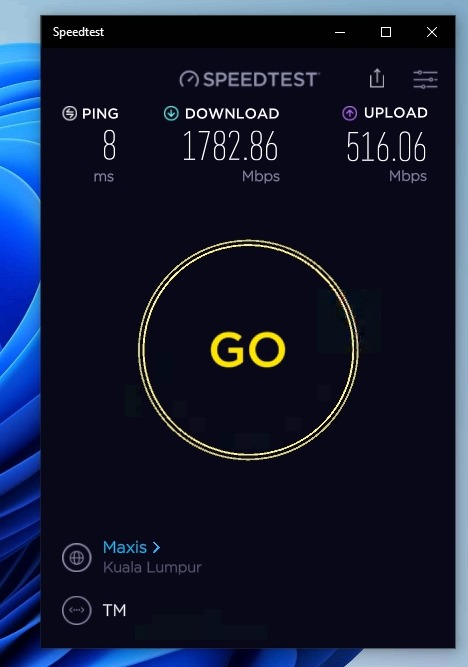
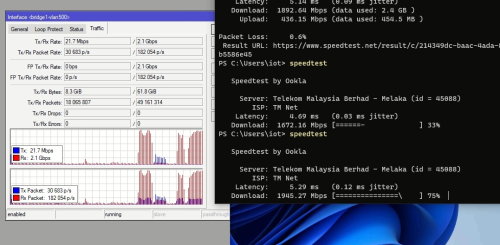
Using 4 x 800Mbps PPPoE Account

Using CLI achieve nearly 2Gbps
This post has been edited by Anime4000: Jun 20 2025, 04:37 PM
Home Networking Ditch ONU, use GPON SFP on Business Grade Router, 2.5G ONU for Unifi & Maxis, NO NEED VLAN
|
|
 Aug 14 2022, 04:57 AM Aug 14 2022, 04:57 AM
|
 
Senior Member
2,400 posts Joined: Jul 2009 From: /dev/null  
|
Using 4 x 800Mbps PPPoE Account Using CLI achieve nearly 2Gbps This post has been edited by Anime4000: Jun 20 2025, 04:37 PM ejery, hasmidzul_jojo, and 1 other liked this post
|
|
|
|
|
|
Aug 14 2022, 05:08 PM
|
 
Elite
4,541 posts Joined: Jan 2003 From: BSRPPG51 Access Concentrator
|
QUOTE(Anime4000 @ Aug 14 2022, 04:57 AM) Someone had 2.5Gb Mode: What SFP ONU is that?Using CLI achieve nearly 2Gbps  |
|
|
Aug 14 2022, 06:02 PM
|
|
Senior Member
2,400 posts Joined: Jul 2009 From: /dev/null
|
QUOTE(asellus @ Aug 14 2022, 05:08 PM) What SFP ONU is that? This post has been edited by Anime4000: Oct 27 2024, 12:50 AM hasmidzul_jojo liked this post
|
|
|
Aug 14 2022, 09:29 PM
|

Probation
21 posts Joined: Jan 2021
|
Hi Team,
recently i tested again plug-in the same sfp v2801F as before in FGT 500D but with few changes based on TM provided new gpon modem (ZTE ZHXN F620) but not working any more. pppoe connected (after waiting little longer time) but connected with very slow speed (ard 30mbps) only, subscribed 500mbps TM Unifi . the only changes i did was using new modem mac add, model , software version etc...others remain same if im not mistaken. I follow our cikgu @Anime4000  guide in github.com as usual. below are the config : guide in github.com as usual. below are the config :flash set GPON_PLOAM_PASSWD 1234567890 flash set GPON_SN ZTExxxxxxx flash set GPON_ONU_MODEL F620 flash set OMCI_TM_OPT 0 flash set VLAN_CFG_TYPE 1 flash set PON_VENDOR_ID ZTEG flash set OMCI_SW_VER1 V9.0.10P4N2 flash set OMCI_SW_VER2 V9.0.10P4N2 flash set CUSTOM_OMCI_SW_VER1 V9.0.10P4N2 flash set CUSTOM_OMCI_SW_VER2 V9.0.10P4N2 flash set HW_HWVER V7.0 flash set ELAN_MAC_ADDR f864b8bf8a74 flash set VS_AUTH_KEY DD4D14B4773F74DF18F742E1A0E3673D flash set OMCI_FAKE_OK 1 flash set OMCI_OLT_MODE 1 not sure where i did mistake....need some help thanks team |
|
|
Aug 14 2022, 09:33 PM
|
|
Probation
21 posts Joined: Jan 2021
|
QUOTE(Ouru @ Mar 21 2021, 03:55 PM) Hi all, Hi Team,successfully tested V2801F into Fortigate 500D. thanks to Anime4000 to initiate this idea and other members who share guides here. personally myself 1st timer in this whole process, good learning  1. V2801F brought from Russia, rm320 + shipping , almost 2 month+ to receive 2. Earlier brought sercomm FGS202 from France no WebGui , couldn't make it run & not able to telnet 3. V2801F with WebGui easy just entered SLID password from TM's GPON ONT Alcatel-Lucent I-240G-P , need to convert from Hex to Ascii  recently i tested again plug-in the same sfp v2801F as before in FGT 500D but with few changes based on TM provided new gpon modem (ZTE ZHXN F620) but not working any more. pppoe connected (after waiting little longer time) but connected with very slow speed (ard 30mbps) only, subscribed 500mbps TM Unifi . the only changes i did was using new modem mac add, model , software version etc...others remain same if im not mistaken. I follow our cikgu @Anime4000 thumbsup.gif guide in github.com as usual. below are the config : flash set GPON_PLOAM_PASSWD 1234567890 flash set GPON_SN ZTExxxxxxx flash set GPON_ONU_MODEL F620 flash set OMCI_TM_OPT 0 flash set VLAN_CFG_TYPE 1 flash set PON_VENDOR_ID ZTEG flash set OMCI_SW_VER1 V9.0.10P4N2 flash set OMCI_SW_VER2 V9.0.10P4N2 flash set CUSTOM_OMCI_SW_VER1 V9.0.10P4N2 flash set CUSTOM_OMCI_SW_VER2 V9.0.10P4N2 flash set HW_HWVER V7.0 flash set ELAN_MAC_ADDR f864b8bf8a74 flash set VS_AUTH_KEY DD4D14B4773F74DF18F742E1A0E3673D flash set OMCI_FAKE_OK 1 flash set OMCI_OLT_MODE 1 not sure where i did mistake....need some help thanks team |
|
|
Aug 14 2022, 10:35 PM
|

Junior Member
124 posts Joined: Mar 2012
|
QUOTE(Ouru @ Aug 14 2022, 09:33 PM) not sure where i did mistake....need some help thanks team |
|
|
|
|
|
Aug 15 2022, 11:16 PM
Show posts by this member only | IPv6 | Post
#507
|

Junior Member
205 posts Joined: Sep 2005 
|
I have try to configure UDM pro by using ODI GPON DFP-34G-2C2, connected successfully but in the log it keep showing timeout PADO. any configuration i did wrong?
daemon.warn pppd[1607]: Timeout waiting for PADO packets daemon.err pppd[1607]: Unable to complete PPPoE Discovery daemon.err pppd[1607]: error sending pppoe packet: No buffer space available daemon.err pppd[1607]: error sending pppoe packet: No buffer space available daemon.err pppd[1607]: error sending pppoe packet: No buffer space available daemon.warn pppd[1607]: Timeout waiting for PADO packets daemon.err pppd[1607]: Unable to complete PPPoE Discovery daemon.err pppd[1607]: error sending pppoe packet: No buffer space available daemon.err pppd[1607]: error sending pppoe packet: No buffer space available daemon.err pppd[1607]: error sending pppoe packet: No buffer space available daemon.warn pppd[1607]: Timeout waiting for PADO packets daemon.err pppd[1607]: Unable to complete PPPoE Discovery daemon.err pppd[1607]: error sending pppoe packet: No buffer space available daemon.err pppd[1607]: error sending pppoe packet: No buffer space available daemon.err pppd[1607]: error sending pppoe packet: No buffer space available |
|
|
Aug 16 2022, 06:27 AM
|
|
Probation
21 posts Joined: Jan 2021
|
QUOTE(izhamsatria @ Aug 14 2022, 10:35 PM) Try OMCI_TM_OPT 1 or 2 salam bro,still connect with low speed (30-40 mbps) , i did try few combinations also like changing omci_fake 1/0 and omci_olt 0/1 together with OMCI_TM_OPT 1/2.  |
|
|
Aug 16 2022, 10:02 PM
|
|
Senior Member
2,400 posts Joined: Jul 2009 From: /dev/null
|
QUOTE(Ouru @ Aug 16 2022, 06:27 AM) salam bro, it seem uisng incorrect OMCI info still connect with low speed (30-40 mbps) , i did try few combinations also like changing omci_fake 1/0 and omci_olt 0/1 together with OMCI_TM_OPT 1/2. or OLT doesn't recognized, this happen when using same brand info as OLT try check your OLT which brand is then use other brand OMCI for me, my OLT is Nokia, so I use Huawei OMCI Info, simply set HW_HWVER and PLOAM Password |
|
|
Aug 27 2022, 03:01 AM
Show posts by this member only | IPv6 | Post
#510
|
|
Junior Member
932 posts Joined: Dec 2019
|
Hi all sifus, just spent like 2 hours reading from page 1 to the final page and I’ve learnt a lot, but just asking a few questions cause I’m tempted to attempt this (Planning a DIY OPNsense build to replace the default TP-Link router)
1. Do I just need a SFP+ port for connecting the GPON Stick, and making sure FreeBSD supports that card? (Planned build is for a 6/7th i5 with 2/4 10GBe RJ45, and either quad/octa port 1GBe, and adding a SFP+ card for SFP+ ONU) 2. How can I get my PLOAM password? My ONU is the FiberHome HG6240A. Other than getting TM technicians to come and replace the unit with a new unit and asking for the ID/Pass. Appreciate all the answers and thanks to all the member here for the hard work to reverse MY Fibre infra.   This post has been edited by yenchenje: Aug 27 2022, 03:02 AM |
|
|
Aug 27 2022, 03:15 PM
Show posts by this member only | IPv6 | Post
#511
|
|
Senior Member
2,400 posts Joined: Jul 2009 From: /dev/null
|
QUOTE(yenchenje @ Aug 27 2022, 03:01 AM) Hi all sifus, just spent like 2 hours reading from page 1 to the final page and I’ve learnt a lot, but just asking a few questions cause I’m tempted to attempt this (Planning a DIY OPNsense build to replace the default TP-Link router) Hahaha, my 2 years of hardwork to get it working, also thanks to lwk523 and izhamsatria for 2.5Gb testing on Allo and Unifi1. Do I just need a SFP+ port for connecting the GPON Stick, and making sure FreeBSD supports that card? (Planned build is for a 6/7th i5 with 2/4 10GBe RJ45, and either quad/octa port 1GBe, and adding a SFP+ card for SFP+ ONU) 2. How can I get my PLOAM password? My ONU is the FiberHome HG6240A. Other than getting TM technicians to come and replace the unit with a new unit and asking for the ID/Pass. Appreciate all the answers and thanks to all the member here for the hard work to reverse MY Fibre infra. 1. SFP NIC just fine, most used market and modified Intel SFP+ NIC on AliExpress appear to work, if you plan to 2.5Gb, choice of SFP+ card is limite, one guy from italy manage to work with DELL SFP+ 2.5Gb 2. You can try login FiberHome HG6240A via 192.168.1.1 I believe, need fiber to be disconnected and reboot (prevent OMCI Provisioning take place) if you have 800Mbps or 1Gbps, you need strong single core performance, because PPPoE is not multi-threaded, many router like Asus, Ubiquiti, Mikrotik has Hardware Accelerated PPPoE |
|
|
Aug 27 2022, 04:50 PM
|
|
Elite
4,541 posts Joined: Jan 2003 From: BSRPPG51 Access Concentrator
|
QUOTE(Anime4000 @ Aug 14 2022, 06:02 PM) ODI DFP-34X-2C2 Can you keep using the factory firmware or need special one? |
|
|
Aug 27 2022, 06:02 PM
|
|
Junior Member
932 posts Joined: Dec 2019
|
QUOTE(Anime4000 @ Aug 27 2022, 03:15 PM) Hahaha, my 2 years of hardwork to get it working, also thanks to lwk523 and izhamsatria for 2.5Gb testing on Allo and Unifi Got it, my local link will be 10gb to my NAS, probably not to the broader internet, so it should be fine to obtain PPPoE lease from TM only.1. SFP NIC just fine, most used market and modified Intel SFP+ NIC on AliExpress appear to work, if you plan to 2.5Gb, choice of SFP+ card is limite, one guy from italy manage to work with DELL SFP+ 2.5Gb 2. You can try login FiberHome HG6240A via 192.168.1.1 I believe, need fiber to be disconnected and reboot (prevent OMCI Provisioning take place) if you have 800Mbps or 1Gbps, you need strong single core performance, because PPPoE is not multi-threaded, many router like Asus, Ubiquiti, Mikrotik has Hardware Accelerated PPPoE And is there any known ID/passwords combination for FibreHome HG6240A? Google searching didn't return much. And I'll keep that in mind when speccing the system |
|
|
|
|
|
Aug 27 2022, 07:36 PM
|

Senior Member
1,040 posts Joined: Mar 2006
|
QUOTE(Anime4000 @ Aug 27 2022, 03:15 PM) Hahaha, my 2 years of hardwork to get it working, also thanks to lwk523 and izhamsatria for 2.5Gb testing on Allo and Unifi Hahahx 1. SFP NIC just fine, most used market and modified Intel SFP+ NIC on AliExpress appear to work, if you plan to 2.5Gb, choice of SFP+ card is limite, one guy from italy manage to work with DELL SFP+ 2.5Gb 2. You can try login FiberHome HG6240A via 192.168.1.1 I believe, need fiber to be disconnected and reboot (prevent OMCI Provisioning take place) if you have 800Mbps or 1Gbps, you need strong single core performance, because PPPoE is not multi-threaded, many router like Asus, Ubiquiti, Mikrotik has Hardware Accelerated PPPoE  Also must thank to you and only we all can share info on this thread. Also must thank to you and only we all can share info on this thread. |
|
|
Aug 28 2022, 12:16 AM
Show posts by this member only | IPv6 | Post
#515
|
|
Senior Member
2,400 posts Joined: Jul 2009 From: /dev/null
|
QUOTE(asellus @ Aug 27 2022, 04:50 PM) Can you keep using the factory firmware or need special one? try with stock firmware version first, if didn't work in TM fiber, try use firmware version 220304 or 220414QUOTE(yenchenje @ Aug 27 2022, 06:02 PM) Got it, my local link will be 10gb to my NAS, probably not to the broader internet, so it should be fine to obtain PPPoE lease from TM only. have you try tmadmin, Adm@XXXX ?And is there any known ID/passwords combination for FibreHome HG6240A? Google searching didn't return much. And I'll keep that in mind when speccing the system |
|
|
Aug 28 2022, 01:46 AM
Show posts by this member only | IPv6 | Post
#516
|
|
Junior Member
932 posts Joined: Dec 2019
|
QUOTE(Anime4000 @ Aug 28 2022, 12:16 AM) try with stock firmware version first, if didn't work in TM fiber, try use firmware version 220304 or 220414 XXXX being last 4 digit of the S/N of the ONU box I assume? I have not, I'll give it a try when my family members isn't around to use the internet have you try tmadmin, Adm@XXXX ?  |
|
|
Aug 28 2022, 12:36 PM
Show posts by this member only | IPv6 | Post
#517
|
|
Senior Member
2,400 posts Joined: Jul 2009 From: /dev/null
|
QUOTE(yenchenje @ Aug 28 2022, 01:46 AM) XXXX being last 4 digit of the S/N of the ONU box I assume? I have not, I'll give it a try when my family members isn't around to use the internet Last 4 hex digit of MAC Address |
|
|
Aug 28 2022, 09:56 PM
Show posts by this member only | IPv6 | Post
#518
|
|
Junior Member
932 posts Joined: Dec 2019
|
QUOTE(Anime4000 @ Aug 28 2022, 12:36 PM) Last 4 hex digit of MAC Address Oh, won't it only be 16 digits in HEX form? And your like original post on the first page has the 20 digits PLOAM password right? Or does it not matter as long as the password is correct in HEX form?This post has been edited by yenchenje: Aug 28 2022, 09:58 PM |
|
|
Aug 28 2022, 10:26 PM
Show posts by this member only | IPv6 | Post
#519
|
|
Senior Member
2,400 posts Joined: Jul 2009 From: /dev/null
|
QUOTE(yenchenje @ Aug 28 2022, 09:56 PM) Oh, won't it only be 16 digits in HEX form? And your like original post on the first page has the 20 digits PLOAM password right? Or does it not matter as long as the password is correct in HEX form? my bad,for login into ONU, try this: tmadmin Adm@XXXX where XXXX is last 4 digit hex in capital letters, if you see got write like this: Usr@DE1A just change Usr to Adm |
|
|
Aug 29 2022, 12:45 PM
Show posts by this member only | IPv6 | Post
#520
|
|
Junior Member
932 posts Joined: Dec 2019
|
QUOTE(Anime4000 @ Aug 28 2022, 10:26 PM) my bad, Alright I've tried that combination and is indeed working and have gained access to the ONU management page, now I just need to convert the Adm@XXXX into HEX form for PLOAM password right? And also for VoIP, is it the same deal as yours TM-Maxis connection?for login into ONU, try this: tmadmin Adm@XXXX where XXXX is last 4 digit hex in capital letters, if you see got write like this: Usr@DE1A just change Usr to Adm |
| Change to: |  0.0262sec 0.0262sec
 0.54 0.54
 6 queries 6 queries
 GZIP Disabled GZIP Disabled
Time is now: 15th December 2025 - 11:22 PM |
 Quote
Quote