Welcome Guest ( Log In | Register )

83 Pages « < 25 26 27 28 29 > » Bottom

Outline · [ Standard ] · Linear+

Home Networking Ditch ONU, use GPON SFP on Business Grade Router, 2.5G ONU for Unifi & Maxis, NO NEED VLAN

views
     
TSAnime4000
post Aug 29 2022, 01:25 PM

Look at all my stars!!
*******
Senior Member
2,399 posts

Joined: Jul 2009
From: /dev/null


QUOTE(yenchenje @ Aug 29 2022, 12:45 PM)
Alright I've tried that combination and is indeed working and have gained access to the ONU management page, now I just need to convert the Adm@XXXX into HEX form for PLOAM password right? And also for VoIP, is it the same deal as yours TM-Maxis connection?
*
VoIP should be same procedure, if didn't work, need find correct User-Agent for Unifi
yenchenje
post Aug 29 2022, 04:25 PM

Enthusiast
*****
Junior Member
932 posts

Joined: Dec 2019
QUOTE(Anime4000 @ Aug 29 2022, 01:25 PM)
VoIP should be same procedure, if didn't work, need find correct User-Agent for Unifi
*
From the settings I've gathered from GPON ONU, it looks similar to your Maxis VoIP address for the gateway, ins.tm.com.my and all the port being 5060, and that's basically it, the proxy is also a private IP, looks like there's gonna be quite some fiddling that needs to be done as my family uses VoIP from time to time, and porting it over from ONU box seems hard, and not like your Maxis VoIP Archer C5v settings

Also has anyone here tried to build a PFSense/OPNSense box properly? Have you found out which card works with GPON ONU SFP? So far I've found a few cards that might work on eBay, I'd list the cards but at the end of the day it's just all chipsets doing the heavy lifting. Mellanox ConnectX-3, Broadcom BCM57810S, Intel 82599, BladeEngines 3 (BE3) Emulex, Solarflare SFC9120 are the ones that I can find, but on the official github page, the only one tested with PCIe is just BCM57810S, but what about the other ones? I know that the Intel X540 has the SFP MAC module not supported issue, other than that is there any other known issues with certain chipset?

This post has been edited by yenchenje: Aug 29 2022, 04:41 PM
TSAnime4000
post Aug 29 2022, 05:09 PM

Look at all my stars!!
*******
Senior Member
2,399 posts

Joined: Jul 2009
From: /dev/null


QUOTE(yenchenje @ Aug 29 2022, 04:25 PM)
From the settings I've gathered from GPON ONU, it looks similar to your Maxis VoIP address for the gateway, ins.tm.com.my and all the port being 5060, and that's basically it, the proxy is also a private IP, looks like there's gonna be quite some fiddling that needs to be done as my family uses VoIP from time to time, and porting it over from ONU box seems hard, and not like your Maxis VoIP Archer C5v settings

Also has anyone here tried to build a PFSense/OPNSense box properly? Have you found out which card works with GPON ONU SFP? So far I've found a few cards that might work on eBay, I'd list the cards but at the end of the day it's just all chipsets doing the heavy lifting. Mellanox ConnectX-3, Broadcom BCM57810S, Intel 82599, BladeEngines 3 (BE3) Emulex, Solarflare SFC9120 are the ones that I can find, but on the official github page, the only one tested with PCIe is just BCM57810S, but what about the other ones? I know that the Intel X540 has the SFP MAC module not supported issue, other than that is there any other known issues with certain chipset?
*
Unifi VoIP need to try and more testing,
I maxis customer, I have time to time to check and test...

most PCIe SFP is limited, require some hack to make it work, I think better use Mikrotik or Ubiquiti for highly compatible most SFP module.

most ONU SFP are in base-X and SGMII, even RTL960x can emulate fiber Transceiver, but I can't confirm that work on manu PCIe SFP
yenchenje
post Aug 29 2022, 05:42 PM

Enthusiast
*****
Junior Member
932 posts

Joined: Dec 2019
QUOTE(Anime4000 @ Aug 29 2022, 05:09 PM)
Unifi VoIP need to try and more testing,
I maxis customer, I have time to time to check and test...

most PCIe SFP is limited, require some hack to make it work, I think better use Mikrotik or Ubiquiti for highly compatible most SFP module.

most ONU SFP are in base-X and SGMII, even RTL960x can emulate fiber Transceiver, but I can't confirm that work on manu PCIe SFP
*
The thing is with Mikrotik/Ubiquiti. unless I fork out an insane amount of money, it's basically near impossible to get a cheap 10GBe capable device, there's QNAP/ASUS/Netgear as the cheaper and more home friendly option, but as the only device that'll be capable/need to be 10GBe is just my NAS and or my PC, and it'll be doing at most streaming media locally. The highest bitrate content that I have access to currently is still just 70mbps, which for gigabit is still more than sufficient, but as I also have home surveillance running, hence the idea of getting a 10GBe link to it.

But as it's still only 1-2 devices at max, a single X540-T2 RJ45 is more than enough for my use. And I also do have a POE 8 port switch, to handle my cameras. There's the XG-U2008 but no point to just get that for the two 10GB port when the other 8 won't really be used.

My usage will mostly be consisting of.
5 LAN devices (PC GBe, NAS GBe, CX65 100MB, Tuner Box 100MB, HikVision 100MB Camera)
2 Wired AP Backhaul (1 PoE AP, 1 Wired AP)
Rest of the devices are all wireless (2 Wi-Fi 5 AP, 1 Wi-Fi 6 AP)

That's basically a full job for even my current 8 port TP-Link PoE switch. At most I'll just upgrade to a 16 port PoE switch down the road (I use a lot of PoE). I plan to size down my current setup to a 2/3 plug at most setup. Currently it's ONU, Router, Switch (Routing seperate VLAN to free up port on router), PoE switch, NAS to probably just router/PoE switch (Throwing VLAN seperation onto the poe switch if possible when I upgrade), or an AIO NAS/router setup with Proxmox.

If there's a need to test it then I guess the only choice is to just get the broadcom one as it's been proven to work. And just not get anything that isn't X540 rclxub.gif


josh5671
post Sep 1 2022, 11:14 AM

Regular
******
Senior Member
1,197 posts

Joined: Dec 2010
hello, I have not much knowledge on networking.

is there something like ONU+router all in one unit?
like old time ADSL modem+router combo?
PRSXFENG
post Sep 1 2022, 12:19 PM

Look at all my stars!!
*******
Senior Member
2,608 posts

Joined: Nov 2020


QUOTE(josh5671 @ Sep 1 2022, 11:14 AM)
hello, I have not much knowledge on networking.

is there something like ONU+router all in one unit?
like old time ADSL modem+router combo?
*
Got, TIME Fibre is using those.

But if you're interested in replacing your current setup to a 2in1 I think most ISP's can't and won't help you
josh5671
post Sep 1 2022, 12:26 PM

Regular
******
Senior Member
1,197 posts

Joined: Dec 2010
QUOTE(PRSXFENG @ Sep 1 2022, 12:19 PM)
Got, TIME Fibre is using those.

But if you're interested in replacing your current setup to a 2in1 I think most ISP's can't and won't help you
*
i am new to fiber (actually fiber coming soon to my home, ya after these year)
thats why i ask this question. so if the device i mention exist, i can plan for it now.
less problem later
PRSXFENG
post Sep 1 2022, 12:51 PM

Look at all my stars!!
*******
Senior Member
2,608 posts

Joined: Nov 2020


QUOTE(josh5671 @ Sep 1 2022, 12:26 PM)
i am new to fiber (actually fiber coming soon to my home, ya after these year)
thats why i ask this question. so if the device i mention exist, i can plan for it now.
less problem later
*
for a typical installation you will get 2 items

the Modem/ONT, which is ISP property and you must return it to the ISP after you end your subscription
Most people never touch this and just use it as is and is good enough for most people
This is where the fibre cable connects to

then, a router is provided which plugs into the ONT via Ethernet, this one is your's to keep after the 2 year contract for most isps
most people replace this with their own as the isp provided one isnt great

some isps like TIME to save cost/save space/save power provide an all in one solution, 1 box, directly connects to fibre

This thread is for enterprise tier where you can plug fibre directly into a sfp module on your own custom router setup

For your use case, I'll recommend you just stay with having 2 items
yenchenje
post Sep 1 2022, 03:28 PM

Enthusiast
*****
Junior Member
932 posts

Joined: Dec 2019
QUOTE(josh5671 @ Sep 1 2022, 11:14 AM)
hello, I have not much knowledge on networking.

is there something like ONU+router all in one unit?
like old time ADSL modem+router combo?
*
This thread is an example of "If you don't know anything even in layman terms, you probably don't need it."
So far almost all ISP provides you with 2 devices by default, ONT/ONU box to terminate your fibre into a signal your router can understand, and the router for the actual PPPoE, AP, etc etc. I have seen AIO boxes that has the fibre directly connected into the router itself but those are rare and replacing those are super hard. But if your ISP provides you with two boxes, you can just swap the router given to you out quite easily.

Most people here wants to ditch ONU boxes due to the extra plug that it takes up hence extra power consumption, also you can assume if you're investing upwards of 1k in network gear, you'll most definitely have a UPS. And with UPS comes limited power plug and limited battery capacity to keep their internet up and running even in an event of blackout.

Hope this clarifies why people are doing it this way and why you probably again, don't need to do any of this. rclxms.gif
josh5671
post Sep 2 2022, 10:42 AM

Regular
******
Senior Member
1,197 posts

Joined: Dec 2010
QUOTE(PRSXFENG @ Sep 1 2022, 12:51 PM)
for a typical installation you will get 2 items

the Modem/ONT, which is ISP property and you must return it to the ISP after you end your subscription
Most people never touch this and just use it as is and is good enough for most people
This is where the fibre cable connects to

then, a router is provided which plugs into the ONT via Ethernet, this one is your's to keep after the 2 year contract for most isps
most people replace this with their own as the isp provided one isnt great

some isps like TIME to save cost/save space/save power provide an all in one solution, 1 box, directly connects to fibre

This thread is for enterprise tier where you can plug fibre directly into a sfp module on your own custom router setup

For your use case, I'll recommend you just stay with having 2 items
*
I see and understood your explanation.
so that All in One(ONT+Router) combo only exist in enterprise grade device or got consumer grade out there (maybe another thread for that kind of discussion?)
Willing to know.

thank you.

QUOTE(yenchenje @ Sep 1 2022, 03:28 PM)
This thread is an example of "If you don't know anything even in layman terms, you probably don't need it."
So far almost all ISP provides you with 2 devices by default, ONT/ONU box to terminate your fibre into a signal your router can understand, and the router for the actual PPPoE, AP, etc etc. I have seen AIO boxes that has the fibre directly connected into the router itself but those are rare and replacing those are super hard. But if your ISP provides you with two boxes, you can just swap the router given to you out quite easily.

Most people here wants to ditch ONU boxes due to the extra plug that it takes up hence extra power consumption, also you can assume if you're investing upwards of 1k in network gear, you'll most definitely have a UPS. And with UPS comes limited power plug and limited battery capacity to keep their internet up and running even in an event of blackout. 

Hope this clarifies why people are doing it this way and why you probably again, don't need to do any of this.  rclxms.gif
*
Yes, I understand that logic.


'If you don't know anything even in layman terms, you probably don't need it' this depend on people.
With no offense, I literally try to decrease the device (not power consumption wise), because current i got 2 streamyx and 1 4G. if i use modem+router config, that will be 6 device filling up my desk.
With incoming fiber plus my friend not far away from me have issue with unifi. i probably will left another streamyx for a while, maybe keep it.

not expert for all these thing, but i try to keep my build as simple as it be.

This post has been edited by josh5671: Sep 2 2022, 10:43 AM

TSAnime4000
post Sep 2 2022, 01:07 PM

Look at all my stars!!
*******
Senior Member
2,399 posts

Joined: Jul 2009
From: /dev/null


QUOTE(josh5671 @ Sep 1 2022, 12:26 PM)
i am new to fiber (actually fiber coming soon to my home, ya after these year)
thats why i ask this question. so if the device i mention exist, i can plan for it now.
less problem later
*
My method GPON ONU SFP + RB5009 become PON Router meanwhile Wireless AP in another device.

I merge ONU and Router into one device, one plug,
I try to reduce number of plug socket because UPS has limited number of socket

I haven't measure stock ONU power consumption, based on standard DC rating, usually they use around 12V 1A not sure how much AC to DC conversion lost

SFP only using 3.3V and sip power from SFP Host (Router), there will be single AC to DC conversion lost, I believe it extends UPS Uptime while I safely shutdown home lab server.

another thing is, look tidy when Fiber connect directly to Router,

also, TM cannot disable ONU WebGUI, you can read TX and RX dBm power, easy to troubleshoot...
PRSXFENG
post Sep 2 2022, 02:46 PM

Look at all my stars!!
*******
Senior Member
2,608 posts

Joined: Nov 2020


QUOTE(josh5671 @ Sep 2 2022, 10:42 AM)
I see and understood your explanation.
so that All in One(ONT+Router) combo only exist in enterprise grade device or got consumer grade out there (maybe another thread for that kind of discussion?)
Willing to know.

thank you.
Yes, I understand that logic.
'If you don't know anything even in layman terms, you probably don't need it' this depend on people.
With no offense, I literally try to decrease the device (not power consumption wise), because current i got 2 streamyx and 1 4G. if i use modem+router config, that will be 6 device filling up my desk.
With incoming fiber plus my friend not far away from me have issue with unifi. i probably will left another streamyx for a while, maybe keep it.

not expert for all these thing, but i try to keep my build as simple as it be.
*
not sure if TM will let you keep streamyx as you're basically upgrading to fibre from copper in their system
(unless you mean upgrading 1 of the 2 streamyx to fibre and keeping the other as streamyx)

in terms of decreasing devices, the ont isnt too big depending on the model you get, some people stack the router on top, might affect thermals but should be fine if you add a cooling fan

sadly I don't think there's really much choice for you

going with enterprise tier (sfp module, sfp router) is going to be very expensive + need to know how to setup as tm probably wont help you
consumer tier ones like the all in one boxes that time fibre uses, not sure where to get them and again not sure if tm will help you setup

yenchenje
post Sep 2 2022, 04:23 PM

Enthusiast
*****
Junior Member
932 posts

Joined: Dec 2019
QUOTE(josh5671 @ Sep 2 2022, 10:42 AM)
I see and understood your explanation.
so that All in One(ONT+Router) combo only exist in enterprise grade device or got consumer grade out there (maybe another thread for that kind of discussion?)
Willing to know.

thank you.
Yes, I understand that logic.
'If you don't know anything even in layman terms, you probably don't need it' this depend on people.
With no offense, I literally try to decrease the device (not power consumption wise), because current i got 2 streamyx and 1 4G. if i use modem+router config, that will be 6 device filling up my desk.
With incoming fiber plus my friend not far away from me have issue with unifi. i probably will left another streamyx for a while, maybe keep it.

not expert for all these thing, but i try to keep my build as simple as it be.
*
I don't exactly understand how your config is working currently but here's my parent's old house procedure. TM upgraded infra around that area, we went from Streamyx 8mbps to Unifi 30mbps fibre, FOC and with discount iirc, and is currently paying 60-70ish RM per month for it. They let us keep the old Archer C5v, but pulled new fiber from our backyard to in house, both of the ONU/router are both FiberHome. And with how TM is trying to transition away from copper, I doubt they'll let you "keep" the Streamyx ADSL connection. Our old phone line that's used for ADSL is left as is and not touched since then.

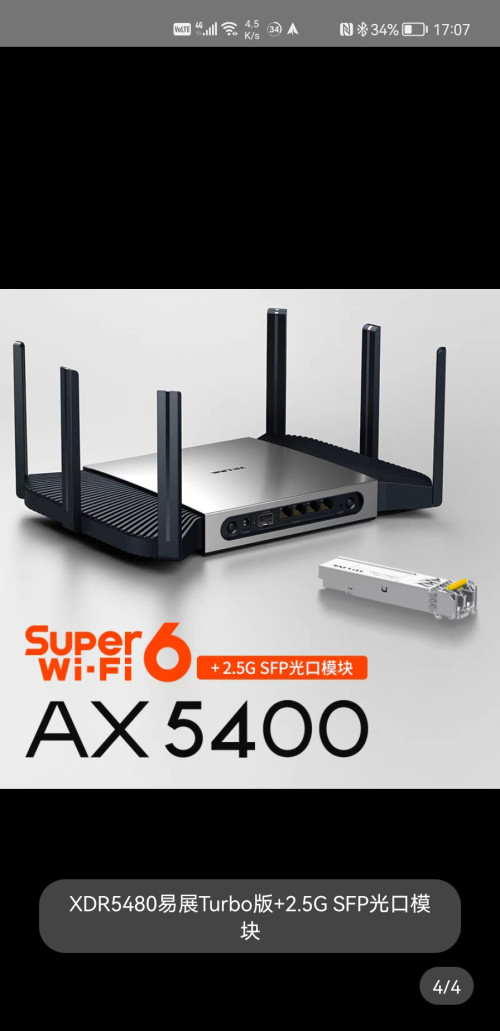
And for your usage, the best I can recommend is the TP-LINK XDR5480, a TP-Link router from China that has been proven to work with SFP ONU xPON stick here and is probably the best use case for what you're trying to do. For your 4G whatever, I assume it's either a 4G dongle or Unifi mobile? No offense but your wording is all over the place so I can only assume it's a 4G dongle? For that you're probably gonna have to just trial and error with, Anime4000 here has succeeded in putting their dongle as 4G backup in case of Unifi side failure but it's really complicated for a beginner.

Or... the other option is get a Mikrotik hEX S/hEX POE, repurpose your old router as pure AP and off you go. There's not that much options that's somewhat cheap-ish that is an AIO(ONU + Router + AP, that's not pure e-waste anyway).

Side-note the XDR5480 is about RM550 on AliExpress atm.
josh5671
post Sep 2 2022, 04:42 PM

Regular
******
Senior Member
1,197 posts

Joined: Dec 2010
QUOTE(PRSXFENG @ Sep 2 2022, 02:46 PM)
not sure if TM will let you keep streamyx as you're basically upgrading to fibre from copper in their system
(unless you mean upgrading 1 of the 2 streamyx to fibre and keeping the other as streamyx)

in terms of decreasing devices, the ont isnt too big depending on the model you get, some people stack the router on top, might affect thermals but should be fine if you add a cooling fan

sadly I don't think there's really much choice for you

going with enterprise tier (sfp module, sfp router) is going to be very expensive + need to know how to setup as tm probably wont help you
consumer tier ones like the all in one boxes that time fibre uses, not sure where to get them and again not sure if tm will help you setup
*
QUOTE(yenchenje @ Sep 2 2022, 04:23 PM)
I don't exactly understand how your config is working currently but here's my parent's old house procedure. TM upgraded infra around that area, we went from Streamyx 8mbps to Unifi 30mbps fibre, FOC and with discount iirc, and is currently paying 60-70ish RM per month for it. They let us keep the old Archer C5v, but pulled new fiber from our backyard to in house, both of the ONU/router are both FiberHome. And with how TM is trying to transition away from copper, I doubt they'll let you "keep" the Streamyx ADSL connection. Our old phone line that's used for ADSL is left as is and not touched since then.

And for your usage, the best I can recommend is the TP-LINK XDR5480, a TP-Link router from China that has been proven to work with SFP ONU xPON stick here and is probably the best use case for what you're trying to do. For your 4G whatever, I assume it's either a 4G dongle or Unifi mobile? No offense but your wording is all over the place so I can only assume it's a 4G dongle? For that you're probably gonna have to just trial and error with, Anime4000 here has succeeded in putting their dongle as 4G backup in case of Unifi side failure but it's really complicated for a beginner.

Or... the other option is get a Mikrotik hEX S/hEX POE, repurpose your old router as pure AP and off you go. There's not that much options that's somewhat cheap-ish that is an AIO(ONU + Router + AP, that's not pure e-waste anyway).

Side-note the XDR5480 is about RM550 on AliExpress atm.
*
thanks both of your input even my question not related with enterprise grade device.

from what i heard tm will keep copper line for phone etc for some people that not upgrade to unifi, but i will make double check about it.
XDR5480 marked will do research about it.

the 4G device using not dongle, is router alike device from Huawei, model B628.


Edit:
Is that sfp correct for fiber optic to plug in?
user posted image

This post has been edited by josh5671: Sep 2 2022, 05:09 PM
yenchenje
post Sep 2 2022, 05:27 PM

Enthusiast
*****
Junior Member
932 posts

Joined: Dec 2019
QUOTE(josh5671 @ Sep 2 2022, 04:42 PM)
thanks both of your input even my question not related with enterprise grade device.

from what i heard tm will keep copper line for phone etc for some people that not upgrade to unifi, but i will make double check about it.
XDR5480 marked will do research about it.

the 4G device using not dongle, is router alike device from Huawei, model B628.
Edit:
Is that sfp correct for fiber optic to plug in?
user posted image
*
I don't see why TM would let people keep original phone line where it's more susceptible to copper damages, pretty sure all Fiber connection has a phone line that's based on a seperate VLAN, VLAN400 iirc, Unless it's not covered by Unifi, then they'll do it. Even if not covered by Unifi, currently Allo is working extra hard to cover areas not covered by Unifi. Unless you live somewhere REALLY remote, you'll most likely get Unifi and Streamyx will be deprecated/legacy for your area. If I'm not wrong people that's still on Streamyx will be forced to upgrade to Unifi if the infrastructure is available at their area. That's what happened to my parent's old house anyway, they just send a message informing they'll be performing an upgrade from Streamyx to Unifi.

For your huawei 4G modem, what purpose is it serving? Backup? Fallover? As I don't see why not just get a smaller dongle/router that has only a single LAN, or better even, consult Anime4000's setup for their 4G dongle in router as failover, saving another plug and space.

And yes that's the SFP port you'll need to plug in SFP ONU xPON. And you don't need the 2.5G SFP module that is packaged as a combo from what I can only assume taobao? As that is for multi mode LC. Malaysia fibre uses both UPC and APC. APC is only used by Time and UPC is used by TM, and other ISP that runs on the same infra. The SFP ONU xPON stick u can buy from TB/AliEx is suitable for TM by default, so just buy that and you'll be good to go. It'll only be a single port and not like the dual port SFP module in the picture of the router.

This post has been edited by yenchenje: Sep 2 2022, 05:34 PM
josh5671
post Sep 2 2022, 05:33 PM

Regular
******
Senior Member
1,197 posts

Joined: Dec 2010
QUOTE(yenchenje @ Sep 2 2022, 05:27 PM)
I don't see why TM would let people keep original phone line where it's more susceptible to copper damages, pretty sure all Fiber connection has a phone line that's based on a seperate VLAN, VLAN400 iirc, Unless it's not covered by Unifi, then they'll do it. Even if not covered by Unifi, currently Allo is working extra hard to cover areas not covered by Unifi. Unless you live somewhere REALLY remote, you'll most likely get Unifi and Streamyx will be deprecated/legacy for your area. If I'm not wrong people that's still on Streamyx will be forced to upgrade to Unifi if the infrastructure is available at their area. That's what happened to my parent's old house anyway, they just send a message informing they'll be performing an upgrade from Streamyx to Unifi.

For your huawei 4G modem, what purpose is it serving? Backup? Fallover? As I don't see why not just get a smaller dongle/router that has only a single LAN, or better even, consult Anime4000's setup for their 4G dongle in router as failover, saving another plug and space.

And yes that's the SFP port you'll need to plug in SFP ONU xPON.
*
4g is my main internet right now, using unlimited quota and unlimited hotspot i able to legally plug into modem can reach 30-160m download, 10-12m upload. One streamyx is old primary, one streamtx for cctv.

Noted about sfp port. Will study abit make sure what i think will match what result it will provide.

yenchenje
post Sep 2 2022, 05:35 PM

Enthusiast
*****
Junior Member
932 posts

Joined: Dec 2019
QUOTE(josh5671 @ Sep 2 2022, 05:33 PM)
4g is my main internet right now, using unlimited quota and unlimited hotspot i able to legally plug into modem can reach 30-160m download, 10-12m upload.  One streamyx is old primary, one streamtx for cctv.

Noted about sfp port.  Will study abit make sure what i think will match what result it will provide.
*
Then I'd recommend you look into using your 4G as failover with Anime4000's setup as reference. If your package is the default 30mbps then you can probably consider to keep 4G as main? But if it's 100/300, just ditch the 4G modem, put the SIM into a dongle, use it as a backup and change to Unifi as your main. Or if you really have the budget to spare, consider going 800/200 and use SFP ONU xPON to maybe bypass hard cap of TM OLT to reach higher speeds, Anime4000 has managed to surpass 200mbps upload provided by TM and get about 500mbps upload, way beyond what TM offers as part of their package.

This post has been edited by yenchenje: Sep 2 2022, 05:37 PM
josh5671
post Sep 2 2022, 05:43 PM

Regular
******
Senior Member
1,197 posts

Joined: Dec 2010
QUOTE(yenchenje @ Sep 2 2022, 05:35 PM)
Then I'd recommend you look into using your 4G as failover with Anime4000's setup as reference. If your package is the default 30mbps then you can probably consider to keep 4G as main? But if it's 100/300, just ditch the 4G modem, put the SIM into a dongle, use it as a backup and change to Unifi as your main. Or if you really have the budget to spare, consider going 800/200 and use SFP ONU xPON to maybe bypass hard cap of TM OLT to reach higher speeds, Anime4000 has managed to surpass 200mbps upload provided by TM and get about 500mbps upload, way beyond what TM offers as part of their package.
*
Will go 300mbps, already planned totally ditch 4g or keep it on dongle.

But the Anime4000 set up i need extra study, because i got 0 knowledge about the that sector. Only basic networking knowledge. So now i can't tell its realistic to do like that or no.
yenchenje
post Sep 2 2022, 06:15 PM

Enthusiast
*****
Junior Member
932 posts

Joined: Dec 2019
QUOTE(josh5671 @ Sep 2 2022, 05:43 PM)
Will go 300mbps,  already planned totally ditch 4g or keep it on dongle.

But the Anime4000 set up i need extra study, because i got 0 knowledge about the that sector. Only basic networking knowledge. So now i can't tell its realistic to do like that or no.
*
It's just a lot of tweaking and manual configuration for your devices. It's possible but it'll be quite a lengthy process until you reach that part. Even as someone is doing networking/PC as a hobby it's a lot to take in for me as well, so good luck console.gif
TSAnime4000
post Sep 2 2022, 11:46 PM

Look at all my stars!!
*******
Senior Member
2,399 posts

Joined: Jul 2009
From: /dev/null


QUOTE(josh5671 @ Sep 2 2022, 04:42 PM)
thanks both of your input even my question not related with enterprise grade device.

from what i heard tm will keep copper line for phone etc for some people that not upgrade to unifi, but i will make double check about it.
XDR5480 marked will do research about it.

the 4G device using not dongle, is router alike device from Huawei, model B628.
Edit:
Is that sfp correct for fiber optic to plug in?
user posted image
*
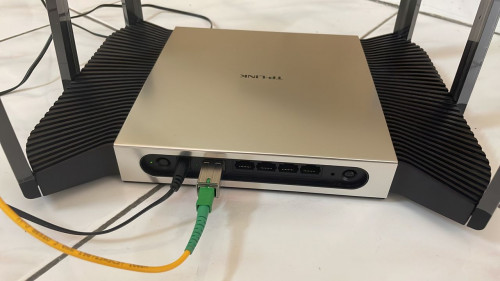
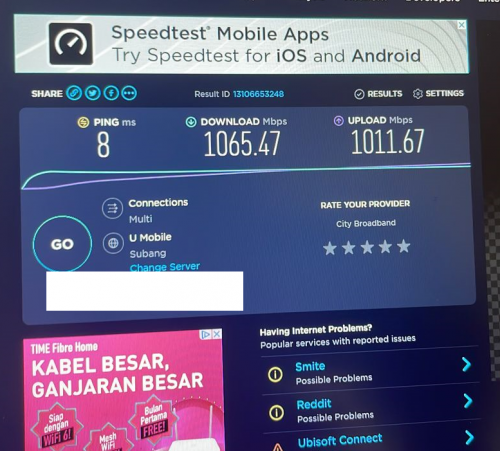
This has been done by lwk523
ISP: Umobile
Fiber: Allo
user posted image
user posted image

NOTE:
He tested via Wi-Fi 6 2x2, download speed should be more than 1.3Gbps like izhamsatria did with Unifi with 10Gb Switch:
user posted image

This post has been edited by Anime4000: Sep 2 2022, 11:48 PM

83 Pages « < 25 26 27 28 29 > » Top
 

Change to:
| Lo-Fi Version
0.0243sec    0.71    6 queries    GZIP Disabled
Time is now: 12th December 2025 - 04:20 AM