Welcome Guest ( Log In | Register )

83 Pages « < 15 16 17 18 19 > » Bottom

Outline · [ Standard ] · Linear+

Home Networking Ditch ONU, use GPON SFP on Business Grade Router, 2.5G ONU for Unifi & Maxis, NO NEED VLAN

views
     
lwk523
post Sep 2 2021, 08:39 PM

Premium Q Trader
******
Senior Member
1,040 posts

Joined: Mar 2006


QUOTE(Anime4000 @ Jul 25 2021, 11:26 PM)
To avoid OLT Alarm, you need make your SFP ONU Stick like your original ONU, by updating required info for your SFP ONU Stick
You can read here, I make complete guide and sacrifice my ONU collection for this purpose: https://github.com/Anime4000/RTL9601C1/blob.../VS_AUTH_KEY.md

TLDR, Using HG8240H ONT Device Information on SFP ONU Stick;
CODE

flash set PON_VENDOR_ID HWTC
flash set HW_CWMP_MANUFACTURER 'Huawei Technologies Co., Ltd'
flash set HW_CWMP_PRODUCTCLASS HG8240H
flash set HW_HWVER BF9.A
flash set ELAN_MAC_ADDR 043389FE8F59
flash set VS_AUTH_KEY 4FF78A9422FCBC797A0A3061186F20B7

flash set OMCI_FAKE_OK 1
flash set OMCI_SW_VER1 V3R017C10S100
flash set OMCI_SW_VER2 V3R017C10S100
flash set GPON_ONU_MODEL HG8240H
flash set GPON_SN HWTC98AFDD9D
flash set GPON_PLOAM_PASSWD 1234567890


When SFP ONU Stick connecting to OLT, and everything checks out!

Take note that GPON has fixed MTU size which is 2000 bytes.

Advantage using SFP ONU Stick allow you to use PPPoE MTU 1500, able to access many website that block MTU 1492
If your ISP support RFC4638

About Telephone over xPON, I pretty sure they use VLAN for this, refer to your ISP which VLAN they use for Telephone line, then you bridge it, either bridge tagged to tagged or tagged to untag
*
Hi bro,

Is that you mean TM will detect your ONU model ? Will it block if it detect another model? I change to my Huawei HG8240 to HG8145V5 (WIFI router , ONT all in one. ) I don't understand why I cant get the connection up even I have the ONT password.

Thank you smile.gif

This post has been edited by lwk523: Sep 2 2021, 08:46 PM
afif92
post Sep 3 2021, 12:35 AM

Casual
***
Junior Member
374 posts

Joined: Mar 2010
QUOTE(Anime4000 @ Jul 25 2021, 11:26 PM)
To avoid OLT Alarm, you need make your SFP ONU Stick like your original ONU, by updating required info for your SFP ONU Stick
You can read here, I make complete guide and sacrifice my ONU collection for this purpose: https://github.com/Anime4000/RTL9601C1/blob.../VS_AUTH_KEY.md

TLDR, Using HG8240H ONT Device Information on SFP ONU Stick;
CODE

flash set PON_VENDOR_ID HWTC
flash set HW_CWMP_MANUFACTURER 'Huawei Technologies Co., Ltd'
flash set HW_CWMP_PRODUCTCLASS HG8240H
flash set HW_HWVER BF9.A
flash set ELAN_MAC_ADDR 043389FE8F59
flash set VS_AUTH_KEY 4FF78A9422FCBC797A0A3061186F20B7

flash set OMCI_FAKE_OK 1
flash set OMCI_SW_VER1 V3R017C10S100
flash set OMCI_SW_VER2 V3R017C10S100
flash set GPON_ONU_MODEL HG8240H
flash set GPON_SN HWTC98AFDD9D
flash set GPON_PLOAM_PASSWD 1234567890


When SFP ONU Stick connecting to OLT, and everything checks out!

Take note that GPON has fixed MTU size which is 2000 bytes.

Advantage using SFP ONU Stick allow you to use PPPoE MTU 1500, able to access many website that block MTU 1492
If your ISP support RFC4638

About Telephone over xPON, I pretty sure they use VLAN for this, refer to your ISP which VLAN they use for Telephone line, then you bridge it, either bridge tagged to tagged or tagged to untag
*
How to find website that block MTU under 1500?

TSAnime4000
post Sep 3 2021, 02:21 AM

Look at all my stars!!
*******
Senior Member
2,399 posts

Joined: Jul 2009
From: /dev/null


QUOTE(lwk523 @ Sep 2 2021, 08:39 PM)
Hi bro,

Is that you mean TM will detect your ONU model ? Will it block if it detect another model? I change to my Huawei HG8240 to HG8145V5 (WIFI router , ONT all in one. ) I don't understand why I cant get the connection up even I have the ONT password.

Thank you  smile.gif
*
Yes, it will detect and forced ONT Provision.
When you using ALL in One, TM OLT will provision LAN1 Unifi or LAN2 Other ISP, etc...
Particular Provision make ONU just simple dumb bridge, so, your ALL in One will not work.

If you still want ALL in One, please use:

RB4011iGS+5HacQ2HnD-IN + ONU SFP Stick

QUOTE(afif92 @ Sep 3 2021, 12:35 AM)
How to find website that block MTU under 1500?
*
just block PMTU via ICMP
lwk523
post Sep 3 2021, 08:31 AM

Premium Q Trader
******
Senior Member
1,040 posts

Joined: Mar 2006


QUOTE(Anime4000 @ Sep 3 2021, 02:21 AM)
Yes, it will detect and forced ONT Provision.
When you using ALL in One, TM OLT will provision LAN1 Unifi or LAN2 Other ISP, etc...
Particular Provision make ONU just simple dumb bridge, so, your ALL in One will not work.

If you still want ALL in One, please use:

RB4011iGS+5HacQ2HnD-IN + ONU SFP Stick
just block PMTU via ICMP
*
Now only time fibre come with All in one and I feel this is more better compare with Maxis and TM.
As latest device is supported on All in one function and don't know why ISP want to waste another device just for bridging. hmm.gif


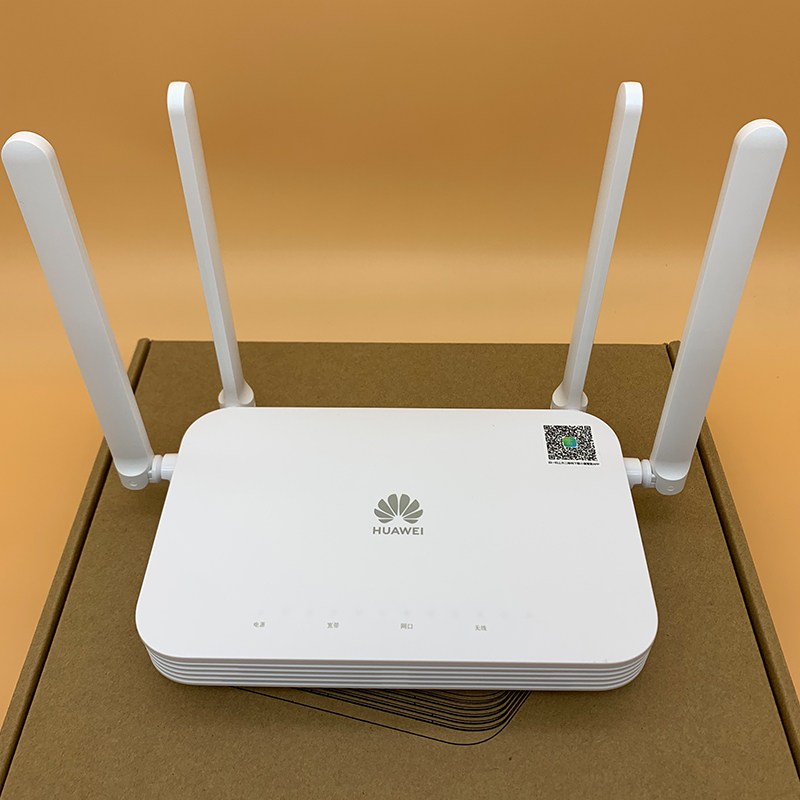
Actually, I planned to get this Huawei K662C which is around RM200 and Wifi 6 & Mesh is supported.

user posted image

This post has been edited by lwk523: Sep 3 2021, 08:33 AM
PRSXFENG
post Sep 3 2021, 08:50 AM

Look at all my stars!!
*******
Senior Member
2,608 posts

Joined: Nov 2020


QUOTE(lwk523 @ Sep 3 2021, 08:31 AM)
Now only time fibre come with All in one and I feel this is more better compare with Maxis and TM.
As latest device is supported on All in one function and don't know why ISP want to waste another device just for bridging.  hmm.gif
Actually, I planned to get this Huawei K662C which is around RM200 and Wifi 6 & Mesh is supported.

user posted image
*
Well, there are a few reasons why separate is better.
First of all looking at the TIME Fibre thread, seems like these All In One Huawei sucks...

2nd is that if you want to replace your own router, it's easier, just unplug stock router and swap.
Where as with all in one you have to ask cs to change modes.


lwk523
post Sep 3 2021, 08:59 AM

Premium Q Trader
******
Senior Member
1,040 posts

Joined: Mar 2006


QUOTE(PRSXFENG @ Sep 3 2021, 08:50 AM)
Well, there are a few reasons why separate is better.
First of all looking at the TIME Fibre thread, seems like these All In One Huawei sucks...

2nd is that if you want to replace your own router, it's easier, just unplug stock router and swap.
Where as with all in one you have to ask cs to change modes.
*
Yeah, you are right and only minor users like us can do own setup for all in one.


TSAnime4000
post Sep 3 2021, 02:54 PM

Look at all my stars!!
*******
Senior Member
2,399 posts

Joined: Jul 2009
From: /dev/null


QUOTE(lwk523 @ Sep 3 2021, 08:59 AM)
Yeah, you are right and only minor users like us can do own setup for all in one.
*
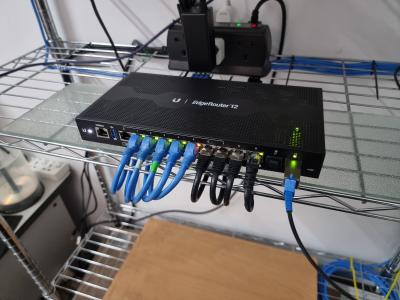
you still can setup All in One, simply using GPON ONU SFP Stick, plug into Mikrotik RB4011 WiFi Model.

Attached Image

currently I use EdgeRouter 12, my RB3011 broken
lwk523
post Sep 3 2021, 03:18 PM

Premium Q Trader
******
Senior Member
1,040 posts

Joined: Mar 2006


QUOTE(Anime4000 @ Sep 3 2021, 02:54 PM)
you still can setup All in One, simply using GPON ONU SFP Stick, plug into Mikrotik RB4011 WiFi Model.

Attached Image

currently I use EdgeRouter 12, my RB3011 broken
*
Nice setup bro but Mikrotik things look susah for me .. .. sweat.gif
TSAnime4000
post Sep 3 2021, 08:45 PM

Look at all my stars!!
*******
Senior Member
2,399 posts

Joined: Jul 2009
From: /dev/null


QUOTE(lwk523 @ Sep 3 2021, 03:18 PM)
Nice setup bro but Mikrotik things look susah for me  .. ..  sweat.gif
*
both are equally same difficulty, just Ubiquiti have nice basic GUI, anything need use command line
mauli74
post Sep 7 2021, 01:29 AM

New Member
*
Junior Member
48 posts

Joined: Mar 2011
I have a dumb question.

What is the improvement after going through all these hassles?
TSAnime4000
post Sep 7 2021, 10:51 AM

Look at all my stars!!
*******
Senior Member
2,399 posts

Joined: Jul 2009
From: /dev/null


QUOTE(mauli74 @ Sep 7 2021, 01:29 AM)
I have a dumb question.

What is the improvement after going through all these hassles?
*
reduce latency,
GPON to SFP to CPU

Not like GPON to LAN --- LAN to CPU (Router)

LAN has ~3ns delay
thankyou
post Sep 7 2021, 08:24 PM

Regular
******
Senior Member
1,941 posts

Joined: Jan 2003
Hello, it has been awhile! Nice you have gotten edgerouter 12!

Don't you find the router is a little hot? I bought a dual USB fan to cool down the temperature...

This post has been edited by thankyou: Sep 7 2021, 08:25 PM
TSAnime4000
post Sep 8 2021, 04:17 AM

Look at all my stars!!
*******
Senior Member
2,399 posts

Joined: Jul 2009
From: /dev/null


QUOTE(thankyou @ Sep 7 2021, 08:24 PM)
Hello, it has been awhile! Nice you have gotten edgerouter 12!

Don't you find the router is a little hot? I bought a dual USB fan to cool down the temperature...
*
Yea, since my RB3011UiAS switch chip dead.

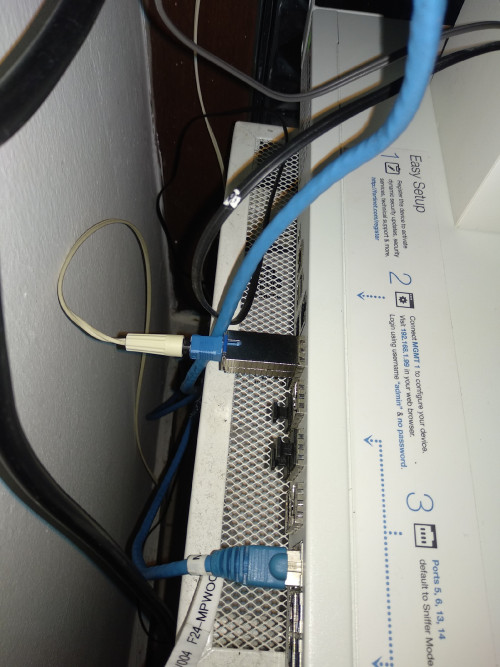
Yes, I notice run quite hot, I put 120mm fan on top at sfp edge using top blower (since hot air is lighter than cold). and make my SFP run at 36°c instead of 55°c

the CPU at weak spot, Enable QoS make FastPath disable and put cpu on heavy load.

During speed test with QoS Enable, download speed limited at ~300Mbps, with QoS Disabled: 512Mbps

For now, I disable QoS

also, I set eth8 as 2nd LAN for SoftEther VPN on Proxmox VM,

make thing easier, I make VLAN on switch0.821 and switch0.822 just to bridge Maxis VLAN service, I can connect any switch port, even add VLAN 822 on my Windows PC for VoIP hacking,

I was trying implementing Maxis VoIP on VoIP Desk Phone, later I can use eth9 (PoE) to power VoIP Desk Phone, Total Eliminate Maxis Router.
lwk523
post Oct 6 2021, 03:28 PM

Premium Q Trader
******
Senior Member
1,040 posts

Joined: Mar 2006


QUOTE(Anime4000 @ Sep 8 2021, 04:17 AM)
Yea, since my RB3011UiAS switch chip dead.

Yes, I notice run quite hot, I put 120mm fan on top at sfp edge using top blower (since hot air is lighter than cold). and make my SFP run at 36°c instead of 55°c

the CPU at weak spot, Enable QoS make FastPath disable and put cpu on heavy load.

During speed test with QoS Enable, download speed limited at ~300Mbps, with QoS Disabled: 512Mbps

For now, I disable QoS

also, I set eth8 as 2nd LAN for SoftEther VPN on Proxmox VM,

make thing easier, I make VLAN on switch0.821 and switch0.822 just to bridge Maxis VLAN service, I can connect any switch port, even add VLAN 822 on my Windows PC for VoIP hacking,

I was trying implementing Maxis VoIP on VoIP Desk Phone, later I can use eth9 (PoE) to power VoIP Desk Phone, Total Eliminate Maxis Router.
*
I plan to setup softether server with my Allo 1gbps up and down speed. Any advice on the ONU ? laugh.gif
?
TSAnime4000
post Oct 7 2021, 10:54 PM

Look at all my stars!!
*******
Senior Member
2,399 posts

Joined: Jul 2009
From: /dev/null


QUOTE(lwk523 @ Oct 6 2021, 03:28 PM)
I plan to setup softether server with my Allo 1gbps up and down speed. Any advice on the ONU ?  laugh.gif
?
*
I think to get SFP ONU quite hard, might work, might not, just try and luck.

probably Allo/TIME/Viewquest didn't impose OLT Speed Cap, they relaying on standard 1Gbps Link Speed to limit bandwidth, with custom 2.5G ONU, you can have more speed!

Note that, when OLT enforce bandwidth limit, it use Processor Time = Lag, no bandwidth limit on 1Gbps subscribers just reduced OLT load time.

some 1Gbps user able to get 2.1Gbps internet after tweak SFP ONU run at 2.5G mode.

problem is, configuring SFP ONU to run at 2.5G instead of 1G is possible at 50:50 chance.
lwk523
post Oct 7 2021, 11:19 PM

Premium Q Trader
******
Senior Member
1,040 posts

Joined: Mar 2006


QUOTE(Anime4000 @ Oct 7 2021, 10:54 PM)
I think to get SFP ONU quite hard, might work, might not, just try and luck.

probably Allo/TIME/Viewquest didn't impose OLT Speed Cap, they relaying on standard 1Gbps Link Speed to limit bandwidth, with custom 2.5G ONU, you can have more speed!

Note that, when OLT enforce bandwidth limit, it use Processor Time = Lag, no bandwidth limit on 1Gbps subscribers just reduced OLT load time.

some 1Gbps user able to get 2.1Gbps internet after tweak SFP ONU run at 2.5G mode.

problem is, configuring SFP ONU to run at 2.5G instead of 1G is possible at 50:50 chance.
*
You really pro on fibre stuff and all information is kinda rare.
Thank bro

Gaara92
post Nov 19 2021, 11:42 AM

Herald
****
Junior Member
612 posts

Joined: Mar 2008


QUOTE(Ouru @ Mar 21 2021, 03:55 PM)
Hi all,

successfully tested V2801F into Fortigate 500D. thanks to Anime4000 to initiate this idea and other members who share guides here. personally myself 1st timer in this whole process, good learning  thumbup.gif

1. V2801F brought from Russia, rm320 + shipping , almost 2 month+ to receive
2. Earlier brought sercomm FGS202 from France no WebGui , couldn't make it run & not able to telnet
3. V2801F with WebGui easy just entered SLID password from TM's GPON ONT Alcatel-Lucent I-240G-P , need to convert from Hex to Ascii

user posted image
*
May I know how you got into Alcatel lucent ONU? I got friend who have this kind of ONU and he don't know the login to enter the webgui.
TSAnime4000
post Nov 21 2021, 08:42 PM

Look at all my stars!!
*******
Senior Member
2,399 posts

Joined: Jul 2009
From: /dev/null


QUOTE(Gaara92 @ Nov 19 2021, 11:42 AM)
May I know how you got into Alcatel lucent ONU? I got friend who have this kind of ONU and he don't know the login to enter the webgui.
*
Another way to get ONU PLOAM Password...

1. Turn off ONU
2. call TM (100)
3. tell TM: ONU LOS/Red

4. When TM technician come, do this:
4.1 Take white paper
4.2 Tear white paper (piece)
4.3 Jam piece white paper into ONU Fiber Port
4.4 Technician check, ONU cannot use, they replace
4.5 During replacing ONU, ask technician for PLOAM/ONU Password, force technician to write down!!!

5. PROFIT biggrin.gif

I done this countless of times tongue.gif when I fry TM ONU during reverse engineering (overdrive TTL, NAND Read Write, etc...)

For TM, ONU just cost them RM2, dont worry...
rezzorix
post Dec 28 2021, 12:58 PM

Getting Started
**
Junior Member
98 posts

Joined: Nov 2021
Hi Guys,

I am using a Mikrotik RB5009 and just received an ODI XPON ONU Stick.

The web interface of the stick supposed to be reachable at 192.168.100.1 or 192.168.1.1

So I did the following:

1. Create a Bridge between SFP+ and ETH4
2. Plug in client at ETH4 with manual IP 192.168.100.2 (or x.x.1.2)

However, cannot reach the stick at all, no ping or http possible.

Did I miss a step?


asellus
post Dec 28 2021, 04:27 PM

#gompusas
Group Icon
Elite
4,541 posts

Joined: Jan 2003
From: BSRPPG51 Access Concentrator


QUOTE(rezzorix @ Dec 28 2021, 12:58 PM)
Hi Guys,

I am using a Mikrotik RB5009 and just received an ODI XPON ONU Stick.

The web interface of the stick supposed to be reachable at 192.168.100.1 or 192.168.1.1

So I did the following:

1. Create a Bridge between SFP+ and ETH4
2. Plug in client at ETH4 with manual IP 192.168.100.2 (or x.x.1.2)

However, cannot reach the stick at all, no ping or http possible.

Did I miss a step?
*
Did you connect the fiber cable to the SFP module?

83 Pages « < 15 16 17 18 19 > » Top
 

Change to:
| Lo-Fi Version
0.0349sec    0.62    6 queries    GZIP Disabled
Time is now: 12th December 2025 - 07:03 PM