Welcome Guest ( Log In | Register )

83 Pages « < 16 17 18 19 20 > » Bottom

Outline · [ Standard ] · Linear+

Home Networking Ditch ONU, use GPON SFP on Business Grade Router, 2.5G ONU for Unifi & Maxis, NO NEED VLAN

views
     
Gaara92
post Dec 28 2021, 06:57 PM

Herald
****
Junior Member
612 posts

Joined: Mar 2008


QUOTE(rezzorix @ Dec 28 2021, 12:58 PM)
Hi Guys,

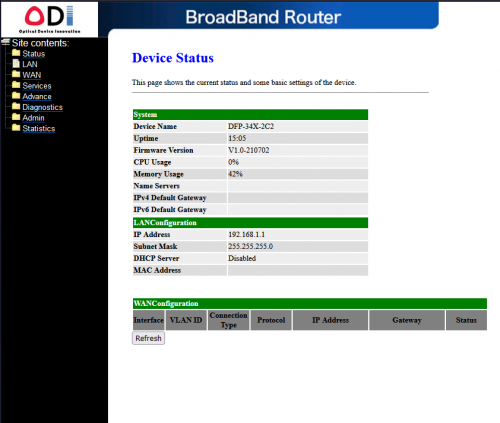
I am using a Mikrotik RB5009 and just received an ODI XPON ONU Stick.

The web interface of the stick supposed to be reachable at 192.168.100.1 or 192.168.1.1

So I did the following:

1. Create a Bridge between SFP+ and ETH4
2. Plug in client at ETH4 with manual IP 192.168.100.2 (or x.x.1.2)

However, cannot reach the stick at all, no ping or http possible.

Did I miss a step?
*
Try to assign an IP address to the stick or in your case your bridge, actually no need to bridge also jusst put and address from the GPON subnet to the stick itself, you can direct connect with it. And try to plug in the fiber to the stick, most stick does not online when it is not plugged in.
rezzorix
post Dec 30 2021, 07:27 PM

Getting Started
**
Junior Member
98 posts

Joined: Nov 2021
asellus & Gaara92 Thanks both of your for your help. thumbup.gif

I followed what you wrote and tried different variants - assigned different ips, with/without bridge, with/without plugged in fiber etc. etc.
Still cannot reach the webinterface.

The stick shows up in routers interface overview but in the details it seems the information arent complete.
For example MAC address of stick is not shown etc.

Summary: aside from the stick being super-super-hot (like really burning hot) nothing happens.

Maybe a faulty stick then?
Will try to return & exchange and then see how it goes... grumble.gif
rezzorix
post Dec 31 2021, 10:12 PM

Getting Started
**
Junior Member
98 posts

Joined: Nov 2021
QUOTE(rezzorix @ Dec 30 2021, 07:27 PM)
asellus & Gaara92 Thanks both of your for your help.  thumbup.gif

I followed what you wrote and tried different variants - assigned different ips, with/without bridge, with/without plugged in fiber etc. etc.
Still cannot reach the webinterface.

The stick shows up in routers interface overview but in the details it seems the information arent complete.
For example MAC address of stick is not shown etc.

Summary: aside from the stick being super-super-hot (like really burning hot) nothing happens.

Maybe a faulty stick then?
Will try to return & exchange and then see how it goes...  grumble.gif
*
Update from Seller: they say that the stick works with a "Switch" only, but not with a "Router"...
What to say... anyway, will get a refund through Lazada i guess.
TSAnime4000
post Jan 1 2022, 01:13 AM

Look at all my stars!!
*******
Senior Member
2,399 posts

Joined: Jul 2009
From: /dev/null


QUOTE(rezzorix @ Dec 31 2021, 10:12 PM)
Update from Seller: they say that the stick works with a "Switch" only, but not with a "Router"...
What to say... anyway, will get a refund through Lazada i guess.
*
eh, it should work, if GPON Stick have embedded Web GUI, it should work like external ONU,
mind share lazada link here...
rezzorix
post Jan 1 2022, 10:16 PM

Getting Started
**
Junior Member
98 posts

Joined: Nov 2021
QUOTE(Anime4000 @ Jan 1 2022, 01:13 AM)
eh, it should work, if GPON Stick have embedded Web GUI, it should work like external ONU,
mind share lazada link here...
*
Anime4000
Sure, can here the link: https:// www.lazada.com.my/products/i2605338727-s11707386106.html
TSAnime4000
post Jan 2 2022, 12:18 AM

Look at all my stars!!
*******
Senior Member
2,399 posts

Joined: Jul 2009
From: /dev/null


QUOTE(rezzorix @ Jan 1 2022, 10:16 PM)
Anime4000
Sure, can here the link: https:// www.lazada.com.my/products/i2605338727-s11707386106.html
*
oh that, either ZTE (old) or Realtek RTL9601C1 (new)
If you have it, try disassemble check which SoC you get
rezzorix
post Jan 2 2022, 02:03 AM

Getting Started
**
Junior Member
98 posts

Joined: Nov 2021
QUOTE(Anime4000 @ Jan 2 2022, 12:18 AM)
oh that, either ZTE (old) or Realtek RTL9601C1 (new)
If you have it, try disassemble check which SoC you get
*
Anime4000
Dont really want to open it up, but production date is Nov 2021, so should be a new model then, correct?
TSAnime4000
post Jan 2 2022, 01:58 PM

Look at all my stars!!
*******
Senior Member
2,399 posts

Joined: Jul 2009
From: /dev/null


QUOTE(rezzorix @ Jan 2 2022, 02:03 AM)
Anime4000
Dont really want to open it up, but production date is Nov 2021, so should be a new model then, correct?
*
Yes, it should be Realtek SoC, are you using Ubiquity or Mikrotik?
Gaara92
post Jan 2 2022, 02:04 PM

Herald
****
Junior Member
612 posts

Joined: Mar 2008


QUOTE(Anime4000 @ Jan 2 2022, 01:58 PM)
Yes, it should be Realtek SoC, are you using Ubiquity or Mikrotik?
*
he is using rb5009 like mine but with time fiber
rezzorix
post Jan 2 2022, 03:16 PM

Getting Started
**
Junior Member
98 posts

Joined: Nov 2021
QUOTE(Gaara92 @ Jan 2 2022, 02:04 PM)
he is using rb5009 like mine but with time fiber
*
Anime4000 Gaara92

Exactly. Mikrotik RB5009 nod.gif
TSAnime4000
post Jan 2 2022, 06:55 PM

Look at all my stars!!
*******
Senior Member
2,399 posts

Joined: Jul 2009
From: /dev/null


QUOTE(rezzorix @ Jan 2 2022, 03:16 PM)
Anime4000 Gaara92

Exactly. Mikrotik RB5009 nod.gif
*
then,
1. Set IP Address 192.168.1.2/24 on sfpplus1
2. Add sfpplus1 under WAN Interface List

now you can access without need to bridge, just NAT
rezzorix
post Jan 3 2022, 12:51 PM

Getting Started
**
Junior Member
98 posts

Joined: Nov 2021
QUOTE(Anime4000 @ Jan 2 2022, 06:55 PM)
then,
1. Set IP Address 192.168.1.2/24 on sfpplus1
2. Add sfpplus1 under WAN Interface List

now you can access without need to bridge, just NAT
*
That worked.
The part I missed was adding it under an Interface List rclxms.gif


Now need to figure out the TIME broadband configuration

user posted image
Gaara92
post Jan 3 2022, 12:54 PM

Herald
****
Junior Member
612 posts

Joined: Mar 2008


QUOTE(rezzorix @ Jan 3 2022, 12:51 PM)
That worked.
The part I missed was adding it under an Interface List  rclxms.gif
Now need to figure out the TIME broadband configuration

user posted image
*
flash it with V2801F firmware. but before you do can you backup the actual firmware. I think my default firmware is same as this @Anime4000
rezzorix
post Jan 3 2022, 03:41 PM

Getting Started
**
Junior Member
98 posts

Joined: Nov 2021
Anime4000 Gaara92 asellus


Ok, so far so good.

Flashing done - telnet comes up for about 4...5 seconds and then it reboots.
I also see that the webinterface is working until reboot.

Now regarding the Auto Reboot Fix...

So lets see the steps from github:

N/A Downgrade your TWCGPON657 to version B13 or below.
OK Flash with V2801F_V1.9.0-201104.tar and wait.
NOT OK Quickly login and execute echo 3 > /proc/fiber_mode to avoid auto-reboot (invalid VS_AUTH_KEY)

1) the password for the flashed Firmware on github is stated to be either: admin:stdONU101 or admin:system
This didnt work for me; I can login into telnet with credentials admin:admin

2) Time is just enough to run echo 3 > /proc/fiber_mode before the reboot.
However that doesnt seem to work, the stick is still in the reboot loop.
I tried this with fiber in and out, both same result.

PENDING Disconnect fiber from module to restore telnet
PENDING Update VS_AUTH_KEY acording to ELAN_MAC_ADDR and HW_HWVER
PENDING Reboot (in telnet)
PENDING Reflash again with V2801F_V1.9.0-201104.tar (must do after fix VS_AUTH_KEY)
PENDING Enjoy!


Gaara92
post Jan 4 2022, 07:12 AM

Herald
****
Junior Member
612 posts

Joined: Mar 2008


QUOTE(rezzorix @ Jan 3 2022, 03:41 PM)
Anime4000 Gaara92 asellus
Ok, so far so good.

Flashing done - telnet comes up for about 4...5 seconds and then it reboots.
I also see that the webinterface is working until reboot.

Now regarding the Auto Reboot Fix...

So lets see the steps from github:

N/A Downgrade your TWCGPON657 to version B13 or below.
OK Flash with V2801F_V1.9.0-201104.tar and wait.
NOT OK Quickly login and execute echo 3 > /proc/fiber_mode to avoid auto-reboot (invalid VS_AUTH_KEY)

1) the password for the flashed Firmware on github is stated to be either: admin:stdONU101 or admin:system
This didnt work for me; I can login into telnet with credentials admin:admin

2) Time is just enough to run echo 3 > /proc/fiber_mode before the reboot.
However that doesnt seem to work, the stick is still in the reboot loop.
I tried this with fiber in and out, both same result.

PENDING Disconnect fiber from module to restore telnet
PENDING Update VS_AUTH_KEY acording to ELAN_MAC_ADDR and HW_HWVER
PENDING Reboot (in telnet)
PENDING Reflash again with V2801F_V1.9.0-201104.tar (must do after fix VS_AUTH_KEY)
PENDING Enjoy!
*
If it does not autoreboot no need to do the auto reboot fix. Does your fiber got laser readings? Tx and Rx
rezzorix
post Jan 4 2022, 12:47 PM

Getting Started
**
Junior Member
98 posts

Joined: Nov 2021
QUOTE(Gaara92 @ Jan 4 2022, 07:12 AM)
If it does not autoreboot no need to do the auto reboot fix. Does your fiber got laser readings? Tx and Rx
*
It does auto-reboot.
It is stuck in a bootloop.

Online: ~5..6 seconds
Rebooting: ~20..30 seconds.
Gaara92
post Jan 4 2022, 02:43 PM

Herald
****
Junior Member
612 posts

Joined: Mar 2008


QUOTE(rezzorix @ Jan 4 2022, 12:47 PM)
It does auto-reboot.
It is stuck in a bootloop.

Online: ~5..6 seconds
Rebooting: ~20..30 seconds.
*
Then you need to use autoit software to autorun the command using macro key. You cannot type it manually as it will b e impossible.
rezzorix
post Jan 4 2022, 02:46 PM

Getting Started
**
Junior Member
98 posts

Joined: Nov 2021
QUOTE(Gaara92 @ Jan 4 2022, 02:43 PM)
Then you need to use autoit software to autorun the command using macro key. You cannot type it manually as it will b e impossible.
*
Yep, did that - as mentioned above with autoit I get the echo 3 > /proc/fiber_mode through.
But the thing still stuck in rebooting all the time.


Gaara92
post Jan 4 2022, 07:44 PM

Herald
****
Junior Member
612 posts

Joined: Mar 2008


QUOTE(rezzorix @ Jan 4 2022, 02:46 PM)
Yep, did that - as mentioned above with autoit I get the echo 3 > /proc/fiber_mode through.
But the thing still stuck in rebooting all the time.
*
Have you entered VS AUTH KEY correctly?
rezzorix
post Jan 4 2022, 08:15 PM

Getting Started
**
Junior Member
98 posts

Joined: Nov 2021
QUOTE(Gaara92 @ Jan 4 2022, 07:44 PM)
Have you entered VS AUTH KEY correctly?
*
Not getting this far. For this even with autoit the time is not enough.

Autoit can only login (username+pw) and then add echo 3 > /proc/fiber_mode

The next command will only be entered partially and then interrupted do to reboot happening.

Anyway I thought that this will already switch echo 3 > /proc/fiber_mode should already prevent the reboot, correct?

The point on Githhub says: "Quickly login and execute echo 3 > /proc/fiber_mode to avoid auto-reboot (invalid VS_AUTH_KEY)"

The total available time after reboot is max 4..5 seconds - there is no way of changing all the other variables because of that.

83 Pages « < 16 17 18 19 20 > » Top
 

Change to:
| Lo-Fi Version
0.0318sec    0.45    6 queries    GZIP Disabled
Time is now: 12th December 2025 - 05:43 PM