Welcome Guest ( Log In | Register )

83 Pages « < 78 79 80 81 82 > » Bottom

Outline · [ Standard ] · Linear+

Home Networking Ditch ONU, use GPON SFP on Business Grade Router, 2.5G ONU for Unifi & Maxis, NO NEED VLAN

views
     
TSAnime4000
post Jun 14 2025, 04:46 AM

Look at all my stars!!
*******
Senior Member
2,399 posts

Joined: Jul 2009
From: /dev/null


Finding 2.5G HiSGMII stability since Mikrotik 7.19.1
CODE
What's new in 7.19.1 (2025-May-23 17:27):
*) ethernet - fixed flow-control for RB5009;


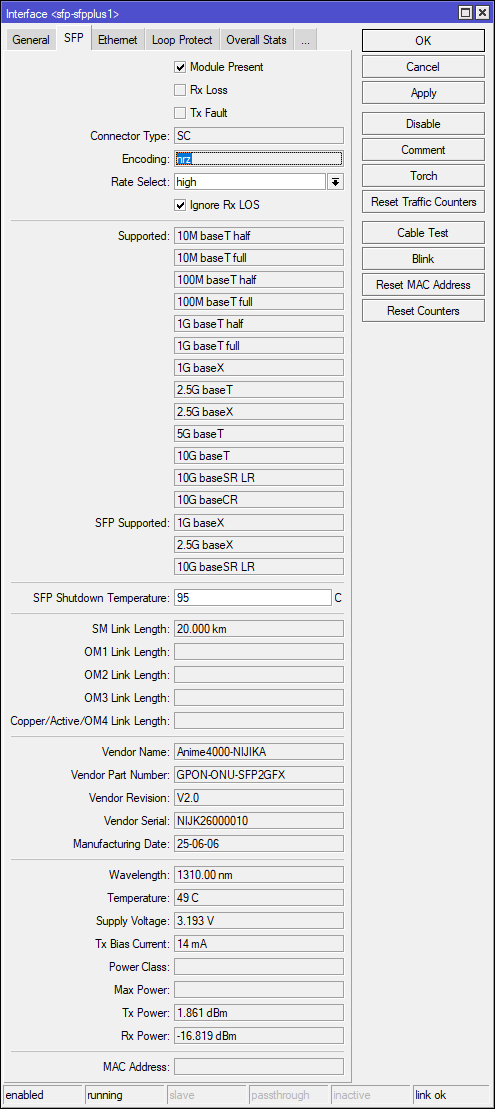
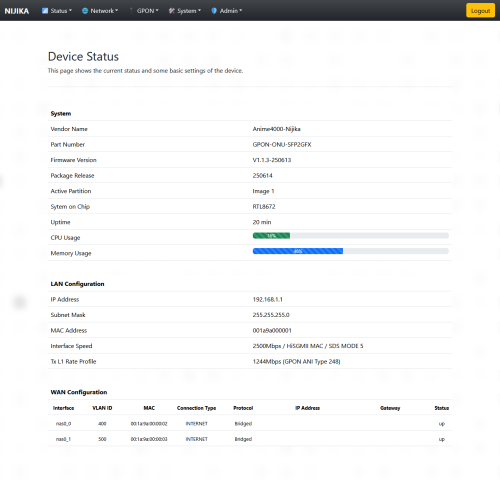
My NIJIKA stick EEPROM need update
1. NRZ encoding instead of old 8b/10b
2. HiSGMII MAC (as per recommended among devs)

user posted image

user posted image


tng55
post Jun 14 2025, 11:30 AM

Regular
******
Senior Member
1,438 posts

Joined: Sep 2021


QUOTE(Anime4000 @ Jun 14 2025, 04:46 AM)
Finding 2.5G HiSGMII stability since Mikrotik 7.19.1
CODE
What's new in 7.19.1 (2025-May-23 17:27):
*) ethernet - fixed flow-control for RB5009;


My NIJIKA stick EEPROM need update
1. NRZ encoding instead of old 8b/10b
2. HiSGMII MAC (as per recommended among devs)

user posted image

user posted image
*
rx power before 15dBm now 16dBm
TSAnime4000
post Jun 14 2025, 01:30 PM

Look at all my stars!!
*******
Senior Member
2,399 posts

Joined: Jul 2009
From: /dev/null


QUOTE(tng55 @ Jun 14 2025, 11:30 AM)
rx power before 15dBm now 16dBm
*
this different stick, I test each one, this #10 also have different calibration
hadith_corner
post Jun 18 2025, 11:29 AM

Getting Started
**
Junior Member
205 posts

Joined: Jan 2012
From: Antah Berantah
Will this item works with Ubiquity Unifi Dream Machine SE? Currently use the default unifi GN630V COMBO BOX AX3000 SKYWORTH.

Not sure if this device probelmatic or not, but im keep getting networks down/packet loss everyday.

Thinking if changing to this device can help resolving this issue.
yenchenje
post Jun 19 2025, 12:12 PM

Enthusiast
*****
Junior Member
932 posts

Joined: Dec 2019
QUOTE(hadith_corner @ Jun 18 2025, 11:29 AM)
Will this item works with Ubiquity Unifi Dream Machine SE? Currently use the default unifi GN630V COMBO BOX AX3000 SKYWORTH.

Not sure if this device probelmatic or not, but im keep getting networks down/packet loss everyday.

Thinking if changing to this device can help resolving this issue.
*
PPPoE done on UDM SE, PON Stick plugged into CRS305 to split out to UDM SE and ATA device here.

Can personally attest to stability compared to GN630V, but depending on your OLT, you might experience degraded speed. I'm on 2Gbps DL/1Gbps UL here but I can barely crack either of those even on a quiet network.

However I can hit near full speed with IDS/IPS off on my UDM SE with GN630V, probably more optimization is needed with PON stick and probably modify some settings on TM's side. I haven't bothered to pester TM to swap OLT ports for me for Alcatel OLT, just keep in mind this is depending on OLT you're assigned to.

Stability also is up even with constant high volume traffic (torrenting), 500-600Mbps DL and 400-500Mbps UL and still rock solid. But might be a UDM SE limitation, ping does spike during large DL, so if you have any latency sensitive application, you might experience some high pings. For me it's during my valorant games.
ZJL
post Jun 20 2025, 02:05 PM

New Member
*
Newbie
37 posts

Joined: Jan 2018
I get hold of a used but untouched firmware for DFP-34X-2C3. According to this repo, and I'm on TIME Broadband, which of this in the repo should I flash?

https://github.com/Anime4000/RTL960x/tree/m...are/DFP-34X-2C2


TSAnime4000
post Jun 20 2025, 04:17 PM

Look at all my stars!!
*******
Senior Member
2,399 posts

Joined: Jul 2009
From: /dev/null


QUOTE(ZJL @ Jun 20 2025, 02:05 PM)
I get hold of a used but untouched firmware for DFP-34X-2C3. According to this repo, and I'm on TIME Broadband, which of this in the repo should I flash?

https://github.com/Anime4000/RTL960x/tree/m...are/DFP-34X-2C2
*
No, TIME has strict and need Huawei OMCI and my repo are out of date, all proprietary are not public
also, just stay with stock as is
Turnip
post Jun 27 2025, 06:50 PM

bonjour beau là-bas
******
Senior Member
1,111 posts

Joined: Aug 2005
From: UK


Hello Anime4000
Ive messaged you on Carousel the other day regarding my 3 storey shop/school.
Currently using crappy skyworth onu/router combo from TM.

im just curious are there :
any routers that support all-in-one solution with SFP+ sticks inserted (on sfp port) without needing a seperate ONU modem/fiber to rj45 converters?
At home im using the TPLink Archer GE800 (it has an SFP+ 10GBe port)I wonder if this works?

as my partner are concerned with the aesthetic looks - dont want messy2 serabai cables here and there. As the fibre cable is at the G Floor.

Currently,
have the Tp Link DECO BE-65 - 3x in mesh, still yet to hookup as still considering whether separate modem+sfp stick are the only option for that.

already got your combo for my own house years back anyway.

This post has been edited by Turnip: Jun 28 2025, 02:00 PM
ZJL
post Jul 2 2025, 10:41 PM

New Member
*
Newbie
37 posts

Joined: Jan 2018
QUOTE(Anime4000 @ Jun 20 2025, 04:17 PM)
No, TIME has strict and need Huawei OMCI and my repo are out of date, all proprietary are not public
also, just stay with stock as is
*
In need of some advice here. This ODI SFP without media converter can I access to webui? I have a SFP switch and SFP router.

On router the SFP port interface do I set address 192.168.1.1/24 and my PC to within same subnet range?

On switch, I presume just the PC need 192.168.1.x/24 IP but the x just cannot be 1?

Both for the above, is it just head directly to web portal and key in http or https 192.168.1.1?
boringz
post Jul 18 2025, 03:17 PM

Getting Started
**
Junior Member
181 posts

Joined: Apr 2007


will wait for contract to end. thanks!

This post has been edited by boringz: Jul 28 2025, 11:27 AM
mhwee
post Jul 18 2025, 07:28 PM

Getting Started
**
Junior Member
241 posts

Joined: Sep 2005
From: Johor
QUOTE(ZJL @ Jul 2 2025, 10:41 PM)
In need of some advice here. This ODI SFP without media converter can I access to webui? I have a SFP switch and SFP router.

On router the SFP port interface do I set address 192.168.1.1/24 and my PC to within same subnet range?

On switch, I presume just the PC need 192.168.1.x/24 IP but the x just cannot be 1?

Both for the above, is it just head directly to web portal and key in http or https 192.168.1.1?
*
ZJL

An easier way is just use RB4011, RB50090, etc , mikrotik router which has SFP port. No need another sfp switch.

Assuming your GPON stick is 192.168.1.1, your mikrotik router is 192.168.88.1

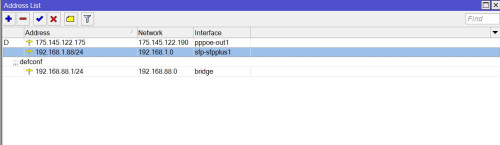
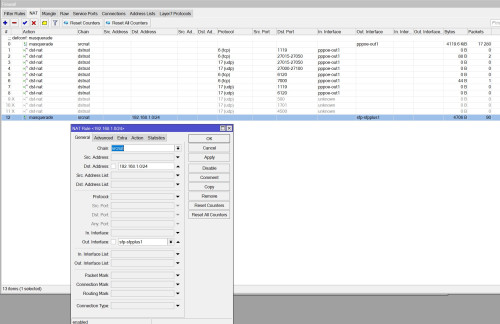
In order to be able to manage GPON stick from router's 192.168.88.0/24,

user posted image
user posted image

192.168.1.88/24 is just an address i choose to access from, can be any address 192.168.1.x/24.

IP-addresses-add address as 1st photo
IP-firewall-nat-add srcnat as 2nd photo

But if u choose to use mikrotik with a sfp switch, the concept is the same, you can adjust accordingly.

This post has been edited by mhwee: Jul 18 2025, 07:37 PM
kwss
post Jul 18 2025, 09:12 PM

Regular
******
Senior Member
1,207 posts

Joined: Aug 2018
QUOTE(boringz @ Jul 18 2025, 03:17 PM)
Hi sifus, I need some pointers thats related to GPON ONU.

I have signed up Digi fiber (2gb dl and 1gb ul) a month ago but I notice during certain usage periods eg: evening to midnight - high usage periods, websites stop working, certain apps such as wechat don't work, and sites like speedtest and fast.com tend to show unstable or incomplete tests. Of course if I restart both the ONU and the router (mikrotik) it goes back to normal, but after some time (maybe high usage? maybe Digi fiber FUP? maybe ONU problem? maybe wrong config for 2gb for mikrotik rb5009?) it will get laggy/have intermittent network connections especially during night periods of high usage.
Before you might point out that it is mainly due to high usage, I have gone through all sorts of checks to figure out what are the issues; because most importantly, on another property in the same location, I am using Maxis fiber 1gb package (1gb dl 500mb ul) under the exact same conditions (same hardware, wiring, and users) and I don't have such issue even with very high concurrent device usage.

Used under maxis fiber 1gb plan (public wan usage, very high number of concurrent users during peak hours evening-night with no issue on internet connectivity):
- Mikrotik RB4011 as core router - with settings, handling probably 120 devices combined (mobile/computer)
- Skyworth GPON GN630E
- Subsequent APs are either asus or tenda routers catering up to max 10 devices at a time.
The above setup did not give me any problems at all. All internet usage is smooth like butter.

But as I was setting up digi fiber at another property (just behind, it uses the same TM pole even!) and signed up with Digi Fiber, and I tried:
- Mikrotik RB5009 first, then swap RB4011 to see if RB5009 is faulty (but outcome the same)
- Skyworth GPON GN630E - speedtest does give me 2gb dl/1gb ul if I connect to the provided tplink digi router if i use 1 to 1 eth connection (right now I am testing an older fiberhome ONU that goes up to 800mbps to see if the GN630E is causing the issue? although TM contractor says its not the issue)
- Same subsequent APs are either asus or tenda routers catering up to max 10 devices at a time.
- mikrotik firewall configs are the same as the ones used under maxis fiber 1gb plan. so i presume it shouldnt be affecting this.

For this particular network I only have usage up to probably 15-20 devices before the network goes bonkers, compared to the one right behind which goes up to on average 120 devices with no issue.
There were other multiple problems with Digi fiber initially:
problems with TM dl & ul settings on backend that they did not open to 2gb dl and 1gb ports and had to contact "FTC" to open it. Then there was the PPPOE repeated disconnections which I think is because digi fiber uses ipv6, and the disconnections stop after I disabled ipv6 in mikrotik.
Other things that were done were:
- redoing of pigtail fiber cable by TM
- changing eth cables to confirm its not the cable issues. (confirm 1gbps/2.5gbps shown on mikrotik)
- using older backup RB4011 as end APs to confirm if its the tenda/asus router issue (same)

My location is at Kampar (Perak) - so the infra is under TM.

So my remaining steps I can figure out on:
1) change the ONU to the SFP type presumably sold here? Or the ONU bridge? Would it be the problem you think?
2) maybe somehow there's someone hogging the bandwidth very badly in this particularly property compared to the other one? (detailed traffic monitoring)
3) give up about Digi fiber? Maybe its their FUP?

Thanks for your advice. I'm keen to try if its the ONU problem, or whether its some other settings problem..
*
I really don't think it's an IPv6 causing disconnection. Can you enable it and try again?
How do you configure it by the way.

If it's a layer 2 problem aka the PON network, then it won't disconnect from the fact that it's on IPv6. PON only speak frame and encapsulation of packet, it doesn't know if you are sending TCP UDP IPv4 IPv6.

I suspect Digi put a cap on how many concurrent session a subscriber can open on the CGNAT. Either they do it because they lack IPv4 address or due to abuse prevention.

You can verify how many seasons you are holding by logging into the Mikrotik. If this is the case IPv6 should help you.

You mention you face the problem at night, how about heavy usage in the morning? Like 2am? Or 9am?

It could simply be due to congestion in the evening. Or their CGNAT really ran out of IPv4 address and starts dropping session.

EDIT:
Check out another thread:
Celcom Messed Up Its Japan DataPacket Route?, All Other Local Telcos Just Fine
https://forum.lowyat.net/topic/5526337

Is yours Digi ASN or Celcom ASN?

It could also be that to conserve their IPv4 address, they set a very aggressive timeout on their NAT session. You can sort of workaround this by setting an even more aggressive timeout in Mikrotik. However, not all app will work. So this is not an actual solution.

This post has been edited by kwss: Jul 18 2025, 09:25 PM
boringz
post Jul 19 2025, 02:33 PM

Getting Started
**
Junior Member
181 posts

Joined: Apr 2007


- will wait for contract to end. thanks!


This post has been edited by boringz: Jul 28 2025, 11:26 AM
kwss
post Jul 19 2025, 10:59 PM

Regular
******
Senior Member
1,207 posts

Joined: Aug 2018
QUOTE(boringz @ Jul 19 2025, 02:33 PM)
1) I didn't do any config. thats the thing. Just normal stock setup with some minor firewall config. Skyworth modem connect into rb5009 port.
2) before this it had the same issue even with their stock tplink router, I saw frequent disconnections until I think they did something from the backend to update/close the issue.
3) okay let me see how to track the sessions and see how it works.
4) morning probably unable to replicate because concurrent real user sessions lesser. mikrotik has tools to replicate this? let me research.
5) possible you mention congestion (from my end), I did, but I also isolated each end AP to just 100mbps to limit (6 APs) that totals up to 600mbps ul dl max concurrent, same thing.
6) not 100% sure what ASN means, but since I sign under digi so I think Digi ASN.

I'm going to order 1 SFP from @anime4000 to try, and conclude if its the PON unit issue.

Otherwise I will conclude its either as you mention: digi putting a cap on how many concurrent session a subscriber can open.

But quick update: I found a spare fiberhome ONU and currently testing it (old version caps to 800mbps dl speed), so far no weird issues last night! (of course if congestion type of surfing then unavoidable). Will do stress testing next few days when user session capacity comes in on weekday to see what happens. cross fingers.
*
If you re-enable IPv6 and there is no more frequent disconnection then they most likely quietly fixed it.

You can check the number of session in IP > Firewall > Connections > Tracking.
Scroll all the way down and you should see the number.

It is difficult to replicate actual internet traffic. No synthetic tool exist as far as I know. First you need to simulate the IMIX packet profile. Then you must simulate not only traffic from multiple source address, but to multiple destination address as well, over different ASN. This is what burns up IPv4 address / port in a NAT pool. CGNAT or your own NAT.

You can enable graphing in Mikrotik, internally it basically read SNMP data and put it into a graph. From here you can see CPU usage, RAM usage and each of your interface usage. You can quickly judge if something is saturated at a high level. However, since rb5009 is a non-ASIC router, the graph cannot tell you if one of your CPU core is pegged. Not all RouterOS process do multi-core properly.

Most of the time it is the ISP having congestion, not your network, but wth a simple monitoring setup I mentioned above, you can quickly rule out problem of your own.

Go to this website: https://rpkitest.nlnetlabs.net/
Screenshot me the top part which shows the ASxxxx

If you buy the SPF module knowing that it might not fix your problem then it is fine. You do get better security using the module compared to TM's ONU / ONR.

You can just run the Fiberhome and see how it goes. If it is really OK, then I don't know what is wrong already. Maybe overheat or this Skyworth really have a firmware bug. Their previous D-Link ONR also has a bug where it will drop your speed to 300Mbps when you turn on VPN, even if you are in bridge mode
boringz
post Jul 21 2025, 09:54 AM

Getting Started
**
Junior Member
181 posts

Joined: Apr 2007


-will wait for contract to end! thanks!


This post has been edited by boringz: Jul 28 2025, 11:26 AM
kwss
post Jul 21 2025, 11:31 PM

Regular
******
Senior Member
1,207 posts

Joined: Aug 2018
QUOTE(boringz @ Jul 21 2025, 09:54 AM)
Based on my checks last night, using the fiber home modem option does not work as well. I now believe as you suggest, that under a certain maximum number of connections as you have pointed out, they start to fail (blocking by Digi fiber). Normal web surfing, WeChat, Microsoft teams, shopee app failed to load/lag/need to keep refreshing during the down time(meaning it did not load right away on the first time) - approx 10pm onward range.

I haven't tracked it onsite at night yet(I am away from the site at night) - but currently during daytime it's between 300-700 range.

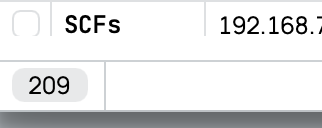
This is what you meant right? the 209 number.
user posted image

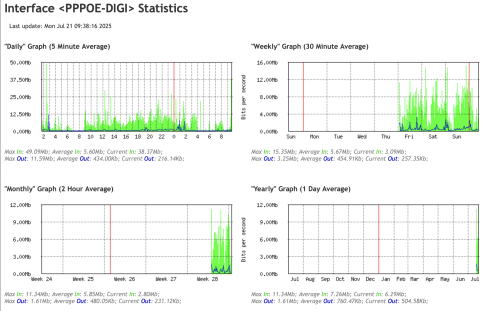
I have enabled graphing also to see the data usage.

user posted image

And as per the rpki test result:
user posted image
Is there a way/script I can enable tracking for number of open sessions in logging? *nevermind - I setup a script to log active connections every minute.

And is there a way I can use the remote DNS to login to mikrotik? I enabled Cloud > DDNS enabled but it writes: Router is behind a NAT. Remote connection might not work. *nevermind - I found the way to get this to work with zerotier.

I will do a remote login and do a comparison on the number of active connections to see what's the limitation.
*
There are a few things you can do to confirm and alleviate the issue:
Enable IPv6
I see that it is disabled. IPv6 don't do NAT and hence won't count to the cap.

Use Mikrotik to perform DNS
Instead of pointing to third-party DNS server inside your DHCP or RA, point them to your Mikrotik instead. This will allow caching and reduces connection from all the devices burning up NAT entry just for DNS.

My own assumption and question:
You mentioned you changed from Maxis to Digi. I assumed everything else is the same, including the number of devices and usage pattern.

I assumed you are using the exact same hardware, including your Mikrotik, switch and AP. Except the ONU.

I also assume you just change the PPPoE and maybe the VLAN tagging in your Mikrotik and nothing else.

Is my assumption correct?

How are those devices connected to your network? Wired or WiFi?

Some other things you can try to confirm if it is Digi problem:
Upgrade to the latest RouterOS
I think in the recent version they mention something about improve stability under heavy usage. The description is vague and I am not sure if it apply to you. Just upgrade and try it out.

Swap you ONU + Router with your Maxis account
You mentioned you have another location just behind using Maxis.
Just move the Maxis Skyworth + rb4011 over and swap with your Digi Skyworth + rb5009

Now you can test at night if your Digi setup is still having issue. This will directly tell if Digi network is having a congestion in general or is it a NAT session issue.

Disconnect PPPoE for 2 minutes and reconnect when problem occur (if you are on site)
The 2 minutes is sufficient for NAT session to timeout if they use an aggressive setting.
If you reconnect and suddenly everything is fast again, this is a big indicator you are hitting the NAT limit.
You obviously cannot do this remotely cos you will lock yourself out.
boringz
post Jul 21 2025, 11:49 PM

Getting Started
**
Junior Member
181 posts

Joined: Apr 2007


- will wait for contract to end! thanks


This post has been edited by boringz: Jul 28 2025, 11:25 AM
kwss
post Jul 22 2025, 08:24 AM

Regular
******
Senior Member
1,207 posts

Joined: Aug 2018
QUOTE(boringz @ Jul 21 2025, 11:49 PM)
Are there some specific settings I should do to enable ipv6? Since I did not "Disable Ipv6" i just run it as it is.
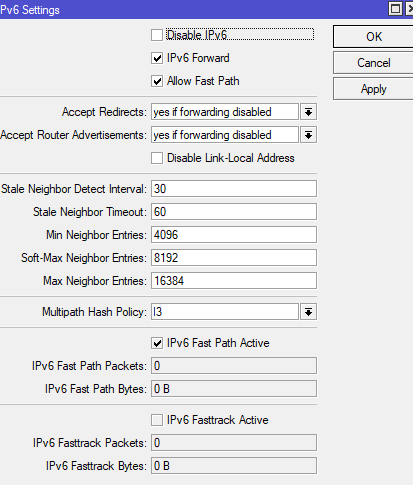
user posted image

This is what I see in Addresses in IPV6:
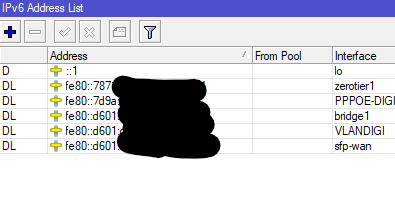
user posted image

I am pointing it to 8.8.8.8 and 8.8.4.4, any pointers on how to point them to mikrotik? (i will search online in the meantime).

Your assumption is correct - and actually it is not a swap, it is a different site, but it is at the same area. The devices are essentially the same except the ISP is digi fiber.

Devices are connected via wifi, however me personally connecting via wired gives the same outcome.

Strangely: I have setup the SFP by @anime4000 today following his configurations, and using RB5009. Although I hit the speeds of 2gb dl and 1gb ul from speedtests, the outcome seem to be far worse than using the fiberhome + rb4011. Far worse meaning all attempts to try using fast.com usually fail, most attempts to open websites fail, and all forms of apps such as wechat, etc fail. funnily the speedtest I did lead me to attempt to do it with kuching isp, even though I am located in perak. But then again rb4011 and fiberhome also gives problems sporadically, during certain time/usage patterns. Even the RPKI website you shared cannot be loaded.

From remote monitoring into the routers I confirm: there is no overusage - the speeds are well below the 2gb/1gb provided. I don't think users ever get a chance to even surf the speeds.

To answer your questions:

1) they are the latest versions. 7.19.3 For the routers handling maxis fiber & digi fiber.
2) Yes they are swapped. As mentioned funnily fiberhome seem to work better. I have not swap the skyworth yet due to avoiding any disruption. But, testing anime4000's SFP ONU unit proves that either my RB5009 is giving problems, or that after a certain number of connections (as you mention about NAT limit), then maybe packets start to get lost.
3) Yes, if I disconnect and reconnect it usually gets fast again, but only for a short time during peak periods, as the connections quickly rush back in.

So you reckon the "NAT limit' is something imposed by digi fiber correct? And there's nothing I can do to bypass this limit or I can mitigate this by setting up queues/etc?

These are the number of connections i logged using digi fiber. For maxis fiber it is at least 5 times higher, and no issues.
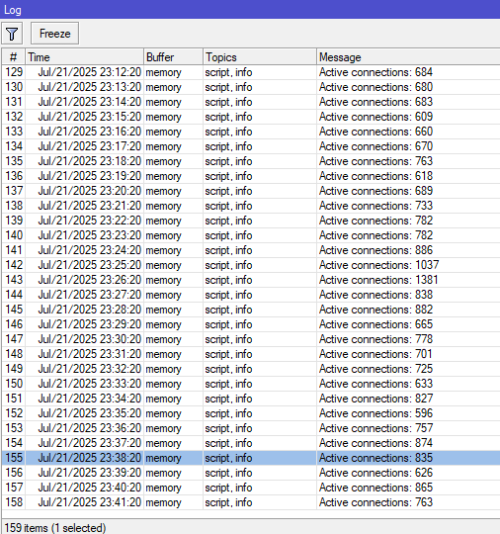
user posted image
*
Regarding the PON stick, it is best you test it independently like during afternoon when you normally don't face problem. It is hard to know if it is a PON stick problem or not when the failure mode is the same.

For now I will focus on your Layer 3 problem and not introduce too much variable.

That IPv6 setting is to enable / disable the IPv6 stack in RouterOS, it won't get you any IPv6 address.

Here is how to configure IPv6:
Go to IPv6 > DHCP Client.
Add new.
Interface: PPPOE-DIGI
Request: Select only Prefix
Pool name: You can put anything you want


Go to IPv6 > Address.
Add new.
Address: ::1/64
That's colon colon one slash sixty four

From pool: The name of the pool from previous step
Interface: bridge1


Go to IPv6 > ND.
Add new.
Interface: bridge1
MTU: 1480
DNS Server: 2001:4860:4860::8888


Go to IPv6 > Firewall
Check if there exist Action = fasttrack connection
If exist, skip.
If doesn't exist, add new.
Chain: Forward
Click Action.
Action: fasttrack connection
Move the fasttrack rule to the top! This is a must!


Verify IPv6 is working by visiting:
https://whatismyipaddress.com/
https://rpkitest.nlnetlabs.net/

Both should show IPv6 section.
If it doesn't work, you might need to disconnect / reconnect your WiFi / wired and wait like a minute for the RA to distribute the address.


After you verified IPv6 is working, setup IPv4 DNS resolution with Mikrotik
Go to IP > DNS
Servers: 2001:4860:4860::8888
Remove all IPv4 addresses here as you want DNS resolution to use IPv6 only to avoid using up NAT session.

Allow Remote Requests: Enabled


Go to IP > DHCP Server.
Click on the "Network" tab on top.
Click defconf.
DNS Server: 192.168.88.1
If you changed your Mikrotik IP address then adjust accordingly.


Once this is done, disconnect / reconnect your WiFi and verify your laptop is getting the correct DNS information for both IPv4 and IPv6.

Once they are correct, reboot all AP and switch to force reconnect all the client to use you newly configured settings.

Yes this limit is imposed by Digi. You can either request a public IP or ask them to raise the limit. I can already imagine what is in their mind when you talk about NAT session limit.

No amount of queue will fix this. It is not a bandwidth problem.

Anyway I check CelcomDigi website and they don't seems to have business plan. Is this a consumer plan?

This post has been edited by kwss: Jul 22 2025, 08:27 AM

boringz
post Jul 22 2025, 11:34 AM

Getting Started
**
Junior Member
181 posts

Joined: Apr 2007


- will wait for contract to end! thanks

This post has been edited by boringz: Jul 28 2025, 11:25 AM
tng55
post Jul 22 2025, 12:39 PM

Regular
******
Senior Member
1,438 posts

Joined: Sep 2021


QUOTE(boringz @ Jul 22 2025, 11:34 AM)
I have done as you mentioned, and I saw that I do not get any ipv6 at all.

Then I reconnected back the tplink digi modem provided, and its the same outcome even enabling ipv6. I reckon after the previous complaint to them, they have disabled ipv6 and hence "quietly solved" the pppoe disconnect issue previously.

Okay so I guess I'm stuck with the current configuration. Done all including setting up ipv6 on all APs but same. mikrotik and tplink does not show the ipv6 through the websites you provided.

Thanks kwss for your advice. I learned alot through this process. I will probably just move on and get another telco.

And yes as to your last question, yes this is a consumer plan, no business plan. Any idea whether signing up for business plan will remove the CGNAT session limit for any/all providers? Is Unifi business good for this?
*
you may terminate DIGI you still prefer Maxis fibre without trouble right
get Maxis fibre you problem solve
no need business plan its expensive
you had used Maxis fibre consumer plan right
then get 2GBPS Maxis Fibre settle

83 Pages « < 78 79 80 81 82 > » Top
 

Change to:
| Lo-Fi Version
0.0226sec    0.41    6 queries    GZIP Disabled
Time is now: 3rd December 2025 - 07:40 PM