Welcome Guest ( Log In | Register )

Outline · [ Standard ] · Linear+

Home Networking Ditch ONU, use GPON SFP on Business Grade Router, 2.5G ONU for Unifi & Maxis, NO NEED VLAN

views
     
mhwee
post May 5 2025, 02:59 PM

Getting Started
**
Junior Member
241 posts

Joined: Sep 2005
From: Johor
QUOTE(Anime4000 @ May 4 2025, 05:38 PM)
wow, can you access WebGUI and download the XML file? and edit to enable telnet or ssh like this
https://github.com/Anime4000/Hacking_Huawei_HG8240H5_ONT

if you managed login ssh/telnet, do this:
omcicmd mib show meid 131

this tell what OLT are you on

try login WebGUI while fiber is connected
*
hi, sorry to interrupt, can i know what is the purpose of you guys doing this? i meant all the hacking... to get ploam password or voip password? All the passwords can easily get from during TM installation. i meant all those useful info like LOID, Poam/SN, voip user and password etc.

I got both old BTU extra siting in store room, almost want to throw already. sweat.gif

user posted image

If the purpose is to get some settings to push to 2Gbps, then normal combo also can get easily max speed as long as NIC card, switch, PC is correct.
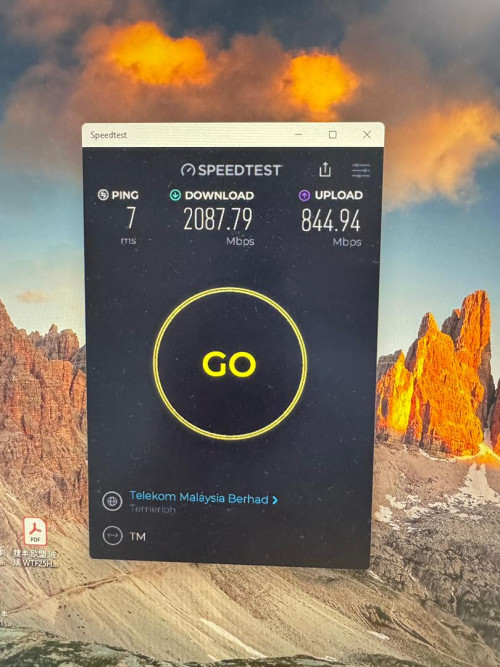
user posted image

This post has been edited by mhwee: May 5 2025, 03:10 PM
mhwee
post Jul 18 2025, 07:28 PM

Getting Started
**
Junior Member
241 posts

Joined: Sep 2005
From: Johor
QUOTE(ZJL @ Jul 2 2025, 10:41 PM)
In need of some advice here. This ODI SFP without media converter can I access to webui? I have a SFP switch and SFP router.

On router the SFP port interface do I set address 192.168.1.1/24 and my PC to within same subnet range?

On switch, I presume just the PC need 192.168.1.x/24 IP but the x just cannot be 1?

Both for the above, is it just head directly to web portal and key in http or https 192.168.1.1?
*
ZJL

An easier way is just use RB4011, RB50090, etc , mikrotik router which has SFP port. No need another sfp switch.

Assuming your GPON stick is 192.168.1.1, your mikrotik router is 192.168.88.1

In order to be able to manage GPON stick from router's 192.168.88.0/24,

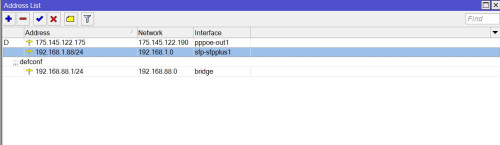
user posted image
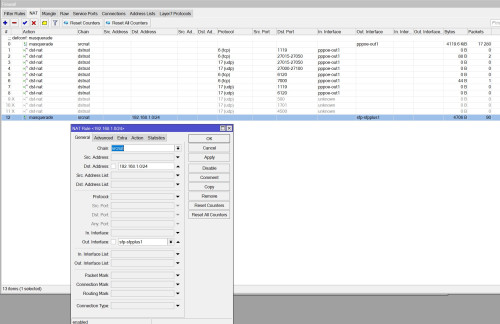
user posted image

192.168.1.88/24 is just an address i choose to access from, can be any address 192.168.1.x/24.

IP-addresses-add address as 1st photo
IP-firewall-nat-add srcnat as 2nd photo

But if u choose to use mikrotik with a sfp switch, the concept is the same, you can adjust accordingly.

This post has been edited by mhwee: Jul 18 2025, 07:37 PM


Change to:
| Lo-Fi Version
0.0568sec    0.41    7 queries    GZIP Disabled
Time is now: 7th December 2025 - 07:15 PM