

 Apr 30 2024, 12:50 PM


QUOTE(Anime4000 @ Apr 12 2024, 06:21 PM)
Another Nijika firmware, change the way it handle VLAN from PPTP and VEIP,
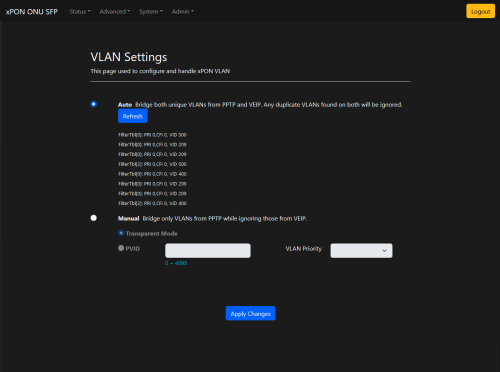
the Auto mode is bridge all unque VLAN from PPTP and VEIP, if found same VLAN on both, ignored:
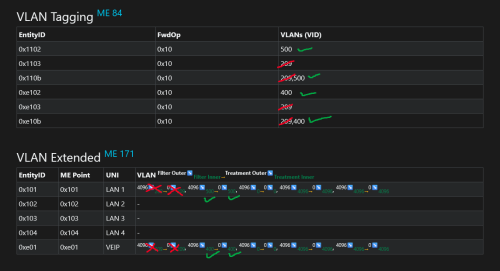
this should resolve VoIP issue, so far tested on Nokia OLT
and TM Eng. kind of okay of this ME 84, 171 hack
In case of customer has more TEL line, likely VoIP have exist on both, this time use PPTP only bridge
this change on Revision 240410 Nijika

Hello Anime,the Auto mode is bridge all unque VLAN from PPTP and VEIP, if found same VLAN on both, ignored:
this should resolve VoIP issue, so far tested on Nokia OLT
and TM Eng. kind of okay of this ME 84, 171 hack
In case of customer has more TEL line, likely VoIP have exist on both, this time use PPTP only bridge
this change on Revision 240410 Nijika
i got the device already and setup my Unifi 2Gbps. (im the guy who bought the device recently from you through the Carous App in Sepang)
I manage to not use any additional switch for VLAN(before i use the TP-Link smart switch). I direct add vlan ID : 500 to the 2.5Gbps ONU/Fiber converter device on manual bridge mode and it works while dialing PPoE from my old Xiaomi AX6000.
Nice no more additional switches. 👍🏻
It's just that,
i am not able to break the 1Gbps barrier. Highest on Speedtest.net is 940Mbps Up n Down through cat8 cable.
The WAN port on the Xiaomi AX6000(router) is 2.5Gbps
While the LAN ports is 1Gbps
Wonder why i can't break the 1Gbps still. Or not even achieving 1Gbps(best is 940Mbps down and up)
SFP PON already on 2.5Gbps from the light indicator on the 2.5Gbps ONU/Fiber converter.
This post has been edited by Turnip: Apr 30 2024, 03:14 PM
 Quote
Quote


 0.0665sec
 0.54
0.54
 7 queries
 GZIP Disabled