Welcome Guest ( Log In | Register )

83 Pages « < 79 80 81 82 83 >Bottom

Outline · [ Standard ] · Linear+

Home Networking Ditch ONU, use GPON SFP on Business Grade Router, 2.5G ONU for Unifi & Maxis, NO NEED VLAN

views
     
kwss
post Jul 22 2025, 02:04 PM

Regular
******
Senior Member
1,207 posts

Joined: Aug 2018
QUOTE(boringz @ Jul 22 2025, 11:34 AM)
I have done as you mentioned, and I saw that I do not get any ipv6 at all.

Then I reconnected back the tplink digi modem provided, and its the same outcome even enabling ipv6. I reckon after the previous complaint to them, they have disabled ipv6 and hence "quietly solved" the pppoe disconnect issue previously.

Okay so I guess I'm stuck with the current configuration. Done all including setting up ipv6 on all APs but same. mikrotik and tplink does not show the ipv6 through the websites you provided.

Thanks kwss for your advice. I learned alot through this process. I will probably just move on and get another telco.

And yes as to your last question, yes this is a consumer plan, no business plan. Any idea whether signing up for business plan will remove the CGNAT session limit for any/all providers? Is Unifi business good for this?
*
No harm calling Digi and complain about the lack of IPv6 and ask them to enable again.
If IPv6 is enough to get by CGNAT cap then you do save money.

If you are not in contract and can cancel, all Unifi Biz come with public IPv4 and /56 IPv6 prefix. This is enough for you to create 256 networks internally via VLAN or routed port.

The IPv4 address is enough for 65000 NAT session.

Not sure about other telco.
TSAnime4000
post Aug 9 2025, 08:36 PM

Look at all my stars!!
*******
Senior Member
2,399 posts

Joined: Jul 2009
From: /dev/null


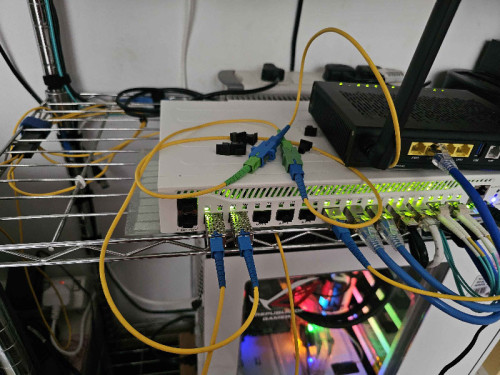
Today I do something crazy

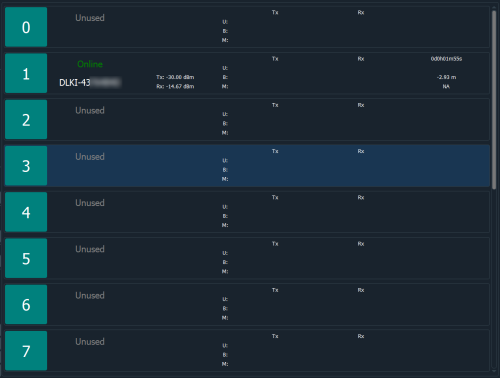
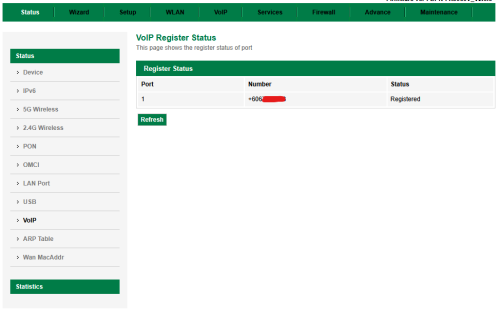
CCR2004 act like OLT
user posted image

user posted image

user posted image

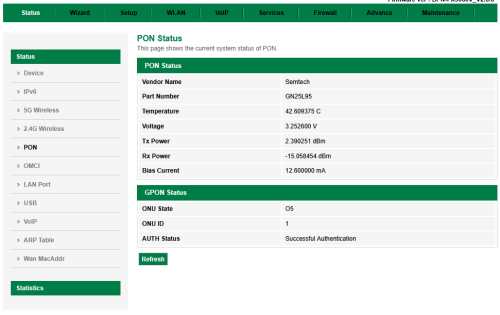
the SFP range is 8KM, to reduce power by mis-match UPC APC
user posted image

No need set RG Mode
user posted image

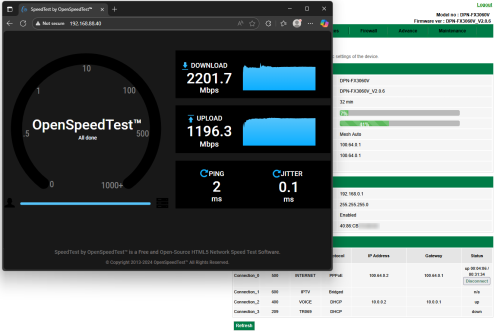
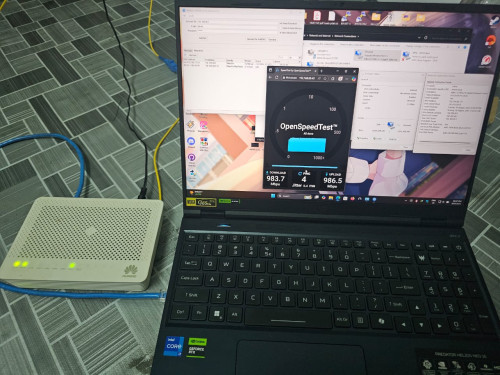
LAN Speedtest Results
user posted image

the OLT support only 1:16

I went to Jabodetabek, meet my GPON team and got this

the OLT act like L2 Switch, simple, auto registration

Now, can create own FTTR


This post has been edited by Anime4000: Aug 9 2025, 08:38 PM
kwss
post Aug 9 2025, 09:14 PM

Regular
******
Senior Member
1,207 posts

Joined: Aug 2018
QUOTE(Anime4000 @ Aug 9 2025, 08:36 PM)
Today I do something crazy

CCR2004 act like OLT
user posted image

user posted image

user posted image

the SFP range is 8KM, to reduce power by mis-match UPC APC
user posted image

No need set RG Mode
user posted image

LAN Speedtest Results
user posted image

the OLT support only 1:16

I went to Jabodetabek, meet my GPON team and got this

the OLT act like L2 Switch, simple, auto registration

Now, can create own FTTR
*
Very nice setup yo. Did you use inline attenuator? I didn't see any. Don't burn your laser module.
The RX is borderline high.
TSAnime4000
post Aug 9 2025, 09:20 PM

Look at all my stars!!
*******
Senior Member
2,399 posts

Joined: Jul 2009
From: /dev/null


QUOTE(kwss @ Aug 9 2025, 09:14 PM)
Very nice setup yo. Did you use inline attenuator? I didn't see any. Don't burn your laser module.
The RX is borderline high.
*
nah, I just miss-match UPC and APC three times and get -15dBm, should be ok

this OLT only support 1:16, so enough for creating own FTTR
TSAnime4000
post Aug 10 2025, 11:27 PM

Look at all my stars!!
*******
Senior Member
2,399 posts

Joined: Jul 2009
From: /dev/null


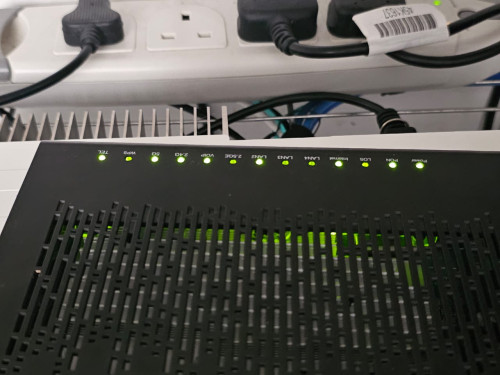
today I tried with old Unifi ONU, Huawei HG8420H5 with OLT SFP

without changing any settings, stock Unifi HWTC Firmware, untagged traffic work just fine!

This mean, I can turn HG8420H5 like Media Converter + Switch!
user posted image

I tried Nokia ONU, it didn't allow untagged traffic,
I haven't tried ZTE, and Fiberhome ONU yet
kwss
post Aug 10 2025, 11:46 PM

Regular
******
Senior Member
1,207 posts

Joined: Aug 2018
QUOTE(Anime4000 @ Aug 10 2025, 11:27 PM)
today I tried with old Unifi ONU, Huawei HG8420H5 with OLT SFP

without changing any settings, stock Unifi HWTC Firmware, untagged traffic work just fine!

This mean, I can turn HG8420H5 like Media Converter + Switch!
user posted image

I tried Nokia ONU, it didn't allow untagged traffic,
I haven't tried ZTE, and Fiberhome ONU yet
*
What if you use the classic Priority Tagged VLAN 0 trick?
Just tag it as VLAN 0.
TSAnime4000
post Aug 10 2025, 11:53 PM

Look at all my stars!!
*******
Senior Member
2,399 posts

Joined: Jul 2009
From: /dev/null


QUOTE(kwss @ Aug 10 2025, 11:46 PM)
What if you use the classic Priority Tagged VLAN 0 trick?
Just tag it as VLAN 0.
*
based on ME 84 and 171, it pass as is and no VLAN entry on the table

ME 84, just 0x00 FwdOp with zero Entry
ME 171, just 0x1000 Filter (Wildcards = any VLAN) pair with RemoveTags 0 (no tag rewrite/stripping)

The OLT just push very basic and user side managed

on Huawei, I not configure anything, it just works! I think Unifi Firmware that Huawei made are bridge mode as always...
kwss
post Aug 11 2025, 12:00 AM

Regular
******
Senior Member
1,207 posts

Joined: Aug 2018
QUOTE(Anime4000 @ Aug 10 2025, 11:53 PM)
based on ME 84 and 171, it pass as is and no VLAN entry on the table

ME 84, just 0x00 FwdOp with zero Entry
ME 171, just 0x1000 Filter (Wildcards = any VLAN) pair with RemoveTags 0 (no tag rewrite/stripping)

The OLT just push very basic and user side managed

on Huawei, I not configure anything, it just works! I think Unifi Firmware that Huawei made are bridge mode as always...
*
Okay. I suspect the OLT don't support priority tagged VLAN.
In Australia NBN, this is the exact trick being used to do untagged VLAN and they are all Nokia ONU.
kwss
post Aug 11 2025, 12:06 AM

Regular
******
Senior Member
1,207 posts

Joined: Aug 2018
Oh wait.
Is there a way you can set the OLT port as trunk in Mikrotik?
I suspect it's Mikrotik that chew the tag.
At least on Cisco they chew the tag if it's not trunk port
tng55
post Aug 11 2025, 12:41 AM

Regular
******
Senior Member
1,440 posts

Joined: Sep 2021


QUOTE(Anime4000 @ Aug 9 2025, 08:36 PM)
Today I do something crazy

CCR2004 act like OLT
user posted image

user posted image

user posted image

the SFP range is 8KM, to reduce power by mis-match UPC APC
user posted image

No need set RG Mode
user posted image

LAN Speedtest Results
user posted image

the OLT support only 1:16

I went to Jabodetabek, meet my GPON team and got this

the OLT act like L2 Switch, simple, auto registration

Now, can create own FTTR
*
wow very nice
you can MINI ISP sell rclxm9.gif

explain if you sell neighbor and another neighbor and few house
each house set speed 100mbps or 50mbps easy earn money to pay RM3xx possible you income RM400 and pay bill tm RM3xx so you have RM1xx explain my tips

how my idea rclxm9.gif
TSAnime4000
post Aug 11 2025, 02:35 AM

Look at all my stars!!
*******
Senior Member
2,399 posts

Joined: Jul 2009
From: /dev/null


QUOTE(kwss @ Aug 11 2025, 12:06 AM)
Oh wait.
Is there a way you can set the OLT port as trunk in Mikrotik?
I suspect it's Mikrotik that chew the tag.
At least on Cisco they chew the tag if it's not trunk port
*
If you see the D-Link ONR B1, the VLAN also works.

at Mikrotik, just add VLAN as usual,
the OLT, just pass traffic as is (VLAN Aware)
at ONT, traffic come as Raw Layer 2.

the OMCI ME 171 didn't push any VLAN Entry, and ME 84 just simple 0x00 FwdOp
kwss
post Aug 11 2025, 03:10 AM

Regular
******
Senior Member
1,207 posts

Joined: Aug 2018
QUOTE(Anime4000 @ Aug 11 2025, 02:35 AM)
If you see the D-Link ONR B1, the VLAN also works.

at Mikrotik, just add VLAN as usual,
the OLT, just pass traffic as is (VLAN Aware)
at ONT, traffic come as Raw Layer 2.

the OMCI ME 171 didn't push any VLAN Entry, and ME 84 just simple 0x00 FwdOp
*
What I meant was Nokia ONU must use Priority Tagged method to do untagged VLAN. I know you can make it work on D-Link and Huawei without tagged VLAN.

The thing with priority vlan is that the switch chip will automatically untag it if it's not a trunk port.

Looking at:
https://help.mikrotik.com/docs/spaces/ROS/p...d+VLAN+priority

It seems like Mikrotik has some very weird method of doing it. So there's a high chance tagged VLAN 0 never make it to your OLT, that's why you never see it in ME.
TSAnime4000
post Aug 13 2025, 10:02 PM

Look at all my stars!!
*******
Senior Member
2,399 posts

Joined: Jul 2009
From: /dev/null


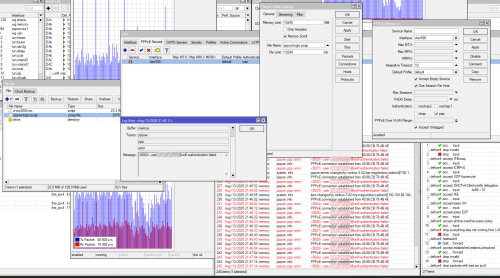
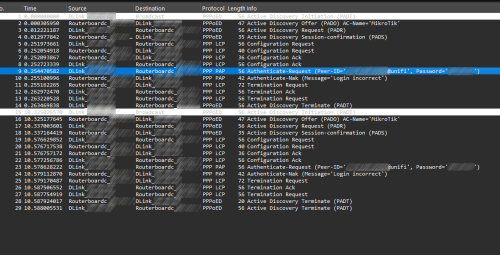
with OLT, I can get PPPoE Password from Mikrotik (Host PPPoE Server) and download pcap file
user posted image

then open the .pcap file, and get PPPoE password
user posted image

useful when ISP start lock down the equipment like Telkom Indonesia IndiHome

This post has been edited by Anime4000: Aug 13 2025, 10:05 PM
ZJL
post Aug 17 2025, 09:39 PM

New Member
*
Newbie
37 posts

Joined: Jan 2018
I bought an Ubiquiti router. Correct GPON SFP from few laying around earlier. The webui IP 192.168.1.1 for router and stick is the same . How to access the Stick GUI ? How to setup the Ubiquiti like static routing needed? The GPON doesn't go UP if fiber not connected ?

This post has been edited by ZJL: Aug 17 2025, 09:39 PM
tng55
post Aug 18 2025, 12:32 AM

Regular
******
Senior Member
1,440 posts

Joined: Sep 2021


QUOTE(ZJL @ Aug 17 2025, 09:39 PM)
I bought an Ubiquiti router. Correct GPON SFP from few laying around earlier. The webui IP 192.168.1.1 for router and stick is the same . How to access the Stick GUI ? How to setup the Ubiquiti like static routing needed? The GPON doesn't go UP if fiber not connected ?
*
where you did bought GPON Stick ??
if you bought somewhere or china easy tm will banned gpon stick don't do connect fiber
need configuration gpon stick for PLOM PASSWORD AND SERIAL NUMBER AND MAC ADDRESS very imported
kwss
post Aug 18 2025, 01:32 AM

Regular
******
Senior Member
1,207 posts

Joined: Aug 2018
QUOTE(ZJL @ Aug 17 2025, 09:39 PM)
I bought an Ubiquiti router. Correct GPON SFP from few laying around earlier. The webui IP 192.168.1.1 for router and stick is the same . How to access the Stick GUI ? How to setup the Ubiquiti like static routing needed? The GPON doesn't go UP if fiber not connected ?
*
You must change your Ubiquiti to use another subnet. Then you must NAT the interface to your SFP.
You cannot configure static routing now because for static route to work, you must configure it at both the router and the SFP. Not even sure if your SFP firmware can do L3.

You have 2 ways:
1. Configure your SFP to not toggle the LOS pin when there's no signal. For some firmware like 8311 you can do it in the UI in recent release. For others you need to write a specific location in EEPROM.
2. Configure your router to ignore the LOS pin of the SFP. Mikrotik can do this. I don't think Ubiquiti can but don't quote me on this.

Or just plug it into the network like 3 - 4 am and see what happens.

But seriously, your question is really very the super basic. You really want to start with PON when there are so many things you can do?

EDIT:
I just want to clarify that I am all for freedom of experimentation and do not support any form of knowledge gatekeeping. Just keep in mind PON is very much a fragile, shared network.

I personally don't think anything bad will happen if you plug in the stick, as long as there is no firmware mod.

But if you are interested in networking, I can tell you upfront there's no money in this, unless you want to work for PON vendors, who are all in China and have a long queue of people trying to get a job there.

Sure there's a lot of niche and specialist role in networking, but I still think there's very little money in this unless you are the equipment vendor.

This post has been edited by kwss: Aug 18 2025, 01:44 AM
ZJL
post Aug 18 2025, 10:09 PM

New Member
*
Newbie
37 posts

Joined: Jan 2018
Thanks everyone. I manage to successfully setup myself from reading and some logic senses.

ODI is the model of SFP bought from Alibaba.
Using Ubiquiti Dream Router 7

My earlier post was solved through latest Unifi OS update. The Combo WAN port is allowed to be change to LAN. I was stuck from not able to access the ODI web ui because LAN doesn't talk directly to WAN port even though on same subnet.

I figure out finally:
Setup Electrical WAN as main and temporary set Optical WAN as Common LAN to be part of the other 3x 2.5GE capable Electrical LAN.

Once solved that part, I manage to access ODI web gui and inser what was necessary.


This post has been edited by ZJL: Aug 24 2025, 11:12 PM
ZJL
post Aug 18 2025, 10:25 PM

New Member
*
Newbie
37 posts

Joined: Jan 2018
Some image of the Dream Router 7

Privacy related. Actual photo removed

This post has been edited by ZJL: Aug 24 2025, 11:12 PM
TSAnime4000
post Aug 19 2025, 09:44 PM

Look at all my stars!!
*******
Senior Member
2,399 posts

Joined: Jul 2009
From: /dev/null


ZJL
actually TIME not allow using PON Stick, since it lacks TR069, they can detect and disable it. Hopefully TIME didn't run routine checkup, because this easily can be detected
tng55
post Aug 20 2025, 12:46 AM

Regular
******
Senior Member
1,440 posts

Joined: Sep 2021


QUOTE(Anime4000 @ Aug 19 2025, 09:44 PM)
ZJL
actually TIME not allow using PON Stick, since it lacks TR069, they can detect and disable it. Hopefully TIME didn't run routine checkup, because this easily can be detected
*
yah i already told ZJL i asking GPON PON where did buy and i told easy can be banned i was though he use TM UNIFI but i see he use TIME rclxub.gif
i know GPON PON STICK TIME AND TM easy can banned
i see he bought ODI DFP-34X-2C3 is the model of SFP bought from Alibaba. bangwall.gif
that his own to risk to get banned rclxub.gif

here my post https://forum.lowyat.net/index.php?showtopi...ost&p=112038531

83 Pages « < 79 80 81 82 83 >Top
 

Change to:
| Lo-Fi Version
0.0228sec    0.81    6 queries    GZIP Disabled
Time is now: 5th December 2025 - 11:16 AM