


Use the following command to backup current SN
CODE
cfgmib get GPON_SN
This post has been edited by blacktubi: May 10 2023, 05:45 PM
Home Networking Ditch ONU, use GPON SFP on Business Grade Router, 2.5G ONU for Unifi & Maxis, NO NEED VLAN
|
|
 May 10 2023, 05:44 PM May 10 2023, 05:44 PM
Return to original view | Post
#1
|
 
Elite
8,406 posts Joined: Jul 2008  
|
Just to share cloning SN might not be required depending on the OLT, but it's a good idea to do it anyways
Use the following command to backup current SN CODE cfgmib get GPON_SN This post has been edited by blacktubi: May 10 2023, 05:45 PM |
|
|
|
|
|
May 10 2023, 06:26 PM
Return to original view | Post
#2
|
|
Elite
8,406 posts Joined: Jul 2008
|
PINK Fibre 1Gbps plan
 Tested on a 2Gbps supported location For those planning to their change the modem thinking it can unlock more speed, don't bother On the bright side, I get sub 1ms ping now More info: Huawei OLT, VLAN 499 This post has been edited by blacktubi: May 10 2023, 06:28 PM |
|
|
May 10 2023, 08:58 PM
Return to original view | Post
#3
|
|
Elite
8,406 posts Joined: Jul 2008
|
QUOTE(Anime4000 @ May 10 2023, 08:51 PM) so PINK Fiber VLAN is 499, is almost everywhere? I give my RTL9601CI to friend who in PINK coverage. looking into VLAN map found VLAN 499 there Yup, they should be using 499 almost everywhere VLAN 140 is used for VOIP, I am not using it so didn't bother to reverse engineer the configuration. |
|
|
Jul 2 2023, 12:22 PM
Return to original view | Post
#4
|
|
Elite
8,406 posts Joined: Jul 2008
|
RTL960x user reporting in and it's still running strong with pink fibre 1Gbps.
It wouldn't bypass speedcap as TIME uses XGPON for 2Gbps. However, I can get 1040Mbps instead of 940Mbps now. And, it does have better fibre reading than my Huawei ONU so that's a plus too. |
|
|
Jul 3 2023, 02:41 PM
Return to original view | Post
#5
|
|
Elite
8,406 posts Joined: Jul 2008
|
QUOTE(Anime4000 @ Jul 3 2023, 12:28 AM) Lucky you... Don't think got other ISP since no other VLANs detected apart from the usual TIME VLAN.your PINK is only have PINK ISP or got other ISP? some user can't use GPON ONU SFP on PINK after O5, OLT reject and stuck at O2 There's a built-in tool to detect rogue ONU within Huawei OLT. Since TIME's network is almost fully Huawei infra, they can use it to find those non Huawei ONUs easily. |
|
|
Sep 6 2023, 05:14 PM
Return to original view | Post
#6
|
|
Elite
8,406 posts Joined: Jul 2008
|
QUOTE(yenchenje @ Sep 6 2023, 04:50 PM) Should still be the same as the ones on Aliexpress/taobao link. But currently TM is still using GPON OLT as opposed to XPON OLT correct? And hence the compatibility issue? XGPON uses different wavelength of light. Unless the product advertises backwards compatibility with GPON, else I would assume it's XGPON only. |
|
|
|
|
|
Sep 28 2023, 09:23 PM
Return to original view | Post
#7
|
|
Elite
8,406 posts Joined: Jul 2008
|
QUOTE(Anime4000 @ Sep 24 2023, 12:07 AM) I have tested extensively on TP-LINK Deco BE85 Go and annoy support.my@tp-link.comtldr; Not Recommended for 2Gbps tldr why; Weird bug when using 2.5G ONU + PPPoE + VLAN verification; two different owner tested, more report to come They are probably willing to fix it for a close to RM4k product |
|
|
Oct 29 2023, 06:44 PM
Return to original view | Post
#8
|
|
Elite
8,406 posts Joined: Jul 2008
|
Status update.
Everything is still good with PINK fiber. |
|
|
Nov 27 2023, 08:02 PM
Return to original view | Post
#9
|
|
Elite
8,406 posts Joined: Jul 2008
|
Anyone using Maxis 2Gbps on TM Infra mind to shed some light on the performance?
Seriously considering switching over from TIME 1Gbps TIME 2Gbps is too pricey |
|
|
Nov 27 2023, 08:13 PM
Return to original view | Post
#10
|
|
Elite
8,406 posts Joined: Jul 2008
|
QUOTE(Oltromen Ripot @ Nov 27 2023, 08:10 PM) at least TIME is "true" 2Gbps. I will be registering for a new account so I should be getting a 2.5G capable ONU.read the current few last pages of Maxis Fibre thread: 1Gbps-ers need to recontract because ONU(!) need to change, yet only get Fibrehome 1GbE ONU, not 2.5GbE. Only sad part is my area doesn't have Maxis NGBB. |
|
|
Dec 16 2023, 10:54 PM
Return to original view | Post
#11
|
|
Elite
8,406 posts Joined: Jul 2008
|
QUOTE(Anime4000 @ Dec 16 2023, 12:49 PM) 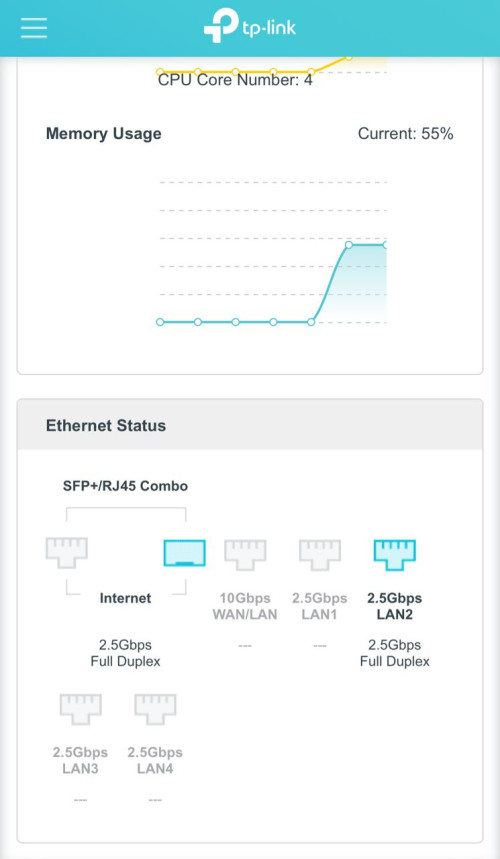 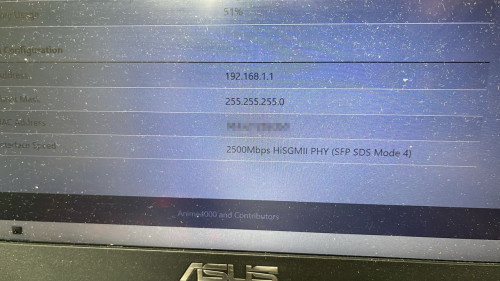 Now Archer BE800 can support my 2.5G GPON Stick I just have updated my TP-Link Archer BE800 - Enabling 2.5G Mode @ Anime4000's GitHub Need my GPON Stick to work due to various fixes has been implemented (such as fix 67Mbps upload speed issue) TP-Link need your feedback before committing to main/stable, please send your feedback here If stable for 30 days, then I can tell them tldr: Download & Update Debug Firmware CODE http://192.168.0.1/webpages/debug.html CODE combo_debug stop combo_debug set plus combo_debug ipg_set combo10g 1_192bit Hopefully they wouldn't stop selling the BE800 since not many actually uses the costly SFP+ port. |
|
|
May 16 2024, 10:13 AM
Return to original view | Post
#12
|
|
Elite
8,406 posts Joined: Jul 2008
|
QUOTE(kevink82 @ May 16 2024, 10:04 AM) I'm on maxis and they just gave me a skyworth branded one with a 2.5gbps ethernet port. Are you on 2Gbps or 1Gbps plan? |
|
|
May 29 2024, 02:19 PM
Return to original view | Post
#13
|
|
Elite
8,406 posts Joined: Jul 2008
|
Just got my Maxis-TM installed, received the Skyworth 2.5GE ONU. WebUI is active but Telnet is nuked.
Put that away and switch to my own ONU immediately. Strange enough I got VID500 on ME 84. Maybe I should try to use Unifi with it but it will probably trigger alarm within TM system. They are doing PPPOE and OLT validation more strictly now to prevent account sharing. ME 84 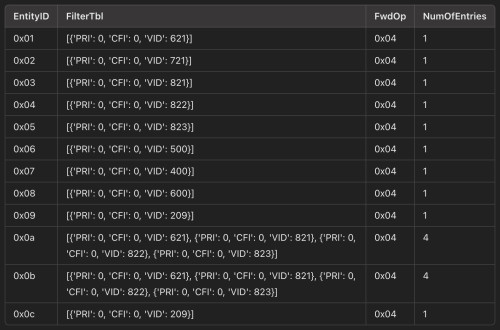 ME 171 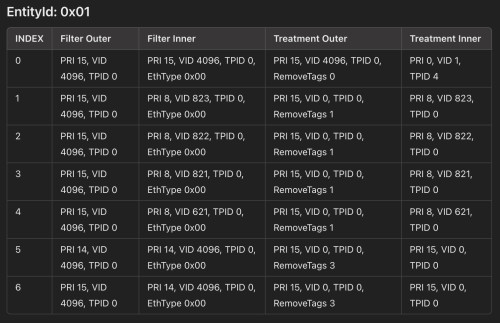 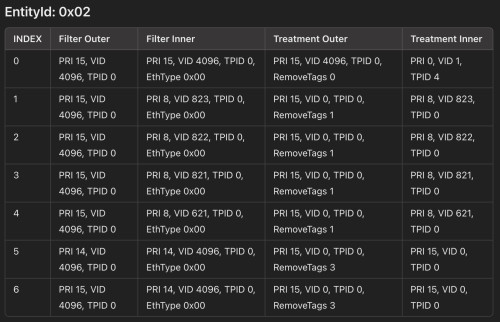 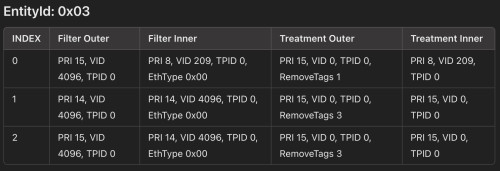 |
|
|
|
|
|
May 29 2024, 05:57 PM
Return to original view | Post
#14
|
|
Elite
8,406 posts Joined: Jul 2008
|
QUOTE(Anime4000 @ May 29 2024, 02:36 PM) that table look confusing, your ME171 which one PPTP and VEIP? also which ME171 point to what LAN Port? Nope, it's not from GN630E. Telnet is nuked there, couldn't get anything useful out of it.those table from Skyworth ONU? also, VLAN 721?? if ME171 exist, VLAN on ME84 that not mentioned on ME171 can't work, also, you can use Unifi PPPoE on VLAN 621 I assume you under Huawei OLT, FwdOp is 0x04 It's an RTL9601D based engineering sample ONU, which will disregard OLT port mapping resulting in this weird ME 171. In fact, I can configure it to map whatever VID to whatever port I want. VLAN 721 used by Maxis Fiber Business. CODE 621 HSI_vlan 721 SME_vlan 821 MGMT_vlan 822 VoIP_vlan 823 VOD+BTV_vlan It does work like a charm with TM and TIME Infra. Yes, it's a HW OLT. Anyways thanks for the input. |
|
|
May 29 2024, 08:27 PM
Return to original view | Post
#15
|
|
Elite
8,406 posts Joined: Jul 2008
|
QUOTE(Anime4000 @ May 29 2024, 08:13 PM) I see, I thought was GN630E, Didn't have NGBB to test. Should be fine as I believe NGBB should be fully Huawei.So, you also get same SDK Have you tried on Maxis own Infra? |
|
|
May 29 2024, 09:45 PM
Return to original view | Post
#16
|
|
Elite
8,406 posts Joined: Jul 2008
|
QUOTE(Anime4000 @ May 29 2024, 08:29 PM) can you try query ME 350, 370 and 373 on SDK you have Here you go. I don't have the SDK personally but this sample can support HW specific ME.Any idea what this is about? » Click to show Spoiler - click again to hide... « |
|
|
May 29 2024, 10:39 PM
Return to original view | IPv6 | Post
#17
|
|
Elite
8,406 posts Joined: Jul 2008
|
QUOTE(Anime4000 @ May 29 2024, 10:12 PM) That's Proprietary Huawei OMCI, useful on Huawei only GPON. Btw Maxis 1Gbps speed cap profile by TM is quite low at my OLT, only able to get 870Mbps most of the time.By default, it wont come, same like D-Link DPN-FX3060V Stock:  Nijika Mod: 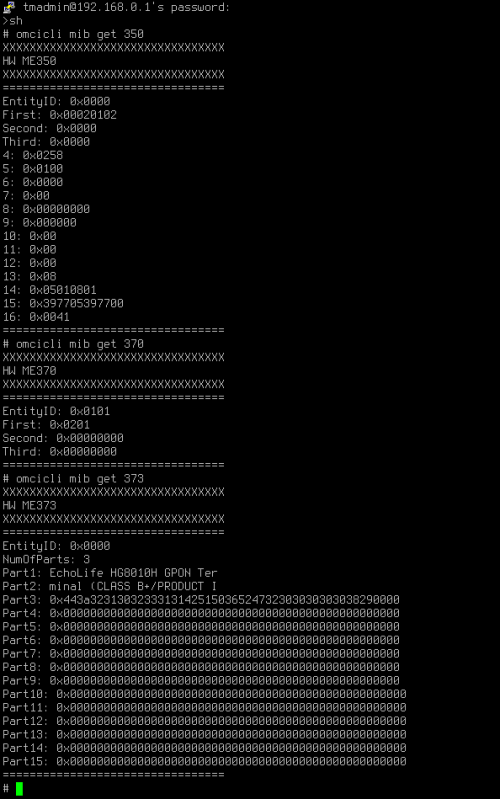 Gonna complain to them when I have the time. Singh93 liked this post
|
|
|
May 29 2024, 11:54 PM
Return to original view | Post
#18
|
|
Elite
8,406 posts Joined: Jul 2008
|
QUOTE(Anime4000 @ May 29 2024, 11:27 PM) that quite low, even capped at exactly 1024M, it should give Gigabit speed like 970Mbps at least Tested with all major servers in KL in SG, peak at around 860-880 mark. Similar results on both ONU.perhaps find reliable server to test? for me in Seremban, SG speedtest server give higher results and lower ping compared to local/Lembah Klang server. I don't why, maybe MyIX that bad? TM direct to SG is quite good from Seremban I wonder if they cap me based on the old 800Mbps plan with 10% buffer cause it does seem like it. |
|
|
May 31 2024, 10:28 PM
Return to original view | Post
#19
|
|
Elite
8,406 posts Joined: Jul 2008
|
QUOTE(tyja @ May 31 2024, 10:14 PM) using Ubiquiti UCG also got this speedtest. max 880mbps. There's some weird traffic shaping either by Maxis or TM.if test direct using speedtest inside UCG to ubiquiti singapore server can get 923mbps. pppoe handle by other router I can get 930Mbps only with their PJ or Subang Jaya server. TIME will give me the full 1040Mbps to Singapore server but they had some routing issues lately. I am using the exact same equipment for both Maxis and TIME so it's definitely not an equipment issue.  This post has been edited by blacktubi: May 31 2024, 10:30 PM |
|
|
Jun 1 2024, 02:34 PM
Return to original view | Post
#20
|
|
Elite
8,406 posts Joined: Jul 2008
|
QUOTE(Anime4000 @ Jun 1 2024, 01:32 PM) if your Maxis under TM fiber, the PPPoE is handled by TM, I have this verified during transition from Maxis to Unifi Ultra and re use old DP port. that port contains my old Maxis PPPoE and current Unifi. My speed will spike to more than 1500Mbps for 0.5seconds then only settle down to slightly below 900Mbps.You can try use Unifi Account on VLAN 621, it works. So, the L3 Traffic Shaping is handled by TM. Only different is Internet Gateway and Peering. As for me, my speedtest results are better at Singapore compared with Klang, Cyberjaya, Brickfields, all around Lembah Klang server. I don't know why my 2G not that fast locally but only to SG also, try IPv6 only speedtest: https://ipv6.speedtest.net For Mikrotik RB5009, IPv6 still in software, 1.4GHz @ 4 Core max at 81% usage during IPv6 test, but all local server give same result like SG did in IPv6. I sure that IPv6 only network are not that congested, so, give it a try. Take note that in IPv6 speedtest has HTTPS enforced this cause latency increase by 1~3ms also use strong computer, HTTPS take alot of CPU especially in upload test. I suspect the QoS or whatever traffic shaping on ISP side is just poorly configured. To resolve this, I've configured my own QoS to my router and it seems to fix it. Will continue to investigate further when I got the time.  MYIX Maxis no longer peers with Singtel so it will go through NTT now. Other SG servers are not as fast.   Singh93 liked this post
|
| Change to: |  0.0704sec 0.0704sec
 0.19 0.19
 7 queries 7 queries
 GZIP Disabled GZIP Disabled
Time is now: 4th December 2025 - 10:54 PM |
 Quote
Quote