Welcome Guest ( Log In | Register )

Bump Topic Topic Closed RSS Feed
138 Pages « < 31 32 33 34 35 > » Bottom

Outline · [ Standard ] · Linear+

 Intel Pentium Dual Core E2140/E2160/E2180 Thread, Discussion & Compilation

views
     
Snyy
post Nov 23 2007, 09:51 PM

Alyssa
****
Senior Member
595 posts

Joined: Jan 2003
From: Sitiawan/ Tropicana Petaling Jaya


QUOTE(bryanyeo87 @ Nov 22 2007, 06:06 PM)
What are the other sub timings you set? other then the ram timings
FSB ocing lor...F3 gives higher FSB ocing but has issues with rams  laugh.gif
*
erm... all other timing I leave it auto. Just now try x6, it same just can push up few FSB only. cry.gif

Anyone tried update BIOS in windows b4?


kucingfight
post Nov 23 2007, 11:27 PM

Look at all my stars!!
Group Icon
Elite
5,784 posts

Joined: Jan 2003
From: Shah Alam


QUOTE(Are_keem @ Nov 23 2007, 07:35 PM)
yes, test everything,
try using 1 stick on every single slot, still the same result.
wanna ask, my friend said it maybe caused by ram slot voltage short.
is there such thing?  blink.gif
stripped everyting,
my rig went naked last night, also try to connect only mobo, proc, RAM and psu,
still the same.. aihh..
dont tell me my mobo kong oledi.. cry.gif
*
mmm the ds3 shouldnt be tat sissy...it takes some beatings 2 kill a board. furthermore it has dual bios, the backup should restore should the main 1 fails...mmm weird..any other cpu to test on the board?


Added on November 23, 2007, 11:28 pmyeap no prob..i always update from windows

This post has been edited by kucingfight: Nov 23 2007, 11:28 PM
plankton
post Nov 23 2007, 11:43 PM

*Place Custom Member Title Here*
*****
Senior Member
809 posts

Joined: Dec 2004


the bios updater is ok also.. just use a thumbdrive
Are_keem
post Nov 24 2007, 12:02 AM

I'm riders, not rempit
*******
Senior Member
2,123 posts

Joined: Jul 2006
From: where am I suppose to be?


QUOTE(bryanyeo87 @ Nov 23 2007, 07:41 PM)
as a really really last resort

take out the battery, cut off the power supply and go to sleep, when you wake up tomorrow, it might boot laugh.gif
*
dunt say lidat la..
me wanna cry oledi.. cry.gif
is it going to work? hmm.gif

QUOTE(kucingfight @ Nov 23 2007, 11:27 PM)
mmm the ds3 shouldnt be tat sissy...it takes some beatings 2 kill a board. furthermore it has dual bios, the backup should restore should the main 1 fails...mmm weird..any other cpu to test on the board?
wah liao..
CPU kong? weird...
on that time, vcore was set to normal (1.325v I guess),
how come it can KO.. sad.gif
bryanyeo87
post Nov 24 2007, 02:18 AM

Below the Belt
*******
Senior Member
3,175 posts

Joined: May 2006
QUOTE(Snyy @ Nov 23 2007, 09:51 PM)
erm... all other timing I leave it auto. Just now try x6, it same just can push up few FSB only.  cry.gif

Anyone tried update BIOS in windows b4?
*
Try this timings in bios, set ram divider 1:1 first

Cas Latency time 5
Dram Ras to Cas delay 6
Dram ras precahrge 5
precaharge delay 15
act to act delay 3
rank write to read delay 10
write to precharge delay 13
refresh to act delay 50
TRD auto
TRD precahrge delay auto


Try this settings


QUOTE(Are_keem @ Nov 24 2007, 12:02 AM)
dunt say lidat la..
me wanna cry oledi.. cry.gif
is it going to work? hmm.gif
wah liao..
CPU kong? weird...
on that time, vcore was set to normal (1.325v I guess),
how come it can KO.. sad.gif
*
many reason for it to KO, can be mobo...ram gc...and the list goes on...best you try the cpu on another mobo and another cpu in this mobo..

Try my suggestion, pop out the battery, turn off the power to the psu and go to sleep, tomorrow when you wake up, retry it, best of luck bro :3

Are_keem
post Nov 25 2007, 09:00 AM

I'm riders, not rempit
*******
Senior Member
2,123 posts

Joined: Jul 2006
From: where am I suppose to be?


QUOTE(bryanyeo87 @ Nov 24 2007, 02:18 AM)
many reason for it to KO, can be mobo...ram gc...and the list goes on...best you try the cpu on another mobo and another cpu in this mobo..

Try my suggestion, pop out the battery, turn off the power to the psu and go to sleep, tomorrow when you wake up, retry it, best of luck bro :3
*
tested oledi,
and no luck for me....... cry.gif
RMA the board is the last method. sad.gif
eaststyler
post Nov 25 2007, 12:30 PM

Getting Started
**
Junior Member
67 posts

Joined: Aug 2006
From: kaRakuRa viLLagE


QUOTE(Are_keem @ Nov 25 2007, 09:00 AM)
tested oledi,
and no luck for me....... cry.gif
RMA the board is the last method. sad.gif
*
aduhh baru pakai dh buat hal sweat.gif sedih.....online pakai laptop ke.........
Are_keem
post Nov 25 2007, 08:46 PM

I'm riders, not rempit
*******
Senior Member
2,123 posts

Joined: Jul 2006
From: where am I suppose to be?


QUOTE(eaststyler @ Nov 25 2007, 12:30 PM)
aduhh baru pakai dh buat hal sweat.gif sedih.....online pakai laptop ke.........
*
on pakai lappy la ni,
aduhh.. so easy to kill this ds3.. sweat.gif

some said got strucked by lightning, some said PSU kong, some said kena ram slot voltage short.
pening oledi.. rclxub.gif
bryanyeo87
post Nov 26 2007, 12:29 AM

Below the Belt
*******
Senior Member
3,175 posts

Joined: May 2006
@Are_keem

btw, waht was your idle and load temps with the xigmatek and oced at 2.8ghz?

and what was the estimated ambient temps?

Are_keem
post Nov 26 2007, 12:41 AM

I'm riders, not rempit
*******
Senior Member
2,123 posts

Joined: Jul 2006
From: where am I suppose to be?


paired my xigmatek with 12cm fan (est. 1600rpm),
idle temp around 32C and load around 37~39C.
ambient temp around 28C since I am not in air-conditioned room.
bryanyeo87
post Nov 26 2007, 01:47 AM

Below the Belt
*******
Senior Member
3,175 posts

Joined: May 2006
hmm...using wut program?

my HDT-S1283 with bolt-through kit does 51c on load.. and that is undervolting it already...using lavalys :S
and that temp is at nite..when it is the coldest...am i doing something wrong?
Snyy
post Nov 26 2007, 11:14 AM

Alyssa
****
Senior Member
595 posts

Joined: Jan 2003
From: Sitiawan/ Tropicana Petaling Jaya


QUOTE(kucingfight @ Nov 23 2007, 11:27 PM)

Added on November 23, 2007, 11:28 pmyeap no prob..i always update from windows
*
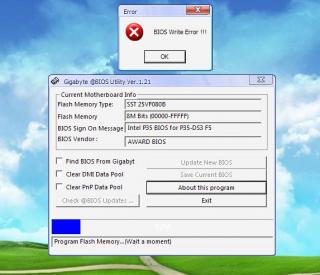
hmm.gif wired. I'm having an issue when I was updating the BIOS in windows using @BIOS. An error message pop up after it start updating the BIOS. Is there any setting I need to do 1st b4 I can flash in windows?


QUOTE(bryanyeo87 @ Nov 24 2007, 02:18 AM)
Try this timings in bios, set ram divider 1:1 first

Cas Latency time                      5
Dram Ras to Cas delay              6
Dram ras precahrge                  5
precaharge delay                      15
act to act delay                          3
rank write to read delay            10
write to precharge delay            13
refresh to act delay                  50
TRD                                        auto
TRD precahrge delay                auto
Try this settings
are you suspecting my RAM holding my CPU back? because my RAM can do DDR1100 with 5-5-5-15 with all sub timing leave it to auto. so, was hoping the update of BIOS would help. sad.gif
bryanyeo87
post Nov 26 2007, 07:02 PM

Below the Belt
*******
Senior Member
3,175 posts

Joined: May 2006
QUOTE(Snyy @ Nov 26 2007, 11:14 AM)
are you suspecting my RAM holding my CPU back? because my RAM can do DDR1100 with 5-5-5-15 with all sub timing leave it to auto.  so, was hoping the update of BIOS would help.  sad.gif
*
im not suspecting your ram, but i am suspecting the TRFC as well as the sub timings from the NB tot he rams...

just try out the settings and see biggrin.gif
btw, you can save your old bios settings by pressing F11

Snyy
post Nov 26 2007, 09:30 PM

Alyssa
****
Senior Member
595 posts

Joined: Jan 2003
From: Sitiawan/ Tropicana Petaling Jaya


QUOTE(bryanyeo87 @ Nov 26 2007, 07:02 PM)
im not suspecting your ram, but i am suspecting the TRFC as well as the sub timings from the NB tot he rams...

just try out the settings and see biggrin.gif
btw, you can save your old bios settings by pressing F11
*
okok. I will try it out later. but I still cant update my BIOS. This is the error. Anyone know what is the problem?


Attached thumbnail(s)
Attached Image
bryanyeo87
post Nov 27 2007, 12:24 AM

Below the Belt
*******
Senior Member
3,175 posts

Joined: May 2006
QUOTE(Snyy @ Nov 26 2007, 09:30 PM)
okok. I will try it out later. but I still cant update my BIOS. This is the error. Anyone know what is the problem?
*
you have the bios write protect turned on in the bios, its somewhere inside..forgot which section, consult ur manual book biggrin.gif

and tick

- CLear DMI data pool
-Clear PnP data pool

but you will lose all your previous settigns saved. but tis safer to start fresh no? biggrin.gif

This post has been edited by bryanyeo87: Nov 27 2007, 12:26 AM
Shoot@M3
post Nov 27 2007, 06:54 PM

=|| elf ||=
******
Senior Member
1,326 posts

Joined: Jan 2003
From: Kota Kinabalu, Orang Utan Clan o.O


Newcomer here
Long time no OC edi

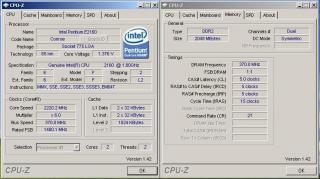
Pentium Dual Core e2160, 1.8GHz Now at 3.33GHz (stock voltage, stock cooling)
Paired with GA-P35-DS3L
Lousy pair of RAMs, KVR667
Lousy 7300GT PCI-E VGA set at 100 Fixed

Hitting wall with my RAM I think cos @ Multiplier x8, can go up to around 420FSB with windows hang, BSOD and stuff
Need wait till I get actual RAM cos this one I pinjam testing only

icon_rolleyes.gif icon_rolleyes.gif

Attached Image

I can't disable the EIST, after disable in bios still has the EIST where my multiplier changes rclxub.gif

This post has been edited by Shoot@M3: Nov 27 2007, 09:21 PM
wodenus
post Nov 27 2007, 07:04 PM

Tree Octopus
********
All Stars
14,990 posts

Joined: Jan 2003
QUOTE(Shoot@M3 @ Nov 27 2007, 06:54 PM)
Newcomer here
Long time no OC edi

Pentium Dual Core e2160, 1.8GHz Now at 3.33GHz (stock voltage, stock cooling)
Paired with GA-P35-DS3L
Lousy pair of RAMs, KVR667
Lousy 7300GT PCI-E VGA

icon_rolleyes.gif  icon_rolleyes.gif
*
Hm... what HSF do you have on ? smile.gif
kucingfight
post Nov 27 2007, 07:12 PM

Look at all my stars!!
Group Icon
Elite
5,784 posts

Joined: Jan 2003
From: Shah Alam


QUOTE(wodenus @ Nov 27 2007, 07:04 PM)
Hm... what HSF do you have on ? smile.gif
*
as he mentioned stock cooling already? rolleyes.gif
wodenus
post Nov 27 2007, 07:18 PM

Tree Octopus
********
All Stars
14,990 posts

Joined: Jan 2003
QUOTE(kucingfight @ Nov 27 2007, 07:12 PM)
as he mentioned stock cooling already?  rolleyes.gif
*
Oh right didn't see that tongue.gif
Shoot@M3
post Nov 27 2007, 08:21 PM

=|| elf ||=
******
Senior Member
1,326 posts

Joined: Jan 2003
From: Kota Kinabalu, Orang Utan Clan o.O


biggrin.gif Idle temp at stock cooling is around 50'C
hmmm wait till have more budget then get better cooling but it is really really quiet now my pc lolx, last time so noisy with AMD Athlon 2200+
Now I wake up thot my pc shut down cos so quiet rclxm9.gif need to get used to it

138 Pages « < 31 32 33 34 35 > » Top
Topic ClosedOptions
 

Change to:
| Lo-Fi Version
0.0292sec    0.40    6 queries    GZIP Disabled
Time is now: 12th December 2025 - 07:33 PM