Welcome Guest ( Log In | Register )

92 Pages « < 70 71 72 73 74 > » Bottom

Outline · [ Standard ] · Linear+

 Unifi Air, is it good?

views
     
jimmy_none
post Nov 10 2020, 09:32 PM

On my way
****
Senior Member
648 posts

Joined: Sep 2006


QUOTE(Cendol_Pulut90 @ Nov 10 2020, 07:15 PM)
For that budget get a Huawei B310As-852 BUT make sure to check for Band 38 & Band 40 at your place since B310 852 dont detect Band 5. Can check lte band using Network Cell Lite app.
*
I dont have the Unifi Air sim yet. Plan to get it after I get the modem. I have checked the coverage area in Unifi Air website and my location is within the blue area so safe assume it should have sweat.gif sweat.gif sweat.gif

So far I only see modified Huawei B310As-852 in Shopee, it is safe o get the modified version? The warranty range 1-6months.. rclxub.gif rclxub.gif
Cendol_Pulut90
post Nov 11 2020, 10:59 AM

Getting Started
**
Junior Member
260 posts

Joined: Apr 2014
From: Pandan Indah, Kuala Lumpur


QUOTE(jimmy_none @ Nov 10 2020, 09:32 PM)
I dont have the Unifi Air sim yet. Plan to get it after I get the modem. I have checked the coverage area in Unifi Air website and my location is within the blue area so safe assume it should have  sweat.gif sweat.gif  sweat.gif
So far I only see modified Huawei B310As-852 in Shopee, it is safe o get the modified version? The warranty range 1-6months.. rclxub.gif  rclxub.gif
*
You can try ask in FB Group : B310 Owner Malaysia. Got seller there selling original unmod version.
Eugene91
post Nov 15 2020, 10:18 AM

Look at all my stars!!
*******
Senior Member
6,109 posts

Joined: Dec 2008
From: Mike India Romeo India


Hi guys, does the ZTE MF286C modem bundled with the plan is a CAT6 modem that can support LTE-A/4G+?
ashdwoers
post Nov 15 2020, 06:32 PM

Newb
*******
Senior Member
2,234 posts

Joined: Feb 2012


QUOTE(Eugene91 @ Nov 15 2020, 10:18 AM)
Hi guys, does the ZTE MF286C modem bundled with the plan is a CAT6 modem that can support LTE-A/4G+?
*
No
dyenjarin
post Nov 19 2020, 02:30 PM

New Member
*
Newbie
12 posts

Joined: Jan 2017
Hi does unifi air is support tenda 4G680 as I plan to buy the simcard only
zerofighter P
post Nov 20 2020, 01:38 PM

New Member
*
Probation
3 posts

Joined: Nov 2020
Hi,
1st time user. Currently stuck with streamyx but need a cheap alternative since no Fiber in my area and am working from home for the next few months. Was looking into getting just the SIM card only. Any recommendations for a router. Budget around RM300+
Was looking at the TP-Link TL-MR6400 . Would that be a good router to get?
Any other alternative recommendations?
SUSdreign
post Nov 20 2020, 10:20 PM

Casual
***
Junior Member
382 posts

Joined: Jan 2003


Iam using this
https://shopee.com.my/PROLiNK-4G-Sim-Card-L...8884.1886637138

so far so good 9 months, iam lite mostly DL and web surfing.
Cendol_Pulut90
post Nov 21 2020, 10:06 AM

Getting Started
**
Junior Member
260 posts

Joined: Apr 2014
From: Pandan Indah, Kuala Lumpur


QUOTE(zerofighter @ Nov 20 2020, 01:38 PM)
Hi,
1st time user. Currently stuck with streamyx but need a cheap alternative since no Fiber in my area and am working from home for the next few months. Was looking into getting just the SIM card only. Any recommendations for a router. Budget around RM300+
Was looking at the TP-Link TL-MR6400 . Would that be a good router to get?
Any other alternative recommendations?
*
MR6400 is good enough but make sure your area have strong band 38 / 40. Other recommendation of course huawei b310-852 for same price range.
sharpman
post Nov 24 2020, 02:41 PM

Veteran LYN Forumer
******
Senior Member
1,110 posts

Joined: Jan 2003


Hi guys, I am using Unifi Air currently on Huawei B818-263 and the speed is good around 70-80 Mbps.

My problem is I can't connect to PPTP VPN using Windows 10 native VPN.

I have 2 VPN servers one in Cyberjaya on Unifi Fibre 800 Mbps and another one in Ampang on Maxis Home Fibre 300 Mbps.

I believe this is Unifi Air issue as I can connect to both VPN servers over Maxis and Celcom network.

Any workaround?

This post has been edited by sharpman: Nov 24 2020, 02:49 PM
GOPI56
post Nov 24 2020, 02:50 PM

Regular
******
Senior Member
1,495 posts

Joined: Dec 2012
QUOTE(sharpman @ Nov 24 2020, 12:41 AM)
Hi guys, I am using Unifi Air currently on Huawei B8180-263 and the speed is good around 70-80 Mbps.

My problem is I can't connect to PPTP VPN using Windows 10 native VPN.

I have 2 VPN servers one in Cyberjaya on Unifi Fibre 800 Mbps and another one in Ampang on Maxis Home Fibre 300 Mbps.

I believe this is Unifi Air issue as I can connect to both VPN servers over Maxis and Celcom network.

Any workaround?
*
Found a temporary workaround fix from Unifi community forum. https://community.unifi.com.my/t5/unifi-hom...fice/td-p/37829

Steps taken:
1. Drop my PC LAN connection to UNIFI router.

2. Connect my PC to DIGI hotspot.

3. Connect to my office VPN.

4. Reconnect my PC LAN connection to UNIFI router.

5. Now, the VPN connection is working perfectly without any package dropping. Besides, the network is consuming my UNIFI bandwidth instead of DIGI bandwidth even though the VPN connection is established via the DIGI route previously.
sharpman
post Nov 24 2020, 03:20 PM

Veteran LYN Forumer
******
Senior Member
1,110 posts

Joined: Jan 2003


QUOTE(GOPI56 @ Nov 24 2020, 02:50 PM)
Found a temporary workaround fix from Unifi community forum. https://community.unifi.com.my/t5/unifi-hom...fice/td-p/37829

Steps taken:
1. Drop my PC LAN connection to UNIFI router.

2. Connect my PC to DIGI hotspot.

3. Connect to my office VPN.

4. Reconnect my PC LAN connection to UNIFI router.

5. Now, the VPN connection is working perfectly without any package dropping. Besides, the network is consuming my UNIFI bandwidth instead of DIGI bandwidth even though the VPN connection is established via the DIGI route previously.
*
hey thanks.

I found another solution, on both places in Cyberjaya and Ampang routers, I setup OVPN profile and connect to both places via Open VPN protocol instead of PPTP.

But your workaround should work too smile.gif
jkgermanotta
post Nov 24 2020, 08:49 PM

Getting Started
**
Junior Member
112 posts

Joined: May 2012
QUOTE(jkgermanotta @ Oct 23 2020, 07:57 AM)
that is quite far. so mine should not have any problem since just blocks away right? ok i shall get bebas.
*
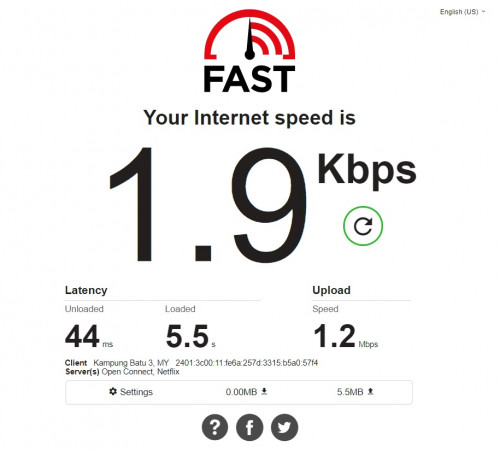
user posted image

day two. i regret it lol. i mean how is that even legal??????
tomato people
post Nov 24 2020, 09:01 PM

Tomato fan
******
Senior Member
1,732 posts

Joined: Jul 2016
From: tomato land


QUOTE(jkgermanotta @ Nov 24 2020, 08:49 PM)
user posted image

day two. i regret it lol. i mean how is that even legal??????
*
Wtf...😣😣😣


Cendol_Pulut90
post Nov 25 2020, 11:51 AM

Getting Started
**
Junior Member
260 posts

Joined: Apr 2014
From: Pandan Indah, Kuala Lumpur


QUOTE(GOPI56 @ Nov 24 2020, 02:50 PM)
Found a temporary workaround fix from Unifi community forum. https://community.unifi.com.my/t5/unifi-hom...fice/td-p/37829

Steps taken:
1. Drop my PC LAN connection to UNIFI router.

2. Connect my PC to DIGI hotspot.

3. Connect to my office VPN.

4. Reconnect my PC LAN connection to UNIFI router.

5. Now, the VPN connection is working perfectly without any package dropping. Besides, the network is consuming my UNIFI bandwidth instead of DIGI bandwidth even though the VPN connection is established via the DIGI route previously.
*
hurmm i dont really understand. after step 3 and 4 above, your pc still connected to digi hotspot ? which means your pc connected both thru wifi digi hotspot and lan cable unifi router ?
ace-user
post Nov 25 2020, 07:06 PM

Easily Poisoned
*******
Senior Member
2,154 posts

Joined: Nov 2012


Letting go of my Huawei B818 cheap here: https://forum.lowyat.net/index.php?act=ST&f...0#entry99058223

Hit me up if you're interested smile.gif
Lewbes P
post Nov 25 2020, 07:26 PM

New Member
*
Probation
7 posts

Joined: Nov 2020
i just bought unifi simcard for BEBAS plan found out internet is much more unstable compared than my umobile gx30 plan at my area .

It only tops 2mbps with many disconnection spikes,

as im using my phone to get internet, does getting LTE router able to improve the bad connectivity issues?

JLA
post Nov 25 2020, 08:39 PM

Look at all my stars!!
*******
Senior Member
2,785 posts

Joined: May 2008
QUOTE(Lewbes @ Nov 25 2020, 07:26 PM)
i just bought unifi simcard for BEBAS plan found out internet is much more unstable compared than my umobile gx30 plan at my area .

It only tops 2mbps with many disconnection spikes,

as im using my phone to get internet, does getting LTE router able to improve the bad connectivity issues?
*
make sure connect to LTE band 40 to get unifi mobile high speed
'network cell info' app to check LTE band
cellmapper app can see LTE band and which connected tower
danny_vxe
post Nov 27 2020, 07:14 AM

New Member
*
Junior Member
42 posts

Joined: Dec 2008
QUOTE(dyenjarin @ Nov 19 2020, 02:30 PM)
Hi does unifi air is support tenda 4G680 as I plan to buy the simcard only
*
Hi, I plan to switch from unifi air to Time. Want to let go my contract and the Huawei B618-65D. My contract end at Sept 2021. Let me know if you interested 😊
danny_vxe
post Nov 27 2020, 07:17 AM

New Member
*
Junior Member
42 posts

Joined: Dec 2008
QUOTE(zerofighter @ Nov 20 2020, 01:38 PM)
Hi,
1st time user. Currently stuck with streamyx but need a cheap alternative since no Fiber in my area and am working from home for the next few months. Was looking into getting just the SIM card only. Any recommendations for a router. Budget around RM300+
Was looking at the TP-Link TL-MR6400 . Would that be a good router to get?
Any other alternative recommendations?
*
Hi, I plan to switch from unifi air to Time. Want to let go my contract and the Huawei B618-65D. My contract end at Sept 2021. Let me know if you interested 😊
joe_black
post Nov 27 2020, 08:39 AM

Getting Started
**
Junior Member
65 posts

Joined: Sep 2004
From: KL, CBJ


I would like to sell my Prolink Mifi - PRT7011L

https://shopee.com.my/PROLiNK-PRT7011L-4G-S...88884.368261653

I have been using this for Unifi Air - with nice speed.
Anyone interested? Please PM me.
RM100

92 Pages « < 70 71 72 73 74 > » Top
 

Change to:
| Lo-Fi Version
0.0368sec    0.74    6 queries    GZIP Disabled
Time is now: 11th December 2025 - 07:40 AM