

Any update regarding the fans not boasting problem for reaven se r?
ILLEGEAR Custom Performance Laptops v.4, AMD RYZEN 4800H with FREE AC Valhalla
ILLEGEAR Custom Performance Laptops v.4, AMD RYZEN 4800H with FREE AC Valhalla
|
|
 Jun 6 2020, 04:18 PM Jun 6 2020, 04:18 PM
Show posts by this member only | IPv6 | Post
#1501
|
 
Junior Member
354 posts Joined: Sep 2008 From: Seremban  
|
Any update regarding the fans not boasting problem for reaven se r?
|
|
|
|
|
|
Jun 6 2020, 05:04 PM
Show posts by this member only | IPv6 | Post
#1502
|

Senior Member
1,272 posts Joined: May 2010 From: Team ILLEGEAR
|
QUOTE(lsl640 @ Jun 6 2020, 04:18 PM) Any update regarding the fans not boasting problem for reaven se r? Yes the FAE has sent me a BIOS update yesterday midnight but our tech is not working during weekend, we will be able to provide an update on tuesday. |
|
|
Jun 6 2020, 07:01 PM
Show posts by this member only | IPv6 | Post
#1503
|
|
Junior Member
354 posts Joined: Sep 2008 From: Seremban
|
QUOTE(Prince J @ Jun 6 2020, 05:04 PM) Yes the FAE has sent me a BIOS update yesterday midnight but our tech is not working during weekend, we will be able to provide an update on tuesday. Thanks! |
|
|
Jun 6 2020, 08:40 PM
Show posts by this member only | IPv6 | Post
#1504
|

Probation
0 posts Joined: Jun 2020
|
QUOTE(scy7he @ Jun 4 2020, 12:12 PM) I'm still exploring the options and getting used to monitoring my CPU and GPU temps, but a test I did maxed out at around 87°C running at "game" mode (not turbo). Just a little update after running some games and monitoring the temps.Will update once I have done more monitoring over time running actual games and post some figures here. Basically, using the Illegear Command Center Operating Modes: - Game mode results in my GPU reaching 87 C and my CPU hitting dangerously close to 95 C - Turbo mode results in a slight decrease in GPU and CPU temps but both are still around the high 80s C - Fan boost gives me temperatures hovering between 70 - 75 C but is, well, very noisy Is this common gaming laptops or is there something I can do to fix it? |
|
|
Jun 6 2020, 09:00 PM
|

Probation
0 posts Joined: May 2020
|
QUOTE(scy7he @ Jun 6 2020, 08:40 PM) Just a little update after running some games and monitoring the temps. For a gaming laptop it is normalfor CPU to be running around 80-89°C While GPU is normal below 85°C. But your ambient temperature also plays a huge role on your cpu and gpu temps. U can try downloading intel XTU and undervolt ur CPU to an extent that is stable for ur machine. Other measure of reducing temps is changing ur thermal compund/paste to a better one. But currently in the market illegaer already equipped their laptop with the best(thermal grizzly kryonaut).Basically, using the Illegear Command Center Operating Modes: - Game mode results in my GPU reaching 87 C and my CPU hitting dangerously close to 95 C - Turbo mode results in a slight decrease in GPU and CPU temps but both are still around the high 80s C - Fan boost gives me temperatures hovering between 70 - 75 C but is, well, very noisy Is this common gaming laptops or is there something I can do to fix it? Just make sure ur fans is running as it should. They run in higher rpms (gets louder) corresponding to your cpu temps. If it is silent throughout, then it has a problem which illegear has yet to release a with bios/ec fix. |
|
|
Jun 6 2020, 09:04 PM
|

Senior Member
4,038 posts Joined: Aug 2005 From: Earth 
|
Hi everyone,
I do pickup my Illegear Onyx Pro earlier this week took about 1 month for stock to arrive due to lot's of customization 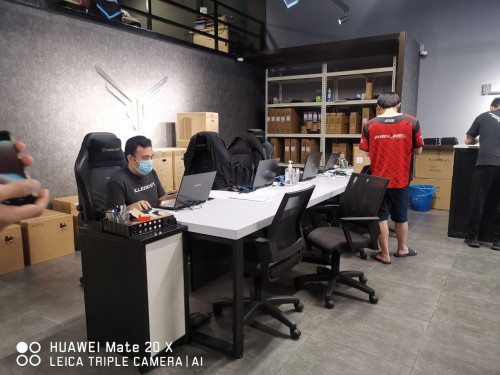  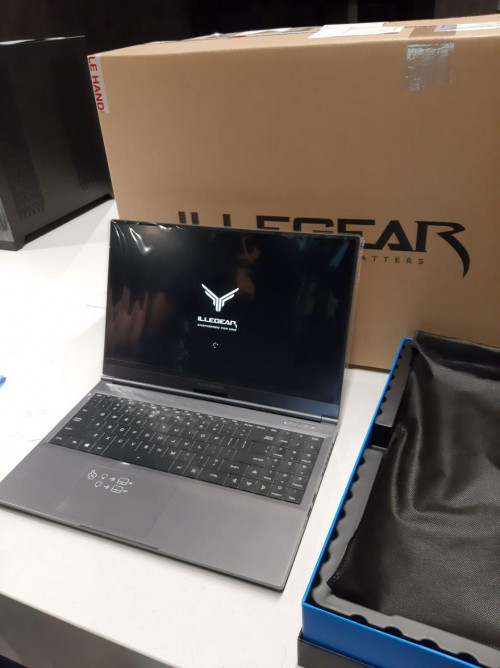 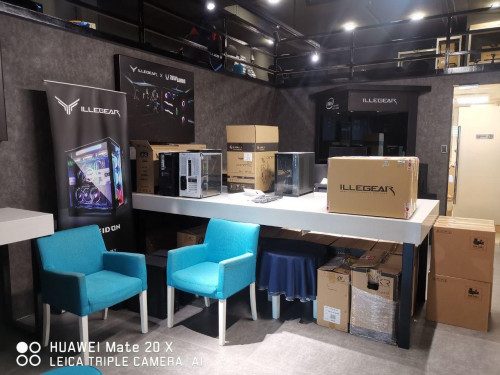 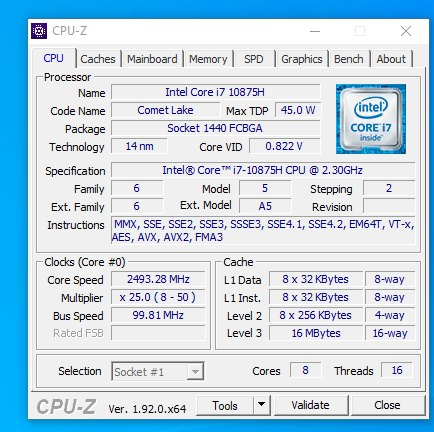 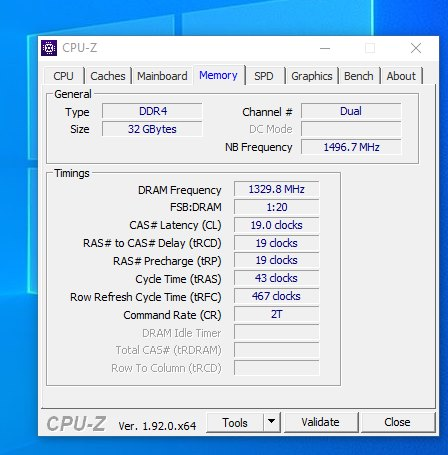 The only thing they don't have stock is the mouse pad , the said can pickup later when stock arrived or they ship it to you |
|
|
|
|
|
Jun 6 2020, 09:15 PM
Show posts by this member only | IPv6 | Post
#1507
|
|
Probation
0 posts Joined: Jun 2020
|
QUOTE(Santau_GO @ Jun 6 2020, 09:00 PM) For a gaming laptop it is normalfor CPU to be running around 80-89°C While GPU is normal below 85°C. But your ambient temperature also plays a huge role on your cpu and gpu temps. U can try downloading intel XTU and undervolt ur CPU to an extent that is stable for ur machine. Other measure of reducing temps is changing ur thermal compund/paste to a better one. But currently in the market illegaer already equipped their laptop with the best(thermal grizzly kryonaut). I have to turn on the fan boost manually in order to get the fans running at higher rpms. Using the Game Mode or Turbo Mode in the Command Center is actually quite silent. Just make sure ur fans is running as it should. They run in higher rpms (gets louder) corresponding to your cpu temps. If it is silent throughout, then it has a problem which illegear has yet to release a with bios/ec fix. I guess the Command Center is not adjusting the fans as it should right now. |
|
|
Jun 6 2020, 10:01 PM
|

Junior Member
187 posts Joined: Jul 2009
|
QUOTE(scy7he @ Jun 6 2020, 09:15 PM) I have to turn on the fan boost manually in order to get the fans running at higher rpms. Using the Game Mode or Turbo Mode in the Command Center is actually quite silent. same here, waiting for their update for bios and ECI guess the Command Center is not adjusting the fans as it should right now. |
|
|
 Jun 6 2020, 11:02 PM Jun 6 2020, 11:02 PM
|
|
Probation
0 posts Joined: May 2020
|
Since the new mdels of ILLEGEAR laptops is running 10th gen intel CPU. Thinking of getting that Hyper X impact with 2933mhz CL17 to unlock this machine's full potential.
Is it beneficial for us to upgrade to 2933mhz? Since the advertised speed is one of the advantages over last two generations. The ram Illegear provides is running on slow 2666mhz CL19. Any thoughts?  |
|
|
Jun 6 2020, 11:15 PM
Show posts by this member only | IPv6 | Post
#1510
|

Senior Member
8,240 posts Joined: Apr 2017
|
QUOTE(Santau_GO @ Jun 6 2020, 11:02 PM) Is it beneficial for us to upgrade to 2933mhz? Since the advertised speed is one of the advantages over last two generations. The ram Illegear provides is running on slow 2666mhz CL19. max 5% performance increase in games - not worth it IMO. Though lower latency might help |
|
|
Jun 7 2020, 12:11 AM
Show posts by this member only | IPv6 | Post
#1511
|
|
Probation
0 posts Joined: Apr 2020
|
QUOTE(arslow @ Jun 5 2020, 05:05 PM) Is the cpu fan running? Check command center to get the rpm I don't think that ILLEGEAR Command Center can check Fan RPMQUOTE(Prince J @ Jun 5 2020, 05:18 PM) Kindly hold on, am liaising with FAE regards to this as they plan to release the latest BIOS to fix the power draw (EC) on ID-V (RAVEN SE) After updating to Windows 10 ver2004 , it becomes lower temperature ( approximate 56°C with only Chrome running )Not sure why though |
|
|
Jun 7 2020, 01:03 AM
|

Junior Member
8 posts Joined: Apr 2019 From: Hyderabad, India
|
QUOTE(Santau_GO @ Jun 6 2020, 08:32 PM) Since the new mdels of ILLEGEAR laptops is running 10th gen intel CPU. Thinking of getting that Hyper X impact with 2933mhz CL17 to unlock this machine's full potential. I was surprised to see them still giving old 2666 mHz CL19 ram instead of 2933 mHz CL17(or lower) even when the CPUs support it. Is it beneficial for us to upgrade to 2933mhz? Since the advertised speed is one of the advantages over last two generations. The ram Illegear provides is running on slow 2666mhz CL19. Any thoughts?  |
|
|
Jun 7 2020, 02:48 AM
|
|
Newbie
2 posts Joined: Aug 2015
|
QUOTE(SaiyanGoku @ Jun 7 2020, 01:03 AM) I was surprised to see them still giving old 2666 mHz CL19 ram instead of 2933 mHz CL17(or lower) even when the CPUs support it. Wished they offered HyperX CL15 sticks or some of Corsair's higher speed ones but that would cost them and us a pretty penny |
|
|
|
|
|
Jun 7 2020, 03:36 AM
|
|
Senior Member
1,272 posts Joined: May 2010 From: Team ILLEGEAR
|
QUOTE(scy7he @ Jun 6 2020, 08:40 PM) Just a little update after running some games and monitoring the temps. Basically, using the Illegear Command Center Operating Modes: - Game mode results in my GPU reaching 87 C and my CPU hitting dangerously close to 95 C - Turbo mode results in a slight decrease in GPU and CPU temps but both are still around the high 80s C - Fan boost gives me temperatures hovering between 70 - 75 C but is, well, very noisy Is this common gaming laptops or is there something I can do to fix it? QUOTE(Santau_GO @ Jun 6 2020, 09:00 PM) For a gaming laptop it is normalfor CPU to be running around 80-89°C While GPU is normal below 85°C. But your ambient temperature also plays a huge role on your cpu and gpu temps. U can try downloading intel XTU and undervolt ur CPU to an extent that is stable for ur machine. Other measure of reducing temps is changing ur thermal compund/paste to a better one. But currently in the market illegaer already equipped their laptop with the best(thermal grizzly kryonaut). Yes the BIOS issue affects all RTX2060 models (ONYX V, PRODIGY, RAVEN SE-R). Kindly wait for our update on next week Just make sure ur fans is running as it should. They run in higher rpms (gets louder) corresponding to your cpu temps. If it is silent throughout, then it has a problem which illegear has yet to release a with bios/ec fix.  QUOTE(Santau_GO @ Jun 6 2020, 11:02 PM) Since the new mdels of ILLEGEAR laptops is running 10th gen intel CPU. Thinking of getting that Hyper X impact with 2933mhz CL17 to unlock this machine's full potential. We will offer 2933MHz RAM in a week or two (some existing orders will get free upgrade). It's the same 3200MHz RAM we use in ONYX V Ryzen, however Intel systems only able to detect 2933MHz.Is it beneficial for us to upgrade to 2933mhz? Since the advertised speed is one of the advantages over last two generations. The ram Illegear provides is running on slow 2666mhz CL19. Any thoughts? This post has been edited by Prince J: Jun 7 2020, 03:37 AM |
|
|
Jun 7 2020, 03:41 AM
|
|
Senior Member
1,272 posts Joined: May 2010 From: Team ILLEGEAR
|
QUOTE(MX510 @ Jun 6 2020, 09:04 PM) Hi everyone, Sorry for the delay happened to your order, we will deliver the upgraded RGB mousepad to you once we received the container.I do pickup my Illegear Onyx Pro earlier this week took about 1 month for stock to arrive due to lot's of customization The only thing they don't have stock is the mouse pad , the said can pickup later when stock arrived or they ship it to you |
|
|
Jun 7 2020, 07:41 AM
|
|
Junior Member
187 posts Joined: Jul 2009
|
QUOTE(Prince J @ Jun 7 2020, 03:36 AM) Yes the BIOS issue affects all RTX2060 models (ONYX V, PRODIGY, RAVEN SE-R). Kindly wait for our update on next week aww...new RAM pulak, wish i didnt order so fast lolWe will offer 2933MHz RAM in a week or two (some existing orders will get free upgrade). It's the same 3200MHz RAM we use in ONYX V Ryzen, however Intel systems only able to detect 2933MHz. |
|
|
Jun 7 2020, 10:36 AM
Show posts by this member only | IPv6 | Post
#1517
|
|
Probation
0 posts Joined: Apr 2020
|
QUOTE(yongchin89 @ Jun 7 2020, 07:41 AM) aww...new RAM pulak, wish i didnt order so fast lol Same bro :\ |
|
|
Jun 7 2020, 11:50 AM
|
|
Junior Member
91 posts Joined: Dec 2007
|
QUOTE(Prince J @ Jun 7 2020, 03:36 AM) Yes the BIOS issue affects all RTX2060 models (ONYX V, PRODIGY, RAVEN SE-R). Kindly wait for our update on next week How will I know if my order will receive this free upgrade? We will offer 2933MHz RAM in a week or two (some existing orders will get free upgrade). It's the same 3200MHz RAM we use in ONYX V Ryzen, however Intel systems only able to detect 2933MHz. |
|
|
Jun 7 2020, 01:24 PM
|
|
Newbie
2 posts Joined: Feb 2005
|
Will there be a ryzen version of Ionic?
|
|
|
Jun 7 2020, 03:23 PM
|

Senior Member
1,214 posts Joined: Jul 2005 From: KaY El (KL)
|
Any idea if Selenite Pro with 2070 Max-P can do well in 1440p gaming? like above 60fps ? Common games i plany nowadays is CS GO , CODMW & Warzone, Metro series, Fallout, GTA V
I am trying to get a monitor, finding alot 27" 144hz monitor now comes with 1440p. AFAIK, downscaling 1080p in 1400p monitor as it is not native will made the graphic looks blurry. This post has been edited by jason111785: Jun 7 2020, 03:31 PM |
|
Topic ClosedOptions
|
| Change to: |  0.0298sec 0.0298sec
 0.35 0.35
 6 queries 6 queries
 GZIP Disabled GZIP Disabled
Time is now: 20th December 2025 - 04:01 PM |
 Quote
Quote