

ayam sad, get my SE-R on first day spot 1 dead pixel, 2nd day already got 5 dead and dim pixel....warranty cover or not?
ILLEGEAR Custom Performance Laptops v.4, AMD RYZEN 4800H with FREE AC Valhalla
ILLEGEAR Custom Performance Laptops v.4, AMD RYZEN 4800H with FREE AC Valhalla
|
|
 May 17 2020, 09:33 PM May 17 2020, 09:33 PM
Return to original view | IPv6 | Post
#1
|
 
Junior Member
187 posts Joined: Jul 2009  
|
ayam sad, get my SE-R on first day spot 1 dead pixel, 2nd day already got 5 dead and dim pixel....warranty cover or not?
|
|
|
|
|
|
May 18 2020, 01:32 PM
Return to original view | IPv6 | Post
#2
|
|
Junior Member
187 posts Joined: Jul 2009
|
QUOTE(Prince J @ May 18 2020, 01:14 AM) Hi yongchin, do you have contact number for fast reply? i whatsapp support team no reply at allIf you have more than 2x dead pixels you may send in for warranty and we will change the panel for you. You may refer to our display quality standard as below: ILLEGEAR Display Quality Standards guarantee your screen has less than 3 lit pixels, 3 dead pixels or 3 lit and dead pixels in total. In choosing dead pixel insurance option, we will ensure that your screen is FREE from ANY dead pixel or partially-lit pixels within 180 days of purchasing. Note: ILLEGEAR only uses grade A and A+ screens. During the screen manufacturing process, it is not uncommon for one or more subpixels to become fixed in an unchanging state. A display with 1 to 5 fixed subpixel is considered normal and within industry standards. This insurance is for users who cannot accept even one single tiny stuck pixel.  |
|
|
May 18 2020, 02:05 PM
Return to original view | IPv6 | Post
#3
|
|
Junior Member
187 posts Joined: Jul 2009
|
QUOTE(Prince J @ May 18 2020, 02:02 PM) Our support whatsapp has accumulated messages from weekend, but i believe we have been responding to you via Facebook since yesterday (Sunday) and over here at forum to have you send in your laptop for checking. Therefore, kindly send in your laptop so we can assist you on that. oraitToday is the 9th working day of your order, we will definitely try our best to get it done within the ordering period. 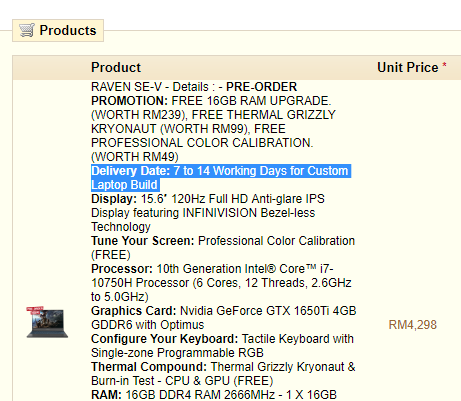 |
|
|
May 21 2020, 03:43 PM
Return to original view | Post
#4
|
|
Junior Member
187 posts Joined: Jul 2009
|
anyone here own raven-SE R series? what's your temperature when gaming? mine hit up to 94C (without fan boost) when gaming even on Dota 2, when on fan boost is around 70-85C, you guys on fan boost always when gaming?
|
|
|
May 21 2020, 03:56 PM
Return to original view | Post
#5
|
|
Junior Member
187 posts Joined: Jul 2009
|
QUOTE(chittyserv @ May 21 2020, 03:53 PM) Not normal. Raven SE on dota2 full graphics gtx1650 about 60+ on GPU. 90+ is CPU, 10750h + gtx2060 Your 90+ is CPU? 90+ is without fan boost option, GPU is 80+ also without fan boost This post has been edited by yongchin89: May 21 2020, 04:01 PM |
|
|
May 21 2020, 06:16 PM
Return to original view | Post
#6
|
|
Junior Member
187 posts Joined: Jul 2009
|
QUOTE(chittyserv @ May 21 2020, 05:53 PM) Wow lucky I didn't buy the rtx. So high temp hmm 68C it mentioned in the video when gaming? it deduct the ambient temperature out ah? loland yeah, this RTX is really hot, especially the panel in the exhaust there, i can fry egg but i'll get buttery smooth fps This post has been edited by yongchin89: May 21 2020, 06:17 PM |
|
|
|
|
|
May 21 2020, 06:19 PM
Return to original view | Post
#7
|
|
Junior Member
187 posts Joined: Jul 2009
|
QUOTE(Prince J @ May 21 2020, 06:07 PM) The SE-R is optimized for performance to maintain stable FPS. You can adjust the fan boost to bring down the temperature or change your mode in command center on fan boost it did get my temperature drop around total of 10-12C cooler, but the sound is like my robot vacuum but a mini version sound |
|
|
May 23 2020, 10:25 PM
Return to original view | Post
#8
|
|
Junior Member
187 posts Joined: Jul 2009
|
QUOTE(Prince J @ May 23 2020, 06:12 PM) Hi lcpheng, just re-confirmed with the support manager Brenden who was conversing with you via Whatsapp. It's abnormal for RAVEN SE's fan not kicking in until 90++ degree Celsius by downloading game, it can be caused by wrong drivers installation or the hardware. Did you reformat your PC recently? Can we have your system to check next week? hi, my raven SE-R temp max at 94 but fan wont boost itself, i have to manually select fan boost to get it cool down to 80+ |
|
|
May 23 2020, 10:29 PM
Return to original view | Post
#9
|
|
Junior Member
187 posts Joined: Jul 2009
|
QUOTE(dylan_chng @ May 23 2020, 07:03 PM) With all the negativity happening on this discussion thread, keycap problem, thermal problem, long processing times, etc, etc. your temperature go up till what celcius when using 100% on the proc? mine when gaming it will shoot up to 94C which can burn hand yojust wanted to say as a Illegear Raven user for just over a year. I render alot a videos, pinning the processor at 100% quite often, I have no major complaints. |
|
|
May 23 2020, 10:42 PM
Return to original view | IPv6 | Post
#10
|
|
Junior Member
187 posts Joined: Jul 2009
|
QUOTE(lcpheng @ May 23 2020, 08:01 PM) Playing triple-A titles with fan boost on thermal is fine and I'm really happy with the performance, problem is when you do other less demanding stuffs and you don't want to turn on fan boost, then the temp will go up to 95 degree then the CPU will thermal throttle. I don't think it's hardware problem. I was asking technician about the fan profile setting and that's how they responded. when playing triple A game, your raven heat go up until how many? on fan boost all the time while gaming? |
|
|
May 24 2020, 07:47 AM
Return to original view | IPv6 | Post
#11
|
|
Junior Member
187 posts Joined: Jul 2009
|
QUOTE(dylan_chng @ May 24 2020, 12:41 AM) not sure about specific RPM but my fan would be running at full speed. How to check fan RPM? If i on my fan boost (very loud) when CPU at 100%usage, it will Cool it down alot (10C to 12C)I do have a turbo mode. When engaged, would make fan louder. CPU temps drops about 5 degree celsius. CPU turbo boast remains the same. My video editing software does not use GPU acceleration so my GPU is mostly idling. Do note I am using regular (thick) Raven, not Raven SE |
|
|
May 24 2020, 08:26 AM
Return to original view | IPv6 | Post
#12
|
|
Junior Member
187 posts Joined: Jul 2009
|
QUOTE(dylan_chng @ May 23 2020, 11:06 PM) Around 85 degrees celcius hmm, weeird, i cant find my cpu temp at HWMonitor or open hardware monitor.....only able to see it at illegear command center 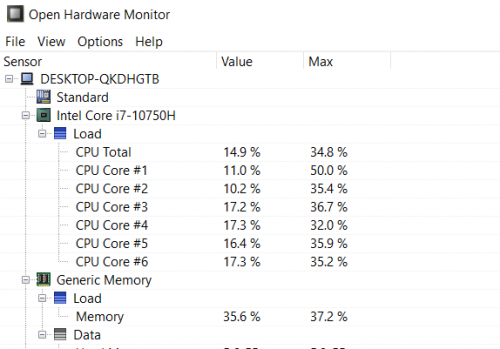 |
|
|
May 24 2020, 09:04 AM
Return to original view | IPv6 | Post
#13
|
|
Junior Member
187 posts Joined: Jul 2009
|
QUOTE(arslow @ May 24 2020, 09:00 AM) Could be due to the fact the cpu is still new Yeap, command center show themUsually apps ike HWMonitor will be able to see both temperatures and the RPM of the fans. Doesn't the illegear Command Centre show them? |
|
|
|
|
|
May 24 2020, 01:43 PM
Return to original view | IPv6 | Post
#14
|
|
Junior Member
187 posts Joined: Jul 2009
|
QUOTE(Nickysnipe @ May 24 2020, 11:19 AM) So i just got my Onyx G two days ago. This machine is beautiful, sleek and I love the keyboard. Yesterday tried some games like Anno 1800, The Division 2, Dota, CS:GO. So far so good. CPU and GPU temp mostly is 70+ celcius. Well, fan is a bit loud but is fine i guess cause i am using headphone. Machine is very quiet in normal usage and i am satisfied with the result. fan was loud because was on fan boost?Illegear staff is very helpful in the way of purchasing.  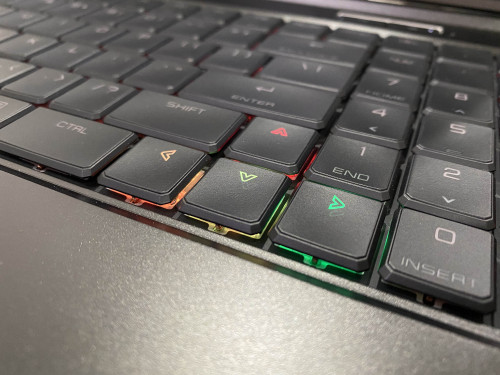 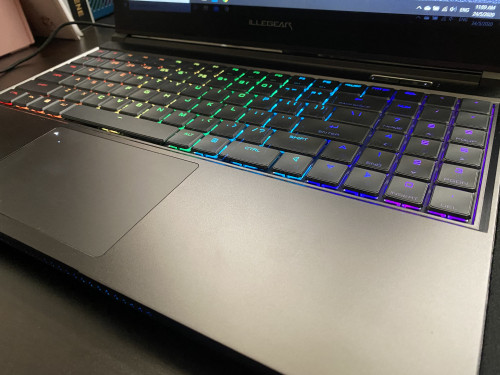 |
|
|
May 24 2020, 04:01 PM
Return to original view | IPv6 | Post
#15
|
|
Junior Member
187 posts Joined: Jul 2009
|
QUOTE(pluginbaby @ May 24 2020, 03:57 PM) Keep it on Game Mode if you are ok with loud noises. Im on Onyx 8750h 2060 and play games on Equilibrium mode. On stock it is indeed hot and loud but after tuning in throttlestop I managed to figure out sweetspot for the games I play and anticipate the max clock needed roughly. Mind to share your configuration? I'm still finding a tutorial in YouTube, no experience at all in undervolt... Seeing alot ppl say it will help in heat90degrees+ temp and loud fan noise seems normal for out of the box condition without further undervolt and some tuning when under load. |
|
|
May 25 2020, 09:28 AM
Return to original view | Post
#16
|
|
Junior Member
187 posts Joined: Jul 2009
|
QUOTE(aqil2900 @ May 25 2020, 05:08 AM) I just bought the ROGUE model with Intel i5 10300H CPU and with RTX 2060 GPU. It is indeed and cool looking laptop.. what concern me the most is the heat generated by the cpu and gpu... when I first got the laptop.. I run and play Ark Survival Evolved at high setting and it plays smoothly.. but after done playing it for 30 mins the CPU is at 94°C and the GPU is almost the same temperature... I know it is really bad coz the air blown by the exhaust is enough to make my hands feel numb if i put it too long there. Regarding the processor... I managed to lower the processor temperature bu under volt it by. 105 mV... and it plays around 77-84 °C under full load stress test... but with the gpu part... I cant figure anything out to keep it cool while playing.... I look on the nvidia website and look for my graphic card clock speed and for rtx 2060 mobile it goes 900+ mhz to 1200 mhz (boost) when I look it up on msi afterburner tools.. the graph is way off the recommended speed.. and when I run the bench mark test the gpu clock speed goes 1500+ mhz until the gpu temperature reach around 86°C and start to thermal throttle ... I tried to lower the graph so it constant at 1200mhz att all voltage.. but it just wont work... when I save the profile it will automatically goes to 1300mhz constant graph.. and the temperature is still high and unhealthy... anyone have recommendations to solve this problems? BTW i use intel XTU to undervolt my cpu Oooo, rogue got 5 heatpipe also stay at 94C? I guess it is their profile/tuning that they did |
|
|
May 27 2020, 01:00 AM
Return to original view | IPv6 | Post
#17
|
|
Junior Member
187 posts Joined: Jul 2009
|
QUOTE(Farkmylife @ May 26 2020, 02:45 PM) My model is SE-R, the temperature seems decreases quite a number of it after I under volt the cpu. mind to share what software and the configuration? im finding way to undervolt too, no experience at all |
|
|
May 27 2020, 01:07 AM
Return to original view | IPv6 | Post
#18
|
|
Junior Member
187 posts Joined: Jul 2009
|
i just noticed that while i gaming with plugged in adapter, my battery percentage will drop and it would trigger to charge it. normal ah?
|
|
|
May 27 2020, 01:16 AM
Return to original view | IPv6 | Post
#19
|
|
Junior Member
187 posts Joined: Jul 2009
|
QUOTE(chittyserv @ May 26 2020, 09:50 PM) Open your task manager see which graphics card is running your game. With the dual graphics card now it may have switched to your processor graphics card. I dont think it will lag for no reason. this happen to me also lol, set to turbo mode without plugged in, it will lagged/spike, cant game at all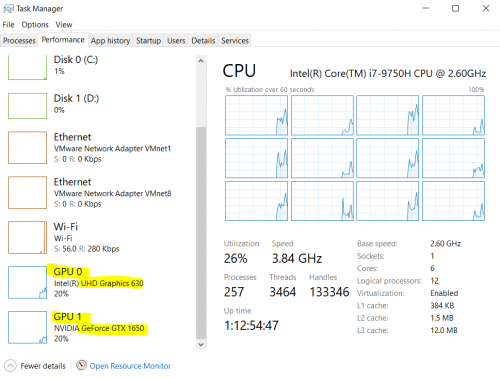 GPU running on 100% but temperature keep stable at 51 degree celcius....i think something wrong with illegear profile..... i only can game on plugged in QUOTE(rapple @ May 26 2020, 04:58 PM) are you saying gaming laptop without charging is not suitable for gaming? i feel you bro, same situation hereI tried. Without charging it will LAGGED. Rimworld is not a graphic intense game. My 5 year old rm2k laptop Asus runs fine with or without charging. If it needs to be charged every single time I played a simple game then what's the point buying a laptop might as well just use desktop. Buy a 4k laptop but their advice/explanation is not to degrade battery life but not user experience. Everything is fine until I try gaming without charging. Disappointed. Edit: Before I pay the deposit I have told them what I used it for and what games I played. Its recommended by your side. This post has been edited by yongchin89: May 27 2020, 01:18 AM |
|
|
May 27 2020, 11:35 AM
Return to original view | Post
#20
|
|
Junior Member
187 posts Joined: Jul 2009
|
QUOTE(chittyserv @ May 27 2020, 08:50 AM) Ill do some test tonight and see if I can provide a solution. Ill try to run dota2 on battery and see what needs to be tweaked. i run dota2 on battery also, fps is definitely feel like 30fps or lower, playable but you'll be frustrated like youre playing in low spec laptop lol |
|
Topic ClosedOptions
|
| Change to: |  0.2266sec 0.2266sec
 0.76 0.76
 7 queries 7 queries
 GZIP Disabled GZIP Disabled
Time is now: 18th December 2025 - 03:13 PM |
 Quote
Quote