
Welcome Guest ( Log In | Register )

Bump Topic Topic Closed RSS Feed
316 Pages « < 202 203 204 205 206 > » Bottom

Outline · [ Standard ] · Linear+

Unifi Official TM UniFi High Speed Broadband Thread V37, READ 1ST PAGE FOR TURBO SPEED INFO!

views
     
kelvin988
post Sep 9 2019, 10:48 PM

Enthusiast
*****
Senior Member
743 posts

Joined: Sep 2011
QUOTE(joshhd @ Sep 9 2019, 10:31 PM)
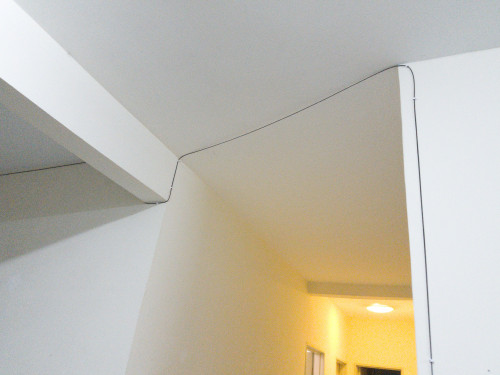
Hmm, it appears that TM Unifi now deploys fibre FTTH to high rise buildings that uses VDSL copper? These photos are taken at one of my friend's condo unit. The condo is located in Setapak, Kuala Lumpur.
user posted image
The fibre cable is obviously laid like this, which is kinda eyesore la tbh... The condo doesn't have fibre infrastructure, so they had to lay the cable into condo unit like this. Similar like TIME Fibre.
user posted image
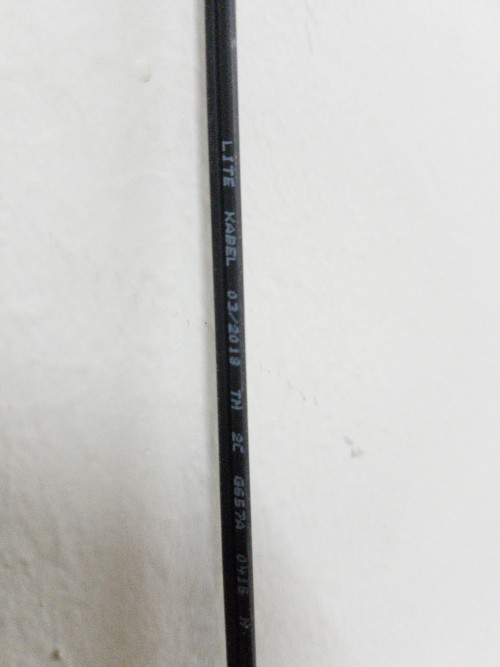
Close up look at TM's fibre cable

user posted image
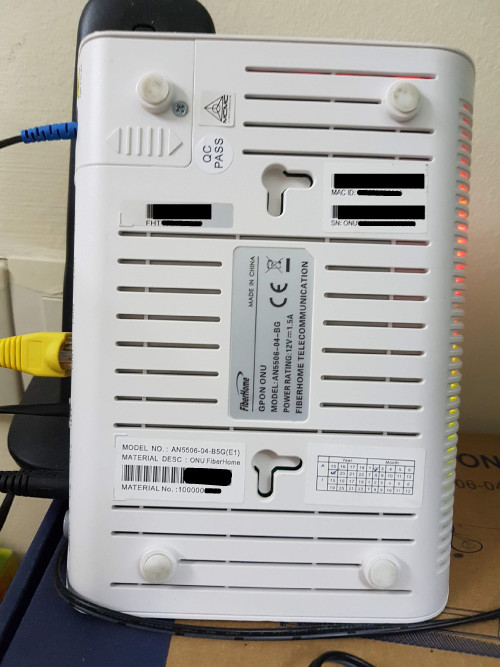
New TM Unifi ONU fibre modem? It's not the Huawei anymore...
user posted image
FiberHome brand... I never hear before. As what I know, even Maxis Fibre and TIME Fibre don't supply this fibre modem brand to its customers...  hmm.gif

Let me remind again, these photos are taken in a condominium and not landed house, where all this while, many would never thought that TM would deploy FTTH to high rise buildings someday and stuck in copper cable forever.

The fibre cable comes from the ceiling of the corridor (walkway), and then ends at the MDF room.
As I walk around the corridor in the same floor, apparently only my friend's unit and a very few other units can be seen that the fibre cable is laid into units like this.
Maybe they would only come and lay fibre cable for new installations or customers who upgrades to Unifi's higher speed package?

I contacted TM via live chat and ask, they say the condo is using the combination of both copper and fibre, and the max speed for high rise building is basically still 30Mbps.  shakehead.gif
Then I was like, if it's only 30Mbps, then what's the point of them installing fibre at the first place?  dry.gif
Since it's already using fibre cable, why not offer much higher speeds that VDSL copper can't provide, such as 300Mbps and above?  shakehead.gif
*
if ftth in condo, can support up to 800mbps, nowsday new condo all run FTTH edi
SUSpakji
post Sep 9 2019, 10:55 PM

Regular
******
Senior Member
1,386 posts

Joined: Nov 2012


QUOTE(haturaya @ Sep 9 2019, 08:10 PM)
Yup it include Ultimate pack.

Total to pay = RM159 + 6% SST (RM9.55).

sweat.gif

And one more reason that I didn't move to Maxis is because of public IP address. Need public IP address because I have 4 servers running. Need stable IPV4 & IPV6. So far, UniFi implementation works.  thumbsup.gif
*
i agree with you so UNIFI Stable then Maxis
i wont move to maxis i wont switch maxis its shit because poor connection and technical lazy

i will stay unifi
joshhd
post Sep 9 2019, 11:09 PM

Look at all my stars!!
*******
Senior Member
7,799 posts

Joined: Dec 2014
From: Malaysia


QUOTE(kelvin988 @ Sep 9 2019, 10:48 PM)
if ftth in condo, can support up to 800mbps, nowsday new condo all run FTTH edi
*

Did you mean, as long the high rise building is newly built or built today, TM has stopped laying copper telephone lines into the building, and uses 100% fibre on that building?
Or it still has to depend on location, like whether fibre is available in the area or not?

No that condo is not new... It's about 7-8 years already. All along it was VDSL copper.
Yes I know fibre can support even to Gbps speeds in the future. But the thing is, TM still say that customers in this condo can subscribe to max 30Mbps. It doesn't make sense at all.
When I asked them in live chat on why is this the case, they simply brushed me off by replying "We don't have the detail about it"
and never bother to ask any relevant departments for answers or other colleagues that might be familiar about it. How professional. rclxms.gif
Their customer service is really good in replying questions. So I reply to them "Thank you, your information is very helpful."
MeowZ
post Sep 10 2019, 10:37 AM

Getting Started
**
Junior Member
219 posts

Joined: Jan 2003
From: New Johore
guys can i terminate my Unifi Advance 30Mbps rm179 by just walking in to TMPoint and bringing the modem?

this 30 day notice thing is really stupid


Andrew Lim
post Sep 10 2019, 11:07 AM

Just keep on keeping on
*******
Senior Member
2,844 posts

Joined: Nov 2007


Seems like Unifi or Blizzard fixed their connection issues. I can login to Blizzard Battle.net without using a VPN now. smile.gif
joshhd
post Sep 10 2019, 11:24 AM

Look at all my stars!!
*******
Senior Member
7,799 posts

Joined: Dec 2014
From: Malaysia


QUOTE(MeowZ @ Sep 10 2019, 10:37 AM)
guys can i terminate my Unifi Advance 30Mbps rm179 by just walking in to TMPoint and bringing the modem?

this 30 day notice thing is really stupid
*

You got to give them 30 days advance notice if you want to terminate the service, or else I don't think they'll let you cancel right away.
Why you wanna terminate? Too expensive, or what? Or perhaps you might wanna consider the new 30Mbps RM89/month (unlimited quota) package?
Contact TM for more info. Or have a live chat with them here: https://unifi.com.my/campaign/chat/unifichat.html
Select "Chat with our agent".
cba5566
post Sep 10 2019, 11:32 AM

Casual
***
Junior Member
422 posts

Joined: Mar 2010
QUOTE(MeowZ @ Sep 10 2019, 10:37 AM)
guys can i terminate my Unifi Advance 30Mbps rm179 by just walking in to TMPoint and bringing the modem?

this 30 day notice thing is really stupid
*
Spent rm179 to use 30M package....

Nowadays rm89 already can subscribe for that package.

Go to tmpoint or live chat with them to downgrade the package...

Need to do something about it.

hurricane21
post Sep 10 2019, 12:17 PM

Senior Probation
******
Senior Member
1,389 posts

Joined: Feb 2006
From: Southern Region


Last night was on 175 ip range, but all site redirected to singapore, even ads also show singapore ads.

Initially thought VPN was on accidently but no, lastly restart modem all back to normal. hmm.gif
solarmystic
post Sep 10 2019, 12:38 PM

Getting Started
**
Junior Member
271 posts

Joined: Jun 2009
QUOTE(joshhd @ Sep 9 2019, 10:31 PM)
user posted image
New TM Unifi ONU fibre modem? It's not the Huawei anymore...

user posted image
FiberHome brand... I never hear before. As what I know, even Maxis Fibre and TIME Fibre don't supply this fibre modem brand to its customers...  hmm.gif
That's quite a common TM supplied FTTH modem, I have the exact same model for my landed 100M/50M subscription.

This post has been edited by solarmystic: Sep 10 2019, 12:38 PM
haturaya
post Sep 10 2019, 01:28 PM

Look at all my stars!!
Group Icon
Elite
2,554 posts

Joined: Jan 2003
QUOTE(joshhd @ Sep 9 2019, 10:31 PM)
Hmm, it appears that TM Unifi now deploys fibre FTTH to high rise buildings that uses VDSL copper? These photos are taken at one of my friend's condo unit. The condo is located in Setapak, Kuala Lumpur.
user posted image
The fibre cable is obviously laid like this, which is kinda eyesore la tbh... The condo doesn't have fibre infrastructure, so they had to lay the cable into condo unit like this. Similar like TIME Fibre.

user posted image
Close up look at TM's fibre cable

user posted image
New TM Unifi ONU fibre modem? It's not the Huawei anymore...

user posted image
FiberHome brand... I never hear before. As what I know, even Maxis Fibre and TIME Fibre don't supply this fibre modem brand to its customers...  hmm.gif

Let me remind again, these photos are taken in a condominium and not landed house, where all this while, many would never thought that TM would deploy FTTH to high rise buildings someday and stuck in copper cable forever.

The fibre cable comes from the ceiling of the corridor (walkway), and then ends at the MDF room.
As I walk around the corridor in the same floor, apparently only my friend's unit and a very few other units can be seen that the fibre cable is laid into units like this.
Maybe they would only come and lay fibre cable for new installations or customers who upgrades to Unifi's higher speed package?

I contacted TM via live chat and ask, they say the condo is using the combination of both copper and fibre, and the max speed for high rise building is basically still 30Mbps.  shakehead.gif
Then I was like, if it's only 30Mbps, then what's the point of them installing fibre at the first place?  dry.gif
Since it's already using fibre cable, why not offer much higher speeds that VDSL copper can't provide, such as 300Mbps and above?  shakehead.gif
*
From TM

Pdf regarding AN5506=04 Unit
JuneResources
post Sep 10 2019, 02:44 PM

ONE Stop Resources
*******
Senior Member
4,177 posts

Joined: Mar 2012
From: Kuala Lumpur


QUOTE(zeroty @ Sep 8 2019, 09:25 AM)
So did u managed to solve ur router issue?

I have router problem also, I called 100 they inform me the charges. RM50 for a router warranty claim is ridiculous. Rather buy my own router.
*
Yes, they manage to settle my router..
Change to Dlink one.. As they say currently supply 2 brand name with TPLink & Dlink..

If want other brand name or model router, then go and buy by yourself.
If you just install it and not more than 1 year, then it should have warranty claim..

Nowadays router is really costly, not cheap at all.. cry.gif
sl3ge
post Sep 10 2019, 03:25 PM

Regular
******
Senior Member
1,367 posts

Joined: Jan 2003
Hi guys here,

My monthly payment is RM120.

I login unifi account show "unifi 300Mbps (Turbo Upgrade 2018) ",

But i run speedtest.net download speed max show 60Mbps only, is it normal?

How can i make the speed near to 300MBps?

(Landed. Wifi)
SUSpakji
post Sep 10 2019, 03:33 PM

Regular
******
Senior Member
1,386 posts

Joined: Nov 2012


QUOTE(sl3ge @ Sep 10 2019, 03:25 PM)
Hi guys here,

My monthly payment is RM120.

I login unifi account show "unifi 300Mbps (Turbo Upgrade 2018) ",

But i run speedtest.net download speed max show 60Mbps only, is it normal?

How can i make the speed near to 300MBps?

(Landed. Wifi)
*
wifi almost speed half
you still no use LAN Cable

wifi speed 60mpbs is normail cannot handle 300mbps

you try LAN Cable see you get full speed
AV_2018
post Sep 10 2019, 04:39 PM

Casual
***
Junior Member
451 posts

Joined: Apr 2018
QUOTE(sl3ge @ Sep 10 2019, 03:25 PM)
Hi guys here,

My monthly payment is RM120.

I login unifi account show "unifi 300Mbps (Turbo Upgrade 2018) ",

But i run speedtest.net download speed max show 60Mbps only, is it normal?

How can i make the speed near to 300MBps?

(Landed. Wifi)
*
Only 802.11ac (Wi-Fi 5) with 2x2 MIMO (866Mbps link speed) can reach 300Mbps.
blacktubi
post Sep 10 2019, 04:39 PM

-
Group Icon
Elite
8,418 posts

Joined: Jul 2008

QUOTE(JuneResources @ Sep 10 2019, 02:44 PM)
Yes, they manage to settle my router..
Change to Dlink one.. As they say currently supply 2 brand name with TPLink & Dlink..

If want other brand name or model router, then go and buy by yourself.
If you just install it and not more than 1 year, then it should have warranty claim..

Nowadays router is really costly, not cheap at all.. cry.gif
*
A half decent smartphone is RM1000 and a decent laptop is at least RM2000

Even you have 5 devices in a house, that's at least RM5000 worth of devices connected to a router.

Don't cheap out on router, get a good one else you will be bottlenecked by a router with all your expensive devices. laugh.gif
sl3ge
post Sep 10 2019, 04:45 PM

Regular
******
Senior Member
1,367 posts

Joined: Jan 2003
QUOTE(AV_2018 @ Sep 10 2019, 04:39 PM)
Only 802.11ac (Wi-Fi 5) with 2x2 MIMO (866Mbps link speed) can reach 300Mbps.
*
just found out i am connecting 2.4GHz,
now i connect to 5Ghz and run speedtest dl 200Mbps..yeah.

200Mbps should max already right?

chocobo7779
post Sep 10 2019, 04:46 PM

Power is nothing without control
********
All Stars
14,674 posts

Joined: Sep 2010
QUOTE(blacktubi @ Sep 10 2019, 04:39 PM)
A half decent smartphone is RM1000 and a decent laptop is at least RM2000

Even you have 5 devices in a house, that's at least RM5000 worth of devices connected to a router.

Don't cheap out on router, get a good one else you will be bottlenecked by a router with all your expensive devices. laugh.gif
*
Plus things like security updates and more futureproof features such as AX WiFi too icon_idea.gif

Also a cheap AX router? hmm.gif

https://www.tp-link.com/my/home-networking/...er/archer-ax50/

It seems to cost about the equivalent of USD140 in some countries hmm.gif
chocobo7779
post Sep 10 2019, 04:47 PM

Power is nothing without control
********
All Stars
14,674 posts

Joined: Sep 2010
QUOTE(sl3ge @ Sep 10 2019, 04:45 PM)
just found out i am connecting 2.4GHz,
now i connect to 5Ghz and run speedtest dl 200Mbps..yeah.

200Mbps should max already right?
*
Yup 200-300Mbps is what you can expect from a 2x2 ac WiFi connection icon_idea.gif
Mazda9
post Sep 10 2019, 05:14 PM

On my way
****
Junior Member
535 posts

Joined: Mar 2009
Ever since TM changed my btu to Nokia 4 months ago, I was constantly experiencing network speed degradation issue where by download speed was in the range of 500-650mbps and upload maximum 85mbps.

Used internal and backdoor escalation method to TM management and they finally came today to change my BTU to this latest model back to HUAWEI which was received by TM less than a month ago on trial and my speed is back rocking again 🙌

My current speed after BTU change to TM latest model which was just launch a month ago .
Attached Image

Latest BTU (HUAWEI)
Attached Image


In summary:- Nokia btu can be a problem for network speed degradation issue for users having Unifi package of 500mbps speed and above and Huawei was and always is the best!!! 😁

This post has been edited by Mazda9: Sep 10 2019, 05:16 PM
cHiLdHo0drEaMz
post Sep 10 2019, 05:56 PM

#DBAP
******
Senior Member
1,031 posts

Joined: Jun 2011
From: #KajangTop


QUOTE(Mazda9 @ Sep 10 2019, 05:14 PM)
Ever since TM changed my btu to Nokia  4 months ago, I was constantly experiencing network speed degradation issue where by download speed was in the range of 500-650mbps and upload maximum 85mbps.

ByUsed internal and backdoor escalation method to TM management and they finally came today to change my BTU to this latest model back to HUAWEI which was received by TM less than a month ago on trial and my speed is back rocking again 🙌

My current speed after BTU change to TM latest model which was just  launch a month ago .
Attached Image

Latest BTU (HUAWEI)
Attached Image
In summary:- Nokia btu can be a problem for network speed degradation issue for users having Unifi package of 500mbps speed and above and Huawei was and always is the best!!! 😁
*
Are the newly registered customer entitled for this btu as well ?


316 Pages « < 202 203 204 205 206 > » Top
Topic ClosedOptions
 

Change to:
| Lo-Fi Version
0.0387sec    0.69    6 queries    GZIP Disabled
Time is now: 15th December 2025 - 05:18 PM
