
Welcome Guest ( Log In | Register )

8 Pages « < 3 4 5 6 7 > » Bottom

Outline · [ Standard ] · Linear+

 Adata XPG SX8200 Pro 512GB NVME SSD, Affordable alternative for high speed

views
     
Donchay
post May 29 2019, 09:22 PM

Casual
***
Junior Member
324 posts

Joined: Feb 2012


Hi all, overall I'm new to PC and SSD.

So I bought the 256GB 3 weeks ago from lazada. Works perfectly fine until last weekend , which I find it to my horror after I came back from holiday.
All applications, boot up , browsers, even start windows button shows signs of delaying / lag.
Worst still, windows 10 automatic upgrade mine to 1903 version.

Format windows over 10 times to troubleshoot what could be the cause of the slow down.
until it hit my mind it could be the SSD...
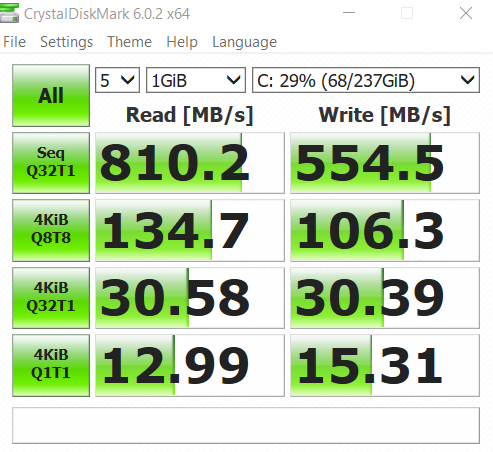
user posted image

Screenshot above, I'm thinking it could be the symptop of my SSD failing, although its just 3 weeks. What you guys think?

After typing this, I'm replacing my old SSD to check and compare.
TSxxboxx
post May 30 2019, 10:10 PM

The mind is for having ideas, not holding them
*******
Senior Member
5,261 posts

Joined: Oct 2004
From: J@Y B33


QUOTE(Donchay @ May 29 2019, 09:22 PM)
Hi all, overall I'm new to PC and SSD.

So I bought the 256GB 3 weeks ago from lazada. Works perfectly fine until last weekend , which I find it to my horror after I came back from holiday.
All applications, boot up , browsers, even start windows button shows signs of delaying / lag.
Worst still, windows 10 automatic upgrade mine to 1903 version.

Format windows over 10 times to troubleshoot what could be the cause of the slow down.
until it hit my mind it could be the SSD...

user posted image

Screenshot above, I'm thinking it could be the symptop of my SSD failing, although its just 3 weeks. What you guys think?

After typing this, I'm replacing my old SSD to check and compare.
*

That is super slow.

Install CrystalDiskMark and check for any SMART warning for the drive.
Donchay
post May 31 2019, 05:45 PM

Casual
***
Junior Member
324 posts

Joined: Feb 2012


QUOTE(xxboxx @ May 30 2019, 10:10 PM)
That is super slow.

Install CrystalDiskMark and check for any SMART warning for the drive.
*
That is done as well. No warnings no nothing. Health is at 100percent.

Could it be just bad luck I got a defective product?

One strange phenomenon, is that I take the ssd out and put it back , it went back straight to 3400 read speed, only to slow down to 800 after 15 to 20 minutes...
TSxxboxx
post May 31 2019, 08:51 PM

The mind is for having ideas, not holding them
*******
Senior Member
5,261 posts

Joined: Oct 2004
From: J@Y B33


QUOTE(Donchay @ May 31 2019, 05:45 PM)
That is done as well. No warnings no nothing. Health is at 100percent.

Could it be just bad luck I got a defective product?

One strange phenomenon, is that I take the ssd out and put it back , it went back straight to 3400 read speed, only to slow down to 800 after 15 to 20 minutes...
*

Weird, it can perform at full speed but then later on it looks like throttled. Have you check the temp? Maybe overheat?

Since the changes that you done recently is upgrading to 1903, got possibility of incompatibility? Maybe try reinstall 1809 windows and see if it's the same.
Donchay
post Jun 3 2019, 11:26 AM

Casual
***
Junior Member
324 posts

Joined: Feb 2012


QUOTE(xxboxx @ May 31 2019, 08:51 PM)
Weird, it can perform at full speed but then later on it looks like throttled. Have you check the temp? Maybe overheat?

Since the changes that you done recently is upgrading to 1903, got possibility of incompatibility? Maybe try reinstall 1809 windows and see if it's the same.
*
My old SSD ( non NVMe ) works fine with the existing windows and drivers.

And nope the SSD does not have heat issue, 33-36 degree celcius.

But it does nt matter now, currebtly processing 1 to 1 replacement.

Thanks for the troubleshooting idea 😀😀😀
Donchay
post Jun 5 2019, 12:13 PM

Casual
***
Junior Member
324 posts

Joined: Feb 2012


1 to 1 replacement is done, same situation..

Guess it could be the drivers sad.gif
TSxxboxx
post Jun 5 2019, 02:56 PM

The mind is for having ideas, not holding them
*******
Senior Member
5,261 posts

Joined: Oct 2004
From: J@Y B33


QUOTE(Donchay @ Jun 5 2019, 12:13 PM)
1 to 1 replacement is done, same situation..

Guess it could be the drivers sad.gif
*

Try install this driver and hopefully can fix it.

QUOTE(xxboxx @ Mar 15 2019, 07:33 PM)

"pure" 32bit OFA NVMe driver v1.5.0.0 for Win10 x86 mod+signed
https://www.win-unattended.de/Benutzer/Fern...%20Fernando.rar

"pure" 64bit OFA NVMe driver v1.5.0.0 for Win10 x64 mod+signed
https://www.win-unattended.de/Benutzer/Fern...%20Fernando.rar

The driver I got it from here
https://www.win-raid.com/t29f25-Recommended...vers.html#msg61
It was signed by the website owner
*
Donchay
post Jun 6 2019, 01:38 AM

Casual
***
Junior Member
324 posts

Joined: Feb 2012


QUOTE(xxboxx @ Jun 5 2019, 02:56 PM)
Try install this driver and hopefully can fix it.
*
Hi Thanks for the links and information.

I tried to follow the steps on installing the drivers via the 3rd link but I couldn't follow and lost.
Can you explain how do I do and what should I select?
TSxxboxx
post Jun 6 2019, 09:44 AM

The mind is for having ideas, not holding them
*******
Senior Member
5,261 posts

Joined: Oct 2004
From: J@Y B33


QUOTE(Donchay @ Jun 6 2019, 01:38 AM)
Hi Thanks for the links and information.

I tried to follow the steps on installing the drivers via the 3rd link but I couldn't follow and lost.
Can you explain how do I do and what should I select?
*

First you need to install the certificate that come together in the zip file. Double click it is enough to install it if not mistaken.

Then go find your NVME SSD in Device Manager, check it's properties and click update driver. Select have disk and browse to the extracted inf file.

Take note that SSD driver is very important file for Windows, make sure you really understand how to install it properly. If wrong file or something is wrong you'll end up with Windows cannot boot and have to clean install Windows. Backup your file before attempting to do install this.
warlove3
post Jun 25 2019, 09:25 PM

On my way
****
Senior Member
537 posts

Joined: Nov 2006


did anyone managed to upgrade the firmware using SSD Toolbox? It keeps bringing me back to the website itself
TSxxboxx
post Jun 26 2019, 12:35 AM

The mind is for having ideas, not holding them
*******
Senior Member
5,261 posts

Joined: Oct 2004
From: J@Y B33


QUOTE(warlove3 @ Jun 25 2019, 09:25 PM)
did anyone managed to upgrade the firmware using SSD Toolbox? It keeps bringing me back to the website itself
*

The firmware need to upgrade?

When I first got this SSD I install SSD Toolbox but after seeing how clumsy the software look like I uninstall it.
jamalnsx
post Jul 4 2019, 12:30 PM

Getting Started
**
Junior Member
141 posts

Joined: Nov 2005


I'm also getting this SSD 512GB. Will install Windows 10 tonight and see how it goes.

Anybody have use it with hackintosh and the sector size is 4kb or 512b?

This post has been edited by jamalnsx: Jul 4 2019, 12:31 PM
sHawTY
post Jul 8 2019, 03:24 PM

Frequent Reporter
********
All Stars
14,909 posts

Joined: Jul 2005

QUOTE(Donchay @ Jun 5 2019, 12:13 PM)
1 to 1 replacement is done, same situation..

Guess it could be the drivers sad.gif
If 1-to-1 is already done but the issue is still there, it's not the SSD nor the driver that's causing the issue
It's your system

Are you using it in a laptop or a desktop?
The best way to test if the SSD is working fine is try installing the SSD in another desktop / laptop
oro89
post Jan 4 2020, 12:12 PM

Getting Started
**
Junior Member
129 posts

Joined: Oct 2008
Any illegear z5 skylake user here is using this ssd? Pm me pls
Mushwashan
post Jan 11 2020, 11:11 AM

Getting Started
**
Junior Member
64 posts

Joined: Sep 2013
From: Perak


now it only rm300 will considering to buy for my hackintosh project
btw. brand nvme ape yg value for money utk 512GB

slaveone
post Jan 11 2020, 11:16 AM

Regular
******
Senior Member
1,231 posts

Joined: Jan 2003
QUOTE(Mushwashan @ Jan 11 2020, 11:11 AM)
now it only rm300 will considering to buy for my hackintosh project
btw. brand nvme ape yg value for money utk 512GB
*
this brand
sHawTY
post Jan 11 2020, 11:56 AM

Frequent Reporter
********
All Stars
14,909 posts

Joined: Jul 2005

QUOTE(Mushwashan @ Jan 11 2020, 11:11 AM)
brand nvme ape yg value for money utk 512GB
The SX8200 Pro
TSxxboxx
post Jan 11 2020, 12:36 PM

The mind is for having ideas, not holding them
*******
Senior Member
5,261 posts

Joined: Oct 2004
From: J@Y B33


QUOTE(Mushwashan @ Jan 11 2020, 11:11 AM)
now it only rm300 will considering to buy for my hackintosh project
btw. brand nvme ape yg value for money utk 512GB
*
That's cheap.
gengstapo
post Jan 11 2020, 12:57 PM

Retired enthusiast
********
All Stars
10,688 posts

Joined: Jan 2005
Has anyone tried where the nvme fixed on pci-e adapter?
Wonder about the performance
sHawTY
post Jan 11 2020, 08:02 PM

Frequent Reporter
********
All Stars
14,909 posts

Joined: Jul 2005

QUOTE(gengstapo @ Jan 11 2020, 12:57 PM)
Has anyone tried where the nvme fixed on pci-e adapter?
Wonder about the performance
I used it before on my Z97 motherboard, runs perfectly fine can get full speed
As long as your UEFI supports NVMe boot, you can run it just fine with PCI-e adapter

8 Pages « < 3 4 5 6 7 > » Top
 

Change to:
| Lo-Fi Version
0.0227sec    0.81    6 queries    GZIP Disabled
Time is now: 19th December 2025 - 04:59 AM

