Welcome Guest ( Log In | Register )

3 Pages  1 2 3 >Bottom

Outline · [ Standard ] · Linear+

 Adata XPG SX8200 Pro 512GB NVME SSD, Affordable alternative for high speed

views
     
TSxxboxx
post Dec 25 2018, 06:34 PM, updated 3y ago

The mind is for having ideas, not holding them
*******
Senior Member
5,261 posts

Joined: Oct 2004
From: J@Y B33


EDIT: Adata Switches to Slower Controller, NAND on SX8200 Pro
This review does not represent current SX8200 Pro performance anymore after they revised it. I'm sure the current model is still fast, but there will be difference from my review. Original review below:

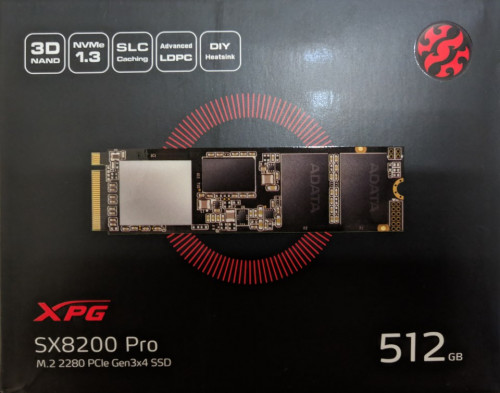
When it comes to NVME SSD, people always think about Samsung 970 Pro as the best NVME drive. But being the best also means the most expensive. Most seller is selling 512GB drive for almost RM1500. The cheapest I saw is from one seller for RM920. Is there any other drive that can give almost similar performance without paying that much? After reading around I think I found such drive. Enter Adata XPG SX8200 Pro. I bought it for RM440, that’s even less than half price compared to the cheapest seller of 970 Pro. But is it any good?
user posted image
NVME, 512GB size, M.2 2280 length, PCIe Gen 3x4 SSD

It promises read speed up to 3500MB/s and write speed up to 2300MB/s. Lets find out how it performs.
I’ll compare it to Samsung 850 Evo 250GB SATA SSD and Western Digital 3TB HDD. Both is connected on SATA 3 (6Gb/s speed)

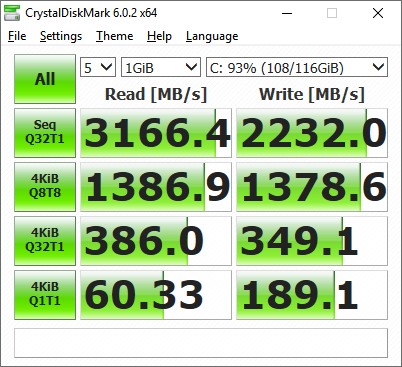
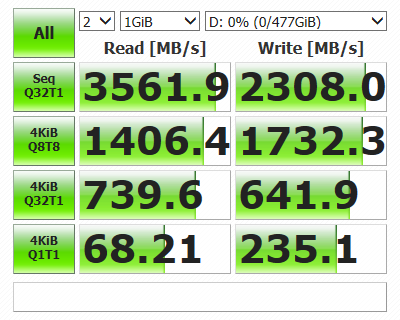
First test is Crystal DiskMark. For 970 Pro benchmark result I taken from guru3D review (https://www.guru3d.com/articles-pages/samsung-970-pro-m-2-512gb-nvme-ssd-review.html)
Although my system used is different then theirs, the result I believe should be not much different.
user posted image
Samsung 970 Pro 512GB

user posted image
Adata XPG SX8200 Pro 512GB

user posted image
Samsung 850 Evo 250GB

user posted image
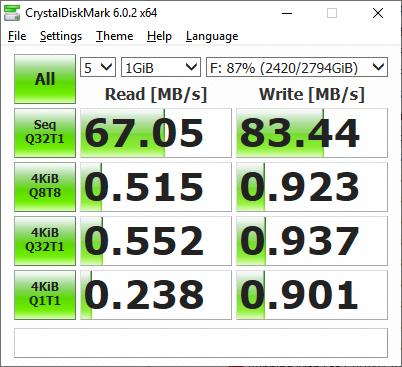
Western Digital 3TB

From these results can see that 970 Pro faster by 200MB/s on sequential read than SX8200 Pro, that’s translate to about 6%. Sequential write speed almost similar on both. 4KBQ8T8 read is similar while write sees 970 Pro faster 334MB/s, which about 24%. 4KBQ32T1 show 970 Pro faster on read and write by about 74% and 66%. 4KBQ1T1 is almost similar on both drive.

SX8200 Pro is faster on everything compared to 850 Evo. Limitation of SATA speed is apparent when it’s about sequential read and write. SX8200 Pro tops read speed by 6 times! Write speed is a bit more modest 4.3 times faster. 4KBQ32T1 test show SX8200 Pro faster by 21% on read and 19% on write. SX8200 Pro able to double the speed on both read and write for 4KBQ1T1.

As for HDD, well it’s really not a competitor at all to any of the drive. The sole reason for continue using HDD will be it’s the cheapest for GB per Ringgit ratio.

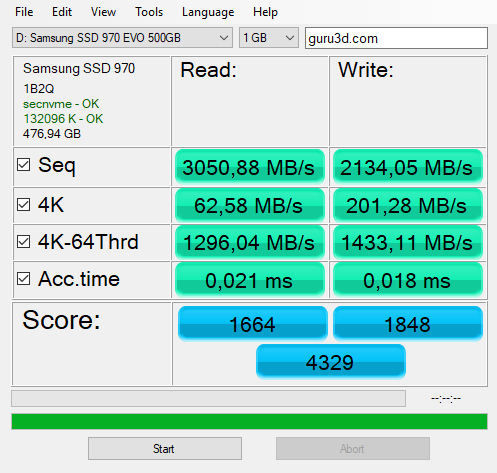
Next benchmark would be on AS SSD program.
user posted image
Samsung 970 Pro 512GB

user posted image
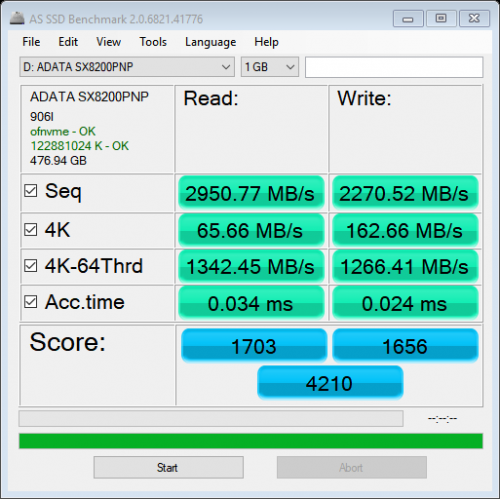
Adata XPG SX8200 Pro 512GB

user posted image
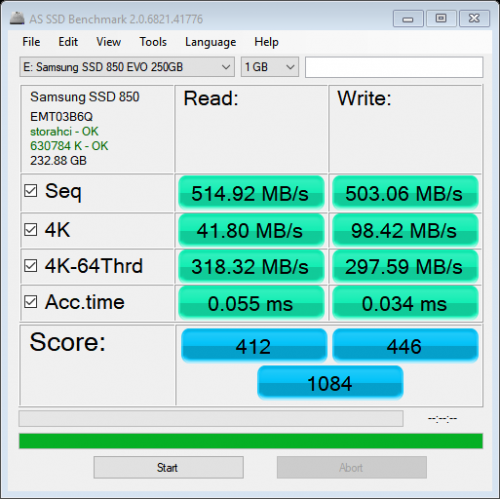
Samsung 850 Evo 250GB

user posted image
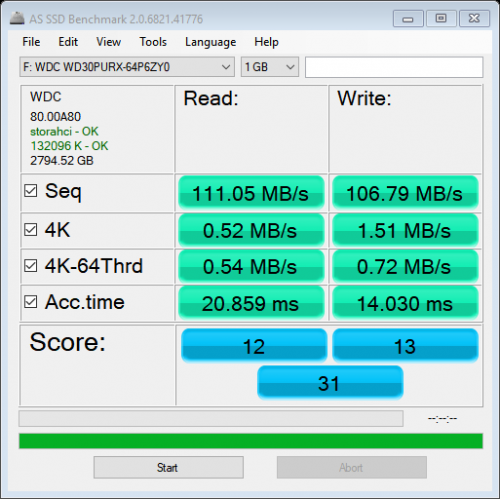
Western Digital 3TB

In this benchmark SX8200 Pro shows that it can also give back punches to 970 Pro. Sequential read for 970 Pro only faster by 3% while for write SX8200 Pro is faster by about 6%. For 4K read SX8200 Pro marginally faster by 5% but write sees 970 Pro pull ahead by 24%. 4K-64Thrd write 970 Pro again pull ahead by 13%. Overall score gives 970 Pro a lead by only 3%.

Compared to 850 Evo, SX8200 Pro shows again it’s faster on everything. 4K test shows the smallest difference but even that SX8200 Pro tops by 57% read and 65% write.

This post has been edited by xxboxx: Jan 16 2021, 01:49 PM
TSxxboxx
post Dec 25 2018, 06:35 PM

The mind is for having ideas, not holding them
*******
Senior Member
5,261 posts

Joined: Oct 2004
From: J@Y B33


Samsung Magician which is SSD management also can do performance benchmark. Again it shows how NVME is better than SATA.
user posted image


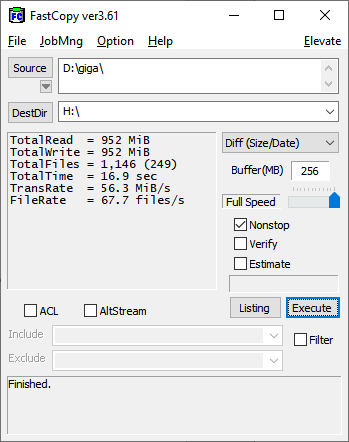
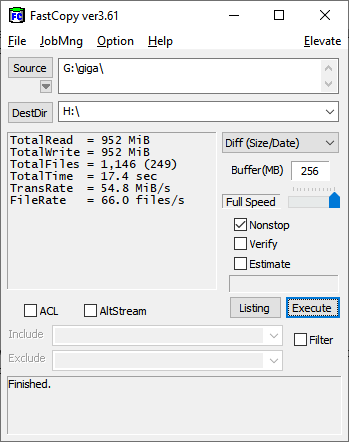
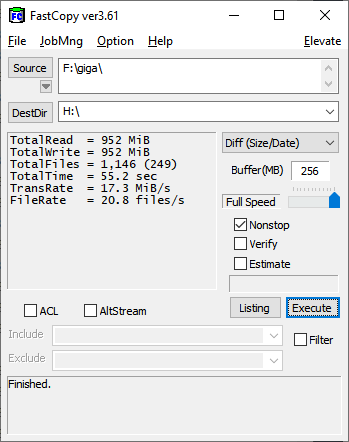
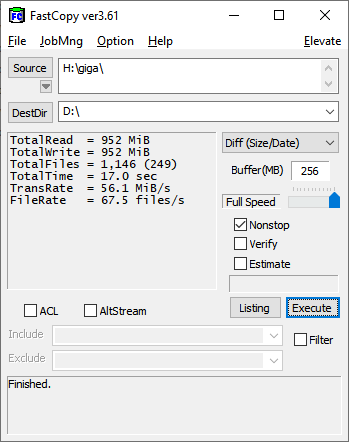
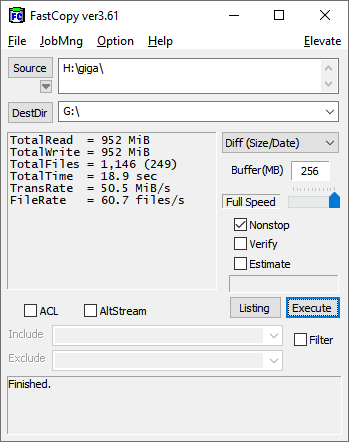
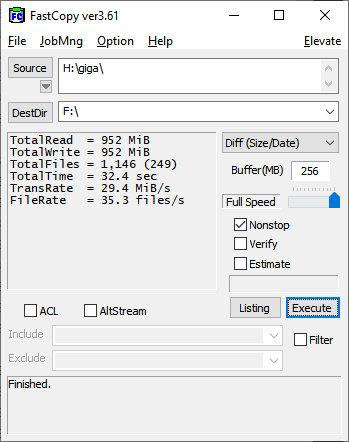
Now for some real world test. One big file test is pointless as the AS SSD sequential read and write benchmark already show each drive speed, SATA bandwidth is also 850 Evo limiting factor for big file test. I use 1146 files with various sizes in a folder, total size is 952MB, write and read it to RAM disk drive so that the other end will not be the limiting factor. I use FastCopy program as it is able to record time and transfer rate.

user posted image
Adata XPG SX8200 Pro 512GB read

user posted image
Samsung 850 Evo 250GB read

user posted image
Western Digital 3TB read

In these tests we can see SX8200 Pro read speed is faster than 850 Evo by about 0.5 seconds or 3%. Compared to Western Digital, SX8200 Pro is faster by 3 times. On to write speed.


user posted image
Adata XPG SX8200 Pro 512GB write

user posted image
Samsung 850 Evo 250GB write


user posted image
Western Digital 3TB write

On write speed SX8200 Pro is again faster than 850 Evo, by 2.9 second or about 10%. Compared to Western Digital, SX8200 Pro is faster by about 90%.


In conclusion, Adata XPG SX8200 Pro prove to be value for money compared to Samsung 970 Pro. It only loses out not by much yet it is a lot cheaper. It shows that you don’t need to have the most expensive drive to get good performance anymore unlike few years ago.

Against SATA SSD drive like Samsung 850 Evo, SX8200 Pro win by super wide margin when the data is big, but small file shows both have similar performance. The difference can only be felt when you’re dealing with bid data such as starting Windows or opening big application or copying large files. But when it’s just opening office files or image, both will feel just about the same.

This test also show why people should stop using HDD as their Windows or application drive, the speed and latency gap is just ridiculously big.

NVME SSD with read high speed of 3500MB/s and write speed of 2300MB/s before this usually reserved to the premium drive that have very high price tag. But now such speed also have arrive to those that want more value per ringgit on their purchase.

This post has been edited by xxboxx: Dec 25 2018, 06:51 PM
TSxxboxx
post Dec 25 2018, 06:35 PM

The mind is for having ideas, not holding them
*******
Senior Member
5,261 posts

Joined: Oct 2004
From: J@Y B33


Additional Info

Adata XPG SX8200 Pro doesn't come with it's own cloning software, but you can get free license for Acronis True image HD by registering your SSD.

Another thing is the drive doesn't have own NVME driver but instead rely on MS generic NVME driver. It's still work of course, just that it doesn't feel as premium as having own driver.

Unlike Samsung Magician program that look sleek, have useful function and can check for latest driver, Adata SSD Toolbox look amateur and you kind of doubt if it's utilities is actually working.

Update after use about 3 weeks vs Samsung Evo 850 SATA SSD previously:
-When open files and programs can feel it's faster, maybe the difference is just a second or two but still noticeable.

This post has been edited by xxboxx: Jan 13 2019, 11:20 AM
TSxxboxx
post Dec 26 2018, 11:25 AM

The mind is for having ideas, not holding them
*******
Senior Member
5,261 posts

Joined: Oct 2004
From: J@Y B33


QUOTE(Vigilant @ Dec 26 2018, 03:04 AM)
xxboxx Where can I get the NVME at RM440?
*

Many online seller have it. Check around, good place to start is Shopee and Lazada
I don't want to name the seller as not only them have it, and important to read each seller rating so that you know what you're getting into.

QUOTE(k town shit @ Dec 26 2018, 09:58 AM)
is this a graphic card for GPU or hard disk for storage? Why it looks like plug into the graphic card port?
*

I don't know how to answer this question sweat.gif

I assume you know what is SATA SSD right? Go read about NVME at Wikipedia first, then read this review. Then you'll know what's each type of drive advantage is. Tho with NVME, SATA SSD is seem redundant now.
TSxxboxx
post Jan 13 2019, 10:59 AM

The mind is for having ideas, not holding them
*******
Senior Member
5,261 posts

Joined: Oct 2004
From: J@Y B33


QUOTE(nrw @ Jan 13 2019, 01:02 AM)
u should compare speed with 50%/75%/90% of the drive being filled with data and u'll see what difference that makes wink.gif
*

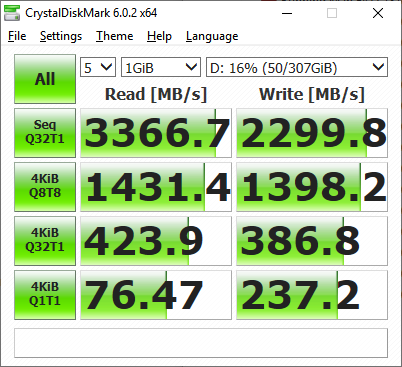
user posted image
16% fill up

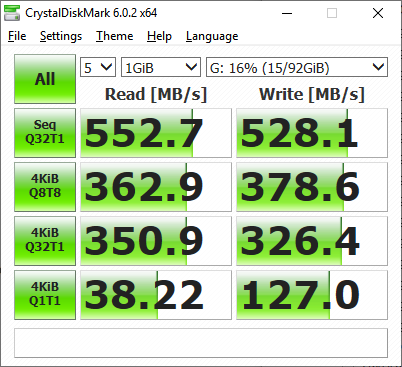
user posted image
93% fill up

Not much difference
TSxxboxx
post Jan 13 2019, 11:18 AM

The mind is for having ideas, not holding them
*******
Senior Member
5,261 posts

Joined: Oct 2004
From: J@Y B33


Update after use about 3 weeks vs Samsung Evo 850 SATA SSD previously:
-When open files and programs can feel it's faster, maybe the difference is just a second or two but still noticeable.
TSxxboxx
post Jan 13 2019, 12:51 PM

The mind is for having ideas, not holding them
*******
Senior Member
5,261 posts

Joined: Oct 2004
From: J@Y B33


QUOTE(nrw @ Jan 13 2019, 12:43 PM)
is your partition or drive filled up 93%?
cuz ur testing a 512GB drive with 476GB net capacity and your screenshots are  just showing a 116GB partition that is filled with 108GB.
*

I partition it to 2 drive.
You mean both partition need to be 90% fill up?
Next time test then, need time to copy those files to fill up the drive.

Now I remember I also unallocated about 10% for over provisioning, so won't able to do 90% fill up test.

This post has been edited by xxboxx: Jan 13 2019, 12:55 PM
TSxxboxx
post Jan 13 2019, 04:05 PM

The mind is for having ideas, not holding them
*******
Senior Member
5,261 posts

Joined: Oct 2004
From: J@Y B33


QUOTE(nrw @ Jan 13 2019, 03:43 PM)
if you're free just do 75% then biggrin.gif

I have the same drive since late November.. while I agree it's a neat drive (I think the best for sale at this price point) you'll probably agree with my opinion that the more this ssd is filled the more ground it looses for example on the 970pro you tested above.

this unfortunately is the case with almost all ssd's but those adata's tend to take a bigger hit compared to lets say the samsung's.

No idea how much your drive is filled in total, but you can already see a 20% decreasement from your last screenshot in 4K random read already.
*

I didn't test 970 Pro, it's taken from guru3D review.

You got the link for 970 Pro benchmark when it's 50%/75%/90%?
TSxxboxx
post Jan 22 2019, 05:09 PM

The mind is for having ideas, not holding them
*******
Senior Member
5,261 posts

Joined: Oct 2004
From: J@Y B33


QUOTE(caloyness @ Jan 22 2019, 03:13 PM)
i bought this sx8200 pro last week and use it on my B450 board.
so far the performance is okay, but sometimes im getting
"BSOD : unexpected_Store_exception"

around 2 times happened in 1 week, in happens when monitor goes to sleep or pc when its idle for long time, then suddenly blue screen with this stop code.

this is running on a fresh win 10 pro after updating windows.
*

https://www.errorsolutions.tech/error/unexpected-store-exception-windows-10/
https://social.technet.microsoft.com/Forums...n10itprogeneral
https://answers.microsoft.com/en-us/windows...35-e1f3798b54c7

If don't want troubleshoot then maybe try reinstalling fresh Windows


Or can try use custom firmware. After I updated to 1809 windows can't read the drive's SMART info. I end up using Generic OFA NVMe driver v1.5.0.0 from Win-Raid forum to get back the SMART info.
TSxxboxx
post Jan 22 2019, 05:27 PM

The mind is for having ideas, not holding them
*******
Senior Member
5,261 posts

Joined: Oct 2004
From: J@Y B33


QUOTE(caloyness @ Jan 22 2019, 05:16 PM)
thanks bro, will try.

below is per other user issue, almost same like mine. When leaving the PC idle for a long time.
*

I think this is more likely Windows issue. Before I use this SSD I also always encounter BSOD after back from SLEEP, and I always encounter Win Defender notify it stop unauthorized program from making changes to the memory (sometimes even Win own program!) after come back from HIBERNATE, and sometimes BSOD too. It will never fail to happen every time I use SLEEP or HIBERNATE, I now end up only use SHUTDOWN every time. I upgrade from Win 7 to 10, then use migration tools to change SSD twice. So maybe too many broken files already.
TSxxboxx
post Jan 29 2019, 01:14 PM

The mind is for having ideas, not holding them
*******
Senior Member
5,261 posts

Joined: Oct 2004
From: J@Y B33


QUOTE(Marcion @ Jan 27 2019, 07:45 PM)
want to ask why adata toolbox temperature display error?
*

It's Windows driver issue. After I updated to 1809 windows can't read the drive's SMART info. I end up using Generic OFA NVMe driver v1.5.0.0 from Win-Raid forum to get back the SMART info.
TSxxboxx
post Jan 29 2019, 10:44 PM

The mind is for having ideas, not holding them
*******
Senior Member
5,261 posts

Joined: Oct 2004
From: J@Y B33


QUOTE(Marcion @ Jan 29 2019, 07:34 PM)
how install it to work?
*
On Device Manager, look for Disk drives > ADATA SX8200, right click > update driver > let me pick > Have Disk, browse to the folder that you extracted
TSxxboxx
post Jan 31 2019, 02:25 PM

The mind is for having ideas, not holding them
*******
Senior Member
5,261 posts

Joined: Oct 2004
From: J@Y B33


QUOTE(Marcion @ Jan 30 2019, 08:03 PM)
no wonder it still don't work mine is adata XPG GAMMIX S11 not SX8200
*

Hahaha lol

Another way that I found while googling is to fresh install Windows. But this is on different computer with different nvme drive. So don't know iwill it work the same with ADATA.
TSxxboxx
post Feb 4 2019, 09:01 PM

The mind is for having ideas, not holding them
*******
Senior Member
5,261 posts

Joined: Oct 2004
From: J@Y B33


QUOTE(sHawTY @ Feb 4 2019, 03:40 PM)
OFA NVMe driver slows down the SSD performance
My SX8200 Pro read & write speed drops down a lot after using the OFA NVMe driver
*

Which driver you using now? SMART info can be displayed?
TSxxboxx
post Feb 5 2019, 10:27 AM

The mind is for having ideas, not holding them
*******
Senior Member
5,261 posts

Joined: Oct 2004
From: J@Y B33


QUOTE(sHawTY @ Feb 5 2019, 04:17 AM)
Generic Windows 10 NVMe driver
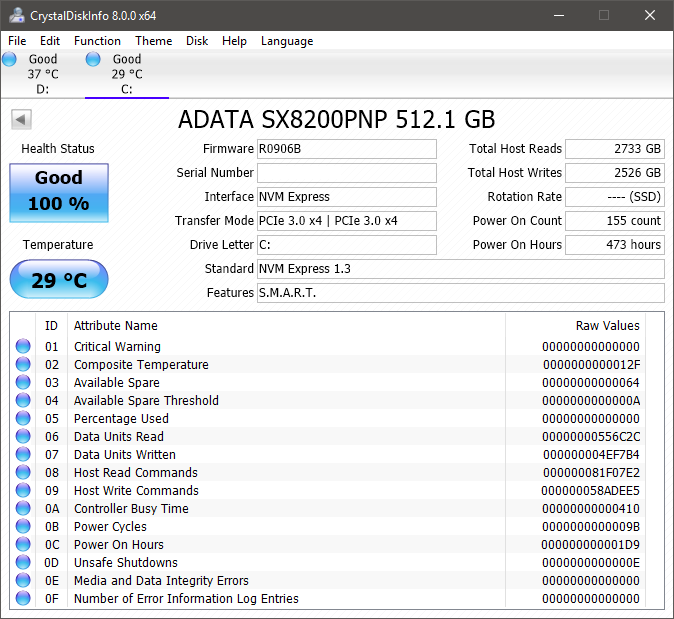
Yes, SMART information is displayed correctly in CrystalDiskInfo

Well except the temperature reading. I don't believe the temperature reading is correct since the SSD is sitting between 2 x RX 580. Even when gaming the temperature never exceeds 31°C

user posted image
*

You already on 1809 when install this SSD? Or clean install 1809?

I after upgrade to 1809 the SMART info can't be displayed. But HWINFO still able to display the info.

My temp reading is around 39° when light workload and 45° when gaming.
TSxxboxx
post Feb 5 2019, 09:51 PM

The mind is for having ideas, not holding them
*******
Senior Member
5,261 posts

Joined: Oct 2004
From: J@Y B33


QUOTE(sHawTY @ Feb 5 2019, 04:31 PM)
Clean install 1809
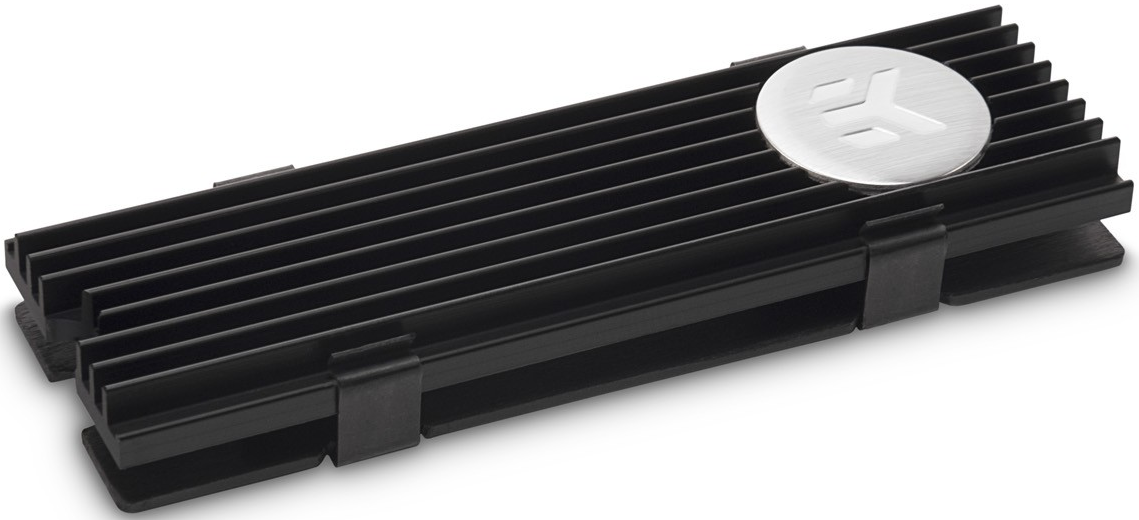
I'm using EK-M.2 NVMe Heatsink on the SX8200 Pro although I think the temperature is still incorrect

user posted image
*

Thought so clean install. Haha the road that I unwilling to take.

For me OFA NVMe driver give similar speed.

Yours in air conditioning room? Mine is not. I also have thick heatsink as the MB comes with it. When gaming my GPU is 75° and CPU is 55°
TSxxboxx
post Feb 6 2019, 09:57 AM

The mind is for having ideas, not holding them
*******
Senior Member
5,261 posts

Joined: Oct 2004
From: J@Y B33


QUOTE(sHawTY @ Feb 5 2019, 11:01 PM)
No air conditioner
My GPU is around 85°C at maximum load
Whereas my CPU never exceed 45°C because it's watercooled

Although the EK-M.2 heatsink does cool both the top & bottom part of the SSD, not like all M.2 motherboard heatsink that only cools the top of the SSD
*

If in air conditioning room then maybe can get such temperature. Without it I don't think can get same like ambient temperature even with the 2 sides heatsink.
TSxxboxx
post Mar 15 2019, 07:33 PM

The mind is for having ideas, not holding them
*******
Senior Member
5,261 posts

Joined: Oct 2004
From: J@Y B33


QUOTE(ngwoeijiang @ Mar 15 2019, 01:56 PM)
Do you still keep the Driver because i cannot access the file anymore
*

The account that created this link has been terminated due to multiple violations of our Terms of Service. sweat.gif

"pure" 32bit OFA NVMe driver v1.5.0.0 for Win10 x86 mod+signed
https://www.win-unattended.de/Benutzer/Fern...%20Fernando.rar

"pure" 64bit OFA NVMe driver v1.5.0.0 for Win10 x64 mod+signed
https://www.win-unattended.de/Benutzer/Fern...%20Fernando.rar

The driver I got it from here
https://www.win-raid.com/t29f25-Recommended...vers.html#msg61
It was signed by the website owner
TSxxboxx
post May 7 2019, 05:04 PM

The mind is for having ideas, not holding them
*******
Senior Member
5,261 posts

Joined: Oct 2004
From: J@Y B33


QUOTE(BigSaver @ May 7 2019, 08:46 AM)
Guys,

Has anyone facing this problem with SX8200 pro?

1) 1st time boot (everytime), bios said no bootable device, then need to restart pc to see the sx8200 drive
2) Leave my pc idle ( like >10 minute) then blue screen happened.

Ive done fresh window install for 2nd time already. Yet the problem still appear.

Something to do with adata driver?

Now thinking to switch to MX500, i know the speed cant match NVME, but the problem above is annoying.
*

My system always shut down, and normal boot. Didn't encounter such issue. Maybe bios setting need to change, or motherboard got conflict as some is using the NVME data lane with some SATA port.
When leave your PC, does it go to sleep? Have you try after fresh install, then don't install other software first and see if the problem still persist.


Do you have fast boot enabled?
https://www.win-raid.com/t3975f46-Which-NVM...-related-6.html

You can try this generic OFA driver

32bit
https://www.win-unattended.de/Benutzer/Fern...%20Fernando.rar

64bit
https://www.win-unattended.de/Benutzer/Fern...%20Fernando.rar

This post has been edited by xxboxx: May 7 2019, 05:10 PM
TSxxboxx
post May 7 2019, 05:05 PM

The mind is for having ideas, not holding them
*******
Senior Member
5,261 posts

Joined: Oct 2004
From: J@Y B33


QUOTE(caloyness @ May 7 2019, 11:26 AM)
Hi bro,

same with me, i already raise this issue in this forum before.
i leave idle for 1hr or so and then blue screen , stop code : storage something.
*

Your problem still persist until now?

3 Pages  1 2 3 >Top
 

Change to:
| Lo-Fi Version
0.0251sec    1.50    7 queries    GZIP Disabled
Time is now: 19th December 2025 - 10:42 AM