Welcome Guest ( Log In | Register )

8 Pages < 1 2 3 4 5 > » Bottom

Outline · [ Standard ] · Linear+

 Adata XPG SX8200 Pro 512GB NVME SSD, Affordable alternative for high speed

views
     
TSxxboxx
post Feb 4 2019, 09:01 PM

The mind is for having ideas, not holding them
*******
Senior Member
5,261 posts

Joined: Oct 2004
From: J@Y B33


QUOTE(sHawTY @ Feb 4 2019, 03:40 PM)
OFA NVMe driver slows down the SSD performance
My SX8200 Pro read & write speed drops down a lot after using the OFA NVMe driver
*

Which driver you using now? SMART info can be displayed?
sHawTY
post Feb 5 2019, 04:17 AM

Frequent Reporter
********
All Stars
14,909 posts

Joined: Jul 2005

QUOTE(xxboxx @ Feb 4 2019, 09:01 PM)
Which driver you using now? SMART info can be displayed?
Generic Windows 10 NVMe driver
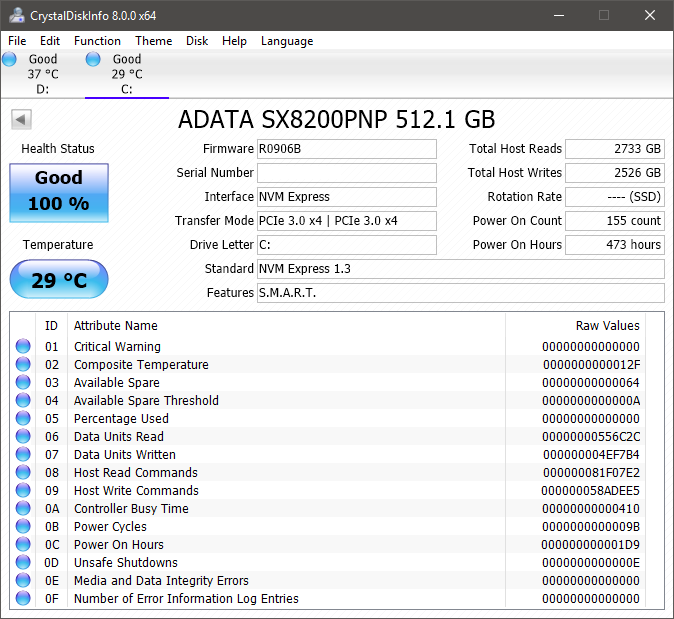
Yes, SMART information is displayed correctly in CrystalDiskInfo

Well except the temperature reading. I don't believe the temperature reading is correct since the SSD is sitting between 2 x RX 580. Even when gaming the temperature never exceeds 31°C

user posted image
TSxxboxx
post Feb 5 2019, 10:27 AM

The mind is for having ideas, not holding them
*******
Senior Member
5,261 posts

Joined: Oct 2004
From: J@Y B33


QUOTE(sHawTY @ Feb 5 2019, 04:17 AM)
Generic Windows 10 NVMe driver
Yes, SMART information is displayed correctly in CrystalDiskInfo

Well except the temperature reading. I don't believe the temperature reading is correct since the SSD is sitting between 2 x RX 580. Even when gaming the temperature never exceeds 31°C

user posted image
*

You already on 1809 when install this SSD? Or clean install 1809?

I after upgrade to 1809 the SMART info can't be displayed. But HWINFO still able to display the info.

My temp reading is around 39° when light workload and 45° when gaming.
sHawTY
post Feb 5 2019, 04:31 PM

Frequent Reporter
********
All Stars
14,909 posts

Joined: Jul 2005

QUOTE(xxboxx @ Feb 5 2019, 10:27 AM)
You already on 1809 when install this SSD? Or clean install 1809?
Clean install 1809
QUOTE(xxboxx @ Feb 5 2019, 10:27 AM)
My temp reading is around 39° when light workload and  45° when gaming.
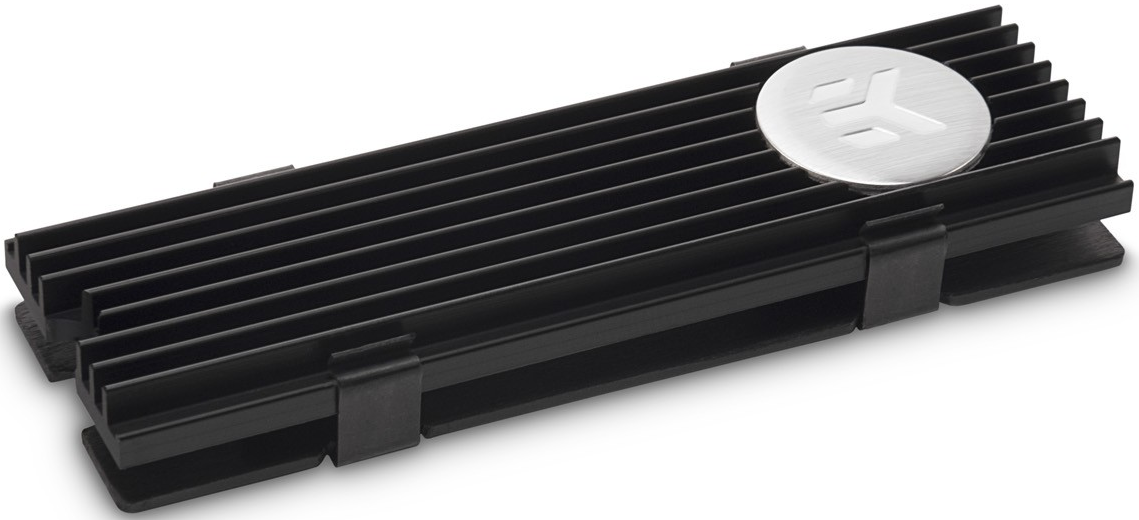
I'm using EK-M.2 NVMe Heatsink on the SX8200 Pro although I think the temperature is still incorrect

user posted image

This post has been edited by sHawTY: Feb 5 2019, 04:35 PM
TSxxboxx
post Feb 5 2019, 09:51 PM

The mind is for having ideas, not holding them
*******
Senior Member
5,261 posts

Joined: Oct 2004
From: J@Y B33


QUOTE(sHawTY @ Feb 5 2019, 04:31 PM)
Clean install 1809
I'm using EK-M.2 NVMe Heatsink on the SX8200 Pro although I think the temperature is still incorrect

user posted image
*

Thought so clean install. Haha the road that I unwilling to take.

For me OFA NVMe driver give similar speed.

Yours in air conditioning room? Mine is not. I also have thick heatsink as the MB comes with it. When gaming my GPU is 75° and CPU is 55°
sHawTY
post Feb 5 2019, 11:01 PM

Frequent Reporter
********
All Stars
14,909 posts

Joined: Jul 2005

QUOTE(xxboxx @ Feb 5 2019, 09:51 PM)
Yours in air conditioning room? Mine is not. I also have thick heatsink as the MB comes with it. When gaming my GPU is 75° and CPU is 55°
No air conditioner
My GPU is around 85°C at maximum load
Whereas my CPU never exceed 45°C because it's watercooled

Although the EK-M.2 heatsink does cool both the top & bottom part of the SSD, not like all M.2 motherboard heatsink that only cools the top of the SSD

This post has been edited by sHawTY: Feb 5 2019, 11:01 PM
TSxxboxx
post Feb 6 2019, 09:57 AM

The mind is for having ideas, not holding them
*******
Senior Member
5,261 posts

Joined: Oct 2004
From: J@Y B33


QUOTE(sHawTY @ Feb 5 2019, 11:01 PM)
No air conditioner
My GPU is around 85°C at maximum load
Whereas my CPU never exceed 45°C because it's watercooled

Although the EK-M.2 heatsink does cool both the top & bottom part of the SSD, not like all M.2 motherboard heatsink that only cools the top of the SSD
*

If in air conditioning room then maybe can get such temperature. Without it I don't think can get same like ambient temperature even with the 2 sides heatsink.
ngwoeijiang
post Mar 15 2019, 01:56 PM

New Member
*
Newbie
1 posts

Joined: Mar 2015
QUOTE(xxboxx @ Jan 22 2019, 05:09 PM)
https://www.errorsolutions.tech/error/unexp...ion-windows-10/
https://social.technet.microsoft.com/Forums...n10itprogeneral
https://answers.microsoft.com/en-us/windows...35-e1f3798b54c7

If don't want troubleshoot then maybe try reinstalling fresh Windows
Or can try use custom firmware. After I updated to 1809 windows can't read the drive's SMART info. I end up using Generic OFA NVMe driver v1.5.0.0 from Win-Raid forum to get back the SMART info.
*
Do you still keep the Driver because i cannot access the file anymore
TSxxboxx
post Mar 15 2019, 07:33 PM

The mind is for having ideas, not holding them
*******
Senior Member
5,261 posts

Joined: Oct 2004
From: J@Y B33


QUOTE(ngwoeijiang @ Mar 15 2019, 01:56 PM)
Do you still keep the Driver because i cannot access the file anymore
*

The account that created this link has been terminated due to multiple violations of our Terms of Service. sweat.gif

"pure" 32bit OFA NVMe driver v1.5.0.0 for Win10 x86 mod+signed
https://www.win-unattended.de/Benutzer/Fern...%20Fernando.rar

"pure" 64bit OFA NVMe driver v1.5.0.0 for Win10 x64 mod+signed
https://www.win-unattended.de/Benutzer/Fern...%20Fernando.rar

The driver I got it from here
https://www.win-raid.com/t29f25-Recommended...vers.html#msg61
It was signed by the website owner
BigSaver
post May 7 2019, 08:46 AM

v(^_^)V
******
Senior Member
1,029 posts

Joined: Apr 2008
From: Earth


Guys,

Has anyone facing this problem with SX8200 pro?

1) 1st time boot (everytime), bios said no bootable device, then need to restart pc to see the sx8200 drive
2) Leave my pc idle ( like >10 minute) then blue screen happened.

Ive done fresh window install for 2nd time already. Yet the problem still appear.

Something to do with adata driver?

Now thinking to switch to MX500, i know the speed cant match NVME, but the problem above is annoying.
caloyness
post May 7 2019, 11:26 AM

Getting Started
**
Junior Member
264 posts

Joined: Jan 2016
QUOTE(BigSaver @ May 7 2019, 08:46 AM)
Guys,

Has anyone facing this problem with SX8200 pro?

1) 1st time boot (everytime), bios said no bootable device, then need to restart pc to see the sx8200 drive
2) Leave my pc idle ( like >10 minute) then blue screen happened.

Ive done fresh window install for 2nd time already. Yet the problem still appear.

Something to do with adata driver?

Now thinking to switch to MX500, i know the speed cant match NVME, but the problem above is annoying.
*
Hi bro,

same with me, i already raise this issue in this forum before.
i leave idle for 1hr or so and then blue screen , stop code : storage something.
TSxxboxx
post May 7 2019, 05:04 PM

The mind is for having ideas, not holding them
*******
Senior Member
5,261 posts

Joined: Oct 2004
From: J@Y B33


QUOTE(BigSaver @ May 7 2019, 08:46 AM)
Guys,

Has anyone facing this problem with SX8200 pro?

1) 1st time boot (everytime), bios said no bootable device, then need to restart pc to see the sx8200 drive
2) Leave my pc idle ( like >10 minute) then blue screen happened.

Ive done fresh window install for 2nd time already. Yet the problem still appear.

Something to do with adata driver?

Now thinking to switch to MX500, i know the speed cant match NVME, but the problem above is annoying.
*

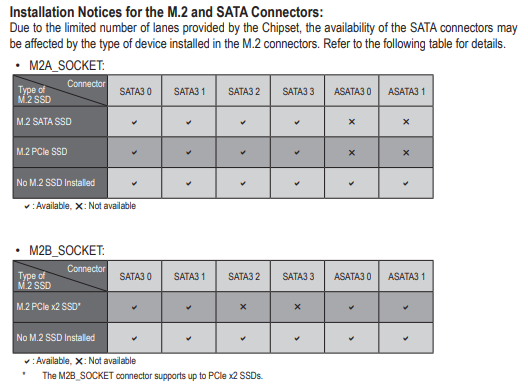
My system always shut down, and normal boot. Didn't encounter such issue. Maybe bios setting need to change, or motherboard got conflict as some is using the NVME data lane with some SATA port.
When leave your PC, does it go to sleep? Have you try after fresh install, then don't install other software first and see if the problem still persist.


Do you have fast boot enabled?
https://www.win-raid.com/t3975f46-Which-NVM...-related-6.html

You can try this generic OFA driver

32bit
https://www.win-unattended.de/Benutzer/Fern...%20Fernando.rar

64bit
https://www.win-unattended.de/Benutzer/Fern...%20Fernando.rar

This post has been edited by xxboxx: May 7 2019, 05:10 PM
TSxxboxx
post May 7 2019, 05:05 PM

The mind is for having ideas, not holding them
*******
Senior Member
5,261 posts

Joined: Oct 2004
From: J@Y B33


QUOTE(caloyness @ May 7 2019, 11:26 AM)
Hi bro,

same with me, i already raise this issue in this forum before.
i leave idle for 1hr or so and then blue screen , stop code : storage something.
*

Your problem still persist until now?
jimmylim85
post May 8 2019, 08:12 AM

iPhone world....
*******
Senior Member
7,826 posts

Joined: Jan 2003
From: Ipoh


QUOTE(BigSaver @ May 7 2019, 08:46 AM)
Guys,

Has anyone facing this problem with SX8200 pro?

1) 1st time boot (everytime), bios said no bootable device, then need to restart pc to see the sx8200 drive
2) Leave my pc idle ( like >10 minute) then blue screen happened.

Ive done fresh window install for 2nd time already. Yet the problem still appear.

Something to do with adata driver?

Now thinking to switch to MX500, i know the speed cant match NVME, but the problem above is annoying.
*
Didn't face this problem for me. Have you tried checking your motherboard for latest driver and BIOS update?

I don't think there is requirement from AData driver. Cause is more like plug n play.

I'm using two 8200pro, 256GB for my boot drive and 512mb for my steam games day to day usage on my Rog Strix Z390-E.

Do take note that 3500mb/sec read is available for 256GB to 1TB onwards, just the write speed varies eg. 256GB is 1200mb/sec and 512GB is 2300mb/sec.
BigSaver
post May 8 2019, 09:58 AM

v(^_^)V
******
Senior Member
1,029 posts

Joined: Apr 2008
From: Earth


QUOTE(caloyness @ May 7 2019, 11:26 AM)
Hi bro,

same with me, i already raise this issue in this forum before.
i leave idle for 1hr or so and then blue screen , stop code : storage something.
*
Yeah i notice your post in this thread regarding the blue screen. Have you found the solution?

QUOTE(xxboxx @ May 7 2019, 05:04 PM)
My system always shut down, and normal boot. Didn't encounter such issue. Maybe bios setting need to change, or motherboard got conflict as some is using the NVME data lane with some SATA port.
When leave your PC, does it go to sleep? Have you try after fresh install, then don't install other software first and see if the problem still persist.
Do you have fast boot enabled?
https://www.win-raid.com/t3975f46-Which-NVM...-related-6.html

You can try this generic OFA driver

32bit
https://www.win-unattended.de/Benutzer/Fern...%20Fernando.rar

64bit
https://www.win-unattended.de/Benutzer/Fern...%20Fernando.rar
*
Thanks for the driver! will try when reach at home.

Bios, i haven't change anything except XMP profile. Will try to play other setting. Any setting that i can refer? im using Giga B450 pro

Ive try with sleep and w/o sleep, still blue screen (forgot the code error but if not mistaken "system service exemption" need to check again). Best to do is not to leave my pc at all or just shutdown if afk. sad.gif

Why i suspect the problem come from my SX8200, 1st problem appear when bios said missing boot. i try startup repair, usb repair, cmd repair all wont work. Last choice fresh format

Then 2nd time appear when not detect bootable device even though i already set priory boot. Need to restart then can see the boot again. Also ive notice all my old windows (i keep my old windows when fresh format) files are missing. Supposedly it will remain.

QUOTE(jimmylim85 @ May 8 2019, 08:12 AM)
Didn't face this problem for me. Have you tried checking your motherboard for latest driver and BIOS update?

I don't think there is requirement from AData driver. Cause is more like plug n play.

I'm using two 8200pro, 256GB for my boot drive and 512mb for my steam games day to day usage on my Rog Strix Z390-E.

Do take note that 3500mb/sec read is available for 256GB to 1TB onwards, just the write speed varies eg. 256GB is 1200mb/sec and 512GB is 2300mb/sec.
*
I haven't check latest driver/bios after 2nd time fresh format. Just use typical windows auto update driver except GPU driver.

When google around, i found some ppl faced almost similar problem as mine. Could be bad lemon unit. sad.gif

This post has been edited by BigSaver: May 8 2019, 09:58 AM

caloyness
post May 8 2019, 10:08 AM

Getting Started
**
Junior Member
264 posts

Joined: Jan 2016
QUOTE(xxboxx @ May 7 2019, 05:05 PM)
Your problem still persist until now?
*
doesn't happen all the time, but issue still persist.
maybe once a week it happens.
sHawTY
post May 8 2019, 10:45 AM

Frequent Reporter
********
All Stars
14,909 posts

Joined: Jul 2005

QUOTE(caloyness @ May 7 2019, 11:26 AM)
same with me, i already raise this issue in this forum before.
You raise issue in here for what?
To see if other users has the same issue boleh la biggrin.gif
To get it fixed, speak directly with ADATA. Contact their technical support
TSxxboxx
post May 8 2019, 03:00 PM

The mind is for having ideas, not holding them
*******
Senior Member
5,261 posts

Joined: Oct 2004
From: J@Y B33


QUOTE(BigSaver @ May 8 2019, 09:58 AM)
Thanks for the driver! will try when reach at home.

Bios, i haven't change anything except XMP profile. Will try to play other setting. Any setting that i can refer? im using Giga B450 pro

Ive try with sleep and w/o sleep, still blue screen (forgot the code error but if not mistaken "system service exemption" need to check again). Best to do is not to leave my pc at all or just shutdown if afk.  sad.gif

Why i suspect the problem come from my SX8200, 1st problem appear when bios said missing boot. i try startup repair, usb repair, cmd repair all wont work. Last choice fresh format

Then 2nd time appear when not detect bootable device even though i already set priory boot. Need to restart then can see the boot again. Also ive notice all my old windows (i keep my old windows when fresh format) files are missing. Supposedly it will remain.
*

I assume no conflict with your M.2 and SATA port that being used on the motherboard?
user posted image

Last time I remember reading about RAID setting for M.2 need to be enable/disable (can't remember which one tongue.gif ), this is because of Windows issue.

There's also possibility you got a lemon unit. Can try using it on other PC to confirm it's really the SX8200 problem.

Old windows file missing I don't think SX8200 problem, maybe you got enable auto clean storage or when do disk cleanup you might also have selected the old windows file.
TSxxboxx
post May 8 2019, 03:05 PM

The mind is for having ideas, not holding them
*******
Senior Member
5,261 posts

Joined: Oct 2004
From: J@Y B33


QUOTE(caloyness @ May 8 2019, 10:08 AM)
doesn't happen all the time, but issue still persist.
maybe once a week it happens.
*

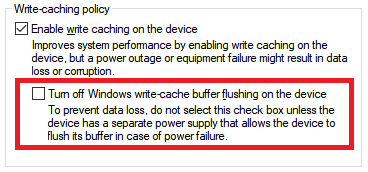
Do you have this setting on your SX8200 properties?
If got then make sure the red colour that I highlight is not selected

user posted image
caloyness
post May 8 2019, 04:28 PM

Getting Started
**
Junior Member
264 posts

Joined: Jan 2016
QUOTE(xxboxx @ May 8 2019, 03:05 PM)
Do you have this setting on your SX8200 properties?
If got then make sure the red colour that I highlight is not selected

user posted image
*
will check later, i didn't tweak anything so far all stock settings.

8 Pages < 1 2 3 4 5 > » Top
 

Change to:
| Lo-Fi Version
0.0314sec    0.76    6 queries    GZIP Disabled
Time is now: 17th December 2025 - 09:24 AM