Outline ·
[ Standard ] ·
Linear+
Adata XPG SX8200 Pro 512GB NVME SSD, Affordable alternative for high speed
|
soonwai
|
 Jan 26 2021, 03:57 AM Jan 26 2021, 03:57 AM
|

|
Been a bit busy with the new Mac. Finally found some time to post this. Tests were done on a Mac Mini M1 16/256. The Mac Mini has 2 Thunderbolt 3 USBC ports. 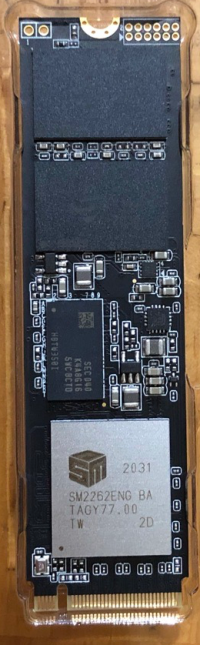 My 2TB Adata SX8200 Pro has the SM2262ENG, the newer but lower clocked controller.  SX8200 Pro in an Acasis Thunderbolt 3 40Gbps external enclosure. It has an Intel JHL6340 Thunderbolt 3 Controller. I thought it would be faster than this.  Will test it in a PC when I get the chance. 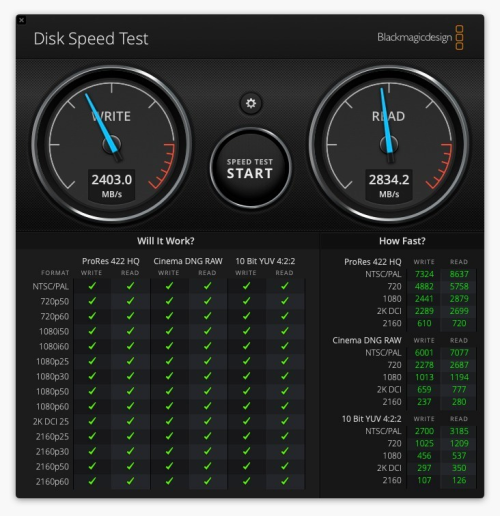 For comparison, the speed of the onboard SSD in the Mac Mini M1. Overall, I'm happy with it. For normal use, there's no discernible difference between the internal and external SSDs This post has been edited by soonwai: Jan 26 2021, 04:05 AM |
|
|
|
|
|
TSxxboxx
|
Jan 26 2021, 03:47 PM
|
|
|
Maybe the SSD incompatible with Thunderbolt 3 Controller. Looks like only running 20Gbps speed, or only 2 lanes of PCIE.
|
|
|
|
|
|
soonwai
|
Jan 26 2021, 03:56 PM
|
|
|
QUOTE(xxboxx @ Jan 26 2021, 03:47 PM) Maybe the SSD incompatible with Thunderbolt 3 Controller. Looks like only running 20Gbps speed, or only 2 lanes of PCIE. I think you're right on the dot. Mac reports "Current Link Width: 0x2" Looks like only 2 lanes being used. I have another enclosure coming in with the JHL7440 controller. Will test that one later. The enclosure I tested with is a JHL6340. Might also borrow a different brand of SSD, maybe something with a Phison or Samsung controller, to test out. Do you use any external Thunderbolt SSDs? Mac System Info Thunderbolt Bus 1: Vendor Name: Apple Inc. Device Name: Mac mini Port: Status: Device connected Link Status: 0x0 Speed: Up to 40Gb/s x1 Current Link Width: 0x2 Receptacle: 1 Ash Creek: Vendor Name: Intel Device Name: Ash Creek Vendor ID: 0x8086 Device ID: 0x2 Device Revision: 0x1 Route String: 1 Firmware Version: 41.1 Port (Upstream): Status: Device connected Link Status: 0x2 Speed: Up to 40Gb/s x1 Current Link Width: 0x2 Link Controller Firmware Version: 0.39.0 This post has been edited by soonwai: Jan 26 2021, 03:59 PM |
|
|
|
|
|
TSxxboxx
|
Jan 26 2021, 04:24 PM
|
|
|
QUOTE(soonwai @ Jan 26 2021, 03:56 PM) I think you're right on the dot. Mac reports "Current Link Width: 0x2" Looks like only 2 lanes being used. I have another enclosure coming in with the JHL7440 controller. Will test that one later. The enclosure I tested with is a JHL6340. Might also borrow a different brand of SSD, maybe something with a Phison or Samsung controller, to test out. Do you use any external Thunderbolt SSDs? Mac System Info Thunderbolt Bus 1: Vendor Name: Apple Inc. Device Name: Mac mini Port: Status: Device connected Link Status: 0x0 Speed: Up to 40Gb/s x1 Current Link Width: 0x2 Receptacle: 1 Ash Creek: Vendor Name: Intel Device Name: Ash Creek Vendor ID: 0x8086 Device ID: 0x2 Device Revision: 0x1 Route String: 1 Firmware Version: 41.1 Port (Upstream): Status: Device connected Link Status: 0x2 Speed: Up to 40Gb/s x1 Current Link Width: 0x2 Link Controller Firmware Version: 0.39.0 I don't have external Thunderbolt SSD. You need it to run full 40Gbps? |
|
|
|
|
|
Vincent6596
|
Mar 13 2021, 08:53 PM
|
|
|
is this chip controller "Silicon Motion SM2262ENG" on my 2TB adata sx8200 pro still a good chip, coz i just purchase this nvme ssd last 2 week only.
|
|
|
|
|
|
TSxxboxx
|
Mar 14 2021, 01:14 AM
|
|
|
QUOTE(Vincent6596 @ Mar 13 2021, 08:53 PM) is this chip controller "Silicon Motion SM2262ENG" on my 2TB adata sx8200 pro still a good chip, coz i just purchase this nvme ssd last 2 week only. See post #121, soonwai have same model with same controller and he done speed test with it. Unless you're transferring hundreds of GB constantly, you won't feel any difference in daily use. |
|
|
|
|
|
Vincent6596
|
Mar 14 2021, 02:04 AM
|
|
|
QUOTE(xxboxx @ Mar 14 2021, 01:14 AM) See post #121, soonwai have same model with same controller and he done speed test with it. Unless you're transferring hundreds of GB constantly, you won't feel any difference in daily use. okay, understand  |
|
|
|
|
|
soonwai
|
Mar 14 2021, 02:20 AM
|
|
|
QUOTE(Vincent6596 @ Mar 13 2021, 08:53 PM) is this chip controller "Silicon Motion SM2262ENG" on my 2TB adata sx8200 pro still a good chip, coz i just purchase this nvme ssd last 2 week only. Should be ok I guess, the original one is definitely faster. I can't really tell since I only have one and it's external. It's still plenty fast and at RM900 for 2TB, cheap. Read this, apparently there're now 3 different versions of the SX8200 Pro. https://www.tomshardware.com/news/adata-and...-swapping-parts |
|
|
|
|
|
Vincent6596
|
Mar 14 2021, 02:31 AM
|
|
|
QUOTE(soonwai @ Mar 14 2021, 02:20 AM) Should be ok I guess, the original one is definitely faster. I can't really tell since I only have one and it's external. It's still plenty fast and at RM900 for 2TB, cheap. Read this, apparently there're now 3 different versions of the SX8200 Pro. https://www.tomshardware.com/news/adata-and...-swapping-partsthx for the info bro, i brought it at rm950 |
|
|
|
|
|
MrSpeedy
|
Mar 25 2021, 07:44 PM
|
|
|
Unfortunately I have XPG SX8200 and recently running into random BSOD with the error code: WHEA_UNCORRECTABLE_ERROR After reboot, the NVME drive undetected until I power cycle my PC. And the BSOD constantly happened when I run chkdks /r and in the middle of the scan. Is my NVME drive dead or Windows just being Windows? 
|
|
|
|
|
|
TSxxboxx
|
Mar 25 2021, 08:38 PM
|
|
|
QUOTE(MrSpeedy @ Mar 25 2021, 07:44 PM) Unfortunately I have XPG SX8200 and recently running into random BSOD with the error code: WHEA_UNCORRECTABLE_ERROR After reboot, the NVME drive undetected until I power cycle my PC. And the BSOD constantly happened when I run chkdks /r and in the middle of the scan. Is my NVME drive dead or Windows just being Windows?
What CPU you running? Do you OC the RAM? Check on CrystalDiskInfo or HWiNFO how's the drive health is. |
|
|
|
|
|
soonwai
|
Mar 25 2021, 09:05 PM
|
|
|
QUOTE(MrSpeedy @ Mar 25 2021, 07:44 PM) Unfortunately I have XPG SX8200 and recently running into random BSOD with the error code: WHEA_UNCORRECTABLE_ERROR After reboot, the NVME drive undetected until I power cycle my PC. And the BSOD constantly happened when I run chkdks /r and in the middle of the scan. Is my NVME drive dead or Windows just being Windows?
Oh wow, how old is the SX8200? |
|
|
|
|
|
MrSpeedy
|
Mar 25 2021, 10:38 PM
|
|
|
QUOTE(xxboxx @ Mar 25 2021, 08:38 PM) What CPU you running? Do you OC the RAM? Check on CrystalDiskInfo or HWiNFO how's the drive health is. Ryzen 2200g B450 Fatal1ty ITX bios v4.40 T-Force DELTA RGB DDR4 3200 MHz (Standard XMP @ 1.35V) Sapphire Nitro+ RX580 with latest driver XPG SX8200 Pro 512 GB 

QUOTE(soonwai @ Mar 25 2021, 09:05 PM) Oh wow, how old is the SX8200? Completely assembled my PC since February 2020 Strange this is I can use no problem, even under stress mostly from gaming. The BSOD is easily reproducible when running "chkdsk /r" and "CrystalDiskMark" This post has been edited by MrSpeedy: Mar 25 2021, 10:45 PM |
|
|
|
|
|
TSxxboxx
|
Mar 26 2021, 07:30 AM
|
|
|
QUOTE(MrSpeedy @ Mar 25 2021, 10:38 PM) Ryzen 2200g B450 Fatal1ty ITX bios v4.40 T-Force DELTA RGB DDR4 3200 MHz (Standard XMP @ 1.35V) Sapphire Nitro+ RX580 with latest driver XPG SX8200 Pro 512 GB
Completely assembled my PC since February 2020 Strange this is I can use no problem, even under stress mostly from gaming. The BSOD is easily reproducible when running "chkdsk /r" and "CrystalDiskMark" Your SSD still looks good. Are you still using Win 10 version 20H2? Have applied update? There's a bug with that version that will caused windows files to be corrupted and damage windows partition if run chkdsk on SSD. https://www.ghacks.net/2020/12/19/running-c...e-blue-screens/If already update it, in theory you may be able to repair the damage by running chkdsk in offline mode. And don't use chkdsk on SSD anymore, SSD don't need it. |
|
|
|
|
|
TSxxboxx
|
Mar 26 2021, 07:32 AM
|
|
|
Also do RAM testing using Testmem5 to make sure it's not because of the OC RAM.
|
|
|
|
|
|
MrSpeedy
|
Mar 26 2021, 09:54 AM
|
|
|
QUOTE(xxboxx @ Mar 26 2021, 07:30 AM) Your SSD still looks good. Are you still using Win 10 version 20H2? Have applied update? There's a bug with that version that will caused windows files to be corrupted and damage windows partition if run chkdsk on SSD. https://www.ghacks.net/2020/12/19/running-c...e-blue-screens/If already update it, in theory you may be able to repair the damage by running chkdsk in offline mode. And don't use chkdsk on SSD anymore, SSD don't need it. Yes, 20H2 with the latest update. What do you meant by chkdsk in offline mode? So the solution is to format Windows 10 and reinstall old version? And yeah it's true, I never face any BSOD prior to 20H2 (except when I was trying testing undervolting my GPU, but then the error code is different and kernel dump was made. But this one no time dumping to be written as the SSD somehow like disconnected from MB). Attached thumbnail(s)
|
|
|
|
|
|
TSxxboxx
|
Mar 26 2021, 10:48 AM
|
|
|
QUOTE(MrSpeedy @ Mar 26 2021, 09:54 AM) Yes, 20H2 with the latest update. What do you meant by chkdsk in offline mode? So the solution is to format Windows 10 and reinstall old version? And yeah it's true, I never face any BSOD prior to 20H2 (except when I was trying testing undervolting my GPU, but then the error code is different and kernel dump was made. But this one no time dumping to be written as the SSD somehow like disconnected from MB). If you got run chkdsk when using 20H2 without the patch, it might have caused the file corruption. Maybe offline chkdsk can fix it. Offline mode means check the drive when it is not running Win 10. Run CMD as Administrator, then type "CHKDSK C: /F", it will ask to schedule chkdsk when the PC restart. If still encounter BSOD then can try partition back the drive, format and reinstalling Win 10. This is assuming the BSOD is because of file corruption. If because of other issue then have check some more. |
|
|
|
|
|
SUSZzZzCcCc
|
Mar 26 2021, 12:04 PM
|
New Member

|
QUOTE(MrSpeedy @ Mar 25 2021, 10:38 PM) Ryzen 2200g B450 Fatal1ty ITX bios v4.40 T-Force DELTA RGB DDR4 3200 MHz (Standard XMP @ 1.35V) Sapphire Nitro+ RX580 with latest driver XPG SX8200 Pro 512 GB
Completely assembled my PC since February 2020 Strange this is I can use no problem, even under stress mostly from gaming. The BSOD is easily reproducible when running "chkdsk /r" and "CrystalDiskMark" Cant trust those SSD health check punya , I had 10pc running same model NVME m2 , 8 out of 10 rosak less thn a year , 1 canot detect , few unit run windows random bsod , check health all ok then format some stuck on windows 10 installation , sometime thy will finish installation till random bsod in windows again . The chipset controller of NVME is the culprit . i replace all with normal 2.5" SSD settle , no more BSOD . It is every hard to find out what wrong if u only hv 1 pc , i hv 10 same spec pc thats y i can 100% confirm that stupid NVME problem . |
|
|
|
|
|
rathishsiva
|
Apr 29 2021, 06:43 PM
|
|
|
QUOTE(soonwai @ Jan 26 2021, 03:57 AM) Been a bit busy with the new Mac. Finally found some time to post this. Tests were done on a Mac Mini M1 16/256. The Mac Mini has 2 Thunderbolt 3 USBC ports. My 2TB Adata SX8200 Pro has the SM2262ENG, the newer but lower clocked controller. SX8200 Pro in an Acasis Thunderbolt 3 40Gbps external enclosure. It has an Intel JHL6340 Thunderbolt 3 Controller. I thought it would be faster than this. Will test it in a PC when I get the chance. For comparison, the speed of the onboard SSD in the Mac Mini M1. Overall, I'm happy with it. For normal use, there's no discernible difference between the internal and external SSDs I am wonder how you get such high speeds with the Adata, or I am missing something. I have the 2 TB version and using ORICO Thunderbolt 3 (SCM2T3-G40 model), and I am getting write speeds of max 800MBps and read speeds of 1600 MBps. Is it cause the enclosure comes with passive thunderbolt 3 cables instead of active? |
|
|
|
|
|
soonwai
|
May 2 2021, 03:15 AM
|
|
|
QUOTE(rathishsiva @ Apr 29 2021, 06:43 PM) I am wonder how you get such high speeds with the Adata, or I am missing something. I have the 2 TB version and using ORICO Thunderbolt 3 (SCM2T3-G40 model), and I am getting write speeds of max 800MBps and read speeds of 1600 MBps. Is it cause the enclosure comes with passive thunderbolt 3 cables instead of active? Not sure why yours would be slower. Though I use a different Acasis branded enclosure, it has the same Intel JHL6340 controller as your Orico. I'm also using the short passive TBT3 cables that came with the enclosure. What computer are you using? |
|
|
|
|



 Quote
Quote


 0.0283sec
 0.73
0.73
 6 queries
 GZIP Disabled