Welcome Guest ( Log In | Register )

8 Pages « < 2 3 4 5 6 > » Bottom

Outline · [ Standard ] · Linear+

 Adata XPG SX8200 Pro 512GB NVME SSD, Affordable alternative for high speed

views
     
1024kbps
post May 8 2019, 10:32 PM

李素裳
*******
Senior Member
6,015 posts

Joined: Feb 2007


QUOTE(BigSaver @ May 8 2019, 09:58 AM)
Yeah i notice your post in this thread regarding the blue screen. Have you found the solution?
Thanks for the driver! will try when reach at home.

Bios, i haven't change anything except XMP profile. Will try to play other setting. Any setting that i can refer? im using Giga B450 pro

Ive try with sleep and w/o sleep, still blue screen (forgot the code error but if not mistaken "system service exemption" need to check again). Best to do is not to leave my pc at all or just shutdown if afk.  sad.gif

Why i suspect the problem come from my SX8200, 1st problem appear when bios said missing boot. i try startup repair, usb repair, cmd repair all wont work. Last choice fresh format

Then 2nd time appear when not detect bootable device even though i already set priory boot. Need to restart then can see the boot again. Also ive notice all my old windows (i keep my old windows when fresh format) files are missing. Supposedly it will remain.
I haven't check latest driver/bios after 2nd time fresh format. Just use typical windows auto update driver except GPU driver.

When google around, i found some ppl faced almost similar problem as mine. Could be bad lemon unit.  sad.gif
*
If you overclock, especially RAM, reset to default, don't troubleshooting with OC, you will going nowhere.

Post the BSOD and see which service or driver causing problem, check if it's the same driver causing bluescreen.

Recent Windows update is the problem i think, it's more sensitive to overclocking now, I had to revert the RAM overclock to make Win 10 usable.
sHawTY
post May 9 2019, 12:38 PM

Frequent Reporter
********
All Stars
14,909 posts

Joined: Jul 2005

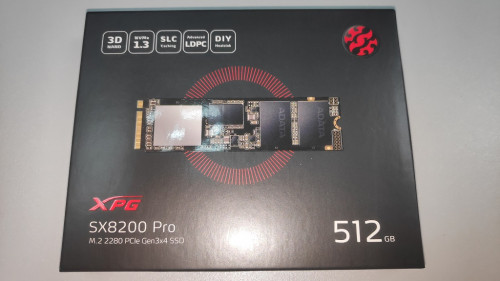
Just received another unit of the 512GB today
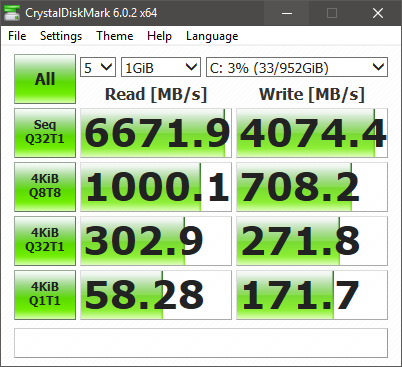
Can't wait to get back home and format my PC later tonight then see what kind of speed can I get with 2 units of ADATA SX8200 Pro 512GB on RAID 0 biggrin.gif

user posted image
TSxxboxx
post May 9 2019, 05:17 PM

The mind is for having ideas, not holding them
*******
Senior Member
5,261 posts

Joined: Oct 2004
From: J@Y B33


QUOTE(1024kbps @ May 8 2019, 10:32 PM)
If you overclock, especially RAM, reset to default, don't troubleshooting with OC, you will going nowhere.

Post the BSOD and see which service or driver causing problem, check if it's the same driver causing bluescreen.

Recent Windows update is the problem i think, it's more sensitive to overclocking now, I had to revert the RAM overclock to make Win 10 usable.
*

I overlooked that he got overclock the RAM. Yeah OC RAM definitely will cause stability issue.


QUOTE(sHawTY @ May 9 2019, 12:38 PM)
Just received another unit of the 512GB today
Can't wait to get back home and format my PC later tonight then see what kind of speed can I get with 2 units of ADATA SX8200 Pro 512GB on RAID 0 biggrin.gif

user posted image
*

Wah buy another one, is it cheap now? biggrin.gif

This post has been edited by xxboxx: May 9 2019, 05:18 PM
1024kbps
post May 9 2019, 09:19 PM

李素裳
*******
Senior Member
6,015 posts

Joined: Feb 2007


QUOTE(xxboxx @ May 9 2019, 05:17 PM)
I overlooked that he got overclock the RAM. Yeah OC RAM definitely will cause stability issue.
Wah buy another one, is it cheap now? biggrin.gif
*
After 5 years you can see him showing off this
user posted image

Joke aside, it was an Fusion IO workstation SSD, the company already sold to Sandisk and now WD.
sHawTY
post May 9 2019, 09:49 PM

Frequent Reporter
********
All Stars
14,909 posts

Joined: Jul 2005

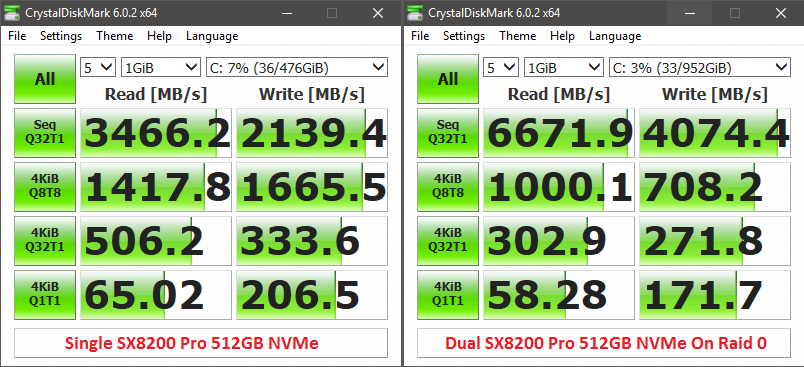
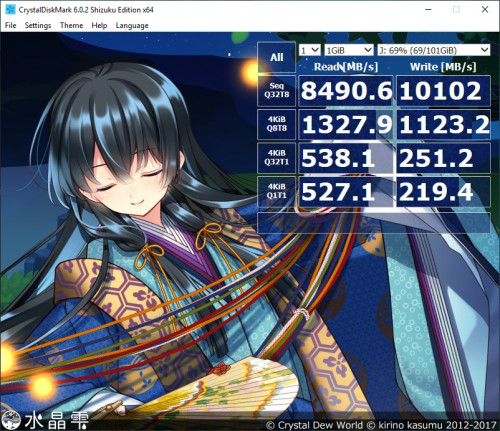
Something wrong. The 4KB speed is wayyyyyy too low
It's even slower than a single SX8200 Pro. Must be my RAID configuration. Or I should move the 2nd SX8200 Pro to another slot on my X399 board since Threadripper is dual die on a single processor unlike most processors

user posted image

This post has been edited by sHawTY: May 9 2019, 09:50 PM
TSxxboxx
post May 10 2019, 10:56 AM

The mind is for having ideas, not holding them
*******
Senior Member
5,261 posts

Joined: Oct 2004
From: J@Y B33


QUOTE(sHawTY @ May 9 2019, 09:49 PM)
Something wrong. The 4KB speed is wayyyyyy too low
It's even slower than a single SX8200 Pro. Must be my RAID configuration. Or I should move the 2nd SX8200 Pro to another slot on my X399 board since Threadripper is dual die on a single processor unlike most processors

user posted image
*

Could it be because of the access time?
https://www.tomshardware.com/reviews/ssd-ra...ark,3485-6.html

Also setting the block size too big will have adverse impact when reading/writing small size file.

But I feel as long as you use and feel there's improvement compared when you using single SSD then it's good enough. Your seq result so high. biggrin.gif
sHawTY
post May 10 2019, 11:20 AM

Frequent Reporter
********
All Stars
14,909 posts

Joined: Jul 2005

QUOTE(xxboxx @ May 10 2019, 10:56 AM)
Could it be because of the access time?
https://www.tomshardware.com/reviews/ssd-ra...ark,3485-6.html

Also setting the block size too big will have adverse impact when reading/writing small size file.

But I feel as long as you use and feel there's improvement compared when you using single SSD then it's good enough. Your seq result so high. biggrin.gif
Not quite sure what's causing these result
Sequential speed is not the whole story

The difference is too much sweat.gif

user posted image
TSxxboxx
post May 10 2019, 12:10 PM

The mind is for having ideas, not holding them
*******
Senior Member
5,261 posts

Joined: Oct 2004
From: J@Y B33


QUOTE(sHawTY @ May 10 2019, 11:20 AM)
Not quite sure what's causing these result
Sequential speed is not the whole story

The difference is too much sweat.gif

user posted image
*

Only the random 4KB big drop. In actual usage the difference is only in nanoseconds biggrin.gif

Is it both benchmark on the same CPU? I ask because Threadripper know for it's latency issue.
sHawTY
post May 10 2019, 12:22 PM

Frequent Reporter
********
All Stars
14,909 posts

Joined: Jul 2005

QUOTE(xxboxx @ May 10 2019, 12:10 PM)
Is it both benchmark on the same CPU? I ask because Threadripper know for it's latency issue.
Yeap. 2950x
TSxxboxx
post May 10 2019, 12:57 PM

The mind is for having ideas, not holding them
*******
Senior Member
5,261 posts

Joined: Oct 2004
From: J@Y B33


QUOTE(sHawTY @ May 10 2019, 12:22 PM)
Yeap. 2950x
*

Then maybe because of the CPU. Anyways it's very small and plenty of random files, so it does not affect much.
1024kbps
post May 10 2019, 03:10 PM

李素裳
*******
Senior Member
6,015 posts

Joined: Feb 2007


QUOTE(sHawTY @ May 10 2019, 11:20 AM)
Not quite sure what's causing these result
Sequential speed is not the whole story

The difference is too much sweat.gif

user posted image
*
hardware raid or software raid?
sHawTY
post May 10 2019, 09:57 PM

Frequent Reporter
********
All Stars
14,909 posts

Joined: Jul 2005

QUOTE(1024kbps @ May 10 2019, 03:10 PM)
hardware raid or software raid?
If by hardware you mean using a special PCI-e card, no
Loaded AMD RAID driver while installing Windows 10
1024kbps
post May 11 2019, 12:02 AM

李素裳
*******
Senior Member
6,015 posts

Joined: Feb 2007


QUOTE(sHawTY @ May 10 2019, 09:57 PM)
If by hardware you mean using a special PCI-e card, no
Loaded AMD RAID driver while installing Windows 10
*
That's hardware RAID with option ROM, try to tweak the settings, but you might have to recreate RAID array = reinstall Windows lol sweat.gif
As far as i know RAID on AMD desktop class mobo is only good for HDD, performance wise Intel might be better, or something like this http://highpoint-tech.com/USA_new/CS-product_nvme.htm
David_78
post May 11 2019, 12:11 AM

Getting Started
**
Junior Member
140 posts

Joined: Dec 2008
latest transcend 1TB NMVE also had same speed bro, even cheaper RM 600 for 1 TB, 3200 read 2500 write.
1024kbps
post May 11 2019, 02:00 AM

李素裳
*******
Senior Member
6,015 posts

Joined: Feb 2007


Probably related:
A Write-Through Cache Method to Improve Small Write Performance of SSD-Based RAID
https://ieeexplore.ieee.org/document/8026840
derthvadar
post May 14 2019, 06:27 PM

(ง •̀_•́)ง
******
Senior Member
1,794 posts

Joined: Feb 2016
From: Bikini Bottom
Just receive my package today. I will do clean install of Windows 10 this weekend.

user posted image


drool.gif
sHawTY
post May 14 2019, 08:14 PM

Frequent Reporter
********
All Stars
14,909 posts

Joined: Jul 2005

QUOTE(1024kbps @ May 11 2019, 02:00 AM)
A Write-Through Cache Method to Improve Small Write Performance of SSD-Based RAID
Done, but no major improvement
The 4KiB changed from 1000MB/s to about 1038MB/s
However the sequential read speed drops from 6600MB/s to 5200MB/s sweat.gif
1024kbps
post May 14 2019, 10:55 PM

李素裳
*******
Senior Member
6,015 posts

Joined: Feb 2007


QUOTE(sHawTY @ May 14 2019, 08:14 PM)
Done, but no major improvement
The 4KiB changed from 1000MB/s to about 1038MB/s
However the sequential read speed drops from 6600MB/s to 5200MB/s sweat.gif
*
You should use it for large cache for PS, or Video editing, RAID tends to increase latency with more drive added, also stock RAID controller does not offer much option compares to dedicated RAID card,
Pretty much like iGPU vs dedicated PCIE GPU analogy.

There should be more option to play, but i dont use it for ages since my raid HDD broken lol/

Also make sure you're using latest RAID driver, not the WHQL driver form microsoft.

user posted image
Samsung Rapid mode sweat.gif

This post has been edited by 1024kbps: May 14 2019, 11:11 PM
sHawTY
post May 15 2019, 09:02 AM

Frequent Reporter
********
All Stars
14,909 posts

Joined: Jul 2005

QUOTE(1024kbps @ May 14 2019, 10:55 PM)
There should be more option to play, but i dont use it for ages since my raid HDD broken lol/
Not much option in Asrock UEFI, only available option is the cache size, no block size option available
QUOTE(1024kbps @ May 14 2019, 10:55 PM)
Also make sure you're using latest RAID driver, not the WHQL driver form microsoft.
I'm using official AMD NVMe RAID driver
7cantona
post May 16 2019, 03:17 AM

On my way
****
Junior Member
586 posts

Joined: Apr 2019
thumbsup.gif a vry comprehensive review rclxms.gif

8 Pages « < 2 3 4 5 6 > » Top
 

Change to:
| Lo-Fi Version
0.0159sec    0.50    6 queries    GZIP Disabled
Time is now: 19th December 2025 - 05:49 AM