Welcome Guest ( Log In | Register )

Outline · [ Standard ] · Linear+

 Adata XPG SX8200 Pro 512GB NVME SSD, Affordable alternative for high speed

views
     
sHawTY
post Dec 26 2018, 07:37 AM

Frequent Reporter
********
All Stars
14,909 posts

Joined: Jul 2005

QUOTE(Vigilant @ Dec 26 2018, 03:04 AM)
xxboxx Where can I get the NVME at RM440?
Buy from this store:
https://shopee.com.my/ADATA-XPG-SX8200-PRO-...3299.1597395557

Do not buy from EIT STORE. Paid to them on 1 November, 12 November still hasn't shipped
No explanation whatsoever from the store & they never reply my chat messages eventhough they read it
Tired of waiting, I request for a refund directly with Lazada help center, luckily got a refund

Then I proceed to order with GT Mart on 12 November. 14 November my SSD already arrived thumbsup.gif
sHawTY
post Dec 26 2018, 09:29 AM

Frequent Reporter
********
All Stars
14,909 posts

Joined: Jul 2005

QUOTE(Vigilant @ Dec 26 2018, 08:42 AM)
Actually the normal SRP is how much if want to get it from a physical store instead of online?
Why do people still insist on buying from physical stores in this day & age? sweat.gif
sHawTY
post Dec 26 2018, 11:04 AM

Frequent Reporter
********
All Stars
14,909 posts

Joined: Jul 2005

QUOTE(Vigilant @ Dec 26 2018, 09:36 AM)
Well, to avoid something such as your case for instance
That's why I gave the GT Mart link
The problemaitc seller is the EIT Store
QUOTE(k town shit @ Dec 26 2018, 09:58 AM)
is this a graphic card for GPU or hard disk for storage? Why it looks like plug into the graphic card port?
Baru keluar dari gua ke bang?
Its a solid state drive for storage

M.2 NVMe Solid State Drive has been available since 2013
sHawTY
post Jan 20 2019, 11:56 AM

Frequent Reporter
********
All Stars
14,909 posts

Joined: Jul 2005

QUOTE(nrw @ Jan 13 2019, 03:43 PM)
those adata's tend to take a bigger hit compared to lets say the samsung's.
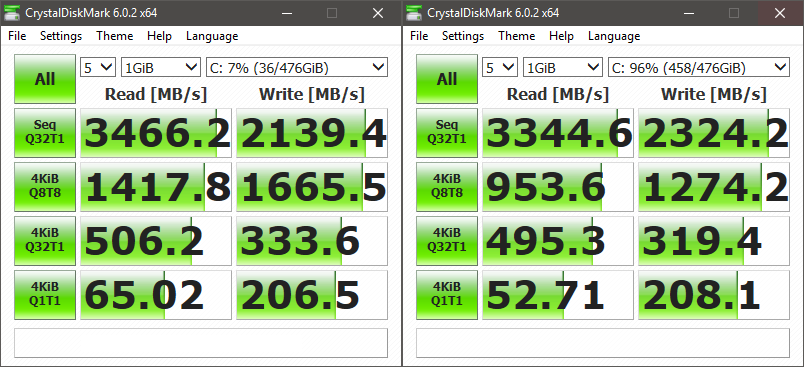
Although there is a speed decrease, it's not to a level where it goes down lower than SATA SSD speed
Below is my test results between 7% and 96%

user posted image

With the price difference between a Samsung 970 Pro 512GB at RM1K++ & ADATA SX8200 Pro 512GB at RM435, I'd take the ADATA anyday

This post has been edited by sHawTY: Jan 22 2019, 03:19 PM
sHawTY
post Jan 22 2019, 03:20 PM

Frequent Reporter
********
All Stars
14,909 posts

Joined: Jul 2005

QUOTE(caloyness @ Jan 22 2019, 03:13 PM)
i bought this sx8200 pro last week and use it on my B450 board.
so far the performance is okay, but sometimes im getting
"BSOD : unexpected_Store_exception"

around 2 times happened in 1 week, in happens when monitor goes to sleep or pc when its idle for long time, then suddenly blue screen with this stop code.

this is running on a fresh win 10 pro after updating windows.
Are you having the same issue if you use another SSD?
Can state the model of your motherboard
sHawTY
post Jan 22 2019, 03:48 PM

Frequent Reporter
********
All Stars
14,909 posts

Joined: Jul 2005

QUOTE(caloyness @ Jan 22 2019, 03:23 PM)
Only happened since i switch to SX8200 pro as my main OS drive.
Does that mean you have another SSD that doesn't have this issue?
sHawTY
post Feb 4 2019, 03:40 PM

Frequent Reporter
********
All Stars
14,909 posts

Joined: Jul 2005

QUOTE(xxboxx @ Jan 29 2019, 01:14 PM)
Generic OFA NVMe driver v1.5.0.0 from
OFA NVMe driver slows down the SSD performance
My SX8200 Pro read & write speed drops down a lot after using the OFA NVMe driver
sHawTY
post Feb 5 2019, 04:17 AM

Frequent Reporter
********
All Stars
14,909 posts

Joined: Jul 2005

QUOTE(xxboxx @ Feb 4 2019, 09:01 PM)
Which driver you using now? SMART info can be displayed?
Generic Windows 10 NVMe driver
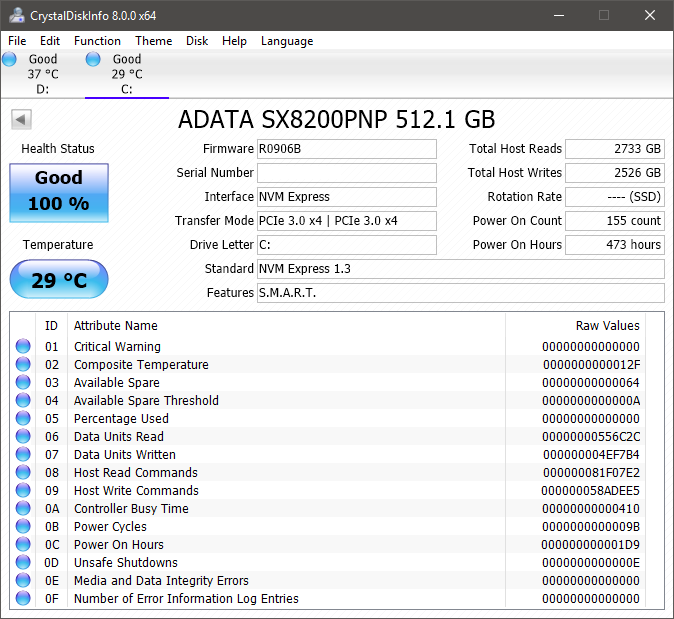
Yes, SMART information is displayed correctly in CrystalDiskInfo

Well except the temperature reading. I don't believe the temperature reading is correct since the SSD is sitting between 2 x RX 580. Even when gaming the temperature never exceeds 31°C

user posted image
sHawTY
post Feb 5 2019, 04:31 PM

Frequent Reporter
********
All Stars
14,909 posts

Joined: Jul 2005

QUOTE(xxboxx @ Feb 5 2019, 10:27 AM)
You already on 1809 when install this SSD? Or clean install 1809?
Clean install 1809
QUOTE(xxboxx @ Feb 5 2019, 10:27 AM)
My temp reading is around 39° when light workload and  45° when gaming.
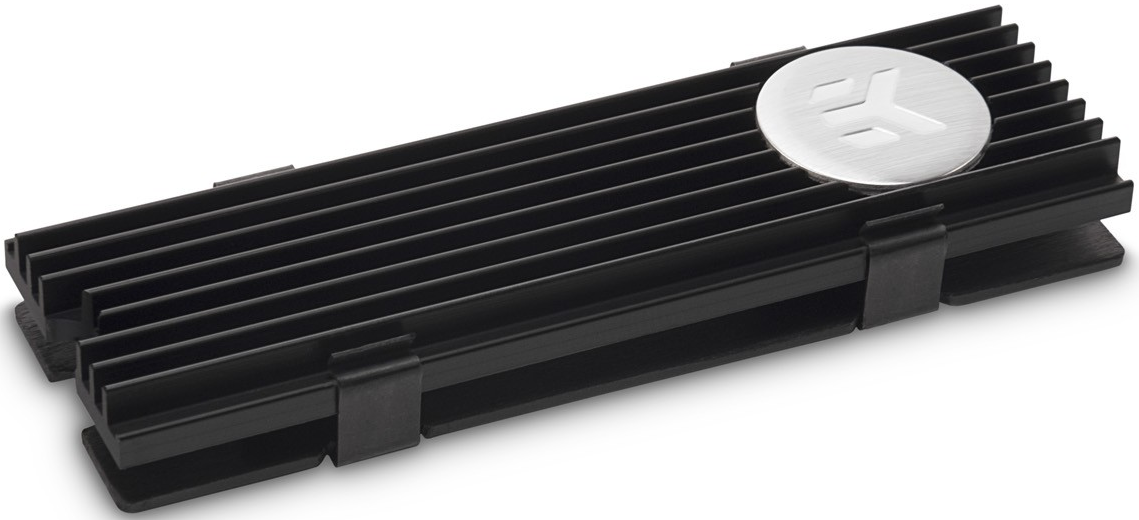
I'm using EK-M.2 NVMe Heatsink on the SX8200 Pro although I think the temperature is still incorrect

user posted image

This post has been edited by sHawTY: Feb 5 2019, 04:35 PM
sHawTY
post Feb 5 2019, 11:01 PM

Frequent Reporter
********
All Stars
14,909 posts

Joined: Jul 2005

QUOTE(xxboxx @ Feb 5 2019, 09:51 PM)
Yours in air conditioning room? Mine is not. I also have thick heatsink as the MB comes with it. When gaming my GPU is 75° and CPU is 55°
No air conditioner
My GPU is around 85°C at maximum load
Whereas my CPU never exceed 45°C because it's watercooled

Although the EK-M.2 heatsink does cool both the top & bottom part of the SSD, not like all M.2 motherboard heatsink that only cools the top of the SSD

This post has been edited by sHawTY: Feb 5 2019, 11:01 PM
sHawTY
post May 8 2019, 10:45 AM

Frequent Reporter
********
All Stars
14,909 posts

Joined: Jul 2005

QUOTE(caloyness @ May 7 2019, 11:26 AM)
same with me, i already raise this issue in this forum before.
You raise issue in here for what?
To see if other users has the same issue boleh la biggrin.gif
To get it fixed, speak directly with ADATA. Contact their technical support
sHawTY
post May 9 2019, 12:38 PM

Frequent Reporter
********
All Stars
14,909 posts

Joined: Jul 2005

Just received another unit of the 512GB today
Can't wait to get back home and format my PC later tonight then see what kind of speed can I get with 2 units of ADATA SX8200 Pro 512GB on RAID 0 biggrin.gif

user posted image
sHawTY
post May 9 2019, 09:49 PM

Frequent Reporter
********
All Stars
14,909 posts

Joined: Jul 2005

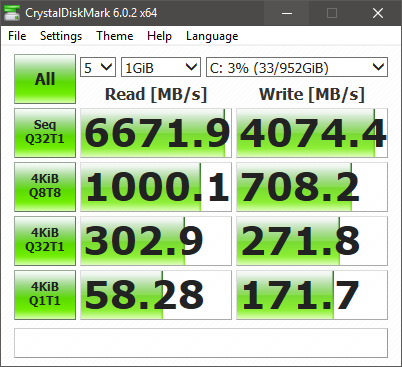
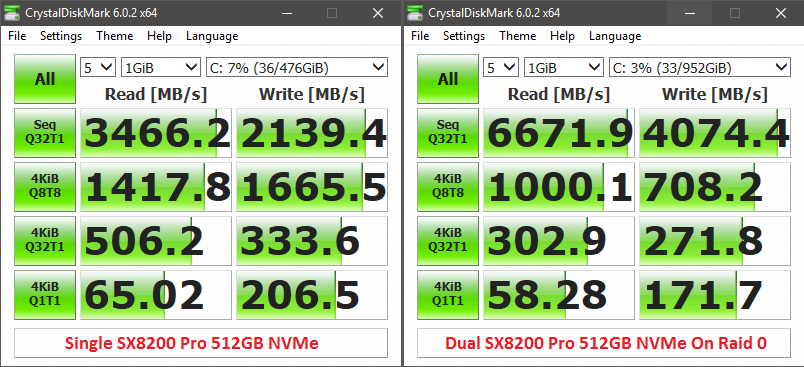
Something wrong. The 4KB speed is wayyyyyy too low
It's even slower than a single SX8200 Pro. Must be my RAID configuration. Or I should move the 2nd SX8200 Pro to another slot on my X399 board since Threadripper is dual die on a single processor unlike most processors

user posted image

This post has been edited by sHawTY: May 9 2019, 09:50 PM
sHawTY
post May 10 2019, 11:20 AM

Frequent Reporter
********
All Stars
14,909 posts

Joined: Jul 2005

QUOTE(xxboxx @ May 10 2019, 10:56 AM)
Could it be because of the access time?
https://www.tomshardware.com/reviews/ssd-ra...ark,3485-6.html

Also setting the block size too big will have adverse impact when reading/writing small size file.

But I feel as long as you use and feel there's improvement compared when you using single SSD then it's good enough. Your seq result so high. biggrin.gif
Not quite sure what's causing these result
Sequential speed is not the whole story

The difference is too much sweat.gif

user posted image
sHawTY
post May 10 2019, 12:22 PM

Frequent Reporter
********
All Stars
14,909 posts

Joined: Jul 2005

QUOTE(xxboxx @ May 10 2019, 12:10 PM)
Is it both benchmark on the same CPU? I ask because Threadripper know for it's latency issue.
Yeap. 2950x
sHawTY
post May 10 2019, 09:57 PM

Frequent Reporter
********
All Stars
14,909 posts

Joined: Jul 2005

QUOTE(1024kbps @ May 10 2019, 03:10 PM)
hardware raid or software raid?
If by hardware you mean using a special PCI-e card, no
Loaded AMD RAID driver while installing Windows 10
sHawTY
post May 14 2019, 08:14 PM

Frequent Reporter
********
All Stars
14,909 posts

Joined: Jul 2005

QUOTE(1024kbps @ May 11 2019, 02:00 AM)
A Write-Through Cache Method to Improve Small Write Performance of SSD-Based RAID
Done, but no major improvement
The 4KiB changed from 1000MB/s to about 1038MB/s
However the sequential read speed drops from 6600MB/s to 5200MB/s sweat.gif
sHawTY
post May 15 2019, 09:02 AM

Frequent Reporter
********
All Stars
14,909 posts

Joined: Jul 2005

QUOTE(1024kbps @ May 14 2019, 10:55 PM)
There should be more option to play, but i dont use it for ages since my raid HDD broken lol/
Not much option in Asrock UEFI, only available option is the cache size, no block size option available
QUOTE(1024kbps @ May 14 2019, 10:55 PM)
Also make sure you're using latest RAID driver, not the WHQL driver form microsoft.
I'm using official AMD NVMe RAID driver
sHawTY
post Jul 8 2019, 03:24 PM

Frequent Reporter
********
All Stars
14,909 posts

Joined: Jul 2005

QUOTE(Donchay @ Jun 5 2019, 12:13 PM)
1 to 1 replacement is done, same situation..

Guess it could be the drivers sad.gif
If 1-to-1 is already done but the issue is still there, it's not the SSD nor the driver that's causing the issue
It's your system

Are you using it in a laptop or a desktop?
The best way to test if the SSD is working fine is try installing the SSD in another desktop / laptop
sHawTY
post Jan 11 2020, 11:56 AM

Frequent Reporter
********
All Stars
14,909 posts

Joined: Jul 2005

QUOTE(Mushwashan @ Jan 11 2020, 11:11 AM)
brand nvme ape yg value for money utk 512GB
The SX8200 Pro

2 Pages  1 2 >Top
 

Change to:
| Lo-Fi Version
0.0319sec    0.65    7 queries    GZIP Disabled
Time is now: 18th December 2025 - 08:14 PM