

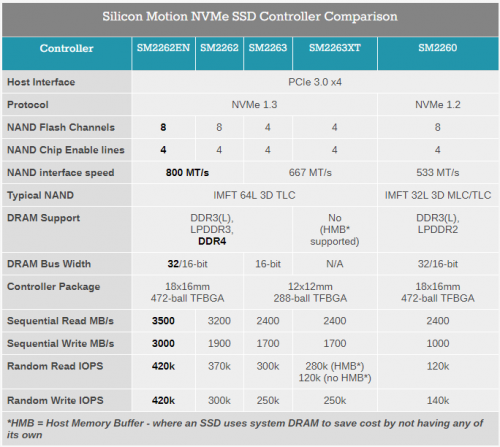
Note: The SX8200 which uses the SM2262 the SX8200 Pro is using the SM2262EN controller which however seems to be having similar issues.
This post has been edited by nrw: Jan 13 2019, 09:42 PM
Adata XPG SX8200 Pro 512GB NVME SSD, Affordable alternative for high speed
|
|
 Jan 13 2019, 05:10 PM Jan 13 2019, 05:10 PM
|
 
Junior Member
398 posts Joined: Jul 2014  
|
additional "The catch is that these drives using the SM2262 controller lose most of their performance advantage when the test is run on a full drive." (quoted from the anandtech review)
Note: The SX8200 which uses the SM2262 the SX8200 Pro is using the SM2262EN controller which however seems to be having similar issues. This post has been edited by nrw: Jan 13 2019, 09:42 PM |
|
|
|
|
|
Jan 20 2019, 11:56 AM
|

All Stars
14,909 posts Joined: Jul 2005 
|
QUOTE(nrw @ Jan 13 2019, 03:43 PM) those adata's tend to take a bigger hit compared to lets say the samsung's. Although there is a speed decrease, it's not to a level where it goes down lower than SATA SSD speedBelow is my test results between 7% and 96% 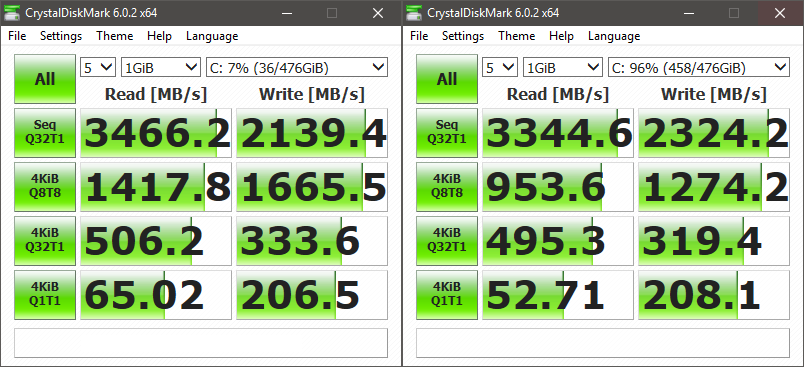 With the price difference between a Samsung 970 Pro 512GB at RM1K++ & ADATA SX8200 Pro 512GB at RM435, I'd take the ADATA anyday This post has been edited by sHawTY: Jan 22 2019, 03:19 PM |
|
|
Jan 22 2019, 03:13 PM
|
|
Junior Member
264 posts Joined: Jan 2016
|
i bought this sx8200 pro last week and use it on my B450 board.
so far the performance is okay, but sometimes im getting "BSOD : unexpected_Store_exception" around 2 times happened in 1 week, in happens when monitor goes to sleep or pc when its idle for long time, then suddenly blue screen with this stop code. this is running on a fresh win 10 pro after updating windows. This post has been edited by caloyness: Jan 22 2019, 03:14 PM |
|
|
Jan 22 2019, 03:20 PM
|
|
All Stars
14,909 posts Joined: Jul 2005
|
QUOTE(caloyness @ Jan 22 2019, 03:13 PM) i bought this sx8200 pro last week and use it on my B450 board. Are you having the same issue if you use another SSD?so far the performance is okay, but sometimes im getting "BSOD : unexpected_Store_exception" around 2 times happened in 1 week, in happens when monitor goes to sleep or pc when its idle for long time, then suddenly blue screen with this stop code. this is running on a fresh win 10 pro after updating windows. Can state the model of your motherboard |
|
|
Jan 22 2019, 03:23 PM
|
|
Junior Member
264 posts Joined: Jan 2016
|
QUOTE(sHawTY @ Jan 22 2019, 03:20 PM) Are you having the same issue if you use another SSD? Only happened since i switch to SX8200 pro as my main OS drive.Can state the model of your motherboard  MSI b450 tomahawk with ryzen 2600 |
|
|
Jan 22 2019, 03:48 PM
|
|
All Stars
14,909 posts Joined: Jul 2005
|
QUOTE(caloyness @ Jan 22 2019, 03:23 PM) Only happened since i switch to SX8200 pro as my main OS drive. Does that mean you have another SSD that doesn't have this issue? |
|
|
|
|
|
Jan 22 2019, 03:58 PM
|
|
Junior Member
264 posts Joined: Jan 2016
|
QUOTE(sHawTY @ Jan 22 2019, 03:48 PM) Does that mean you have another SSD that doesn't have this issue? yes, using 120GB sandisk ultra before upgrading. |
|
|
Jan 22 2019, 05:09 PM
|

Senior Member
5,261 posts Joined: Oct 2004 From: J@Y B33
|
QUOTE(caloyness @ Jan 22 2019, 03:13 PM) i bought this sx8200 pro last week and use it on my B450 board. https://www.errorsolutions.tech/error/unexpected-store-exception-windows-10/so far the performance is okay, but sometimes im getting "BSOD : unexpected_Store_exception" around 2 times happened in 1 week, in happens when monitor goes to sleep or pc when its idle for long time, then suddenly blue screen with this stop code. this is running on a fresh win 10 pro after updating windows. https://social.technet.microsoft.com/Forums...n10itprogeneral https://answers.microsoft.com/en-us/windows...35-e1f3798b54c7 If don't want troubleshoot then maybe try reinstalling fresh Windows Or can try use custom firmware. After I updated to 1809 windows can't read the drive's SMART info. I end up using Generic OFA NVMe driver v1.5.0.0 from Win-Raid forum to get back the SMART info. |
|
|
Jan 22 2019, 05:16 PM
|
|
Junior Member
264 posts Joined: Jan 2016
|
QUOTE(xxboxx @ Jan 22 2019, 05:09 PM) https://www.errorsolutions.tech/error/unexp...ion-windows-10/ thanks bro, will try. https://social.technet.microsoft.com/Forums...n10itprogeneral https://answers.microsoft.com/en-us/windows...35-e1f3798b54c7 If don't want troubleshoot then maybe try reinstalling fresh Windows Or can try use custom firmware. After I updated to 1809 windows can't read the drive's SMART info. I end up using Generic OFA NVMe driver v1.5.0.0 from Win-Raid forum to get back the SMART info. below is per other user issue, almost same like mine. When leaving the PC idle for a long time. QUOTE I did this and still got an UNEXPECTED_STORE_EXCEPTION this morning. my screensaver had frozen overnight and when i went to use the machine, it was unresponsive until the BSOD. |
|
|
Jan 22 2019, 05:27 PM
|
|
Senior Member
5,261 posts Joined: Oct 2004 From: J@Y B33
|
QUOTE(caloyness @ Jan 22 2019, 05:16 PM) thanks bro, will try. I think this is more likely Windows issue. Before I use this SSD I also always encounter BSOD after back from SLEEP, and I always encounter Win Defender notify it stop unauthorized program from making changes to the memory (sometimes even Win own program!) after come back from HIBERNATE, and sometimes BSOD too. It will never fail to happen every time I use SLEEP or HIBERNATE, I now end up only use SHUTDOWN every time. I upgrade from Win 7 to 10, then use migration tools to change SSD twice. So maybe too many broken files already.below is per other user issue, almost same like mine. When leaving the PC idle for a long time. |
|
|
Jan 23 2019, 12:51 AM
|
|
Junior Member
398 posts Joined: Jul 2014
|
QUOTE(sHawTY @ Jan 20 2019, 11:56 AM) Although there is a speed decrease, it's not to a level where it goes down lower than SATA SSD speed Below is my test results between 7% and 96% With the price difference between a Samsung 970 Pro 512GB at RM1K++ & ADATA SX8200 Pro 512GB at RM435, I'd take the ADATA anyday 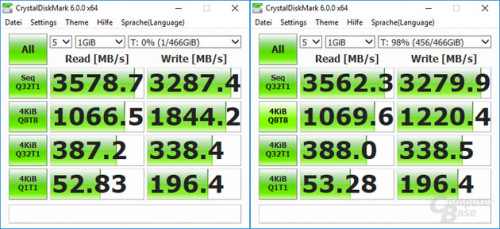 In comparison, new 970 Evo Plus. Note how good it is at keeping the speed. The only noticeable decreasement to be seen at 4KiB Q8T8. However I agree with you (like I have said before) that at the current price point it is the best choice. I merely wanted to point out the lack of this characteristic in your initial review which changes your conclusion abit, after all. Thanks & cheers This post has been edited by nrw: Jan 23 2019, 12:56 AM |
|
|
Jan 26 2019, 06:41 AM
|

Junior Member
320 posts Joined: Jun 2009 
|
Does this drive gets hot? Like after heavy benchmark etc
|
|
|
Jan 27 2019, 05:57 PM
|

Junior Member
765 posts Joined: Jun 2007
|
good price for performance
|
|
|
|
|
|
Jan 27 2019, 07:45 PM
|

Junior Member
247 posts Joined: Feb 2010
|
want to ask why adata toolbox temperature display error?
|
|
|
Jan 29 2019, 01:14 PM
|
|
Senior Member
5,261 posts Joined: Oct 2004 From: J@Y B33
|
QUOTE(Marcion @ Jan 27 2019, 07:45 PM) want to ask why adata toolbox temperature display error? It's Windows driver issue. After I updated to 1809 windows can't read the drive's SMART info. I end up using Generic OFA NVMe driver v1.5.0.0 from Win-Raid forum to get back the SMART info. |
|
|
Jan 29 2019, 07:34 PM
|
|
Junior Member
247 posts Joined: Feb 2010
|
QUOTE(xxboxx @ Jan 29 2019, 02:14 PM) It's Windows driver issue. After I updated to 1809 windows can't read the drive's SMART info. I end up using Generic OFA NVMe driver v1.5.0.0 from Win-Raid forum to get back the SMART info. how install it to work? |
|
|
Jan 29 2019, 10:44 PM
|
|
Senior Member
5,261 posts Joined: Oct 2004 From: J@Y B33
|
QUOTE(Marcion @ Jan 29 2019, 07:34 PM) how install it to work? On Device Manager, look for Disk drives > ADATA SX8200, right click > update driver > let me pick > Have Disk, browse to the folder that you extracted |
|
|
Jan 30 2019, 08:03 PM
|
|
Junior Member
247 posts Joined: Feb 2010
|
QUOTE(xxboxx @ Jan 29 2019, 11:44 PM) On Device Manager, look for Disk drives > ADATA SX8200, right click > update driver > let me pick > Have Disk, browse to the folder that you extracted no wonder it still don't work mine is adata XPG GAMMIX S11 not SX8200 |
|
|
Jan 31 2019, 02:25 PM
|
|
Senior Member
5,261 posts Joined: Oct 2004 From: J@Y B33
|
QUOTE(Marcion @ Jan 30 2019, 08:03 PM) no wonder it still don't work mine is adata XPG GAMMIX S11 not SX8200 Hahaha lolAnother way that I found while googling is to fresh install Windows. But this is on different computer with different nvme drive. So don't know iwill it work the same with ADATA. |
|
|
Feb 4 2019, 03:40 PM
Show posts by this member only | IPv6 | Post
#40
|
|
All Stars
14,909 posts Joined: Jul 2005
|
QUOTE(xxboxx @ Jan 29 2019, 01:14 PM) Generic OFA NVMe driver v1.5.0.0 from OFA NVMe driver slows down the SSD performanceMy SX8200 Pro read & write speed drops down a lot after using the OFA NVMe driver |
| Change to: |  0.0259sec 0.0259sec
 0.83 0.83
 6 queries 6 queries
 GZIP Disabled GZIP Disabled
Time is now: 19th December 2025 - 02:19 AM |
 Quote
Quote