Outline ·
[ Standard ] ·
Linear+
Adata XPG SX8200 Pro 512GB NVME SSD, Affordable alternative for high speed
|
caloyness
|
 Jan 22 2019, 03:13 PM Jan 22 2019, 03:13 PM
|
Getting Started


|
i bought this sx8200 pro last week and use it on my B450 board.
so far the performance is okay, but sometimes im getting
"BSOD : unexpected_Store_exception"
around 2 times happened in 1 week, in happens when monitor goes to sleep or pc when its idle for long time, then suddenly blue screen with this stop code.
this is running on a fresh win 10 pro after updating windows.
This post has been edited by caloyness: Jan 22 2019, 03:14 PM
|
|
|
|
|
|
caloyness
|
Jan 22 2019, 03:23 PM
|
Getting Started
|
QUOTE(sHawTY @ Jan 22 2019, 03:20 PM) Are you having the same issue if you use another SSD? Can state the model of your motherboard Only happened since i switch to SX8200 pro as my main OS drive. MSI b450 tomahawk with ryzen 2600 |
|
|
|
|
|
caloyness
|
Jan 22 2019, 03:58 PM
|
Getting Started
|
QUOTE(sHawTY @ Jan 22 2019, 03:48 PM) Does that mean you have another SSD that doesn't have this issue? yes, using 120GB sandisk ultra before upgrading. |
|
|
|
|
|
caloyness
|
Jan 22 2019, 05:16 PM
|
Getting Started
|
QUOTE(xxboxx @ Jan 22 2019, 05:09 PM) https://www.errorsolutions.tech/error/unexp...ion-windows-10/https://social.technet.microsoft.com/Forums...n10itprogeneralhttps://answers.microsoft.com/en-us/windows...35-e1f3798b54c7If don't want troubleshoot then maybe try reinstalling fresh Windows Or can try use custom firmware. After I updated to 1809 windows can't read the drive's SMART info. I end up using Generic OFA NVMe driver v1.5.0.0 from Win-Raid forum to get back the SMART info. thanks bro, will try. below is per other user issue, almost same like mine. When leaving the PC idle for a long time. QUOTE I did this and still got an UNEXPECTED_STORE_EXCEPTION this morning. my screensaver had frozen overnight and when i went to use the machine, it was unresponsive until the BSOD.
|
|
|
|
|
|
caloyness
|
May 7 2019, 11:26 AM
|
Getting Started
|
QUOTE(BigSaver @ May 7 2019, 08:46 AM) Guys, Has anyone facing this problem with SX8200 pro? 1) 1st time boot (everytime), bios said no bootable device, then need to restart pc to see the sx8200 drive 2) Leave my pc idle ( like >10 minute) then blue screen happened. Ive done fresh window install for 2nd time already. Yet the problem still appear. Something to do with adata driver? Now thinking to switch to MX500, i know the speed cant match NVME, but the problem above is annoying. Hi bro, same with me, i already raise this issue in this forum before. i leave idle for 1hr or so and then blue screen , stop code : storage something. |
|
|
|
|
|
caloyness
|
May 8 2019, 10:08 AM
|
Getting Started
|
QUOTE(xxboxx @ May 7 2019, 05:05 PM) Your problem still persist until now? doesn't happen all the time, but issue still persist. maybe once a week it happens. |
|
|
|
|
|
caloyness
|
May 8 2019, 04:28 PM
|
Getting Started
|
QUOTE(xxboxx @ May 8 2019, 03:05 PM) Do you have this setting on your SX8200 properties? If got then make sure the red colour that I highlight is not selected 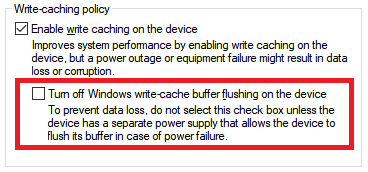 will check later, i didn't tweak anything so far all stock settings. |
|
|
|
|



 Quote
Quote

 0.0277sec
 0.61
0.61
 7 queries
 GZIP Disabled