Outline ·
[ Standard ] ·
Linear+
TIME [OFFICIAL] TIME Fibre Broadband™ v4, Experience the ONE TRUE 2Gbps
|
jjj2
|
 Apr 13 2022, 10:55 PM Apr 13 2022, 10:55 PM
|

|
QUOTE(cairokl @ Apr 12 2022, 03:04 PM) i subscribed 500mpbs for my TIME broadband, currently dont have WIFI 6 device but Im going to have a lot of smart home devices. If i solely use the router of xiaomi ax3600, will it sufficient? or i still need router xiaomi ax3600 and xiaomi ax3000 as mesh node? 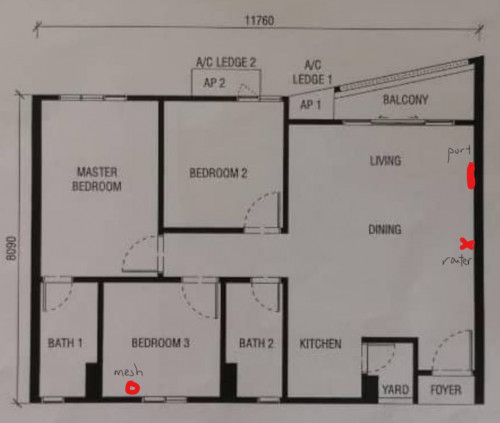 Hi, sorry single router wont work efficiently for your case at the location shown. |
|
|
|
|
|
jun_ng_1208
|
Apr 14 2022, 09:52 AM
|
|
|
I've just recontracted with TIME for the new 500 MBps plan and also gotten the offer for HG8145X6 and 1 mesh node Currently am using the old TP Link C1200 router in the condo and also modem in the fuse box outside the main door area, I'm wondering when then technician comes to setup the new HG8145X6, do they just replace the C1200 in the living room or do they change the modem outside as well? and also is the wifi coverage of the HG8145X6 much better than the old C1200? this is my condo's layout and where the router is, can you guys suggest where should I put the mesh node for max coverage? 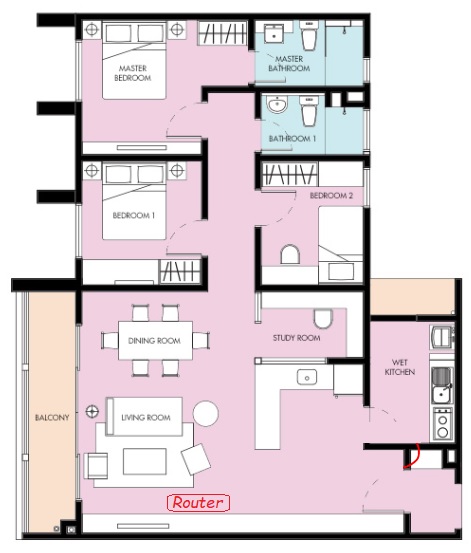 |
|
|
|
|
|
blaze91
|
Apr 14 2022, 04:29 PM
|
|
|
Anyone managed to change DNS configuration through the config file for Huawei WA8021V5 router?
|
|
|
|
|
|
alvinchan826
|
Apr 14 2022, 04:36 PM
|
New Member

|
Plan to take the 100 mbps pkg but convince by agent to take the 500 mbps due to Mesh wifi.
Only 2 person using in my house so is it worth i to pay more and what is Mesh ?
Thanks
This post has been edited by alvinchan826: Apr 14 2022, 04:36 PM
|
|
|
|
|
|
eauyong
|
Apr 14 2022, 07:54 PM
|
Getting Started
|
QUOTE(alvinchan826 @ Apr 14 2022, 04:36 PM) Plan to take the 100 mbps pkg but convince by agent to take the 500 mbps due to Mesh wifi. Only 2 person using in my house so is it worth i to pay more and what is Mesh ? Thanks Same for me 2 person. 100Mbps is good enough from my experience. 5Ghz wifi speed test; ping 10ms., DL120Mbps; UL 108Mbps using the provided HG8145V5. |
|
|
|
|
|
PRSXFENG
|
Apr 14 2022, 08:00 PM
|
|
|
QUOTE(alvinchan826 @ Apr 14 2022, 04:36 PM) Plan to take the 100 mbps pkg but convince by agent to take the 500 mbps due to Mesh wifi. Only 2 person using in my house so is it worth i to pay more and what is Mesh ? Thanks mesh is basically a few routers connected together to create a larger range for the wifi network if your house isnt too big, a single router should suffice plus you can buy your own outside if you do decide you need it later instead of getting tied to 500mbps |
|
|
|
|
|
jjj2
|
Apr 15 2022, 08:24 AM
|
|
|
QUOTE(alvinchan826 @ Apr 14 2022, 04:36 PM) Plan to take the 100 mbps pkg but convince by agent to take the 500 mbps due to Mesh wifi. Only 2 person using in my house so is it worth i to pay more and what is Mesh ? Thanks For 100Mbps, you do have the option to add one time RM99 to upgrade to the HG8145X6 ONT which is more powerful. Depends on your unit size & layout whether you need to for mesh solutions. Thanks. |
|
|
|
|
|
jjj2
|
Apr 15 2022, 08:28 AM
|
|
|
QUOTE(jun_ng_1208 @ Apr 14 2022, 09:52 AM) I've just recontracted with TIME for the new 500 MBps plan and also gotten the offer for HG8145X6 and 1 mesh node Currently am using the old TP Link C1200 router in the condo and also modem in the fuse box outside the main door area, I'm wondering when then technician comes to setup the new HG8145X6, do they just replace the C1200 in the living room or do they change the modem outside as well? Replace the Archer C1200.and also is the wifi coverage of the HG8145X6 much better than the old C1200? Slightly better.this is my condo's layout and where the router is, can you guys suggest where should I put the mesh node for max coverage? 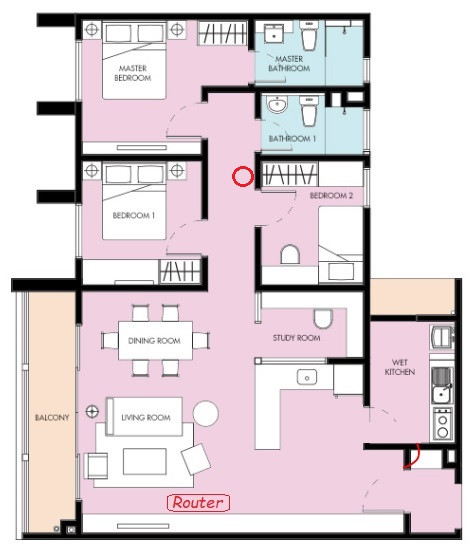 |
|
|
|
|
|
eauyong
|
Apr 15 2022, 08:43 AM
|
Getting Started
|
My apartment size is about 1,000 sq ft and the Huawei HG8145V5 is good all round. No DC for more than 1 month since installed. Device info as below.  -- |
|
|
|
|
|
garybenjamin
|
Apr 15 2022, 12:31 PM
|
New Member
|
QUOTE(jjj2 @ Apr 8 2022, 10:26 AM) Thanks Bro, for Mi AX3000 to pair with HG8145X6 it just plug and play right ? Do I need to do additional setting? |
|
|
|
|
|
jjj2
|
Apr 15 2022, 01:23 PM
|
|
|
QUOTE(garybenjamin @ Apr 15 2022, 12:31 PM) Thanks Bro, for Mi AX3000 to pair with HG8145X6 it just plug and play right ? Do I need to do additional setting? Yes Bro u need to do some settings, either you pair using WPS (this is not mesh ya). Or you hook up with a network cable & set it to become AP. |
|
|
|
|
|
garybenjamin
|
Apr 15 2022, 02:32 PM
|
New Member
|
QUOTE(jjj2 @ Apr 15 2022, 01:23 PM) Yes Bro u need to do some settings, either you pair using WPS (this is not mesh ya). Or you hook up with a network cable & set it to become AP. I see, but i still blur abit bro. Pair using WPS mean it is extender mode already it is not my intention to do it. So to setup mesh environment i think there will be 2 way i can do it right ? 1. Hook up LAN to AX3000 and set AX3000 to AP mode then Mesh to another AX3000 that in masterbed room. But this 1 i will be using HG8145X6 for internet control e.g. white list Mac filtering all here. 2. HG8145X6 as bridge mode push over to AX3000 as gateway, then using MiWIfi interface for all network control. I want to know setup AX3000 as AP or HG8145X6 as Bridge Mode, which coverage and network will be better/more stable? This post has been edited by garybenjamin: Apr 15 2022, 02:35 PM |
|
|
|
|
|
NavarroOne1
|
Apr 17 2022, 01:46 PM
|
New Member
|
I’m getting the Huawei HG8145X6 and 1 mesh node. Is it possible to configure a VPN server at the router stage so my whole house internet connection is routed via VPN? (I couldn’t do in my previous TP-Link Deco M5 setup).
|
|
|
|
|
|
blu.sockz
|
Apr 19 2022, 02:29 PM
|
New Member
|
Can we easily configure Google DNS on HG8145X6? Our need Time assistance?
|
|
|
|
|
|
kraziekd
|
Apr 20 2022, 05:48 AM
|
Getting Started
|
my modem suddenly blink red on LOS.. no connection since last night
what’s the problem?
|
|
|
|
|
|
hirano
|
Apr 20 2022, 10:04 AM
|
|
|
QUOTE(kraziekd @ Apr 20 2022, 05:48 AM) my modem suddenly blink red on LOS.. no connection since last night what’s the problem? Same. From around 12am yesterday until now, no connection. Received sms from TIME at 7am stating disruption of service, that's it. I can't even be online for my work right now (mobile data not sufficient). |
|
|
|
|
|
kraziekd
|
Apr 20 2022, 10:41 AM
|
Getting Started
|
QUOTE(hirano @ Apr 20 2022, 10:04 AM) Same. From around 12am yesterday until now, no connection. Received sms from TIME at 7am stating disruption of service, that's it. I can't even be online for my work right now (mobile data not sufficient). mine adi ok, guess they fixed the problem in my area |
|
|
|
|
|
hsiengloong
|
Apr 21 2022, 02:26 PM
|
|
|
QUOTE(jjj2 @ Apr 8 2022, 10:16 AM) Hi there, thanks for the reply.. Sorry I was away for the past 2 weeks and hence, was not able to reply. My router is Asus RT-AC5300 model.. Would you suggest bridge mode or the AP mode? Currently I am running temporarily on AP mode and for the 2.4G connection, the max speed I can get is only 30mbps (im on 100mbps). Im not sure if its the settings on my Asus or its because of the AP mode.. Thank you Hsieng Loong |
|
|
|
|
|
jjj2
|
Apr 21 2022, 10:04 PM
|
|
|
QUOTE(garybenjamin @ Apr 15 2022, 02:32 PM) I see, but i still blur abit bro. Pair using WPS mean it is extender mode already it is not my intention to do it. So to setup mesh environment i think there will be 2 way i can do it right ? 1. Hook up LAN to AX3000 and set AX3000 to AP mode then Mesh to another AX3000 that in masterbed room. But this 1 i will be using HG8145X6 for internet control e.g. white list Mac filtering all here. 2. HG8145X6 as bridge mode push over to AX3000 as gateway, then using MiWIfi interface for all network control. I want to know setup AX3000 as AP or HG8145X6 as Bridge Mode, which coverage and network will be better/more stable? Use, X6 as ONT with Router function. |
|
|
|
|
|
jjj2
|
Apr 21 2022, 10:19 PM
|
|
|
QUOTE(NavarroOne1 @ Apr 17 2022, 01:46 PM) I’m getting the Huawei HG8145X6 and 1 mesh node. Is it possible to configure a VPN server at the router stage so my whole house internet connection is routed via VPN? (I couldn’t do in my previous TP-Link Deco M5 setup). Sorry Nope. |
|
|
|
|



 Quote
Quote




 0.0351sec
 1.00
1.00
 6 queries
 GZIP Disabled