

Hi Guys, I would like to switch from Unifi to TIME 100mb. what the best offer now? thanks
TIME [OFFICIAL] TIME Fibre Broadband™ v4, Experience the ONE TRUE 2Gbps
TIME [OFFICIAL] TIME Fibre Broadband™ v4, Experience the ONE TRUE 2Gbps
|
|
 Jan 25 2022, 03:48 PM Jan 25 2022, 03:48 PM
|
 
Junior Member
675 posts Joined: Jun 2014 
|
Hi Guys, I would like to switch from Unifi to TIME 100mb. what the best offer now? thanks
|
|
|
|
|
|
Jan 25 2022, 04:50 PM
|

Junior Member
98 posts Joined: Nov 2021
|
How can I create/open a support ticket with TIME without going through this stupid chatbot?
|
|
|
Jan 25 2022, 07:06 PM
Show posts by this member only | IPv6 | Post
#8483
|

Junior Member
41 posts Joined: Sep 2021
|
QUOTE(jjj2 @ Jan 21 2022, 09:45 AM)  QUOTE(jjj2 @ Jan 21 2022, 09:46 AM) The credentials is written on the back of the ONT. Tq jjj2 for the info. Much appreciated. |
|
|
Jan 25 2022, 07:09 PM
Show posts by this member only | IPv6 | Post
#8484
|
|
Junior Member
41 posts Joined: Sep 2021
|
QUOTE(rezzorix @ Jan 25 2022, 04:50 PM) How can I create/open a support ticket with TIME without going through this stupid chatbot? Email them bro, cs@time.com.myNot sure if allowed to post here.🤷 |
|
|
Jan 25 2022, 07:18 PM
|
|
Junior Member
41 posts Joined: Sep 2021
|
QUOTE(jjj2 @ Jan 21 2022, 09:45 AM) But from layman point of view, seems as though my setup with the c1200 is outperforming the new huawei 2 in 1 device. Is it correct that the new huawei 2 in 1 should actually give better performance in terms of coverage? Or is it just because time using this hardware for new sign ups? My main concern is only coverage around the house. |
|
|
Jan 25 2022, 09:11 PM
|
 
Moderator
9,276 posts Joined: Jan 2005 From: KL. Best place in Malaysia. Nuff said 
|
QUOTE(rezzorix @ Jan 25 2022, 04:50 PM) How can I create/open a support ticket with TIME without going through this stupid chatbot? https://www.time.com.my/talk-to-us |
|
|
|
|
|
Jan 25 2022, 09:38 PM
Show posts by this member only | IPv6 | Post
#8487
|

Senior Member
3,608 posts Joined: Feb 2006
|
QUOTE(hezaika @ Jan 24 2022, 02:53 AM)  Anyone got this router with installation? how do I set as bridge? , the router is so bad cant even port forward correctly  Looking to use other router and keep it as ONU. Thanks. |
|
|
Jan 25 2022, 09:41 PM
Show posts by this member only | IPv6 | Post
#8488
|
|
Senior Member
3,608 posts Joined: Feb 2006
|
QUOTE(Jazzer00 @ Jan 25 2022, 07:18 PM) Hi jjj2, i know this might sound silly as I don’t really know the difference between the specs. Hi, we discovered in certain unit layout, the old Archer C1200 is actually performing better (in terms of signal coverage) & speed as well.But from layman point of view, seems as though my setup with the c1200 is outperforming the new huawei 2 in 1 device. Is it correct that the new huawei 2 in 1 should actually give better performance in terms of coverage? Or is it just because time using this hardware for new sign ups? My main concern is only coverage around the house. |
|
|
Jan 25 2022, 09:42 PM
Show posts by this member only | IPv6 | Post
#8489
|
|
Senior Member
3,608 posts Joined: Feb 2006
|
QUOTE(rezzorix @ Jan 25 2022, 04:50 PM) How can I create/open a support ticket with TIME without going through this stupid chatbot? Please give them a call at 1800 18 1818. Alternatively, if you have an account/client manager, you may request their help as well.Thanks. |
|
|
Jan 26 2022, 08:35 AM
|

Junior Member
93 posts Joined: Oct 2021 
|
time cheras down
any1 This post has been edited by mgtow tlts: Jan 26 2022, 09:00 AM Attached thumbnail(s) 
|
|
|
Jan 26 2022, 08:56 AM
|
|
Junior Member
24 posts Joined: Nov 2004
|
Yup..me too ..still down
|
|
|
Jan 26 2022, 08:59 AM
|
|
Junior Member
93 posts Joined: Oct 2021
|
QUOTE(cakawari @ Jan 26 2022, 08:56 AM) Yup..me too ..still down u also cheras area ka |
|
|
Jan 26 2022, 09:00 AM
|
|
Junior Member
24 posts Joined: Nov 2004
|
Cheras
|
|
|
|
|
|
Jan 26 2022, 10:05 AM
Show posts by this member only | IPv6 | Post
#8494
|

Senior Member
1,902 posts Joined: Sep 2012
|
QUOTE(Jazzer00 @ Jan 25 2022, 07:18 PM) Hi jjj2, i know this might sound silly as I don’t really know the difference between the specs. But from layman point of view, seems as though my setup with the c1200 is outperforming the new huawei 2 in 1 device. Is it correct that the new huawei 2 in 1 should actually give better performance in terms of coverage? Or is it just because time using this hardware for new sign ups? My main concern is only coverage around the house. QUOTE(jjj2 @ Jan 25 2022, 09:41 PM) Hi, we discovered in certain unit layout, the old Archer C1200 is actually performing better (in terms of signal coverage) & speed as well. QUOTE(Jazzer00 @ Jan 18 2022, 11:09 PM) Hi sifus, need to ask 2 quick questions. Nope. based on my own experience the new Huawei Echolife HG8145V5 2 in 1 router modem signal coverage is rather, mediocre 1)Can we get time to reset the PPPoe credentials for the account.? And 2) I recently signed up for new time account at my new condo unit, the router model given was the huawei HG8145V5 but seems to be lack of coverage compared to the previous time hardware that was given.(old house) If not mistaken it should be the TP-link archer c-1200 model. Lack of coverage meaning my iphone wifi signal bar only 1 bar. Old house used to be 3 bars. Note: my archer was sitting in wooden tv cabinet with the cabinet doors closed. Huawei is just sitting on the floor in the living room. (open air) Distance between router and room is similar. I use the 2.4ghz connection generally. Any ideas/ suggestions/ recommendations? Should i just switch back to the old hardware setup time previously gave? And is that possible? Sorry for the longwinded post 🤣 even if you coupled with the mesh WA8021V5 performance still average, compared to TP-Link AX73 (RM430) or Asus RT-AX56U ( RM399 ), which I recommend for office/house under 1500sq/f. both supports their own mesh system. This post has been edited by JimbeamofNRT: Jan 26 2022, 10:35 AM |
|
|
Jan 26 2022, 10:58 AM
Show posts by this member only | IPv6 | Post
#8495
|
|
Senior Member
1,902 posts Joined: Sep 2012
|
QUOTE(aced84 @ Jan 20 2022, 12:32 AM) Lowyat friends! well, I wonder what's your reaction when you are using the AX3 Pro ( if you think that your current AX3 is a monster ). But yes it is a bang for buck router.I am SUPER HAPPY that I took on JJ's advise! I've never used any Huawei devices so I was in dilemma when I had to make decisions before or during the sign up process for Time broadband service. Back story: I originally signed up on TIME corporate website, they even scheduled a contractor to install my Time broadband few days earlier. However when I was about to confirm with the contractor if I would take on the earlier installation date, I had few questions about MESH pairing because I bought a Huawei AX3 (Dual-core) WiFi 6 router (it's very affordable - less than RM150 on discount day on Shopee, considering how powerful it is!). I had to call in to Time customer support, live chat with the customer support team, and also to question hard on the installation contractor about the pairing choice I had. I can either go with the Huawei router that they currently giving out F.O.C with my 100mbps plan, the WiFi 5 Huawei 2-in-1 HG8145V5 router and pair it with my Huawei AX3 (Dual-core) WiFi 6 router. OR I can pay a one time upgrade fee of RM99 to upgrade the WiFi 5 router to a WiFi 6 2-in-1 HG8145X6 router and pair it with my Huawei AX3 (Dual-core) WiFi 6 router. I've asked 3 different person about it (Time CS team, assigned technician, and a local third party company) they were not able to give me straight-up answers, keep on telling me that they don't have the answer to those things, other than to just ask me use the router that they supply and to get their own MESH nodes. Feeling frustrated, I cancelled the original order, and I looked into Lowyat forum and found JJ! One of his posts was about pairing up the AX3 router! So I reached out to JJ and consulted with him about how to pair up to either one of those routers. After getting to know my unit is over 1300 sqft, JJ advised me to go get the HG8145X6 instead. So eventually I told JJ just help me to sign up to Time, through him! I'm glad I did. Now I after the installation, JJ is still advising me on how to deal with the signaling problem at home. Initially, by only using HG8145X6 alone, he WiFi signal is ok, not superb but good enough, even at the far end and far edge of my house, but the signal and speed was not stable. Sometimes strong sometimes weak, sometimes fast, sometimes slow. After using the REPEATER mode to pair up HG8145X6 and AX3, even when I'm on repeater mode, I can get MAX, FULL SPEED (look at screenshot) at 100mbps when did a speedtest! (Repeater mode with a LAN cable hooked onto my PC)! I can also get more than half of the full speed on WiFi-only setup (need to have WiFi 6 receiver too). HOLY COW! I've never had any devices like this monster AX3 lol.... not to mention that the setup process was so easy, not like other branded routers! Thanks to JJ, I don't have to hesitate when I was making my decision about to upgrade from WiFi 5 to Wifi 6 or not, and how to deal with the pairing stuff etc. The pairing up boosted the WiFi signal to WHOLE HOUSE and I can run full speed at ANY CORNER of the house... With just two units of router! That's really impressive! Again, I want to thank JJ and everyone else who's given help on this section of the forum, you guys are much more helpful than Time's CS haha! 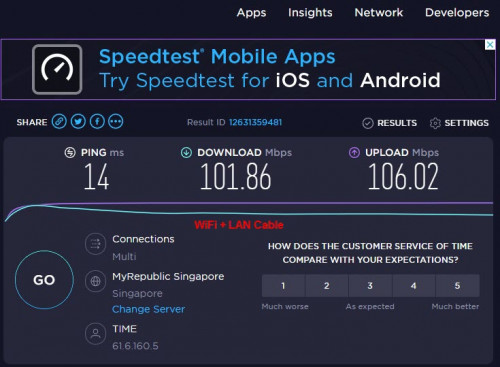 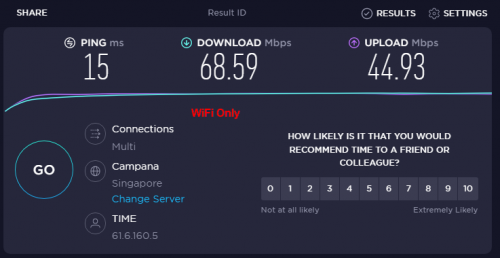 what's the size of your house? 2 storeys? 3 storeys? condo? I noticed that huawei routers always doesn't stated the ram specs been using asuswrt merlin for quite some time I found the interface is very simple This post has been edited by JimbeamofNRT: Jan 26 2022, 11:03 AM |
|
|
Jan 26 2022, 03:17 PM
|
|
Junior Member
93 posts Joined: Oct 2021
|
still no internet in cheras
|
|
|
Jan 26 2022, 03:27 PM
|
|
Junior Member
24 posts Joined: Nov 2004
|
We should claim rebate ..what happen to time..still down
|
|
|
Jan 26 2022, 03:30 PM
|
|
Junior Member
93 posts Joined: Oct 2021
|
QUOTE(cakawari @ Jan 26 2022, 03:27 PM) We should claim rebate ..what happen to time..still down it seems like we 2 only kena...aka only cheras |
|
|
Jan 26 2022, 03:34 PM
Show posts by this member only | IPv6 | Post
#8499
|
|
Junior Member
93 posts Joined: Oct 2021
|
QUOTE(cakawari @ Jan 26 2022, 03:27 PM) We should claim rebate ..what happen to time..still down OK AREADY |
|
|
Jan 26 2022, 11:36 PM
|
|
Senior Member
602 posts Joined: May 2006 From: kay ell
|
QUOTE(trix @ Jan 24 2022, 11:06 AM) Live chat with CS, ask them to change it to bridge mode when you said you had to disable it yourself, how did you do it? i cant login to the modem/router anymore.15m done from waiting to initiate chat until completion But from my recent dealings with them, they somehow were unable to disable the wifi on the ONT. I had to disable it myself. |
| Change to: |  0.0290sec 0.0290sec
 0.97 0.97
 6 queries 6 queries
 GZIP Disabled GZIP Disabled
Time is now: 19th December 2025 - 02:07 AM |
 Quote
Quote