Outline ·
[ Standard ] ·
Linear+
TIME [OFFICIAL] TIME Fibre Broadband™ v4, Experience the ONE TRUE 2Gbps
|
yeapch01
|
 Jul 9 2021, 01:53 PM Jul 9 2021, 01:53 PM
|

|
QUOTE(jason1986 @ Jul 9 2021, 11:35 AM) Hi guys, my JMB finally intends to invite time to deploy fibre at our condo. Can the relevant PIC from time contact me? Thank you. dear bro Thanks for your interest in Time Fibre, kindly feel free to check your pm for further detail Thanks |
|
|
|
|
|
xHj09
|
Jul 12 2021, 12:33 PM
|
|
|
sial, last night connection suddenly super slow dl speed 7Mbps (barely able to watch youtube, getting auto 144p) after reboot router from gateway dl speed improved a bit to 9Mbps, wanted to request customer service to refresh port (used to do it with unifi) but the bot recommended self diagnostics, so i did self diagnostics and saw 'high fibre reading' and raised a ticket after raising ticket then hard reboot by turning off ONU and router, after that LOS red light blinking  working from home with 1 bar 4G maxis data now tough WFH life with shitty maxis line here at kajang |
|
|
|
|
|
FusionXY
|
Jul 12 2021, 01:14 PM
|
|
|
QUOTE(xHj09 @ Jul 12 2021, 12:33 PM) sial, last night connection suddenly super slow dl speed 7Mbps (barely able to watch youtube, getting auto 144p) after reboot router from gateway dl speed improved a bit to 9Mbps, wanted to request customer service to refresh port (used to do it with unifi) but the bot recommended self diagnostics, so i did self diagnostics and saw 'high fibre reading' and raised a ticket after raising ticket then hard reboot by turning off ONU and router, after that LOS red light blinking working from home with 1 bar 4G maxis data now tough WFH life with shitty maxis line here at kajang You're using TIME Fibre or Maxis Fibre. This post has been edited by FusionXY: Jul 12 2021, 01:14 PM |
|
|
|
|
|
xHj09
|
Jul 12 2021, 01:38 PM
|
|
|
QUOTE(FusionXY @ Jul 12 2021, 01:14 PM) You're using TIME Fibre or Maxis Fibre. TIME down. Earliest schedule for technician to check is tomorrow 3pm  Using shitty Maxis data now |
|
|
|
|
|
ahmadmoonsyi
|
Jul 13 2021, 02:17 PM
|
New Member

|
finally got my TIME installed! want to ask which profile to use to connect with my AX20 router? also i got this ONT that also a router (all in one), so i need to call CS first to convert the ONT?  |
|
|
|
|
|
FusionXY
|
Jul 13 2021, 02:18 PM
|
|
|
QUOTE(ahmadmoonsyi @ Jul 13 2021, 02:17 PM) finally got my TIME installed! want to ask which profile to use to connect with my AX20 router? also i got this ONT that also a router (all in one), so i need to call CS first to convert the ONT? Hello, 1st step is contact CS to convert to bridge mode. 2nd step, use custom mode for setting up. Make sure you got PPPoE details ready. |
|
|
|
|
|
ahmadmoonsyi
|
Jul 13 2021, 03:31 PM
|
New Member
|
QUOTE(FusionXY @ Jul 13 2021, 02:18 PM) Hello, 1st step is contact CS to convert to bridge mode. 2nd step, use custom mode for setting up. Make sure you got PPPoE details ready. or i can just choose none right? okay got the pppoe info in the email just now after the installation today. yet to call the CS, will do soon. 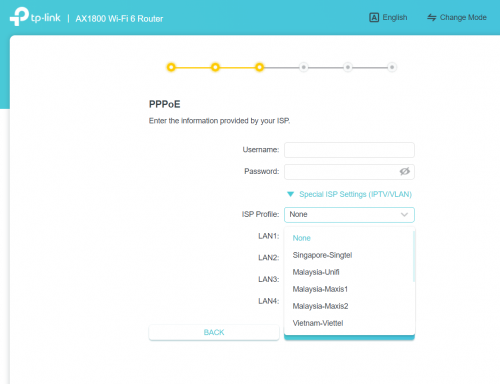 |
|
|
|
|
|
FusionXY
|
Jul 13 2021, 04:52 PM
|
|
|
QUOTE(ahmadmoonsyi @ Jul 13 2021, 03:31 PM) or i can just choose none right? okay got the pppoe info in the email just now after the installation today. yet to call the CS, will do soon. Yes, TIME doesn't need any VLAN Settings. |
|
|
|
|
|
Naskah
|
Jul 14 2021, 05:31 PM
|
Getting Started
|
Hi may i know does it worth free upgrade to Huawei WA8021V5 WiFi mesh with 24 month contract renewal? may i know does it come with wifi6?
|
|
|
|
|
|
FusionXY
|
Jul 14 2021, 06:01 PM
|
|
|
QUOTE(Naskah @ Jul 14 2021, 05:31 PM) Hi may i know does it worth free upgrade to Huawei WA8021V5 WiFi mesh with 24 month contract renewal? may i know does it come with wifi6? It is only WiFi 5. Thank you. |
|
|
|
|
|
Naskah
|
Jul 14 2021, 06:07 PM
|
Getting Started
|
QUOTE(FusionXY @ Jul 14 2021, 06:01 PM) It is only WiFi 5. Thank you. Thanks. |
|
|
|
|
|
battosai
|
Jul 15 2021, 05:47 AM
|
New Member
|
Objective Hardware Upgrading Planned Event: We are upgrading our hardware in order to improve our services to you and ensure a better network.
Type of maintenance Remote
Start Date & Time 16 July 2021 at 00:00:00 hrs (GMT+8)
End Date & Time 16 July 2021 at 06:00:00 hrs (GMT+8)
Estimated Downtime 01 hour(s) 00 minute(s)
cheras permaisuri area
|
|
|
|
|
|
matrism
|
Jul 15 2021, 03:15 PM
|
Getting Started
|
hi all, anyone can point me how to setup mikrotik hap ac2 pppoe ipv6 connection?
|
|
|
|
|
|
stormseeker92
|
Jul 17 2021, 10:05 PM
|
|
|
Hi,
Green Suria Apartment, Jalan Green Suria, BTHO, 43200 Selangor
Got coverage?
|
|
|
|
|
|
FusionXY
|
Jul 17 2021, 10:11 PM
|
|
|
QUOTE(stormseeker92 @ Jul 17 2021, 10:05 PM) Hi, Green Suria Apartment, Jalan Green Suria, BTHO, 43200 Selangor Got coverage? Hello, I'm am sorry to inform that there is no coverage your premise. |
|
|
|
|
|
stormseeker92
|
Jul 17 2021, 10:32 PM
|
|
|
QUOTE(FusionXY @ Jul 17 2021, 10:11 PM) Hello, I'm am sorry to inform that there is no coverage your premise. thanks for the prompt reply. any idea when will install the fibre line? |
|
|
|
|
|
ExHolyAngel
|
Jul 21 2021, 02:00 AM
|
|
|
anyone got any idea why the relocation services under the settings icon gone missing? i need to do a relocation request due to house moving.
|
|
|
|
|
|
wirelessbuyer
|
Jul 21 2021, 12:24 PM
|
|
|
QUOTE(ExHolyAngel @ Jul 21 2021, 02:00 AM) anyone got any idea why the relocation services under the settings icon gone missing? i need to do a relocation request due to house moving. Try gear icon > manage plan > relocate service, mine still showing |
|
|
|
|
|
ocyrus
|
Jul 22 2021, 11:11 AM
|
Getting Started
|
I'm on the Time 100Mbps plan (using the TP-Link EC230-G1 router) and there are some dead spots in the bedrooms of my condo.
Want to get sifus advise - should I buy TP-link mesh unit myself, or get Time Omnimesh? Kind of a noob when it comes to mesh, so appreciate any advise you guys can give.
|
|
|
|
|
|
szecheng
|
Jul 22 2021, 04:36 PM
|
|
|
QUOTE(ocyrus @ Jul 22 2021, 11:11 AM) I'm on the Time 100Mbps plan (using the TP-Link EC230-G1 router) and there are some dead spots in the bedrooms of my condo. Want to get sifus advise - should I buy TP-link mesh unit myself, or get Time Omnimesh? Kind of a noob when it comes to mesh, so appreciate any advise you guys can give. how big is your condo? ax73 should be sufficient, no need mesh |
|
|
|
|



 Quote
Quote





 0.0340sec
 0.67
0.67
 6 queries
 GZIP Disabled