Welcome Guest ( Log In | Register )

672 Pages « < 331 332 333 334 335 > » Bottom

Outline · [ Standard ] · Linear+

TIME [OFFICIAL] TIME Fibre Broadband™ v4, Experience the ONE TRUE 2Gbps

views
     
jjj2
post Jan 5 2021, 05:42 PM

Look at all my stars!!
*******
Senior Member
3,612 posts

Joined: Feb 2006
QUOTE(Davidtcf @ Jan 4 2021, 09:47 AM)
After further testing, found out is the wifi on the new Huawei HG8145V5 giving issues. Anyone having this problem? It is affecting all my devices with intermittent drops. (my LG washing machine keep disconnect from Wifi, and my son's zoom tuition classes kept disconnecting every 10-15 mins, then my work laptop also).

Anyone have similar issues using this new wifi router modem from TIME? Planning to get my own TP Link Wifi router if this continues. The TIME technical team told me they can configure the device to act as modem only.. but sigh dunno when they free to help me zzz.

Of course would prefer much if they can replace the HG8145V5 with another branded model, or a new same device for me to test again. So far experience with the support team is that they are slow in helping me  doh.gif

If I know so much problems after change, would rather just stick to unifi.
*
Hi, so far we have not faced such issue.

Do lodge a report to TIME CS on the issue, and SI will attend to your case soon.
jjj2
post Jan 5 2021, 05:44 PM

Look at all my stars!!
*******
Senior Member
3,612 posts

Joined: Feb 2006
QUOTE(0204 @ Jan 4 2021, 05:21 PM)
Hi, I notice that recently TIME have change to giving out HG8145V5. And it could be that that i'm unable to find much info. I'm trying to set mine to bridge mode so i can let my AX3600 to do the routing and dailing. But I could not find the WAN config setting that can change to bridge mode.

Is there a different credential i can login to see the setting? Or the latest firmware just completely remove that ability?
*
Hi, you can request for that, advisable during Installation, you gotta tell the SI, and he will request the Provisioning Team to load in different firmware where you can set in the Bridge Mode.

Alternatively, configure your AX3600 as AP mode.

Thanks.
hlmilk112
post Jan 5 2021, 06:31 PM

Getting Started
**
Junior Member
106 posts

Joined: Sep 2010
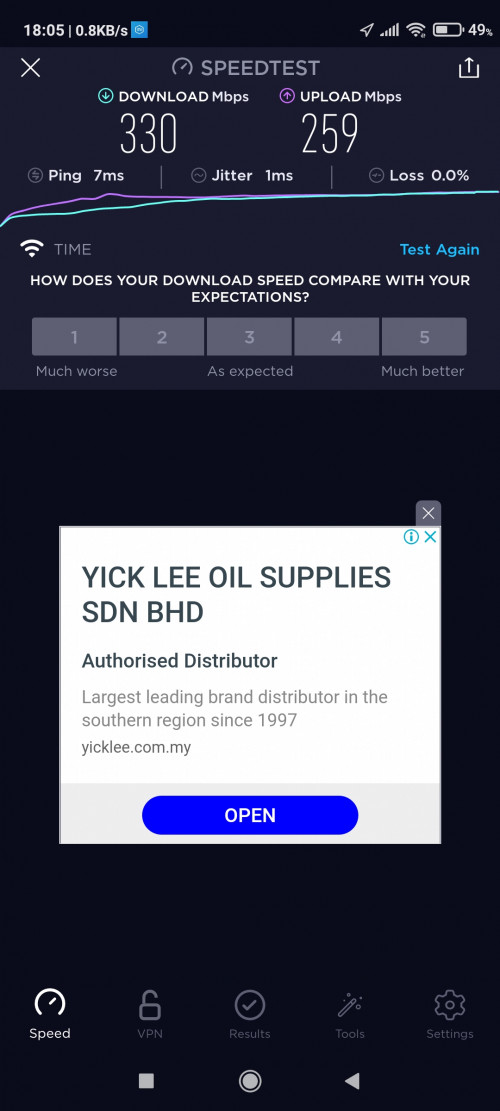
Hi all, 500mbps wifi speedtest:

1. With Huawei HG8145V5

user posted image

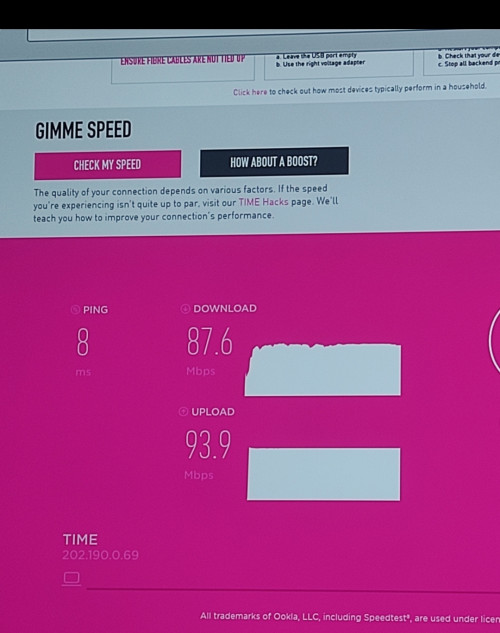
2. With Tenda AC15

user posted image

3. Direct Cat 8 lan cable connect to android tv Sony x8000h (connect to huawei Hg8145v5)

user posted image

Hairan is direct lan connection gets only less than 100mbps? Any setting for huawei hg8145v5 lan connection goes wrong? Later will try connect with Tenda ac15 lan. 🤔🤔🤔

This post has been edited by hlmilk112: Jan 5 2021, 06:32 PM
blacktubi
post Jan 5 2021, 07:14 PM

-
Group Icon
Elite
8,421 posts

Joined: Jul 2008

QUOTE(hlmilk112 @ Jan 5 2021, 06:31 PM)
Hi all, 500mbps wifi speedtest:

1. With Huawei HG8145V5


2. With Tenda AC15


3. Direct Cat 8 lan cable connect to android tv Sony x8000h (connect to huawei Hg8145v5)


Hairan is direct lan connection gets only less than 100mbps? Any setting for huawei hg8145v5 lan connection goes wrong? Later will try connect with Tenda ac15 lan. 🤔🤔🤔
*
It's because Sony Android TV is not having Gigabit LAN port.

They only support up to 100Mbps.

0204
post Jan 5 2021, 07:33 PM

Casual
***
Junior Member
423 posts

Joined: Apr 2005


QUOTE(Noname95 @ Jan 5 2021, 05:12 PM)
This is 5ghz speed test by installer, 2.4ghz more worse. Lol

Below attached is 2.4ghz speed test done by me
[attachmentid=10748349]
*
I see haha.. is it tested right next to the router?
0204
post Jan 5 2021, 07:36 PM

Casual
***
Junior Member
423 posts

Joined: Apr 2005


QUOTE(Davidtcf @ Jan 4 2021, 11:46 PM)
For this you need to make Helpdesk log a ticket to technical team and let them help u. They need to do something at the backend in the modem to allow it to become modem only. Can’t do it ourselves.

Helpdesk might keep deny say u need settle all of it yourself but it is actually BS. Just sounded them in my call just now. Now waiting for TIME level 2/3 person to call me and help me tomorrow.
*
They've done it for me.. called me up and did something on the backend and i can now dial using my mi router.. but the thing is.. i now have no idea how to access my HG8145V5 interface. have you gone around and do that?

Cause I'm wondering if I can reverse this in the future for troubleshooting or do i have to call them again to do that.
hlmilk112
post Jan 5 2021, 08:58 PM

Getting Started
**
Junior Member
106 posts

Joined: Sep 2010
QUOTE(blacktubi @ Jan 5 2021, 07:14 PM)
It's because Sony Android TV is not having Gigabit LAN port.

They only support up to 100Mbps.
*
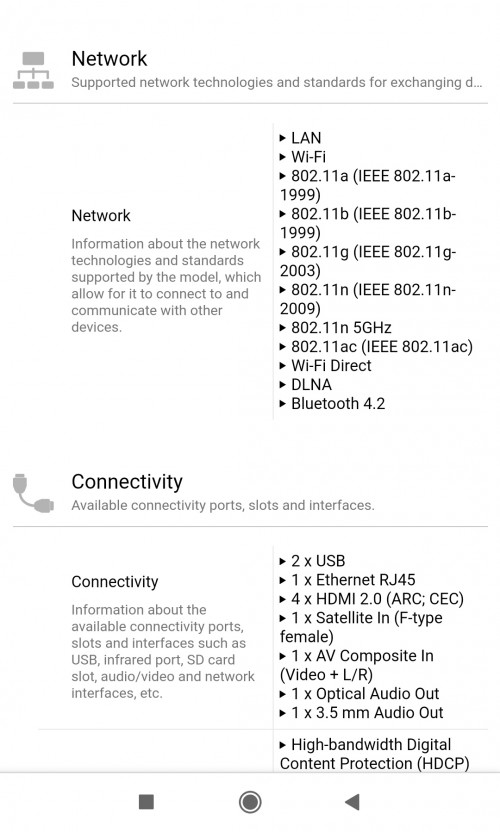
Oh itu macam ka? Aiyo i only got this specification. Not stated LAN in details. Haih......

user posted image
blacktubi
post Jan 5 2021, 09:06 PM

-
Group Icon
Elite
8,421 posts

Joined: Jul 2008

QUOTE(hlmilk112 @ Jan 5 2021, 08:58 PM)
Oh itu macam ka? Aiyo i only got this specification. Not stated LAN in details. Haih......

*
Yup, I have a Sony Android TV.

Actually using WiFi may provide a faster speed than Ethernet LAN since the TV supported Wireless AC. But, I would prefer the stability of Ethernet.

I doubt the TV need more than 100Mbps due to the slow CPU.

This post has been edited by blacktubi: Jan 5 2021, 09:08 PM
Noname95
post Jan 5 2021, 09:47 PM

New Member
*
Junior Member
44 posts

Joined: Oct 2016
QUOTE(0204 @ Jan 5 2021, 07:33 PM)
I see haha.. is it tested right next to the router?
*
Yes bro. Not much different. Is this their HG8145V5 issues, the router not that good ? Previously using Unifi also can get full speed 300mbps on their given router.
mnky
post Jan 5 2021, 10:07 PM

New Member
*
Junior Member
10 posts

Joined: Mar 2012
Hi sifus,

Would like to check with TIME users if you guys have any difficulties in opening Netflix via browser when using TIME? I also cannot open i-akaun KWSP on my laptop while on TIME. Had to open up personal hotspot to access to the websites. Anything that I can do to fix this?
soonwai
post Jan 5 2021, 10:08 PM


********
All Stars
11,459 posts

Joined: Oct 2007
From: KL


QUOTE(mnky @ Jan 5 2021, 10:07 PM)
Hi sifus,

Would like to check with TIME users if you guys have any difficulties in opening Netflix via browser when using TIME? I also cannot open i-akaun KWSP on my laptop while on TIME. Had to open up personal hotspot to access to the websites. Anything that I can do to fix this?
*
Try disabling IPv6.

Just tried i-akaun on my TIME which is IPv4 only. No problem.

This post has been edited by soonwai: Jan 5 2021, 10:10 PM
mnky
post Jan 5 2021, 10:09 PM

New Member
*
Junior Member
10 posts

Joined: Mar 2012
QUOTE(soonwai @ Jan 5 2021, 10:08 PM)
Try disabling IPv6.
*
You mean on the router or my laptop? Sorry i a bit noob :/
soonwai
post Jan 5 2021, 10:11 PM


********
All Stars
11,459 posts

Joined: Oct 2007
From: KL


QUOTE(mnky @ Jan 5 2021, 10:09 PM)
You mean on the router or my laptop? Sorry i a bit noob :/
*
One or the other also can. Whichever is easier. Try on your laptop first.

This post has been edited by soonwai: Jan 5 2021, 10:11 PM
Davidtcf
post Jan 6 2021, 12:27 PM

To the moon!!
*******
Senior Member
3,520 posts

Joined: Jan 2003


QUOTE(0204 @ Jan 5 2021, 07:36 PM)
They've done it for me.. called me up and did something on the backend and i can now dial using my mi router.. but the thing is.. i now have no idea how to access my HG8145V5 interface. have you gone around and do that?

Cause I'm wondering if I can reverse this in the future for troubleshooting or do i have to call them again to do that.
*
Yea I tried going into the modem using my cable but no longer have access. Anything after this need their technical team to help. As usual call their Helpdesk first for them to escalate. What I don’t like is we don’t have direct access to the tech team.
MaGNiFiCo
post Jan 6 2021, 01:28 PM

weeeeeeeeeeeee
******
Senior Member
1,604 posts

Joined: Oct 2005
From: Penang


QUOTE(mnky @ Jan 5 2021, 10:07 PM)
Hi sifus,

Would like to check with TIME users if you guys have any difficulties in opening Netflix via browser when using TIME? I also cannot open i-akaun KWSP on my laptop while on TIME. Had to open up personal hotspot to access to the websites. Anything that I can do to fix this?
*
Netflix is a breeze and no issues with i akaun too. Are you on any DNS?
mnky
post Jan 6 2021, 02:03 PM

New Member
*
Junior Member
10 posts

Joined: Mar 2012
QUOTE(MaGNiFiCo @ Jan 6 2021, 01:28 PM)
Netflix is a breeze and no issues with i akaun too. Are you on any DNS?
*
Dear sifus,

I wasn't on any DNS previously and now I'm on Google DNS and it worked just fine! Thank you a lot for the help! smile.gif
0204
post Jan 6 2021, 02:19 PM

Casual
***
Junior Member
423 posts

Joined: Apr 2005


QUOTE(Davidtcf @ Jan 6 2021, 12:27 PM)
Yea I tried going into the modem using my cable but no longer have access. Anything after this need their technical team to help. As usual call their Helpdesk first for them to escalate. What I don’t like is we don’t have direct access to the tech team.
*
It seems they've updated the modem to remove the connection in wan config. now it's blank. I manage to login using wifi, the modem reset to default wifi that you can login. No way to get in using cable. So i have to keep 2.4g on at lowest tx for future. You can check bottom of your modem for the default wifi

just bit more clarification for anybody reading this. I can now dial using own router. Just i don't have the ability to change hg8245v5 back to combi mode from bridge mode. I guess all wan config needed to be done by their tech team. hg8245v5 firmware is totally locked from us.

This post has been edited by 0204: Jan 6 2021, 02:22 PM
Davidtcf
post Jan 6 2021, 03:41 PM

To the moon!!
*******
Senior Member
3,520 posts

Joined: Jan 2003


QUOTE(0204 @ Jan 6 2021, 02:19 PM)
It seems they've updated the modem to remove the connection in wan config. now it's blank. I manage to login using wifi, the modem reset to default wifi that you can login. No way to get in using cable. So i have to keep 2.4g on at lowest tx for future. You can check bottom of your modem for the default wifi

just bit more clarification for anybody reading this. I can now dial using own router. Just i don't have the ability to change hg8245v5 back to combi mode from bridge mode. I guess all wan config needed to be done by their tech team. hg8245v5 firmware is totally locked from us.
*
yea so many things locked from us.. I got raise this concern to the tech guy by the name of SK.
and only their tech team can help.. others in helpdesk either give wrong info or just taichi to tech team.
when I was using hg8245v5 as wifi router I realized I cant change the default dns directly in config page also. SK told me must ask tech team to change if really want to.

if tech team busy, good luck u might need to wait 1-2 days for them to get back to you.

few days ago bought AX50 TP-link wifi router, after config yesterday only started using it with TIME fiber. This is what I call a wifi router, as until now not a single connection break while working from home. Worth the one time investment. The wifi router has 3 years warranty too thumbup.gif

if anyone got issues using hg8245v5 please invest in your own wifi router (or mesh systems)... even unifi won't give you a good wifi router no matter what package you pick (unless add $$ for monthly commitment which is not worth it). The IT shop dude explained to me cheap wifi routers have poor memory, RAM, processor etc.. if your home got many devices then expect it to drop often or disconnect. Sometimes with even few devices connect, but coz they surf heavy enough to affect the wifi connection already. The hardware on a cheap wifi router has a lower limit.

This post has been edited by Davidtcf: Jan 6 2021, 03:43 PM
hlmilk112
post Jan 7 2021, 07:24 AM

Getting Started
**
Junior Member
106 posts

Joined: Sep 2010
The new Huawei HG8145V5 cannot set in Google DNS rite? Its locked. Anyone know how to unblock it?
hlmilk112
post Jan 7 2021, 07:29 AM

Getting Started
**
Junior Member
106 posts

Joined: Sep 2010
QUOTE(mnky @ Jan 6 2021, 02:03 PM)
Dear sifus,

I wasn't on any DNS previously and now I'm on Google DNS and it worked just fine! Thank you a lot for the help! smile.gif
*
Hi bro,
u set Google DNS in router or ONU? Huawei hg8240h? hg8145v5? or others? Mind to share?

672 Pages « < 331 332 333 334 335 > » Top
 

Change to:
| Lo-Fi Version
0.0236sec    0.61    6 queries    GZIP Disabled
Time is now: 22nd December 2025 - 10:17 AM