Outline ·
[ Standard ] ·
Linear+
TIME [OFFICIAL] TIME Fibre Broadband™ v4, Experience the ONE TRUE 2Gbps
|
CH3COOH
|
 Jul 25 2020, 05:20 PM Jul 25 2020, 05:20 PM
|
Getting Started


|
QUOTE(evofantasy @ Jul 22 2020, 11:48 PM) Been with TIME for a few years now, thinking that the router needs an upgrade... Thinking if I should buy my own router or sign up for another 2 years contract hmmm I think Xiaomi AX36000 quote value for money. Can head to YouTube for some review. |
|
|
|
|
|
CH3COOH
|
Nov 10 2020, 08:57 PM
|
Getting Started
|
QUOTE(Berkshire Breakaway @ Nov 10 2020, 06:41 PM) guys is there any resale value for the old Huawei ONU boxes? i understood that these boxes have separate authentication password with on premise OLT (not same as the pppoe account). if such information is not shared with the customer, does the old unit hold any value? can it be resold? if yes, who would buy it? since all customers get a new ONT with lifetime warranty Unlikely got people will buy though. |
|
|
|
|
|
CH3COOH
|
Nov 18 2020, 09:40 PM
|
Getting Started
|
QUOTE(fakerdemit @ Nov 18 2020, 02:45 AM) I'm having a poor wifi connection from my room, the router is like 2-3 meter away from my room. I don't know why, maybe there is dead spot in my room. I'm looking for ways to improve the wifi connection because of wfh. Can someone suggest some tips or device to buy? Currently using default router, but I don't think can upgrade to a better one because I'm only renting the room and the router was provided by the landlord. My housemate got himself a wifi extender but according to him even that doesn't improve the speed. So I'm looking at wifi mesh but not sure which one should I get. Get a LAN cable plug into your default router and pull into your room. Buy this device, plug the cable in and setup. Voila, enjoy your own personal WIFI. https://www.senheng.com.my/tp-link-300mbps-...6oaAvPEEALw_wcB |
|
|
|
|
|
CH3COOH
|
Dec 5 2020, 04:15 PM
|
Getting Started
|
QUOTE(artadi @ Dec 5 2020, 09:45 AM) Does most or all subscriers here always gets the max speed of your package? Like 100mbps for 100mbps package or 500mbps for 500mbps package? I feel like can only get the max speed when the technician is doing the speed test. Your broadband is best effort. But MCMC mandate user must able to get at least 80% of subscribed speed. You want to get 100% speed, get a DIA, which is super costly. And truth is default wifi router always sucks, get a better one yourself. |
|
|
|
|
|
CH3COOH
|
Dec 13 2020, 12:23 AM
|
Getting Started
|
QUOTE(Icehart @ Dec 12 2020, 11:11 PM) Can anyone in 1Gbps plan speed test and show their results here? Considering between 500Mbps and 1Gbps. 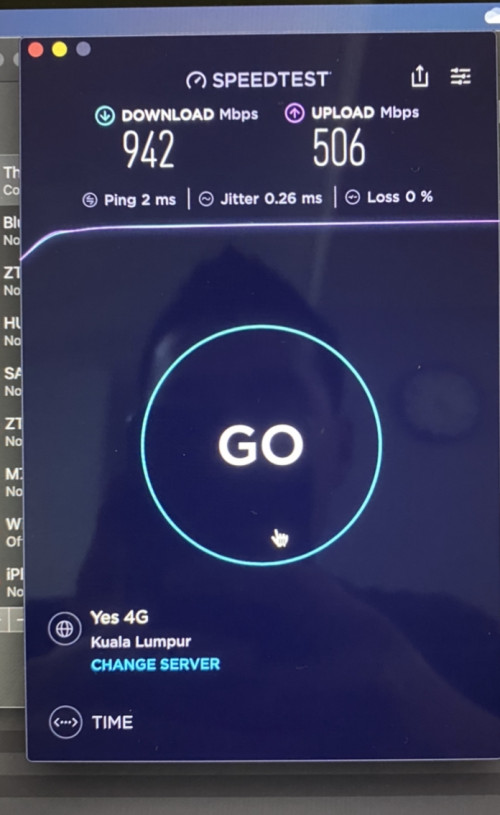 Tested over Cat-6 RJ45 cable. |
|
|
|
|
|
CH3COOH
|
Jun 7 2021, 10:43 PM
|
Getting Started
|
QUOTE(Ilomilo @ Jun 7 2021, 09:09 PM) Anyone know if Internet installation is allowed in condos during FMCO? Management giving me trouble saying that SOP don't allow new installation, only allow fixing during FMCO. However I've looked through Strata management SOP and although it expressly allows fixing of electrical and plumbing during FMCO, but nothing mention on new installation, only cannot do renovation and moving house. Anyone got any news/articles clarifying this ah? Difficult wfh with my shitty mobile data only. I guess it depends on your management. I just saw an installer came by my condo for installation. |
|
|
|
|



 Quote
Quote
 0.0389sec
 0.29
0.29
 7 queries
 GZIP Disabled