


Home Networking WiFi Router Discussion Thread, Updated for 2023
Home Networking WiFi Router Discussion Thread, Updated for 2023
|
|
 Jul 12 2020, 12:14 PM Jul 12 2020, 12:14 PM
Return to original view | Post
#1
|
 
Junior Member
904 posts Joined: Mar 2018  
|
Hi, I'm upgrading my DIR-850L router soon but I am not sure where to find my unifi id and password, is this the one that I needed to setup my new router?
|
|
|
|
|
|
Jul 12 2020, 02:20 PM
Return to original view | Post
#2
|
|
Junior Member
904 posts Joined: Mar 2018
|
QUOTE(FusionXY @ Jul 12 2020, 01:16 PM) Yes, this is the Unifi details shown in the picture. Thanks, then I should be able to setup my new router when it arrives. This is my first time doing so hahaThanks  |
|
|
Jul 12 2020, 03:25 PM
Return to original view | IPv6 | Post
#3
|
|
Junior Member
904 posts Joined: Mar 2018
|
QUOTE(FusionXY @ Jul 12 2020, 02:40 PM) You're welcome. I don't know what is that, maybe I will ask again while I'm setting it up.😅Enable VLAN Tagging as well for unifi. You can check in the VLAN settings for the numbers set for unifi. Thanks. |
|
|
Jul 15 2020, 09:46 PM
Return to original view | Post
#4
|
|
Junior Member
904 posts Joined: Mar 2018
|
Just set up my new router, wifi range improved and I'm able to get 300Mbps on 5GHz which the previous router could not. Can I know how often should I reboot my router or modem?
|
|
|
Jul 15 2020, 10:05 PM
Return to original view | Post
#5
|
|
Junior Member
904 posts Joined: Mar 2018
|
QUOTE(FusionXY @ Jul 15 2020, 09:49 PM) Hello, you don't need to restart everytime. You mean when my electronic devices face wifi disconnection?Only restart if got disconnections. Thanks. |
|
|
Jul 15 2020, 10:39 PM
Return to original view | Post
#6
|
|
Junior Member
904 posts Joined: Mar 2018
|
QUOTE(FusionXY @ Jul 15 2020, 10:23 PM) Yes, like sudden No Internet then only restart. Which router that you are using? I'm using Archer AX20 now. I hope that disconnection issue wont happen lol, that's the reason why I replaced my old router. I am using Archer C9 and running for 24/7 everyday without restart. Only restart if suddenly become slow or no connection at all. Thanks.  |
|
|
|
|
|
Jul 20 2020, 05:23 PM
Return to original view | Post
#7
|
|
Junior Member
904 posts Joined: Mar 2018
|
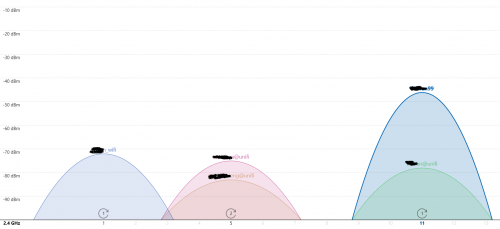 Just curious if this situation happens, which wifi channel would you guys set on? Previously my router automatically selected channel 8 but I change it to 11. This post has been edited by pikafaded: Jul 20 2020, 05:24 PM |
|
|
Jul 20 2020, 06:17 PM
Return to original view | Post
#8
|
|
Junior Member
904 posts Joined: Mar 2018
|
QUOTE(blacktubi @ Jul 20 2020, 06:09 PM) Channel 11. Alright, thanks. Adjacent channel interference is much worst than co-channel interference.  |
|
|
Dec 4 2020, 05:09 PM
Return to original view | Post
#9
|
|
Junior Member
904 posts Joined: Mar 2018
|
Sorry out of topic, I have a laptop cooling fan and I should use it on my router or my modem? If I use it on my router, the modem will be quite warm. If I use it on my modem, the router will be a little warm, which is cooler compared to using it on the modem. Unifi fibre modem + TP Link AX20 setup
This post has been edited by pikafaded: Dec 4 2020, 05:10 PM |
|
|
Dec 4 2020, 05:25 PM
Return to original view | Post
#10
|
|
Junior Member
904 posts Joined: Mar 2018
|
QUOTE(FusionXY @ Dec 4 2020, 05:11 PM) Normally ONU is very cold and doesn't heat up. That means it is better to put for the router? Since it does everything for the connectivity between router and devices.Best to put both or router only. Thanks. |
|
|
Dec 4 2020, 05:42 PM
Return to original view | Post
#11
|
|
Junior Member
904 posts Joined: Mar 2018
|
QUOTE(FusionXY @ Dec 4 2020, 05:26 PM) Yes, if got space for both then put both or router only. alright. ThanksONU normally won't overheat much heat than the router. |
|
|
Dec 29 2020, 11:14 AM
Return to original view | Post
#12
|
|
Junior Member
904 posts Joined: Mar 2018
|
QUOTE(shahie @ Dec 29 2020, 06:44 AM) just disable the smart connect and 2.4Ghz band too, if no old device on your home which did not recognize higher band. just use 5ghz band with protocol n/ac/ax and leave the channel to auto, than you are safe. If my house is not interfered with any other 5ghz WiFi, which channel should I use? Or should I leave it as Auto as well? |
|
|
Dec 29 2020, 04:34 PM
Return to original view | Post
#13
|
|
Junior Member
904 posts Joined: Mar 2018
|
QUOTE(blacktubi @ Dec 29 2020, 12:48 PM) For most routers in the market, channel 149 and above always have a better performance Okay thanks. What about channel width? Keeping it at Auto?This post has been edited by pikafaded: Dec 29 2020, 04:42 PM |
|
|
|
|
|
Feb 28 2021, 10:59 AM
Return to original view | Post
#14
|
|
Junior Member
904 posts Joined: Mar 2018
|
Anyone know why my AX20 has hidden networks with same signal strength and WiFi channel as my 2.4GHz and 5GHz WiFi? It shows up at my laptop and will It affects my network speed? Since they are interfering each other.
|
|
|
Feb 28 2021, 12:41 PM
Return to original view | Post
#15
|
|
Junior Member
904 posts Joined: Mar 2018
|
QUOTE(wirelessbuyer @ Feb 28 2021, 11:23 AM) Turn off OneMesh feature and see whether it is still there Solved it, thanks |
|
|
Oct 28 2021, 09:40 AM
Return to original view | Post
#16
|
|
Junior Member
904 posts Joined: Mar 2018
|
Hi, should I enable TWT on my router if not all the connected devices are using WiFi 6?
|
|
|
Jan 3 2023, 11:31 AM
Return to original view | Post
#17
|
|
Junior Member
904 posts Joined: Mar 2018
|
Hi, recently some of my devices face sudden lost of Internet connection. I suspect it's the issue from my 2.5 years old AX20. Tried to reboot both modem and router, change Wi-Fi channels also could not fix the issue. May I know it's the end of the router or there is other way to fix it? Thanks.
|
|
|
Jan 3 2023, 11:25 PM
Return to original view | Post
#18
|
|
Junior Member
904 posts Joined: Mar 2018
|
QUOTE(YoungMan @ Jan 3 2023, 08:20 PM) Reset and reconfigure, then test it for sometime to see. Also if new firmware available, update it. Alright, will try it. Btw do I need to enable OFDMA? And Wifi channel should I use Auto or manually choose 1 which is less crowded? |
|
|
Feb 12 2023, 07:04 PM
Return to original view | IPv6 | Post
#19
|
|
Junior Member
904 posts Joined: Mar 2018
|
Hi, is there any reliable WiFi 6 router for around RM350? Using Unifi 300Mbps now and my current AX20 is giving me high ping value very frequent.
|
|
|
Feb 12 2023, 09:23 PM
Return to original view | Post
#20
|
|
Junior Member
904 posts Joined: Mar 2018
|
QUOTE(YoungMan @ Feb 12 2023, 08:58 PM) You have other router to try? Just to make sure the high ping is not router problem. I might switch back to the Dlink router given by TM to test. Will Ethernet cable connecting modem and router causes it? Also it is less likely of the modem issue right?This post has been edited by pikafaded: Feb 12 2023, 09:27 PM |
| Change to: |  0.0362sec 0.0362sec
 0.26 0.26
 7 queries 7 queries
 GZIP Disabled GZIP Disabled
Time is now: 24th December 2025 - 01:12 AM |
 Quote
Quote