

Anyone know which router gives best wifi ping? My ax20 ping around 10-30ms, wanna know if any router can do better.
Home Networking WiFi Router Discussion Thread, Updated for 2023
Home Networking WiFi Router Discussion Thread, Updated for 2023
|
|
 Sep 26 2021, 09:06 PM Sep 26 2021, 09:06 PM
|
 
All Stars
10,859 posts Joined: Jan 2003 From: Sarawak  
|
Anyone know which router gives best wifi ping? My ax20 ping around 10-30ms, wanna know if any router can do better.
|
|
|
|
|
|
Sep 26 2021, 10:25 PM
Show posts by this member only | IPv6 | Post
#4202
|

Senior Member
3,102 posts Joined: May 2005 From: Penang *̡͌l̡*̡̡
|
QUOTE(ybtan @ Sep 25 2021, 06:57 PM) Hello so you mean the models you mentioned will be the main unit connect to the modem? Then my current 2 E4s link to it? Yes, cons is if the device connector to E4 then your speed will limit to 100mbs... But M5 and above you should buy 2pcs, then if really had blink spot, only patch with E4(wire backhaul) |
|
|
Sep 27 2021, 12:27 AM
|

Senior Member
663 posts Joined: Feb 2007
|
QUOTE(tachlio @ Sep 26 2021, 10:25 PM) Yes, cons is if the device connector to E4 then your speed will limit to 100mbs... Thank you for your input! But M5 and above you should buy 2pcs, then if really had blink spot, only patch with E4(wire backhaul)  |
|
|
Sep 27 2021, 12:21 PM
Show posts by this member only | IPv6 | Post
#4204
|

Newbie
8 posts Joined: Mar 2013
|
QUOTE(LYenHoong @ Jul 21 2021, 12:36 PM) House type: Landed Is the LG8245X6 better than C5V in term of stability and range based on your experience? I registered for interest in KAON router since they announce existing user will get replacement, but no response till now. Can't change to custom router since I'm still using the dect phone and no space to use bridge mode. I'm open to any other suggestion too.Size of house: Around 4000 sqft, double story Features required: Router that can work with Maxis Fibre, Wifi 6 preferred Number of devices connected to WiFi: 20+ Internet Speed: 500 Mbps Budget: ~RM500, but flexible Hi, would like to seek your advice for a new router. Just changed to Maxis Fibre 500 Mbps package, and was provided with the KAONMEDIA AR2140 and a Deco M4R (2-pack). The KAON router worked very well with almost no downtime at all, but failed after a month or so. Got the Maxis technician to come and they replaced it with a Huawei LG8245X6. The Huawei router doesn't seem able to support the amount of devices, with packet loss and lag spikes for 2-3 minutes every hour or so. Don't need super wide coverage, as it will be covered by the Deco M4, just need a stable router that can handle the large amount of devices. The budget of RM500 is flexible and can top up if worth it. Thanks in advance for any suggestions! |
|
|
Sep 29 2021, 11:05 AM
|

Junior Member
441 posts Joined: Feb 2012 From: @Kuala Lumpur 
|
House type: Landed
Size of house: ard 3800sqf / 2 double storey house combined Features required: Just recommend me anything ^^ Number of devices connected to WiFi: plus minus 11-12 devices Internet Speed: 800mbps Budget:RM500-1000 Hi all sifus, would like to seek advice from you guys. currently running unifi router with two mesh m4 around the house. the main deco is wired to the unifi router (this router cuts off internet on and off  ) while the other mesh is wireless with the main deco. speed is unstable for me so am thinking to upgrade either the main router or mesh? ) while the other mesh is wireless with the main deco. speed is unstable for me so am thinking to upgrade either the main router or mesh?Thank you in advance for suggetions!  |
|
|
Sep 29 2021, 11:05 AM
|
|
Junior Member
441 posts Joined: Feb 2012 From: @Kuala Lumpur
|
deleted-- double post
This post has been edited by lyl_bgr: Sep 29 2021, 11:06 AM |
|
|
|
|
|
Sep 29 2021, 01:55 PM
|
|
Senior Member
2,670 posts Joined: Sep 2006
|
5 Ghz Wifi signal drops for just 2-3 seconds, very brief and then ok again. Been happening like once in an hour. Is it a sign that router is dying?
No issue on wired connection. Router is Asus RT-AC86U, about 3 years old. |
|
|
Sep 29 2021, 02:01 PM
Show posts by this member only | IPv6 | Post
#4208
|

Senior Member
3,834 posts Joined: Aug 2016
|
QUOTE(jimbet1337 @ Sep 29 2021, 01:55 PM) 5 Ghz Wifi signal drops for just 2-3 seconds, very brief and then ok again. Been happening like once in an hour. Is it a sign that router is dying? Seen this common issue on one of the thread before.No issue on wired connection. Router is Asus RT-AC86U, about 3 years old. |
|
|
Sep 29 2021, 03:09 PM
Show posts by this member only | IPv6 | Post
#4209
|

Junior Member
566 posts Joined: Jun 2005 From: Somewhere over the rainbow
|
QUOTE(jimbet1337 @ Sep 29 2021, 01:55 PM) 5 Ghz Wifi signal drops for just 2-3 seconds, very brief and then ok again. Been happening like once in an hour. Is it a sign that router is dying? Any idea what the temperature of the CPU and wifi chips is? No issue on wired connection. Router is Asus RT-AC86U, about 3 years old. AC86U is famous for overheating (above 100 deg). |
|
|
Sep 29 2021, 03:24 PM
|
|
Senior Member
2,670 posts Joined: Sep 2006
|
QUOTE(kk131 @ Sep 29 2021, 03:09 PM) Any idea what the temperature of the CPU and wifi chips is? 2.4 Ghz : 47 degCAC86U is famous for overheating (above 100 deg). 5 Ghz : 55 degC CPU : 60 degC Running on Merlin firmware and I even put the twin fan kit on it, 1 week after I bought the router. Been working great though. Months of uptime without disconnection, both LAN & wifi. Only last week I notice the intermittent connection on wifi, LAN is still good. This post has been edited by jimbet1337: Sep 29 2021, 03:25 PM |
|
|
Sep 29 2021, 06:28 PM
Show posts by this member only | IPv6 | Post
#4211
|

Junior Member
455 posts Joined: Aug 2012
|
Hi everyone, let's say I plan to have router downstairs and have ethernet cable pulled all the way upstairs (hide inside wall), what would be the best downstairs router + upstairs access point combo?
Size of house: 2000sqft double storey terrace Internet Speed: 300mbps Budget:RM1000 Wifi connected devices: 4 phones/laptop, maybe up to 10 smart devices. The rest I try to keepwired (PC, TV, TV Box). Would maxis' latest wifi 6 router be good enough? Or will it "choke" when worst case scenario all devices are connected and streaming. |
|
|
Sep 29 2021, 06:49 PM
|
 
Elite
8,408 posts Joined: Jul 2008 
|
QUOTE(XweienX @ Sep 29 2021, 06:28 PM) Hi everyone, let's say I plan to have router downstairs and have ethernet cable pulled all the way upstairs (hide inside wall), what would be the best downstairs router + upstairs access point combo? ISP provided router will always chokeSize of house: 2000sqft double storey terrace Internet Speed: 300mbps Budget:RM1000 Wifi connected devices: 4 phones/laptop, maybe up to 10 smart devices. The rest I try to keepwired (PC, TV, TV Box). Would maxis' latest wifi 6 router be good enough? Or will it "choke" when worst case scenario all devices are connected and streaming. RT-AX3000 + RT-AX55 linked with AiMesh and hardwired for Ethernet backhaul. |
|
|
Sep 29 2021, 06:49 PM
|
|
Elite
8,408 posts Joined: Jul 2008
|
QUOTE(lyl_bgr @ Sep 29 2021, 11:05 AM) House type: Landed Maybe try connect your Deco M4 directly to the modem and use PPPOE mode.Size of house: ard 3800sqf / 2 double storey house combined Features required: Just recommend me anything ^^ Number of devices connected to WiFi: plus minus 11-12 devices Internet Speed: 800mbps Budget:RM500-1000 Hi all sifus, would like to seek advice from you guys. currently running unifi router with two mesh m4 around the house. the main deco is wired to the unifi router (this router cuts off internet on and off ) while the other mesh is wireless with the main deco. speed is unstable for me so am thinking to upgrade either the main router or mesh?Thank you in advance for suggetions! |
|
|
|
|
|
Sep 29 2021, 09:06 PM
Show posts by this member only | IPv6 | Post
#4214
|
|
Junior Member
455 posts Joined: Aug 2012
|
QUOTE(blacktubi @ Sep 29 2021, 06:49 PM) ISP provided router will always choke thanks for the suggestion. Sorry if stupid question, but I just wanna confirm. Even if using ethernet, I still have to configure both of them as a mesh system first using the app, correct?RT-AX3000 + RT-AX55 linked with AiMesh and hardwired for Ethernet backhaul. |
|
|
Sep 29 2021, 10:05 PM
|
|
Elite
8,408 posts Joined: Jul 2008
|
QUOTE(XweienX @ Sep 29 2021, 09:06 PM) thanks for the suggestion. Sorry if stupid question, but I just wanna confirm. Even if using ethernet, I still have to configure both of them as a mesh system first using the app, correct? I recommend that so you have the benefit of roaming, centralized control and a more seamless connection. |
|
|
Sep 30 2021, 01:17 AM
|
|
Junior Member
441 posts Joined: Feb 2012 From: @Kuala Lumpur
|
QUOTE(blacktubi @ Sep 29 2021, 06:49 PM) Maybe try connect your Deco M4 directly to the modem and use PPPOE mode. thanks for the input! didnt realise i have that option  i am kind of interested in asus aimesh system, seems like kind of interesting! hahja  if i want to go aimesh what should i get? thank you sir!   This post has been edited by lyl_bgr: Sep 30 2021, 01:17 AM |
|
|
Sep 30 2021, 07:24 AM
Show posts by this member only | IPv6 | Post
#4217
|
|
Junior Member
566 posts Joined: Jun 2005 From: Somewhere over the rainbow
|
QUOTE(jimbet1337 @ Sep 29 2021, 03:24 PM) 2.4 Ghz : 47 degC Nothing from the log to give a clue? 5 Ghz : 55 degC CPU : 60 degC Running on Merlin firmware and I even put the twin fan kit on it, 1 week after I bought the router. Been working great though. Months of uptime without disconnection, both LAN & wifi. Only last week I notice the intermittent connection on wifi, LAN is still good. I've found the latest Merlin firmware on my AC68U to be very stable. |
|
|
Sep 30 2021, 07:40 PM
|
|
Elite
8,408 posts Joined: Jul 2008
|
QUOTE(lyl_bgr @ Sep 30 2021, 01:17 AM) thanks for the input! didnt realise i have that option Just buy 2 AiMesh router than you get a AiMesh mesh WiFi network i am kind of interested in asus aimesh system, seems like kind of interesting! hahja if i want to go aimesh what should i get? thank you sir! As for the model, it depends on how deep is your pocket. Hard to give a recommendation without knowing your budget |
|
|
Oct 2 2021, 11:17 AM
Show posts by this member only | IPv6 | Post
#4219
|
|
Newbie
1 posts Joined: Jun 2012
|
Any one know how to configure Guest WiFi on MAXIS LG8245X6?
WiFi guest would have internet access, but not router admin or have visibility to other devices in the network. 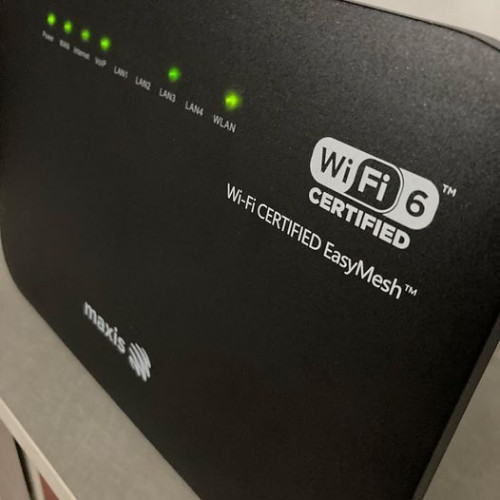 This post has been edited by muz.abd: Oct 2 2021, 11:21 AM |
|
|
Oct 5 2021, 06:50 PM
|
|
Newbie
3 posts Joined: Sep 2014
|
Hi all Sifu here, currently i am using streamyx 8mbps with modem D-Link DSL-2750E .
1) Is that possible i add below new router to my D-Link DSL-2750E and all my wifi devices connect to this new router?? 2) If ya, below which router is the best choice for 10++ devices (smartphone and laptop all using wifi) connect at the same time and best for future use when unifi 30mbps available. 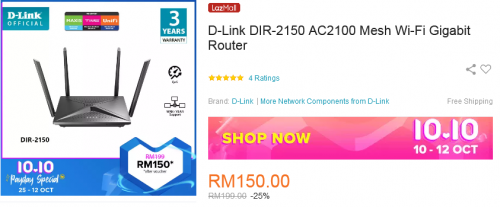 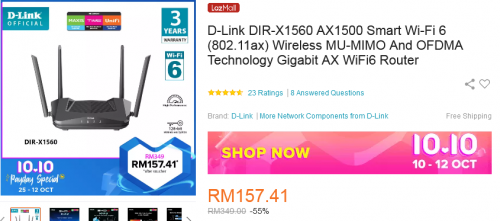 This post has been edited by yukiast: Oct 5 2021, 07:07 PM |
| Change to: |  0.0273sec 0.0273sec
 0.41 0.41
 6 queries 6 queries
 GZIP Disabled GZIP Disabled
Time is now: 6th December 2025 - 01:58 PM |
 Quote
Quote