Welcome Guest ( Log In | Register )

302 Pages « < 200 201 202 203 204 > » Bottom

Outline · [ Standard ] · Linear+

Home Networking WiFi Router Discussion Thread, Updated for 2023

views
     
tnsai
post Aug 23 2021, 10:08 PM

Regular
******
Senior Member
1,418 posts

Joined: Jul 2005
Hey all, I currently have a Asus RT-AX3000 .. anybody suggestions for the "cheapest" AIMesh node I can get for my router ?

Currently my daughter in her room still can access my 5g wifi but she says the connection very spotty and affects her online classes.. however budget it tight, so appreciate any suggestions.

I saw this

https://shopee.com.my/Asus-Rt-Ac59U-V2-Ac15...7368?position=8

Will this work?


Also, how does AIMesh work? I saw my friend's wifi mesh network from maxis, he has to has one node connected to the main router via wire..

Do I have to do this for AiMesh?

Thanks for any info.
TSblacktubi
post Aug 23 2021, 10:14 PM

-
Group Icon
Elite
8,408 posts

Joined: Jul 2008

QUOTE(tnsai @ Aug 23 2021, 10:08 PM)
Hey all, I currently have a Asus RT-AX3000 .. anybody suggestions for the "cheapest" AIMesh node I can get for my router ?

Currently my daughter in her room still can access my 5g wifi but she says the connection very spotty and affects her online classes.. however budget it tight, so appreciate any suggestions.

I saw this

https://shopee.com.my/Asus-Rt-Ac59U-V2-Ac15...7368?position=8

Will this work?
Also, how does AIMesh work? I saw my friend's wifi mesh network from maxis, he has to has one node connected to the main router via wire..

Do I have to do this for AiMesh?

Thanks for any info.
*
I will recommend bump up the budget and get at least the RT-AX55 if you want a problem free connection.
tnsai
post Aug 23 2021, 10:16 PM

Regular
******
Senior Member
1,418 posts

Joined: Jul 2005
QUOTE(blacktubi @ Aug 23 2021, 10:14 PM)
I will recommend bump up the budget and get at least the RT-AX55 if you want a problem free connection.
*
Ah ok thanks.. seems not too much of a bump. Will look into it thanks.

Oh I installed merlin wrt on my current router, the aimesh feature should work the same also right ? (just saw some videos seems like aimesh different from my friend's airties mesh network.. no need to wire connection one mesh to router first)
kk131
post Aug 24 2021, 06:49 AM

On my way
****
Junior Member
566 posts

Joined: Jun 2005
From: Somewhere over the rainbow


QUOTE(tnsai @ Aug 23 2021, 10:16 PM)
Ah ok thanks.. seems not too much of a bump. Will look into it thanks.

Oh I installed merlin wrt on my current router, the aimesh feature should work the same also right ? (just saw some videos seems like aimesh different from my friend's  airties mesh network.. no need to wire connection one mesh to router first)
*
You can use either ethernet cable or wifi for the backhaul connection to the router. Using cable will give more throughput to the clients.
QuantumEdge
post Aug 24 2021, 09:42 AM

Regular
******
Senior Member
1,595 posts

Joined: Jan 2016


QUOTE(blacktubi @ Aug 23 2021, 09:04 PM)
TM should've provide a new VDSL router when migrate to Unifi Lite as the 8961N is ADSL only which is slow.

If you wish to buy your own, the VR600V is the best choice you can get in Malaysia now. But, I cannot verify whether it can support Unifi Fibre.
*
Thanks, I'll double check with the seller
szecheng
post Aug 24 2021, 02:49 PM

Casual
***
Junior Member
460 posts

Joined: Jun 2008


QUOTE(tnsai @ Aug 23 2021, 10:16 PM)
Ah ok thanks.. seems not too much of a bump. Will look into it thanks.

Oh I installed merlin wrt on my current router, the aimesh feature should work the same also right ? (just saw some videos seems like aimesh different from my friend's  airties mesh network.. no need to wire connection one mesh to router first)
*
wired backhaul if you can, you wont regret
botak91
post Aug 24 2021, 03:31 PM

Getting Started
**
Junior Member
132 posts

Joined: Feb 2007
QUOTE(maxguy @ Aug 23 2021, 06:59 PM)
So you would recommend this?

QUOTE(hazairi @ Aug 23 2021, 08:15 PM)
a 2017 model?
*
Is the AC86U bad then?
maxguy
post Aug 24 2021, 03:52 PM

Enthusiast
*****
Senior Member
822 posts

Joined: Jan 2003


I've been using AC68U since 2014 for home unifi and it never failed
FusionXY
post Aug 24 2021, 03:57 PM

LAZZIE ON VACATION
*******
Senior Member
3,834 posts

Joined: Aug 2016

QUOTE(maxguy @ Aug 24 2021, 03:52 PM)
I've been using AC68U since 2014 for home unifi and it never failed
*
A very legend model still selling now.
kk131
post Aug 24 2021, 04:08 PM

On my way
****
Junior Member
566 posts

Joined: Jun 2005
From: Somewhere over the rainbow


QUOTE(tnsai @ Aug 23 2021, 10:16 PM)
Ah ok thanks.. seems not too much of a bump. Will look into it thanks.

Oh I installed merlin wrt on my current router, the aimesh feature should work the same also right ? (just saw some videos seems like aimesh different from my friend's  airties mesh network.. no need to wire connection one mesh to router first)
*
Aimesh works the same, it's a closed source from the official Asus firmware. Recommend that you install the Diversion addon to block ads on your network.
maxguy
post Aug 24 2021, 04:27 PM

Enthusiast
*****
Senior Member
822 posts

Joined: Jan 2003


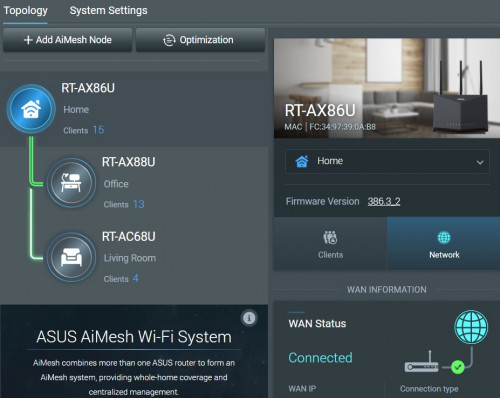
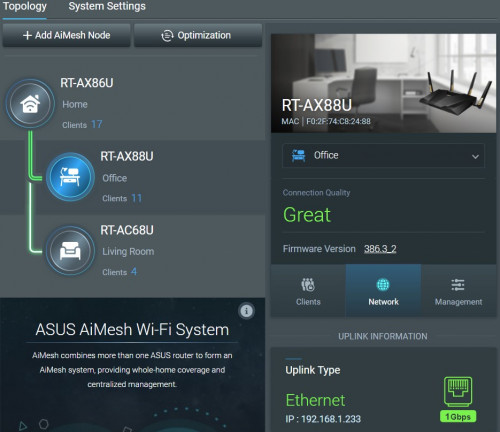
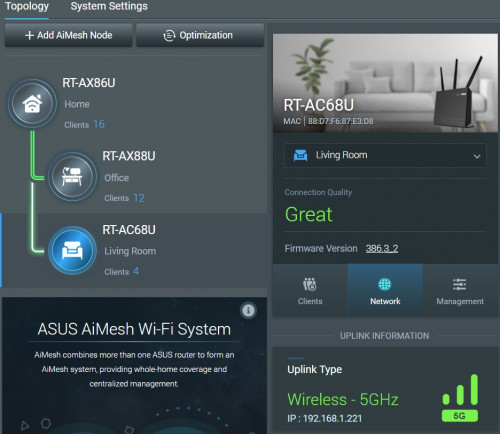
current home unifi setup with aimesh Asuswrt-Merlin

AX86U router
user posted image
AX88U node wired
user posted image
AC68U node wireless
user posted image
tnsai
post Aug 24 2021, 10:31 PM

Regular
******
Senior Member
1,418 posts

Joined: Jul 2005
QUOTE(kk131 @ Aug 24 2021, 06:49 AM)
You can use either ethernet cable or wifi for the backhaul connection to the router. Using cable will give more throughput to the clients.
*
QUOTE(szecheng @ Aug 24 2021, 02:49 PM)
wired backhaul if you can, you wont regret
*
QUOTE(kk131 @ Aug 24 2021, 04:08 PM)
Aimesh works the same, it's a closed source  from the official Asus firmware. Recommend that you install the Diversion addon to block ads on your network.
*
QUOTE(maxguy @ Aug 24 2021, 04:27 PM)
current home unifi setup with aimesh Asuswrt-Merlin

AX86U router
user posted image
AX88U node wired
user posted image
AC68U node wireless
user posted image
*
Thanks for the info and advice. Cheers!
botak91
post Aug 25 2021, 10:42 AM

Getting Started
**
Junior Member
132 posts

Joined: Feb 2007
QUOTE(maxguy @ Aug 24 2021, 04:27 PM)
current home unifi setup with aimesh Asuswrt-Merlin

AX86U router
user posted image
AX88U node wired
user posted image
AC68U node wireless
user posted image
*
I'm guessing then that you would not hesitate to recommend the 86U?
enduser
post Aug 25 2021, 10:50 AM

Regular
******
Senior Member
1,280 posts

Joined: Jan 2003
QUOTE(botak91 @ Aug 25 2021, 10:42 AM)
I'm guessing then that you would not hesitate to recommend the 86U?
*
am still using ac86u as main router for 800mbps unifi, never once failed me.

Thinking for upgrade but nah for current speed not yet necessary

sicklad77
post Aug 26 2021, 09:06 AM

On my way
****
Junior Member
532 posts

Joined: Aug 2010

Hi, need advice and do bear with me. I’m still noob and trying to figure out the lingos as well.

isp : unifi 300mbps
Router : ac66u (4 years old)
AP : deco m4 (free from unifi)
House : 3200sqft
Devices connected : 15x (tv,phones,pc,ipcamera etc)

so my asus router is connected on my ground floor and my M4 is on the second floor connected via lan cable and settings change to AP mode.

before this I’m able to get 300mbps on downstairs but now I’m only getting less than 30mbps downstairs even standing next to the router.
It’s only after I disconnect the 2.4ghz then reconnect then I’m getting the full speed.
I’m suspecting that since I’m using same settings and name for the wifi, if I’m at the ground floor it is still connected to the upstairs M4 and does not auto-connect to the router.
How to fix this? Should I buy a wifi6 router to fix this??

This post has been edited by sicklad77: Aug 26 2021, 10:03 AM
nokia6280
post Aug 26 2021, 10:34 AM

Look at all my stars!!
*******
Senior Member
5,705 posts

Joined: Sep 2011


QUOTE(sicklad77 @ Aug 26 2021, 09:06 AM)
Hi, need advice and do bear with me. I’m still noob and trying to figure out the lingos as well.

isp : unifi 300mbps
Router : ac66u (4 years old)
AP : deco m4 (free from unifi)
House : 3200sqft
Devices connected : 15x (tv,phones,pc,ipcamera etc)

so my asus router is connected on my ground floor and my M4 is on the second floor connected via lan cable and settings change to AP mode.

before this I’m able to get 300mbps on downstairs but now I’m only getting less than 30mbps downstairs even standing next to the router.
It’s only after I disconnect the 2.4ghz then reconnect then I’m getting the full speed.
I’m suspecting that since I’m using same settings and name for the wifi, if I’m at the ground floor it is still connected to the upstairs M4 and does not auto-connect to the router.
How to fix this? Should I buy a wifi6 router to fix this??
*
Use different name for wifi router and Deco M4?
kk131
post Aug 26 2021, 10:43 AM

On my way
****
Junior Member
566 posts

Joined: Jun 2005
From: Somewhere over the rainbow


QUOTE(sicklad77 @ Aug 26 2021, 09:06 AM)
Hi, need advice and do bear with me. I’m still noob and trying to figure out the lingos as well.

isp : unifi 300mbps
Router : ac66u (4 years old)
AP : deco m4 (free from unifi)
House : 3200sqft
Devices connected : 15x (tv,phones,pc,ipcamera etc)

so my asus router is connected on my ground floor and my M4 is on the second floor connected via lan cable and settings change to AP mode.

before this I’m able to get 300mbps on downstairs but now I’m only getting less than 30mbps downstairs even standing next to the router.
It’s only after I disconnect the 2.4ghz then reconnect then I’m getting the full speed.
I’m suspecting that since I’m using same settings and name for the wifi, if I’m at the ground floor it is still connected to the upstairs M4 and does not auto-connect to the router.
How to fix this? Should I buy a wifi6 router to fix this??
*
Maybe they're using the same WiFi channels. Have run site survey on the Asus router, it's under the WiFi category.
szecheng
post Aug 26 2021, 11:32 AM

Casual
***
Junior Member
460 posts

Joined: Jun 2008


QUOTE(sicklad77 @ Aug 26 2021, 09:06 AM)
Hi, need advice and do bear with me. I’m still noob and trying to figure out the lingos as well.

isp : unifi 300mbps
Router : ac66u (4 years old)
AP : deco m4 (free from unifi)
House : 3200sqft
Devices connected : 15x (tv,phones,pc,ipcamera etc)

so my asus router is connected on my ground floor and my M4 is on the second floor connected via lan cable and settings change to AP mode.

before this I’m able to get 300mbps on downstairs but now I’m only getting less than 30mbps downstairs even standing next to the router.
It’s only after I disconnect the 2.4ghz then reconnect then I’m getting the full speed.
I’m suspecting that since I’m using same settings and name for the wifi, if I’m at the ground floor it is still connected to the upstairs M4 and does not auto-connect to the router.
How to fix this? Should I buy a wifi6 router to fix this??
*
you are getting 30mb from 2.4ghz maybe your device still connected to m4 wifi
thats the problem when you are not using mesh system, it will not auto roaming.

if you dont want to buy new mesh or router, better you configure m4 to have different ssid name

CY THAM P
post Aug 26 2021, 03:59 PM

New Member
*
Probation
1 posts

Joined: Aug 2021


Hi All, want to ask when input Unifi mobile prepaid simcard into Huawei modem model B316-855, it is not work, no wifi signal, but when insert simcard into phone and share wifi signal it is work.
Is it mean that unifi mobile prepaid simcard unable to use in modem?
But, I have checked the band for the modem is enough for unifi mobile simcard.

Anyone can advise?
nokia6280
post Aug 27 2021, 12:13 PM

Look at all my stars!!
*******
Senior Member
5,705 posts

Joined: Sep 2011


QUOTE(CY THAM @ Aug 26 2021, 03:59 PM)
Hi All, want to ask when input Unifi mobile prepaid simcard into Huawei modem model B316-855, it is not work, no wifi signal, but when insert simcard into phone and share wifi signal it is work.
Is it mean that unifi mobile prepaid simcard unable to use in modem?
But, I have checked the band for the modem is enough for unifi mobile simcard.

Anyone can advise?
*
https://www.youtube.com/watch?v=TrvK-NAD7zU

302 Pages « < 200 201 202 203 204 > » Top
 

Change to:
| Lo-Fi Version
0.0232sec    0.20    6 queries    GZIP Disabled
Time is now: 6th December 2025 - 08:16 AM