Welcome Guest ( Log In | Register )

302 Pages « < 155 156 157 158 159 > » Bottom

Outline · [ Standard ] · Linear+

Home Networking WiFi Router Discussion Thread, Updated for 2023

views
     
FusionXY
post Jan 30 2021, 08:05 PM

LAZZIE ON VACATION
*******
Senior Member
3,836 posts

Joined: Aug 2016

QUOTE(petlu28 @ Jan 30 2021, 07:50 PM)
Hi! All,
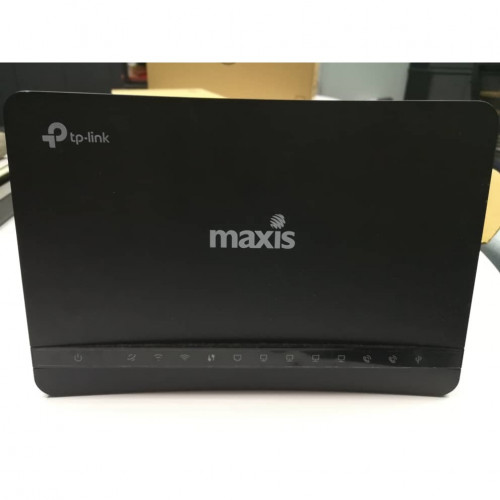
I have issued for the Internet connection. Sometime will auto disconnect. I have check speed thru speed test sometime can't get server. Somemore I reported ISP & come check or change original router but in the end also same. Do you think I should change router?
*
What's your router model?

Thanks
petlu28
post Jan 30 2021, 08:09 PM

Look at all my stars!!
*******
Senior Member
3,936 posts

Joined: Dec 2010
QUOTE(FusionXY @ Jan 30 2021, 08:05 PM)
What's your router model?

Thanks
*
user posted image

TPLINK MAXIS ADSL ARCHER C5v
FusionXY
post Jan 30 2021, 08:39 PM

LAZZIE ON VACATION
*******
Senior Member
3,836 posts

Joined: Aug 2016

QUOTE(petlu28 @ Jan 30 2021, 08:09 PM)
user posted image

TPLINK MAXIS ADSL ARCHER C5v
*
Have you test on LAN Cable connection?
Can get server via LAN Cable? Before getting a new own router. Check LAN Cable connection first.

Thanks.
petlu28
post Jan 30 2021, 08:41 PM

Look at all my stars!!
*******
Senior Member
3,936 posts

Joined: Dec 2010
I have download speed test in tvbox & have check when feel speed slow. Sometime can't get server thru LAN.

Just a while only suddenly WiFi disconnect again. 😭

QUOTE(FusionXY @ Jan 30 2021, 08:39 PM)
Have you test on LAN Cable connection?
Can get server via LAN Cable? Before getting a new own router. Check LAN Cable connection first.

Thanks.
*
This post has been edited by petlu28: Jan 30 2021, 09:46 PM
TSblacktubi
post Jan 30 2021, 09:02 PM

-
Group Icon
Elite
8,421 posts

Joined: Jul 2008

QUOTE(zher4883 @ Jan 30 2021, 07:36 PM)
Well marketing exaggeration as usual. There are routers that uses significantly better FEM Modules and didn't put as much emphasis on wall penetrating strength.
*
Yup, FEM is the keyword here but that's not the full story. Some manufacturers with better R&D capability will develop their own RF circuitry rather than relying on a FEM combo solution.
nbotsduo
post Jan 30 2021, 09:05 PM

New Member
*
Newbie
25 posts

Joined: Nov 2017
Hi guys!
Just got deco m4 from tm. Which setup do you guys recommend? Make the m4 into router or set it as ap and connect it with rg4332 router?
TSblacktubi
post Jan 30 2021, 09:44 PM

-
Group Icon
Elite
8,421 posts

Joined: Jul 2008

QUOTE(nbotsduo @ Jan 30 2021, 09:05 PM)
Hi guys!
Just got deco m4 from tm. Which setup do you guys recommend? Make the m4 into router or set it as ap and connect it with rg4332 router?
*
Do the direct connection if possible, it will provide the best possible performance without bottleneck.
FusionXY
post Jan 30 2021, 09:58 PM

LAZZIE ON VACATION
*******
Senior Member
3,836 posts

Joined: Aug 2016

QUOTE(petlu28 @ Jan 30 2021, 08:41 PM)
I have download speed test in tvbox & have check when feel speed slow. Sometime can't get server thru LAN.
*
Hello, the technician changed to a new router also having issues.

Got extra router or LAN Cable to try? Or you can ask your neighbor using Maxis.

QUOTE(nbotsduo @ Jan 30 2021, 09:05 PM)
Hi guys!
Just got deco m4 from tm. Which setup do you guys recommend? Make the m4 into router or set it as ap and connect it with rg4332 router?
*
I would like to recommend you to set as router as speed might be slower with AP mode.
Can refer to blacktubi advice above.

Thanks.

This post has been edited by FusionXY: Jan 30 2021, 09:58 PM
petlu28
post Jan 30 2021, 10:18 PM

Look at all my stars!!
*******
Senior Member
3,936 posts

Joined: Dec 2010
Home don't have any extra router & neighbour using data not home fiber.

[quote=FusionXY,Jan 30 2021, 09:58 PM]
Hello, the technician changed to a new router also having issues.

Got extra router or LAN Cable to try? Or you can ask your neighbor using Maxis.


wirelessbuyer
post Jan 31 2021, 10:07 AM

Casual
***
Junior Member
346 posts

Joined: Jul 2012
This seller provide 10% store-wide voucher with no cap! Can get ax73 at RM360 lmao .. 3 unit left gogo buy rclxms.gif rclxms.gif

https://shopee.com.my/product/175364569/9211715068
hdd-corrupted
post Jan 31 2021, 11:30 AM

Getting Started
**
Junior Member
279 posts

Joined: Aug 2009
From: KL


QUOTE(weixiong91 @ Jan 30 2021, 06:53 PM)
I just got myself an AC23 2 days back and set it up. Unfortunately, all the "wall killing" and extra long range wasn't the case. Comparing with my old DLink 868-L, the older DLink performed much better in terms of max 5GHz and similar performance in terms of range. This is especially surprising considering that the 868-L only has internal antenna vs AC23 which has 7 huge external antenna.

Anyone experienced the same thing as I have?

P/S: It is a Malaysia set with the latest firmware installed.
*
if you want to sell the 868L let me know. thanks.
JuzJoe
post Jan 31 2021, 11:58 AM

Getting Started
**
Junior Member
101 posts

Joined: Oct 2008


Good day people, I'm looking to upgrade/improve my network setup at home. I'm subscribed to Unifi living in a double story terrace with my unifi black cylinder router placed downstairs near the TV and my main PC with onboard wifi 6 setup at the upper floor in one of the smaller rooms. I'm pretty new to all this home network thing and just recently doing research and found out about wifi 6.

Any advice on how I should setup my home network? Do I need a mesh for upstairs? The current router that got my attention right now are the Asus tuf ax3000 and asus rt ax86u ax5700(are this overkill router)

I realised that my download speed is slower than upload. Is that normal?

user posted image
taqu
post Jan 31 2021, 12:37 PM

Enthusiast
*****
Junior Member
864 posts

Joined: May 2005
That old D-Link router can barely cover a single floor. The Asus routers you mention should be great.
jchong
post Jan 31 2021, 02:49 PM

****************
*******
Senior Member
5,989 posts

Joined: Nov 2005
QUOTE(FusionXY @ Jan 29 2021, 04:46 PM)
Yes, if walls are too thick.

Using Mesh Solution will help. As I cannot guarantee whether single router can cover over thick walls.
Most condominiums and apartments have thick walls due to soundproofing that your neighbor can't hear you very loud.
*
The thick walls (if any) would only be between different units. Within your own unit the walls should be the normal thickness.
FusionXY
post Jan 31 2021, 02:52 PM

LAZZIE ON VACATION
*******
Senior Member
3,836 posts

Joined: Aug 2016

QUOTE(jchong @ Jan 31 2021, 02:49 PM)
The thick walls (if any) would only be between different units. Within your own unit the walls should be the normal thickness.
*
Yup, some cases that single router cannot cover in the rooms.

Mesh is the only solution.
laksamana
post Jan 31 2021, 03:01 PM

Regular
******
Senior Member
1,356 posts

Joined: Nov 2006
From: An Illuminati organization ..


QUOTE(JuzJoe @ Jan 31 2021, 11:58 AM)
Good day people, I'm looking to upgrade/improve my network setup at home. I'm subscribed to Unifi living in a double story terrace with my unifi black cylinder router placed downstairs near the TV and my main PC with onboard wifi 6 setup at the upper floor in one of the smaller rooms. I'm pretty new to all this home network thing and just recently doing research and found out about wifi 6.

Any advice on how I should setup my home network? Do I need a mesh for upstairs? The current router that got my attention right now are the Asus tuf ax3000 and asus rt ax86u ax5700(are this overkill router)

I realised that my download speed is slower than upload. Is that normal?

user posted image
*
I'm assuming that's your 2.4Ghz wifi speed ....

Chances are you are suffering from a combination of weak signal (not apparent from just looking at the wifi bars on your device) / channel congestion, or both

Without knowing your Unifi speed, if you want ultimate performance then the ax86u is definitely a good choice, even better if you pair it with another cheap Asus ax router in a mesh setup

This post has been edited by laksamana: Jan 31 2021, 03:02 PM
JuzJoe
post Jan 31 2021, 04:53 PM

Getting Started
**
Junior Member
101 posts

Joined: Oct 2008


QUOTE(laksamana @ Jan 31 2021, 03:01 PM)
I'm assuming that's your 2.4Ghz wifi speed ....

Chances are you are suffering from a combination of weak signal (not apparent from just looking at the wifi bars on your device) / channel congestion, or both

Without knowing your Unifi speed, if you want ultimate performance then the ax86u is definitely a good choice, even better if you pair it with another cheap Asus ax router in a mesh setup
*
The package that I subscribed to is 500mbps. So does that mean I'm not getting the speed that I'm paying for. OMG, I have been blindly paying TM doh.gif doh.gif doh.gif

This post has been edited by JuzJoe: Jan 31 2021, 04:55 PM
laksamana
post Jan 31 2021, 05:11 PM

Regular
******
Senior Member
1,356 posts

Joined: Nov 2006
From: An Illuminati organization ..


QUOTE(JuzJoe @ Jan 31 2021, 04:53 PM)
The package that I subscribed to is 500mbps. So does that mean I'm not getting the speed that I'm paying for. OMG, I have been blindly paying TM  doh.gif  doh.gif  doh.gif
*
You are getting what you pay for, provided your devices are set up right ...

If you connect a laptop / PC with a LAN cable directly to your router, you will get the full speed for downloads

The thing is not many wireless devices are capable of reaching that maximum speed

Unless all your gadgets are AX enabled, and are located around 10 feet from the router with a perfect signal, then maybe you will hit the max speed

The importance of a good router / mesh setup is for multiple wireless devices to handle all sorts of streams simultaneously without interruption, not just 1 device achieving maximum throughput


JuzJoe
post Jan 31 2021, 05:21 PM

Getting Started
**
Junior Member
101 posts

Joined: Oct 2008


QUOTE(laksamana @ Jan 31 2021, 05:11 PM)
You are getting what you pay for, provided your devices are set up right ...

If you connect a laptop / PC with a LAN cable directly to your router, you will get the full speed for downloads

The thing is not many wireless devices are capable of reaching that maximum speed

Unless all your gadgets are AX enabled, and are located around 10 feet from the router with a perfect signal, then maybe you will hit the max speed

The importance of a good router / mesh setup is for multiple wireless devices to handle all sorts of streams simultaneously without interruption, not just 1 device achieving maximum throughput
*
I guess I will have to start by changing the router to wifi 6 first, then get a mesh set up if I see that the signal is not strong enough (heard that wifi 6 has better signal range compared to ac).

Am i correct to say that with a mesh setup, I will be able to achieve the optimal speed? Or is that impossible due to natural limitations of wifi?


This post has been edited by JuzJoe: Jan 31 2021, 05:28 PM
laksamana
post Jan 31 2021, 05:49 PM

Regular
******
Senior Member
1,356 posts

Joined: Nov 2006
From: An Illuminati organization ..


QUOTE(JuzJoe @ Jan 31 2021, 05:21 PM)
I guess I will have to start by changing the router to wifi 6 first, then get a mesh set up if I see that the signal is not strong enough (heard that wifi 6 has better signal range compared to ac).

Am i correct to say that with a mesh setup, I will be able to achieve the optimal speed? Or is that impossible due to natural limitations of wifi?
*
I'm on Asus routers, so can only speak about those

The high end AX ones def have good signal power

With mesh, you will optimize your wifi, but achieving maximum speed depends on many factors for wifi

302 Pages « < 155 156 157 158 159 > » Top
 

Change to:
| Lo-Fi Version
0.0206sec    0.84    6 queries    GZIP Disabled
Time is now: 18th December 2025 - 09:11 PM