Welcome Guest ( Log In | Register )

53 Pages « < 28 29 30 31 32 > » Bottom

Outline · [ Standard ] · Linear+

 ILLEGEAR Onyx Discussion Thread V1, Illegear's first Bazel-less Notebook

views
     
hshern95
post Apr 3 2019, 12:21 AM

Getting Started
**
Junior Member
81 posts

Joined: Apr 2014


user posted image

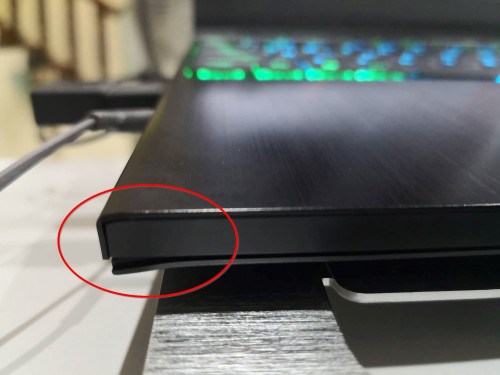
Hi peeps, may I ask is this a design or defect??
Actually I got this notebook on 21/03/2019 (Not to mention the service is quick and nice), and everything's fine except this. Then I was like since this did not affect my daily usage and I just accepted it. Until today I found that this corner looks like slightly bigger than two weeks earlier.

Just wanna know whether it's defect or a design?
STEVE@ILLEGEAR
post Apr 3 2019, 05:27 PM

New Member
*
Newbie
2 posts

Joined: Apr 2018
From: Team ILLEGEAR


QUOTE(hshern95 @ Apr 3 2019, 12:21 AM)
user posted image

Hi peeps, may I ask is this a design or defect??
Actually I got this notebook on 21/03/2019 (Not to mention the service is quick and nice), and everything's fine except this. Then I was like since this did not affect my daily usage and I just accepted it. Until today I found that this corner looks like slightly bigger than two weeks earlier.

Just wanna know whether it's defect or a design?
*
Hi hshern95, Should you wish to send in your laptop to our office for us to have a look at the issue?
phoyer15 P
post Apr 4 2019, 10:57 AM

New Member
*
Probation
0 posts

Joined: Apr 2019


QUOTE(Prince J @ Apr 2 2019, 11:37 AM)
I suggest you to completely uninstall the steam/office and try to re-install again. It seems to be caused by the software rather than the hardware.
No. ONYX is using Intel 9560 AC 2x2.
*
Hi Prince J,

I've managed to successfully install Steam and MS, but when I try to update Kaspersky and my Autodesk products, similar error log about connection failure appeared. I've already sent my onyx to the office for inspection. Thank you. biggrin.gif
hshern95
post Apr 4 2019, 04:57 PM

Getting Started
**
Junior Member
81 posts

Joined: Apr 2014


QUOTE(STEVE@ILLEGEAR @ Apr 3 2019, 05:27 PM)
Hi hshern95, Should you wish to send in your laptop to our office for us to have a look at the issue?
*
Can I send it to your office on June? Because I'm currently overseas.
STEVE@ILLEGEAR
post Apr 4 2019, 05:03 PM

New Member
*
Newbie
2 posts

Joined: Apr 2018
From: Team ILLEGEAR


QUOTE(hshern95 @ Apr 4 2019, 04:57 PM)
Can I send it to your office on June? Because I'm currently overseas.
*
Hi hshern95, Yes it is possible to do so
anthraxxxx
post Apr 7 2019, 10:51 PM

Getting Started
**
Junior Member
137 posts

Joined: Mar 2006


Hi. Is the 144hz screen upgrade only applicable for 1060 if I choose onyx lite?
Prince J
post Apr 8 2019, 01:25 AM

Regular
******
Senior Member
1,272 posts

Joined: May 2010
From: Team ILLEGEAR


QUOTE(anthraxxxx @ Apr 7 2019, 10:51 PM)
Hi. Is the 144hz screen upgrade only applicable for 1060 if I choose onyx lite?
*
hi anthraxxxx,

Yes ONYX Lite has 144Hz IPS option.
anthraxxxx
post Apr 8 2019, 11:43 AM

Getting Started
**
Junior Member
137 posts

Joined: Mar 2006


QUOTE(Prince J @ Apr 8 2019, 01:25 AM)
hi anthraxxxx,

Yes ONYX Lite has 144Hz IPS option.
*
Can I still choose the 144hz IPS option if I pick GTX 1050 Ti?

Prince J
post Apr 8 2019, 11:44 AM

Regular
******
Senior Member
1,272 posts

Joined: May 2010
From: Team ILLEGEAR


QUOTE(anthraxxxx @ Apr 8 2019, 11:43 AM)
Can I still choose the 144hz IPS option if I pick GTX 1050 Ti?
*
Yes you can.
Grevil
post Apr 11 2019, 04:32 PM

New Member
*
Newbie
16 posts

Joined: Apr 2013
QUOTE(pluginbaby @ Mar 25 2019, 03:12 PM)
Core clock is 2.19Ghz with turbo boost disabled and no other thing touched.

Score? hahahahaa. just 690-695 based 3 runs i did just now. If on turbo boost usually it is around 12xx. Tried playing with this setup while setting afterburner for flat curve at 1.4Ghz. Fortnite at High preset with motion blur disabled at 60fps and grass disabled, fps averages at 65-68 degrees with it peaked at 70 degrees just for short while.

I tried to add in epic Anti Aliasing and epic Textures but that just doesnt improve the quality to a significant level so im sticking to High preset now.  rclxms.gif
*
So currently disable turbo boost is the best way to keep temp low abit? I'm using this way to disable turno boost:
https://www.geeks3d.com/20170213/how-to-dis...-on-a-notebook/.

But still felt very hot on the panel of power button.

Any others recommended way? Internal or external(is cooling pad still a thing?) both also ok, as long as it cool down onyx when gaming.
AZIM@ILLEGEAR
post Apr 11 2019, 05:52 PM

New Member
*
Junior Member
28 posts

Joined: Feb 2017
From: Team ILLEGEAR


For the laptop, the temperature levels observed are perfectly fine but should you wish to bring down the temperature further, I would recommend for you boost the fan/equip a laptop cooler with a slanted design/use an external fan/operate the laptop in an air-conditioned room smile.gif
pluginbaby
post Apr 12 2019, 09:13 AM

Look at all my stars!!
*******
Senior Member
2,661 posts

Joined: Apr 2007


QUOTE(Grevil @ Apr 11 2019, 04:32 PM)
So currently disable turbo boost is the best way to keep temp low abit? I'm using this way to disable turno boost:
https://www.geeks3d.com/20170213/how-to-dis...-on-a-notebook/.

But still felt very hot on the panel of power button.

Any others recommended way? Internal or external(is cooling pad still a thing?) both also ok, as long as it cool down onyx when gaming.
*
I think there's no way to reduce the temp of the top panel near the power button since the placement of the cooling pipes and CPU+GPU is right near the bottom of it. I even trying to aim a stand fan at it yet it is still warm lol.

Anyway it is better to have it warm there rather than right under keyboard or touchpad as that would be unpleasant for daily usage. Should be fine I guess unless you are doing great stressing productivity tasks that constantly ramps up to turbo boost and temp go above 80 degrees. Disabling turbo boost for me looks to be good as my normal productivity tasks and gaming doesn't require super intensive CPU clocks.

Haven't tried the setting to 99%. Could work and will try soon but for now Intel XTU serves me fine to control that.

This post has been edited by pluginbaby: Apr 12 2019, 09:14 AM
Grevil
post Apr 15 2019, 12:15 PM

New Member
*
Newbie
16 posts

Joined: Apr 2013
Thanks for @AZIM@ILLEGEAR @pluginbaby suggestion.
k!nex
post Apr 16 2019, 12:32 PM

Restless stars
*******
Senior Member
3,389 posts

Joined: Mar 2007
From: KL


QUOTE(AZIM@ILLEGEAR @ Mar 26 2019, 07:25 PM)
Yes, the Onyx keyboard switches are interchangeable, same goes to the keycaps smile.gif
*
Hi Azim , is it possible to change Onyx keycaps to Selenite keycaps ? Are they interchangeable. I still like the keycaps shape of the Selenite .
AZIM@ILLEGEAR
post Apr 16 2019, 01:04 PM

New Member
*
Junior Member
28 posts

Joined: Feb 2017
From: Team ILLEGEAR


QUOTE(k!nex @ Apr 16 2019, 12:32 PM)
Hi Azim , is it possible to change Onyx keycaps to Selenite keycaps ? Are they interchangeable. I still like the keycaps shape of the Selenite .
*
Hi k!nex, I'm afraid the keycaps on the Selenite is not interchangeable with the Onyx because of the difference in the keycap dimensions. Nevertheless, we shall announce it officially once the octagon version of the Onyx keycaps (CAP 3) is released soon smile.gif
TSEiraku
post Apr 16 2019, 02:00 PM

Geeking since 1985!
*******
Senior Member
7,037 posts

Joined: Apr 2006


QUOTE(AZIM@ILLEGEAR @ Apr 16 2019, 01:04 PM)
Hi k!nex, I'm afraid the keycaps on the Selenite is not interchangeable with the Onyx because of the difference in the keycap dimensions. Nevertheless, we shall announce it officially once the octagon version of the Onyx keycaps (CAP 3) is released soon smile.gif
*
Talking about caps, I finally got around to mix-matching my Onyx caps. Now my CAPS, NUM and NUMPAD keys all use the older square Cap 1 and the rest are on the standard Brown-switch Cap 2... just for the fun of it lol.

Might just get a Cap 3 set once those hit also. Being able to physically alter the feel of your keys on-the-fly like this pretty funky TBH.

Also, yeah, cooling pads are still a thing. The best I've tested has got to be the Coolermaster A200 if you wanna go the "conventional" cooler route (good air volume from the twin fans and matches the vents on the Onyx), but I also use an X-Lite II which is not bad. Don't expect a HUGE drop in thermals, but the extra volume of air does help.

As for Vaccum coolers (the "extractor" types), I don't think those work well with the twin vent design on the Onyx... unless you buy two of those.

This post has been edited by Eiraku: Apr 16 2019, 02:10 PM

wkwong91
post Apr 16 2019, 02:56 PM

NeneBubu
******
Senior Member
1,171 posts

Joined: Oct 2010


Hi guys, is it the battery will stop charging when full?
k!nex
post Apr 16 2019, 03:13 PM

Restless stars
*******
Senior Member
3,389 posts

Joined: Mar 2007
From: KL


QUOTE(AZIM@ILLEGEAR @ Apr 16 2019, 01:04 PM)
Hi k!nex, I'm afraid the keycaps on the Selenite is not interchangeable with the Onyx because of the difference in the keycap dimensions. Nevertheless, we shall announce it officially once the octagon version of the Onyx keycaps (CAP 3) is released soon smile.gif
*
Owh... So there is actually a plan to release the octagon keycaps. Any tentative pricing. I need to start saving already. Learnt from Rosmah on tabiat menabung. biggrin.gif
Is it end-user replaceable or do I need to send my unit over for you guys to do it ?


k!nex
post Apr 16 2019, 03:22 PM

Restless stars
*******
Senior Member
3,389 posts

Joined: Mar 2007
From: KL


Btw, I have tried numerous ways for cooling. I think the main problem is the rubber feet at the bottom of the notebook is not tall enough. That hinders airflow . I did an experiment by comparing the placement of the notebook. Put on the desk like usual and tilt the rear by 1.5cm like that by putting a small book between the 2 fans inlet. There is a significant drop in temperature when i run benchmarks. I think those notebook coolers dont work that well because the fans are not powerful enough, it is only drawing power from USB port , 5V 500mA max.
YVONNE@ILLEGEAR
post Apr 16 2019, 03:59 PM

New Member
*
Newbie
2 posts

Joined: Nov 2017
From: Team ILLEGEAR


QUOTE(k!nex @ Apr 16 2019, 03:13 PM)
Owh... So there is actually a plan to release the octagon keycaps. Any tentative pricing. I need to start saving already. Learnt from Rosmah on tabiat menabung. biggrin.gif
Is it end-user replaceable or do I need to send my unit over for you guys to do it ?
*
Good day! Sorry to inform you that octagon keycap is not compatible with the keyboard panel used in the Onyx model.
We shall keep you informed on the latest updates once given by the manufacturer later. Thanks and have a nice day!


53 Pages « < 28 29 30 31 32 > » Top
 

Change to:
| Lo-Fi Version
0.0164sec    0.49    6 queries    GZIP Disabled
Time is now: 3rd December 2025 - 11:39 AM