Welcome Guest ( Log In | Register )

53 Pages « < 29 30 31 32 33 > » Bottom

Outline · [ Standard ] · Linear+

 ILLEGEAR Onyx Discussion Thread V1, Illegear's first Bazel-less Notebook

views
     
ZM Fong
post Apr 16 2019, 04:25 PM

Laptop advisor
*******
Senior Member
8,240 posts

Joined: Apr 2017
QUOTE(k!nex @ Apr 16 2019, 03:22 PM)
Btw, I have tried numerous ways for cooling. I think the main problem is the rubber feet at the bottom of the notebook is not tall enough. That hinders airflow . I did an experiment by comparing the placement of the notebook. Put on the desk like usual and tilt the rear by 1.5cm like that by putting a small book between the 2 fans inlet. There is a significant drop in temperature when i run benchmarks. I think those notebook coolers dont work that well because the fans are not powerful enough, it is only drawing power from USB port , 5V 500mA max.
*
That's exactly what I always recommend others to do instead of buying cooling pad...free yet effective method, applies to all laptops
mcloudteo
post Apr 19 2019, 08:09 PM

Getting Started
**
Junior Member
72 posts

Joined: Dec 2009
QUOTE(k!nex @ Apr 16 2019, 03:22 PM)
Btw, I have tried numerous ways for cooling. I think the main problem is the rubber feet at the bottom of the notebook is not tall enough. That hinders airflow . I did an experiment by comparing the placement of the notebook. Put on the desk like usual and tilt the rear by 1.5cm like that by putting a small book between the 2 fans inlet. There is a significant drop in temperature when i run benchmarks. I think those notebook coolers dont work that well because the fans are not powerful enough, it is only drawing power from USB port , 5V 500mA max.
*
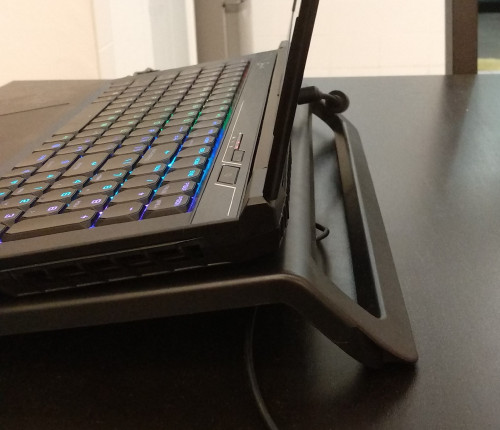
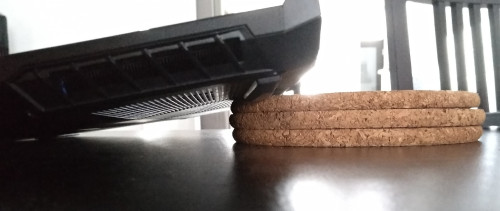
I do exactly the same though I'm using the cooler pad but never use the fan just to lift up the laptop tongue.gif

The cool thing about using the cooler pad is i can put on my lap and it look more organize as well sorry I'm OCD devil.gif

user posted image
ZM Fong
post Apr 19 2019, 11:50 PM

Laptop advisor
*******
Senior Member
8,240 posts

Joined: Apr 2017
QUOTE(mcloudteo @ Apr 19 2019, 08:09 PM)
I do exactly the same though I'm using the cooler pad but never use the fan just to lift up the laptop  tongue.gif

The cool thing about using the cooler pad is i can put on my lap and it look more organize as well sorry I'm OCD  devil.gif

user posted image
*
Does the cooling pad has enough airflow on the bottom of the laptop or not. Many cheap cooling pads suck in airflow, relying the weak fans which did nothing. I tried one CM before, that one sucks
mcloudteo
post Apr 20 2019, 07:37 AM

Getting Started
**
Junior Member
72 posts

Joined: Dec 2009
QUOTE(ZM Fong @ Apr 19 2019, 11:50 PM)
Does the cooling pad has enough airflow on the bottom of the laptop or not. Many cheap cooling pads suck in airflow, relying the weak fans which did nothing. I tried one CM before, that one sucks
*
I'm not using the fan..... sweat.gif
ZM Fong
post Apr 20 2019, 11:08 AM

Laptop advisor
*******
Senior Member
8,240 posts

Joined: Apr 2017
QUOTE(mcloudteo @ Apr 20 2019, 07:37 AM)
I'm not using the fan.....  sweat.gif
*
Then you might just want to lift up the back by a bit to enable more airflow. The cooling pad might block some airflow
k!nex
post Apr 20 2019, 12:13 PM

Restless stars
*******
Senior Member
3,389 posts

Joined: Mar 2007
From: KL


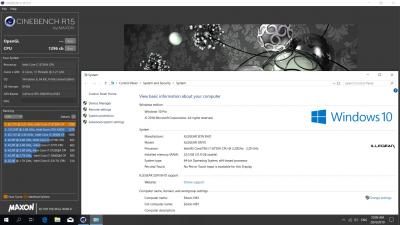
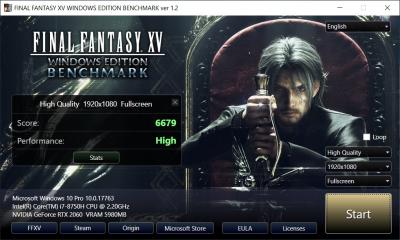
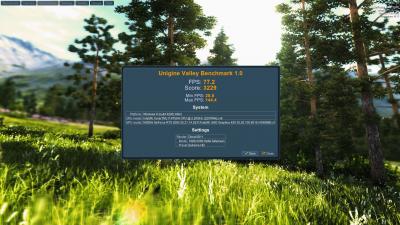
Here are some figures for performance numbers for my slightly tweaked Onyx RTX 2060.

Cinebench R15 scores:

» Click to show Spoiler - click again to hide... «


Firestrike Benchmark:
» Click to show Spoiler - click again to hide... «


Final Fantasy XV Benchmark :

» Click to show Spoiler - click again to hide... «


Unigine Valley Extreme HD :

» Click to show Spoiler - click again to hide... «


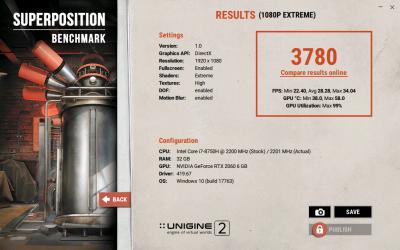
Superposition Benchmark 1080p Extreme

» Click to show Spoiler - click again to hide... «


Power Limit for i7 8750H during idle in HWinfo64 :
» Click to show Spoiler - click again to hide... «


Stress test for ROG Realbench ( ambient temp 25C) :

CPU
» Click to show Spoiler - click again to hide... «


GPU
» Click to show Spoiler - click again to hide... «


For the CPU side, I can confirm that the Power Limit is dynamic. It can change depending on temperature. CPU will start throttling at 95C

This post has been edited by k!nex: May 2 2019, 08:51 PM
mcloudteo
post Apr 20 2019, 01:37 PM

Getting Started
**
Junior Member
72 posts

Joined: Dec 2009
QUOTE(ZM Fong @ Apr 20 2019, 11:08 AM)
Then you might just want to lift up the back by a bit to enable more airflow. The cooling pad might block some airflow
*
by using book? sweat.gif

sorry as i mentioned it look more organize on the cooler pad maybe it not important to you but it's for me. tongue.gif


but I curious how both of these method will affect the temperature of the laptop hence i did the test just now devil.gif

both test using intel xtu with 5 minutes stress test on cpu


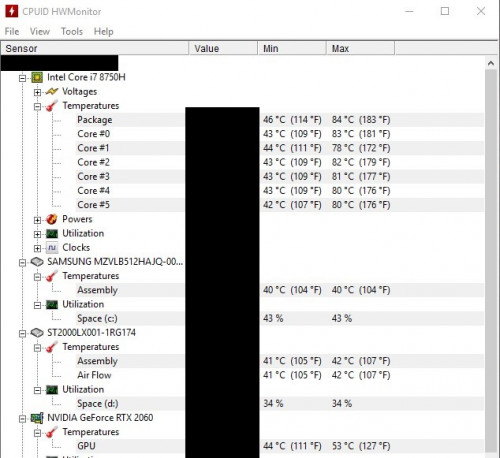
First test tilt the rear putting something in between the 2 fans inlet like what k!nex did.

user posted image

user posted image


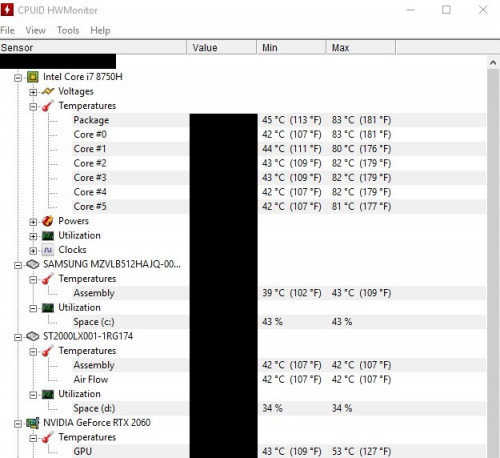
Second test put on cooler pad without fan.

user posted image


I re-run 3 times to make sure the result is consistent as you can see above the result of both method are the same judging from the max recorded value, even the temperature of other component other than cpu.

anyway the test just out of curiosity it's not a professional test of any sort. laugh.gif

This post has been edited by mcloudteo: Apr 20 2019, 01:38 PM
ZM Fong
post Apr 20 2019, 03:14 PM

Laptop advisor
*******
Senior Member
8,240 posts

Joined: Apr 2017
QUOTE(mcloudteo @ Apr 20 2019, 01:37 PM)
snip
*
Agree that cooling pad looks more organized. Thanks for the testing. I guess it depends on the cooling pad model. My CM Notepal X-Slim II does have slightly worse result compared to putting book at the back (with fans). Still think that cooling pad isn't the best way to decrease temps

This post has been edited by ZM Fong: Apr 20 2019, 03:14 PM
k!nex
post Apr 20 2019, 09:14 PM

Restless stars
*******
Senior Member
3,389 posts

Joined: Mar 2007
From: KL


QUOTE(mcloudteo @ Apr 20 2019, 01:37 PM)
by using book?  sweat.gif

sorry as i mentioned it look more organize on the cooler pad maybe it not important to you but it's for me.  tongue.gif

but I curious how both of these method will affect the temperature of the laptop hence i did the test just now  devil.gif

both test using intel xtu with 5 minutes stress test on cpu
First test tilt the rear putting something in between the 2 fans inlet like what k!nex did.

user posted image

user posted image
Second test put on cooler pad without fan.

user posted image
I re-run 3 times to make sure the result is consistent as you can see above the result of both method are the same judging from the max recorded value, even the temperature of other component other than cpu.

anyway the test just out of curiosity it's not a professional test of any sort.  laugh.gif
*
There is 1 thing you forgot to do . If you want apples to apples comparison, you should max out both fans before you do a stress test for temps.
prasys
post Apr 20 2019, 11:27 PM

Heros Never Die
Group Icon
VIP
12,925 posts

Joined: Mar 2005
From: Kuala Lumpur
QUOTE(mcloudteo @ Apr 20 2019, 01:37 PM)
by using book?  sweat.gif

sorry as i mentioned it look more organize on the cooler pad maybe it not important to you but it's for me.  tongue.gif

but I curious how both of these method will affect the temperature of the laptop hence i did the test just now  devil.gif

both test using intel xtu with 5 minutes stress test on cpu
First test tilt the rear putting something in between the 2 fans inlet like what k!nex did.

user posted image

user posted image
Second test put on cooler pad without fan.

user posted image
I re-run 3 times to make sure the result is consistent as you can see above the result of both method are the same judging from the max recorded value, even the temperature of other component other than cpu.

anyway the test just out of curiosity it's not a professional test of any sort.  laugh.gif
*
Hiding the other details , umm can't comprehend that one
mcloudteo
post Apr 21 2019, 12:31 PM

Getting Started
**
Junior Member
72 posts

Joined: Dec 2009
QUOTE(prasys @ Apr 20 2019, 11:27 PM)
Hiding the other details , umm can't comprehend that one
*
Not intended to hide anything, the current value is pointless it depend on when you do the screenshot, just don't want to confuse the viewer.


take for example you do the screenshot right after the cpu stress test the value will be similar to max value but if you screen shot 10 second later the drop in cpu frequency will bring down the temperature reading so it's pointless to view the current value


mcloudteo
post Apr 21 2019, 12:33 PM

Getting Started
**
Junior Member
72 posts

Joined: Dec 2009
QUOTE(k!nex @ Apr 20 2019, 09:14 PM)
There is 1 thing you forgot to do . If you want apples to apples comparison, you should max out both fans before you do a stress test for temps.
*
not a real world test if I max out the fan as I dont use my laptop with max fan anyway it just too noisy.
sw1314
post Apr 24 2019, 10:58 AM

Casual
***
Junior Member
312 posts

Joined: Aug 2012
i read the previous post Onyx can buy larger battery
is it still available?
aiming Onyx Lite now
AZIM@ILLEGEAR
post Apr 24 2019, 11:04 AM

New Member
*
Junior Member
28 posts

Joined: Feb 2017
From: Team ILLEGEAR


QUOTE(sw1314 @ Apr 24 2019, 10:58 AM)
i read the previous post Onyx can buy larger battery
is it still available?
aiming Onyx Lite now
*
Hi sw1314, the extended battery pack option has been withdrawn from the customization page at the moment because the component is out of stock at the moment (will be back ETA by middle of May). However, it is possible for you to upgrade the battery at a later date as well because of the modularity of our laptops 😊
sw1314
post Apr 24 2019, 11:16 AM

Casual
***
Junior Member
312 posts

Joined: Aug 2012
QUOTE(AZIM@ILLEGEAR @ Apr 24 2019, 11:04 AM)
Hi sw1314, the extended battery pack option has been withdrawn from the customization page at the moment because the component is out of stock at the moment (will be back ETA by middle of  May). However, it is possible for you to upgrade the battery at a later date as well because of the modularity of our laptops 😊
*
ic.. thank a lot
if buy the upgrade the battery along is how much?
because if i buy now the batttery still new
AZIM@ILLEGEAR
post Apr 24 2019, 11:44 AM

New Member
*
Junior Member
28 posts

Joined: Feb 2017
From: Team ILLEGEAR


QUOTE(sw1314 @ Apr 24 2019, 11:16 AM)
ic.. thank a lot
if buy the upgrade the battery along is how much?
because if i buy now the batttery still new
*
The battery will be priced as RM450/unit and the price would be the same for an upgrade/separate purchase, hope this clarifies.
sw1314
post Apr 24 2019, 11:46 AM

Casual
***
Junior Member
312 posts

Joined: Aug 2012
QUOTE(AZIM@ILLEGEAR @ Apr 24 2019, 11:44 AM)
The battery will be priced as RM450/unit and the price would be the same for an upgrade/separate purchase, hope this clarifies.
*
noted and thank
pluginbaby
post Apr 24 2019, 02:04 PM

Look at all my stars!!
*******
Senior Member
2,661 posts

Joined: Apr 2007


QUOTE(AZIM@ILLEGEAR @ Apr 24 2019, 11:44 AM)
The battery will be priced as RM450/unit and the price would be the same for an upgrade/separate purchase, hope this clarifies.
*
Would it be available for rtx2060 config? Or just for gtx1060 config?
tch23
post Apr 25 2019, 08:21 AM

Getting Started
**
Junior Member
51 posts

Joined: Sep 2008


Hmm, noticed that there are no 144hz screen option for onyx lite currently. And big different between 60hz and 144hz?
ZM Fong
post Apr 25 2019, 12:23 PM

Laptop advisor
*******
Senior Member
8,240 posts

Joined: Apr 2017
QUOTE(tch23 @ Apr 25 2019, 08:21 AM)
And big different between 60hz and 144hz?
*
For fast paced games, yes

53 Pages « < 29 30 31 32 33 > » Top
 

Change to:
| Lo-Fi Version
0.1154sec    0.77    6 queries    GZIP Disabled
Time is now: 4th December 2025 - 02:38 PM