Outline ·
[ Standard ] ·
Linear+
Unifi Official TM UniFi High Speed Broadband Thread V33, Enjoy Your UniFi
|
mztang52
|
 Apr 15 2018, 10:09 AM Apr 15 2018, 10:09 AM
|

|
QUOTE(soul_project @ Apr 15 2018, 10:04 AM) RM0.00 Unifi: We apologise as there may be some delay in restoring svc (6037732xxxx) at yr area. Expected restoration by 16/04/2018 10:17 PM. Visit unifi.com.my & click live chat for enquiries. TQ Wtf down 2 days. Ss2 area. You can ask for refund for the disruption of service. Don't give them any excuse to charge you for the same price when they failed to provide you internet service for two days. |
|
|
|
|
|
soul_project
|
Apr 15 2018, 10:15 AM
|
|
|
QUOTE(mztang52 @ Apr 15 2018, 10:09 AM) You can ask for refund for the disruption of service. Don't give them any excuse to charge you for the same price when they failed to provide you internet service for two days. What's the process like ya bro? Use tm live chat and ask for refund? Or there's certain website to lodge request? |
|
|
|
|
|
fruitie
|
Apr 15 2018, 12:26 PM
|
Rise and Shine

|
QUOTE(soul_project @ Apr 15 2018, 10:15 AM) What's the process like ya bro? Use tm live chat and ask for refund? Or there's certain website to lodge request? Report a case via 100, they will open report for you. Tell them it's not fair to charge you when you don't get to use it. The rebate will be given in next bill. |
|
|
|
|
|
mztang52
|
Apr 15 2018, 01:23 PM
|
|
|
QUOTE(soul_project @ Apr 15 2018, 10:15 AM) What's the process like ya bro? Use tm live chat and ask for refund? Or there's certain website to lodge request? Just call 100 will do, you can use live chat or email too. |
|
|
|
|
|
Alex9182
|
Apr 15 2018, 08:44 PM
|
|
|
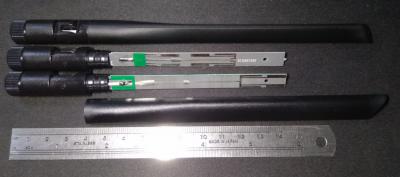
QUOTE(XPS @ Apr 12 2018, 07:12 PM) wah, not bad, got to see inside of the Blue Cave unit and the antenna.  Asus antenna is not same to TP-Link, TP-Link mostly use PCB etched antenna while Asus use tube shape antenna. which one is better? This post has been edited by Alex9182: Apr 15 2018, 08:55 PM Attached thumbnail(s)

|
|
|
|
|
|
Keatsan
|
Apr 16 2018, 08:46 AM
|
|
|
Subang Area, today morning 8.20am, a brief outage of unifi. Lasted for 25 minutes before it's up.
Anyone else experienced this besides me?
Not sure what happen but internet is back up by 8.45am
|
|
|
|
|
|
plumberly
|
Apr 16 2018, 10:53 AM
|
|
|
Need help from friends here who have resolved this sound issue.
Got this sound issue now and then when watching HypTV (like not tuned properly, high pitch sound) since I switched to Unifi some 2 yrs ago. I managed to solve the sound problem by :
** changing to certain channel and then go back to the channel I want to watch,
** restarting the HypTV box
It is now getting rather annoying to do all that almost 1-3 times daily to correct the sound. To add salt to injury, my 2 old solution sometimes worked and sometimes not.
Like to learn from those who faced the same problem and how you managed to solve it.
Thanks.
|
|
|
|
|
|
stephantsen
|
Apr 16 2018, 11:09 AM
|
|
|
QUOTE(plumberly @ Apr 16 2018, 10:53 AM) Need help from friends here who have resolved this sound issue. Got this sound issue now and then when watching HypTV (like not tuned properly, high pitch sound) since I switched to Unifi some 2 yrs ago. I managed to solve the sound problem by : ** changing to certain channel and then go back to the channel I want to watch, ** restarting the HypTV box It is now getting rather annoying to do all that almost 1-3 times daily to correct the sound. To add salt to injury, my 2 old solution sometimes worked and sometimes not. Like to learn from those who faced the same problem and how you managed to solve it. Thanks. [CODE] i am also encountering this problem, so annoying |
|
|
|
|
|
VeeJay
|
Apr 16 2018, 11:56 AM
|
|
|
QUOTE(plumberly @ Apr 16 2018, 10:53 AM) Need help from friends here who have resolved this sound issue. Got this sound issue now and then when watching HypTV (like not tuned properly, high pitch sound) since I switched to Unifi some 2 yrs ago. I managed to solve the sound problem by : ** changing to certain channel and then go back to the channel I want to watch, ** restarting the HypTV box It is now getting rather annoying to do all that almost 1-3 times daily to correct the sound. To add salt to injury, my 2 old solution sometimes worked and sometimes not. Like to learn from those who faced the same problem and how you managed to solve it. Thanks. QUOTE(stephantsen @ Apr 16 2018, 11:09 AM) [CODE] i am also encountering this problem, so annoying the only solution I know off is unplug your hdmi at unifitv and plug it again, that resets the noise. Mine not that often, but once in a while ada la |
|
|
|
|
|
plumberly
|
Apr 16 2018, 12:28 PM
|
|
|
QUOTE(VeeJay @ Apr 16 2018, 11:56 AM) the only solution I know off is unplug your hdmi at unifitv and plug it again, that resets the noise. Mine not that often, but once in a while ada la Done that but not 100% success every time. Thanks. This post has been edited by plumberly: Apr 16 2018, 01:19 PM |
|
|
|
|
|
AVFAN
|
Apr 16 2018, 06:03 PM
|
|
|
QUOTE(VeeJay @ Apr 16 2018, 11:56 AM) the only solution I know off is unplug your hdmi at unifitv and plug it again, that resets the noise. Mine not that often, but once in a while ada la is this with new small white or old big silver stb? mine is old big silver with same hdmi cable... 6 years... never encountered this. now i'm concerned if this noise thingy is common with small white box..? |
|
|
|
|
|
VeeJay
|
Apr 16 2018, 06:21 PM
|
|
|
QUOTE(AVFAN @ Apr 16 2018, 06:03 PM) is this with new small white or old big silver stb? mine is old big silver with same hdmi cable... 6 years... never encountered this. now i'm concerned if this noise thingy is common with small white box..? yes, its the EC6108V8. Mine kinda rare, but couple of friends been having frequent issues, it could be the cable they had supplied with as well. Since I dont encounter often, didnt play around with switching the cable. Also wondering if it has to do with CEC... http://www.tomshardware.com/forum/id-31532...hdmi-cable.html |
|
|
|
|
|
stephantsen
|
Apr 16 2018, 07:21 PM
|
|
|
so it is cable problem? not the stb? then i can just simy change the cable
This post has been edited by stephantsen: Apr 16 2018, 07:22 PM
|
|
|
|
|
|
VeeJay
|
Apr 16 2018, 07:25 PM
|
|
|
QUOTE(stephantsen @ Apr 16 2018, 07:21 PM) so it is cable problem? not the stb? then i can just simy change the cable Does yours happens frequently? If so, do try swapping the cable.....do let us know the outcome |
|
|
|
|
|
AVFAN
|
Apr 16 2018, 07:30 PM
|
|
|
QUOTE(VeeJay @ Apr 16 2018, 06:21 PM) yes, its the EC6108V8. Mine kinda rare, but couple of friends been having frequent issues, it could be the cable they had supplied with as well. Since I dont encounter often, didnt play around with switching the cable. Also wondering if it has to do with CEC... http://www.tomshardware.com/forum/id-31532...hdmi-cable.htmlyes... could be hdmi cable problem. cec... not sure... tot it is more to do with certain brands of TV-AVR... ARC not working properly. i never had to deal with it... maybe others who experienced can shed some light. so.. it is not always TM-Unifi problem but can be something else..?! |
|
|
|
|
|
siawyent
|
Apr 16 2018, 08:47 PM
|
|
|
Anyone have a problem when log into Unifi website? My account shown nothing, it said I don't have an account.
Actually, I used Unifi portal to view and pay bills for last few months, but today can't see anything.
|
|
|
|
|
|
hitz666
|
Apr 16 2018, 08:53 PM
|
New Member

|
hi guys,
I just purchase LG 4k tv, i'm having problem to access the tv apps (netflix/youtube) when connected to unifi but able to access via my phone hotspot, wonder anyone facing the same issue?
|
|
|
|
|
|
mztang52
|
Apr 16 2018, 11:22 PM
|
|
|
QUOTE(hitz666 @ Apr 16 2018, 08:53 PM) hi guys, I just purchase LG 4k tv, i'm having problem to access the tv apps (netflix/youtube) when connected to unifi but able to access via my phone hotspot, wonder anyone facing the same issue? Your phone hotspot? Is it unifi mobile? How did you connect your LG TV to the UniFi? |
|
|
|
|
|
Rudd
|
Apr 16 2018, 11:35 PM
|
|
|
So, after 2 weeks using unifi.
The router ac1200 decided not to detect internet connection & cannot use wifi. Wifi led turn red/orange.
The unifitv still works, meaning modem & lan is working ok.
Check tplink webpage, my ip address went missing.
After 3rd reboot attempted, the ip return & now wifi works.
Any faced this before?
|
|
|
|
|
|
hitz666
|
Apr 17 2018, 08:19 AM
|
New Member
|
QUOTE(mztang52 @ Apr 16 2018, 11:22 PM) Your phone hotspot? Is it unifi mobile? How did you connect your LG TV to the UniFi? i'm using digi btw, after few hours looking for solution, finally solved the connection problem by using the wifi guest network |
|
|
|
|





 Quote
Quote








 0.0236sec
 0.67
0.67
 6 queries
 GZIP Disabled