Welcome Guest ( Log In | Register )

61 Pages « < 56 57 58 59 60 > » Bottom

Outline · [ Standard ] · Linear+

 Nvidia Shield TV 2017

views
     
NewB-MX
post Feb 8 2022, 07:41 PM

Getting Started
**
Junior Member
87 posts

Joined: Sep 2011
QUOTE(juzmafia @ Feb 8 2022, 01:37 PM)
» Click to show Spoiler - click again to hide... «


The IR battery drain issue was due to the remote keep emitting IR signal non stop even when not in use and it was fixed later via firmware update for the remote. Iinm, latest Shield 2019 remote firmware version is v1.12.
Does this still happen to your remote when you setup IR? You can check with your phone camera.
Did you ever reset your remote?
>> https://nvidia.custhelp.com/app/answers/det...-remote-control

There's setting to prevent shield tv to sleep when there is audio playing, check at under the settings>device preference>screensaver>Stay Awake on Music
*
I didn't check for IR 'leak'. Since turning it on causes problem witj the Bluetooth connection with the hub/console (at least for my set), I am keeping IR off.

On "Stay awake on music", I already have it turned On but it still goes to sleep while Tidal is playing.

juzmafia
post Feb 9 2022, 01:49 PM

On my way
****
Junior Member
562 posts

Joined: Oct 2012
From: Out of the world...

QUOTE(NewB-MX @ Feb 8 2022, 07:41 PM)
I didn't check for IR 'leak'. Since turning it on causes problem witj the Bluetooth connection with the hub/console (at least for my set), I am keeping IR off.

On "Stay awake on music", I already have it turned On but it still goes to sleep while Tidal is playing.
*
If turning IR off fix the battery issue then your remote has software issue or failed to update properly(happens before). Hopefully this is long term fix for your remote.

Does the sleep issue started after the SE 9.0 update or before that?
Try to see if can reproduce the same sleep issue with other app like Spotify.

If this issue happen after the SE 9.0 then best report it to Nvidia.
NewB-MX
post Feb 12 2022, 02:38 AM

Getting Started
**
Junior Member
87 posts

Joined: Sep 2011
QUOTE(juzmafia @ Feb 9 2022, 01:49 PM)
If turning IR off fix the battery issue then your remote has software issue or failed to update properly(happens before). Hopefully this is long term fix for your remote.

Does the sleep issue started after the SE 9.0 update or before that?
Try to see if can reproduce the same sleep issue with other app like Spotify.

If this issue happen after the SE 9.0 then best report it to Nvidia.
*
I am not using SE 9.0. Withholding the update in view of all the reported issues.

I have opened a ticket with Nvidia but it has not responded. Will update.
NewB-MX
post Feb 17 2022, 02:38 AM

Getting Started
**
Junior Member
87 posts

Joined: Sep 2011
QUOTE(NewB-MX @ Feb 12 2022, 02:38 AM)
I am not using SE 9.0. Withholding the update in view of all the reported issues.

I have opened a ticket with Nvidia but it has not responded. Will update.
*
Received an e-mail from Nvidia suggesting a list of things to do.

But luckily I don't have to go through them cos the problem I had somehow is gone! Now Shield doesn't go to sleep while Tidal is playing. I really don't know what happened.

On another note, does anyone know whether it is possible to :-

(a) transfer some data from the internal storage to the adopted storage?; and

(b) choose where apps are installed?

I have a USB drive acting as an adopted storage in order to add more space to the meagre internal storage. But I notice that most of the data and possibly new apps which I installed recently are still in the internal storage. This causes problem as sometimes I get a warning from the system saying that the internal storage space is getting very low; the culprit which eats up a lot of internal storage space is the Cache, which I will then clear when I get that warning.

There is a lot more space in the adopted storage which is not utilised by the system.

Thanks!
juzmafia
post Feb 17 2022, 11:56 PM

On my way
****
Junior Member
562 posts

Joined: Oct 2012
From: Out of the world...

QUOTE(NewB-MX @ Feb 17 2022, 02:38 AM)
Received an e-mail fromΒ  Nvidia suggesting a list of things to do.

But luckily I don'tΒ  have to go through them cos the problem I had somehow is gone! Now Shield doesn't go to sleep while Tidal is playing. I really don't know what happened.

On another note, does anyone know whether it is possible to :-

(a) transfer some data from the internal storage to the adopted storage?; and

(b) choose where apps are installed?

I have a USB drive acting as an adopted storage in order to add more space to the meagre internal storage. But I notice that most of the data and possibly new apps which I installed recently are still in the internal storage. This causes problem as sometimes I get a warning from the system saying that the internal storage space is getting very low; the culprit which eats up a lot of internal storage space is the Cache, which I will then clear when I get that warning.

There is a lot more space in the adopted storage which is not utilised by the system.

Thanks!
*
a. If you're referring to app data then that depends on how the developer coded the app to use which storage location. Unfortunately most Android TV apps are coded to use internal storage only.

b. Yes, but still depends on how the app is coded and need to do it individually.
i. For apps that support move to adopted storage:
1. Go to settings>apps
2. Select the app
3. Select Storage used
4. Select USB drive

ii. For apps that don't support move to adopted storage:
1. Enable Developer option(Settings>device preference>about and continuously click on Build until it show 'You are now a developer' popup).
2. Go to settings>device preferences>developer option
3. Enable Force allow apps on external

Now you'll be able to move almost all apps to adopted storage individually but note the following:
i. Not all apps can be force to adopted storage. Ex: pre-installed and system apps.(Even if it is possible to move these apps, DO NOT do that)
ii. Some apps do not support adopted storage and able to force move to adopted storage but will stop working. Will need to move back to internal storage.
iii. Apps that require DRM is best to stay at internal storage. (Ex: streaming apps)
iv. If you had to reset your device before backing up the adopted drive, you'll lose everything.
v. In some case, due to slow in scanning/detect by the system after cold boot the apps on adopted storage won't appear on the system.(usually happen on ATV dongle with Y-cable)


Note that with SE 9.0(Android 11), the force allow apps on external option will cause some apps on adopted storage to fail to update via Google Playstore.
The workaround is to transfer the app back to internal storage, then update and move back to adopted storage.
This is Android issue started since version 10.
Refer: https://nvidia.custhelp.com/app/answers/detail/a_id/5324


On the low storage issue, refer this: https://nvidia.custhelp.com/app/answers/det..._id/5301/kw/Low

This post has been edited by juzmafia: Feb 20 2022, 01:19 PM

NewB-MX
post Feb 26 2022, 04:18 AM

Getting Started
**
Junior Member
87 posts

Joined: Sep 2011
QUOTE(juzmafia @ Feb 17 2022, 11:56 PM)
a. If you're referring to app data then that depends on how the developer coded the app to use which storage location. Unfortunately most Android TV apps are coded to use internal storage only.

b. Yes, but still depends on how the app is coded and need to do it individually.
i. For apps that support move to adopted storage:
1. Go to settings>apps
2. Select the app
3. Select Storage used
4. Select USB drive

ii. For apps that don't support move to adopted storage:
1. Enable Developer option(Settings>device preference>about and continuously click on Build until it show 'You are now a developer' popup).
2. Go to settings>device preferences>developer option
3. Enable Force allow apps on external

Now you'll be able to move almost all apps to adopted storage individually but note the following:
i. Not all apps can be force to adopted storage. Ex: pre-installed and system apps.(Even if it is possible to move these apps, DO NOT do that)
ii. Some apps do not support adopted storage and able to force move to adopted storage but will stop working. Will need to move back to internal storage.
iii. Apps that require DRM is best to stay at internal storage. (Ex: streaming apps)
iv. If you had to reset your device before backing up the adopted drive, you'll lose everything.
v. In some case, due to slow in scanning/detect by the system after cold boot the apps on adopted storage won't appear on the system.(usually happen on ATV dongle with Y-cable)
Note that with SE 9.0(Android 11), the force allow apps on external option will cause some apps on adopted storage to fail to update via Google Playstore.
The workaround is to transfer the app back to internal storage, then update and move back to adopted storage.
This is Android issue started since version 10.
Refer: https://nvidia.custhelp.com/app/answers/detail/a_id/5324
On the low storage issue, refer this: https://nvidia.custhelp.com/app/answers/det..._id/5301/kw/Low
*
Thanks so much for this! thumbup.gif
Dickong
post Apr 12 2022, 11:31 PM

Regular
******
Senior Member
1,689 posts

Joined: Jan 2003
Shield tv firmware 9.0.2 is out today. Just upgrade
jhleo1
post Apr 12 2022, 11:33 PM

Look at all my stars!!
*******
Senior Member
4,381 posts

Joined: Jan 2003
I received long ago because registered their beta program.

QUOTE(Dickong @ Apr 12 2022, 11:31 PM)
Shield tv firmware 9.0.2 is out today. Just upgrade
*
Andrewtst
post Apr 25 2022, 12:03 PM

Forgiveness is Happiness
*********
All Stars
29,764 posts

Joined: Jan 2009
From: Johor, Malaysia.


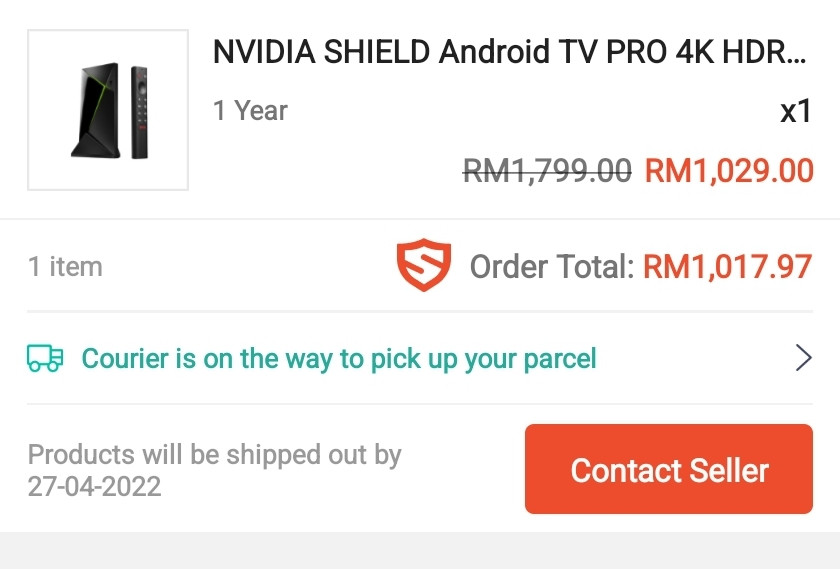
Finally purchase the Nvidia Shield Pro. Can't wait it arrival. 😊

user posted image

This post has been edited by Andrewtst: Apr 25 2022, 12:04 PM
juzmafia
post Apr 25 2022, 01:30 PM

On my way
****
Junior Member
562 posts

Joined: Oct 2012
From: Out of the world...

QUOTE(Andrewtst @ Apr 25 2022, 12:03 PM)
Finally purchase the Nvidia Shield Pro. Can't wait it arrival. 😊

user posted image
*
Congrats..

Do note that currently the latest public update is still not that stable and there's issue with Plex that is affecting media with TrueHD.
Other than that, Android TV 11 permission restrictions is kinda annoying and Kodi does not "officially" support Android 11.


Unfortunately, you can't skip the new update because for first time setup it will force update to latest public release..πŸ˜…

Edit:
IMO, most Android TV do not support Android TV 11 yet..πŸ‘€

This post has been edited by juzmafia: Apr 25 2022, 01:57 PM
Andrewtst
post Apr 25 2022, 01:43 PM

Forgiveness is Happiness
*********
All Stars
29,764 posts

Joined: Jan 2009
From: Johor, Malaysia.


QUOTE(juzmafia @ Apr 25 2022, 01:30 PM)
Congrats..

Do note that currently the latest public update is still not that stable and there's issue with Plex that is affecting media with TrueHD.
Other than that, Android TV 11 permission restrictions is kinda annoying and Kodi does not "officially" support Android 11. 

Unfortunately, you can't skip the new update because for first time setup it will force update to latest public release..πŸ˜…
*

Means TrueHD not support in latest update? 😱
juzmafia
post Apr 25 2022, 01:49 PM

On my way
****
Junior Member
562 posts

Joined: Oct 2012
From: Out of the world...

QUOTE(Andrewtst @ Apr 25 2022, 01:43 PM)
Means TrueHD not support in latest update? 😱
*
Not related to Shield TV firmware, only the latest version of Plex app is having issue with TrueHD but they have fixed it in latest beta.
Andrewtst
post Apr 25 2022, 01:53 PM

Forgiveness is Happiness
*********
All Stars
29,764 posts

Joined: Jan 2009
From: Johor, Malaysia.


QUOTE(juzmafia @ Apr 25 2022, 01:49 PM)
Not related to Shield TV firmware, only the latest version of Plex app is having issue with TrueHD but they have fixed it in latest beta.
*
Oh OK. Great to know they are fixing it. Plex is my main apps and I want TrueHD support. 😁

Apple TV 4K Dolby Vision layer support is too limited. Playback using Plex sometimes get kicking out, Infuse support DV is not good. Poor VPN format support. So it is time to ditch Apple TV 4K. πŸ˜…πŸ˜…πŸ˜…

As for Chromecast for Google TV is under power, browsing Plex is way too slow. Higher bitrate over 80Mbps file keep buffering, not support TrueHD. So it is time to ditch it as well. πŸ˜…

This post has been edited by Andrewtst: Apr 25 2022, 02:04 PM
linkinstreet
post Apr 25 2022, 02:12 PM

Red Bull Addict
Group Icon
Moderator
9,275 posts

Joined: Jan 2005
From: KL. Best place in Malaysia. Nuff said

QUOTE(Andrewtst @ Apr 25 2022, 01:53 PM)
Oh OK. Great to know they are fixing it.  Plex is my main apps and I want TrueHD support. 😁

Apple TV 4K Dolby Vision layer support is too limited. Playback using Plex sometimes get kicking out, Infuse support DV is not good. Poor VPN format support. So it is time to ditch Apple TV 4K. πŸ˜…πŸ˜…πŸ˜…

As for Chromecast for Google TV is under power, browsing Plex is way too slow. Higher bitrate over 80Mbps file keep buffering, not support TrueHD. So it is time to ditch it as well. πŸ˜…
*
I also gatal tangan wanting to get an Nvidia Shield for my Plex. Feels that my smart TV is not able to handle it properly.
Andrewtst
post Apr 25 2022, 02:36 PM

Forgiveness is Happiness
*********
All Stars
29,764 posts

Joined: Jan 2009
From: Johor, Malaysia.


QUOTE(linkinstreet @ Apr 25 2022, 02:12 PM)
I also gatal tangan wanting to get an Nvidia Shield for my Plex. Feels that my smart TV is not able to handle it properly.
*
You may consider. Price now seems OK. 😊

Smart TV handling Plex even worst. The new interface is very power hunger.
linkinstreet
post Apr 25 2022, 02:57 PM

Red Bull Addict
Group Icon
Moderator
9,275 posts

Joined: Jan 2005
From: KL. Best place in Malaysia. Nuff said

QUOTE(Andrewtst @ Apr 25 2022, 02:36 PM)
You may consider. Price now seems OK. 😊

Smart TV handling Plex even worst. The new interface is very power hunger.
*
right now not even using the plex app on my smart tv. I have to use Kodi + plex plugin due to how many library I have sweat.gif
juzmafia
post Apr 25 2022, 02:59 PM

On my way
****
Junior Member
562 posts

Joined: Oct 2012
From: Out of the world...

QUOTE(Andrewtst @ Apr 25 2022, 01:53 PM)
Oh OK. Great to know they are fixing it.  Plex is my main apps and I want TrueHD support. 😁

Apple TV 4K Dolby Vision layer support is too limited. Playback using Plex sometimes get kicking out, Infuse support DV is not good. Poor VPN format support. So it is time to ditch Apple TV 4K. πŸ˜…πŸ˜…πŸ˜…

As for Chromecast for Google TV is under power, browsing Plex is way too slow. Higher bitrate over 80Mbps file keep buffering, not support TrueHD. So it is time to ditch it as well. πŸ˜…
*
Emm..
Iinm, Shield TV DV support is similar to Apple TV 4K. Both can't do full(P7 double layer) DV and will falback to HDR10. Meanwhile, CCwGTV can do Full DV.

Apparently, there is another issue with Plex(server) where HW transcoding is broken and no fix yet.
Andrewtst
post Apr 25 2022, 03:16 PM

Forgiveness is Happiness
*********
All Stars
29,764 posts

Joined: Jan 2009
From: Johor, Malaysia.


QUOTE(juzmafia @ Apr 25 2022, 02:59 PM)
Emm..
Iinm, Shield TV DV support is similar to Apple TV 4K. Both can't do full(P7 double layer) DV and will falback to HDR10. Meanwhile, CCwGTV can do Full DV.

Apparently, there is another issue with Plex(server) where HW transcoding is broken and no fix yet.
*
Oh no. Nightmare then.

I though Shield and CCwGTV is same on DV. I want replace CCwGTV because it is not fast and buffering if the bitrate is over 80mbps. Also basically YouTube in CCwGTV can't playback 4K HDR 60fps, it also buffering. All this issue is not there in Apple TV 4K and no issue in my PC even 8K.

I don't do transcode, I play it in original maximum size.

This post has been edited by Andrewtst: Apr 25 2022, 03:18 PM
linkinstreet
post Apr 25 2022, 03:18 PM

Red Bull Addict
Group Icon
Moderator
9,275 posts

Joined: Jan 2005
From: KL. Best place in Malaysia. Nuff said

QUOTE(Andrewtst @ Apr 25 2022, 03:16 PM)
I though Shield and CCwGTV is same on DV. I want replace CCwGTV because it is not fast and buffering if the bitrate is over 80mbps.
*
Are you using Wifi or dedicated ethernet? I used a USB hub with Power Delivery to get a USB ethernet for the CCwGTV.
Andrewtst
post Apr 25 2022, 03:20 PM

Forgiveness is Happiness
*********
All Stars
29,764 posts

Joined: Jan 2009
From: Johor, Malaysia.


QUOTE(linkinstreet @ Apr 25 2022, 03:18 PM)
Are you using Wifi or dedicated ethernet? I used a USB hub with Power Delivery to get a USB ethernet for the CCwGTV.
*
WiFI, I original plan buy and attached the USB ethernet but CCwGTV is slow in Plex, so I never plan to buy the ethernet. πŸ˜…

Plex in Kodi ok but the interface is err. πŸ˜…

This post has been edited by Andrewtst: Apr 25 2022, 03:36 PM

61 Pages « < 56 57 58 59 60 > » Top
 

Change to:
| Lo-Fi Version
0.0323sec    0.22    6 queries    GZIP Disabled
Time is now: 2nd December 2025 - 02:11 AM