

Not to mention they might buy a used one on eBay to save more money instead of giving u the brand new m1330 hahaha kidding.
Eiraku, UGPM.
Dell XPS M1210 Support Thread #1, COD4? No problem...
Dell XPS M1210 Support Thread #1, COD4? No problem...
|
|
 Jun 24 2007, 11:49 AM Jun 24 2007, 11:49 AM
|
 
Senior Member
1,238 posts Joined: May 2007 
|
Not to mention they might buy a used one on eBay to save more money instead of giving u the brand new m1330 hahaha kidding.
Eiraku, UGPM. |
|
|
|
|
|
Jun 24 2007, 12:15 PM
|

Senior Member
7,037 posts Joined: Apr 2006 
|
QUOTE(derred @ Jun 24 2007, 11:49 AM) Not to mention they might buy a used one on eBay to save more money instead of giving u the brand new m1330 hahaha kidding. Roger... Still nothing in the inbox though... Eiraku, UGPM.   |
|
|
Jun 24 2007, 12:20 PM
|

Junior Member
304 posts Joined: Jun 2007 From: Kota Kinabalu
|
well personally i like the 1210 looks better...boxy pc-ish look...1330 looks like the thing u use to hold the door at the bottom or sumting fogot wat its called lol
|
|
|
Jun 24 2007, 12:37 PM
|
|
Senior Member
7,037 posts Joined: Apr 2006
|
QUOTE(AzeL @ Jun 24 2007, 12:20 PM) well personally i like the 1210 looks better...boxy pc-ish look...1330 looks like the thing u use to hold the door at the bottom or sumting fogot wat its called lol A door wedge... A RM5k magnesium/aluminium/plastic door wedge, to be exact... |
|
|
Jun 24 2007, 12:55 PM
|
|
Junior Member
304 posts Joined: Jun 2007 From: Kota Kinabalu
|
hey i have the 1330...it's 100% rubber and very durable!..its under my door right now hehe
|
|
|
Jun 24 2007, 12:59 PM
|
|
Senior Member
1,238 posts Joined: May 2007
|
QUOTE(Eiraku @ Jun 23 2007, 11:15 PM) Roger... Still nothing in the inbox though... lol including just now, I already sent like 3 of em. New one consists of 1st and 2nd one so.. good news good news  |
|
|
|
|
|
Jun 24 2007, 06:36 PM
|
|
Junior Member
304 posts Joined: Jun 2007 From: Kota Kinabalu
|
does coolbits work with the xtreme G mobile force driver or must use with the official forceware driver?
|
|
|
Jun 24 2007, 08:03 PM
|
|
Senior Member
7,037 posts Joined: Apr 2006
|
QUOTE(AzeL @ Jun 24 2007, 06:36 PM) does coolbits work with the xtreme G mobile force driver or must use with the official forceware driver? Well, as of now... Coolbits DOES NOT WORK with any of the Vista drivers... The only tool I know of that actually does anything on Vista (where overclocking is concerned) is ATITool, check google for the latest beta of that...  IMHO, the 160.03 driver from LaptopVideo2Go.com is better even than the MobileForce drivers... It's faster in FEAR, Far Cry AND it makes Galactic Civilization II playable (which was not so with the Dell drivers or the MobileForce drivers)... Mind you, even the very latest drivers available from LV2G seems to break at one point or another (at the very least, FEAR refuses to run)... But 160.03 has been stable so far (short of screwing up Aero every time an OpenGL Screensaver is run, but nothing else), and AT LEAST it enables the Colour Controls on Vista (say yay to Gamma correction!)... There's no difference in performance between MobileForce and the Dell drivers, so I didn't bother... And the official ForceWares? Don't bother, you'll need modifed .INFs for them anyway, so better get something newer from LV2G... Word of caution though, any damages incurred by overclocking (yes, they'll know when they open the GPU up) will void the warranty... So take that into consideration if you were planning to do anything of the sort... |
|
|
Jun 24 2007, 09:07 PM
|
|
Junior Member
304 posts Joined: Jun 2007 From: Kota Kinabalu
|
no la just asking about the coolbits thing coz read somewhere if change the pre-rendering from 3 to 0 it'll improve fps somehwat....but the post was dated 2005 so not exactly reliable.
and no not planning to any overclocking of any sort...im a respectable conservatist haha better than mobileforce drivers?....then u better change the link at ur 1st post from mobileforce to the driver at laptopvideo2go =)...guess ill download it then. thx! |
|
|
Jun 24 2007, 11:13 PM
|

Senior Member
6,633 posts Joined: Jan 2003 From: www.kelvinchiew.com
|
now using dual channel on my xps doesnt feel much diff as without dual channel
|
|
|
Jun 24 2007, 11:18 PM
|
|
Senior Member
7,037 posts Joined: Apr 2006
|
QUOTE(AzeL @ Jun 24 2007, 09:07 PM) no la just asking about the coolbits thing coz read somewhere if change the pre-rendering from 3 to 0 it'll improve fps somehwat....but the post was dated 2005 so not exactly reliable. Roger, will update... But plz refer to a HOW-TO regarding the drivers a few pages back before doing anything... That might save you from a world of hurt... and no not planning to any overclocking of any sort...im a respectable conservatist haha better than mobileforce drivers?....then u better change the link at ur 1st post from mobileforce to the driver at laptopvideo2go =)...guess ill download it then. thx! QUOTE(porkchop @ Jun 24 2007, 11:13 PM) now using dual channel on my xps doesnt feel much diff as without dual channel Dual channel doesn't really make anything go faster particularly, but it reduces the bottleneck between the HDD, CPU and RAM... So, it's more of an incremental speed upgrade... Things should be a littttttttttttle bit smoother in Vista... I guess... Unless, you installed 2x2GB sticks... Then things should go a lottttttttttttt more smoother in Vista (even though 32bit Vista can only use around 3.5GB RAM effectively... You need 64bit Vista to properly use all 4 gigs of RAM)... This post has been edited by Eiraku: Jun 24 2007, 11:24 PM |
|
|
Jun 25 2007, 03:40 AM
|
|
Senior Member
1,238 posts Joined: May 2007
|
I still remember back then when I suggest LV2G to Eiraku, it was not stable enuf for use so he decided not to let post it in frontpage. During those time, the MobileWare or whatever is better than LV2G. For my type of system LV2G is always the best choice if u asked me.
This post has been edited by derred: Jun 25 2007, 03:43 AM |
|
|
Jun 25 2007, 12:49 PM
|
|
Senior Member
6,633 posts Joined: Jan 2003 From: www.kelvinchiew.com
|
my notebook always kinda running hot....i think even in idle the processor is at full speed...how to adjsut auto timing??
|
|
|
|
|
|
Jun 25 2007, 01:05 PM
|
|
Senior Member
1,238 posts Joined: May 2007
|
U have NHC? If u hav that just change that from there. It shudnt be that hard.
|
|
|
Jun 25 2007, 04:06 PM
|
|
Junior Member
461 posts Joined: Jan 2003
|
The S cable thingi that connects the laptop to the tv...what is it called? I asked a few shops here and none of them seems to know what I was talking about.
|
|
|
Jun 25 2007, 04:32 PM
|

Senior Member
909 posts Joined: Jan 2003 From: London
|
Thanks guys for the help regarding the webcam. I contacted Dell support, looks like it's a known problem. Its due to the small sensor size in the camera. Oh nevermind...sigh..
Also got a chance to ask about the XPS M1330. The guys said he is testing out a black one...It will be slimmer and lighter than the 1210, though he declined to give exact figures, will have a 8400 card, a 2.0MP camera..price he said might be on the little high side after all the configurations... |
|
|
Jun 25 2007, 04:37 PM
|

Junior Member
416 posts Joined: Jan 2003 From: PeE JaY
|
Sigh....just when I got my hands on XPS M1210 not too long back...now they wanna launch new 1 pulak...
Oh well... Anyway, for the benefits of the n00b owners like myself. Not sure if it is posted here before or not... Here's a quick guide on how to change the RAM if you plan on upgrading. The RAM that is located on the bottom side of the laptop is kinda straight forward. The 2nd piece of RAM is located beneath the keyboard (I actually just found that out not too long ago.  ...like I said...i'm a n00b...) ...like I said...i'm a n00b...)First, we need to open up the panel located on the top part of the keyboard where the Power button is located. just use a small blade to unclick the piece and slowly lift it up. (flip the screen back so that it is flat...it is easier to remove the panel that way) 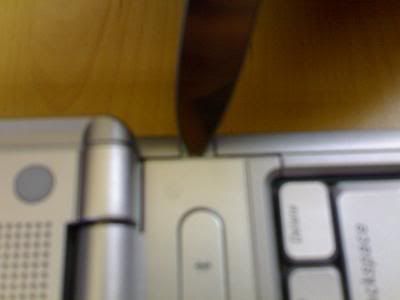 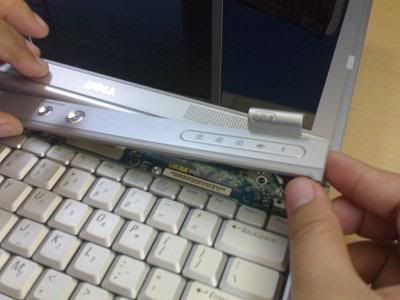 Then, there are 3 screws that we need to remove for the keyboard. 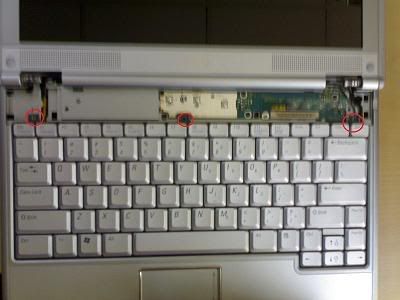 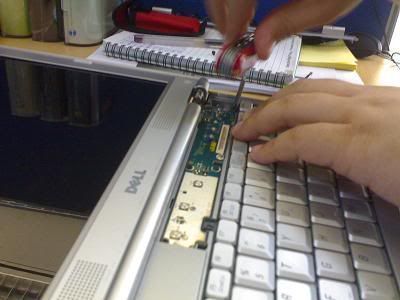 Slowly lift up the keyboard and you'll find the RAM there. (becareful here as the keyboard is still connected to the motherboard. Then, push the clip that is holding the Ram to either side and the RAM will pop up. 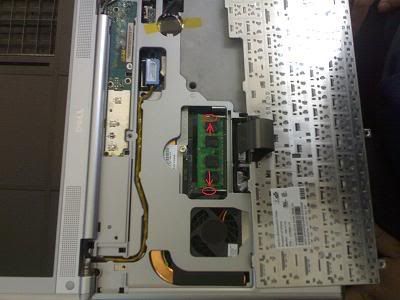 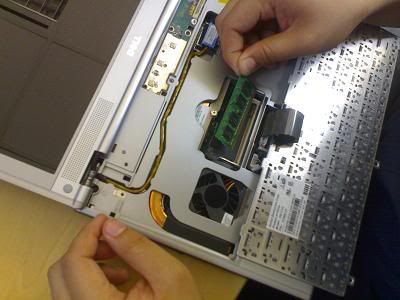 Dell is kind enough to put there BIG BIG..."DIMM A DDR2 ONLY"...So that Dunggus like me don't actually put in the wrong type of RAM... 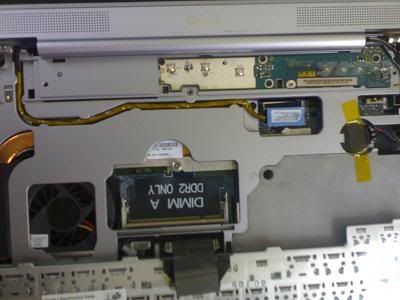 Tadda....RAM upgraded....    |
|
|
Jun 25 2007, 06:22 PM
|
|
Senior Member
7,037 posts Joined: Apr 2006
|
QUOTE(FaTJ3sT3R aka Th!NjOK3R @ Jun 25 2007, 04:37 PM) Sigh....just when I got my hands on XPS M1210 not too long back...now they wanna launch new 1 pulak... Woah... Fully featured HOW TO with pics! This is going FrontPage!Oh well... Anyway, for the benefits of the n00b owners like myself. Not sure if it is posted here before or not... Here's a quick guide on how to change the RAM if you plan on upgrading. The RAM that is located on the bottom side of the laptop is kinda straight forward. The 2nd piece of RAM is located beneath the keyboard (I actually just found that out not too long ago. ...like I said...i'm a n00b...)First, we need to open up the panel located on the top part of the keyboard where the Power button is located. just use a small blade to unclick the piece and slowly lift it up. » Click to show Spoiler - click again to hide... « Tadda....RAM upgraded.... Thanks man! Added on June 25, 2007, 6:35 pm QUOTE(derred @ Jun 25 2007, 03:40 AM) I still remember back then when I suggest LV2G to Eiraku, it was not stable enuf for use so he decided not to let post it in frontpage. During those time, the MobileWare or whatever is better than LV2G. For my type of system LV2G is always the best choice if u asked me. Yeah, at that time I was only trying the LATEST and GREATEST drivers... Turns out that in the world of Beta Vista nVidia drivers, higher number don't necessarily mean better drivers... And it seems that an update to the tried and tested 106.03 has come out, 106.04... Seems to fix some stuff and give better gaming performance... Downloading to test rite now... EDIT: Been reading up on it... 106.04 seems to give some problems under certain games, so I'll hold out for now... QUOTE(eyen @ Jun 25 2007, 04:06 PM) The S cable thingi that connects the laptop to the tv...what is it called? I asked a few shops here and none of them seems to know what I was talking about. I think it's called, the S-Video Cable... And I've yet to find any S-Video --> Component cables that work... This post has been edited by Eiraku: Jun 25 2007, 07:33 PM |
|
|
Jun 25 2007, 06:41 PM
|
|
Junior Member
304 posts Joined: Jun 2007 From: Kota Kinabalu
|
» Click to show Spoiler - click again to hide... « man doin those stuff aint noob at all...noobz would go to pc shops and heve the guys there change the ram for them (like what would i do) haha...it doesnt void the warranty or anything right if u upgrade the ram urself?...how come i read comments about removing the upgraded ram and inserting back the original when u need to call dell to service ur comp or sumting? |
|
|
Jun 25 2007, 07:36 PM
|
|
Senior Member
7,037 posts Joined: Apr 2006
|
QUOTE(AzeL @ Jun 25 2007, 06:41 PM) » Click to show Spoiler - click again to hide... « man doin those stuff aint noob at all...noobz would go to pc shops and heve the guys there change the ram for them (like what would i do) haha...it doesnt void the warranty or anything right if u upgrade the ram urself?...how come i read comments about removing the upgraded ram and inserting back the original when u need to call dell to service ur comp or sumting? Imagine them mishandling the RAM that you bought with your own hard earned money, and THEN imagine them not being liable for anything if they damage it... |
| Change to: |  0.0258sec 0.0258sec
 0.77 0.77
 6 queries 6 queries
 GZIP Disabled GZIP Disabled
Time is now: 19th December 2025 - 08:30 PM |
 Quote
Quote