"The Chronicles of Dell, 1st Chapter":Started using the XPS at around 9pm, now it's 3am. What have I found out within this first 6 hours of my new XPS's life?
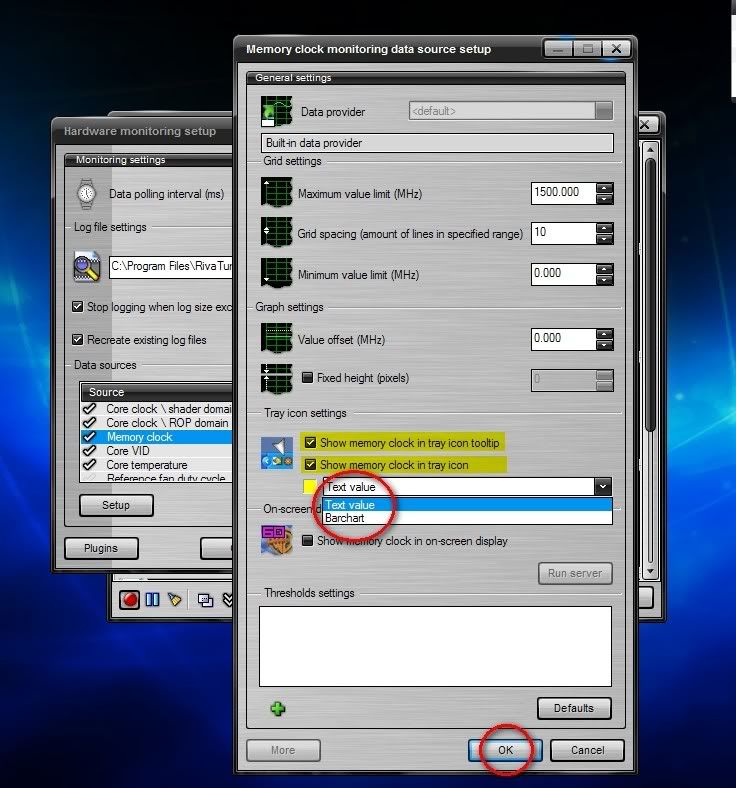
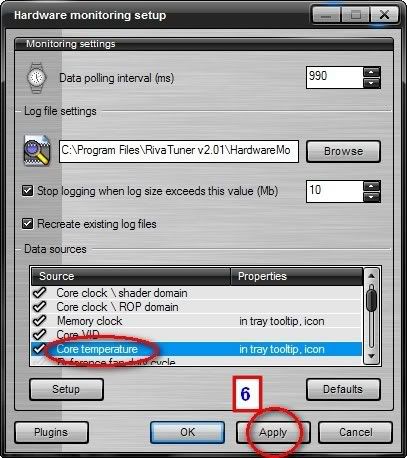
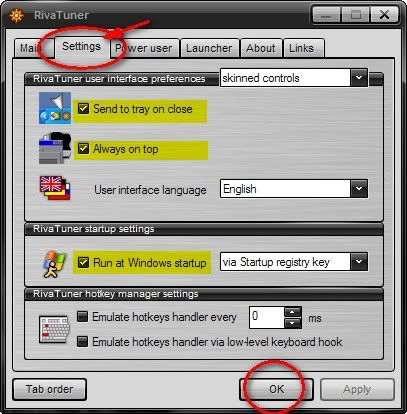
1) Confirmed I have the Squeeking Noise Syndrome... High pitched noises coming from most probably the C2D. As RMclock can't really be used for Vista yet (and it'll kill the battery life), I'll just live with the pain of the constant noise equivalent to some tiny person scratching his tiny nails across a tiny blackboard. Tried to modify the USB power management options, only to find that they are not set in the first place...
2) Practical battery life for 6-cell = Just under 2 hours with the screen on medium-high brightness, and WiFi used constantly. Not bad... But now I kinda regret not taking the 9-cell one...
3) Practical gaming experiances =
FEAR: Quite smooth (20-30fps) at 640x480, mostly medium settings, shadows on, volumetric lights off, FSAA off, anistropic off.
STALKER: Very smooth (30-40fps) at 800x600, mostly medium-high settings, FSAA off, anistropic off.
C&C3: Smooth (20-30fps) at 800x600, mostly high settings, FSAA off.
- Quite satisfied with the result. And that's BEFORE updating to the latest MobileForce drivers AND a complete reformat to get rid of all the Dell bloatware. There's bound to be (some) room for improvement.
4) Problems? Opera hanging on me... End process in task manager fails, after which the task manager fails to start completely... It happened after I installed Flash, so maybe it has to do with that... In the end I was forced to do a couple of hard resets (aka, turning the XPS off manually...

) to restart the XPS. Vista issue, or Opera issue? Nothing else yet...
5) And thankfully, 6 hours with no BSODs... Thank you god...
"The Chronicles of Dell, 2nd Chapter":Problems? Welcome to the wonderful world of Dell!
Well actually, only one really niggling problem as of yet: the keyboard quality. Guess what happened? The "B" key came loose...
Well, I managed to push it firmly back in, where it looks stuck enough (for now anyway - I wasn't really prepared to lose precious time testing the XPS to its limit by having to replace the whole darned keyboard due to a loose "B" key), but it raises questions over just how well the God forsaken thing was designed... My friend's old Inspiron also has keys coming off, and it's only 2++ years old. Pretty sad, if you ask me. Not to mention the keyboard plastics themselves feel very, very cheap.
My Fujitsu only had such problems towards the end of 3 years, but then I paid 6k for the bugger back in the day (okay,
my dear father paid the 6 grand), so the mechanics of cost and value dictates that it SHOULD have a good, well lasting keyboard.
Oh well, one more thing I'll have to live with, unless anybody is crazy enough to peel off a ThinkPad T60's keys one by one, and adapt them to the XPS's keyboard, one by one (the T60's got best feeling plastics on a keyboard, IMHO). To be fair, the keyboard itself is very likable, and has a great feel to it (except for the slight flex on the right hand side).
The Squeeking thing is finally settling down to a tolerable level, maybe due to me getting used to it. But to begin with, I don't think I have it THAT badly.
The LCD light leakage is getting to me, especially when looking at the BIOS's black screen every time I start up, but the general quality of the panel itself prevents me from trying my luck at a replacement. For all intents and purposes, I might get one even worse, so I'll live with it.
The
MobileForce drivers? The one I had was the one before the current release (M6 or something like that). The funny thing was, after installing it, the Vista experiance scores dropped wayyyyyyyyyyyy down off the charts.
Aero scores were 2.0, and Gaming scores were 3.1... FEAR's test scene scores also dropped somewhat, with the minumum FPS dropping from 12 to 7, and a higher percentage of the FPSs fell into the below 20 mark...

On Dell's newest updated drivers (if you can call a 9*.** Forceware driver new), the Vista experiance scores were somewhat better,
3.7 for Aero, 3.4 for Gaming.
Which makes me think that Dell is tooling up their drivers to give good Vista Exp. scores, BUT the FEAR test scene scores also improved by a bit, 15FPS minimum with almost 60% of the scene being in the 20-30FPS range, which overruled that theory.
The MobileForce drivers do seem to provide slightly crisper textures though.
Tried modding the 7400go with ATITools too, but decided against it. Any gains I
theoretically could get by overclocking the card brings me ever closer to
practically frying the motherboard.
And I realised, why would I want to game on 1600x whatever resolution when I only have a 12' screen anyway? It's optical suicide...
800x600's good enough for me!
And after my previous experiance with my 3.7kg Fujitsu 14' C2220, the feeling of bringing around a 2++kg 12' could only be described as sheer joy. Plus, for the size and approximate weight of a Macbook, I can play STALKER, FEAR and C&C3 on it easy (and I read it can even play SUPREME COMMANDER - aka, supreme video card killer - on very low, 800x600).
Rainbow Six Vegas, Crysis, Bioshock? I'm gonna have to get myself a Xbox 360 later it seems...
Casual gamer (or a hard core gamer who has spent his entire 22 years of life playing cutting edge games at lowered detail levels and resolutions, and had grown quite used to it) + XPS M1210 =

Real hard core gamer + XPS M1210 =

The end word for this edition of
"The Chronicles of Dell" = I'm really falling in love with my XPS, problems and all...
"The Chronicles of Dell, 3rd Chapter: Teaching a young dog new tricks!"No more major problems to report, here in the third day. A few program related lock-ups that required me to hard-reset the XPS, just a reminder perhaps, of the instability of Vista. But nothing major.
Games continue to run rock solid on the XPS, changed the STALKER resolution to 1280x800 (native resolution), and it's still running smooth without any hiccups. FEAR continued to run fine even with the processors clocked down to 60%, which I have set in the Vista power management config for running on the battery.
Which reminds me, with proper power management settings (turn off unused USB ports, display 40% brightness, processor 60% max 5% min, bluetooth off), I could extend the XPS's battery life well over 2 and a half hours for net surfing and about 1 hour ++ for gaming, which is respectable enough for a 3-cell battery... I wonder how much longer it could go with the 9-cell one...

Like life on my previous WinXP (and later Ubuntu) lappy, I was soon trying my best to customize (read: change everything until something breaks) Vista. Hanging around the Neowin forums, I found out a couple of interesting stuff.
1. A lot of interesting add ons programs exist, even for Vista.Windowblinds is Vista compatible, even if I lack the resources to get it, for now. There's even a uxtheme patch for Vista, which allows for the usage of 3rd party msstyles. The sad part was, not many people were THAT interested in creating Vista themes, so it wasn't really worth it to hack a system file to use the sad few msstyles which exists for Vista, at least for me.
Then there's virtual desktops for Vista. A fan of being span several programs across multiple desktops (something I've learned to live by in Ubuntu, and I've even added it to my old WinXP), there's a couple of programs that exist to do just that.
The most interesting one by far is:
YOD'M 3D. It emulates the 3d cube effect found on Beryl equipped Linux computers, which in layman's terms, provides you with a four face cube where each cube-face is a different desktop. It's very stable on my Vista, and very, very usable. You can even set different wallpapers for each desktop (something even Beryl couldn't do).
The sad part was, it just refuses to start itself automatically with Vista. No matter what I did (registry entry, startup folder, etc., etc.), it did not start up well. So I ditched it and went for the next best thing,
VISTA VIRTUAL DESKTOPS. Although not as flashy as Yod'm 3D (and no option to set different Wallpapers for each desktop), it works well. (EDIT: Found a better solution - DEXPOT. Does Virtual Desktops, Expose-like window tiling and so much more...)
Next, we have other enhancements such as a Flip 3D alternative called SmartFlip which arranges your flipped windows in a eliptical fashion (much more like Expose) and an actual Expose clone for Vista called Switcher. Both were buggy and slow for me, but they might be useful to someone else.
As for me, I downloaded a small program called UtilMouse.exe that changes a middle mouse double click to run Flip3D. It's also (supposedly) able to do a couple of other stuff (like minimizing all windows and stuff) by just using the mouse, but I've never really figured out how.
So much more Vista compatible enhancement programs to talk about, so little time... Maybe I'll tell you guys more in the next installment + links to the programs above...
Back to the XPS, the B key's creating loud popping noises when I hit it at a certain angle, but at least it's not coming off. Other then that, the third day of my XPS's life contains far less drama then the first few days. Again I fear for the life expectancy of the keyboard...
And another 2 things I forgot to mention.
1) My Vista certificate thingy (the sticker that they put underneath the XPS) has a large hole in it... I wonder if that invalidates Vista?
2) The 120GB HDD comes with ONLY 110GBs... What's up with that? I reckon that has to do with how Windows defines 1GB and how the HDD manafacturers define 1GB, but that's 10GBs worth of difference there... Hmm...
"The Chronicles of Dell, Final Chapter: Settling In!"Well, what can I say? For one thing, I'm thankful to God that I was spared a
total lemon, and although there are things that the XPS can be improved on, I'm generally very happy with the M1210.
Happy enough NOT to turn it in for anything else (Except maybe a Sony VAIO FE series + some sort of Sony Complete-Cover, but no such thing exists, right)...

To summarize the whole week long experiance:
1) Build Quality:Generally, the build quality of the XPS is very, very good. The
hinges feel very sturdy, even after going through my rough way of doing things. The entire frame of the XPS feel very robust as well (
it's build around a magnesium frame, so that's expected).
The first thing is the design.
It looks retro, in a good way. Its angular and very computer-ish, and while I like it the way it is, it's
sure not going to win any design awards.
The lid is of particular interest, though.
The entire black part is magnesium, as many of you know already, and it provides excellent protection to the LCD. No amount of pressing on the lid will ever show on the LCD side. It flexes quite a bit, though, but again, not enough to cause any interference to the LCD.
It's the silver plastic part (with the XPS logo), that's a bit of a problem. It's the part that the hinges (and the speakers) are build around, and it feels a bit flimsy actually, making me wonder if it can take the stresses I'm gonna put on it (closing, opening, closing...).
Next, we move on to the next issue, the keyboard. For a RM5000++ lappy, the keyboard - although well designed and comfortable - feels utterly cheap.
The plastics feel like a RM15 cheapo keyboard (scratch that, the cheapo keyboard feels better), and
if you're lucky, you'll get some keys coming off. My "B" key did this the second day I got the XPS, even though I managed to stick it securely back in (with some bending and turning, don't try this at home people), it still makes popping noises sometimes. Oh, and the
right hand side flexes quite a bit too, and you can actually hit a DVD inserted in the drive if you press hard enough.
The last issue I have with the XPS's build quality is the
DVD tray. It feels flimsy in comparison to the other laptops I've tried, and the drive itself is quite particular. I have to double check every time I pop a disk in to make sure it's properly and securely in, if not it just goes "wreeeeeeeeeeeeeeeeee" on me.
The reflective LCD is nice and clear, although it's gonna be a while before I get used to looking at myself typing. There's a slight light leakage at the bottom of the screen, but I'm not gonna risk getting a screen that's even worse just to fix a little light leakage.
The palm rests aren't easily scratched, but there have been reports of the paint coming off them. I haven't used it long enough, so I can comment much.
2) Performance:I haven't had any Dual Core lappies before this (my last lappy was a Pentium 4M - not a centrino one, the OLD mobile Pentium 4 - Fujitsu C2220), so I can't speak from comparitive experiance when I say that this thing is
fast, real fast. And my processor's only the T5600, its not even the 2GHz T7200 (and for those of you who was rich and lucky enough to get the 2.66GHz C2D that was only available during the PC-Fair promotion, I hate you...

).
Even then, it plays most current games with little difficulty. Granted, the GeForce 7400go can only make most of them run at medium graphics settings with Anistrophy and Anti Aliasing turned off, but for a 12 inch lappy, that's not bad.
It even runs
Rainbow Six Vegas (the current Video Card Killer) at very low settings
with acceptable frame rates (acceptable = 10-20FPS). What more can I ask for (well, I can ask for a 7600go equipped VAIO FE or a X1600 equipped S73G, but no CompleteCover like drop coverage for both).
And you must remember that I'm running on Vista here. On Windows XP the games should be even faster...
I just hope Dell sells GF 8000 series upgrades for the XPS (even at the cost of replacing the Mobo) when they come out...
For day to day multitasking, I can watch some anime, while surfing the net, while writing in Word, while installing Oblivion, while Virus-scanning.... with little slowdown....
The WiFi module, for an onboard Intel chip, is quite good as well.
I can get 3 bars easy where everybody else in my hostel was getting only one. So no qualms there.
3) Service:I haven't had to replace or repair anything yet, so I can't say anything about the infamous on-site service that Dell has (except that they can be horrendous at times). But the XPS service line people (at least the ones I go through to) seemed knowledgeable enough, and were pleasent to talk to.
My Sales Assistant was also very helpful, and I know I can buy from him again. Still, he could be more helpful in getting some discounts for me though...

The delivery was only 1 day late in comparison to the Estimated Time, so it's within
acceptable limits. The box came to me a bit crumpled on the side though, but it didn't affect my precious XPS inside, so it's not a big problem.
4) Other IssuesThe processor whine is something I've learned to live with, but I sure can live without. Maybe it's something to do with the bearing on the cooling fans, but as long as it doesn't effect the lappy itself, then I'm not gonna go and call the
Legion Of Doom (the On-Site wrecking... oh I mean repairing people) just to get it fixed at the risk of them busting something else up.
Same goes with the light leakage, no Legion Of Doom (LOD) for me.
The bluetooth died on me a few days back too, and it turns out that it was my fault for somehow telling the module to turn itself off within Vista. A quick call to the XPS people didn't really fix the problem by itself, but it helped me locate the source. And I was ready to have the LOD descend on me too, thank God.
The speakers? In itself, they are pretty tiny sounding. Well, the Audigy thingy I got is only a software driver, so I didn't expect it be able to do much. But it did boost the sound quite a bit. For small speakers mounted in the LCD, I can say I'm quite satisfied with them. If I want better sound, I'll just hook up my twin Altec Lansings.
Vista? Well, if you have above 1.5GBs of RAM, it's really sweet. If not, it's complete crap. It does slow down games a bit (blame the immature drivers), but I'll readily trade full games performance for a sweet, day-to-day user interface.
So, the end word?I'm loving every second I'm spending with the XPS, and would
readily reccomend it to anyone looking for a good 12 inch lappy with all its limitations. It's no desktop replacement, though, but for good mobile fun, you can't get better bang for your buck then with the XPS M1210.
But if you order one, pray hard to God that you won't get a lemon (An XPS with +10 Problems, -10 Reliability and +10 "Oh-My-God-What-Is-This-Crap" Feeling).
That's the end of the week long adventure, folks.



 Apr 28 2007, 12:38 AM, updated 18y ago


 Quote
Quote




 0.6611sec
 0.54
0.54
 7 queries
 GZIP Disabled