Welcome Guest ( Log In | Register )

Outline · [ Standard ] · Linear+

Tech Support ZTE H267A Modem + Router Unifi

views
     
TSunknown
post Nov 9 2017, 05:43 PM, updated 9y ago

10k Club
********
All Stars
12,012 posts

Joined: Jan 2003
From: Kuala Lumpur


Hello,

I apply 30Mbps Unifi, and installer say all new modem give now is ZTE H267A Modem + Router for VDSL. I own Asus RT-68U, they installer say cannot use this router. It's any way i can use my own Asus router?


jusbella
post Nov 9 2017, 05:58 PM

Look at all my stars!!
*******
Senior Member
3,034 posts

Joined: Dec 2011


QUOTE(unknown @ Nov 9 2017, 05:43 PM)
Hello,

I apply 30Mbps Unifi, and installer say all new modem give now is ZTE H267A Modem + Router for VDSL. I own Asus RT-68U, they installer say cannot use this router. It's any way i can use my own Asus router?
*
Basically yours is latest all in one vdsl device. So cannot use Asus router.

Or else u can access to zte device and try set the port to bridge mode vlan 500 then plug in WAN port from asus to lan port x your zte where x is port number you set to bridge mode. This is just illustration info, u have to try. Cannot guaranteed work.
xavi5567
post Nov 9 2017, 07:21 PM

\(●'Å'●)/
*******
Senior Member
3,348 posts

Joined: May 2006
From: The Matrix

QUOTE(jusbella @ Nov 9 2017, 05:58 PM)
Basically yours is latest all in one vdsl device. So cannot use Asus router.

Or else u can access to zte device and try set the port to bridge mode vlan 500 then plug in WAN port from asus to lan port x your zte where x is port number you set to bridge mode. This is just illustration info, u have to try. Cannot guaranteed work.
*
I tried that... Set to bridge the Internet terus tak blink for me... Fucking shit. Man...Only can use my router as a repeater now
jusbella
post Nov 9 2017, 07:36 PM

Look at all my stars!!
*******
Senior Member
3,034 posts

Joined: Dec 2011


QUOTE(xavi5567 @ Nov 9 2017, 07:21 PM)
I tried that... Set to bridge the Internet terus tak blink for me... Fucking shit. Man...Only can use my router as a repeater now
*
Ya internet won't blink.

But u need setup Asus wan port to ZTE port, then Asus set pppoe can ad.
zeronehza
post Nov 9 2017, 11:29 PM

Malaysian Real Madrid Supporter Club
******
Senior Member
1,704 posts

Joined: Jan 2003
From: Hogoh Pahang Hogoh

QUOTE(xavi5567 @ Nov 9 2017, 07:21 PM)
I tried that... Set to bridge the Internet terus tak blink for me... Fucking shit. Man...Only can use my router as a repeater now
*
u can find replacement for VDSL2 router.. the only one in market only dlink. search lazada vdsl2 router

i've tried bridge this zte but also happen like what u said.. look ike tm lock other mode on that router.
xavi5567
post Nov 10 2017, 12:22 PM

\(●'Å'●)/
*******
Senior Member
3,348 posts

Joined: May 2006
From: The Matrix

QUOTE(zeronehza @ Nov 9 2017, 11:29 PM)
u can find replacement for VDSL2 router.. the only one in market only dlink. search lazada vdsl2 router

i've tried bridge this zte but also happen like what u said.. look ike tm lock other mode on that router.
*
i was using Tenda AC1200 last time as the router.. just that this time cant seems to get it right on this ZTE modem router. the Technician themselves cant seems to help, initially advice to set it to RG tried it.. cannot.. then advice set to bridge .. also cannot.. so now i just off my ZTE wifi and use my Tenda as repeater only.
patricktoh
post Nov 11 2017, 10:11 PM

Casual
***
Junior Member
490 posts

Joined: Jan 2006
From: Kuala Lumpur


QUOTE(xavi5567 @ Nov 10 2017, 12:22 PM)
i was using Tenda AC1200 last time as the router.. just that this time cant seems to get it right on this ZTE modem router. the Technician themselves cant seems to help, initially advice to set it to RG tried it.. cannot.. then advice set to bridge .. also cannot.. so now i just off my ZTE wifi and use my Tenda as repeater only.
*
Did you??
1. Remove the UniFi PPP login and password in ZTE DSL WAN page?
2. Create a new Internet VLAN - ID: 500, connection type: bridge, xDSL transfer mode: PTM, 802.1p: 0
3. Bind the Internet VLAN to a LAN port e.g. LAN-1
4. Connect LAN-1 to Tenda WAN port
5. Configure PPPoE in Tenda
6. Turn off ZTE wifi

Share the result here smile.gif

xavi5567
post Nov 12 2017, 03:16 PM

\(●'Å'●)/
*******
Senior Member
3,348 posts

Joined: May 2006
From: The Matrix

QUOTE(patricktoh @ Nov 11 2017, 10:11 PM)
Did you??
1. Remove the UniFi PPP login and password in ZTE DSL WAN page?
2. Create a new Internet VLAN - ID: 500, connection type: bridge, xDSL transfer mode: PTM, 802.1p: 0
3. Bind the Internet VLAN to a LAN port e.g. LAN-1
4. Connect LAN-1 to Tenda WAN port
5. Configure PPPoE in Tenda
6. Turn off ZTE wifi

Share the result here smile.gif
*
Bro.. it work bro.. ur method works... totally..
but 1 thing I curious is that the ZTE Modem/router now having red light at its indicator..but don't seems to affect mind current internet la.. through Tenda router, internet works and the phone line works as well.
much appreciated to your input...hhaa thumbsup.gif

Aiya... any idea how about Hypptv setting? seems like it was affected by tis setup..i mean does the setting affect Hypptv?

This post has been edited by xavi5567: Nov 12 2017, 04:13 PM
xavi5567
post Nov 12 2017, 05:54 PM

\(●'Å'●)/
*******
Senior Member
3,348 posts

Joined: May 2006
From: The Matrix

update :
by default the ZTE itself have a Vlan under BR_vlan_600 need to enable this and don't kacau . its vlan id should be 600 as well

then Vland trunk tab.
the lan port i.e: lan 1 that u bind to the wan at router. need to set te support vlan number to be 2, then it will pop up two vlan id:(vlan id1 & vlan id2) these two shall then be set as 500 & 600. PVID set to 600.

then it is all good..
internet via own router--OK
hypptv via lan 3 or 4 of ur own router --ok


zeronehza
post Nov 13 2017, 02:12 AM

Malaysian Real Madrid Supporter Club
******
Senior Member
1,704 posts

Joined: Jan 2003
From: Hogoh Pahang Hogoh

QUOTE(xavi5567 @ Nov 12 2017, 05:54 PM)
update :
by default the ZTE itself have a Vlan under BR_vlan_600 need to enable this and don't kacau . its vlan id should be 600 as well

then Vland trunk tab.
the lan port i.e: lan 1 that u bind to the wan at router. need to set te support vlan number to be 2, then it will pop up two vlan id:(vlan id1 & vlan id2) these two shall then be set as 500 & 600. PVID set to 600.

then it is all good..
internet via own router--OK
hypptv via lan 3 or 4 of ur own router --ok
*
yours is ftth ? direct fibre to home ?
patricktoh
post Nov 13 2017, 11:31 AM

Casual
***
Junior Member
490 posts

Joined: Jan 2006
From: Kuala Lumpur


QUOTE(xavi5567 @ Nov 12 2017, 03:16 PM)
Bro.. it work bro.. ur method works... totally..
but 1 thing I curious is that the ZTE Modem/router now having red light at its indicator..but don't seems to affect mind current internet la.. through Tenda router, internet works and the phone line works as well.
much appreciated to your input...hhaa :thumbsup:

Aiya... any idea how about Hypptv setting? seems like it was affected by tis setup..i mean does the setting affect Hypptv?
*
Great news! I can follow your settings once received ZTE 4 in 1 modem tomorrow installation. I registered new UniFi 30mbps RM139 and expecting this VDSL modem to come along.

I will be terminating existing 30mbps RM179 post the installation. Quite funny that TM didn't offer promotion to existing customer that had ended contract. Btw my contract ended 31-Oct 17.

patricktoh
post Nov 13 2017, 11:43 AM

Casual
***
Junior Member
490 posts

Joined: Jan 2006
From: Kuala Lumpur


If the HyypTv port is mapped to ZTE LAN-1 by default then just bind the bridge internet VLAN 500 to LAN-2. Connect own router WAN to ZTE LAN-2.

It is up to you to decide where you want the HyypTV being processed. I recommend leave it to ZTE modem to reduce traffics flow to own router. Or unless your router is supper powerful. I have tried both setups with old school ZTE 831 vdsl modem.
xavi5567
post Nov 13 2017, 12:16 PM

\(●'Å'●)/
*******
Senior Member
3,348 posts

Joined: May 2006
From: The Matrix

QUOTE(patricktoh @ Nov 13 2017, 11:43 AM)
If the HyypTv port is mapped to ZTE LAN-1 by default then just bind the bridge internet  VLAN 500 to LAN-2. Connect own router WAN to ZTE LAN-2.

It is up to you to decide where you want the HyypTV being processed. I recommend leave it to ZTE modem to reduce traffics flow to own router. Or unless your router is supper powerful. I have tried both setups with old school ZTE 831 vdsl modem.
*
By default I think is to the zte lan-4 but initially I confuse with ur instructions... Haha 1st tiner tweaking so much... Lolz... So I jus create another vlan for my own router and bind both to mine router under lan-1...thereafter only my router lan-3/iptv port is working...
xavi5567
post Nov 13 2017, 12:18 PM

\(●'Å'●)/
*******
Senior Member
3,348 posts

Joined: May 2006
From: The Matrix

QUOTE(patricktoh @ Nov 13 2017, 11:31 AM)
Great news! I can follow your settings once received ZTE 4 in 1 modem tomorrow installation. I registered new UniFi 30mbps RM139 and expecting this VDSL modem to come along.

I will be terminating existing 30mbps RM179 post the installation. Quite funny that TM didn't offer promotion to existing customer that had ended contract. Btw my contract ended 31-Oct 17.
*
According to unifi.. The modem depend on the technician that come to install 1...some giv u this 2 in 1 some might giv u the separate 1...

My status same like u la... 1 of the 1st to get the 30mbps at rm210 per month for 2 years... Ask can convert... They say can't... So jus re-apply this and terminate once they activate the new package.

This post has been edited by xavi5567: Nov 13 2017, 12:19 PM
TSunknown
post Nov 13 2017, 01:42 PM

10k Club
********
All Stars
12,012 posts

Joined: Jan 2003
From: Kuala Lumpur


That good for ZTE H267A Unifi can use own router. After a day installation, I make report thru live-chat request to change ZTE H267A to Huawei HG655M.

The live chat staff can't confirm i can change, on next 2hours TM call me and i can change to Huawei HG655M because they still got stock modem and router.


tomastan4134
post Nov 13 2017, 03:43 PM

Enthusiast
*****
Senior Member
830 posts

Joined: Mar 2014
is it possible to request technician to change the modem and router on the spot when new installation?
xavi5567
post Nov 13 2017, 04:35 PM

\(●'Å'●)/
*******
Senior Member
3,348 posts

Joined: May 2006
From: The Matrix

QUOTE(unknown @ Nov 13 2017, 01:42 PM)
That good for ZTE H267A Unifi can use own router. After a day installation, I make report thru live-chat request to change ZTE H267A to Huawei HG655M.

The live chat staff can't confirm i can change, on next 2hours TM call me and i can change to Huawei HG655M because they still got stock modem and router.
*
HG655M isn't that the old modem... I was on that previously... Then they said have to return when terminate...
patricktoh
post Nov 13 2017, 07:22 PM

Casual
***
Junior Member
490 posts

Joined: Jan 2006
From: Kuala Lumpur


You may also get Netis DL4480V 4-in-1 modem as well. My sis in-laws got this few weeks ago to replace her old problematic modem.
xavi5567
post Nov 13 2017, 08:54 PM

\(●'Å'●)/
*******
Senior Member
3,348 posts

Joined: May 2006
From: The Matrix

4 in 1...got wat oh? Modem +router +hypptv +phone meh?
patricktoh
post Nov 13 2017, 09:03 PM

Casual
***
Junior Member
490 posts

Joined: Jan 2006
From: Kuala Lumpur


QUOTE(xavi5567 @ Nov 13 2017, 08:54 PM)
4 in 1...got wat oh? Modem +router +hypptv +phone meh?
*
4 key functions:
1. DSL modem
2. VoIP Phone
3. Router / bridge
4. Wifi AP

This post has been edited by patricktoh: Nov 13 2017, 09:05 PM
patricktoh
post Nov 14 2017, 09:02 PM

Casual
***
Junior Member
490 posts

Joined: Jan 2006
From: Kuala Lumpur


Received ZTE H267A today. What I did after the installer completed the installation.

This ZTE default IP address is 192.168.1.1 so your own router need to be in other segment ie 192.168.0.1/255.255.255.0

At Internet > WAN > DSL tab > DSL Connection
1. Create new item (Internet bridge VLAN)
- Connection name: BR_VLAN_500
- DSL Transfer mode: PTM
- Type: Bridge Connection
- VLAN: On
- VLAN ID: 500
- Apply

2. PPPoE set to Off

3. Click VLAN Trunk tab
- LAN1 set to On
- Supported VLAN number: 1
- VLAN ID1: 500
- PVID: N/A
- Apply

4. Once done connect own router WAN port to ZTE LAN1. HyppTV connect to ZTE default LAN4

Optional>>
5. If you want to pass the HyppTV to own router then
- At DSL connection > BR_VLAN_600 set to On (default is On)

6. At VLAN Trunk
- LAN1 set to On
- Supported VLAN number: 2
- VLAN ID1: 500
- VLAN ID2: 600
- PVID: N/A
- Apply

2 minor observations. I will try to fix it when have time. smile.gif
1. ZTE system time not sync with time server. Suspect it can't pick-up internet traffic
2. Internet LED is off. Should be related to above

This post has been edited by patricktoh: May 31 2019, 08:03 PM
kop2299
post Nov 15 2017, 02:56 PM

Enthusiast
*****
Senior Member
824 posts

Joined: Dec 2006


parking.
zeronehza
post Nov 16 2017, 02:07 AM

Malaysian Real Madrid Supporter Club
******
Senior Member
1,704 posts

Joined: Jan 2003
From: Hogoh Pahang Hogoh

QUOTE(patricktoh @ Nov 14 2017, 09:02 PM)
Received ZTE H267A today. What I did after the installer completed the installation.

At Internet > WAN > DSL tab > DSL Connection
1. Create new item (Internet bridge VLAN)
- Connection name: BR_VLAN_500
- DSL Transfer mode: PTM
- VLAN: On
- VLAN ID: 500
- Apply

2. PPPoE set to Off

3. Click VLAN Trunk tab
- LAN1 set to On
- Supported VLAN number: 1
- VLAN ID1: 500
- PVID: N/A
- Apply

4. Once done connect own router WAN port to ZTE LAN1. HyppTV connect to ZTE default LAN4

Optional>>
5. If you want to pass the HyppTV to own router then
- At DSL connection > BR_VLAN_600 set to On (default is On)

6. At VLAN Trunk
- LAN1 set to On
- Supported VLAN number: 2
- VLAN ID1: 500
- VLAN ID2: 600
- PVID: N/A
- Apply

2 minor observations. I will try to fix it when have time. smile.gif
1. ZTE system time not sync with time server. Suspect it can't pick-up internet traffic
2. Internet LED is off. Should be related to above
*
is this setting for HSBB or SUBB (phone line to zte) ?

patricktoh
post Nov 16 2017, 08:12 AM

Casual
***
Junior Member
490 posts

Joined: Jan 2006
From: Kuala Lumpur


QUOTE(zeronehza @ Nov 16 2017, 02:07 AM)
is this setting for HSBB or SUBB (phone line to zte) ?
*
Mine is HSBB. Default for VDSL phone line. I reckon you don't touch this settings.
twinshell
post Nov 17 2017, 03:55 PM

New Member
*
Junior Member
8 posts

Joined: Aug 2010
@patricktoh thanks. Well explained and works great on ZTE H267A Modem + ASUS RT-AC5300 Router

I made the mistake of changing the Port Binding, until you mentioned the VLAN Trunk tab.

This post has been edited by twinshell: Nov 17 2017, 03:56 PM
patricktoh
post Nov 18 2017, 11:58 AM

Casual
***
Junior Member
490 posts

Joined: Jan 2006
From: Kuala Lumpur


QUOTE(twinshell @ Nov 17 2017, 03:55 PM)
@patricktoh thanks. Well explained and works great on ZTE H267A Modem + ASUS RT-AC5300 Router

I made the mistake of changing the Port Binding, until you mentioned the VLAN Trunk tab.
*
Glad to hear it helps icon_rolleyes.gif I could see you invested in muscular router. thumbup.gif I am only using AC3200.
paklee
post Nov 21 2017, 11:00 AM

Getting Started
**
Junior Member
201 posts

Joined: Nov 2007


Park
fx20
post Nov 21 2017, 03:55 PM

Enthusiast
*****
Senior Member
817 posts

Joined: Feb 2010
QUOTE(paklee @ Nov 21 2017, 11:00 AM)
Park
*
I got alcatel lucent modem, is the huawei one better?

I am planning to request to change the modem.
jusbella
post Nov 21 2017, 04:09 PM

Look at all my stars!!
*******
Senior Member
3,034 posts

Joined: Dec 2011


QUOTE(fx20 @ Nov 21 2017, 03:55 PM)
I got alcatel lucent modem, is the huawei one better?

I am planning to request to change the modem.
*
Alcatel-Lucent is better, its 1gbps.

Huawei is 100mpbs only.
fx20
post Nov 22 2017, 09:31 AM

Enthusiast
*****
Senior Member
817 posts

Joined: Feb 2010
QUOTE(jusbella @ Nov 21 2017, 04:09 PM)
Alcatel-Lucent is better, its 1gbps.

Huawei is 100mpbs only.
*
TM said different brand given according to different equipment used in different area. Cant choose.

BTW, anyone has Alcatel Lucent admin login?
jusbella
post Nov 22 2017, 10:29 AM

Look at all my stars!!
*******
Senior Member
3,034 posts

Joined: Dec 2011


QUOTE(fx20 @ Nov 22 2017, 09:31 AM)
TM said different brand given according to different equipment used in different area. Cant choose.

BTW, anyone has Alcatel Lucent admin login?
*
I'm not sure about distribute modem.

I also got Alcatel model, but 3 years ago I wished to access to Alcatel configuration but no luck, until now I still try access to it.

After few research I founded they using telnet or ssh or whatever it's using command line. There is no web GUI.
fx20
post Nov 22 2017, 09:59 PM

Enthusiast
*****
Senior Member
817 posts

Joined: Feb 2010
QUOTE(jusbella @ Nov 22 2017, 10:29 AM)
I'm not sure about distribute modem.

I also got Alcatel model, but 3 years ago I wished to access to Alcatel configuration but no luck, until now I still try access to it.

After few research I founded they using telnet or ssh or whatever it's using command line. There is no web GUI.
*
Did you figure out how to do it with CLI?
jusbella
post Nov 22 2017, 10:35 PM

Look at all my stars!!
*******
Senior Member
3,034 posts

Joined: Dec 2011


QUOTE(fx20 @ Nov 22 2017, 09:59 PM)
Did you figure out how to do it with CLI?
*
None, 0 chance.

fx20
post Nov 23 2017, 08:30 AM

Enthusiast
*****
Senior Member
817 posts

Joined: Feb 2010
QUOTE(jusbella @ Nov 22 2017, 10:35 PM)
None, 0 chance.
*
That's suck.
I asked TM Tech for the login, they refused to give to me. If you have friend workin in TM, maybe can get the access.
jason1986
post Nov 28 2017, 09:11 PM

On my way
****
Senior Member
695 posts

Joined: Apr 2010


I have been given this router as well and it sucks. I can only get about 5mbps in my room. Modem in living room.

I am staying in an apartment and should be using vdsl2. Can I use the above settings if i buy a router?
patricktoh
post Nov 28 2017, 11:12 PM

Casual
***
Junior Member
490 posts

Joined: Jan 2006
From: Kuala Lumpur


QUOTE(jason1986 @ Nov 28 2017, 09:11 PM)
I have been given this router as well and it sucks. I can only get about 5mbps in my room. Modem in living room.

I am staying in an apartment and should be using vdsl2. Can I use the above settings if i buy a router?
*
Why not? Try invest slight more for a good wifi router. What's your budget like? Alternatively buy a 3 pins plug wifi extender.
jason1986
post Nov 29 2017, 08:38 AM

On my way
****
Senior Member
695 posts

Joined: Apr 2010


QUOTE(patricktoh @ Nov 28 2017, 11:12 PM)
Why not? Try invest slight more for a good wifi router. What's your budget like? Alternatively buy a 3 pins plug wifi extender.
*
thank you for the reply.

I will try to change my wireless adaptor first. currently using a 300mbps wireless adaptor. Will get a dual band one and try to connect to the 5ghz band and test it out first.

My phone is connected to the 5ghz band and it can achieve full speeds in the same room.


jason1986
post Dec 15 2017, 11:57 PM

On my way
****
Senior Member
695 posts

Joined: Apr 2010


QUOTE(jason1986 @ Nov 29 2017, 08:38 AM)
thank you for the reply.

I will try to change my wireless adaptor first. currently using a 300mbps wireless adaptor. Will get a dual band one and try to connect to the 5ghz band and test it out first.

My phone is connected to the 5ghz band and it can achieve full speeds in the same room.
*
an update. bought tp link t4u adaptor and i am getting full speeds connected to the 5ghz band now.

So i guess no need to change router.


Wolger
post Dec 16 2017, 02:03 PM

Getting Started
**
Junior Member
292 posts

Joined: May 2014


I followed your steps but still unable to use it as bridge to my e4200 with dd-wrt. Any idea how?

QUOTE(patricktoh @ Nov 14 2017, 09:02 PM)
Received ZTE H267A today. What I did after the installer completed the installation.

At Internet > WAN > DSL tab > DSL Connection
1. Create new item (Internet bridge VLAN)
- Connection name: BR_VLAN_500
- DSL Transfer mode: PTM
- VLAN: On
- VLAN ID: 500
- Apply

2. PPPoE set to Off

3. Click VLAN Trunk tab
- LAN1 set to On
- Supported VLAN number: 1
- VLAN ID1: 500
- PVID: N/A
- Apply

4. Once done connect own router WAN port to ZTE LAN1. HyppTV connect to ZTE default LAN4

Optional>>
5. If you want to pass the HyppTV to own router then
- At DSL connection > BR_VLAN_600 set to On (default is On)

6. At VLAN Trunk
- LAN1 set to On
- Supported VLAN number: 2
- VLAN ID1: 500
- VLAN ID2: 600
- PVID: N/A
- Apply

2 minor observations. I will try to fix it when have time. smile.gif
1. ZTE system time not sync with time server. Suspect it can't pick-up internet traffic
2. Internet LED is off. Should be related to above
*
patricktoh
post Dec 16 2017, 04:39 PM

Casual
***
Junior Member
490 posts

Joined: Jan 2006
From: Kuala Lumpur


QUOTE(Wolger @ Dec 16 2017, 02:03 PM)
I followed your steps but still unable to use it as bridge to my e4200 with dd-wrt. Any idea how?
*
0. Have you rechecked all the steps I stated? Standard question smile.gif

1. What's the WAN (internet) settings in e4200 dd-wrt?

2. You need to configure PPPoE in dd-wrt with UniFI login details (btw I do not have dd-wrt but setting should be more or less the same)
- Connection type = PPPoE
- User name = xxxx@unifi (you unifi login)
- Password = xxxxx (you need to check from UniFi installation sheet or ask TM 100)
- Connection mode = always on / keep alive
- keep the rest default

3. My instruction was based on assumption that the user knows how to configure own router icon_idea.gif
Wolger
post Dec 16 2017, 05:04 PM

Getting Started
**
Junior Member
292 posts

Joined: May 2014


Yes I did set it to connect from my router.

Still unable to connect.

QUOTE(patricktoh @ Dec 16 2017, 04:39 PM)
0. Have you rechecked all the steps I stated? Standard question  smile.gif

1. What's the WAN (internet) settings in e4200 dd-wrt?

2. You need to configure PPPoE in dd-wrt with UniFI login details (btw I do not have dd-wrt but setting should be more or less the same)
- Connection type = PPPoE
- User name = xxxx@unifi (you unifi login)
- Password = xxxxx (you need to check from UniFi installation sheet or ask TM 100)
- Connection mode = always on / keep alive
- keep the rest default

3. My instruction was based on assumption that the user knows how to configure own router  icon_idea.gif
*


Attached thumbnail(s)
Attached Image
Wolger
post Dec 16 2017, 05:25 PM

Getting Started
**
Junior Member
292 posts

Joined: May 2014


Reset my router. Still not working. Ouch.
patricktoh
post Dec 16 2017, 08:55 PM

Casual
***
Junior Member
490 posts

Joined: Jan 2006
From: Kuala Lumpur


QUOTE(Wolger @ Dec 16 2017, 05:25 PM)
Reset my router. Still not working. Ouch.
*
The setting that I have shared is for bridge mode. ZTE <bridge> own router <LAN/WLAN> PCs / phones. Recommended setup if you have powerful wifi router.

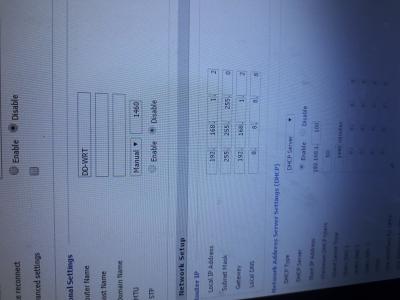
From the screenshot, are you using DD-WRT for AP mode purpose? If yes then then you need to undo all the changes in ZTE bangwall.gif


1. The TM ZTE default IP is 192.168.1.1

In DD-WRT >>

2. DD-WRT router local IP need to configure as 192.168.0.1 / sub-mask 255.255.255.0 (different sub-net to ZTE)

3. Gateway 0.0.0.0

4. Local DNS 0.0.0.0

5. DHCP IP pool must be in 192.168.0.X range e.g.
Start IP address 192.168.0.100
Max user 50
Static DNS1 8.8.8.8

6. How's the PPoE setup at the top?

I Whatsapp-ed you

This post has been edited by patricktoh: Dec 16 2017, 09:10 PM
Wolger
post Dec 17 2017, 10:06 AM

Getting Started
**
Junior Member
292 posts

Joined: May 2014


A big thank you to patricktoh for his time and patient for helping me to set up my router. thumbup.gif thumbup.gif thumbup.gif

For some reason I can't use my e4200 in router mode already. Now only can use it in AP mode.

The version of the dd-wrt is in 2012, will find a time to flash it with latest firmware and see still can connect or not.


patricktoh
post Dec 17 2017, 11:53 AM

Casual
***
Junior Member
490 posts

Joined: Jan 2006
From: Kuala Lumpur


QUOTE(Wolger @ Dec 17 2017, 10:06 AM)
A big thank you to patricktoh for his time and patient for helping me to set up my router.  thumbup.gif  thumbup.gif  thumbup.gif

For some reason I can't use my e4200 in router mode already. Now only can use it in AP mode.

The version of the dd-wrt is in 2012, will find a time to flash it with latest firmware and see still can connect or not.
*
You're most welcome. thumbup.gif
[JackAss]Uncletan
post Dec 17 2017, 10:20 PM

Getting Started
**
Junior Member
75 posts

Joined: Jan 2003
Hi all,

need help.

I have this ZTE (ZXHN-H267A). How do i use it with my DIR-850L router? i try connecting it to LAN1 and try setup on the DIR850L as DHCP but it failed to detect.

Can advice sifus?
[JackAss]Uncletan
post Dec 17 2017, 11:11 PM

Getting Started
**
Junior Member
75 posts

Joined: Jan 2003
Problem solved with Patrick Toh steps... TQTQ
joeblow
post Dec 18 2017, 08:53 PM

Regular
******
Senior Member
1,144 posts

Joined: Dec 2015


Hi there,

I got the above modem/router 2 in 1 as well. I am thinking if I should be getting a separate Asus 86 router? Not sure if this router is any good.

I do have an issue with wifi. Phone, TV, etc no problem. But my laptop seems to be rejecting this connection via Wifi. The connection will after a few seconds show the ! mark meaning no internet. Not sure where the settings go wrong. If I use fixed RJ45 to the router, no problem.

Any gurus can help?

Thanks.


patricktoh
post Dec 19 2017, 01:34 PM

Casual
***
Junior Member
490 posts

Joined: Jan 2006
From: Kuala Lumpur


QUOTE(JackAssUncletan @ Dec 17 2017, 11:11 PM)
Problem solved with Patrick Toh steps... TQTQ
*
Glad to hear it works for you too... rclxms.gif
SilentVampire
post Dec 19 2017, 01:37 PM

Networking Enthusiast
*******
Senior Member
5,714 posts

Joined: Mar 2007


QUOTE(joeblow @ Dec 18 2017, 08:53 PM)
Hi there,

I got the above modem/router 2 in 1 as well. I am thinking if I should be getting a separate Asus 86 router? Not sure if this router is any good.

I do have an issue with wifi. Phone, TV, etc no problem. But my laptop seems to be rejecting this connection via Wifi. The connection will after a few seconds show the ! mark meaning no internet. Not sure where the settings go wrong. If I use fixed RJ45 to the router, no problem.

Any gurus can help?

Thanks.
*
Could be your laptop settings. I would change the router to the Asus RT-AC86U anyway if you have the budget, as it is definitely much better than this router.
patricktoh
post Dec 19 2017, 01:42 PM

Casual
***
Junior Member
490 posts

Joined: Jan 2006
From: Kuala Lumpur


QUOTE(joeblow @ Dec 18 2017, 08:53 PM)
Hi there,

I got the above modem/router 2 in 1 as well. I am thinking if I should be getting a separate Asus 86 router? Not sure if this router is any good.

I do have an issue with wifi. Phone, TV, etc no problem. But my laptop seems to be rejecting this connection via Wifi. The connection will after a few seconds show the ! mark meaning no internet. Not sure where the settings go wrong. If I use fixed RJ45 to the router, no problem.

Any gurus can help?

Thanks.
*
1. Which band you're connecting to, 2.4 or 5ghz? Suggest you turn off the unused band to see if it is better

2. What's the SSID name? Try to give different name for 2.4 and 5 band

3. Any changes you made to ZTE after TM contractor completed the installation?
benny6612
post Dec 20 2017, 03:06 PM

New Member
*
Newbie
10 posts

Joined: Dec 2017
Hi Gurus,

Just got my ZTE H267A Modem a few weeks ago after signing up for 30Mbps....is there a way to boost it's wifi signal strength?

Just moved in to a new apartment, but the reception in some areas receive less than 3Mbps.

I've heard that having a 2+1 modem/router is not good.

But should I call TM and ask for a replacement? (switch back to having 1 modem + 1 router). Since no TV at home yet....Hypptv has not been installed....

Any help is appreciated biggrin.gif biggrin.gif


joeblow
post Dec 20 2017, 03:45 PM

Regular
******
Senior Member
1,144 posts

Joined: Dec 2015


QUOTE(patricktoh @ Dec 19 2017, 01:42 PM)
1. Which band you're connecting to, 2.4 or 5ghz? Suggest you turn off the unused band to see if it is better

2. What's the SSID name? Try to give different name for 2.4 and 5 band

3. Any changes you made to ZTE after TM contractor completed the installation?
*
Hi there,

1. Both band have the same problem.

2. SSID is the same as the previous one I have. Both band have diff name. Key is, it works for phone and tv. So most likely some cockup in my laptop...

3. Nope. I changed nothing.

Anyway it doesn't matter, maybe my windows 7 somehow corrupted. I am now using LAN connect with direct RJ45 to the router. It works fine now.

However one question, now I can't access sensitive websites blocked by our malaysia govt censorship... despite in the router I configure google dns and also in the laptop setting.

Now censorship goes beyond google dns?
patricktoh
post Dec 20 2017, 10:40 PM

Casual
***
Junior Member
490 posts

Joined: Jan 2006
From: Kuala Lumpur


QUOTE(benny6612 @ Dec 20 2017, 03:06 PM)
Hi Gurus,

Just got my ZTE H267A Modem a few weeks ago after signing up for 30Mbps....is there a way to boost it's wifi signal strength?

Just moved in to a new apartment, but the reception in some areas receive less than 3Mbps.

I've heard that having a 2+1 modem/router is not good.

But should I call TM and ask for a replacement? (switch back to having 1 modem + 1 router). Since no TV at home yet....Hypptv has not been installed....

Any help is appreciated biggrin.gif biggrin.gif
*
This ZTE 2 in 1 has no external antenna so don't expect great signal but generally it is a all rounded modem router. Suggest you invest in a mid range AP/router to boost the wifi signals. Or get a powerline extender with wifi repeater to cover the blind spots.

Btw don't think TM will entertain your request for split units.
patricktoh
post Dec 20 2017, 10:44 PM

Casual
***
Junior Member
490 posts

Joined: Jan 2006
From: Kuala Lumpur


QUOTE(joeblow @ Dec 20 2017, 03:45 PM)
Hi there,

1. Both band have the same problem.

2. SSID is the same as the previous one I have. Both band have diff name. Key is, it works for phone and tv. So most likely some cockup in my laptop...

3. Nope. I changed nothing.

Anyway it doesn't matter, maybe my windows 7 somehow corrupted. I am now using LAN connect with direct RJ45 to the router. It works fine now.

However one question, now I can't access sensitive websites blocked by our malaysia govt censorship... despite in the router I configure google dns and also in the laptop setting.

Now censorship goes beyond google dns?
*
Using Google DNS doesn't exempt you from monitored by local gov. You need to have VPN connection. brows.gif
benny6612
post Dec 21 2017, 05:02 PM

New Member
*
Newbie
10 posts

Joined: Dec 2017
QUOTE(patricktoh @ Dec 20 2017, 10:40 PM)
This ZTE 2 in 1 has no external antenna so don't expect great signal but generally it is a all rounded modem router. Suggest you invest in a mid range AP/router to boost the wifi signals. Or get a powerline extender with wifi repeater to cover the blind spots.

Btw don't think TM will entertain your request for split units.
*
Thanks a bunch! Appreciate it! rclxm9.gif rclxm9.gif

Yeah was thinking about that for TM....you saved me the headache xD.

I don't understand why TM would give u a 2-in-1 product with such weak wifi coverage.

So with this ZTE model, I can hook it up with a router and isolate the WiFi signal to emit from the router only?

Tried looking around for guides on how to utilise this, but very little information out there. vmad.gif vmad.gif

patricktoh
post Dec 22 2017, 12:15 PM

Casual
***
Junior Member
490 posts

Joined: Jan 2006
From: Kuala Lumpur


QUOTE(benny6612 @ Dec 21 2017, 05:02 PM)
Thanks a bunch! Appreciate it!  rclxm9.gif  rclxm9.gif

Yeah was thinking about that for TM....you saved me the headache xD.

I don't understand why TM would give u a 2-in-1 product with such weak wifi coverage.

So with this ZTE model, I can hook it up with a router and isolate the WiFi signal to emit from the router only?

Tried looking around for guides on how to utilise this, but very little information out there.  vmad.gif  vmad.gif
*
Yes, you can switch off the ZTE in-built wifi channels. Use the wifi from own router only. I am on this configuration. Only turn on ZTE wifi via the physical button on top when need to check/change ZTE settings. icon_idea.gif
benny6612
post Dec 23 2017, 11:39 PM

New Member
*
Newbie
10 posts

Joined: Dec 2017
QUOTE(patricktoh @ Dec 22 2017, 12:15 PM)
Yes, you can switch off the ZTE in-built wifi channels. Use the wifi from own router only. I am on this configuration. Only turn on ZTE wifi via the physical button on top when need to check/change ZTE settings.  icon_idea.gif
*
Awesome!! Thanks so much Guru Patrick!!! biggrin.gif biggrin.gif

/bow /bow /salute
benny6612
post Dec 26 2017, 11:35 AM

New Member
*
Newbie
10 posts

Joined: Dec 2017
QUOTE(patricktoh @ Dec 22 2017, 12:15 PM)
Yes, you can switch off the ZTE in-built wifi channels. Use the wifi from own router only. I am on this configuration. Only turn on ZTE wifi via the physical button on top when need to check/change ZTE settings.  icon_idea.gif
*
Guru patrick..

Just one quick question... is this router compatible with the zte modem?


Attached thumbnail(s)
Attached Image
patricktoh
post Dec 26 2017, 01:03 PM

Casual
***
Junior Member
490 posts

Joined: Jan 2006
From: Kuala Lumpur


QUOTE(benny6612 @ Dec 26 2017, 11:35 AM)
Guru patrick..

Just one quick question... is this router compatible with the zte modem?
*
Hi Benny,
Yup it is compatible with unifi. This router is only good for long distance, wider wifi coverage. The rest of feature so-so only. Skip this router if you're on unifi 100Mbps package. The 100Mbps WAN port is the bandwidth bottleneck.

If your budget is below RM200 and dual-band not a must then I would recommend you go for TL-WR1043N instead. Main advantage is gigabits WAN & LAN ports. 3 x 5dBi antennas.

http://www.tp-link.com.my/products/details...TL-WR1043N.html

I have old WR1043N to let go. biggrin.gif https://forum.lowyat.net/index.php?showtopic=4480688&hl=

This post has been edited by patricktoh: Dec 26 2017, 01:20 PM
benny6612
post Dec 26 2017, 03:26 PM

New Member
*
Newbie
10 posts

Joined: Dec 2017
QUOTE(patricktoh @ Dec 26 2017, 01:03 PM)
Hi Benny,
Yup it is compatible with unifi. This router is only good for long distance, wider wifi coverage. The rest of feature so-so only. Skip this router if you're on unifi 100Mbps package. The 100Mbps WAN port is the bandwidth bottleneck.

If your budget is below RM200 and dual-band not a must then I would recommend you go for TL-WR1043N instead. Main advantage is gigabits WAN & LAN ports. 3 x 5dBi antennas.

http://www.tp-link.com.my/products/details...TL-WR1043N.html

I have old WR1043N to let go.  biggrin.gif  https://forum.lowyat.net/index.php?showtopic=4480688&hl=
*
Great! Hahaha...thanks for the offer..I'll check with the waifu and get back to you asap tongue.gif
*She is very particular about these things* huhu....

rclxms.gif rclxms.gif rclxub.gif rclxub.gif thumbup.gif
patricktoh
post Dec 29 2017, 11:05 AM

Casual
***
Junior Member
490 posts

Joined: Jan 2006
From: Kuala Lumpur


Wolger

You may read these 2 links and then reattempt your DD-WRT Unifi quest... smile.gif
Basically need to configure VLAN in Cisco manually since DD-WRT does not have pre-configured unifi profile like any other standard routers sold on the shelves.

https://klseet.com/12-dd-wrt/dd-wrt-setup/2...d-wrt-for-unifi

https://klseet.com/12-dd-wrt/dd-wrt-setup/15-setup-for-unifi

This post has been edited by patricktoh: Dec 29 2017, 11:07 AM
benny6612
post Dec 29 2017, 04:26 PM

New Member
*
Newbie
10 posts

Joined: Dec 2017
QUOTE(patricktoh @ Dec 29 2017, 11:05 AM)
Wolger

You may read these 2 links and then reattempt your DD-WRT Unifi quest... smile.gif
Basically need to configure VLAN in Cisco manually since DD-WRT does not have pre-configured unifi profile like any other standard routers sold on the shelves. 

https://klseet.com/12-dd-wrt/dd-wrt-setup/2...d-wrt-for-unifi

https://klseet.com/12-dd-wrt/dd-wrt-setup/15-setup-for-unifi
*
Haha, I x paham all the technical jargons.

Anyway. I purchased TP-WR941HP v1.0, managed to set it up as an access point while disabling the WiFi on the ZTE (2.4Ghz / 5Ghz).

Ran through the TP-link quick setup, and now I get better coverage, but still not max or even higher speeds hahahaha.

Called the TP-link careline, and they said the model i purchased can only act as an coverage extender/wifi access point.

The TP link careline dude said in condo's the stability of the coverage is very difficult because of so many interference. and this TP Link model cannot emit 5Ghz..... sad.gif

Currently, both WLAN configuration on my ZTE is off. (2.4Ghz and 5Ghz)

2.4Ghz channel is on channel 11.
The WAN on the TP-link router is orange in colour @_@.....

Do you have any idea how to stabilise the wifi signals and coverage, despite me being able to get signal even when I'm 2 floors below my unit? xD

icon_question.gif icon_question.gif
SilentVampire
post Dec 29 2017, 04:42 PM

Networking Enthusiast
*******
Senior Member
5,714 posts

Joined: Mar 2007


QUOTE(benny6612 @ Dec 29 2017, 04:26 PM)
Haha, I x paham all the technical jargons.

Anyway. I purchased TP-WR941HP v1.0, managed to set it up as an access point while disabling the WiFi on the ZTE (2.4Ghz / 5Ghz).

Ran through the TP-link quick setup, and now I get better coverage, but still not max or even higher speeds hahahaha.

Called the TP-link careline, and they said the model i purchased can only act as an coverage extender/wifi access point.

The TP link careline dude said in condo's the stability of the coverage is very difficult because of so many interference. and this TP Link model cannot emit 5Ghz..... sad.gif

Currently, both WLAN configuration on my ZTE is off. (2.4Ghz and 5Ghz)

2.4Ghz channel is on channel 11.
The WAN on the TP-link router is orange in colour @_@.....

Do you have any idea how to stabilise the wifi signals and coverage, despite me being able to get signal even when I'm 2 floors below my unit? xD

icon_question.gif  icon_question.gif
*
Yes, if you are living in a condo, I would highly recommend you getting an AP or router that can support 5GHz and AC. Otherwise, your wireless signal will be overwhelmed by other wireless APs. It is what’s it is. No way to stabilize WiFi signals and coverage if you are on the 2.4GHz band, plus you are living in a condo as well.
benny6612
post Dec 29 2017, 04:56 PM

New Member
*
Newbie
10 posts

Joined: Dec 2017
QUOTE(SilentVampire @ Dec 29 2017, 04:42 PM)
Yes, if you are living in a condo, I would highly recommend you getting an AP or router that can support 5GHz and AC. Otherwise, your wireless signal will be overwhelmed by other wireless APs. It is what’s it is. No way to stabilize WiFi signals and coverage if you are on the 2.4GHz band, plus you are living in a condo as well.
*
Huhu.. duly noted. Thanks for the confirmation smile.gif
phra09
post Jan 6 2018, 05:16 PM

Getting Started
**
Junior Member
165 posts

Joined: Jul 2011
How do i set remote access to my router when im outside?

my previous dlink 850 works but can't find much info on this zte via google
patricktoh
post Jan 9 2018, 12:42 PM

Casual
***
Junior Member
490 posts

Joined: Jan 2006
From: Kuala Lumpur


QUOTE(phra09 @ Jan 6 2018, 05:16 PM)
How do i set remote access to my router when im outside?

my previous dlink 850 works but can't find much info on this zte via google
*
If you use bridge mode then you can't reach ZTE modem. The remote access will reach the router that established the PPPoE connection. Presume you want to access the PPPoE router, 2 basic things need to happen

I) Enable remote access from internet to the router
2) You must get hold of the public IP of the active PPPoE connection. I believe you're aware of the public IP keeps changing whenever connection cycled
soonwai
post Jan 9 2018, 12:59 PM


********
All Stars
11,458 posts

Joined: Oct 2007
From: KL


QUOTE(phra09 @ Jan 6 2018, 05:16 PM)
How do i set remote access to my router when im outside?

my previous dlink 850 works but can't find much info on this zte via google
*
Set it here. I think it's off by default.
user posted image
jason880
post Jan 12 2018, 06:05 PM

New Member
*
Newbie
2 posts

Joined: Nov 2013


Hi Patrick,

any update on the option 2?


2 minor observations. I will try to fix it when have time. smile.gif
1. ZTE system time not sync with time server. Suspect it can't pick-up internet traffic
2. Internet LED is off. Should be related to above
*

[/quote]

jason880
post Jan 12 2018, 06:06 PM

New Member
*
Newbie
2 posts

Joined: Nov 2013


[quote=jason880,Jan 12 2018, 06:05 PM]
Hi Patrick,

any update on the option 2?
2 minor observations. I will try to fix it when have time. smile.gif
1. ZTE system time not sync with time server. Suspect it can't pick-up internet traffic
2. Internet LED is off. Should be related to above
*

[/quote]
*

[/quote]

Received ZTE H267A today. What I did after the installer completed the installation.

At Internet > WAN > DSL tab > DSL Connection
1. Create new item (Internet bridge VLAN)
- Connection name: BR_VLAN_500
- DSL Transfer mode: PTM
- VLAN: On
- VLAN ID: 500
- Apply

2. PPPoE set to Off

3. Click VLAN Trunk tab
- LAN1 set to On
- Supported VLAN number: 1
- VLAN ID1: 500
- PVID: N/A
- Apply

4. Once done connect own router WAN port to ZTE LAN1. HyppTV connect to ZTE default LAN4

Optional>>
5. If you want to pass the HyppTV to own router then
- At DSL connection > BR_VLAN_600 set to On (default is On)

6. At VLAN Trunk
- LAN1 set to On
- Supported VLAN number: 2
- VLAN ID1: 500
- VLAN ID2: 600
- PVID: N/A
- Apply

2 minor observations. I will try to fix it when have time. smile.gif
1. ZTE system time not sync with time server. Suspect it can't pick-up internet traffic
2. Internet LED is off. Should be related to above
patricktoh
post Jan 12 2018, 10:08 PM

Casual
***
Junior Member
490 posts

Joined: Jan 2006
From: Kuala Lumpur


[quote=jason880,Jan 12 2018, 06:05 PM]
Hi Patrick,

any update on the option 2?
2 minor observations. I will try to fix it when have time. smile.gif
1. ZTE system time not sync with time server. Suspect it can't pick-up internet traffic
2. Internet LED is off. Should be related to above
*

[/quote]
*

[/quote]

Unfortunately no luck yet but I have an idea. Connect ZTE WAN to router LAN. Then configure ZTE routing thru WAN.
phra09
post Jan 14 2018, 08:28 PM

Getting Started
**
Junior Member
165 posts

Joined: Jul 2011
@soonwai
thanks i manage to get it work..
I guess i still need to know my public ip before i can remote right? any fix ip?

or any app that i can view my router such as dlink?

Thanks
soonwai
post Jan 15 2018, 01:13 AM


********
All Stars
11,458 posts

Joined: Oct 2007
From: KL


QUOTE(phra09 @ Jan 14 2018, 08:28 PM)
@soonwai
thanks i manage to get it work..
I guess i still need to know my public ip before i can remote right? any fix ip?

or any app that i can view my router such as dlink?

Thanks
*
No problem. You can use dynamic dns (DDNS) to keep track of your public ip. The ZTE supports quite a few providers. Were any of your previous routers a DLink? If so then you may already have a dlinkddns account. You can use that with dyndns on the ZTE.

Fix ip available but at a high cost from TM. I don't think there's an app for ZTE unfortunately.

This post has been edited by soonwai: Jan 15 2018, 01:13 AM
phra09
post Jan 17 2018, 07:38 PM

Getting Started
**
Junior Member
165 posts

Joined: Jul 2011
@soonwai
thanks ! manage to get it work finally with your advise
something new i learn biggrin.gif
phra09
post Jan 18 2018, 11:12 PM

Getting Started
**
Junior Member
165 posts

Joined: Jul 2011
QUOTE(soonwai @ Jan 15 2018, 01:13 AM)
No problem. You can use dynamic dns (DDNS) to keep track of your public ip. The ZTE supports quite a few providers. Were any of your previous routers a DLink? If so then you may already have a dlinkddns account. You can use that with dyndns on the ZTE.

Fix ip available but at a high cost from TM. I don't think there's an app for ZTE unfortunately.
*
Bro soonwai, sorry for trouble you again.
crack my head trying to figure this whole day.

i manage to setup ddns, but whenever i reboot router and public ip changed, it doesn't auto update on the ddns provider(so far i tried freedns and noip which supported by zte)
im still confuse if the issue came from ddns provider, my router or configuration problem
appreciate your kind advise


soonwai
post Jan 19 2018, 12:15 AM


********
All Stars
11,458 posts

Joined: Oct 2007
From: KL


QUOTE(phra09 @ Jan 18 2018, 11:12 PM)
Bro soonwai, sorry for trouble you again.
crack my head trying to figure this whole day.

i manage to setup ddns, but whenever i reboot router and public ip changed, it doesn't auto update on the ddns provider(so far i tried freedns and noip which supported by zte)
im still confuse if the issue came from ddns provider, my router or configuration problem
appreciate your kind advise
*
Does it update freedns or noip correctly when you first set it up? The ZTE that I have access to is using DynDNS and its seems to be working ok. Unfortunately I don't use freedns nor noip so can't really help there. Maybe you can enable logging and see if there're any messages in there relating to ddns.
phra09
post Jan 19 2018, 10:08 PM

Getting Started
**
Junior Member
165 posts

Joined: Jul 2011
QUOTE(soonwai @ Jan 19 2018, 12:15 AM)
Does it update freedns or noip correctly when you first set it up? The ZTE that I have access to is using DynDNS and its seems to be working ok. Unfortunately I don't use freedns nor noip so can't really help there. Maybe you can enable logging and see if there're any messages in there relating to ddns.
*
Yea, actually it auto detect my public ip when i first setup. But when i reboot, it does not update.
Just to clarify, what i need is just create new host as dns host type, thats all right. No need port forward or anything since im using router.


soonwai
post Jan 20 2018, 12:54 AM


********
All Stars
11,458 posts

Joined: Oct 2007
From: KL


QUOTE(phra09 @ Jan 19 2018, 10:08 PM)
Yea, actually it auto detect my public ip when i first setup. But when i reboot, it does not update.
Just to clarify,  what i need is just create new host as dns host type, thats all right. No need port forward or anything since im using router.
*
Correct, nothing else to configure since everything is on the router so just ddns type, yourhostname, user & password. And if it updates correctly one time then it should be OK already and it definitely should update after a reboot. Another option is to run a ddns client on a PC.
Hamsom
post Feb 2 2018, 12:20 AM

Casual
***
Junior Member
447 posts

Joined: May 2009
From: Selangor


-deleted- got it.

This post has been edited by Hamsom: Feb 2 2018, 12:26 AM
soonwai
post Feb 2 2018, 12:27 AM


********
All Stars
11,458 posts

Joined: Oct 2007
From: KL


QUOTE(Hamsom @ Feb 2 2018, 12:20 AM)
Hi guys, whats the default user and pass set bt tm for this modem. Helping out mamak here change their wifi password. I am trying to do this without resetting the router.

If there is no default user pass, if i contact tm what do i say?

Couldnt find any sticker or anything other than wifi name and pass.
*
It should be:
Username: tmadmin
Password: Adm@XXXX

XXXX = last 4 digit of MAC address
Hamsom
post Feb 2 2018, 12:29 AM

Casual
***
Junior Member
447 posts

Joined: May 2009
From: Selangor


QUOTE(soonwai @ Feb 2 2018, 12:27 AM)
It should be:
Username: tmadmin
Password: Adm@XXXX

XXXX = last 4 digit of MAC address
*
Yeap just found it. Thanks though.
jackpop
post Feb 3 2018, 05:25 PM

Getting Started
**
Junior Member
62 posts

Joined: Mar 2013
based in these few pages as feedback from forumers here, what i can conclude here for this 4 in 1 modem is weak wifi signal.

Anyone here can you comments whether it work same like Huawei HG655a in term of performance?
cruidi
post Feb 10 2018, 12:50 PM

New Member
*
Junior Member
41 posts

Joined: Jan 2003
From: Miri


@patricktoh read some of your replies and found useful.
I have recently switched to Maxis via Unifi, and plan to ditch the maxis router and use the ZTE H267A and custom router. may i know if you or anyone have knowledge to do the following
replace maxis technicolor TG784nv3 with ZTE H267A and have the voip ported to ZTE H267A? so i dont need two router.
patricktoh
post Feb 13 2018, 12:30 AM

Casual
***
Junior Member
490 posts

Joined: Jan 2006
From: Kuala Lumpur


QUOTE(cruidi @ Feb 10 2018, 12:50 PM)
@patricktoh read some of your replies and found useful.
I have recently switched to Maxis via Unifi, and plan to ditch the maxis router and use the ZTE H267A and custom router. may i know if you or anyone have knowledge to do the following
replace maxis technicolor TG784nv3 with ZTE H267A and have the voip ported to ZTE H267A? so i dont need two router.
*
Hi cruidi,
I have not done so but technically can be done as long you could replicate/dump all the key configurations from Maxis modem
- Internet VLAN
- VoIP VLAN & configuration

These 2 weeks I am very busy hence unable to assist you but after CNY we can try.

Patrick Toh
sudhirian
post Mar 14 2018, 07:15 PM

Getting Started
**
Junior Member
213 posts

Joined: Aug 2008
From: Malaysia
Hi there I would like to enquire if these settings are possible on the Huawei HG8240H ONU modem as well?
axercr777
post Apr 1 2018, 07:12 PM

New Member
*
Newbie
19 posts

Joined: Apr 2017
Bumping up this thread to say thanks to @patricktoh for his help and guidance with this wifi set up just now. You are the best. smile.gif
patricktoh
post Apr 1 2018, 07:29 PM

Casual
***
Junior Member
490 posts

Joined: Jan 2006
From: Kuala Lumpur


QUOTE(axercr777 @ Apr 1 2018, 07:12 PM)
Bumping up this thread to say thanks to @patricktoh for his help and guidance with this wifi set up just now. You are the best. smile.gif
*
You're most welcome. Solving network problems is my hobby. biggrin.gif
lamtwl
post Apr 7 2018, 01:11 PM

New Member
*
Newbie
2 posts

Joined: Dec 2007


QUOTE(patricktoh @ Nov 11 2017, 10:11 PM)
Did you??
1. Remove the UniFi PPP login and password in ZTE DSL WAN page?
2. Create a new Internet VLAN - ID: 500, connection type: bridge, xDSL transfer mode: PTM, 802.1p: 0
3. Bind the Internet VLAN to a LAN port e.g. LAN-1
4. Connect LAN-1 to Tenda WAN port
5. Configure PPPoE in Tenda
6. Turn off ZTE wifi

Share the result here smile.gif
*
QUOTE(patricktoh @ Nov 14 2017, 09:02 PM)
Received ZTE H267A today. What I did after the installer completed the installation.

At Internet > WAN > DSL tab > DSL Connection
1. Create new item (Internet bridge VLAN)
- Connection name: BR_VLAN_500
- DSL Transfer mode: PTM
- VLAN: On
- VLAN ID: 500
- Apply

2. PPPoE set to Off

3. Click VLAN Trunk tab
- LAN1 set to On
- Supported VLAN number: 1
- VLAN ID1: 500
- PVID: N/A
- Apply

4. Once done connect own router WAN port to ZTE LAN1. HyppTV connect to ZTE default LAN4

Optional>>
5. If you want to pass the HyppTV to own router then
- At DSL connection > BR_VLAN_600 set to On (default is On)

6. At VLAN Trunk
- LAN1 set to On
- Supported VLAN number: 2
- VLAN ID1: 500
- VLAN ID2: 600
- PVID: N/A
- Apply

2 minor observations. I will try to fix it when have time. smile.gif
1. ZTE system time not sync with time server. Suspect it can't pick-up internet traffic
2. Internet LED is off. Should be related to above
*
Hi, I just apply for Unifi Lite 10Mbps (Subb) , it's use copper line, not fiber line, installer give me ZTE H267A Modem + Router as well. I wish to use my own Xiaomi Pro router and I had try both method provide above but seem like I fails to connect to internet using my own router. I am not sure the method above can work on Unifi Lite (Subb) or does it need special setting?? sorry for my poor english tongue.gif , hope can get help here, thanks!
patricktoh
post Apr 7 2018, 05:58 PM

Casual
***
Junior Member
490 posts

Joined: Jan 2006
From: Kuala Lumpur


QUOTE(lamtwl @ Apr 7 2018, 01:11 PM)
Hi, I just apply for Unifi Lite 10Mbps (Subb) , it's use copper line, not fiber line, installer give me ZTE H267A Modem + Router as well. I wish to use my own Xiaomi Pro router and I had try both method provide above but seem like I fails to connect to internet using my own router. I am not sure the method above can work on Unifi Lite (Subb) or does it need special setting?? sorry for my poor english  tongue.gif , hope can get help here, thanks!
*
If you have done the my steps in second dialog box then the problem should be from Xiaomi settings. Xiaomi Pro has UniFi profile? I am on copper wire too.

Check this link: https://forum.lowyat.net/topic/4262597/all It says native Xiaomi Pro doesn't support VLAN tagging then you can forget about using it for UniFi except as wifi Access Point.

This post has been edited by patricktoh: Apr 7 2018, 06:36 PM
lamtwl
post Apr 7 2018, 07:58 PM

New Member
*
Newbie
2 posts

Joined: Dec 2007


QUOTE(patricktoh @ Apr 7 2018, 05:58 PM)
If you have done the my steps in second dialog box then the problem should be from Xiaomi settings.  Xiaomi Pro has UniFi profile? I am on copper wire too. 

Check this link: https://forum.lowyat.net/topic/4262597/all It says native Xiaomi Pro doesn't support VLAN tagging then you can forget about using it for UniFi except as wifi Access Point.
*

Thank you thumbup.gif
jas0nmack
post Apr 30 2018, 12:07 PM

New Member
*
Newbie
1 posts

Joined: Apr 2018


Hello all, Thank you for the great thread. I am trying to help my Malaysia office with their static IP and their upgrade to TM 100/50 Fiber. The technicians put in a new wireless router and I didn't know how the old one was configured so we're no longer getting a DHCP address of our public IP to our firewall. I have tried everything listed in this thread but I cannot get our Cisco ASA to connect via PPPoE. I tried to bridge the whole ZTE router as well as the instructions in here.

Hardware Topology:
Alcatel-Lucent I-240G-P ONT
ZTE ZXHN H267A
Cisco ASA 5505

Our previous TM device would give us our static public as a DHCP lease. Any suggestions would be welcomed. I assumed their wireless router did the PPPoE connection and then would hand it off on LAN-1. I also tried to bypass and go straight in the I-240G-P ONT and do the PPPoE in the ASA with VLAN 500 on the outside interface with no success.


*Edit*

Right now I am doing a static DHCP to the MAC of the Cisco ASA and doing a 1 to 1 NAT to accomplish what I need for right now (Site to Site IPSEC VPN) but i would really like to get any firewall out of the way between my firewall and the ISP.

This post has been edited by jas0nmack: Apr 30 2018, 01:23 PM
amirsubhi
post May 1 2018, 10:16 AM

The Power Is IN Your Hand!
******
Senior Member
1,472 posts

Joined: Apr 2005
From: SumwHeRe In MaLaYsIa


QUOTE(lamtwl @ Apr 7 2018, 01:11 PM)
Hi, I just apply for Unifi Lite 10Mbps (Subb) , it's use copper line, not fiber line, installer give me ZTE H267A Modem + Router as well. I wish to use my own Xiaomi Pro router and I had try both method provide above but seem like I fails to connect to internet using my own router. I am not sure the method above can work on Unifi Lite (Subb) or does it need special setting?? sorry for my poor english  tongue.gif , hope can get help here, thanks!
*
You are lucky u get ZTE instead of Huawei, this is quite simple to do it, unbind vlan 500 from port 1 and tag PVID 500 at port 2 and connect your mi router to Port 2

What PVID do is actually watever local traffic going in to ZTE via Port 2, will be tag with 500, so your Mi router does not need to se any vlan. PVID (Port Vlan ID)

QUOTE(jas0nmack @ Apr 30 2018, 12:07 PM)
Hello all, Thank you for the great thread. I am trying to help my Malaysia office with their static IP and their upgrade to TM 100/50 Fiber. The technicians put in a new wireless router and I didn't know how the old one was configured so we're no longer getting a DHCP address of our public IP to our firewall. I have tried everything listed in this thread but I cannot get our Cisco ASA to connect via PPPoE. I tried to bridge the whole ZTE router as well as the instructions in here.

Hardware Topology:
Alcatel-Lucent I-240G-P ONT
ZTE ZXHN H267A
Cisco ASA 5505

Our previous TM device would give us our static public as a DHCP lease. Any suggestions would be welcomed. I assumed their wireless router did the PPPoE connection and then would hand it off on LAN-1. I also tried to bypass and go straight in the I-240G-P ONT and do the PPPoE in the ASA with VLAN 500 on the outside interface with no success.
*Edit*

Right now I am doing a static DHCP to the MAC of the Cisco ASA and doing a 1 to 1 NAT to accomplish what I need for right now (Site to Site IPSEC VPN) but i would really like to get any firewall out of the way between my firewall and the ISP.
*
can you share your "show run interface" so we may get an idea what have gone wrong,

another way to do it as bridging using PVID via zte h267a but it look weird that way lol

This post has been edited by amirsubhi: May 1 2018, 10:17 AM
loonsave
post May 4 2018, 04:32 PM

Regular
******
Senior Member
1,635 posts

Joined: May 2005


I also have some issues to connect from the ZTE H267A, to Juniper SSG5 firewall or DD-WRT router. I followed the instructions from patricktoh, create VLAN500, turned off the PPPoE, and set LAN1 to VLANID 500. But the firewall/router keep showing unable to connect.

I tested with the few scenarios below, but none of them work.

1.) ZTE H267A LAN1(VLANID:500) > Juniper SSG5 PPPoE
2.) ZTE H267A LAN3(PVID:500) > Juniper SSG5 PPPoE
3.) ZTE H267A LAN1(VLANID:500) > DD-WRT WAN1 PPPoE
4.) ZTE H267A LAN3(PVID:500) > DD-WRT WAN1 PPPoE
5.) ZTE H267A LAN1(VLANID:500) > DD-WRT WAN1 with VLAN2.500 PPPoE
6.) ZTE H267A LAN3(PVID:500) > DD-WRT WAN1 with VLAN2.500 PPPoE

Anyone can enlighten me how to make it work?
patricktoh
post May 5 2018, 10:58 AM

Casual
***
Junior Member
490 posts

Joined: Jan 2006
From: Kuala Lumpur


QUOTE(loonsave @ May 4 2018, 04:32 PM)
I also have some issues to connect from the ZTE H267A, to Juniper SSG5 firewall or DD-WRT router. I followed the instructions from patricktoh, create VLAN500, turned off the PPPoE, and set LAN1 to VLANID 500. But the firewall/router keep showing unable to connect.

I tested with the few scenarios below, but none of them work.

1.) ZTE H267A LAN1(VLANID:500) > Juniper SSG5 PPPoE
2.) ZTE H267A LAN3(PVID:500) > Juniper SSG5 PPPoE
3.) ZTE H267A LAN1(VLANID:500) > DD-WRT WAN1 PPPoE
4.) ZTE H267A LAN3(PVID:500) > DD-WRT WAN1 PPPoE
5.) ZTE H267A LAN1(VLANID:500) > DD-WRT WAN1 with VLAN2.500 PPPoE
6.) ZTE H267A LAN3(PVID:500) > DD-WRT WAN1 with VLAN2.500 PPPoE

Anyone can enlighten me how to make it work?
*
PM-ed. whatapps me. smile.gif
DD-WRT is loaded onto what router? brand + model?

I am not familiar with Juniper SSG5 but read this to get an idea VLAN & PPPoE for UniFi - https://www.tp-link.com/in/faq-346.html

DD-WRT for UniFi - https://klseet.com/12-dd-wrt/dd-wrt-setup/2...d-wrt-for-unifi

This post has been edited by patricktoh: May 5 2018, 11:31 AM
chanky
post May 7 2018, 12:33 AM

New Member
*
Newbie
1 posts

Joined: May 2018
hi, im using this zte h267a modem since last year but i always suffer for my wifi connection which automatically dc for all the wifi devices for awhile then it automatically connect it back (more like cant detect internet connection for 10-20seconds). any solution for this?this issue mostly happen during gaming so im kinda frustated for this issue
KKS21199
post Jun 26 2018, 09:14 PM

Getting Started
**
Junior Member
61 posts

Joined: Jan 2013
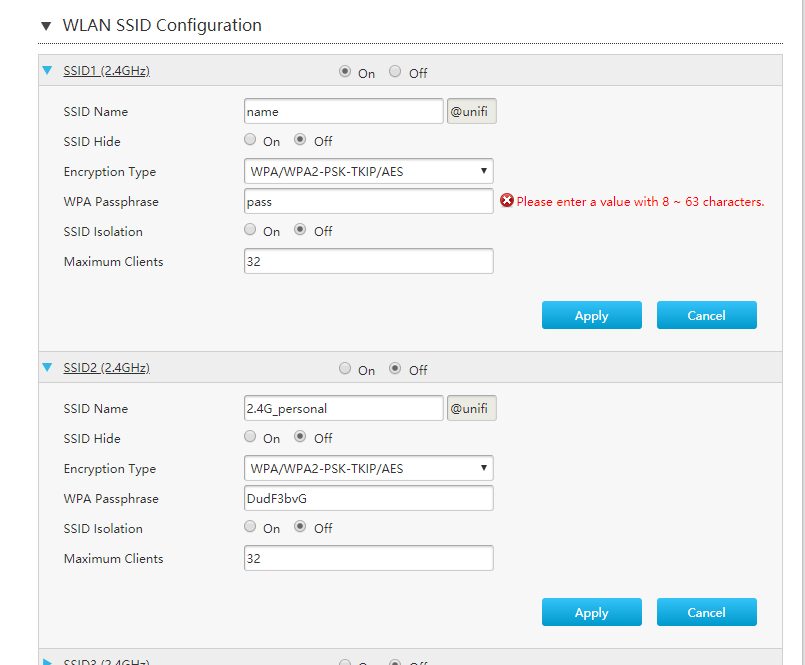
Hi guys, just got my h267a modem upgrade from Unifi today and saw the modem and router are now combined. I don't mind not being able to use my own router but is there anyway to remove the @unifi from the ssid?
patricktoh
post Jun 27 2018, 10:59 PM

Casual
***
Junior Member
490 posts

Joined: Jan 2006
From: Kuala Lumpur


QUOTE(KKS21199 @ Jun 26 2018, 09:14 PM)
Hi guys, just got my h267a modem upgrade from Unifi today and saw the modem and router are now combined. I don't mind not being able to use my own router but is there anyway to remove the @unifi from the ssid?
*
Do you have admin access to the Router-AP? See attached pictures that I am able to define my preferred SSID without @unifi.


Attached thumbnail(s)
Attached Image Attached Image
KKS21199
post Jun 28 2018, 10:41 PM

Getting Started
**
Junior Member
61 posts

Joined: Jan 2013
QUOTE(patricktoh @ Jun 27 2018, 10:59 PM)
Do you have admin access to the Router-AP? See attached pictures that I am able to define my preferred SSID without @unifi.
*
Hi

I use tmadmin user for logging into the router. You can see the @unifi part can't be edited.

user posted image

This post has been edited by KKS21199: Jun 29 2018, 10:32 AM
patricktoh
post Jun 29 2018, 01:36 PM

Casual
***
Junior Member
490 posts

Joined: Jan 2006
From: Kuala Lumpur


QUOTE(KKS21199 @ Jun 28 2018, 10:41 PM)
Hi

I use tmadmin user for logging into the router. You can see the @unifi part can't be edited.

user posted image
*
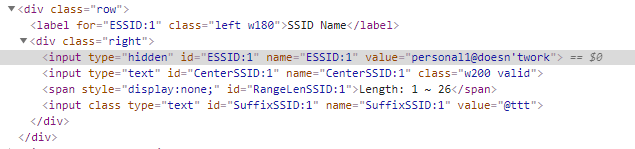
OIC. What's the firmware version? I guess need to hack/intervene the html form code via "F12 Developer Tools" to null the @unifi before hit the "Apply" button. Not difficult if you know how to use the F12 and basic html coding.

Want to try? PM me. brows.gif If you have Skpye screen sharing then will make the trail session easy. cool2.gif
KKS21199
post Jun 29 2018, 10:46 PM

Getting Started
**
Junior Member
61 posts

Joined: Jan 2013
QUOTE(patricktoh @ Jun 29 2018, 01:36 PM)
OIC. What's the firmware version? I guess need to hack/intervene the html form code via "F12 Developer Tools" to null the @unifi before hit the "Apply" button. Not difficult if you know how to use the F12 and basic html coding.

Want to try? PM me.  brows.gif  If you have Skpye screen sharing then will make the trail session easy.  cool2.gif
*
CODE
<input class="w50 PostIgnore" type="text" id="SuffixSSID" name="SuffixSSID" disabled="disabled" readonly="readonly" value="@unifi">


Thats the code for the @unifi box. Changing the value doesn't update on screen. And changing the code to this and editing the value manually within the page doesn't seem to do anything either. I can save it, but once I reload it goes back to @unifi

CODE
<input class="w50" type="text" id="SuffixSSID" name="SuffixSSID" value="">


user posted image

Seems like there is a JS updating it. Not sure how to modify the firmware itself as modifying the js after the page loads doesnt help tongue.gif

user posted image


patricktoh
post Jul 1 2018, 10:05 PM

Casual
***
Junior Member
490 posts

Joined: Jan 2006
From: Kuala Lumpur


QUOTE(KKS21199 @ Jun 29 2018, 10:46 PM)
CODE
<input class="w50 PostIgnore" type="text" id="SuffixSSID" name="SuffixSSID" disabled="disabled" readonly="readonly" value="@unifi">


Thats the code for the @unifi box. Changing the value doesn't update on screen. And changing the code to this and editing the value manually within the page doesn't seem to do anything either. I can save it, but once I reload it goes back to @unifi

CODE
<input class="w50" type="text" id="SuffixSSID" name="SuffixSSID" value="">


user posted image

Seems like there is a JS updating it. Not sure how to modify the firmware itself as modifying the js after the page loads doesnt help tongue.gif

user posted image
*
Seems "SuffixSSID" a dummy at UI and hardwired in the firmware. Maybe dump a older version firmware could help. Need some research. smile.gif
#Victor
post Jul 2 2018, 12:05 PM

Look at all my stars!!
*******
Senior Member
4,672 posts

Joined: Nov 2016
QUOTE(KKS21199 @ Jun 29 2018, 10:46 PM)
CODE
<input class="w50 PostIgnore" type="text" id="SuffixSSID" name="SuffixSSID" disabled="disabled" readonly="readonly" value="@unifi">


Thats the code for the @unifi box. Changing the value doesn't update on screen. And changing the code to this and editing the value manually within the page doesn't seem to do anything either. I can save it, but once I reload it goes back to @unifi

CODE
<input class="w50" type="text" id="SuffixSSID" name="SuffixSSID" value="">


user posted image

Seems like there is a JS updating it. Not sure how to modify the firmware itself as modifying the js after the page loads doesnt help tongue.gif

user posted image
*
QUOTE(patricktoh @ Jul 1 2018, 10:05 PM)
Seems "SuffixSSID" a dummy at UI and hardwired in the firmware. Maybe dump a older version firmware could help. Need some research.  smile.gif
*
This version do not have @unifi suffix when configuring SSID. Maybe downgrade to this version if not major improvement on ur version?
user posted image
soonwai
post Jul 2 2018, 12:09 PM


********
All Stars
11,458 posts

Joined: Oct 2007
From: KL


Firmware 1.0 MYT3 doesn't have the hardcoded suffix.

user posted image

But no idea where to get older firmwares.

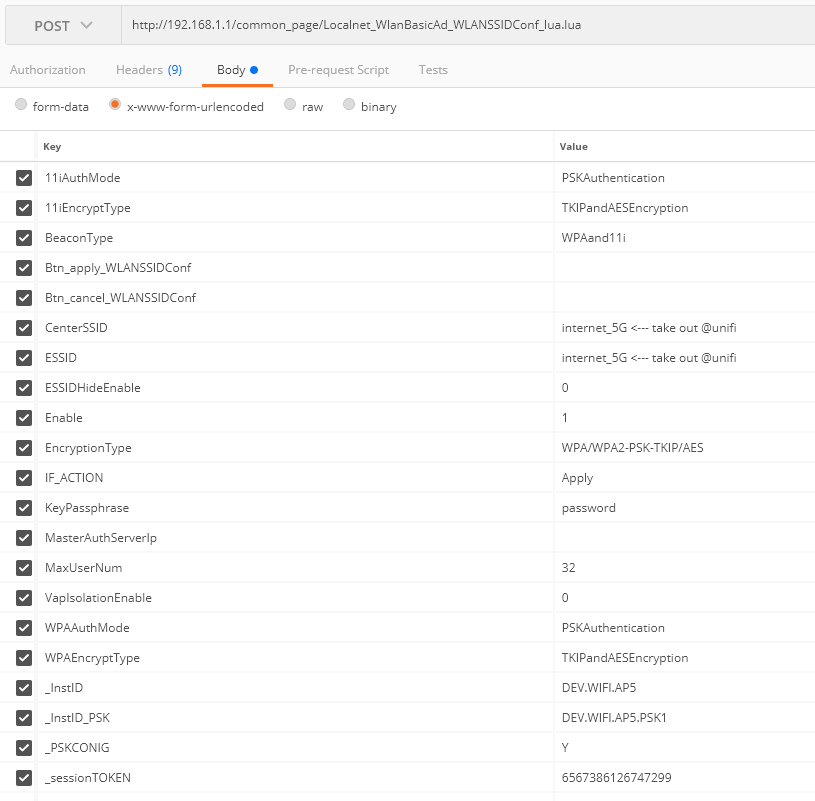
The form is processed by LUA script "/common_page/Localnet_WlanBasicAd_WLANSSIDConf_lua.lua"

Maybe you can SSH in and see if that can be modified.

Failing that, check the form post data, modify it and replay back to the router.

This post has been edited by soonwai: Jul 2 2018, 02:06 PM
KKS21199
post Jul 2 2018, 09:13 PM

Getting Started
**
Junior Member
61 posts

Joined: Jan 2013
QUOTE(#Victor @ Jul 2 2018, 12:05 PM)
This version do not have @unifi suffix when configuring SSID. Maybe downgrade to this version if not major improvement on ur version?
user posted image
*
I am not sure where to find older versions. your boot version is lower than mine and it seems like mine is a minor upgrade only. So shouldn't be a problem to downgrade.

QUOTE(soonwai @ Jul 2 2018, 12:09 PM)
Firmware 1.0 MYT3 doesn't have the hardcoded suffix.

user posted image

But no idea where to get older firmwares.

The form is processed by LUA script "/common_page/Localnet_WlanBasicAd_WLANSSIDConf_lua.lua"

Maybe you can SSH in and see if that can be modified.

Failing that, check the form post data, modify it and replay back to the router.
*

I will just try to edit the post data first. Might just start using my Asus router instead of going through this much trouble.
bokbom
post Jul 3 2018, 01:43 PM

New Member
*
Newbie
1 posts

Joined: Jul 2018
QUOTE(patricktoh @ Jul 1 2018, 10:05 PM)
Seems "SuffixSSID" a dummy at UI and hardwired in the firmware. Maybe dump a older version firmware could help. Need some research.  smile.gif
*
Hello patrick.. I need to ask some and really appreciate if u can help. I just got zte H267A modem as replace for my old innacomm modem. But now i cant connect my cyberoam with this modem. I do set bridge mode on zte modem. I use cyberoam as ppoe. Can u please help me set this modem please.. I use 5 modem as bridge and connect to cyberoam. Please do really need help.
ander7724
post Jul 3 2018, 08:44 PM

Getting Started
**
Junior Member
242 posts

Joined: Oct 2006
From: Si Sa Ket


May i ask how do i change the dns on the ZTE H267 router?
Thanks!
KKS21199
post Jul 3 2018, 09:31 PM

Getting Started
**
Junior Member
61 posts

Joined: Jan 2013
QUOTE(ander7724 @ Jul 3 2018, 08:44 PM)
May i ask how do i change the dns on the ZTE H267 router?
Thanks!
*
user posted image

Under Local Network -> Lan -> IPv4 -> DHCP Server
ander7724
post Jul 3 2018, 09:46 PM

Getting Started
**
Junior Member
242 posts

Joined: Oct 2006
From: Si Sa Ket


QUOTE(KKS21199 @ Jul 3 2018, 09:31 PM)
user posted image

Under Local Network -> Lan -> IPv4 -> DHCP Server
*
Thanks!
KKS21199
post Jul 5 2018, 03:22 PM

Getting Started
**
Junior Member
61 posts

Joined: Jan 2013
QUOTE(soonwai @ Jul 2 2018, 12:09 PM)
Firmware 1.0 MYT3 doesn't have the hardcoded suffix.

user posted image

But no idea where to get older firmwares.

The form is processed by LUA script "/common_page/Localnet_WlanBasicAd_WLANSSIDConf_lua.lua"

Maybe you can SSH in and see if that can be modified.

Failing that, check the form post data, modify it and replay back to the router.
*
user posted image

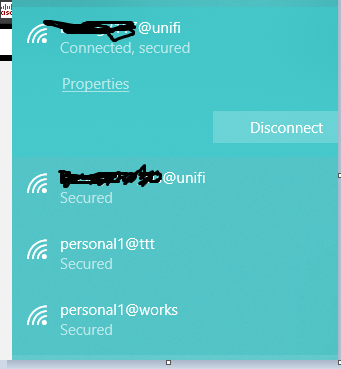
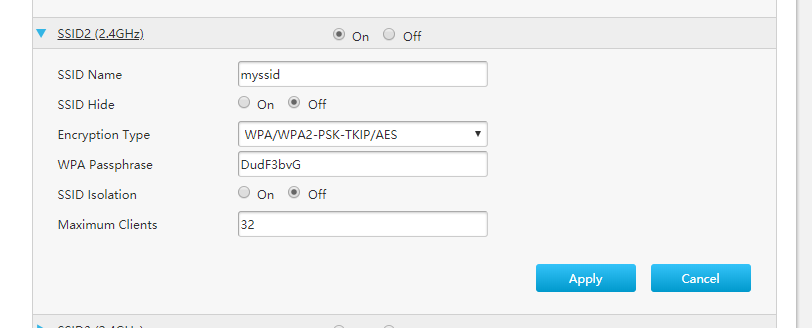
I was able to take out the @unifi part by using postman to intercept the request (as you needed the cookies as well)

and for some reason now the @unifi part is not even there on the web UI for my ssid2 (the one that I intercepted. And I can modify it anyway I want without a @ as well.)

user posted image

So I guess I only need to intercept the request once to remove the @unifi for each ssid.

This post has been edited by KKS21199: Jul 5 2018, 03:23 PM
patricktoh
post Jul 5 2018, 06:23 PM

Casual
***
Junior Member
490 posts

Joined: Jan 2006
From: Kuala Lumpur


QUOTE(bokbom @ Jul 3 2018, 01:43 PM)
Hello patrick.. I need to ask some and really appreciate  if u can help. I just got zte H267A modem as replace for my old innacomm modem. But now i cant connect my cyberoam with this modem. I do set bridge  mode on zte modem. I use cyberoam as ppoe. Can u please help me set this modem please..  I use 5 modem as bridge and connect to cyberoam. Please do really  need help.
*
Apologies, just saw your posting. What Cyberoam model you're using? Does it support VLAN?
patricktoh
post Jul 5 2018, 06:26 PM

Casual
***
Junior Member
490 posts

Joined: Jan 2006
From: Kuala Lumpur


QUOTE(KKS21199 @ Jul 5 2018, 03:22 PM)
user posted image

I was able to take out the @unifi part by using postman to intercept the request (as you needed the cookies as well)

and for some reason now the @unifi part is not even there on the web UI for my ssid2 (the one that I intercepted. And I can modify it anyway I want without a @ as well.)

user posted image

So I guess I only need to intercept the request once to remove the @unifi for each ssid.
*
Bravo bravo bravo rclxms.gif rclxms.gif rclxms.gif
PruneFace
post Jul 6 2018, 07:32 PM

Getting Started
**
Junior Member
279 posts

Joined: Jun 2009


QUOTE(chanky @ May 7 2018, 01:33 AM)
hi, im using this zte h267a modem since last year but i always suffer for my wifi connection which automatically dc for all the wifi devices for awhile then it automatically connect it back (more like cant detect internet connection for 10-20seconds). any solution for this?this issue mostly happen during gaming so im kinda frustated for this issue
*
guys.. im having the same issue.. please assist

This post has been edited by PruneFace: Jul 6 2018, 07:36 PM
#Victor
post Jul 7 2018, 01:30 PM

Look at all my stars!!
*******
Senior Member
4,672 posts

Joined: Nov 2016
QUOTE(PruneFace @ Jul 6 2018, 07:32 PM)
guys.. im having the same issue.. please assist
*
Been running my H267A for almost 1000 hours without rebooting and still works flawlessly and smooth icon_idea.gif
user posted image
joeblow
post Jul 7 2018, 03:21 PM

Regular
******
Senior Member
1,144 posts

Joined: Dec 2015


Anyone knows if this modem can support 50Mbps or 100Mps? What's the max speed?
patricktoh
post Jul 7 2018, 06:21 PM

Casual
***
Junior Member
490 posts

Joined: Jan 2006
From: Kuala Lumpur


QUOTE(PruneFace @ Jul 6 2018, 07:32 PM)
guys.. im having the same issue.. please assist
*
Only wifi failure or the modem rebooted? Check the power adapter condition.
PruneFace
post Jul 7 2018, 06:57 PM

Getting Started
**
Junior Member
279 posts

Joined: Jun 2009


QUOTE(patricktoh @ Jul 7 2018, 07:21 PM)
Only wifi failure or the modem rebooted? Check the power adapter condition.
*
Intermittently no internet connection.. Wifi connected but no internet.. Lan connection working fine with no issue.. Power adapter coukd be the caused? Bcoz im using the old adapter..
PruneFace
post Jul 8 2018, 02:55 AM

Getting Started
**
Junior Member
279 posts

Joined: Jun 2009


QUOTE(#Victor @ Jul 7 2018, 02:30 PM)
Been running my H267A for almost 1000 hours without rebooting and still works flawlessly and smooth  icon_idea.gif
user posted image
*
Oh wai...
patricktoh
post Jul 8 2018, 01:09 PM

Casual
***
Junior Member
490 posts

Joined: Jan 2006
From: Kuala Lumpur


QUOTE(PruneFace @ Jul 7 2018, 06:57 PM)
Intermittently no internet connection.. Wifi connected but no internet.. Lan connection working fine with no issue.. Power adapter coukd be the caused? Bcoz im using the old adapter..
*
Suggest you get another same rating power adapter and monitor. Sometime adapter intermittent problem due to aging ICs/capacitor.
Max
post Jul 9 2018, 06:48 PM

Regular
******
Senior Member
1,705 posts

Joined: Jan 2003
From: Sepang - Putrajaya - Cyberjaya


QUOTE(KKS21199 @ Jul 5 2018, 03:22 PM)
user posted image

I was able to take out the @unifi part by using postman to intercept the request (as you needed the cookies as well)

and for some reason now the @unifi part is not even there on the web UI for my ssid2 (the one that I intercepted. And I can modify it anyway I want without a @ as well.)

user posted image

So I guess I only need to intercept the request once to remove the @unifi for each ssid.
*
hi bro.. how do u remove the @unifi suffix?
any guide to follow. sweat.gif
AmyDazz
post Jul 10 2018, 12:16 AM

Getting Started
**
Junior Member
159 posts

Joined: Oct 2009


QUOTE(#Victor @ Jul 7 2018, 01:30 PM)
Been running my H267A for almost 1000 hours without rebooting and still works flawlessly and smooth  icon_idea.gif
user posted image
*
I am envious of your line quality. Damn excellent! All those high SNR and very low line attenuation.

Where do you stay? Is it a new developed apartment?
#Victor
post Jul 10 2018, 12:45 PM

Look at all my stars!!
*******
Senior Member
4,672 posts

Joined: Nov 2016
QUOTE(AmyDazz @ Jul 10 2018, 12:16 AM)
I am envious of your line quality. Damn excellent! All those high SNR and very low line attenuation.

Where do you stay? Is it a new developed apartment?
*
The stat is taken from a 15 years old apartment, does it consider new?

This post has been edited by #Victor: Jul 10 2018, 12:46 PM
KKS21199
post Jul 11 2018, 09:36 PM

Getting Started
**
Junior Member
61 posts

Joined: Jan 2013
QUOTE(Max @ Jul 9 2018, 06:48 PM)
hi bro.. how do u remove the @unifi suffix?
any guide to follow.  sweat.gif
*
hey,

You have to get Postman app for chrome (with interceptor) or the standalone app for windows and modify the POST request that the page makes and replay it again to the router.

user posted image

Once you have it installed, just login to the router like you normally would. Go to the WAN page and open the SSID you want to edit and click on Apply (make sure your interceptor is own on both the app and chrome if you are using the chrome extension). Postman will catch the POST request and display it on the History list (left side). Click on it and you will see something similar to the picture above. Just modify the CenterSSID and ESSID and click Send. Before sending make sure you are connected back to the same WiFi that you were when you clicked Apply in the WAN Page (For certain SSID updates, the router disconnects and reconnects back within a few seconds.)

https://chrome.google.com/webstore/detail/p...ncdddomop?hl=en

https://chrome.google.com/webstore/detail/p...fpcfhicfo?hl=en

Make sure the Interceptor is enabled in the Postman header toolbar. (for postman chrome extension)

user posted image
Max
post Jul 11 2018, 11:25 PM

Regular
******
Senior Member
1,705 posts

Joined: Jan 2003
From: Sepang - Putrajaya - Cyberjaya


QUOTE(KKS21199 @ Jul 11 2018, 09:36 PM)
hey,

You have to get Postman app for chrome (with interceptor) or the standalone app for windows and modify the POST request that the page makes and replay it again to the router.

user posted image

Once you have it installed, just login to the router like you normally would. Go to the WAN page and open the SSID you want to edit and click on Apply (make sure your interceptor is own on both the app and chrome if you are using the chrome extension). Postman will catch the POST request and display it on the History list (left side). Click on it and you will see something similar to the picture above. Just modify the CenterSSID and ESSID and click Send. Before sending make sure you are connected back to the same WiFi that you were when you clicked Apply in the WAN Page (For certain SSID updates, the router disconnects and reconnects back within a few seconds.)

https://chrome.google.com/webstore/detail/p...ncdddomop?hl=en

https://chrome.google.com/webstore/detail/p...fpcfhicfo?hl=en

Make sure the Interceptor is enabled in the Postman header toolbar. (for postman chrome extension)

user posted image
*
Thanx bro for the guide.. i will try tomorrow.. doesn't have chance today to do..

Btw, another thing about DNS. I changed in the LAN and under the DNS page/tab.. but it doesn't work.. cant access block site..
KKS21199
post Jul 12 2018, 11:00 PM

Getting Started
**
Junior Member
61 posts

Joined: Jan 2013
QUOTE(Max @ Jul 11 2018, 11:25 PM)
Thanx bro for the guide.. i will try tomorrow.. doesn't have chance today to do..

Btw, another thing about DNS. I changed in the LAN and under the DNS page/tab.. but it doesn't work.. cant access block site..
*
I had the same problem, but I just added IPv6 DNS to my computer and laptop under my network properties.

CODE
The Google Public DNS IPv6 addresses are as follows:

2001:4860:4860::8888
2001:4860:4860::8844


I also added it here but I am really not sure if it does anything sweat.gif

user posted image
Max
post Jul 12 2018, 11:07 PM

Regular
******
Senior Member
1,705 posts

Joined: Jan 2003
From: Sepang - Putrajaya - Cyberjaya


QUOTE(KKS21199 @ Jul 12 2018, 11:00 PM)
I had the same problem, but I just added IPv6 DNS to my computer and laptop under my network properties.

CODE
The Google Public DNS IPv6 addresses are as follows:

2001:4860:4860::8888
2001:4860:4860::8844


I also added it here but I am really not sure if it does anything  sweat.gif

user posted image
*
Like this have to set dns in all devices manually..
Why la this aio router modem cant do this dns globally.. haih..
aynshtayn
post Jul 24 2018, 11:57 AM

New Member
*
Newbie
4 posts

Joined: Nov 2012
From: Wangsa Maju
I think I have found right thread to ask this question biggrin.gif
I'm trying to configure VOIP service to use with third party voip service (betamax in my case, google voice also works).
First I thought I can configure it to use par with TM with 2 phones as this modem has 2 phone plugs. But voip settings allow one server only.
So I decided to change to betamax setup everything.
1. Router seems to connect back to tm sip servers even if I change settings to different server (hardcoded?).
2. I need to leave outbound servers empty (required by betamax), routers seems to write back tm sip outbound sip even though I remove and apply changes

Any thoughts on how to change SIP settings?
cabuk
post Jul 25 2018, 09:57 PM

New Member
*
Newbie
3 posts

Joined: Jul 2018


QUOTE(patricktoh @ Nov 11 2017, 10:11 PM)
Did you??
1. Remove the UniFi PPP login and password in ZTE DSL WAN page?
2. Create a new Internet VLAN - ID: 500, connection type: bridge, xDSL transfer mode: PTM, 802.1p: 0
3. Bind the Internet VLAN to a LAN port e.g. LAN-1
4. Connect LAN-1 to Tenda WAN port
5. Configure PPPoE in Tenda
6. Turn off ZTE wifi

Share the result here smile.gif
*
Thank patricktoh.. i follow the step and work properly.

patricktoh
post Jul 26 2018, 12:14 AM

Casual
***
Junior Member
490 posts

Joined: Jan 2006
From: Kuala Lumpur


QUOTE(cabuk @ Jul 25 2018, 09:57 PM)
Thank patricktoh.. i follow the step and work properly.
*
thumbup.gif
alvpkl
post Jul 29 2018, 02:24 PM

Getting Started
**
Junior Member
124 posts

Joined: Mar 2011


Does anyone know how to block Youtube using the IPV6 filter? It doesn't work in the configuration below:


Attached thumbnail(s)
Attached Image
#Victor
post Jul 30 2018, 01:40 PM

Look at all my stars!!
*******
Senior Member
4,672 posts

Joined: Nov 2016
Does anyone know how to setup H267A to enable printer shared to the network using the router's USB port? I can see the printer name appear in router home page under USB device but seems can't find option to enable print server.
undine
post Sep 15 2018, 01:59 PM

Getting Started
**
Junior Member
123 posts

Joined: Nov 2008
QUOTE(patricktoh @ Nov 14 2017, 09:02 PM)
Received ZTE H267A today. What I did after the installer completed the installation.

At Internet > WAN > DSL tab > DSL Connection
1. Create new item (Internet bridge VLAN)
- Connection name: BR_VLAN_500
- DSL Transfer mode: PTM
- Type: Bridge Connection
- VLAN: On
- VLAN ID: 500
- Apply

2. PPPoE set to Off

3. Click VLAN Trunk tab
- LAN1 set to On
- Supported VLAN number: 1
- VLAN ID1: 500
- PVID: N/A
- Apply

4. Once done connect own router WAN port to ZTE LAN1. HyppTV connect to ZTE default LAN4

Optional>>
5. If you want to pass the HyppTV to own router then
- At DSL connection > BR_VLAN_600 set to On (default is On)

6. At VLAN Trunk
- LAN1 set to On
- Supported VLAN number: 2
- VLAN ID1: 500
- VLAN ID2: 600
- PVID: N/A
- Apply

2 minor observations. I will try to fix it when have time. smile.gif
1. ZTE system time not sync with time server. Suspect it can't pick-up internet traffic
2. Internet LED is off. Should be related to above
*
nice, buying ASUS AC-rt68U soon and will follow this setup. just moved to a new house and got my zxhn h267a modem/router today
benny6612
post Oct 27 2018, 03:59 PM

New Member
*
Newbie
10 posts

Joined: Dec 2017
QUOTE(patricktoh @ Jan 9 2018, 12:42 PM)
If you use bridge mode then you can't reach ZTE modem. The remote access will reach the router that established the PPPoE connection. Presume you want to access the PPPoE router, 2 basic things need to happen

I) Enable remote access from internet to the router
2) You must get hold of the public IP of the active PPPoE connection. I believe you're aware of the public IP keeps changing whenever connection cycled
*
Now got another problem. Some kids meddled with my zte modem. Pressing god knows what buttons. Now... my wireless doesnt connect to any device.

LAN cable still works fine. But my devices, tv, ipad,ps4 cant connect. Help plsss. How can i set my zte modem back to normal which would allow auto connect for my devices.....

At first.. i had to change my device ip address from dhcp to static.. with new ip address... then only can connect.

After awhile. Dunno why static also cannot connect. And now with dhcp it states "authentication error".. and all devices cannot connect.

Wah sehh... damn sien lo. Wanna be angry at the kids also dunno.
patricktoh
post Oct 27 2018, 08:25 PM

Casual
***
Junior Member
490 posts

Joined: Jan 2006
From: Kuala Lumpur


QUOTE(benny6612 @ Oct 27 2018, 03:59 PM)
Now got another problem. Some kids meddled with my zte modem. Pressing god knows what buttons. Now... my wireless doesnt connect to any device.

LAN cable still works fine. But my devices, tv, ipad,ps4 cant connect. Help plsss. How can i set my zte modem back to normal which would allow auto connect for my devices.....

At first.. i had to change my device ip address from dhcp to static.. with new ip address... then only can connect.

After awhile. Dunno why static also cannot connect. And now with dhcp it states "authentication error".. and all devices cannot connect.

Wah sehh... damn sien lo. Wanna be angry at the kids also dunno.
*
I presume the wifi and dhcp settings messed-up. Do you know how to access into zte modem settings? PM your phone number to WhatsApp.
#Victor
post Oct 27 2018, 09:37 PM

Look at all my stars!!
*******
Senior Member
4,672 posts

Joined: Nov 2016
QUOTE(benny6612 @ Oct 27 2018, 03:59 PM)
Now got another problem. Some kids meddled with my zte modem. Pressing god knows what buttons. Now... my wireless doesnt connect to any device.

LAN cable still works fine. But my devices, tv, ipad,ps4 cant connect. Help plsss. How can i set my zte modem back to normal which would allow auto connect for my devices.....

At first.. i had to change my device ip address from dhcp to static.. with new ip address... then only can connect.

After awhile. Dunno why static also cannot connect. And now with dhcp it states "authentication error".. and all devices cannot connect.

Wah sehh... damn sien lo. Wanna be angry at the kids also dunno.
*
Reset ur modem and reconfigure it.
benny6612
post Oct 28 2018, 12:10 AM

New Member
*
Newbie
10 posts

Joined: Dec 2017
QUOTE(#Victor @ Oct 27 2018, 09:37 PM)
Reset ur modem and reconfigure it.
*
Modem already resetted and reconfigured.

Various kinds of scenarios now.

1. I use a tp-link range extender on 2.4ghz. ZTE 2.4/5ghz are both turned off. (Wifi connected on phone and tv - "May not be able to acceas Internet appears" with "!" Or "No internet access")

2. I disconnect the lan cable from the tp-link router. Turn on the ZTE 2.4/5ghz. (Failed to obtain IP address appears on phone or "Error in authentication" )

3. Following no.2, I configure my phone's network ip setting from dhcp to static. Internet access enabled only on phone. But tv, laptop and ps4 cannot connect to wifi.

I have checked all zte configuration and tp link config as well.
Tplink setting - "range extender only" with smart ip setting.

All in all. One works but not all works. This randomly happened...not sure if it was becuz of something the kids did or it's at unifi or zte config..

Unifi has resetted my port 3 times. But still the same result. sad.gif
chiafoo
post Oct 28 2018, 11:16 AM

Casual
***
Junior Member
450 posts

Joined: Jan 2007


QUOTE(benny6612 @ Oct 28 2018, 12:10 AM)
Unifi has resetted my port 3 times. But still the same result. sad.gif
*
Factory Reset the modem and use the Service Scenarios configuration/wizzard to set SUBB/HSBB again nex follow step by step to enable the dhcp and wifi .

#Victor
post Oct 28 2018, 12:45 PM

Look at all my stars!!
*******
Senior Member
4,672 posts

Joined: Nov 2016
QUOTE(benny6612 @ Oct 28 2018, 12:10 AM)
Modem already resetted and reconfigured.

Various kinds of scenarios now.

1. I use a tp-link range extender on 2.4ghz. ZTE 2.4/5ghz are both turned off. (Wifi connected on phone and tv - "May not be able to acceas Internet appears" with "!" Or "No internet access")

2. I disconnect the lan cable from the tp-link router. Turn on the ZTE 2.4/5ghz. (Failed to obtain IP address appears on phone or "Error in authentication" )

3. Following no.2, I configure my phone's network ip setting from dhcp to static. Internet access enabled only on phone. But tv, laptop and ps4 cannot connect to wifi.

I have checked all zte configuration and tp link config as well.
Tplink setting - "range extender only" with smart ip setting.

All in all. One works but not all works. This randomly happened...not sure if it was becuz of something the kids did or it's at unifi or zte config..

Unifi has resetted my port 3 times. But still the same result. sad.gif
*
If u already reset ur ZTE, by right it should work as the DHCP or whatever binding supposed to restore default.

QUOTE(chiafoo @ Oct 28 2018, 11:16 AM)
Factory Reset the modem and use the Service Scenarios configuration/wizzard to set SUBB/HSBB again nex follow step by step to enable the dhcp and wifi .
*
I supposed he already set Service Scenario as he mentioned Internet access enabled only on phone but other WiFi devices cannot connect to WiFi when he use static IP on the device.
chiafoo
post Oct 28 2018, 01:35 PM

Casual
***
Junior Member
450 posts

Joined: Jan 2007


QUOTE(#Victor @ Oct 28 2018, 12:45 PM)
If u already reset ur ZTE, by right it should work as the DHCP or whatever binding supposed to restore default.
I supposed he already set Service Scenario as he mentioned Internet access enabled only on phone but other WiFi devices cannot connect to WiFi when he use static IP on the device.
*
Try check the LAN setting is the same as below
Attached Image
benny6612
post Oct 29 2018, 07:34 PM

New Member
*
Newbie
10 posts

Joined: Dec 2017
Weirdly. Now the zte working. But when connected to my tplink as a range extender for 2.4ghz. All devices cannot connect.
[JackAss]Uncletan
post Nov 15 2018, 11:09 PM

Getting Started
**
Junior Member
75 posts

Joined: Jan 2003
Hi all sifus,

I follwed all the steps shared by Patrick but somehow i cant get my new asus rt ac68u to work...anyone using this model and manage to get theirs to work? Mind sharing with me?
[JackAss]Uncletan
post Nov 16 2018, 12:09 AM

Getting Started
**
Junior Member
75 posts

Joined: Jan 2003
Hi All Sifus,

Where can i obtain the Special Requirements from ISP settings?
example:
Enable VPN + DHCP Connection: Yes? or No?
Hostname:?
Mac Address: ? (can this be obtain from inside the ZTE Router page?)

[JackAss]Uncletan
post Nov 16 2018, 11:59 PM

Getting Started
**
Junior Member
75 posts

Joined: Jan 2003
Hi All Sifus,

I got it sorted out.

Changes done was to LAN > IPTV > select ISP Type > Unifi Home and press apply and reboot the router. Wolla it worked. Why and How i am not sure.


pointbreak
post Dec 11 2018, 10:30 PM

New Member
*
Junior Member
17 posts

Joined: Jan 2007
how to do port forward ? anybody can guide ? i cant do it

This post has been edited by pointbreak: Dec 11 2018, 10:58 PM
KL_menJERIT
post Dec 15 2018, 08:07 PM

Casual
***
Junior Member
340 posts

Joined: Mar 2007
From: Malaysia


ZTE zxhn h267a can use as bridge for maxis hsbb vdsl?
tzh2001
post Apr 30 2019, 08:14 AM

Heart warming
***
Junior Member
385 posts

Joined: Jan 2008
don't know why my PC cannot get ip by LAN with this modem router
tested with old router DSL2730E & D850L confirm not PC problem
DHCP is on, connection from smart tv & evpad had no issue sweat.gif
#Victor
post Apr 30 2019, 11:02 AM

Look at all my stars!!
*******
Senior Member
4,672 posts

Joined: Nov 2016
QUOTE(tzh2001 @ Apr 30 2019, 08:14 AM)
don't know why my PC cannot get ip by LAN with this modem router
tested with old router DSL2730E & D850L confirm not PC problem
DHCP is on, connection from smart tv & evpad had no issue sweat.gif
*
Try check ur network adapter ipv6 whether fixed ip? or try temporary disable the router ipv6
tzh2001
post Apr 30 2019, 11:59 AM

Heart warming
***
Junior Member
385 posts

Joined: Jan 2008
QUOTE(#Victor @ Apr 30 2019, 11:02 AM)
Try check ur network adapter ipv6 whether fixed ip? or try temporary disable the router ipv6
*
ipv6 already disable in router'
currently ipv4 is manual assigned while ipv6 leave it auto
#Victor
post Apr 30 2019, 12:50 PM

Look at all my stars!!
*******
Senior Member
4,672 posts

Joined: Nov 2016
QUOTE(tzh2001 @ Apr 30 2019, 11:59 AM)
ipv6 already disable in router'
currently ipv4 is manual assigned while ipv6 leave it auto
*
try set to auto for ur ipv4 network adapter.
03jeff_fwu09 P
post May 24 2019, 05:39 PM

New Member
*
Probation
5 posts

Joined: May 2019
QUOTE(patricktoh @ Nov 14 2017, 09:02 PM)
Received ZTE H267A today. What I did after the installer completed the installation.

At Internet > WAN > DSL tab > DSL Connection
1. Create new item (Internet bridge VLAN)
- Connection name: BR_VLAN_500
- DSL Transfer mode: PTM
- Type: Bridge Connection
- VLAN: On
- VLAN ID: 500
- Apply

2. PPPoE set to Off

3. Click VLAN Trunk tab
- LAN1 set to On
- Supported VLAN number: 1
- VLAN ID1: 500
- PVID: N/A
- Apply

4. Once done connect own router WAN port to ZTE LAN1. HyppTV connect to ZTE default LAN4

Optional>>
5. If you want to pass the HyppTV to own router then
- At DSL connection > BR_VLAN_600 set to On (default is On)

6. At VLAN Trunk
- LAN1 set to On
- Supported VLAN number: 2
- VLAN ID1: 500
- VLAN ID2: 600
- PVID: N/A
- Apply

2 minor observations. I will try to fix it when have time. smile.gif
1. ZTE system time not sync with time server. Suspect it can't pick-up internet traffic
2. Internet LED is off. Should be related to above
*
Hi patrick,

I follow Ur step, at 1st can connect network. After that can't connect. Is that any wrong step I do?

patricktoh
post May 27 2019, 10:34 PM

Casual
***
Junior Member
490 posts

Joined: Jan 2006
From: Kuala Lumpur


QUOTE(03jeff_fwu09 @ May 24 2019, 05:39 PM)
Hi patrick,

I follow Ur step, at 1st can connect network. After that can't connect. Is that any wrong step I do?
*
I am traveling. Get back to you this weekend.
03jeff_fwu09 P
post May 27 2019, 11:26 PM

New Member
*
Probation
5 posts

Joined: May 2019
QUOTE(patricktoh @ May 27 2019, 10:34 PM)
I am traveling. Get back to you this weekend.
*
Sure.
03jeff_fwu09 P
post May 30 2019, 02:05 PM

New Member
*
Probation
5 posts

Joined: May 2019
QUOTE(03jeff_fwu09 @ May 27 2019, 11:26 PM)
Sure.
*
Thanks for Patrick helping. Really helpful.
patricktoh
post May 30 2019, 05:20 PM

Casual
***
Junior Member
490 posts

Joined: Jan 2006
From: Kuala Lumpur


QUOTE(03jeff_fwu09 @ May 30 2019, 02:05 PM)
Thanks for Patrick helping. Really helpful.
*
No problem mate. Basically there were 2 issues.
1. The Asus 87u default uses the same IP address with TM router 192.168.1.1

2. The Asus 87u didn't select Unifi profile. Thus the VLAN settings not correct

I'll update my step by step guide to include avoid using same IP address and remind to select Unifi profile in own router.

Cheers...
coolguy_mahen
post Oct 17 2019, 12:10 AM

Getting Started
**
Junior Member
114 posts

Joined: Nov 2004


Hi all, I recently bought a TP-Link Archer A9 and wanted to use it as my main router, instead of the ZTE supplied by TM.

Followed Patrick's steps above and internet worked without a hitch.(Thanks patrick)

However, I have an alternate suggestion for those who are comfortable enough to try it.


For me, I prefer the ZTE device to stop functioning as a router, as I did not want any double NAT, as well as double wifi, signals intefering each other, (when ZTE and new router placed side by side).

So instead of the above steps, I just changed the mode on ZTE front page (first page right after login) to bridged mode. After you do this, the ZTE will turn into a 'dumb' device, with no user facing web login. No need to panic, you just need to connect LAN from ZTE LAN1 to your router WAN port, and configure the PPoE settings on your new router. And afterr that, you also need to enable the proper IPTV/HyppTV settings. All the router sold in Malaysia will have the settings inside. Just choose the right provider, TM/Unifi in our case.

Once you done above, and the new router establishes connection, your internet is ready!


(PS: before you change mode on ZTE to bridge, remember to note/trace down your Unifi PPoE details. I couldn't remember my password, so I did the live chat w TM and reset my password)

Again with this setup, your hypptv LAN cable need to connect to thenew router, not the ZTE device. This is because the ZTE becomes a pure modem (aka bridge device, with no routing function). To me this is optimal, cause as mentioned earlier, no wifi interference, no double NAT, etc.

Sharing my experience here for anyone who might find this useful.
SilentVampire
post Oct 18 2019, 08:05 AM

Networking Enthusiast
*******
Senior Member
5,714 posts

Joined: Mar 2007


QUOTE(coolguy_mahen @ Oct 17 2019, 12:10 AM)
Hi all, I recently bought a TP-Link Archer A9 and wanted to use it as my main router, instead of the ZTE supplied by TM.

Followed Patrick's steps above and internet worked without a hitch.(Thanks patrick)

However, I have an alternate suggestion for those who are comfortable enough to try it.
For me, I prefer the ZTE device to stop functioning as a router, as I did not want any double NAT, as well as double wifi, signals intefering each other, (when ZTE and new router placed side by side).

So instead of the above steps, I just changed the mode on ZTE front page (first page right after login) to bridged mode. After you do this, the ZTE will turn into a 'dumb' device, with no user facing web login. No need to panic, you just need to connect LAN from ZTE LAN1 to your router WAN port, and configure the PPoE settings on your new router. And afterr that, you also need to enable the proper IPTV/HyppTV settings. All the router sold in Malaysia will have the settings inside. Just choose the right provider, TM/Unifi in our case.

Once you done above, and the new router establishes connection, your internet is ready!
(PS: before you change mode on ZTE to bridge, remember to note/trace down your Unifi PPoE details. I couldn't remember my password, so I did the live chat w TM and reset my password)

Again with this setup, your hypptv LAN cable need to connect to thenew router, not the ZTE device. This is because the ZTE becomes a pure modem (aka bridge device, with no routing function). To me this is optimal, cause as mentioned earlier, no wifi interference, no double NAT, etc.

Sharing my experience here for anyone who might find this useful.
*
Good job. Thank you for sharing rclxms.gif
zhuzzir
post Nov 6 2019, 09:08 PM

New Member
*
Newbie
4 posts

Joined: Jul 2018


Hi guys, really great thread over zte h267a router/modem which as surprisingly had very little information about when googled....
anyway, I've been reading and trying (most of, if not all) of the suggestions here. Tried to but none seems to work for me... thus guys,
if any of you got the idea even just a guest or slightest one i'm welcoming them with both open arms...

Anyway this is what I m trying to do...


BRIDGING between 2 router/modems namely as follows,

1. ZTE H267A (192.168.20.1) acted as subnet (192.168.20.x) router and modem (to internet thru it's DSL interface as originally set by TMNet guys), and;

2. TPLINK WR542G (192.168.1.1) router (modem disabled/not used) for another subnet (192.168.1.x). I tried to have this (TPLINK) WIRELESSLY
(a physical wire link is not possible at the moment) connects to the ZTE (192.168.20.1 on different 192.168.20.x subnet) which acted as general
internet gateway;

well, hopes u guys got the general ideas....

Btw, the ZTE H267A seems to be a newer model in the market (which I guest should support the WDS) while the TPLINK WR542G is an (very?) older model
which WDS is out of the question.
Meanwhile the TPLINK have a simpler straight-forward setup screens and options, compared to the ZTE which have myriads and lots more setup screens and options
on top of confusing terms;

I've tried so many ways and lost count how many different ways I've tried (based of various models of router/wifi I found online although none of the same ZTE H267A model)
and been trying so for last 3 months (or perhaps even more!). Any helps or suggestions r highly appreciated and welcomes...

1. SUBNETS,
Is it possible to WIRELESSLY bridge/connect 2 router/modem together of these 2 models?
a) when each resides on a different subnets as my current setup with ZTE on 192.168.20.x and TPLINK on 192.168.1.x subnets, or;
b) should both of them set to be on the same subnet, either 192.168.20.x or 192.168.1.x (preferred) ?;

2. COMPLICATED OPTIONS,
If (possible which I preferred to), can anyone please show me how to configure the ZTE as it's has more complicated in options and
configurations available (compared to simple single screen on how to setup BRIDGE mode on TPLINK as the manual suggested);

3. MAC ADDRESSES,
I read that for bridging, a MAC address is required however I got confused as the ZTE seems to have number of MAC addresses depending
on its configurations which are...
a) the general/default MAC which is as printed on backside sticker, and;
b) unique MAC for each configured VLAN interfaces, thus I got confused (if its ever needed) which is the correct MAC to be used for ZTE over the TPLNK?


K, guys... Hopes I did made it clear enough for u guys on what I meant and needs... Again, this is a great config resources
for ZTE H267A I found so far. Thanks for the helps n informations so far.

Huzzir
zhuzzir@gmail.com

user posted image

This post has been edited by zhuzzir: Nov 7 2019, 04:09 PM

patricktoh
post Nov 7 2019, 09:53 PM

Casual
***
Junior Member
490 posts

Joined: Jan 2006
From: Kuala Lumpur


QUOTE(zhuzzir @ Nov 6 2019, 09:08 PM)
Hi guys, really great thread over zte h267a router/modem which as surprisingly had very little information about when googled....
anyway, I've been reading and trying (most of, if not all) of the suggestions here. Tried to but none seems to work for me... thus guys,
if any of you got the idea even just a guest or slightest one i'm welcoming them with both open arms...

Anyway this is what I m trying to do...
BRIDGING between 2 router/modems namely as follows,

1. ZTE H267A (192.168.20.1) acted as subnet (192.168.20.x) router and modem (to internet thru it's DSL interface as originally set by TMNet guys), and;

2. TPLINK WR542G (192.168.1.1) router (modem disabled/not used) for another subnet (192.168.1.x). I tried to have this (TPLINK) WIRELESSLY
    (a physical wire link is not possible at the moment) connects to the ZTE (192.168.20.1 on different 192.168.20.x subnet) which acted as general
    internet gateway;

well, hopes u guys got the general ideas....

Btw, the ZTE H267A seems to be a newer model in the market (which I guest should support the WDS) while the TPLINK WR542G is an (very?) older model
which WDS is out of the question.
Meanwhile the TPLINK have a simpler straight-forward setup screens and options, compared to the ZTE which have myriads and lots more setup screens and options
on top of confusing terms;

I've tried so many ways and lost count how many different ways I've tried (based of various models of router/wifi I found online although none of the same ZTE H267A model)
and been trying so for last 3 months (or perhaps even more!). Any helps or suggestions r highly appreciated and welcomes...

1. SUBNETS,
    Is it possible to WIRELESSLY bridge/connect 2 router/modem together of these 2 models?
        a) when each resides on a different subnets as my current setup with ZTE on 192.168.20.x and TPLINK on 192.168.1.x subnets, or;
        b) should both of them set to be on the same subnet, either 192.168.20.x or 192.168.1.x (preferred) ?;

2. COMPLICATED OPTIONS,
    If (possible which I preferred to), can anyone please show me how to configure the ZTE as it's has more complicated in options and
    configurations available (compared to simple single screen on how to setup BRIDGE mode on TPLINK as the manual suggested);

3. MAC ADDRESSES,
    I read that for bridging, a MAC address is required however I got confused as the ZTE seems to have number of MAC addresses depending
    on its configurations which are...
        a) the general/default MAC which is as printed on backside sticker, and;
        b) unique MAC for each configured VLAN interfaces, thus I got confused (if its ever needed) which is the correct MAC to be used for ZTE over the TPLNK?


K, guys... Hopes I did made it clear enough for u guys on what I meant and needs... Again, this is a great config resources
for ZTE H267A I found so far. Thanks for the helps n informations so far.

Huzzir
zhuzzir@gmail.com

user posted image
*
Suggest you flash the WR542G with DD-WRT firmware then configure "Client Bridge (Routed)".
The TP-Link AC1750 in study room (in picture) is wifi bridged to main wifi router at living room.


Attached thumbnail(s)
Attached Image Attached Image
zhuzzir
post Nov 10 2019, 07:20 PM

New Member
*
Newbie
4 posts

Joined: Jul 2018


QUOTE(patricktoh @ Nov 7 2019, 09:53 PM)
Suggest you flash the WR542G with DD-WRT firmware then configure "Client Bridge (Routed)".
The TP-Link AC1750 in study room (in picture) is wifi bridged to main wifi router at living room.
*
Thanks for the suggestion... Read about it before but not yet thought of going into it as flashing the ROM got me in kind
of shivering... But since u suggested, I will give it a through-out reading and see if it can be down with my WR542G.

Yeah btw, got into my hand an INNACOMM W7100N router/modem from a friend who's not using it.... only have a brief looked
into it's setup pages... seems it's newer than my existing ZTE H267A since the W7100N have built in WDS support which should
make it easier to setup as per I required... will give it a try also if paring W7100N with ZTE-H267A could work...

Thanks again patrick, appreciate it very much...

zhuzzir
post Nov 10 2019, 07:20 PM

New Member
*
Newbie
4 posts

Joined: Jul 2018


QUOTE(patricktoh @ Nov 7 2019, 09:53 PM)
Suggest you flash the WR542G with DD-WRT firmware then configure "Client Bridge (Routed)".
The TP-Link AC1750 in study room (in picture) is wifi bridged to main wifi router at living room.
*
Thanks for the suggestion... Read about it before but not yet thought of going into it as flashing the ROM got me in kind
of shivering... But since u suggested, I will give it a through-out reading and see if it can be down with my WR542G.

Yeah btw, got into my hand an INNACOMM W7100N router/modem from a friend who's not using it.... only have a brief looked
into it's setup pages... seems it's newer than my existing ZTE H267A since the W7100N have built in WDS support which should
make it easier to setup as per I required... will give it a try also if paring W7100N with ZTE-H267A could work...

Thanks again patrick, appreciate it very much...

zhuzzir
post Dec 2 2019, 05:59 PM

New Member
*
Newbie
4 posts

Joined: Jul 2018


QUOTE(patricktoh @ Nov 7 2019, 09:53 PM)
Suggest you flash the WR542G with DD-WRT firmware then configure "Client Bridge (Routed)".
The TP-Link AC1750 in study room (in picture) is wifi bridged to main wifi router at living room.
*
Read about DD-WRT, tried to find the one for WR542G model but not found on the site... still playing around the WDS and by now
I've managed to successfully setup the WDS between WR542G (TPLINK) and W7100N (INNATECH) but not to the ZTE H267A which
is (unfortunately) my main router and primary modem... Either WR542G or W7100N failed to linked with ZTE thru WDS todate thou
they can linked thru WDS to each other (WR542G and W7100N)...

There's an alternative way to doing this (thou not ones I preferred) by
1. Using the ZTE as modem/gateway only. DHCP and WIFI disabled;
2. Linked the W7100N by wired LAN interface to ZTE and have the W7100 to
a. Provide the routing services;
b. WIFI AP;
c. Have it WDS (AP+WDS) mode enabled and;
d. Linked with WR542 which is not possible to be physically connected thru WDS;
e. DONE!

Still trying and above and see if any unforseen side-effect and others while (still) trying to liked to ZTE ;-)

Thanks for the suggestions and all the information provided/shared here... Very much valuable....


Huzzir

McKennaScole P
post Dec 9 2019, 08:42 AM

New Member
*
Probation
1 posts

Joined: Dec 2019
Hi, I'm writing this from a country where the router "ZXHN H267A V1.0" firmware is restricted by the ISP. Could you lead me to a firmware to download so that I can set it up myself and use its full capabilities? Thanks
Hardware version is V1.0.1 and boot version is V1.0.2
Zul Allegiance
post Feb 22 2020, 11:20 PM

New Member
*
Newbie
1 posts

Joined: Jun 2010
Hi can anyone help me in setting up vpn in the router. Is it possible to set? Does this modem support vpn? Thank you all for the response
labtec
post Mar 27 2020, 09:59 AM

Regular
******
Senior Member
1,556 posts

Joined: Jan 2003
hi, i'm also using ZTE ZXHN H267A V1.0 modem for my 10Mbps Unifi lite broadband.

May i know can i pair this modem with TP-link Archer A5 wifi router? i don't plan to touch anything on ZTE modem setting and just set the TP link wifi router to either bridge mode or AP mode? and is it using AP mode, the TP link wifi router will share the same SSID name and password as my ZTE modem?

https://www.lazada.com.my/products/online-e...38ceDyIqkk&mp=1

This post has been edited by labtec: Mar 27 2020, 10:05 AM
ravemaster222003
post Apr 11 2020, 12:56 PM

Getting Started
**
Junior Member
243 posts

Joined: Aug 2006
From: Perak


Hi Guys,

Need you opinion. Somehow my ZTE ZXHN H267A is lack in signal strength.
I have spare TP-Link WR1043ND router as it was used together with RG before.

My question:

1. If i change my ZTE as modem only (or bridge) & pair with WR1043ND as router, will it improve the signal strength?

2. Or will it be more value to cost for me to get new or latest modem + router?

P/S: I'm using Unifi 30M and residing in apartment.
jacktiew
post Apr 11 2020, 01:06 PM

Getting Started
**
Junior Member
289 posts

Joined: Sep 2012
QUOTE(labtec @ Mar 27 2020, 09:59 AM)
hi, i'm also using ZTE ZXHN H267A V1.0 modem for my 10Mbps Unifi lite broadband.

May i know can i pair this modem with TP-link Archer A5 wifi router? i don't plan to touch anything on ZTE modem setting and just set the TP link wifi router to either bridge mode or AP mode? and is it using AP mode, the TP link wifi router will share the same SSID name and password as my ZTE modem?

https://www.lazada.com.my/products/online-e...38ceDyIqkk&mp=1
*
Check if your Archer A5 have access point mode or not:-
If yes,
1. Give the Archer A5 a static IP for future easier access.
2. Set your SSID name and password on Archer A5 identical to your ZTE modem.
3. Convert to Access Point mode.
4. Plug LAN cable from Zte modem LAN port to Archer AT LAN port.

If no,
1. Give the Archer A5 a static IP for future easier access.
2. Set your ZTE modem IP address as default gateway on Archer A5.
2. Set your SSID name and password on Archer A5 identical to your ZTE modem.
3. Turn off DHCP.
4. Plug LAN cable from Zte modem LAN port to Archer A5 LAN port.

This post has been edited by jacktiew: Apr 11 2020, 01:14 PM
undine
post May 4 2020, 04:08 PM

Getting Started
**
Junior Member
123 posts

Joined: Nov 2008
so uh... I wanted to replace my netis DL4480V1, which is a vdsl modem + router. Bought Asus RT-AC68U on Shopee from All IT.
Placed the order and everything, only to notice that what I really need is the DSL-AC68U dry.gif

Why would ASUS named their products so similarly.... arghhhh
Max
post May 4 2020, 07:59 PM

Regular
******
Senior Member
1,705 posts

Joined: Jan 2003
From: Sepang - Putrajaya - Cyberjaya


QUOTE(undine @ May 4 2020, 04:08 PM)
so uh... I wanted to replace my netis DL4480V1, which is a vdsl modem + router. Bought Asus RT-AC68U on Shopee from All IT.
Placed the order and everything, only to notice that what I really need is the DSL-AC68U  dry.gif

Why would ASUS named their products so similarly.... arghhhh
*
U should be able to configure the netis as modem only.
All the routing / wifi asus handle.

undine
post May 4 2020, 09:22 PM

Getting Started
**
Junior Member
123 posts

Joined: Nov 2008
QUOTE(Max @ May 4 2020, 07:59 PM)
U should be able to configure the netis as modem only.
All the routing / wifi asus handle.
*
Yeah, I guess that's the plan now. Wanted to just use 1 device for both functions. Bummer sad.gif
[JackAss]Uncletan
post May 28 2020, 05:21 PM

Getting Started
**
Junior Member
75 posts

Joined: Jan 2003
hi all sifu,

I've been using my old ZTE H267A with Asus RT-AC68u till the ZTE gave problems and was replaced to NETIS DL4480V1 today. I am having trouble to reconfigure it back to the method i did with ZTE H267A and Asus RT-AC68u.

Any sifu has gotten their Netis DL4480v1 and Asus RT-AC68u working? Please share what you did.

Things's I've done.

In NETIS DL4480v1:

- under PTM WAN
- under VDSL_Connection_1
> Channel Mode: changed from PPPoE to Bridged
> Connection Type: Internet
> VLAN ID: 500
> Port Mapping: Lan 1 ticked
> MTU: from 1500 to 1492
> IPv4 TCP MSS: 1452
> IPv6 TCP MSS: 1432

- under WLAN Off for both 2.4 and 5 settings.
- then i apply changes and restart the NETIS DL4480v1.
- then the LAN 1 cable from NETIS DL4480v1 connect to Asus RT AC 68u
- that is where problem start.
- i can't connect to 192.168.0.1 any longer it says no internet connection.
- asus router i've resetted my old previous settings.

then when i try to connect back to my NETIS DL4480v1 - i can't.
so i had to press reset button 20secs then only i can.

any idea where i did wrong?

i saw there is WAN settings in NETIS DL4480v1 with pppoe@ccs < should i put mine instead?

please advise sifus!

miloaisdino
post May 28 2020, 06:06 PM

Regular
******
Senior Member
1,418 posts

Joined: Jul 2015
QUOTE(JackAssUncletan @ May 28 2020, 05:21 PM)
hi all sifu,

I've been using my old ZTE H267A with Asus RT-AC68u till the ZTE gave problems and was replaced to NETIS DL4480V1 today. I am having trouble to reconfigure it back to the method i did with ZTE H267A and Asus RT-AC68u.

Any sifu has gotten their Netis DL4480v1 and Asus RT-AC68u working? Please share what you did.

Things's I've done.

In NETIS DL4480v1:

- under PTM WAN
  - under VDSL_Connection_1
    > Channel Mode: changed from PPPoE to Bridged
    > Connection Type: Internet
    > VLAN ID: 500
    > Port Mapping: Lan 1 ticked
    > MTU: from 1500 to 1492
    > IPv4 TCP MSS: 1452
    > IPv6 TCP MSS: 1432

- under WLAN Off for both 2.4 and 5 settings.
- then i apply changes and restart the NETIS DL4480v1.
- then the LAN 1 cable from NETIS DL4480v1 connect to Asus RT AC 68u
- that is where problem start.
- i can't connect to 192.168.0.1 any longer it says no internet connection.
- asus router i've resetted my old previous settings.

then when i try to connect back to my NETIS DL4480v1 - i can't.
so i had to press reset button 20secs then only i can.

any idea where i did wrong?

i saw there is WAN settings in NETIS DL4480v1 with pppoe@ccs < should i put mine instead?

please advise sifus!
*
the lan port of netis should connect to wan port of asus. configure pppoe login on the asus. also disable dhcp on the netis to be safe
[JackAss]Uncletan
post May 28 2020, 06:33 PM

Getting Started
**
Junior Member
75 posts

Joined: Jan 2003
QUOTE(miloaisdino @ May 28 2020, 06:06 PM)
the lan port of netis should connect to wan port of asus. configure pppoe login on the asus. also disable dhcp on the netis to be safe
*
Hi Miloaisdino sifu,

Yes i did that, the LAN1 Port of Netis connect to the WAN Port of Asus Router. I've already configured the PPPOE logon on the asus router but still not working. But i notice in the Netis, there is Ethernet WAN - all down, then PTM WAN - the changes i did, then there is this DSL WAN within the PPPoE@CCS username and password i can't see is being setup and it has a status of UP. not sure if i disable this is disabling the DHCP? or i may be wrong.


[JackAss]Uncletan
post May 28 2020, 07:36 PM

Getting Started
**
Junior Member
75 posts

Joined: Jan 2003
Hi All sifu,

end up settled myself after 3hours plus trial and error -.-

same method applied like ZTE but slight difference.


WinkyJr
post Jul 7 2020, 12:25 PM

Casual
***
Junior Member
432 posts

Joined: Jul 2010

hi guys,

is it possible to totally replace my ZTE-H267A with tp link tp link ax10? or do i still need ZTE-H267A as a modem? and i still need hypptv and phone..
BacktoBasics
post Oct 15 2020, 04:25 PM

Regular
******
Senior Member
1,802 posts

Joined: Oct 2015
QUOTE(WinkyJr @ Jul 7 2020, 12:25 PM)
hi guys,

is it possible to totally replace my ZTE-H267A with tp link tp link ax10? or do i still need ZTE-H267A as a modem? and i still need hypptv and phone..
*
any updates on this?
blacktubi
post Oct 15 2020, 05:03 PM

-
Group Icon
Elite
8,413 posts

Joined: Jul 2008

QUOTE(BacktoBasics @ Oct 15 2020, 04:25 PM)
any updates on this?
*
Yes, possible. Need to change it to bridged mode and do the PPPOE on the TP-Link router.
BacktoBasics
post Oct 16 2020, 09:23 AM

Regular
******
Senior Member
1,802 posts

Joined: Oct 2015
QUOTE(blacktubi @ Oct 15 2020, 05:03 PM)
Yes, possible. Need to change it to bridged mode and do the PPPOE on the TP-Link router.
*
What if my package now is 50mbps and I am using a one unit from unifi (router + modem) ... Then still can use ax10?

Or need to use tp link VR 400? I am leaning to ax10 due to wifi 6 function.

Reason to change is hoping to have better range of wifi

This post has been edited by BacktoBasics: Oct 16 2020, 09:25 AM
ray0611
post Jan 3 2023, 03:33 PM

New Member
*
Newbie
2 posts

Joined: Dec 2011


QUOTE(JackAssUncletan @ May 28 2020, 07:36 PM)
Hi All sifu,

end up settled myself after 3hours plus trial and error -.-

same method applied like ZTE but slight difference.
*
bro might to share what silght diffrence setting u do on that?


Change to:
| Lo-Fi Version
0.0797sec    0.63    6 queries    GZIP Disabled
Time is now: 10th December 2025 - 01:35 AM