Outline ·
[ Standard ] ·
Linear+
Tech Support ZTE H267A Modem + Router Unifi
|
KKS21199
|
 Jun 26 2018, 09:14 PM Jun 26 2018, 09:14 PM
|
Getting Started


|
Hi guys, just got my h267a modem upgrade from Unifi today and saw the modem and router are now combined. I don't mind not being able to use my own router but is there anyway to remove the @unifi from the ssid?
|
|
|
|
|
|
KKS21199
|
Jun 28 2018, 10:41 PM
|
Getting Started
|
QUOTE(patricktoh @ Jun 27 2018, 10:59 PM) Do you have admin access to the Router-AP? See attached pictures that I am able to define my preferred SSID without @unifi. Hi I use tmadmin user for logging into the router. You can see the @unifi part can't be edited. 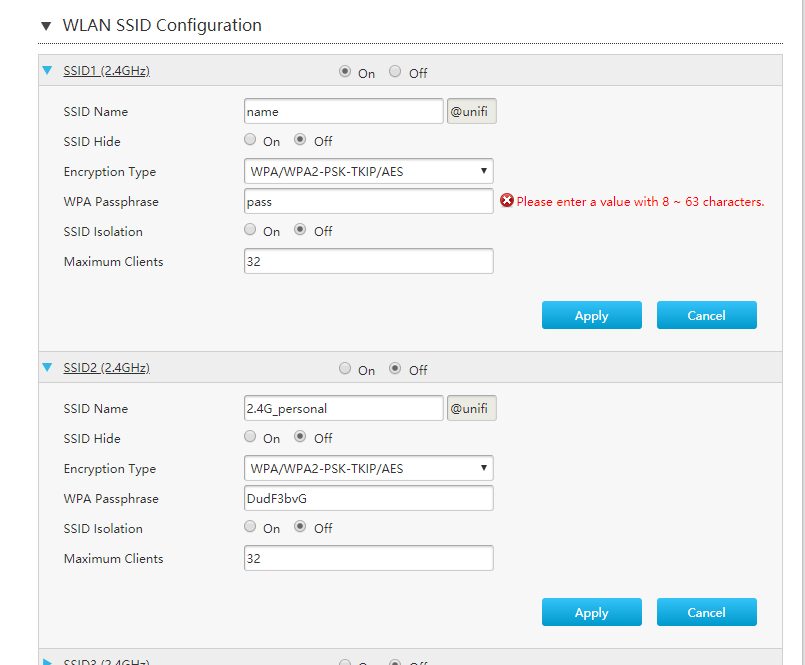 This post has been edited by KKS21199: Jun 29 2018, 10:32 AM This post has been edited by KKS21199: Jun 29 2018, 10:32 AM |
|
|
|
|
|
KKS21199
|
Jun 29 2018, 10:46 PM
|
Getting Started
|
QUOTE(patricktoh @ Jun 29 2018, 01:36 PM) OIC. What's the firmware version? I guess need to hack/intervene the html form code via "F12 Developer Tools" to null the @unifi before hit the "Apply" button. Not difficult if you know how to use the F12 and basic html coding. Want to try? PM me.  If you have Skpye screen sharing then will make the trail session easy.  CODE <input class="w50 PostIgnore" type="text" id="SuffixSSID" name="SuffixSSID" disabled="disabled" readonly="readonly" value="@unifi"> Thats the code for the @unifi box. Changing the value doesn't update on screen. And changing the code to this and editing the value manually within the page doesn't seem to do anything either. I can save it, but once I reload it goes back to @unifi CODE <input class="w50" type="text" id="SuffixSSID" name="SuffixSSID" value=""> 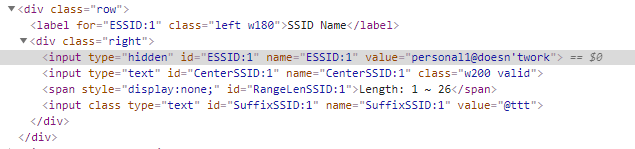 Seems like there is a JS updating it. Not sure how to modify the firmware itself as modifying the js after the page loads doesnt help   |
|
|
|
|
|
KKS21199
|
Jul 2 2018, 09:13 PM
|
Getting Started
|
QUOTE(#Victor @ Jul 2 2018, 12:05 PM) This version do not have @unifi suffix when configuring SSID. Maybe downgrade to this version if not major improvement on ur version?  I am not sure where to find older versions. your boot version is lower than mine and it seems like mine is a minor upgrade only. So shouldn't be a problem to downgrade. QUOTE(soonwai @ Jul 2 2018, 12:09 PM) Firmware 1.0 MYT3 doesn't have the hardcoded suffix.  But no idea where to get older firmwares. The form is processed by LUA script "/common_page/Localnet_WlanBasicAd_WLANSSIDConf_lua.lua" Maybe you can SSH in and see if that can be modified. Failing that, check the form post data, modify it and replay back to the router. I will just try to edit the post data first. Might just start using my Asus router instead of going through this much trouble. |
|
|
|
|
|
KKS21199
|
Jul 3 2018, 09:31 PM
|
Getting Started
|
QUOTE(ander7724 @ Jul 3 2018, 08:44 PM) May i ask how do i change the dns on the ZTE H267 router? Thanks!  Under Local Network -> Lan -> IPv4 -> DHCP Server |
|
|
|
|
|
KKS21199
|
Jul 5 2018, 03:22 PM
|
Getting Started
|
QUOTE(soonwai @ Jul 2 2018, 12:09 PM) Firmware 1.0 MYT3 doesn't have the hardcoded suffix. But no idea where to get older firmwares. The form is processed by LUA script "/common_page/Localnet_WlanBasicAd_WLANSSIDConf_lua.lua" Maybe you can SSH in and see if that can be modified. Failing that, check the form post data, modify it and replay back to the router. 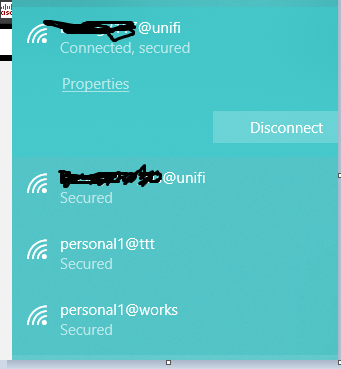 I was able to take out the @unifi part by using postman to intercept the request (as you needed the cookies as well) and for some reason now the @unifi part is not even there on the web UI for my ssid2 (the one that I intercepted. And I can modify it anyway I want without a @ as well.) 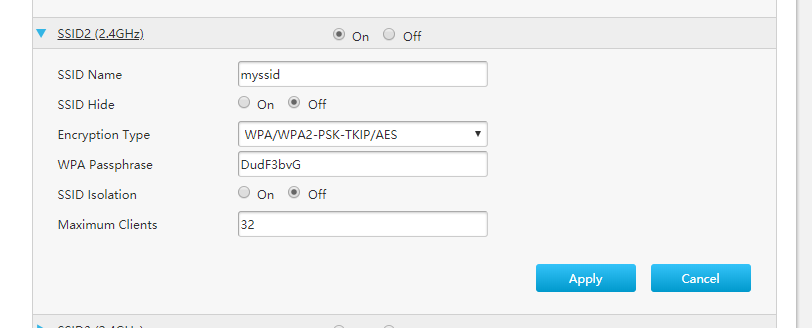 So I guess I only need to intercept the request once to remove the @unifi for each ssid. This post has been edited by KKS21199: Jul 5 2018, 03:23 PM |
|
|
|
|
|
KKS21199
|
Jul 11 2018, 09:36 PM
|
Getting Started
|
QUOTE(Max @ Jul 9 2018, 06:48 PM) hi bro.. how do u remove the @unifi suffix? any guide to follow.  hey, You have to get Postman app for chrome (with interceptor) or the standalone app for windows and modify the POST request that the page makes and replay it again to the router. 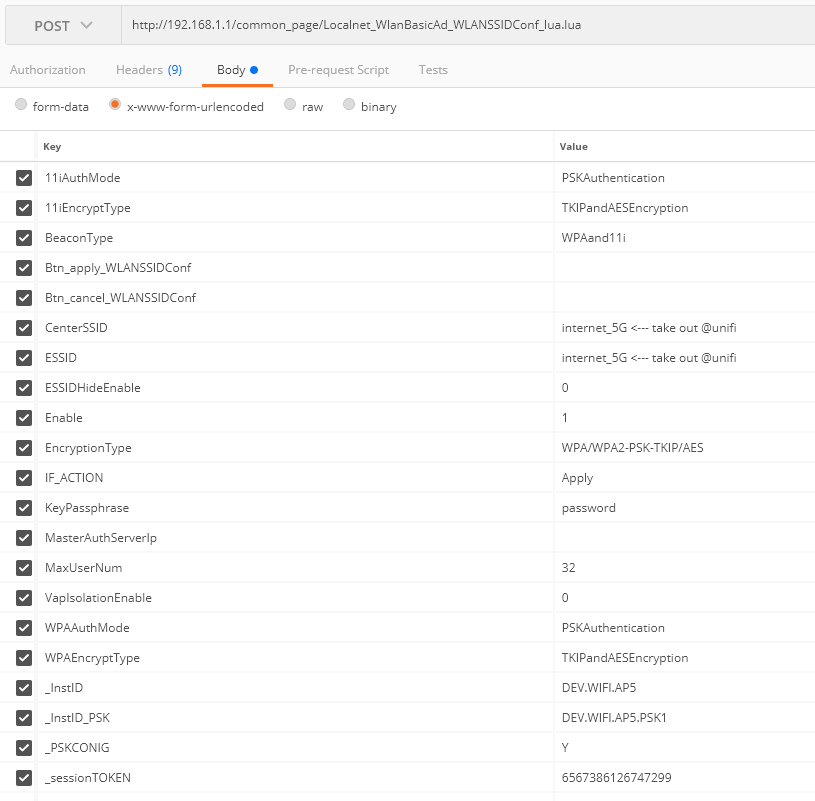 Once you have it installed, just login to the router like you normally would. Go to the WAN page and open the SSID you want to edit and click on Apply (make sure your interceptor is own on both the app and chrome if you are using the chrome extension). Postman will catch the POST request and display it on the History list (left side). Click on it and you will see something similar to the picture above. Just modify the CenterSSID and ESSID and click Send. Before sending make sure you are connected back to the same WiFi that you were when you clicked Apply in the WAN Page (For certain SSID updates, the router disconnects and reconnects back within a few seconds.) https://chrome.google.com/webstore/detail/p...ncdddomop?hl=enhttps://chrome.google.com/webstore/detail/p...fpcfhicfo?hl=enMake sure the Interceptor is enabled in the Postman header toolbar. (for postman chrome extension)  |
|
|
|
|
|
KKS21199
|
Jul 12 2018, 11:00 PM
|
Getting Started
|
QUOTE(Max @ Jul 11 2018, 11:25 PM) Thanx bro for the guide.. i will try tomorrow.. doesn't have chance today to do.. Btw, another thing about DNS. I changed in the LAN and under the DNS page/tab.. but it doesn't work.. cant access block site.. I had the same problem, but I just added IPv6 DNS to my computer and laptop under my network properties. CODE The Google Public DNS IPv6 addresses are as follows:
2001:4860:4860::8888
2001:4860:4860::8844 I also added it here but I am really not sure if it does anything  |
|
|
|
|



 Quote
Quote

 0.0218sec
 0.75
0.75
 7 queries
 GZIP Disabled