Welcome Guest ( Log In | Register )

Outline · [ Standard ] · Linear+

Review Xiaomi Wireless Router Pro, Budget yet with great performance

views
     
TSJayceOoi
post Apr 11 2017, 10:13 AM, updated 8y ago

Pro Blogger
*******
Senior Member
2,741 posts

Joined: Jan 2007
Author's Note: The original review can be found at my blog - Xiaomi Wireless Router Pro Review @ JayceOoi.com.

user posted image

Introduction
Yeah... I have a wireless router that support MU-MIMO (Multi-User - multiple-input and multiple-output) at last. Support simultaneous dual band 2.4GHz and 5.0GHz 802.11ac wave2 networks up to 2533Mbps. And loaded with 3 Gigabit Ethernet ports. Yup, Xiaomi Wireless Router Pro is the one that I am talking about now. As usual, it can be managed with Mi Wi-Fi App easily. How does it perform? Let’s find out...

Special Thanks
This review is possible thanks to below companies. Be sure to check them out...user posted image

Package Content & Design
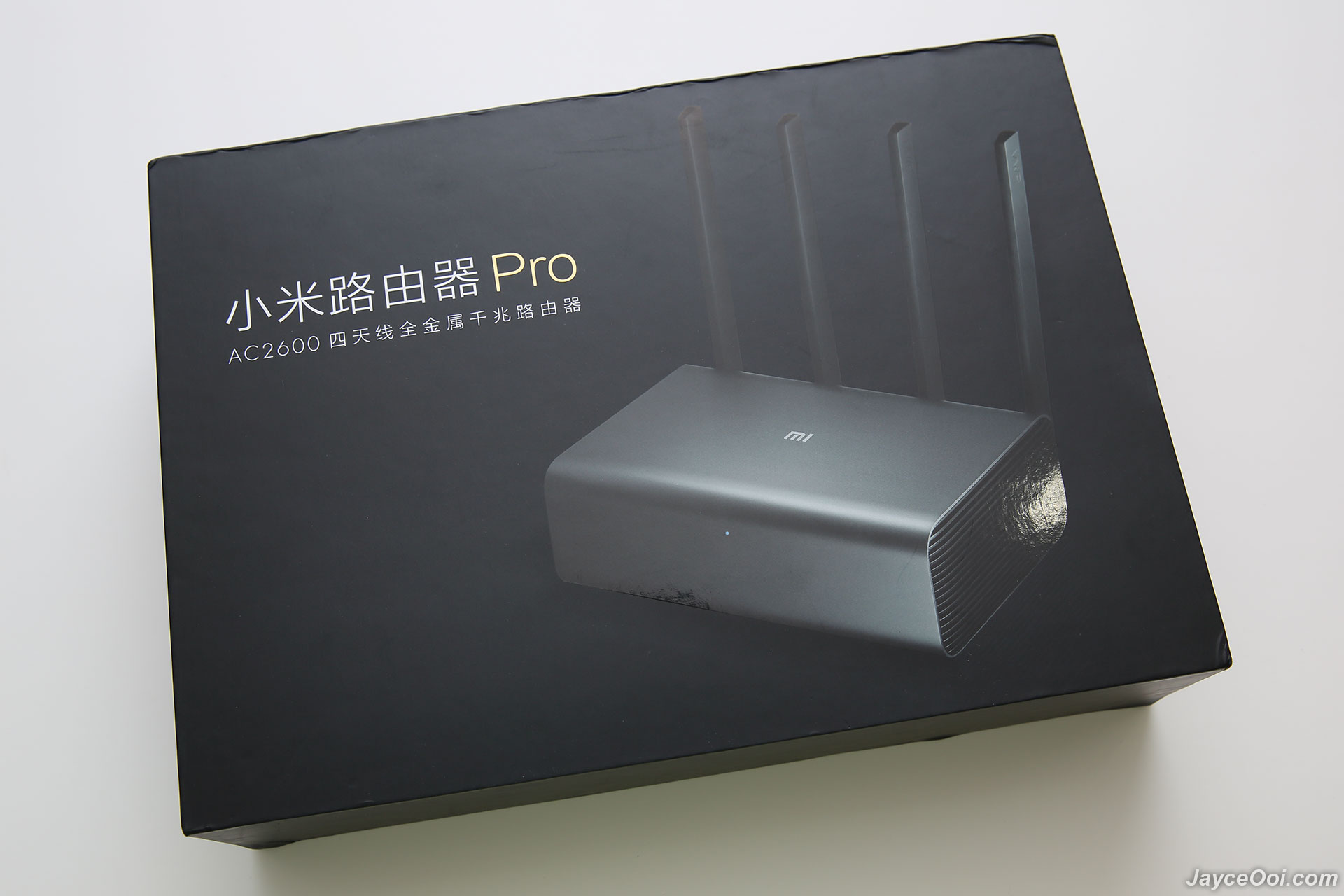
Xiaomi R3P Wireless Router Pro comes in a very nice and premium packaging. And well protected as you can see the router is covered with plastic. After take out Mi Wireless Router Pro, you can find US plug power adaptor and user manual in Chinese. Hmm... Will there be any issue with Chinese version? Let's find out later...
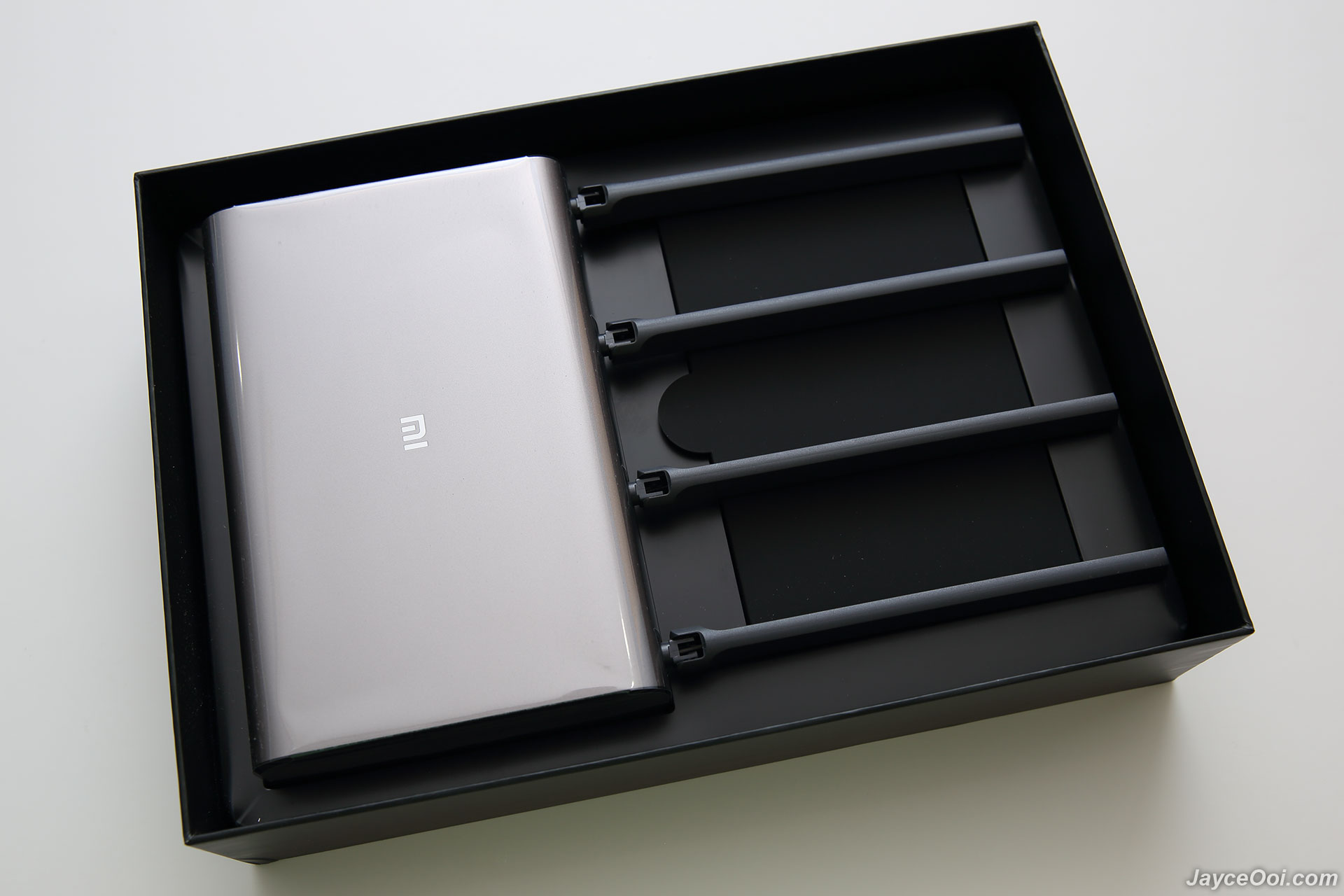
user posted image

user posted image

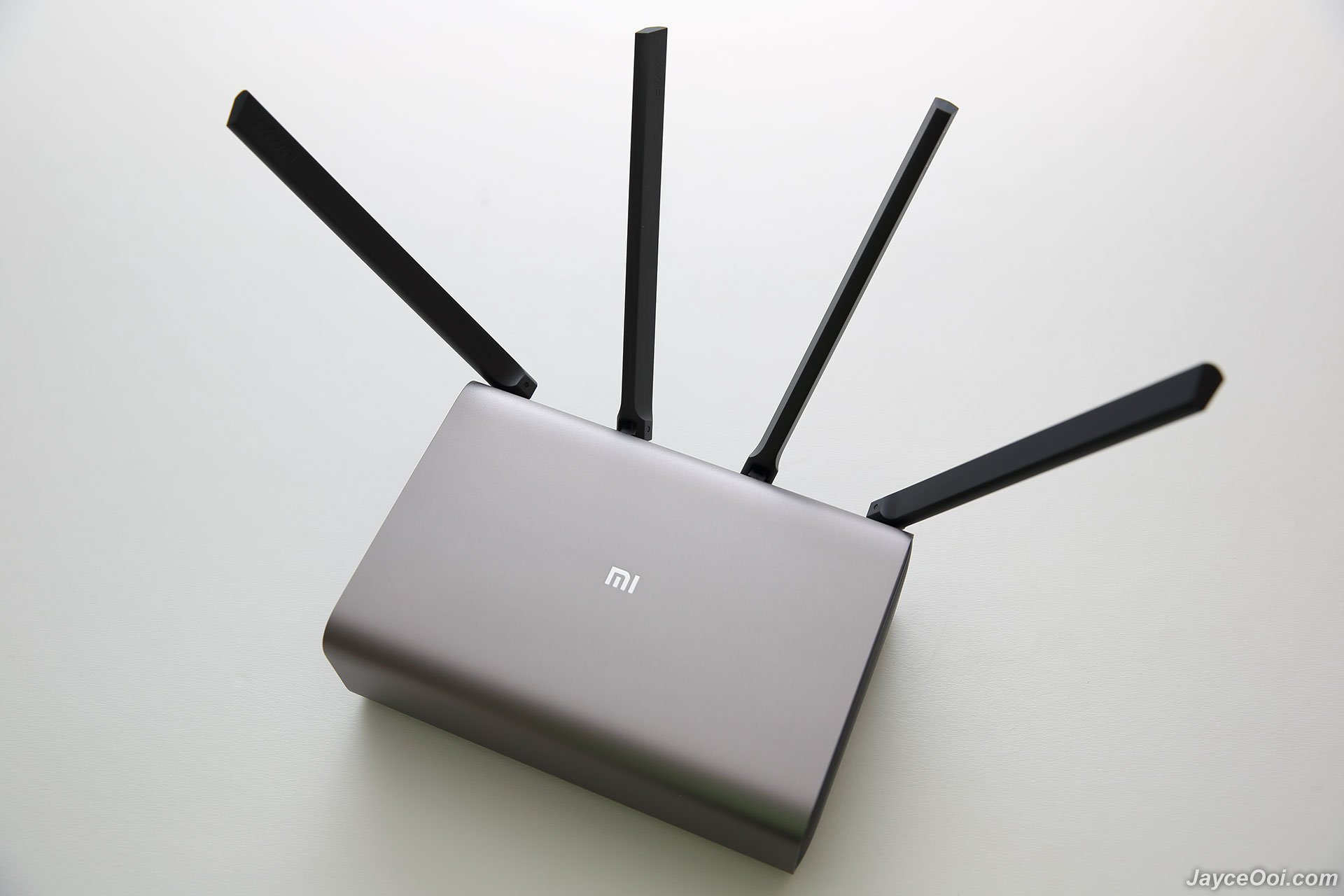
Excellent build quality is what you can get from Xiaomi Wireless Router Pro. All thanks to metal frame body and solid plastic antenna (side and back body are plastic too). And 932.2g in weight. By the way, Pro version has the same design like Xiaomi Wireless Router HD (R3D) with internal hard drive. However, Pro does not have the ability to install HDD / SSD manually as the slot is replaced with large heatsink.

user posted image

4 long antennas, 3 Gigabit Ethernet LAN ports, Ethernet WAN port, USB 3.0 port, power port and reset button are located at back.
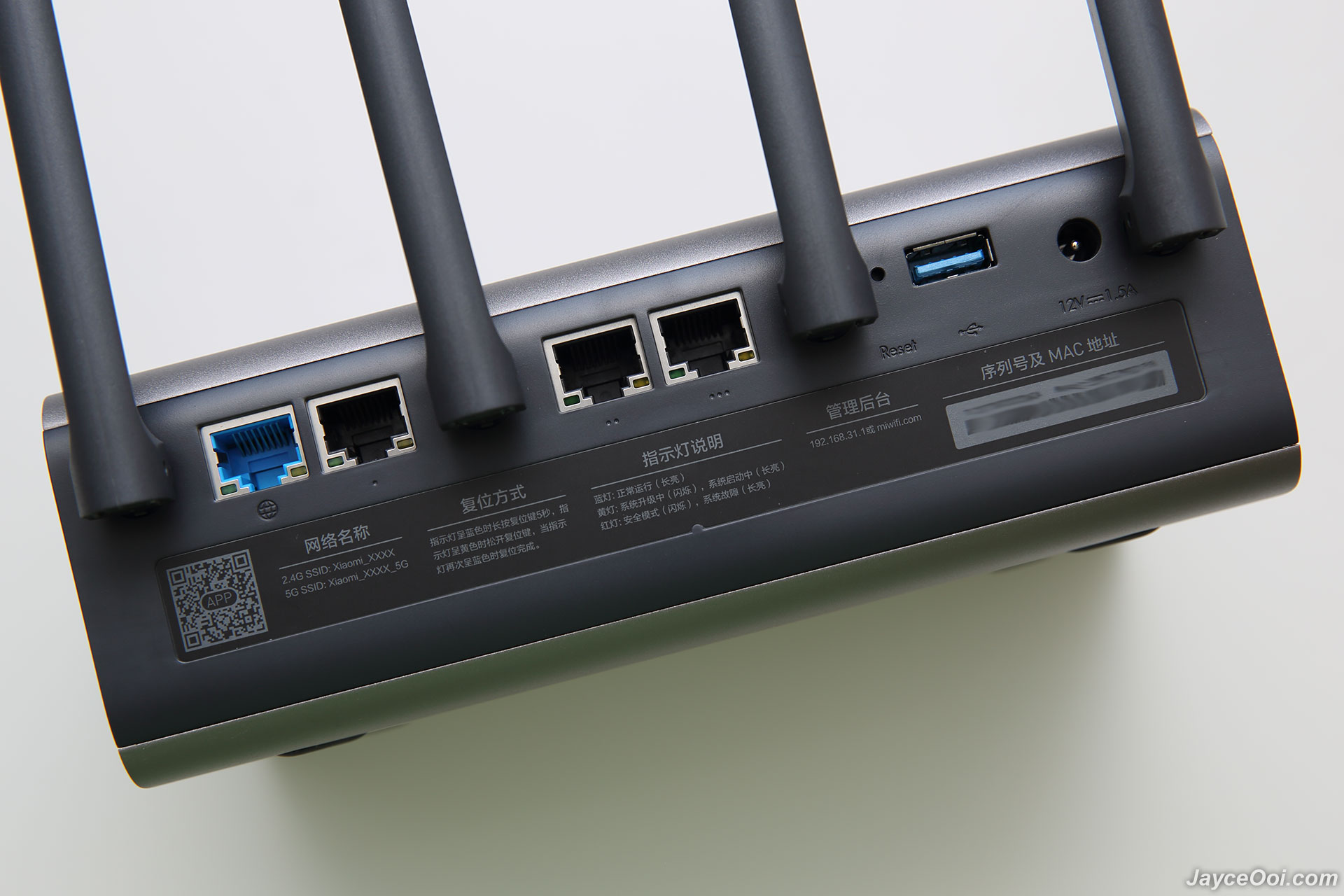
user posted image

4 anti-skid pads are located at the bottom. Don’t be fooled by their tiny sizes. They do provide strong grip and stability here. You need to apply quite some force in order to move the router.

user posted image

Installation
Hurrah!!! You can install Xiaomi Wireless Router Pro in English with Mi Wi-Fi app (can be found at Play Store and App Store for both Android and iOS devices). Just like Xiaomi WiFi Router 3 that I have. Installation is the same - simple and fast. Basically, you need to power on Xiaomi Wireless Router Pro. Then connect your cable/DSL modem Internet cable to WAN port. Use mobile phone to connect to Xiaomi Wireless Router Pro Wi-Fi. Then use MiWiFi App to setup Wi-Fi network name & password (you can set different admin password too). That’s all. You can start to use Xiaomi Wireless Router Pro now and access to Internet.

user posted image

FYI. If you don't have MiWiFi App, you are stuck with web interface in Chinese then. But no worry, Google Chrome translator can help...
TSJayceOoi
post Apr 11 2017, 10:13 AM

Pro Blogger
*******
Senior Member
2,741 posts

Joined: Jan 2007
Software
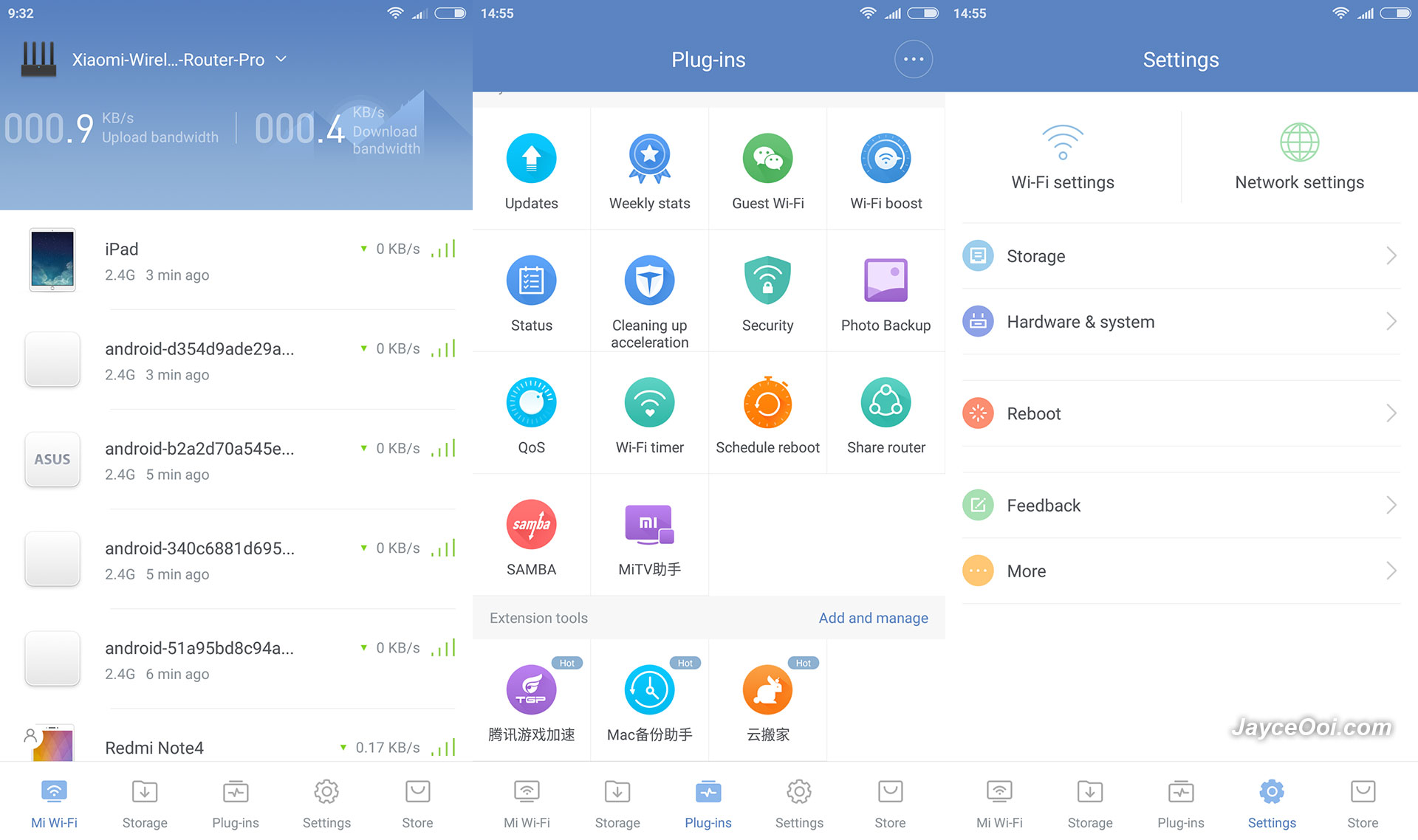
Mi Wi-Fi English application can be used on Xiaomi Wireless Router Pro Chinese edition. Everything is working fine as it should and in English. However, there certain wordings are still in Chinese. No worry, that's around 5 percent among all as you can see on below screenshots.

user posted image

Xiaomi Wireless Router Pro has lot of useful features like guest network, security (firewall), Wi-Fi boost, photo backup, QoS, Wi-Fi timer, SAMBA, schedule reboot and lot more. Every settings can be set from the app too. You can set it as repeater and access point modes on top of normal router mode too.

user posted image

Just like other Xiaomi router, built-in download manager (Xunlei) is there for you. With external USB hard drive, you can use Xiaomi Wireless Router Pro to download normal http, ftp and even BT torrent files. Yes, it can act as local NAS where all your movie, photo and music are stored there. With MU-MIMO, multiple devices can access it with ease and fast. Don't forget fast USB 3.0 port too.

Performance Result
Outstanding!!! I am not expecting that Xiaomi Wireless Router Pro to beat my US$200 Asus RT-AC68U router. Seriously, it win in 2.4GHz range battle where Asus is very good in that. As usual, both of them are placed at the same spot on 1st floor. And screenshots below were taken while I was on ground floor. FYI, Xiaomi Wireless Router Pro only cost half of Asus RT-AC68U.

user posted image

5GHz performance is almost on par. Yes, not far behind as you can see in WiFi Analyzer app. And in actual usage, I did not find any different at all between these two.

user posted image

Here is the WiFi Analyzer time graph for your reference. As you can see, Xiaomi Wireless Router Pro 2.4GHz performance is always on top. And win by 10 dBm.

user posted image

Yeah... I am getting network-attached storage (NAS) alike performance with USB hard drive on Xiaomi Wireless Router Pro through USB 3.0. That's for reading from USB SSD through Gigabit Ethernet. Writing is limited at 22MB/s on Ethernet. Don't know why as I can achieve higher writing speed through wireless.

user posted image

Xiaomi Wireless Router Pro is powered by MT7621A MIPS dual core @ 880MHz. Loaded with 256MB SLC nand flash and 512MB DDR3 RAM. OS based on OpenWRT. As usual, I put it to test as Asus RT-AC68U replacement. Guess what? I am getting the same maximum file transfer rate performance with wireless and much better on Ethernet. Same apply to latency as real-time online games like Clash Royale is smooth as usual. iPerf3 results show the same best rate too. And does not slow down at all when someone is transferring file to/fro USB hard drive. All my 10+ devices are happy with it. Overall, Xiaomi Wireless Router Pro is a better wireless router at lower price.

Advantages
  • 4x4 MU-MIMO 802.11ac
  • Support up to 2533Mbps & Gigabit Ethernet
  • 100MB/s USB 3.0 HDD reading speed
  • Packed with lot features
  • Built-in download manager
  • Top-notch build quality
Limitations
  • Web interface in Chinese
user posted image

Conclusion
Look no further, Xiaomi Wireless Router Pro is the one that suit both your need and budget. Perfect for home and small office use. Enjoy great wireless range and fast transfer rate. Don't forget that it is loaded with lot of useful features too. Interested?
coo|dude
post Apr 16 2017, 12:14 AM

Cool By The Pool!
******
Senior Member
1,064 posts

Joined: Oct 2008


Can this be set up as a WiFi extender? If so, how to set that up?
maxcheam
post Apr 16 2017, 10:47 AM

Casual
***
Junior Member
384 posts

Joined: Jan 2006
From: Penang


nice review! I'm getting one to replace my current Mi Router Mini. Have you got a chance to stress test with multiple devices? Would like to know how MU-MIMO fair because I have a lot of China branded smart gadgets like smart plugs, IP cameras and so on.. notworthy.gif
TSJayceOoi
post Apr 16 2017, 11:39 AM

Pro Blogger
*******
Senior Member
2,741 posts

Joined: Jan 2007
QUOTE(coo|dude @ Apr 16 2017, 12:14 AM)
Can this be set up as a WiFi extender? If so, how to set that up?
*
Yes, just follow the simple instruction will do. No worry...

QUOTE(maxcheam @ Apr 16 2017, 10:47 AM)
nice review! I'm getting one to replace my current Mi Router Mini. Have you got a chance to stress test with multiple devices? Would like to know how MU-MIMO fair because I have a lot of China branded smart gadgets like smart plugs, IP cameras and so on.. notworthy.gif
*
Thanks. What kind of stress test?
maxcheam
post Apr 16 2017, 12:52 PM

Casual
***
Junior Member
384 posts

Joined: Jan 2006
From: Penang


QUOTE(JayceOoi @ Apr 16 2017, 11:39 AM)
Thanks. What kind of stress test?
*
multiple active connections (at least 4).. This router supports 802.11ac wave2 (or more specifically MU-MIMO) which can handle multiple active connections without compromising the speed and performance. wave 1 routers will need the share the available shared wifi space and thus performance are impacted when more devices are connected, the wave 1 routers usually serve connected devices by serving them in a queue basis. Wave 2 routers on the other hand can handle it simultaneously.

This post has been edited by maxcheam: Apr 16 2017, 12:54 PM
TSJayceOoi
post Apr 17 2017, 10:14 AM

Pro Blogger
*******
Senior Member
2,741 posts

Joined: Jan 2007
QUOTE(maxcheam @ Apr 16 2017, 12:52 PM)
multiple active connections (at least 4).. This router supports 802.11ac wave2 (or more specifically MU-MIMO) which can handle multiple active connections without compromising the speed and performance. wave 1 routers will need the share the available shared wifi space and thus performance are impacted when more devices are connected, the wave 1 routers usually serve connected devices by serving them in a queue basis. Wave 2 routers on the other hand can handle it simultaneously.
*
Up to 10 active connections also no problem.
snakesolidus
post Apr 17 2017, 12:04 PM

Casual
***
Junior Member
385 posts

Joined: Feb 2008
Can this be used as an Access Point?

My house is a 3-storey house
1)Modem Router is located at groudfloor, and there is a wall-LAN Port that connects to the first floor
2)First floor has the main living room, has a wall-LAN port connected from ground floor. I plan to put a powerful router/acces point here
3)Second floor, will most likely get the wifi signal from First floor

Need your advice. Thanks:)
TSJayceOoi
post Apr 17 2017, 12:37 PM

Pro Blogger
*******
Senior Member
2,741 posts

Joined: Jan 2007
QUOTE(snakesolidus @ Apr 17 2017, 12:04 PM)
Can this be used as an Access Point?

My house is a 3-storey house
1)Modem Router is located at groudfloor, and there is a wall-LAN Port that connects to the first floor
2)First floor has the main living room, has a wall-LAN port connected from ground floor.  I plan to put a powerful router/acces point here
3)Second floor, will most likely get the wifi signal from First floor

Need your advice. Thanks:)
*
Yes. Just plug the LAN cable into WAN port will do.
andrekua2
post Apr 17 2017, 01:34 PM

10k Club
********
All Stars
13,475 posts

Joined: Jan 2012


100MB/s on wireless? Why do I feel like so fake? Did you reach them on 2.4GHz or 5GHz? Which wifi adapter are you using?
snakesolidus
post Apr 17 2017, 02:21 PM

Casual
***
Junior Member
385 posts

Joined: Feb 2008
QUOTE(JayceOoi @ Apr 17 2017, 12:37 PM)
Yes. Just plug the LAN cable into WAN port will do.
*
I'm currently using Sunway Digital Wave as my ISP, they are on TIME backbone.

Does this router or other Xiaomi routers works with TIME?

Thanks for your prompt feedback smile.gif
TSJayceOoi
post Apr 17 2017, 03:50 PM

Pro Blogger
*******
Senior Member
2,741 posts

Joined: Jan 2007
QUOTE(andrekua2 @ Apr 17 2017, 01:34 PM)
100MB/s on wireless? Why do I feel like so fake? Did you reach them on 2.4GHz or 5GHz? Which wifi adapter are you using?
*
I must improve my writing skill. That's on Ethernet. smile.gif

QUOTE(snakesolidus @ Apr 17 2017, 02:21 PM)
I'm currently using Sunway Digital Wave as my ISP, they are on TIME backbone.

Does this router or other Xiaomi routers works with TIME?

Thanks for your prompt feedback smile.gif
*
No idea on Sunway Digital Wave and TIME. If they can work on normal wireless router, it should work on Xiaomi routers. No VLAN requirement like HyppTV, right? That for surely Xiaomi routers can't support.
sHawTY
post Apr 17 2017, 04:04 PM

Frequent Reporter
********
All Stars
14,909 posts

Joined: Jul 2005

Too bad this router is not using Broadcom CPUs
Else we could install Tomato firmware on it

I hate OpenWRT - No offense to others who are using it

JayceOoi you didn't show us how you install the SSD inside that router
Some images or video or even a GIF file would be useful thumbsup.gif

This post has been edited by sHawTY: Apr 17 2017, 04:07 PM
TSJayceOoi
post Apr 17 2017, 04:10 PM

Pro Blogger
*******
Senior Member
2,741 posts

Joined: Jan 2007
QUOTE(sHawTY @ Apr 17 2017, 04:04 PM)
Too bad this router is not using Broadcom CPUs
Else we could install Tomato firmware on it

I hate OpenWRT - No offense to others who are using it

JayceOoi you didn't show us how you install the SSD inside that router
Some images or video or even a GIF file would be useful thumbsup.gif
*
It is connected through USB. blush.gif
snakesolidus
post Apr 17 2017, 04:31 PM

Casual
***
Junior Member
385 posts

Joined: Feb 2008
QUOTE(JayceOoi @ Apr 17 2017, 03:50 PM)
I must improve my writing skill. That's on Ethernet. smile.gif
No idea on Sunway Digital Wave and TIME. If they can work on normal wireless router, it should work on Xiaomi routers. No VLAN requirement like HyppTV, right? That for surely Xiaomi routers can't support.
*
Noted with thanks.
sHawTY
post Apr 17 2017, 04:37 PM

Frequent Reporter
********
All Stars
14,909 posts

Joined: Jul 2005

QUOTE(JayceOoi @ Apr 17 2017, 04:10 PM)
It is connected through USB.  blush.gif
Ouch, sorry
I thought this is the HD version laugh.gif
maxcheam
post Apr 17 2017, 07:54 PM

Casual
***
Junior Member
384 posts

Joined: Jan 2006
From: Penang


QUOTE(JayceOoi @ Apr 17 2017, 10:14 AM)
Up to 10 active connections also no problem.
*
thumbsup.gif
kkm
post Apr 18 2017, 08:38 AM

Regular
******
Senior Member
1,258 posts

Joined: Jan 2003
Any presets for Unifi, or can do VLAN settings for Hypptv?
Mali
post Apr 18 2017, 10:30 AM

Getting Started
**
Junior Member
145 posts

Joined: Feb 2007
QUOTE(sHawTY @ Apr 17 2017, 04:04 PM)
Too bad this router is not using Broadcom CPUs
Else we could install Tomato firmware on it

I hate OpenWRT - No offense to others who are using it

JayceOoi you didn't show us how you install the SSD inside that router
Some images or video or even a GIF file would be useful thumbsup.gif
*
why you hate openwrt/lede? hmm.gif
TSJayceOoi
post Apr 18 2017, 11:20 AM

Pro Blogger
*******
Senior Member
2,741 posts

Joined: Jan 2007
QUOTE(kkm @ Apr 18 2017, 08:38 AM)
Any presets for Unifi, or can do VLAN settings for Hypptv?
*
Nope, official firmware does not support VLAN.
kkm
post Apr 18 2017, 11:28 AM

Regular
******
Senior Member
1,258 posts

Joined: Jan 2003
QUOTE(JayceOoi @ Apr 18 2017, 11:20 AM)
Nope, official firmware does not support VLAN.
*
Bummer!
Mali
post Apr 18 2017, 12:24 PM

Getting Started
**
Junior Member
145 posts

Joined: Feb 2007
QUOTE(kkm @ Apr 18 2017, 11:28 AM)
Bummer!
*
wait for openwrt/lede support smile.gif
bytes00
post Apr 20 2017, 02:10 PM

Getting Started
**
Junior Member
83 posts

Joined: Oct 2010
price ?
barry
post May 14 2017, 12:45 PM

Getting Started
**
Junior Member
214 posts

Joined: Jan 2003
Good job with the review, YayceOoi. I am looking for a suitable upgrade for my time 100mbps service, and i think this may be it. Where can i get it at the cheapest price?
TSJayceOoi
post May 15 2017, 09:40 AM

Pro Blogger
*******
Senior Member
2,741 posts

Joined: Jan 2007
QUOTE(bytes00 @ Apr 20 2017, 02:10 PM)
price ?
*
QUOTE(barry @ May 14 2017, 12:45 PM)
Good job with the review, YayceOoi. I am looking for a suitable upgrade for my time 100mbps service, and i think this may be it. Where can i get it at the cheapest price?
*
All replied... smile.gif
goandloveyourself
post May 30 2017, 11:21 PM

Getting Started
**
Junior Member
53 posts

Joined: Mar 2016

I just bought and started using this mi router pro.
But I'm lost with the QoS plugin configuration.
Like, how does it work? If I activated QoS on all the connected devices, and then set them all to MAX, does the QoS do anything then?
WHat if I set the QoS for a device to only 90% of my bandwidth, but then only 1 device is using the bandwidth, would the mi router be smart enough to consume all 100% of available bandwidth? Thanks

2. can this router be used standalone modem, directly with telephone lines (ADSL2) instead of ethernet?

This post has been edited by goandloveyourself: May 31 2017, 08:39 AM
sygoh3
post Jun 7 2017, 01:20 PM

Getting Started
**
Junior Member
98 posts

Joined: May 2011
just wonder if you install Mi wifi repeater, if you connected to the mi wifi repeater, are you able to access the hardisk storage that connected to the mi router pro?
muncheno
post Jun 8 2017, 04:54 PM

Enthusiast
*****
Senior Member
736 posts

Joined: Jun 2006
From: Ipoh
QUOTE(sygoh3 @ Jun 7 2017, 01:20 PM)
just wonder if you install Mi wifi repeater, if you connected to the mi wifi repeater, are you able to access the hardisk storage that connected to the mi router pro?
*
Why not?
Any router with USB port or NAS should allow you to do so.
sygoh3
post Jun 9 2017, 08:03 AM

Getting Started
**
Junior Member
98 posts

Joined: May 2011
QUOTE(muncheno @ Jun 8 2017, 04:54 PM)
Why not?
Any router with USB port or NAS should allow you to do so.
*

As per my understanding the WIFI repeater is another connection than the original router( i mean when you scan WIFI through phone you will see the original router and the repeater line which are 2 separate connections), so when connect to the repeater is still able to access the original router hardisk file?
muncheno
post Jun 9 2017, 08:15 AM

Enthusiast
*****
Senior Member
736 posts

Joined: Jun 2006
From: Ipoh
QUOTE(sygoh3 @ Jun 9 2017, 08:03 AM)
As per my understanding the WIFI repeater is another connection than the original router( i mean when you scan WIFI through phone you will see the original router and the repeater line which are 2 separate connections), so when connect to the repeater is still able to access the original router hardisk file?
*
It is same gateway and dhcp from main router.
So yes.
sygoh3
post Jun 9 2017, 08:25 AM

Getting Started
**
Junior Member
98 posts

Joined: May 2011
QUOTE(muncheno @ Jun 9 2017, 08:15 AM)
It is same gateway and dhcp from main router.
So yes.
*
If yes, this is really great rclxms.gif rclxms.gif i might want buy a repeater to try it out
xerophyll
post Jun 12 2017, 05:10 AM

New Member
*
Junior Member
43 posts

Joined: Aug 2008
From: Malaysia


QUOTE(JayceOoi @ May 15 2017, 09:40 AM)
All replied...  smile.gif
*
hi Jayce, i was wondering is it possible to connect this router with a mifi using the usb port for internet connection? internet -> mifi -> router
TSJayceOoi
post Jun 12 2017, 08:47 PM

Pro Blogger
*******
Senior Member
2,741 posts

Joined: Jan 2007
QUOTE(xerophyll @ Jun 12 2017, 05:10 AM)
hi Jayce, i was wondering is it possible to connect this router with a mifi using the usb port for internet connection? internet -> mifi -> router
*
Didn't try mifi through USB. But Android USB tethering is not working. End up using Android hotspot mode to connect to it (set as repeater).
TSJayceOoi
post Jun 16 2017, 09:50 AM

Pro Blogger
*******
Senior Member
2,741 posts

Joined: Jan 2007
QUOTE(Emilly94 @ Jun 12 2017, 09:09 PM)
Great, it looks great. Can we get it in the US?
*
Yes. PM me for details. smile.gif
mousqy
post Jun 21 2017, 12:52 AM

Enthusiast
*****
Senior Member
758 posts

Joined: Aug 2008


can this be used with maxis home fibre? replace that lousy thomson
TSJayceOoi
post Jun 21 2017, 10:33 AM

Pro Blogger
*******
Senior Member
2,741 posts

Joined: Jan 2007
QUOTE(mousqy @ Jun 21 2017, 12:52 AM)
can this be used with maxis home fibre? replace that lousy thomson
*
Didn't have the chance to try Maxis fibre. Does it have a modem and wireless router? If yes, you can simply replace the router then.
muncheno
post Jun 21 2017, 04:56 PM

Enthusiast
*****
Senior Member
736 posts

Joined: Jun 2006
From: Ipoh
Don't think it will support Maxis as primary router.
On default Xiaomi does not support Vlan tagging right?

If not mistaken Maxis is using Vlan 820 for internet.
Then also another Vlan for IPTV and phone line.
mousqy
post Jun 22 2017, 03:26 AM

Enthusiast
*****
Senior Member
758 posts

Joined: Aug 2008


QUOTE(muncheno @ Jun 21 2017, 04:56 PM)
Don't think it will support Maxis as primary router.
On default Xiaomi does not support Vlan tagging right?

If not mistaken Maxis is using Vlan 820 for internet.
Then also another Vlan for IPTV and phone line.
*
even if i dont want voip and iptv?


fibre optic ---> maxis modem --> mi router wan port (use as ppoe dialer)
muncheno
post Jun 22 2017, 06:21 AM

Enthusiast
*****
Senior Member
736 posts

Joined: Jun 2006
From: Ipoh
QUOTE(mousqy @ Jun 22 2017, 03:26 AM)
even if i dont want voip and iptv?
fibre optic ---> maxis modem --> mi router wan port (use as ppoe dialer)
*
I dont own Xiaomi Router Pro.
While in Xiaomi mini and router 3, the answer is no.
Without customs rom it is not possible.
juscogot
post Jun 22 2017, 08:38 AM

New Member
*
Newbie
1 posts

Joined: May 2017
This one can't support custom firmware so mean can't use LTE modem right?

Being searching online but nothing found.
TSJayceOoi
post Jun 22 2017, 09:38 AM

Pro Blogger
*******
Senior Member
2,741 posts

Joined: Jan 2007
QUOTE(mousqy @ Jun 22 2017, 03:26 AM)
even if i dont want voip and iptv?
fibre optic ---> maxis modem --> mi router wan port (use as ppoe dialer)
*
Can you use Maxis modem to dial directly? I do that on Streamyx modem.
mousqy
post Jun 22 2017, 10:12 AM

Enthusiast
*****
Senior Member
758 posts

Joined: Aug 2008


QUOTE(JayceOoi @ Jun 22 2017, 09:38 AM)
Can you use Maxis modem to dial directly? I do that on Streamyx modem.
*
hrmmm let me look into this

found it https://forum.lowyat.net/topic/2710206

thanks man

This post has been edited by mousqy: Jun 22 2017, 10:21 AM
infrasonic
post Jun 25 2017, 11:44 PM

--
****
Senior Member
648 posts

Joined: Jun 2011


Any custom rom for this yet? Would like to use this on unifi
simonlws
post Jun 26 2017, 11:47 AM

Getting Started
**
Junior Member
163 posts

Joined: Feb 2011


I am on Time.com; is it compatible ?
Thanks. May I know the price too?
TheMrBinary
post Jul 3 2017, 06:56 AM

63 72 69 70 70 6c 69 6e 67 20 64 65 70 72 65 73 73 69 6f 6e
*******
Senior Member
2,449 posts

Joined: Dec 2011
From: 27.132481, 73.086548


unifi can support ah?
nikobellic
post Jul 10 2017, 11:07 AM

Getting Started
**
Junior Member
121 posts

Joined: Apr 2012
Hi Jayce,

My friend bought this Mi Router Pro (without hard disk) and was unable to use it for his Maxis Fibre.
He passed to me to try it out on my Unifi.
I tried set it up using Mi Wifi app on my Samsung phone as well as direct LAN connect to my PC following the steps in the manual and app (i can read Chinese).
Both failed. Got wifi signal but no internet connection. It says has problem with DHCP.
My friend said that is the same issue when he tried to set it up for his Maxis Fibre.
What should i do? I am not tech savvy.
Will appreciate your expert advise. Thanks.

Regards
Nikobellic
nikobellic
post Jul 10 2017, 12:05 PM

Getting Started
**
Junior Member
121 posts

Joined: Apr 2012
Other forums in Lowyat say we need to change the Xiaomi router firmware to Asus Padavan firmware in order to use the Xiaomi Router Pro on Maxis Fibre or Unifi. If not (changing the firmware) the Xiaomi Router Pro can only be used as an wifi extender.
Any expert here can advise?
nmb3rs
post Jul 10 2017, 12:11 PM

Getting Started
**
Junior Member
284 posts

Joined: Jan 2007


just curious, why are both of the 5GHz signal sharing the same channel?

was the xiaomi set turn powered on before/after the Asus set? i'd expect the device that is powered-on later will automatically change to another channel to reduce interference...

This post has been edited by nmb3rs: Jul 10 2017, 12:13 PM
ZZR-Pilot
post Jul 10 2017, 05:20 PM

Regular
******
Senior Member
1,057 posts

Joined: Jul 2005
How hard is it to use this with TM Unifi...?
mousqy
post Jul 20 2017, 11:33 AM

Enthusiast
*****
Senior Member
758 posts

Joined: Aug 2008


QUOTE(nikobellic @ Jul 10 2017, 11:07 AM)
Hi Jayce,

My friend bought this Mi Router Pro (without hard disk) and was unable to use it for his Maxis Fibre.
He passed to me to try it out on my Unifi.
I tried set it up using Mi Wifi app on my Samsung phone as well as direct LAN connect to my PC following the steps in the manual and app (i can read Chinese).
Both failed. Got wifi signal but no internet connection. It says has problem with DHCP.
My friend said that is the same issue when he tried to set it up for his Maxis Fibre.
What should i do? I am not tech savvy.
Will appreciate your expert advise. Thanks.

Regards
Nikobellic
*
thanks for sharing
crimv
post Jul 20 2017, 04:19 PM

Getting Started
**
Junior Member
242 posts

Joined: Jun 2009
QUOTE(nikobellic @ Jul 10 2017, 11:07 AM)
Hi Jayce,

My friend bought this Mi Router Pro (without hard disk) and was unable to use it for his Maxis Fibre.
He passed to me to try it out on my Unifi.
I tried set it up using Mi Wifi app on my Samsung phone as well as direct LAN connect to my PC following the steps in the manual and app (i can read Chinese).
Both failed. Got wifi signal but no internet connection. It says has problem with DHCP.
My friend said that is the same issue when he tried to set it up for his Maxis Fibre.
What should i do? I am not tech savvy.
Will appreciate your expert advise. Thanks.

Regards
Nikobellic
*
Without VLAN tagging support , i believe you cant use for MAXIS or UNIFI ..

Last time im using Maxis fibre and having hard time on my newly bought router Archer C7.

I believe for time fiber user wont face issue as TIME doesnt required vlan tagging.

muncheno
post Jul 22 2017, 12:40 PM

Enthusiast
*****
Senior Member
736 posts

Joined: Jun 2006
From: Ipoh
Just sharing here.

For those who want English firmware, it is available from Taiwan.

Info from 4pda.ru
https://4pda.ru/pages/go/?u=http%3A%2F%2Fbi....bin&e=59614649

Do not the 5ghz channel is locked at specific channel, so do check channel if not detecting.

I have not tested this, as I do not own one.

Just my 2-cents.
zhihao4456
post Aug 5 2017, 03:15 PM

On my way
****
Senior Member
559 posts

Joined: Apr 2008
QUOTE(simonlws @ Jun 26 2017, 11:47 AM)
I am on Time.com; is it compatible ?
Thanks. May I know the price too?
*
u can use it with Time on stock firmware~ no problem
zhihao4456
post Aug 5 2017, 03:16 PM

On my way
****
Senior Member
559 posts

Joined: Apr 2008
QUOTE(nikobellic @ Jul 10 2017, 11:07 AM)
Hi Jayce,

My friend bought this Mi Router Pro (without hard disk) and was unable to use it for his Maxis Fibre.
He passed to me to try it out on my Unifi.
I tried set it up using Mi Wifi app on my Samsung phone as well as direct LAN connect to my PC following the steps in the manual and app (i can read Chinese).
Both failed. Got wifi signal but no internet connection. It says has problem with DHCP.
My friend said that is the same issue when he tried to set it up for his Maxis Fibre.
What should i do? I am not tech savvy.
Will appreciate your expert advise. Thanks.

Regards
Nikobellic
*
u need a network switch to do the Vlan so that Unifi and Maxis users can use this
taperlover
post Aug 18 2017, 05:24 PM

New Member
*
Junior Member
39 posts

Joined: Jan 2012


i wonder when xiaomi gonna release 4G router
qzplx
post Aug 22 2017, 09:15 PM

Getting Started
**
Junior Member
137 posts

Joined: Nov 2006
From: SeriMaya Condo


Hi,

Just wondered, if I bought switch for VLAN Support to configure vlan tagging 500 and 600 for TM Unifi does this will work on this router to PPPoe ?

So the connection would be:

Modem -- SWITCH -- Mi R3P
zhihao4456
post Aug 25 2017, 03:44 PM

On my way
****
Senior Member
559 posts

Joined: Apr 2008
QUOTE(qzplx @ Aug 22 2017, 09:15 PM)
Hi,

Just wondered, if I bought switch for VLAN Support to configure vlan tagging 500 and 600 for TM Unifi does this will work on this router to PPPoe ?

So the connection would be:

Modem -- SWITCH -- Mi R3P
*
yes it will work~ all it need is a smart switch to work with this router~

Modem -- SWITCH -- Mi R3P (this is correct)
qzplx
post Aug 27 2017, 03:12 PM

Getting Started
**
Junior Member
137 posts

Joined: Nov 2006
From: SeriMaya Condo


QUOTE(zhihao4456 @ Aug 25 2017, 04:44 PM)
yes it will work~ all it need is a smart switch to work with this router~

Modem -- SWITCH -- Mi R3P (this is correct)
*
Thanks matey,
Ordered 8port tp-link smart switch

acbc
post Aug 27 2017, 03:18 PM

Look at all my stars!!
*******
Senior Member
9,045 posts

Joined: Jan 2003
Can use with Unifi, Maxis or Ohana with TL-SG108E to handle the VLAN tagging. I'm using this method to use back all my old Streamyx routers.
zhihao4456
post Aug 28 2017, 04:30 PM

On my way
****
Senior Member
559 posts

Joined: Apr 2008
QUOTE(qzplx @ Aug 27 2017, 03:12 PM)
Thanks matey,
Ordered 8port tp-link smart switch
*
no problem~ just set up the switch and you can set the router easily
Doraku
post Aug 29 2017, 03:45 AM

Old threads digger
******
Senior Member
1,155 posts

Joined: Apr 2016


Nice review thumbsup.gif thumbsup.gif , Look like a great router but too bad i using streamyx wacko.gif wacko.gif
TSJayceOoi
post Aug 29 2017, 08:19 AM

Pro Blogger
*******
Senior Member
2,741 posts

Joined: Jan 2007
QUOTE(Doraku @ Aug 29 2017, 03:45 AM)
Nice review thumbsup.gif  thumbsup.gif , Look like a great router but too bad i using streamyx wacko.gif  wacko.gif
*
Thanks. But why too bad? I am using Streamyx here as well. blush.gif
Doraku
post Aug 29 2017, 08:08 PM

Old threads digger
******
Senior Member
1,155 posts

Joined: Apr 2016


QUOTE(JayceOoi @ Aug 29 2017, 08:19 AM)
Thanks. But why too bad? I am using Streamyx here as well.  blush.gif
*
Cheap moderm router is enough for who using steamyx,since download speed and upload speed is super slow cry.gif cry.gif ,been use streamyx for about 11 years,still wating for time fibre at my place 100Mbps at same price as streamyx 4mbps
TSJayceOoi
post Aug 30 2017, 11:47 AM

Pro Blogger
*******
Senior Member
2,741 posts

Joined: Jan 2007
QUOTE(Doraku @ Aug 29 2017, 08:08 PM)
Cheap moderm router is enough for who using steamyx,since download speed and upload speed is super slow cry.gif  cry.gif ,been use streamyx for about 11 years,still wating for time fibre at my place 100Mbps at same price as streamyx 4mbps
*
True for normal surfing. A good wireless router is needed when you have lot of HD videos locally. Or lot of wireless devices connected at the same time. And improve on gaming latency too. smile.gif
sonypshomer
post Sep 1 2017, 01:34 AM

Regular
******
Senior Member
1,594 posts

Joined: Aug 2017
I saw one in 11st with 8TB storage

http://www.11street.my/productdetail/xiaom...-drive-42241397

is that the same?
TSJayceOoi
post Sep 1 2017, 11:49 AM

Pro Blogger
*******
Senior Member
2,741 posts

Joined: Jan 2007
QUOTE(sonypshomer @ Sep 1 2017, 01:34 AM)
I saw one in 11st with 8TB storage

http://www.11street.my/productdetail/xiaom...-drive-42241397

is that the same?
*
That's HD version with better CPU.
sonypshomer
post Sep 1 2017, 03:48 PM

Regular
******
Senior Member
1,594 posts

Joined: Aug 2017
QUOTE(JayceOoi @ Sep 1 2017, 11:49 AM)
That's HD version with better CPU.
*
Is that a better buy?
TSJayceOoi
post Sep 1 2017, 05:26 PM

Pro Blogger
*******
Senior Member
2,741 posts

Joined: Jan 2007
QUOTE(sonypshomer @ Sep 1 2017, 03:48 PM)
Is that a better buy?
*
Depend on your needs. It comes with 1TB 3.5" HDD built-in too.
giov007
post Sep 4 2017, 01:16 AM

New Member
*
Newbie
4 posts

Joined: Sep 2017
QUOTE(zhihao4456 @ Aug 25 2017, 03:44 PM)
yes it will work~ all it need is a smart switch to work with this router~

Modem -- SWITCH -- Mi R3P (this is correct)
*
Do i need any special configuration for the smart switch or it is just plug and play ?? , please i need your assistance , i suck at networking.. confused.gif
zhihao4456
post Sep 4 2017, 01:39 AM

On my way
****
Senior Member
559 posts

Joined: Apr 2008
QUOTE(Doraku @ Aug 29 2017, 08:08 PM)
Cheap moderm router is enough for who using steamyx,since download speed and upload speed is super slow cry.gif  cry.gif ,been use streamyx for about 11 years,still wating for time fibre at my place 100Mbps at same price as streamyx 4mbps
*
u can use it with streamyx right now which i think it will be great in handling multiple devices connection with consistent high speed~ Improve your wifi coverage significantly as well, so i think that even u r on streamyx right now, it is good for you to get it~ maybe in future u have TIME already then u still can use back this router


QUOTE(giov007 @ Sep 4 2017, 01:16 AM)
Do i need any special configuration for the smart switch or it is just plug and play ?? , please i need your assistance , i suck at networking..  :confused:
*
yes, u need to do some configuration on the smart switch for Vlan tagging
qzplx
post Sep 4 2017, 07:23 AM

Getting Started
**
Junior Member
137 posts

Joined: Nov 2006
From: SeriMaya Condo


QUOTE(giov007 @ Sep 4 2017, 02:16 AM)
Do i need any special configuration for the smart switch or it is just plug and play ?? , please i need your assistance , i suck at networking..  :confused:
*
Im done with the configuration amd yes it works. Im glad to share how to achie this.
But its not perfect yet, The only thing i need to find out is to make the hypptv work.

But i think i should post on other topics, or should i put it here?
giov007
post Sep 4 2017, 10:54 AM

New Member
*
Newbie
4 posts

Joined: Sep 2017
QUOTE(qzplx @ Sep 4 2017, 07:23 AM)
Im done with the configuration amd yes it works. Im glad to share how to achie this.
But its not perfect yet, The only thing i need to find out is to make the hypptv work.

But i think i should post on other topics, or should i put it here?
*
Can you post screen shots of configuration for the smart switch or just a guide ... im a total noob at this.. i wanna order a tp link smart switch now.. thanks allot in advance

This post has been edited by giov007: Sep 4 2017, 10:54 AM
giov007
post Sep 4 2017, 10:57 AM

New Member
*
Newbie
4 posts

Joined: Sep 2017
QUOTE(zhihao4456 @ Sep 4 2017, 01:39 AM)
u can use it with streamyx right now which i think it will be great in handling multiple devices connection with consistent high speed~ Improve your wifi coverage significantly as well, so i think that even u r on streamyx right now, it is good for you to get it~ maybe in future u have TIME already then u still can use back this router
yes, u need to do some configuration on the smart switch for Vlan tagging
*
is it possible to post a short guide for the configuration needed for the smart switch? ... im a total noob at this.. i wanna order a tp link smart switch now.. thanks allot in advance. I have this Mi R3p Pro router for 2 months now and i can't get it to work via pppoe..on my unifi
azrilyp
post Sep 4 2017, 11:04 AM

Enthusiast
*****
Senior Member
763 posts

Joined: Jan 2005


Is the antenna detachable? If yes, can replace it with couple of the 8dbi's
zhihao4456
post Sep 4 2017, 12:10 PM

On my way
****
Senior Member
559 posts

Joined: Apr 2008
QUOTE(giov007 @ Sep 4 2017, 10:57 AM)
is it possible to post a short guide for the configuration needed for the smart switch? ... im  a total noob at this.. i wanna order a tp link smart switch now.. thanks allot in advance.  I have this Mi R3p Pro  router for 2 months now and i can't get it to work via pppoe..on my unifi
*
sorry i no longer have both of the device, im unable to show u the configuration but u can go youtube look for the guide to setup vlan tagging on the smart switch

QUOTE(azrilyp @ Sep 4 2017, 11:04 AM)
Is the antenna detachable? If yes, can replace it with couple of the 8dbi's
*
not detachable
ape
post Sep 4 2017, 08:22 PM

Enthusiast
*****
Senior Member
849 posts

Joined: Apr 2006
Just check if I only use internet and not hypetv, can I just tag vlan500 in port 1 of the smart switch?
qzplx
post Sep 4 2017, 10:28 PM

Getting Started
**
Junior Member
137 posts

Joined: Nov 2006
From: SeriMaya Condo


Hello,

Please find below from what I have done.
The reason I bought 8 port switch is due to I have maximize my 5 port switch, so upgrading to VLAN switch is worthwhile for me as I have Xiaomi R3P.

I bought TP-Link TL-SG108E. others VLAN switch should be the same, except if you use Cisco, the term will be abit differ.

The configuration as follow:
1. Login to web interface of TP-link router on 192.168.0.1, username and password would be admin admin (default) if you havent change it

2. Goto 802.1Q VLAN and set the VLAN settings as follow:
Make VLAN for Unifi
2a. Enable the 802.1Q VLAN click yes then click apply
2b. On VLAN ID type 500 and on the desc type unifi
2c. Then Port 1 set to tagged port 2 - 6 set to untag
2d. click add/modify

Make VLAN for Hypptv (still not working yet)
2e. On VLAN ID type 600 and on the desc type hypptv
2f. Then Port 1 set to tagged port 7 set to untag
2g. click add/modify

Click save config

3. Setting up the Port VLAN ID goto 802.1Q VLAN PVID Setting
PVID for Unifi
3a. On PVID type 500
3b. Tick port 2 - 6
3c. Click apply

PVID for Hypptv
3d. On PVID type 600
3e. Tick port 7
3f. Click apply

Click save config

On your switch
Port 1 connect it to port 1 on Unifi BTU
Port 2 connect to Xiaomi R3P router WAN Port (blue color)
Port 3 connect to Xiaomi R3P router Switch Port (any)
Port 4 Up to you
Port 5 Up to you
Port 6 Up to you
Port 7 connect to hypptv

Now, goto your router
Login to your R3P web interface 192.168.31.1
Goto connection, internet, and choose PPPoe
Type username and password
Choose custom MTU, change it to 1492
Safe

Now this should work.
Please post if you have further question.

In the mean time, I would appreciate if anyone could share to me how the hypptv works ?
The problem now, Hypptv can connect, but all the channel is black and I got sattelite icon.

Seems like it doesnt get any IP / internet for this.
Maybe its due to on BTU it has merging 2 VLAN in 1 port while I separate 2 vlan in 2 different port.
ape
post Sep 5 2017, 03:26 PM

Enthusiast
*****
Senior Member
849 posts

Joined: Apr 2006
QUOTE(qzplx @ Sep 4 2017, 10:28 PM)
Hello,

Please find below from what I have done.
The reason I bought 8 port switch is due to I have maximize my 5 port switch, so upgrading to VLAN switch is worthwhile for me as I have Xiaomi R3P.

I bought TP-Link TL-SG108E. others VLAN switch should be the same, except if you use Cisco, the term will be abit differ.

The configuration as follow:
1. Login to web interface of TP-link router on 192.168.0.1, username and password would be admin admin (default) if you havent change it

2. Goto 802.1Q VLAN and set the VLAN settings as follow:
Make VLAN for Unifi
2a. Enable the 802.1Q VLAN click yes then click apply
2b. On VLAN ID type 500 and on the desc type unifi
2c. Then Port 1 set to tagged port 2 - 6 set to untag
2d. click add/modify

Make VLAN for Hypptv (still not working yet)
2e. On VLAN ID type 600 and on the desc type hypptv
2f. Then Port 1 set to tagged port 7 set to untag
2g. click add/modify

Click save config

3. Setting up the Port VLAN ID goto 802.1Q VLAN PVID Setting
PVID for Unifi
3a. On PVID type 500
3b. Tick port 2 - 6
3c. Click apply

PVID for Hypptv
3d. On PVID type 600
3e. Tick port 7
3f. Click apply

Click save config

On your switch
Port 1 connect it to port 1 on Unifi BTU
Port 2 connect to Xiaomi R3P router WAN Port (blue color)
Port 3 connect to Xiaomi R3P router Switch Port (any)
Port 4 Up to you
Port 5 Up to you
Port 6 Up to you
Port 7 connect to hypptv

Now, goto your router
Login to your R3P web interface 192.168.31.1
Goto connection, internet, and choose PPPoe
Type username and password
Choose custom MTU, change it to 1492
Safe

Now this should work.
Please post if you have further question.

In the mean time, I would appreciate if anyone could share to me how the hypptv works ?
The problem now, Hypptv can connect, but all the channel is black and I got sattelite icon.

Seems like it doesnt get any IP / internet for this.
Maybe its due to on BTU it has merging 2 VLAN in 1 port while I separate 2 vlan in 2 different port.
*
Thanks for your detailed steps!!! Really helpful to the noob as me...

Btw if i no need hypptv, i can just ignore the vlan 600, right?

qzplx
post Sep 5 2017, 04:01 PM

Getting Started
**
Junior Member
137 posts

Joined: Nov 2006
From: SeriMaya Condo


QUOTE(ape @ Sep 5 2017, 04:26 PM)
Thanks for your detailed steps!!! Really helpful to the noob as me...

Btw if i no need hypptv, i can just ignore the vlan 600, right?
*
Yes, if you dont need Hypptv, you can skip the VLAN 600.

Cheers.
giov007
post Sep 5 2017, 05:47 PM

New Member
*
Newbie
4 posts

Joined: Sep 2017
QUOTE(qzplx @ Sep 4 2017, 10:28 PM)
Hello,

Please find below from what I have done.
The reason I bought 8 port switch is due to I have maximize my 5 port switch, so upgrading to VLAN switch is worthwhile for me as I have Xiaomi R3P.

I bought TP-Link TL-SG108E. others VLAN switch should be the same, except if you use Cisco, the term will be abit differ.

The configuration as follow:
1. Login to web interface of TP-link router on 192.168.0.1, username and password would be admin admin (default) if you havent change it

2. Goto 802.1Q VLAN and set the VLAN settings as follow:
Make VLAN for Unifi
2a. Enable the 802.1Q VLAN click yes then click apply
2b. On VLAN ID type 500 and on the desc type unifi
2c. Then Port 1 set to tagged port 2 - 6 set to untag
2d. click add/modify

Make VLAN for Hypptv (still not working yet)
2e. On VLAN ID type 600 and on the desc type hypptv
2f. Then Port 1 set to tagged port 7 set to untag
2g. click add/modify

Click save config

3. Setting up the Port VLAN ID goto 802.1Q VLAN PVID Setting
PVID for Unifi
3a. On PVID type 500
3b. Tick port 2 - 6
3c. Click apply

PVID for Hypptv
3d. On PVID type 600
3e. Tick port 7
3f. Click apply

Click save config

On your switch
Port 1 connect it to port 1 on Unifi BTU
Port 2 connect to Xiaomi R3P router WAN Port (blue color)
Port 3 connect to Xiaomi R3P router Switch Port (any)
Port 4 Up to you
Port 5 Up to you
Port 6 Up to you
Port 7 connect to hypptv

Now, goto your router
Login to your R3P web interface 192.168.31.1
Goto connection, internet, and choose PPPoe
Type username and password
Choose custom MTU, change it to 1492
Safe

Now this should work.
Please post if you have further question.

In the mean time, I would appreciate if anyone could share to me how the hypptv works ?
The problem now, Hypptv can connect, but all the channel is black and I got sattelite icon.

Seems like it doesnt get any IP / internet for this.
Maybe its due to on BTU it has merging 2 VLAN in 1 port while I separate 2 vlan in 2 different port.
*
Thanks so much.. biggrin.gif rclxms.gif you have saved me...
zhihao4456
post Sep 6 2017, 09:24 AM

On my way
****
Senior Member
559 posts

Joined: Apr 2008
QUOTE(qzplx @ Sep 4 2017, 10:28 PM)
Hello,

Please find below from what I have done.
The reason I bought 8 port switch is due to I have maximize my 5 port switch, so upgrading to VLAN switch is worthwhile for me as I have Xiaomi R3P.

I bought TP-Link TL-SG108E. others VLAN switch should be the same, except if you use Cisco, the term will be abit differ.

The configuration as follow:
1. Login to web interface of TP-link router on 192.168.0.1, username and password would be admin admin (default) if you havent change it

2. Goto 802.1Q VLAN and set the VLAN settings as follow:
Make VLAN for Unifi
2a. Enable the 802.1Q VLAN click yes then click apply
2b. On VLAN ID type 500 and on the desc type unifi
2c. Then Port 1 set to tagged port 2 - 6 set to untag
2d. click add/modify

Make VLAN for Hypptv (still not working yet)
2e. On VLAN ID type 600 and on the desc type hypptv
2f. Then Port 1 set to tagged port 7 set to untag
2g. click add/modify

Click save config

3. Setting up the Port VLAN ID goto 802.1Q VLAN PVID Setting
PVID for Unifi
3a. On PVID type 500
3b. Tick port 2 - 6
3c. Click apply

PVID for Hypptv
3d. On PVID type 600
3e. Tick port 7
3f. Click apply

Click save config

On your switch
Port 1 connect it to port 1 on Unifi BTU
Port 2 connect to Xiaomi R3P router WAN Port (blue color)
Port 3 connect to Xiaomi R3P router Switch Port (any)
Port 4 Up to you
Port 5 Up to you
Port 6 Up to you
Port 7 connect to hypptv

Now, goto your router
Login to your R3P web interface 192.168.31.1
Goto connection, internet, and choose PPPoe
Type username and password
Choose custom MTU, change it to 1492
Safe

Now this should work.
Please post if you have further question.

In the mean time, I would appreciate if anyone could share to me how the hypptv works ?
The problem now, Hypptv can connect, but all the channel is black and I got sattelite icon.

Seems like it doesnt get any IP / internet for this.
Maybe its due to on BTU it has merging 2 VLAN in 1 port while I separate 2 vlan in 2 different port.
*
Nice!!! help alot people that wants to use this router
gnush85
post Sep 6 2017, 11:12 AM

Customizy
******
Senior Member
1,012 posts

Joined: Aug 2007
From: Heaven of Hell


QUOTE(qzplx @ Sep 4 2017, 10:28 PM)
Hello,

Please find below from what I have done.
The reason I bought 8 port switch is due to I have maximize my 5 port switch, so upgrading to VLAN switch is worthwhile for me as I have Xiaomi R3P.

I bought TP-Link TL-SG108E. others VLAN switch should be the same, except if you use Cisco, the term will be abit differ.

The configuration as follow:
1. Login to web interface of TP-link router on 192.168.0.1, username and password would be admin admin (default) if you havent change it

2. Goto 802.1Q VLAN and set the VLAN settings as follow:
Make VLAN for Unifi
2a. Enable the 802.1Q VLAN click yes then click apply
2b. On VLAN ID type 500 and on the desc type unifi
2c. Then Port 1 set to tagged port 2 - 6 set to untag
2d. click add/modify

Make VLAN for Hypptv (still not working yet)
2e. On VLAN ID type 600 and on the desc type hypptv
2f. Then Port 1 set to tagged port 7 set to untag
2g. click add/modify

Click save config

3. Setting up the Port VLAN ID goto 802.1Q VLAN PVID Setting
PVID for Unifi
3a. On PVID type 500
3b. Tick port 2 - 6
3c. Click apply

PVID for Hypptv
3d. On PVID type 600
3e. Tick port 7
3f. Click apply

Click save config

On your switch
Port 1 connect it to port 1 on Unifi BTU
Port 2 connect to Xiaomi R3P router WAN Port (blue color)
Port 3 connect to Xiaomi R3P router Switch Port (any)
Port 4 Up to you
Port 5 Up to you
Port 6 Up to you
Port 7 connect to hypptv

Now, goto your router
Login to your R3P web interface 192.168.31.1
Goto connection, internet, and choose PPPoe
Type username and password
Choose custom MTU, change it to 1492
Safe

Now this should work.
Please post if you have further question.

In the mean time, I would appreciate if anyone could share to me how the hypptv works ?
The problem now, Hypptv can connect, but all the channel is black and I got sattelite icon.

Seems like it doesnt get any IP / internet for this.
Maybe its due to on BTU it has merging 2 VLAN in 1 port while I separate 2 vlan in 2 different port.
*
just curious...why you need WAN and 1 LAN port connect to Mi Router?
qzplx
post Sep 6 2017, 01:43 PM

Getting Started
**
Junior Member
137 posts

Joined: Nov 2006
From: SeriMaya Condo


QUOTE(gnush85 @ Sep 6 2017, 12:12 PM)
just curious...why you need WAN and 1 LAN port connect to Mi Router?
*
If you use only 1 WAN port from Xiaomi to VLAN switch, that means:
You cannot use the other port on the VLAN switch to connect internet, why ?
--> Because the WAN port connected through with PPPoe, this mean that port would have your dynamic IP Public assigned not your local LAN ip.
--> This mean if Xiaomi has DHCP, and you plug some of the PC or host to the VLAN Switch it wont recognise and get the DHCP from Xiaomi.


mousqy
post Sep 7 2017, 11:02 PM

Enthusiast
*****
Senior Member
758 posts

Joined: Aug 2008


QUOTE(qzplx @ Sep 6 2017, 01:43 PM)
If you use only 1 WAN port from Xiaomi to VLAN switch, that means:
You cannot use the other port on the VLAN switch to connect internet, why ?
--> Because the WAN port connected through with PPPoe, this mean that port would have your dynamic IP Public assigned not your local LAN ip.
--> This mean if Xiaomi has DHCP, and you plug some of the PC or host to the VLAN Switch it wont recognise and get the DHCP from Xiaomi.
*
good job on finding a work around

thankssss rclxms.gif rclxms.gif rclxms.gif
qzplx
post Sep 7 2017, 11:45 PM

Getting Started
**
Junior Member
137 posts

Joined: Nov 2006
From: SeriMaya Condo


QUOTE(mousqy @ Sep 8 2017, 12:02 AM)
good job on finding a work around

thankssss rclxms.gif  rclxms.gif  rclxms.gif
*
Cheers matey
mousqy
post Sep 8 2017, 12:11 AM

Enthusiast
*****
Senior Member
758 posts

Joined: Aug 2008


QUOTE(qzplx @ Sep 7 2017, 11:45 PM)
Cheers matey
*
that vlan thing was my only obstacle
» Click to show Spoiler - click again to hide... «


This post has been edited by mousqy: Sep 8 2017, 12:12 AM
zhihao4456
post Sep 8 2017, 11:05 AM

On my way
****
Senior Member
559 posts

Joined: Apr 2008
QUOTE(mousqy @ Sep 8 2017, 12:11 AM)
that vlan thing was my only obstacle
» Click to show Spoiler - click again to hide... «

*
how much did you bought it for?
mousqy
post Sep 8 2017, 11:52 AM

Enthusiast
*****
Senior Member
758 posts

Joined: Aug 2008


QUOTE(zhihao4456 @ Sep 8 2017, 11:05 AM)
how much did you bought it for?
*
360 use mdk10a in lazada app ...get 10% discount
6 months local warranty


This post has been edited by mousqy: Sep 8 2017, 11:52 AM
zhihao4456
post Sep 8 2017, 02:34 PM

On my way
****
Senior Member
559 posts

Joined: Apr 2008
QUOTE(mousqy @ Sep 8 2017, 11:52 AM)
360 use mdk10a in lazada app ...get 10% discount
6 months local warranty
*
mind sharing the link for the item?
kaizoku30
post Sep 8 2017, 05:50 PM

Getting Started
**
Junior Member
86 posts

Joined: Jan 2012
xiaomi wan is not gigabit ? hmm.gif
https://imgur.com/a/XBbvx
https://world.tmall.com/item/545858995315.h...919063:33030646

old post from reddit on different xiaomi router
https://www.reddit.com/r/Xiaomi/comments/34...he_mini_router/
zhihao4456
post Sep 9 2017, 12:00 PM

On my way
****
Senior Member
559 posts

Joined: Apr 2008
QUOTE(kaizoku30 @ Sep 8 2017, 05:50 PM)
if you want gigabit you can get Xiaomi Mi Router Pro or Xiaomi Mi Router 3G
mousqy
post Sep 10 2017, 11:04 AM

Enthusiast
*****
Senior Member
758 posts

Joined: Aug 2008


QUOTE(zhihao4456 @ Sep 8 2017, 02:34 PM)
mind sharing the link for the item?
*
lazada link

QUOTE(kaizoku30 @ Sep 8 2017, 05:50 PM)
The larger Xiaomi router that includes the internal hard drive is gigabit, so keep that in mind ----- read it just dont share link

yeah this one no HD but got big ass heatsink

This post has been edited by mousqy: Sep 10 2017, 11:07 AM
zhihao4456
post Sep 10 2017, 11:19 AM

On my way
****
Senior Member
559 posts

Joined: Apr 2008
QUOTE(mousqy @ Sep 10 2017, 11:04 AM)
lazada link
The larger Xiaomi router that includes the internal hard drive is gigabit, so keep that in mind ----- read it just dont share link

yeah this one no HD but got big ass heatsink
*
thank you very much
mousqy
post Sep 10 2017, 12:21 PM

Enthusiast
*****
Senior Member
758 posts

Joined: Aug 2008


QUOTE(zhihao4456 @ Sep 10 2017, 11:19 AM)
thank you very much
*
sharing is caring smile.gif

u gonna use it on unifi/maxis/time?
kaizoku30
post Sep 10 2017, 06:11 PM

Getting Started
**
Junior Member
86 posts

Joined: Jan 2012
haha just bought this xiaomi pro (non HD, i guess is 100mbps port) using 29KAW voucher, rm313 in total. As of now my setup is using netgear R7000 as router switch, xiaomi miwifi mini as secondary router/AP. initially thought want to setup ubiquiti from USG to AP and cloud key, but the cost is abit overwhelming for now.
zhihao4456
post Sep 10 2017, 07:39 PM

On my way
****
Senior Member
559 posts

Joined: Apr 2008
QUOTE(mousqy @ Sep 10 2017, 12:21 PM)
sharing is caring smile.gif

u gonna use it on unifi/maxis/time?
*
i actually use it before with unifi, was just curious where u get that price

QUOTE(kaizoku30 @ Sep 10 2017, 06:11 PM)
haha just bought this xiaomi pro (non HD, i guess is 100mbps port) using 29KAW voucher, rm313 in total. As of now my setup is using netgear R7000 as router switch, xiaomi miwifi mini as secondary router/AP. initially thought want to setup ubiquiti from USG to AP and cloud key, but the cost is abit overwhelming for now.
*
wah such a good deal for you that u paid only for rm313~

This post has been edited by zhihao4456: Sep 10 2017, 07:40 PM
mousqy
post Sep 14 2017, 12:49 AM

Enthusiast
*****
Senior Member
758 posts

Joined: Aug 2008


anyone knows how to assign public ip to lan device ie ps4
qzplx
post Sep 14 2017, 11:02 AM

Getting Started
**
Junior Member
137 posts

Joined: Nov 2006
From: SeriMaya Condo


QUOTE(mousqy @ Sep 14 2017, 01:49 AM)
anyone knows how to assign public ip to lan device ie ps4
*
On Xiaomi router you can create port forwarding.
Name of your port forwarding : PS4
IP address : Your PS4 LAN IP addr
Port : Your PS4 Network port number
Protocol : TCP & UDP

Save and apply

Goto: http://www.yougetsignal.com/tools/open-ports/
Type your port number there, and leave your ip public there.

Make sure the answer is open.
mousqy
post Sep 14 2017, 11:20 AM

Enthusiast
*****
Senior Member
758 posts

Joined: Aug 2008


QUOTE(qzplx @ Sep 14 2017, 11:02 AM)
On Xiaomi router you can create port forwarding.
Name of your port forwarding : PS4
IP address : Your PS4 LAN IP addr
Port : Your PS4 Network port number
Protocol : TCP & UDP

Save and apply

Goto: http://www.yougetsignal.com/tools/open-ports/
Type your port number there, and leave your ip public there.

Make sure the answer is open.
*
is range a valid input?

TCP: 80, 443, 1935, 3478-3480.
UDP: 3478-3479.

but this will only put me on NAT type 2

like thomson router it gave me an option of specifying certain mac to the public ip -- NAT 1 connection

i did turn on DMZ for PS4 static (dhcp bind) ip

and and how do i use Xunlei its like a very new thing for me ...but mandarin speaking people seems to have been using it for ages

thanks btw
_____________________________________

MAXIS FIBRE USERS ATTENTION

vlan ID to 621
MTU 1480 or 1492

This post has been edited by mousqy: Sep 14 2017, 11:21 AM
qzplx
post Sep 14 2017, 11:40 AM

Getting Started
**
Junior Member
137 posts

Joined: Nov 2006
From: SeriMaya Condo


QUOTE(mousqy @ Sep 14 2017, 12:20 PM)
is range a valid input?

TCP: 80, 443, 1935, 3478-3480.
UDP: 3478-3479.

but this will only put me on NAT type 2

like thomson router it gave me an option of specifying certain mac to the public ip -- NAT 1 connection

i did turn on DMZ for PS4 static (dhcp bind) ip

and and how do i use Xunlei its like a very new thing for me ...but mandarin speaking people seems to have been using it for ages

thanks btw
_____________________________________

MAXIS FIBRE USERS ATTENTION

vlan ID to 621
MTU 1480 or 1492
*
There are port range you can use on xiaomi r3p, but I havent try those.
Just in the bottom of the port forwarding.

Cheers,
Raff
cosmicmeadow
post Oct 17 2017, 12:07 PM

Getting Started
**
Junior Member
223 posts

Joined: Jan 2008
Hi, does this have parental controls like Asus? i.e control the time blocks by MAC address
mousqy
post Oct 21 2017, 10:20 PM

Enthusiast
*****
Senior Member
758 posts

Joined: Aug 2008


QUOTE(cosmicmeadow @ Oct 17 2017, 12:07 PM)
Hi, does this have parental controls like Asus? i.e control the time blocks by MAC address
*
got got

» Click to show Spoiler - click again to hide... «

invisiblelife
post Jan 9 2018, 07:59 PM

New Member
*
Newbie
4 posts

Joined: Dec 2008
From: Peejay


Thank you so much for this post.


This post has been edited by invisiblelife: Jan 9 2018, 10:17 PM
wypua
post Jan 9 2018, 10:52 PM

On my way
****
Senior Member
577 posts

Joined: Jan 2008


First and foremost, thanks alot for thos wonderful post. Get alot of input (which some quite confusing) from here. Just want to ask, currently i m using maxis HUAWEI B315S-22 MODEM. It seems that the range is not that great and when 5 devices connected, it will hav some issue. (Mayb it is due to network coverage or other reason). Is it adviseable to buy this router? If yes, just connect from the modem lan to this xiao mi wan? Thanks
simkimguan
post Jan 11 2018, 03:24 PM

New Member
*
Newbie
1 posts

Joined: Mar 2016
QUOTE(qzplx @ Sep 4 2017, 10:28 PM)
Hello,

Please find below from what I have done.
The reason I bought 8 port switch is due to I have maximize my 5 port switch, so upgrading to VLAN switch is worthwhile for me as I have Xiaomi R3P.

I bought TP-Link TL-SG108E. others VLAN switch should be the same, except if you use Cisco, the term will be abit differ.

The configuration as follow:
1. Login to web interface of TP-link router on 192.168.0.1, username and password would be admin admin (default) if you havent change it

2. Goto 802.1Q VLAN and set the VLAN settings as follow:
Make VLAN for Unifi
2a. Enable the 802.1Q VLAN click yes then click apply
2b. On VLAN ID type 500 and on the desc type unifi
2c. Then Port 1 set to tagged port 2 - 6 set to untag
2d. click add/modify

Make VLAN for Hypptv (still not working yet)
2e. On VLAN ID type 600 and on the desc type hypptv
2f. Then Port 1 set to tagged port 7 set to untag
2g. click add/modify

Click save config

3. Setting up the Port VLAN ID goto 802.1Q VLAN PVID Setting
PVID for Unifi
3a. On PVID type 500
3b. Tick port 2 - 6
3c. Click apply

PVID for Hypptv
3d. On PVID type 600
3e. Tick port 7
3f. Click apply

Click save config

On your switch
Port 1 connect it to port 1 on Unifi BTU
Port 2 connect to Xiaomi R3P router WAN Port (blue color)
Port 3 connect to Xiaomi R3P router Switch Port (any)
Port 4 Up to you
Port 5 Up to you
Port 6 Up to you
Port 7 connect to hypptv

Now, goto your router
Login to your R3P web interface 192.168.31.1
Goto connection, internet, and choose PPPoe
Type username and password
Choose custom MTU, change it to 1492
Safe

Now this should work.
Please post if you have further question.

In the mean time, I would appreciate if anyone could share to me how the hypptv works ?
The problem now, Hypptv can connect, but all the channel is black and I got sattelite icon.

Seems like it doesnt get any IP / internet for this.
Maybe its due to on BTU it has merging 2 VLAN in 1 port while I separate 2 vlan in 2 different port.
*
Hi, was trying as you mention to configure it but still come out error 678. Already attached the picture, can you help me take a look is that anything wrong? appreciate


Attached thumbnail(s)
Attached Image Attached Image Attached Image Attached Image Attached Image Attached Image Attached Image Attached Image Attached Image Attached Image Attached Image Attached Image Attached Image
sitescope
post Jan 17 2018, 02:37 PM

Look at all my stars!!
*******
Senior Member
4,493 posts

Joined: Oct 2013
QUOTE(qzplx @ Sep 4 2017, 10:28 PM)
1. Login to web interface of TP-link router on 192.168.0.1, username and password would be admin admin (default) if you havent change it

2. Goto 802.1Q VLAN and set the VLAN settings as follow:
Make VLAN for Unifi
2a. Enable the 802.1Q VLAN click yes then click apply
2b. On VLAN ID type 500 and on the desc type unifi
2c. Then Port 1 set to tagged port 2 - 6 set to untag
2d. click add/modify
*
how about maxis fiber
just chg ur vlan500 to vlan621 ?

and also why u mention tplink router, should tplink switch ?
haggy36
post Jan 18 2018, 06:00 AM

New Member
*
Newbie
1 posts

Joined: Jan 2018
Hi JayceOoi

Under 'Plug-Ins' for this router it has 'weekly stats', which I assume should give a break down of websites visited by device for the week.
Every time I click on this I get 'no weekly stats'. Do you know what the problem is?

Thanks
TSJayceOoi
post Jan 18 2018, 03:12 PM

Pro Blogger
*******
Senior Member
2,741 posts

Joined: Jan 2007
QUOTE(haggy36 @ Jan 18 2018, 06:00 AM)
Hi JayceOoi

Under 'Plug-Ins' for this router it has 'weekly stats', which I assume should give a break down of websites visited by device for the week.
Every time I click on this I get 'no weekly stats'. Do you know what the problem is?

Thanks
*
Sorry, haggy36. No idea... Do check with Xiaomi Support. smile.gif
totss
post Jan 30 2018, 04:04 PM

New Member
*
Newbie
3 posts

Joined: Feb 2013
Hi JayceOoi.. may u share the link where i can download the openwrt firmware for this type of router (chipset same as yours) . could not find it
TSJayceOoi
post Jan 30 2018, 04:59 PM

Pro Blogger
*******
Senior Member
2,741 posts

Joined: Jan 2007
QUOTE(totss @ Jan 30 2018, 04:04 PM)
Hi JayceOoi.. may u share the link where i can download the openwrt firmware for this type of router (chipset same as yours) . could not find it
*
Sorry totss, I have no idea as well.
totss
post Feb 1 2018, 01:43 AM

New Member
*
Newbie
3 posts

Joined: Feb 2013
QUOTE(sHawTY @ Apr 17 2017, 04:04 PM)
Too bad this router is not using Broadcom CPUs
Else we could install Tomato firmware on it

I hate OpenWRT - No offense to others who are using it

JayceOoi you didn't show us how you install the SSD inside that router
Some images or video or even a GIF file would be useful thumbsup.gif
*
any one successfully flash this router to another rom/firmware? mind to share please thumbup.gif
bananadrew
post Jun 18 2018, 01:03 PM

Getting Started
**
Junior Member
88 posts

Joined: Dec 2012


Hi guys ,
Can anyone try to tag 2 VLAN ID on one port of the tp link switch ? Then connect it at Xiaomi router pro WAN port and see if the HypTV works?
Worth a try.
Please let me know the results.


yop da great
post Jun 26 2018, 07:58 AM

On my way
****
Senior Member
583 posts

Joined: Aug 2006
From: Subang


Hi guys,

Does this device support vpn connection?
turnmeon92
post Jun 29 2018, 03:23 PM

New Member
*
Newbie
10 posts

Joined: Jun 2014
QUOTE(yop da great @ Jun 26 2018, 07:58 AM)
Hi guys,

Does this device support vpn connection?
*
you mean open vpn server in the router? if you mean this then is a no

flubear
post Sep 5 2018, 03:30 PM

Getting Started
**
Junior Member
211 posts

Joined: Jan 2003
From: Seri Kembangan


Hi folks,

I've got connected the Unifi Modem to TPLink 5 port Smart Switch to the Xiaomi R3P Router. It could successfully dial in but somehow I could not connect to the internet.

Any good reason why ?
Thanks
SilentVampire
post Sep 5 2018, 04:22 PM

Networking Enthusiast
*******
Senior Member
5,714 posts

Joined: Mar 2007


QUOTE(flubear @ Sep 5 2018, 03:30 PM)
Hi folks,

I've got connected the Unifi Modem to TPLink 5 port Smart Switch to the Xiaomi R3P Router. It could successfully dial in but somehow I could not connect to the internet.

Any good reason why ?
Thanks
*
VLAN tagging done correctly? VLAN500 for Unifi, and VLAN600 for UnifiTV.
flubear
post Sep 5 2018, 05:36 PM

Getting Started
**
Junior Member
211 posts

Joined: Jan 2003
From: Seri Kembangan


QUOTE(SilentVampire @ Sep 5 2018, 04:22 PM)
VLAN tagging done correctly? VLAN500 for Unifi, and VLAN600 for UnifiTV.
*
Yup, even turned off the vlan600 for unifitv
SilentVampire
post Sep 5 2018, 06:06 PM

Networking Enthusiast
*******
Senior Member
5,714 posts

Joined: Mar 2007


QUOTE(flubear @ Sep 5 2018, 05:36 PM)
Yup, even turned off the vlan600 for unifitv
*
That's weird then, VLAN500 is for the Internet and it should work.
flubear
post Sep 5 2018, 06:13 PM

Getting Started
**
Junior Member
211 posts

Joined: Jan 2003
From: Seri Kembangan


Do you rename the switch ip from 192.168.0.1 to 192.168.0.2?

Do you change the R3P base ip of 192.168.31.1 to 192.168.0.1?

Probably I’ll reset everything and redo again tonight. tried to flash to the newest firmware or the TW English firmware also having issues but if I use it as another access point linking to the TPLINK c1200 router and use it as dialer it works(this crappy router needs to be chucked away for all its drop packets and hanging issue!!!)4
flubear
post Sep 6 2018, 12:58 AM

Getting Started
**
Junior Member
211 posts

Joined: Jan 2003
From: Seri Kembangan


Finally got it working, error was wrong password given!!!! The router will still say successfully dialed despite having faulty password!

jefflai2
post Oct 25 2018, 09:29 AM

New Member
*
Junior Member
42 posts

Joined: Sep 2004
From: KL, Cheras


QUOTE(qzplx @ Sep 4 2017, 10:28 PM)
Hello,

Please find below from what I have done.
The reason I bought 8 port switch is due to I have maximize my 5 port switch, so upgrading to VLAN switch is worthwhile for me as I have Xiaomi R3P.

I bought TP-Link TL-SG108E. others VLAN switch should be the same, except if you use Cisco, the term will be abit differ.

The configuration as follow:
1. Login to web interface of TP-link router on 192.168.0.1, username and password would be admin admin (default) if you havent change it

2. Goto 802.1Q VLAN and set the VLAN settings as follow:
Make VLAN for Unifi
2a. Enable the 802.1Q VLAN click yes then click apply
2b. On VLAN ID type 500 and on the desc type unifi
2c. Then Port 1 set to tagged port 2 - 6 set to untag
2d. click add/modify

Make VLAN for Hypptv (still not working yet)
2e. On VLAN ID type 600 and on the desc type hypptv
2f. Then Port 1 set to tagged port 7 set to untag
2g. click add/modify

Click save config

3. Setting up the Port VLAN ID goto 802.1Q VLAN PVID Setting
PVID for Unifi
3a. On PVID type 500
3b. Tick port 2 - 6
3c. Click apply

PVID for Hypptv
3d. On PVID type 600
3e. Tick port 7
3f. Click apply

Click save config

On your switch
Port 1 connect it to port 1 on Unifi BTU
Port 2 connect to Xiaomi R3P router WAN Port (blue color)
Port 3 connect to Xiaomi R3P router Switch Port (any)
Port 4 Up to you
Port 5 Up to you
Port 6 Up to you
Port 7 connect to hypptv

Now, goto your router
Login to your R3P web interface 192.168.31.1
Goto connection, internet, and choose PPPoe
Type username and password
Choose custom MTU, change it to 1492
Safe

Now this should work.
Please post if you have further question.

In the mean time, I would appreciate if anyone could share to me how the hypptv works ?
The problem now, Hypptv can connect, but all the channel is black and I got sattelite icon.

Seems like it doesnt get any IP / internet for this.
Maybe its due to on BTU it has merging 2 VLAN in 1 port while I separate 2 vlan in 2 different port.
*
Works like a charm, thanks!
Now my home WiFi has great coverage and soeed.
scott-lim
post Nov 1 2018, 01:29 PM

Getting Started
**
Junior Member
150 posts

Joined: Mar 2011


interesting topic discussion here. Im on a junction here trying to figure out which router to get.


1) xiaomi Wireless Router Pro
2) Asus AC66U B1.. ( got great deal on ezbuy now)

now im on unifi 10mb - turbo 100mb with basic package. (No Hypptv)

stay at 2 stories landed property and need better coverage. (Stock Dlink DIR850L very bad on wifi)

xperiaVuser
post Nov 1 2018, 01:38 PM

Regular
******
Senior Member
1,201 posts

Joined: Jul 2013
Should have bought this router since it works with unifi, 4x4 mu-mimo, it's selling for RM280 now on shopee hmmmm


AlexMax
post Nov 4 2018, 01:40 AM

New Member
*
Junior Member
20 posts

Joined: Apr 2005


This router's wifi range is awesome! Replaced the TIME Archer c1200 + TP-Link repeater
The beamforming and mu-mimo is great on this router.

Buy it if your existing router has issues with weak signal due to wall.
abe24
post Nov 8 2018, 06:19 PM

New Member
*
Newbie
32 posts

Joined: Jun 2017
QUOTE(qzplx @ Sep 4 2017, 10:28 PM)
Hello,

Please find below from what I have done.
The reason I bought 8 port switch is due to I have maximize my 5 port switch, so upgrading to VLAN switch is worthwhile for me as I have Xiaomi R3P.

I bought TP-Link TL-SG108E. others VLAN switch should be the same, except if you use Cisco, the term will be abit differ.

The configuration as follow:
1. Login to web interface of TP-link router on 192.168.0.1, username and password would be admin admin (default) if you havent change it

2. Goto 802.1Q VLAN and set the VLAN settings as follow:
Make VLAN for Unifi
2a. Enable the 802.1Q VLAN click yes then click apply
2b. On VLAN ID type 500 and on the desc type unifi
2c. Then Port 1 set to tagged port 2 - 6 set to untag
2d. click add/modify

Make VLAN for Hypptv (still not working yet)
2e. On VLAN ID type 600 and on the desc type hypptv
2f. Then Port 1 set to tagged port 7 set to untag
2g. click add/modify

Click save config

3. Setting up the Port VLAN ID goto 802.1Q VLAN PVID Setting
PVID for Unifi
3a. On PVID type 500
3b. Tick port 2 - 6
3c. Click apply

PVID for Hypptv
3d. On PVID type 600
3e. Tick port 7
3f. Click apply

Click save config

On your switch
Port 1 connect it to port 1 on Unifi BTU
Port 2 connect to Xiaomi R3P router WAN Port (blue color)
Port 3 connect to Xiaomi R3P router Switch Port (any)
Port 4 Up to you
Port 5 Up to you
Port 6 Up to you
Port 7 connect to hypptv

Now, goto your router
Login to your R3P web interface 192.168.31.1
Goto connection, internet, and choose PPPoe
Type username and password
Choose custom MTU, change it to 1492
Safe

Now this should work.
Please post if you have further question.

In the mean time, I would appreciate if anyone could share to me how the hypptv works ?
The problem now, Hypptv can connect, but all the channel is black and I got sattelite icon.

Seems like it doesnt get any IP / internet for this.
Maybe its due to on BTU it has merging 2 VLAN in 1 port while I separate 2 vlan in 2 different port.
*
Update edit**********

Switch for hypptv and modem dialer PPPoE

On your switch
Port 1 connect it to port 1 on Unifi BTU
Port 2 connect to Xiaomi R3P router WAN Port (blue color)
Port 3 X
Port 4 X
Port 5 connect to hypptv

this will work but Port 3 and Port 4 not in use..

This post has been edited by abe24: Nov 15 2018, 04:50 PM
keewah
post Nov 10 2018, 12:38 AM

Casual
***
Junior Member
429 posts

Joined: Jan 2003
QUOTE(xperiaVuser @ Nov 1 2018, 01:38 PM)
Should have bought this router since it works with unifi, 4x4 mu-mimo, it's selling for RM280 now on shopee hmmmm
*
you need additional smart switch to do the vlan tagging job , else only can function as router , but not a modem dialer.
xperiaVuser
post Nov 10 2018, 01:55 AM

Regular
******
Senior Member
1,201 posts

Joined: Jul 2013
QUOTE(keewah @ Nov 10 2018, 12:38 AM)
you need additional smart switch to do the vlan tagging job , else only can function as router , but not a modem dialer.
*
yup just saw that... I'm only using unmanaged switch currently.
Trizzz1989
post Nov 11 2018, 11:32 AM

New Member
*
Newbie
4 posts

Joined: Oct 2014
QUOTE(AlexMax @ Nov 4 2018, 01:40 AM)
This router's wifi range is awesome! Replaced the TIME Archer c1200 + TP-Link repeater
The beamforming and mu-mimo is great on this router.

Buy it if your existing router has issues with weak signal due to wall.
*
I also using time fiber with c2100 tp link router. Do we need to change the setting to make it work other then time username and password?
AlexMax
post Nov 14 2018, 10:42 PM

New Member
*
Junior Member
20 posts

Joined: Apr 2005


QUOTE(Trizzz1989 @ Nov 11 2018, 11:32 AM)
I also using time fiber with c2100 tp link router. Do we need to change the setting to make it work other then time username and password?
*
No settings needed, just the time username and password.
Good thing is TIME don't use VLANs
Lahm809
post Nov 17 2018, 10:15 AM

New Member
*
Newbie
2 posts

Joined: Nov 2018
"4 long antennas, 3 Gigabit Ethernet LAN ports, Ethernet WAN port, USB 3.0 port, power port and reset button are located at back"
I like this thing bruce.gif
vir___killer
post Dec 22 2018, 03:17 PM

On my way
****
Senior Member
646 posts

Joined: Feb 2005
Hi sifu, can it run as access point with usb feature? Will it be stable? Did you load it with any 3rd party firmwares? Thanks.
fansoption
post Apr 11 2019, 11:15 AM

Look at all my stars!!
*******
Senior Member
3,065 posts

Joined: Jan 2003
can use TIME? easy setup for TIME?


Change to:
| Lo-Fi Version
0.0712sec    0.34    6 queries    GZIP Disabled
Time is now: 7th December 2025 - 12:53 PM