

TM point staff told me that i cant downgrade to Unifi Lite from Unifi Advance. So the only way is just terminate and reapply?
Unifi Unifi Lite 10Mbps Brotherhood -- v3.0 --, Incoming RM99 package!? (Put On Hold)
Unifi Unifi Lite 10Mbps Brotherhood -- v3.0 --, Incoming RM99 package!? (Put On Hold)
|
|
 Sep 22 2017, 09:45 PM Sep 22 2017, 09:45 PM
|
 
Junior Member
8 posts Joined: Jun 2014 
|
TM point staff told me that i cant downgrade to Unifi Lite from Unifi Advance. So the only way is just terminate and reapply?
|
|
|
|
|
|
Sep 22 2017, 10:06 PM
|

Senior Member
669 posts Joined: Sep 2015
|
sorry wrong post
This post has been edited by Alex9182: Sep 22 2017, 10:11 PM |
|
|
Sep 22 2017, 10:08 PM
|
|
Senior Member
669 posts Joined: Sep 2015
|
Tm has put up fibre optic cable behind my house, soon Unifi Lite will be availabe, if i want to upgrade the wireless router to High Power models, please recommend which brand and models i should be looking at. thanks in advanced.
This post has been edited by Alex9182: Sep 22 2017, 10:13 PM Attached thumbnail(s) 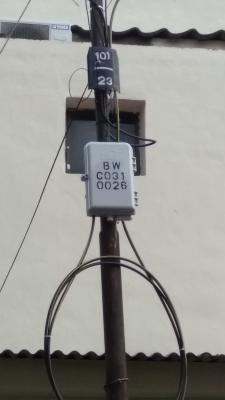
|
|
|
Sep 22 2017, 11:44 PM
|

Senior Member
1,704 posts Joined: Jan 2003 From: Hogoh Pahang Hogoh 
|
QUOTE(yong115 @ Sep 22 2017, 09:45 PM) TM point staff told me that i cant downgrade to Unifi Lite from Unifi Advance. So the only way is just terminate and reapply? apply lite first , after installed, terminate advance QUOTE(Alex9182 @ Sep 22 2017, 10:08 PM) Tm has put up fibre optic cable behind my house, soon Unifi Lite will be availabe, if i want to upgrade the wireless router to High Power models, please recommend which brand and models i should be looking at. thanks in advanced. lucky u covered with FTTH, if i were u, will apply for advance.. not lite.. |
|
|
Sep 23 2017, 09:05 AM
Show posts by this member only | IPv6 | Post
#1085
|

Senior Member
719 posts Joined: Nov 2008
|
|
|
|
Sep 23 2017, 09:10 AM
Show posts by this member only | IPv6 | Post
#1086
|

Junior Member
284 posts Joined: Jan 2007 
|
QUOTE(uncle08 @ Sep 23 2017, 09:05 AM) 200 customers affected only? sounds kind of unrealistic...This post has been edited by nmb3rs: Sep 23 2017, 09:10 AM |
|
|
|
|
|
Sep 23 2017, 10:35 AM
Show posts by this member only | IPv6 | Post
#1087
|

Senior Member
1,448 posts Joined: Apr 2007
|
QUOTE(uncle08 @ Sep 23 2017, 09:05 AM) TIME replace that with the same problematic one use by UniFi customer, TP-Link Archer C1200  but so far my 850L no give problem, using TM customize revision B1, 2.08TM firmware.  |
|
|
Sep 23 2017, 11:25 AM
Show posts by this member only | IPv6 | Post
#1088
|
|
Senior Member
719 posts Joined: Nov 2008
|
Better change the router password la...
Also, disable the remote management off it. lol |
|
|
Sep 23 2017, 12:29 PM
|
|
Junior Member
8 posts Joined: Sep 2010
|
Hi all, i recently moved in to newly bought subsale house. I can see that the previous owner use unifi and installed the cable inside the ceiling. My session to install unifi lite will be tomorrow, so i can just use the same cabling righf?
|
|
|
Sep 23 2017, 12:37 PM
Show posts by this member only | IPv6 | Post
#1090
|

Senior Member
521 posts Joined: Nov 2005  
|
hi guys, i just installed Unifi lite yesterday. How do i change the DNS? i m not very good in networking. Thank you.
they provided me with TP Link AC1200 This post has been edited by Ranny: Sep 23 2017, 12:46 PM |
|
|
Sep 23 2017, 02:36 PM
|
|
Senior Member
719 posts Joined: Nov 2008
|
QUOTE(Ranny @ Sep 23 2017, 12:37 PM) hi guys, i just installed Unifi lite yesterday. How do i change the DNS? i m not very good in networking. Thank you. Go to Settings > Network connection > Network adapter > Change Network Adapter (depends u use LAN cable or WiFi) select the one u are connnecting now. Double click it > Right click Properties> Go to IPV4 (internet Protocol Version 4) > Double click it > Select radio button Use Following DNS Server Addressthey provided me with TP Link AC1200 8.8.8.8 8.8.8.4 Click OK will do |
|
|
Sep 23 2017, 02:51 PM
Show posts by this member only | IPv6 | Post
#1092
|
|
Senior Member
521 posts Joined: Nov 2005
|
QUOTE(uncle08 @ Sep 23 2017, 02:36 PM) Go to Settings > Network connection > Network adapter > Change Network Adapter (depends u use LAN cable or WiFi) select the one u are connnecting now. Double click it > Right click Properties> Go to IPV4 (internet Protocol Version 4) > Double click it > Select radio button Use Following DNS Server Address uncle08, this is what i do. Still cant. Not working.8.8.8.8 8.8.8.4 Click OK will do |
|
|
Sep 23 2017, 02:54 PM
|

Senior Member
5,714 posts Joined: Mar 2007
|
QUOTE(Ranny @ Sep 23 2017, 12:37 PM) hi guys, i just installed Unifi lite yesterday. How do i change the DNS? i m not very good in networking. Thank you. Log into your router and change it from there. So, it's under 'Advanced', then 'DHCP', and then 'DHCP Settings', and under 'Primary DNS', set the value 8.8.8.8, and under 'Secondary DNS', set the value to 8.8.4.4, and then reboot the router and you'll be all set to go.they provided me with TP Link AC1200 This post has been edited by SilentVampire: Sep 23 2017, 03:00 PM |
|
|
|
|
|
Sep 23 2017, 02:55 PM
|
|
Senior Member
1,704 posts Joined: Jan 2003 From: Hogoh Pahang Hogoh
|
QUOTE(Ranny @ Sep 23 2017, 02:51 PM) uncle08, this is what i do. Still cant. Not working. go to network tab and find the dynamic ip, below that some field show obtain DNS from isp = false. enter the google dns manually |
|
|
Sep 23 2017, 02:56 PM
Show posts by this member only | IPv6 | Post
#1095
|
|
Senior Member
521 posts Joined: Nov 2005
|
QUOTE(SilentVampire @ Sep 23 2017, 02:54 PM) Log into your router and change it from there. i changed at the DHCP there also cannot  |
|
|
Sep 23 2017, 03:00 PM
Show posts by this member only | IPv6 | Post
#1096
|
|
Senior Member
521 posts Joined: Nov 2005
|
QUOTE(zeronehza @ Sep 23 2017, 02:55 PM) go to network tab and find the dynamic ip, below that some field show obtain DNS from isp = false. enter the google dns manually i m sorry, i couldnt see those settings above. Mine is TP-Link AC1200can anyone with this router model help me pls? This post has been edited by Ranny: Sep 23 2017, 03:01 PM |
|
|
Sep 23 2017, 03:02 PM
|
|
Senior Member
5,714 posts Joined: Mar 2007
|
QUOTE(Ranny @ Sep 23 2017, 02:56 PM) i changed at the DHCP there also cannot Are you sure? Did you check the DNS server on your computer to see if it has been changed? |
|
|
Sep 23 2017, 03:05 PM
Show posts by this member only | IPv6 | Post
#1098
|
|
Senior Member
521 posts Joined: Nov 2005
|
i found the solution oredi. Thx everyone for the help. it was located at the Advanced section. Need changed from there to Use the following DNS Addresses.
Thx again.  |
|
|
Sep 23 2017, 03:43 PM
Show posts by this member only | IPv6 | Post
#1099
|
|
Senior Member
719 posts Joined: Nov 2008
|
QUOTE(Ranny @ Sep 23 2017, 02:51 PM) uncle08, this is what i do. Still cant. Not working. Try to disable by uncheck your IPV6 from properties. |
|
|
Sep 23 2017, 05:24 PM
Show posts by this member only | IPv6 | Post
#1100
|
|
All Stars
24,219 posts Joined: Mar 2007 From: Kuala Lumpur
|
QUOTE(yong115 @ Sep 22 2017, 09:45 PM) TM point staff told me that i cant downgrade to Unifi Lite from Unifi Advance. So the only way is just terminate and reapply? Of course they will tell you that. But unless if you are under contract, there is no way they can stop you from terminating and applying the Lite.QUOTE(Alex9182 @ Sep 22 2017, 10:08 PM) Tm has put up fibre optic cable behind my house, soon Unifi Lite will be availabe, if i want to upgrade the wireless router to High Power models, please recommend which brand and models i should be looking at. thanks in advanced. Yes, but you must check for available ports. Usually the earlier to go the better. Whats wrong with the supplied router? |
| Change to: |  0.0309sec 0.0309sec
 0.96 0.96
 6 queries 6 queries
 GZIP Disabled GZIP Disabled
Time is now: 1st December 2025 - 10:26 AM |
 Quote
Quote