Welcome Guest ( Log In | Register )

Outline · [ Standard ] · Linear+

Unifi Unifi Lite 10Mbps Brotherhood -- v3.0 --, Incoming RM99 package!? (Put On Hold)

views
     
cba5566
post Dec 20 2020, 06:26 AM

Casual
***
Junior Member
422 posts

Joined: Mar 2010
QUOTE(Yapbe @ Dec 20 2020, 12:32 AM)
HI, I new in Unifi, when I request for Public IP for Unifi, the Live agent(Unifi website) said it's charge RM200 for 1 fixed IP, and he told me to go to TM point to apply.
Anyone come across this issued?
BTW, does Unifi provided Public IP address by default?
*
What is ur ip address ?Subscribe to unifi already ?
Click this link . https://www.ip2location.com/
U need to know what ip address u get first ...


cba5566
post Dec 20 2020, 06:35 AM

Casual
***
Junior Member
422 posts

Joined: Mar 2010
QUOTE(powerwoot @ Dec 19 2020, 08:06 PM)
Saying goodbye to the good unifi lite 10mbps. Managed to upgrade to 100mbps HSBB after years of waiting. TM was reluctant to entertained because my address is in kampung, with dozens of rejection due to no coverage at my area. In fact the nearest DP is less than 100m from my house.
My first complaint to SKMM in Nov last month, fruitful. About 2 week after the complaint submitted, TM agreed to pull a cable to my house.
My VDSL modem can rest in peace inside the kotak now.
*
Old modem can use to extend the wifi coverage as well.
Say...u got bedroom at first floor , pull one network cat5e/cat6 cable
to first floor then connect to old modem.
Simple configuration on it to extend wifi signal to first floor.
May not get high wifi speed , but 30~50M speed enough for u
to access internet.
YoungMan
post Dec 20 2020, 12:23 PM

Look at all my stars!!
*******
Senior Member
6,793 posts

Joined: Oct 2008
From: Kuala Lumpur


QUOTE(Yapbe @ Dec 20 2020, 01:32 AM)
HI, I new in Unifi, when I request for Public IP for Unifi, the Live agent(Unifi website) said it's charge RM200 for 1 fixed IP, and he told me to go to TM point to apply.
Anyone come across this issued?
BTW, does Unifi provided Public IP address by default?
*
That RM200 is fix IP not public IP. Unifi no need to request public IP.
Yapbe
post Dec 21 2020, 12:47 AM

New Member
*
Newbie
24 posts

Joined: Jan 2014
QUOTE(cba5566 @ Dec 20 2020, 06:26 AM)
What is ur ip address ?Subscribe to unifi already ?
Click this link . https://www.ip2location.com/
U need to know what ip address u get first ...
*
Hi, thanks for help.
by the link you provided, my IP address : 175.144.xx.xxx
so, is a Public IP or not?
IF so, will this IP address changing time by time or just this will be a the time.
BTW, i already subscribed to Unifi....for few days ago. smile.gif

Yapbe
post Dec 21 2020, 12:50 AM

New Member
*
Newbie
24 posts

Joined: Jan 2014
QUOTE(YoungMan @ Dec 20 2020, 12:23 PM)
That RM200 is fix IP not public IP. Unifi no need to request public IP.
*
Oh, I see, so the IP address i using will be changing time by time or not?
Thanks for help. biggrin.gif

This post has been edited by Yapbe: Dec 21 2020, 12:55 AM
YoungMan
post Dec 21 2020, 09:25 AM

Look at all my stars!!
*******
Senior Member
6,793 posts

Joined: Oct 2008
From: Kuala Lumpur


QUOTE(Yapbe @ Dec 21 2020, 01:50 AM)
Oh, I see, so the IP address i using will be changing time by time or not?
Thanks for help. biggrin.gif
*
Yes, change each time you restart your modem.
cba5566
post Dec 21 2020, 01:25 PM

Casual
***
Junior Member
422 posts

Joined: Mar 2010
QUOTE(Yapbe @ Dec 21 2020, 12:47 AM)
Hi, thanks for help.
by the link you provided, my IP address : 175.144.xx.xxx
so, is a Public IP or not?
IF so, will this IP address changing time by time or just this will be a the time.
BTW, i already subscribed to Unifi....for few days ago. smile.gif
*
Just do the port forward setup.
Then run bitcomet 1.73 , if green light at
lower right hand side , then it is successful and
it is public ip address.
Private ip address , it will be forever orange light .
ryansxs
post Dec 21 2020, 01:50 PM

Look at all my stars!!
*******
Senior Member
2,376 posts

Joined: Dec 2005


QUOTE(cba5566 @ Dec 20 2020, 06:35 AM)
Old modem can use to extend the wifi coverage as well.
Say...u got bedroom at first floor , pull one network cat5e/cat6 cable
to first floor then connect to old modem.
Simple configuration on it to extend wifi signal to first floor.
May not get high wifi speed , but 30~50M speed enough for u
to access internet.
*
if your modem is a modem router.
then can use the router function. if its just a modem, i dont think you can reuse it.
cba5566
post Dec 21 2020, 02:49 PM

Casual
***
Junior Member
422 posts

Joined: Mar 2010
QUOTE(ryansxs @ Dec 21 2020, 01:50 PM)
if your modem is a modem router.
then can use the router function. if its just a modem, i dont think you can reuse it.
*
I used streamyx 1M before unifi 30M.
Subscribe to 30M plan now.
streamyx used dlink DSL-2750E wifi router.
Do some configuration , plugin the long lan cable to lan port 1 .
wifi signal able to shoot up 32M download , 10M upload speed at
first floor even if spec mentioned only 24M download and 1M upload.

Too bad my plan only 30M , if use 300M then i can test the old
wifi router max potential speed.I believe can hit 50~60M download
speed...

Yapbe
post Dec 22 2020, 02:05 AM

New Member
*
Newbie
24 posts

Joined: Jan 2014
QUOTE(cba5566 @ Dec 21 2020, 01:25 PM)
Just do the port forward setup.
Then run bitcomet 1.73 , if green light at
lower right hand side , then it is successful and
it is public ip address.
Private ip address , it will be forever orange light .
*
THANKS rclxm9.gif GREAT HELP rclxms.gif
Yapbe
post Dec 22 2020, 02:06 AM

New Member
*
Newbie
24 posts

Joined: Jan 2014
QUOTE(YoungMan @ Dec 21 2020, 09:25 AM)
Yes, change each time you restart your modem.
*
Thanks for the USEFUL information thumbup.gif
josh5671
post Mar 31 2021, 04:39 PM

Regular
******
Senior Member
1,197 posts

Joined: Dec 2010
currently got any way to check unifi fiber coverage or new deployed area?
because i ask TM staff they said my area supposed have fiber on march or april delayed to june. so here i going to verify some source to see whateveer it true.
supergen3
post Mar 31 2021, 05:23 PM

Getting Started
**
Junior Member
134 posts

Joined: May 2010


QUOTE(josh5671 @ Mar 31 2021, 04:39 PM)
currently got any way to check unifi fiber coverage or new deployed area?
because i ask TM staff they said my area supposed have fiber on march or april delayed to june. so here i going to verify some source to see whateveer it true.
*
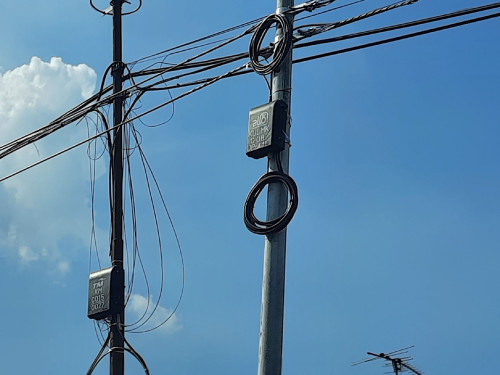
Look at the telephone poles at your Taman, if the poles have cables with yellow line on it, then congratulations TM is in the process of laying Unifi to your area. The cables are usually in a bundle of loop dropped on top of the poles until the installation of the fiber distribution panel on the poles. Here is a picture of FDP. It takes about a month after the FDP is mated to the cables, for TM to commission the network in the Taman. You will know unifi is coming, as Unifi sales agents will go door to door to sell Unifi to existing Streamyx customers.

user posted image
safwansaupi99
post Jul 19 2021, 06:05 PM

New Member
*
Newbie
1 posts

Joined: Jul 2017


Hi all, Im currently subsribed to Unifi Lite service. Kg area so maybe another 50 years only got fibre.

I mostly use Internet to play games therefore low latency is very preferred and for most game no need very high speed connection.

Its just that the connection has been super unstable, and every time I reported to TM they just came and check the router and at times replace it. In my cases they reverted it back to a Riger modem which is very old doh.gif . I am very confident by now that it has nothing to do with the router as it already the 3rd time they came and the same issue is still there.

So, I am in need of suggestion as I am at my wit's end. Dont know what to do and complain anymore.

FYI, the most stable latency I can get is 120ms+. From there it can jump to god knows where and when.

Thanks biggrin.gif
heLL_bOy
post Jul 19 2021, 06:21 PM

Regular
******
Senior Member
1,348 posts

Joined: Nov 2004
From: HEAVEN & HELL


QUOTE(safwansaupi99 @ Jul 19 2021, 06:05 PM)
Hi all, Im currently subsribed to Unifi Lite service. Kg area so maybe another 50 years only got fibre.

I mostly use Internet to play games therefore low latency is very preferred and for most game no need very high speed connection.

Its just that the connection has been super unstable, and every time I reported to TM they just came and check the router and at times replace it. In my cases they reverted it back to a Riger modem which is very old    doh.gif . I am very confident by now that it has nothing to do with the router as it already the 3rd time they came and the same issue is still there.

So, I am in need of suggestion as I am at my wit's end. Dont know what to do and complain anymore.

FYI, the most stable latency I can get is 120ms+. From there it can jump to god knows where and when.

Thanks  biggrin.gif
*
your unstable connection is about latency? if yes... ADSL unable get you good latency or lower ping compare to Fiber.


newtester
post Aug 5 2021, 03:44 PM

New Member
*
Junior Member
20 posts

Joined: Mar 2009
QUOTE(safwansaupi99 @ Jul 19 2021, 06:05 PM)
Hi all, Im currently subsribed to Unifi Lite service. Kg area so maybe another 50 years only got fibre.

I mostly use Internet to play games therefore low latency is very preferred and for most game no need very high speed connection.

Its just that the connection has been super unstable, and every time I reported to TM they just came and check the router and at times replace it. In my cases they reverted it back to a Riger modem which is very old    doh.gif . I am very confident by now that it has nothing to do with the router as it already the 3rd time they came and the same issue is still there.

So, I am in need of suggestion as I am at my wit's end. Dont know what to do and complain anymore.

FYI, the most stable latency I can get is 120ms+. From there it can jump to god knows where and when.

Thanks  biggrin.gif
*
Did this happen only recently?


Change to:
| Lo-Fi Version
0.0217sec    0.69    6 queries    GZIP Disabled
Time is now: 1st December 2025 - 11:07 PM