

QUOTE(SwarmTroll @ Oct 13 2023, 04:32 AM)
Guys, is this an actual thing? I actually set Cloudfare DNS at the internet settings there lol.

No, it's not. Set whatever DNS that you like. I'm using quad9, Google & Cloudflare.TP-LINK Malaysia Official Thread, Technical Enquiries and Support
|
|
 Oct 13 2023, 09:47 AM Oct 13 2023, 09:47 AM
Show posts by this member only | IPv6 | Post
#4421
|
 
All Stars
11,459 posts Joined: Oct 2007 From: KL  
|
QUOTE(SwarmTroll @ Oct 13 2023, 04:32 AM) Guys, is this an actual thing? I actually set Cloudfare DNS at the internet settings there lol. No, it's not. Set whatever DNS that you like. I'm using quad9, Google & Cloudflare. |
|
|
|
|
|
Oct 13 2023, 10:07 AM
Show posts by this member only | IPv6 | Post
#4422
|

Senior Member
4,034 posts Joined: Dec 2019
|
QUOTE(soonwai @ Oct 13 2023, 09:47 AM) No, it's not. Set whatever DNS that you like. I'm using quad9, Google & Cloudflare. what he was advised; - for PPPoE dial-up, leave to use whatever DNS assigned by upstream. - for local DHCP service, manually set for devices to use your preferred DNS. it makes sense if the router is dependent to resolve hostnames that are only available inside own ISP network, for example, TR-069 hostname, which might not be resolvable if using 3rd-party DNS servers. |
|
|
Oct 13 2023, 11:09 AM
Show posts by this member only | IPv6 | Post
#4423
|
|
All Stars
11,459 posts Joined: Oct 2007 From: KL
|
QUOTE(Oltromen Ripot @ Oct 13 2023, 10:07 AM) what he was advised; Thanks for the correction. My router doesn't use TR-069 so I don't use ISP's DNS.- for PPPoE dial-up, leave to use whatever DNS assigned by upstream. - for local DHCP service, manually set for devices to use your preferred DNS. it makes sense if the router is dependent to resolve hostnames that are only available inside own ISP network, for example, TR-069 hostname, which might not be resolvable if using 3rd-party DNS servers. |
|
|
Oct 13 2023, 12:10 PM
Show posts by this member only | IPv6 | Post
#4424
|
|
Senior Member
4,034 posts Joined: Dec 2019
|
wrong
This post has been edited by Oltromen Ripot: Oct 13 2023, 12:11 PM |
|
|
Oct 13 2023, 12:12 PM
Show posts by this member only | IPv6 | Post
#4425
|
|
Senior Member
4,034 posts Joined: Dec 2019
|
QUOTE(soonwai @ Oct 13 2023, 11:09 AM) Thanks for the correction. My router doesn't use TR-069 so I don't use ISP's DNS. this TR-069 server address only resolvable from within Unifi network. trying to resolve it using same server but from outside resulted in failure.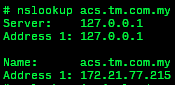 |
|
|
Oct 14 2023, 10:23 AM
|

Junior Member
188 posts Joined: Jan 2008
|
Hi, will XE75 better or a X95 in a scenario below where the house is around 5000sqf.
On Unifi business plan, 300mbps. Come with stock Unifi modem and Dlink routers which are pretty bad. |
|
|
|
|
|
Oct 14 2023, 11:23 AM
|
 
Elite
8,421 posts Joined: Jul 2008 
|
QUOTE(adrianteo @ Oct 14 2023, 10:23 AM) Hi, will XE75 better or a X95 in a scenario below where the house is around 5000sqf. Deco X95 is more performant than XE75On Unifi business plan, 300mbps. Come with stock Unifi modem and Dlink routers which are pretty bad. |
|
|
Oct 14 2023, 01:21 PM
Show posts by this member only | IPv6 | Post
#4428
|
|
Senior Member
1,402 posts Joined: Apr 2012
|
Ooooh looks like TP-Link AX73 v1 is getting EasyMesh function real soon, they released the firmware for EU version already.
|
|
|
Oct 15 2023, 09:17 PM
Show posts by this member only | IPv6 | Post
#4429
|

Senior Member
652 posts Joined: Jan 2005 
|
just got my unifi package to 500 mbps.
My house is a double storey terrace house. TM gave the stock Fiberhome mesh router, The main router is at upstairs with beside the modem, and the second router (mesh) is downstairs. Upstairs rooms can get 300 Mbps - 500 Mbps Downstairs living room, when connected to fiberhome mesh (downstairs) can only max get 250 Mbps. Would like to get opinions to improve and so that i can get downstairs living room 500Mbps (other location downstairs not prioirity) , should i get: 1. XE75 deco 2 packs 2. Archer Ax73 (upstairs) and downstairs to use RE705X Thanks |
|
|
Oct 17 2023, 09:43 AM
|

All Stars
10,859 posts Joined: Jan 2003 From: Sarawak
|
Hi, wanna ask for TP-Link RE605X range extender, can i use it become like a wifi adapter for my non-wifi6 devices to connect to my wifi6 router. via connect to the re605x using wired, then the re605x will use wifi6 connect to my router.
|
|
|
Oct 17 2023, 12:39 PM
|

Senior Member
2,075 posts Joined: Sep 2021 From: nowhere
|
QUOTE(Lucas @ Oct 15 2023, 09:17 PM) just got my unifi package to 500 mbps. Get XE75 twin combo, always better than nerfed router+repeater comboMy house is a double storey terrace house. TM gave the stock Fiberhome mesh router, The main router is at upstairs with beside the modem, and the second router (mesh) is downstairs. Upstairs rooms can get 300 Mbps - 500 Mbps Downstairs living room, when connected to fiberhome mesh (downstairs) can only max get 250 Mbps. Would like to get opinions to improve and so that i can get downstairs living room 500Mbps (other location downstairs not prioirity) , should i get: 1. XE75 deco 2 packs 2. Archer Ax73 (upstairs) and downstairs to use RE705X Thanks |
|
|
Oct 17 2023, 05:22 PM
Show posts by this member only | IPv6 | Post
#4432
|

Senior Member
617 posts Joined: Mar 2005 From: Mars
|
Hey guys, just want to ask if it is possible to link my Deco M5 to the D-Link AX3000 provided by TM?
Extender maybe? My line is shared to my mother's unit next door. We are living in a condo. |
|
|
Oct 17 2023, 05:47 PM
|
|
Elite
8,421 posts Joined: Jul 2008
|
QUOTE(sailou @ Oct 17 2023, 05:22 PM) Hey guys, just want to ask if it is possible to link my Deco M5 to the D-Link AX3000 provided by TM? Not possible, it will not workExtender maybe? My line is shared to my mother's unit next door. We are living in a condo. Only option is to get another cheap used Deco and use it on the unit next door |
|
|
|
|
|
Oct 17 2023, 05:55 PM
Show posts by this member only | IPv6 | Post
#4434
|
|
Senior Member
2,075 posts Joined: Sep 2021 From: nowhere
|
QUOTE(sailou @ Oct 17 2023, 05:22 PM) Hey guys, just want to ask if it is possible to link my Deco M5 to the D-Link AX3000 provided by TM? my suggestion is just sell off what tm given and go all in to decoExtender maybe? My line is shared to my mother's unit next door. We are living in a condo. and btw deco m5 can be used for backup also, because wifi 5 model, max can 500 mbps only so its time to go for at least deco X50 starter kit (1 unit is around rm370 and 2 units just under rm800) for a great starting experience of deco whole home system |
|
|
Oct 17 2023, 06:16 PM
Show posts by this member only | IPv6 | Post
#4435
|
|
Senior Member
617 posts Joined: Mar 2005 From: Mars
|
I am currently using 2 units of M5. One unit on each place. My mum's place are only able to get around 20mbps of my 100mbps line.
Just got my line upgraded to 500mb and using the Dlink mesh provided by TM. So far able to get 50-60mbps at my mum's place. So I was thinking if I can link the M5 to Dlink to get better speed. Thanks for the info guys. |
|
|
Oct 17 2023, 09:06 PM
Show posts by this member only | IPv6 | Post
#4436
|
|
Senior Member
1,402 posts Joined: Apr 2012
|
Hello Sifu's,
When you change to a new router, is there anything that should be tweaked in the advanced settings to improve the router? e.g. OFDMA, airtime fairness, DHCP server address lease time set to max, etc. I can't really find a proper guide online. |
|
|
Oct 18 2023, 12:37 AM
Show posts by this member only | IPv6 | Post
#4437
|

Junior Member
558 posts Joined: Aug 2017 
|
Hi geng,
Wanna clarify, for Tp link Ax53, how many wireless channel that available? |
|
|
Oct 18 2023, 11:13 AM
|

All Stars
17,467 posts Joined: May 2008 From: Lazada 
|
One of my house using TPLINK AX55 is having some strange problem. The Unifi setup will reset when:
1. I use the schedule reboot 1 times per week 2. Electricity cut off (TNB) and resume back to normal - so router will auto reboot Why is this happen? Each time happen I have to reconfig again. |
|
|
Oct 18 2023, 11:38 AM
Show posts by this member only | IPv6 | Post
#4439
|
|
Senior Member
4,034 posts Joined: Dec 2019
|
QUOTE(NightFelix @ Oct 18 2023, 11:13 AM) One of my house using TPLINK AX55 is having some strange problem. The Unifi setup will reset when: is there a function to "commit config" to flash nvram inside?1. I use the schedule reboot 1 times per week 2. Electricity cut off (TNB) and resume back to normal - so router will auto reboot Why is this happen? Each time happen I have to reconfig again. maybe need to force it to store. probably your device have damaged flash nvram. it cannot survive a reboot. |
|
|
Oct 18 2023, 11:49 AM
|
|
All Stars
17,467 posts Joined: May 2008 From: Lazada
|
QUOTE(Oltromen Ripot @ Oct 18 2023, 11:38 AM) is there a function to "commit config" to flash nvram inside? sounds like a defect model to me, maybe time to claim warranty.maybe need to force it to store. probably your device have damaged flash nvram. it cannot survive a reboot. |
| Change to: |  0.0257sec 0.0257sec
 0.80 0.80
 6 queries 6 queries
 GZIP Disabled GZIP Disabled
Time is now: 20th December 2025 - 09:39 PM |
 Quote
Quote