Outline ·
[ Standard ] ·
Linear+
TP-LINK Malaysia Official Thread, Technical Enquiries and Support
|
Alpha_Tay
|
 Sep 7 2023, 03:03 AM Sep 7 2023, 03:03 AM
|

|
Online Update Update firmware over the internet. Firmware Version: 1.3.5 Build 20211231 rel.63820(5553) Hardware Version: Archer AX20 v1.20 Latest Firmware Version: 1.3.6 Build 20230830 rel.15380 What's New This update is recommended for all users and provides important security updates Modifications and Bug Fixes 1. Enhance device security; 2. Improve the stability of the equipment. Firmware Version: 1.3.6 Build 20230830 rel.15380(5553) Hardware Version: Archer AX20 v1.20 CHECK FOR UPDATES Firmware is up to date. only available from Router Internal Online Update and Tether Apps at the moment. firmware now available to download at US site but not yet available at Malaysia Site. https://www.tp-link.com/us/support/download...v1.20/#Firmwarehttps://www.tp-link.com/my/support/download...v1.20/#FirmwareAX20(US)_V1 and AX20(EU&JP)_V1 use the same firmware update file while AX20(EU&JP)_V1 and AX20(EU)_V2 , AX20(US)_V1 and AX20(US)_V1.2 use different firmware update file. https://www.tp-link.com/us/support/download...20/v1/#Firmwarehttps://www.tp-link.com/en/support/download...20/v1/#FirmwareThis post has been edited by Alpha_Tay: Sep 11 2023, 04:47 PM |
|
|
|
|
|
Alpha_Tay
|
Sep 10 2023, 09:20 PM
|
|
|
Double Post
This post has been edited by Alpha_Tay: Sep 10 2023, 09:21 PM
|
|
|
|
|
|
keong8867
|
Sep 11 2023, 02:55 AM
|
|
|
anyone know how do I limit speed in deco?
|
|
|
|
|
|
tvcat
|
Sep 15 2023, 06:59 AM
|
|
|
Does TP-Link router support DuckDNS?
|
|
|
|
|
|
PRSXFENG
|
Sep 15 2023, 11:57 PM
|
|
|
QUOTE(tvcat @ Sep 15 2023, 06:59 AM) Does TP-Link router support DuckDNS? Unless they changed it in the past year, I'm pretty sure it's only TP-Link, NO-IP and Dyn |
|
|
|
|
|
tvcat
|
Sep 16 2023, 05:20 AM
|
|
|
QUOTE(PRSXFENG @ Sep 15 2023, 11:57 PM) Unless they changed it in the past year, I'm pretty sure it's only TP-Link, NO-IP and Dyn I see, thanks for the info. This is too bad, even the DLink has DuckDNS support. |
|
|
|
|
|
Anime4000
|
Sep 17 2023, 06:09 PM
|
|
|
today I tested TP-Link Deco BE85 SFP+ with GPON ONU SFP (miniONT) on customer house... 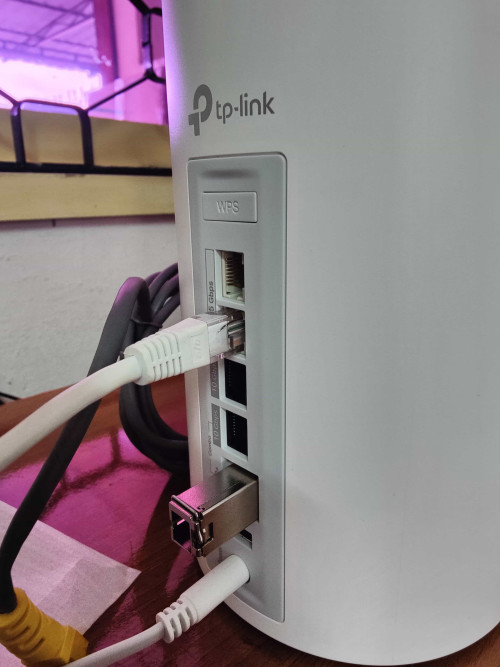 apparently TP-Link Deco BE85 doesn't' understand HiSGMII (2.5Gbps) very sad, if not can make All in One with 2Gbps Unifi support! The WebGUI and Deco App very dumb down version, no way to check the LAN and SFP Interface is up or not... hope TP-Link can make an update and add a option (2.5Gbps, Auto Negotiation Disabled) just like Mikrotik did way to apart from NBase-T and MII Standard |
|
|
|
|
|
blacktubi
|
Sep 17 2023, 06:48 PM
|
-

|
QUOTE(Anime4000 @ Sep 17 2023, 06:09 PM) today I tested TP-Link Deco BE85 SFP+ with GPON ONU SFP (miniONT) on customer house... apparently TP-Link Deco BE85 doesn't' understand HiSGMII (2.5Gbps) very sad, if not can make All in One with 2Gbps Unifi support! The WebGUI and Deco App very dumb down version, no way to check the LAN and SFP Interface is up or not... hope TP-Link can make an update and add a option (2.5Gbps, Auto Negotiation Disabled) just like Mikrotik did way to apart from NBase-T and MII Standard Do you manage to get any SFP module to work on Deco BE85? |
|
|
|
|
|
Anime4000
|
Sep 17 2023, 08:43 PM
|
|
|
QUOTE(blacktubi @ Sep 17 2023, 06:48 PM) Do you manage to get any SFP module to work on Deco BE85? so far I only test is GPON Stick, I didn't try other SFP |
|
|
|
|
|
Skeuomorphic
|
Sep 25 2023, 04:00 PM
|
|
|
hello, may i know if archer ax53 is worth an upgrade over archer c80 (current router used since 2020). im subscribed to Maxis Fibre 300Mbps
|
|
|
|
|
|
uhlaw
|
Sep 25 2023, 04:04 PM
|
|
|
In Deco X50-5G, band cannot be found manually? 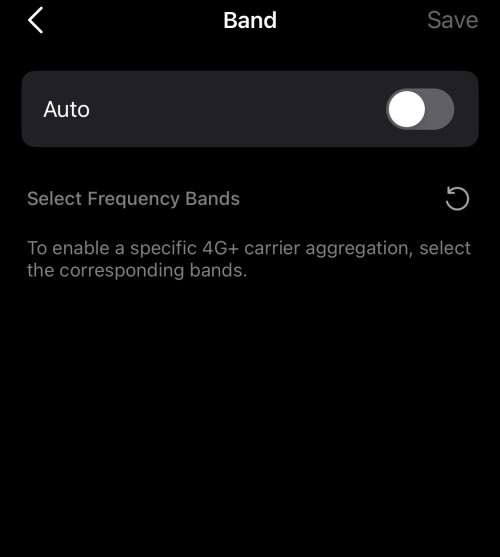 This post has been edited by uhlaw: Sep 25 2023, 04:04 PM This post has been edited by uhlaw: Sep 25 2023, 04:04 PM |
|
|
|
|
|
abcdef123456
|
Sep 25 2023, 04:31 PM
|
Getting Started

|
Hi guys, few days ago tplink released new firmware for archer Ax73 v2.  Should i upgrade it or wait for a while? |
|
|
|
|
|
abcdef123456
|
Sep 25 2023, 04:33 PM
|
Getting Started
|
QUOTE(abcdef123456 @ Sep 6 2023, 08:17 AM) I realized that while doing the setup i set the dns to google dns at internet part,which an IT friend told me for that part better to use the ISP dns. Now i set it to ISP dns, and set the google dns at the dhcp server part. Still monitoring now,but my 5ghz speedtest looking normal now. |
|
|
|
|
|
abcdef123456
|
Sep 25 2023, 04:35 PM
|
Getting Started
|
I realized after my security changed to wpa2 mode, it solved the internet intermittent issue (will dc and reconnects). Before that was wpa2/wpa3 mixed mode. Is this consider the router issue or it is just the conflict occurs while using the mixed mode?
|
|
|
|
|
|
jasonchan323
|
Sep 30 2023, 05:42 PM
|
Getting Started
|
im using time broadband currently and would like upgrade the router. is tp link ax55 compatible to time broadband?
if yes, is it difficult for setting?
|
|
|
|
|
|
petrofsky77
|
Sep 30 2023, 09:16 PM
|
|
|
QUOTE(jasonchan323 @ Sep 30 2023, 05:42 PM) im using time broadband currently and would like upgrade the router. is tp link ax55 compatible to time broadband? if yes, is it difficult for setting? For direct fibre ISPs (like TM and Time), the setup is fairly easy, just need to make sure that you set the Internet VLAN correctly and enable the 802.11Q tag. For Unifi it's VLAN 500. Not sure about Time since i've never configured their line before. |
|
|
|
|
|
yoonlim
|
Oct 2 2023, 04:41 PM
|
Getting Started
|
I am on unifi 500/mbps download and 100mbps upload. I can get full download/upload speed when using speedtest app to test. But when I used Deco app to do speedtest, the best upload speed I can get is around 25mbps. Anyone facing inaccurate/slow upload speed issue when using deco app? By the way I am using BE85. 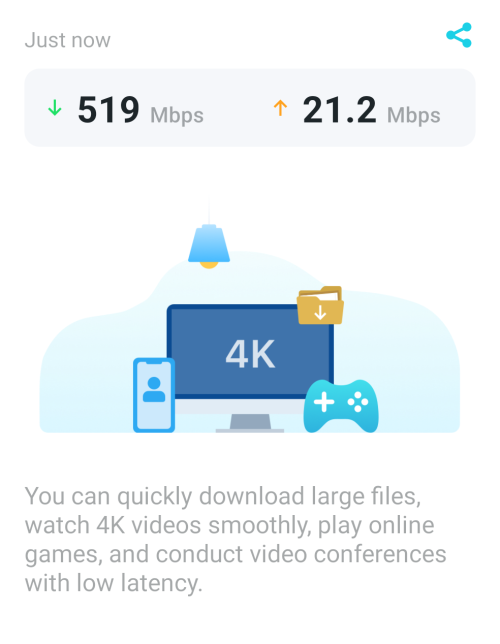 This post has been edited by yoonlim: Oct 2 2023, 04:42 PM This post has been edited by yoonlim: Oct 2 2023, 04:42 PM |
|
|
|
|
|
Alpha_Tay
|
Oct 2 2023, 06:31 PM
|
|
|
QUOTE(yoonlim @ Oct 2 2023, 04:41 PM) I am on unifi 500/mbps download and 100mbps upload. I can get full download/upload speed when using speedtest app to test. But when I used Deco app to do speedtest, the best upload speed I can get is around 25mbps. Anyone facing inaccurate/slow upload speed issue when using deco app? By the way I am using BE85. due to TP-Link SpeedTest Server Location Distance. |
|
|
|
|
|
yoonlim
|
Oct 2 2023, 06:34 PM
|
Getting Started
|
QUOTE(Alpha_Tay @ Oct 2 2023, 06:31 PM) due to TP-Link SpeedTest Server Location Distance. The server location is near to my place. Download speed ok, only upload speed is very slow using Deco App to test internet speed. Using official speedtest app no issue on download and upload. |
|
|
|
|
|
Alpha_Tay
|
Oct 2 2023, 07:21 PM
|
|
|
QUOTE(yoonlim @ Oct 2 2023, 06:34 PM) The server location is near to my place. Download speed ok, only upload speed is very slow using Deco App to test internet speed. Using official speedtest app no issue on download and upload. or the TP-Link SpeedTest Server Saturated? or the route between TP-Link SpeedTest Server and you is Saturated? This post has been edited by Alpha_Tay: Oct 2 2023, 07:36 PM |
|
|
|
|



 Quote
Quote






 0.0200sec
 0.81
0.81
 6 queries
 GZIP Disabled