

QUOTE(Alpha_Tay @ Oct 2 2023, 07:21 PM)
or the TP-Link SpeedTest Server Saturated? or the route between TP-Link SpeedTest Server and you is Saturated?

Funny thing is speedtest app no issue. Only deco app having slow upload issue.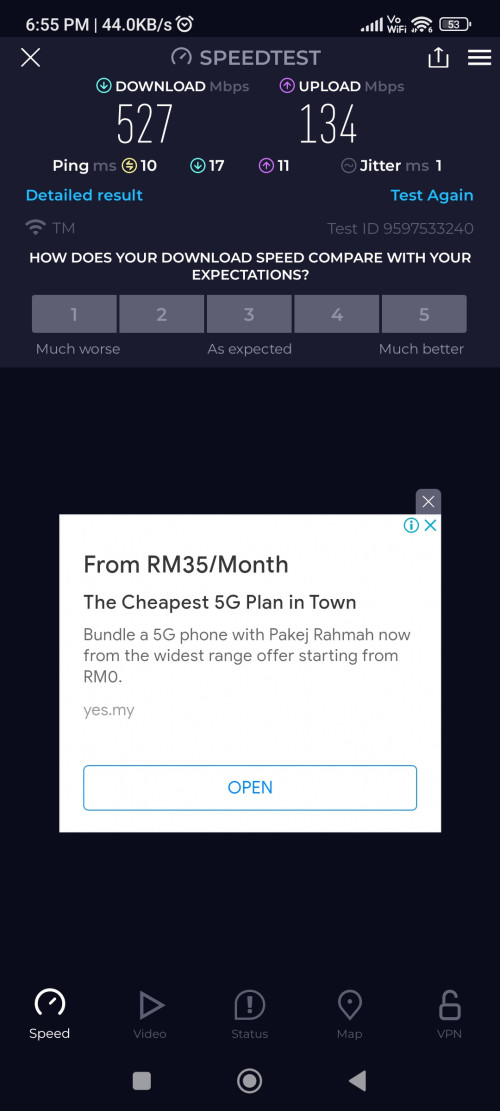
TP-LINK Malaysia Official Thread, Technical Enquiries and Support
|
|
 Oct 2 2023, 07:58 PM Oct 2 2023, 07:58 PM
|
 
Junior Member
104 posts Joined: May 2006 
|
QUOTE(Alpha_Tay @ Oct 2 2023, 07:21 PM) or the TP-Link SpeedTest Server Saturated? or the route between TP-Link SpeedTest Server and you is Saturated? Funny thing is speedtest app no issue. Only deco app having slow upload issue. |
|
|
|
|
|
Oct 2 2023, 09:08 PM
Show posts by this member only | IPv6 | Post
#4402
|

Senior Member
4,034 posts Joined: Dec 2019
|
QUOTE(Alpha_Tay @ Oct 2 2023, 06:31 PM) due to TP-Link SpeedTest Server Location Distance. QUOTE(yoonlim @ Oct 2 2023, 06:34 PM) The server location is near to my place. Download speed ok, only upload speed is very slow using Deco App to test internet speed. Using official speedtest app no issue on download and upload. QUOTE(Alpha_Tay @ Oct 2 2023, 07:21 PM) or the TP-Link SpeedTest Server Saturated? or the route between TP-Link SpeedTest Server and you is Saturated? What "TP-Link test servers..."?it's listing exactly the same Ookla's speedtest servers lah. 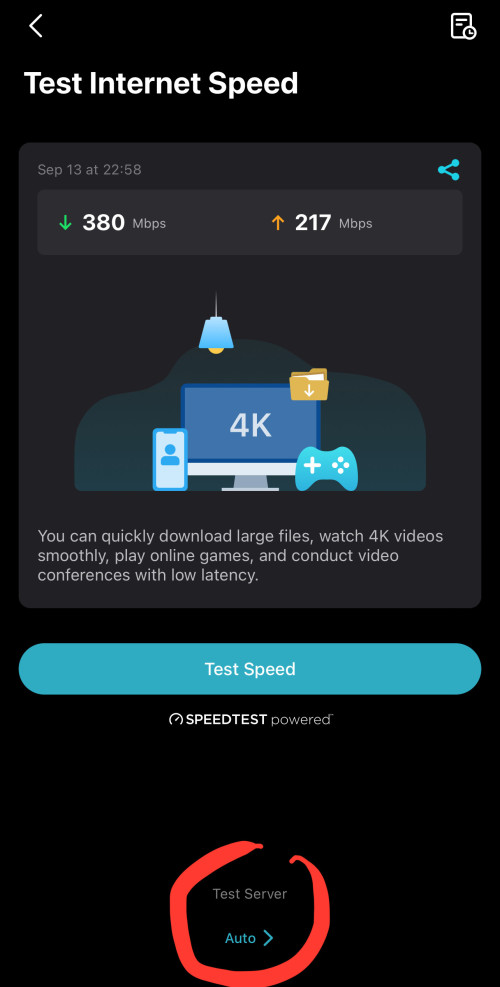 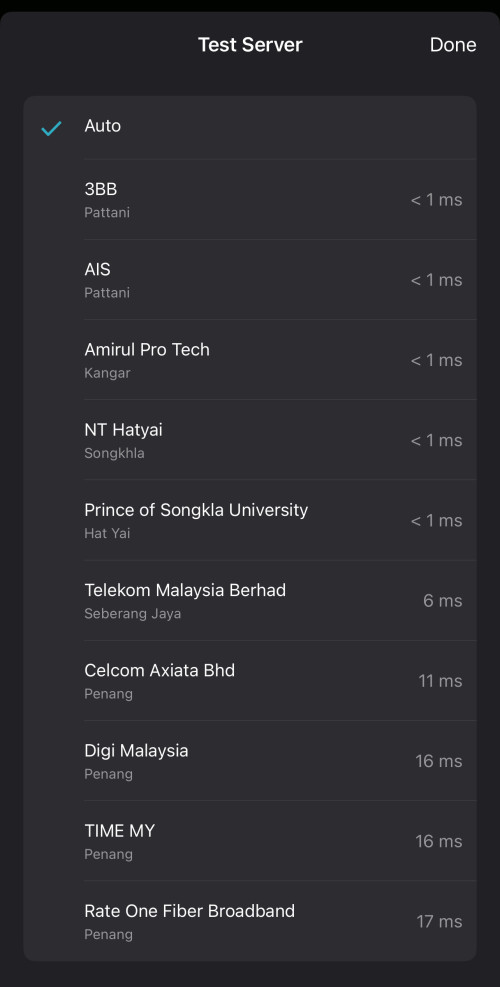 |
|
|
Oct 2 2023, 09:32 PM
|
|
Junior Member
104 posts Joined: May 2006
|
QUOTE(Oltromen Ripot @ Oct 2 2023, 09:08 PM) What "TP-Link test servers..."? Yes, the servers are within Klang valleyit's listing exactly the same Ookla's speedtest servers lah. |
|
|
Oct 2 2023, 09:36 PM
Show posts by this member only | IPv6 | Post
#4404
|
|
Senior Member
4,034 posts Joined: Dec 2019
|
QUOTE(yoonlim @ Oct 2 2023, 09:32 PM) Yes, the servers are within Klang valley did you use same server for both Speedtest and Deco's built-in? assuming all else are equal, should be a good judge whether we can trust Deco's built-in. |
|
|
Oct 2 2023, 10:09 PM
|
|
Junior Member
104 posts Joined: May 2006
|
QUOTE(Oltromen Ripot @ Oct 2 2023, 09:36 PM) did you use same server for both Speedtest and Deco's built-in? assuming all else are equal, should be a good judge whether we can trust Deco's built-in. I tried manually select few identical servers to test. Seems only deco app with slow upload speed |
|
|
Oct 3 2023, 05:22 PM
Show posts by this member only | IPv6 | Post
#4406
|

Senior Member
1,725 posts Joined: Jan 2003
|
» Click to show Spoiler - click again to hide... « didnt use deco app to knew their speed test server selection. This post has been edited by Alpha_Tay: Oct 3 2023, 05:23 PM |
|
|
|
|
|
Oct 9 2023, 06:49 PM
|
|
Junior Member
68 posts Joined: Dec 2017
|
Hi guys, this few days i had the free wifi upgrade from 300 to 500mbps. Lan cable no issue, however my weird getting weird,even with 5ghz sometimes i cannot get bck ori 300mbps.At most i can get back 300/100,using ax73.I just restarted the router and modem. The upload seems normal, just the download speed
|
|
|
Oct 9 2023, 09:35 PM
Show posts by this member only | IPv6 | Post
#4408
|
|
Senior Member
4,034 posts Joined: Dec 2019
|
QUOTE(abcdef123456 @ Oct 9 2023, 06:49 PM) Hi guys, this few days i had the free wifi upgrade from 300 to 500mbps. Lan cable no issue, however my weird getting weird,even with 5ghz sometimes i cannot get bck ori 300mbps.At most i can get back 300/100,using ax73.I just restarted the router and modem. The upload seems normal, just the download speed https://superuser.com/questions/1619079/wha...4-ghz-and-5-ghz |
|
|
Oct 10 2023, 12:17 AM
|
|
Junior Member
68 posts Joined: Dec 2017
|
QUOTE(Oltromen Ripot @ Oct 9 2023, 09:35 PM) I am not expecting to get 500/100 using my ipad, i think the limitation 400/400.Just that im curious why before the upgrade my speedtest for 5ghz i could get 300mbps for most of the time.Since the upgrade, speedtest for 5ghz is turning backward, average around 150+ i would say. I could still get 330+ which i think is the limitation,but its just harder to reach near 300mbps now.I did not change any setting other than off and on the modem n router.Any suggestion i could do, eg changing 5ghz wifi channel? Recently the ax73 v2 has a new firmware update, still wondering want to update or not |
|
|
Oct 10 2023, 08:24 AM
Show posts by this member only | IPv6 | Post
#4410
|
|
Senior Member
4,034 posts Joined: Dec 2019
|
QUOTE(abcdef123456 @ Oct 10 2023, 12:17 AM) I am not expecting to get 500/100 using my ipad, i think the limitation 400/400.Just that im curious why before the upgrade my speedtest for 5ghz i could get 300mbps for most of the time.Since the upgrade, speedtest for 5ghz is turning backward, average around 150+ i would say. I could still get 330+ which i think is the limitation,but its just harder to reach near 300mbps now.I did not change any setting other than off and on the modem n router. scan the airwaves and move your channel; maybe you have a bad clash with neighbour over same channel.Any suggestion i could do, eg changing 5ghz wifi channel? Recently the ax73 v2 has a new firmware update, still wondering want to update or not adjust width of channel to be wider; but avoid using 5GHz width 160MHz to be considerate to neighbours. ie. avoid use so wide until other people cannot even get a quieter channel to slot in. Ramjade liked this post
|
|
|
Oct 10 2023, 10:26 AM
|
|
Junior Member
68 posts Joined: Dec 2017
|
QUOTE(Oltromen Ripot @ Oct 10 2023, 08:24 AM) scan the airwaves and move your channel; maybe you have a bad clash with neighbour over same channel. currently my 5ghz is set to 20/40 channel width, wifi channel to be auto. Any rule of thumb of what channels i can try with. Should i change the channel width too or its fine?adjust width of channel to be wider; but avoid using 5GHz width 160MHz to be considerate to neighbours. ie. avoid use so wide until other people cannot even get a quieter channel to slot in. To be honest, i cannot recall time that i face like speedtest issue with 5ghz before, even with the tm provided router. When i first bought the ax73 router, i did face some issue on 5ghz speedtest but that was due to setting problem. After changing, things are looking fine until recent unifi free upgrade. I understand my ipad pro has limitation, but at least it shouldnt have drawback. This post has been edited by abcdef123456: Oct 10 2023, 10:30 AM |
|
|
Oct 10 2023, 01:20 PM
Show posts by this member only | IPv6 | Post
#4412
|
|
Senior Member
4,034 posts Joined: Dec 2019
|
QUOTE(abcdef123456 @ Oct 10 2023, 10:26 AM) currently my 5ghz is set to 20/40 channel width, wifi channel to be auto. Any rule of thumb of what channels i can try with. Should i change the channel width too or its fine? you can try width 20/40/80 MHz. (160Mhz is kinda greedy "all are mine", denying co-existence with others).To be honest, i cannot recall time that i face like speedtest issue with 5ghz before, even with the tm provided router. When i first bought the ax73 router, i did face some issue on 5ghz speedtest but that was due to setting problem. After changing, things are looking fine until recent unifi free upgrade. I understand my ipad pro has limitation, but at least it shouldnt have drawback. you can set channel selection to auto. 5GHz can overlap with radar, that's why better set to auto unless you know what you are selecting. other than that, i've no idea, except, maybe, when you tested before, you channel didn't clash with neighbour, and now you do. |
|
|
Oct 10 2023, 04:49 PM
|
|
Senior Member
1,202 posts Joined: Jul 2013
|
QUOTE(abcdef123456 @ Oct 10 2023, 10:26 AM) currently my 5ghz is set to 20/40 channel width, wifi channel to be auto. Any rule of thumb of what channels i can try with. Should i change the channel width too or its fine? I'm currently using AX73 @ Unifi 500Mbps as well, here are my settingsTo be honest, i cannot recall time that i face like speedtest issue with 5ghz before, even with the tm provided router. When i first bought the ax73 router, i did face some issue on 5ghz speedtest but that was due to setting problem. After changing, things are looking fine until recent unifi free upgrade. I understand my ipad pro has limitation, but at least it shouldnt have drawback. transmit power: high channel width: 20/40/80 MHz mode: 802.11a/n/ac/ax mixed 2x2 and above devices no problem getting the maximum speed. » Click to show Spoiler - click again to hide... « This post has been edited by xperiaVuser: Oct 10 2023, 05:15 PM |
|
|
|
|
|
Oct 11 2023, 02:41 AM
|

Junior Member
558 posts Joined: Aug 2017  
|
Hi noob question :
If I'm doing mesh for both ax53, after that I moved the second unit a bit farther (basically turn it off and on again) would it be auto connect to the main router that I setup earlier? |
|
|
Oct 11 2023, 07:53 AM
|
|
Junior Member
68 posts Joined: Dec 2017
|
QUOTE(xperiaVuser @ Oct 10 2023, 04:49 PM) I'm currently using AX73 @ Unifi 500Mbps as well, here are my settings Hi, i tried with your method to change the width to 20/40/80 MHz (was 20/40 before), mode i still use back a/n/ac as most of my devices do not support ax. I fixed a channel as well. The performance did change, i could now get 450 and above for speedtest on 5ghz, not everytime i could get this though. Need a little time for it to get stable.transmit power: high channel width: 20/40/80 MHz mode: 802.11a/n/ac/ax mixed 2x2 and above devices no problem getting the maximum speed. » Click to show Spoiler - click again to hide... « But i am still curious why cant i even get back my previous max speed of 300mbps after the upgrade since nothing has been changed in the setting? |
|
|
Oct 11 2023, 08:56 AM
|

Senior Member
1,846 posts Joined: Jan 2003 From: City^of^Anggerik 
|
QUOTE(Khan92 @ Oct 11 2023, 02:41 AM) Hi noob question : Yes....If I'm doing mesh for both ax53, after that I moved the second unit a bit farther (basically turn it off and on again) would it be auto connect to the main router that I setup earlier? Khan92 liked this post
|
|
|
Oct 11 2023, 09:16 AM
Show posts by this member only | IPv6 | Post
#4417
|
|
Senior Member
4,034 posts Joined: Dec 2019
|
QUOTE(abcdef123456 @ Oct 11 2023, 07:53 AM) Hi, i tried with your method to change the width to 20/40/80 MHz (was 20/40 before), mode i still use back a/n/ac as most of my devices do not support ax. I fixed a channel as well. The performance did change, i could now get 450 and above for speedtest on 5ghz, not everytime i could get this though. Need a little time for it to get stable. the situation is fluid.But i am still curious why cant i even get back my previous max speed of 300mbps after the upgrade since nothing has been changed in the setting? you setup auto channel this, auto setting there. your left neighbour do the same. your right neighbour do the same. you front neighbout use Asus. your rear neighbour use Deco. some fucker simply allow auto 160MHz. another fucker set static channel and 160MHz. your mesh nodes also use different channels for each of them, only the backbone will be same channel. all your auto devices also will auto-reselect a new channel and width from time to time according to their own algorithm on doing so. it cannot be helped that from time to time, you must experience hardship when too many APs ended up fighting for same channel. PRSXFENG liked this post
|
|
|
Oct 11 2023, 11:16 AM
|
|
Junior Member
68 posts Joined: Dec 2017
|
QUOTE(Oltromen Ripot @ Oct 11 2023, 09:16 AM) the situation is fluid. my main question is why before the free upgrade everything is fine, problem only occurs after the upgrade. Somemore, settings not changed once the upgrade done as well. Now i am forced to change the settings due to the worsen speedtest after upgradeyou setup auto channel this, auto setting there. your left neighbour do the same. your right neighbour do the same. you front neighbout use Asus. your rear neighbour use Deco. some fucker simply allow auto 160MHz. another fucker set static channel and 160MHz. your mesh nodes also use different channels for each of them, only the backbone will be same channel. all your auto devices also will auto-reselect a new channel and width from time to time according to their own algorithm on doing so. it cannot be helped that from time to time, you must experience hardship when too many APs ended up fighting for same channel. |
|
|
Oct 11 2023, 02:37 PM
|
|
Senior Member
1,202 posts Joined: Jul 2013
|
QUOTE(abcdef123456 @ Oct 11 2023, 07:53 AM) Hi, i tried with your method to change the width to 20/40/80 MHz (was 20/40 before), mode i still use back a/n/ac as most of my devices do not support ax. I fixed a channel as well. The performance did change, i could now get 450 and above for speedtest on 5ghz, not everytime i could get this though. Need a little time for it to get stable. Perhaps it's congestion like what Oltromen said. Neighbours also change package, meddled with the settings > 160MHz.But i am still curious why cant i even get back my previous max speed of 300mbps after the upgrade since nothing has been changed in the setting? Before concluding, check your LAN cable from ONU to Router is properly fitted in their respective slots/ports. Story: Yesterday got technician come to check my complaint about calls not stable/clear, higher ping to TM servers, Unifi TV laggy. The bugger wiggle rigorously on the LAN cables that are connected to the router, after that he held on the LAN cable that's connected to the WAN port, he kept pulling in/out slightly saying you see the indicator light, that means no internet. So the guy's hinting my router is the problem. I told him I've tested with another router and cables, the problem remains, that shut him up. At that point, I went up to my router and check myself, lo and behold he has loosen all my LAN cables from their respective ports. I just told him off, and change a new ONU. ONU changed, calls loud and clear, lower ping to TM servers, unifi tv no more laggy. This post has been edited by xperiaVuser: Oct 11 2023, 02:56 PM PRSXFENG liked this post
|
|
|
Oct 13 2023, 04:32 AM
Show posts by this member only | IPv6 | Post
#4420
|
|
Senior Member
1,402 posts Joined: Apr 2012
|
QUOTE(abcdef123456 @ Sep 25 2023, 04:33 PM) I realized that while doing the setup i set the dns to google dns at internet part,which an IT friend told me for that part better to use the ISP dns. Now i set it to ISP dns, and set the google dns at the dhcp server part. Still monitoring now,but my 5ghz speedtest looking normal now. Guys, is this an actual thing? I actually set Cloudfare DNS at the internet settings there lol.This post has been edited by SwarmTroll: Oct 13 2023, 04:34 AM |
| Change to: |  0.0234sec 0.0234sec
 0.77 0.77
 6 queries 6 queries
 GZIP Disabled GZIP Disabled
Time is now: 21st December 2025 - 11:50 AM |
 Quote
Quote
