Welcome Guest ( Log In | Register )

249 Pages « < 204 205 206 207 208 > » Bottom

Outline · [ Standard ] · Linear+

 TP-LINK Malaysia Official Thread, Technical Enquiries and Support

views
     
MyProLife
post Mar 15 2022, 01:39 PM

I bully wumao & MPKL
*******
Senior Member
2,075 posts

Joined: Sep 2021
From: nowhere

QUOTE(Pisaro @ Mar 15 2022, 01:29 PM)
Hi Sifu,

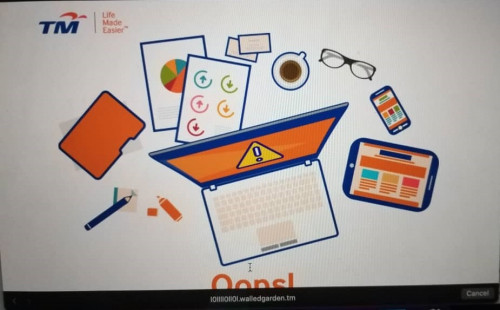
Need help, yesterday I reset my router, obtained a new password from TM for my PPPoE. Configure everything accordingly but still failed to connect to internet. I am using Archer C20. I've enabled IPTV when setting up PPPoE to Malaysia-Unifi. IGMP v3. I got pop up below

user posted image

Please advise
*
maybe check for outstanding bills first
Pisaro
post Mar 15 2022, 02:10 PM

New Member
*
Junior Member
11 posts

Joined: May 2008
never have an issue with clearing the bill on time.
FusionXY
post Mar 15 2022, 02:24 PM

LAZZIE ON VACATION
*******
Senior Member
3,836 posts

Joined: Aug 2016

QUOTE(Pisaro @ Mar 15 2022, 01:29 PM)
Hi Sifu,

Need help, yesterday I reset my router, obtained a new password from TM for my PPPoE. Configure everything accordingly but still failed to connect to internet. I am using Archer C20. I've enabled IPTV when setting up PPPoE to Malaysia-Unifi. IGMP v3. I got pop up below

user posted image

Please advise
*
Is your bill due?
Walled garden is a sign of not paying bill on time.
Pisaro
post Mar 15 2022, 02:26 PM

New Member
*
Junior Member
11 posts

Joined: May 2008
QUOTE(FusionXY @ Mar 15 2022, 02:24 PM)
Is your bill due?
Walled garden is a sign of not paying bill on time.
*
Couldn't be wor. I checked from Unifi apps my account all clear with RM0.00 sad.gif
FusionXY
post Mar 15 2022, 02:35 PM

LAZZIE ON VACATION
*******
Senior Member
3,836 posts

Joined: Aug 2016

QUOTE(Pisaro @ Mar 15 2022, 02:26 PM)
Couldn't be wor. I checked from Unifi apps my account all clear with RM0.00  sad.gif
*
Try contact TM.
Pisaro
post Mar 15 2022, 02:41 PM

New Member
*
Junior Member
11 posts

Joined: May 2008
when I connect back using TM old RG router, I can access to Internet. I just called TM 100, they say the port outside is not connected, or unstable connectivity detected. So they will send technical to check the box outside on the port.
Deskihaoz
post Mar 15 2022, 05:43 PM

Getting Started
**
Junior Member
61 posts

Joined: Jun 2011
Hi, Sifusss, Im new to mesh wifi stuff.

Recently moved in to 4 storey house so i bought 3packs of TP Link MEsh wifi M4 model.

Currently setup was using TIME 300mbps package and modem have to put at G floor as the fibred cable built into there.

Router im using the mesh wifi router FREE by TIME when i upgraded from 100mbps to 300mbps recently and place at 1st floor living hall.

For the 3 packs of M4 mesh, 1st M4 i set as main deco and plugged into router at 1st floor living hall there.

2nd deco i plugged at second floor small living hall and 3rd deco I put at top 3rd floor inside my master bedroom.

Currently speed was G floor around 20-30mbps, 1st floor can get full 300++mbps, 2nd floor can only get around 60-70mbps and last top 4th floor can only can like 40-50mbps.

Can I ask if these reading were normal for this kind of house and placements?

Or how can I improve 2nd and 3rd floor speed atleast can reach half of 300mbps which around 100-150mbps?

*I tried to move around the M4 deco packs within the floors as well but not much differents. doh.gif
blacktubi
post Mar 15 2022, 06:06 PM

-
Group Icon
Elite
8,423 posts

Joined: Jul 2008

QUOTE(Deskihaoz @ Mar 15 2022, 05:43 PM)
Hi, Sifusss, Im new to mesh wifi stuff.

Recently moved in to 4 storey house so i bought 3packs of TP Link MEsh wifi M4 model.

Currently setup was using TIME 300mbps package and modem have to put at G floor as the fibred cable built into there.

Router im using the mesh wifi router FREE by TIME when i upgraded from 100mbps to 300mbps recently and place at 1st floor living hall.

For the 3 packs of M4 mesh, 1st M4 i set as main deco and plugged into router at 1st floor living hall there.

2nd deco i plugged at second floor small living hall and 3rd deco I put at top 3rd floor inside my master bedroom.

Currently speed was G floor around 20-30mbps, 1st floor can get full 300++mbps, 2nd floor can only get around 60-70mbps and last top 4th floor can only can like 40-50mbps.

Can I ask if these reading were normal for this kind of house and placements?

Or how can I improve 2nd and 3rd floor speed atleast can reach half of 300mbps which around 100-150mbps?

*I tried to move around the M4 deco packs within the floors as well but not much differents. doh.gif
*
You will need a better model.

Bear in mind in my test within the same floor in my apartment, the speed already dropped to 200Mbps after 2 walls.
Deskihaoz
post Mar 15 2022, 06:19 PM

Getting Started
**
Junior Member
61 posts

Joined: Jun 2011
QUOTE(blacktubi @ Mar 15 2022, 06:06 PM)
You will need a better model.

Bear in mind in my test within the same floor in my apartment, the speed already dropped to 200Mbps after 2 walls.
*
Hi, Thanks alot.

Do we get better result with just changing the main deco to better model? If so, which model you think would be good for such case like mine ya?

Or can I open the wall powerline port at 1st floor and connect it over there instead of G floor will make the connection better in between?

Thank you. notworthy.gif
Eugene91
post Mar 24 2022, 08:35 AM

Look at all my stars!!
*******
Senior Member
6,109 posts

Joined: Dec 2008
From: Mike India Romeo India


Anyone here noticed the MR600 (EU v2) QOS doesn't seem to be working?

I'm on Archer MR600(EU)_V2_210208 firmware.

I've tried to set my Samsung Smart TV to the the lowest priority @ 5% but it still consumes most of the bandwith causing high pings 1500-3000ms ping on my laptop.
Oltromen Ripot
post Apr 10 2022, 04:36 PM

👍 999999 person Likes this member
*******
Senior Member
4,034 posts

Joined: Dec 2019
QUOTE(myron649 @ Apr 10 2022, 12:06 PM)
QUOTE(Oltromen Ripot @ Apr 8 2022, 05:42 PM)

are you on Unifi? You can leverage on easy installment to get tri-band mesh.

I use my RT-AX86U only for dialling, routing, and failover to standby B618.
The wireless AP function; i fully dedicate off to tri-band TP-Link M9 Plus.
user posted image
*
Can share how to configure this? Seems complex to me
*
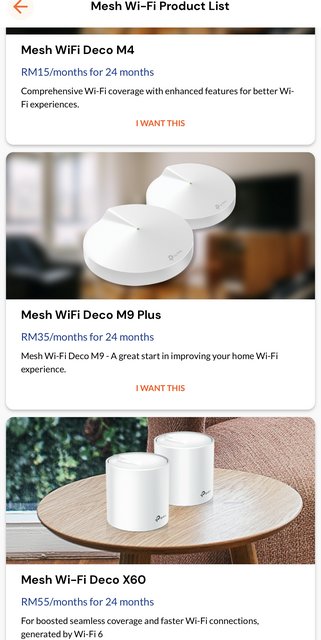
Unifi offer installment for tri-band M9 Plus or the tri-band X60. M4 and X60 are dual-band, so still no dedicated backhaul.

For the mesh:
General guideline; DO NOT MAKE YOUR MESH DEVICE A ROUTER.
Let your existing router handle dialling out to Internet, while your mesh is connected to normal LAN port of router. Let your router handle dishing out DHCP as it is. All your client devices are to connect to the Wifi name of your mesh.

Your old router can have its Wifi name intact; give new Wifi name to your mesh.

OR, like how i did, i give the old name to mesh and renamed-but-did-not-connect new Wifi name to old router. Either way, you need to check all client devices whether they can connect to the mesh; some client device are sticky and only want to connect to MAC address of old Wifi.


The failover to Huawei B618; this is my own choice to leverage failover capability that came with dual WAN port feature of RT-AX86U and to still make standby of excess wireless internet quota; you don't have to do the same as it won't improve your internet experience from impaired wifi transmission.

This post has been edited by Oltromen Ripot: Apr 10 2022, 04:39 PM
Alpha_Tay
post Apr 15 2022, 12:34 PM

Beware The Spammer Star!
******
Senior Member
1,725 posts

Joined: Jan 2003
TP-Link Wi-Fi 6E will Support EasyMesh™! Free Upgrades for Other Devices to Follow!

By TP-Link Editorial Group 12-27-2021

Recently, TP-Link announced its plans for a free EasyMesh™ upgrade for its routers and range extenders. It's worth noting that the newest TP-Link range extenders (RE815XE, RE900XD) will already come equipped with the super-compatible EasyMesh™ standard.

https://www.tp-link.com/my/blog/290/tp-link...ces-to-follow-/

https://www.tp-link.com/en/easymesh/

What is EasyMesh?

By TP-Link Editorial Group 12-27-2021

EasyMesh is a standard certification launched by the WiFi Alliance, which brings a standards-based approach to multiple AP networks. It is a basic standard that defines the protocol for the interconnectivity between different APs. The latest version is EasyMesh R2.

How can we get products that support EasyMesh?

All EasyMesh devices are mesh devices, but not all mesh WiFi devices support EasyMesh. Although there are already many whole home WiFi products that support multiple access points, as well as software and analysis systems that tie them together, they must still come from the same manufacturer. That leaves us with a limited number of devices that support EasyMesh today. You can find compatible devices at https://www.wi-fi.org/ .
TP-Link is committed to the development of EasyMesh products and has launched the HC220 series of products that support EasyMesh.
HC220-G5: https://service-provider.tp-link.com/home-w...ystem/hc220-g5/

More EasyMesh compatible WiFi 6 products will be available soon.
HX220-G5: https://service-provider.tp-link.com/home-w...ystem/hx220-g5/
HX223-G1: https://service-provider.tp-link.com/home-w...ystem/hx223-g1/

https://www.tp-link.com/my/blog/288/

-

Kevin_Z
2022-01-25 14:31:07
Re:EasyMesh feature in all OneMesh Routers
@JP827767099

Hello, thank you for your interest in the EasyMesh feature we are introducing to the TP-Link routers and range extenders.

EasyMesh will be a different Wi-Fi standard apart from Onemesh, we cannot say now if Onemesh devices will be compatible with Easymesh now since Easymesh is still under development, it is recommended to keep an eye on the EasyMesh splash page for updated news.

Visit this blog to know more about EasyMesh: What is EasyMesh?

https://community.tp-link.com/en/home/forum/topic/521918

SHENZHEN, China – Jan.5, 2022 – TP-Link®, a leading global provider of consumer and business networking products, has today unveiled its latest networking technologies and offerings. The Archer AXE200 Omni, the award-winning WiFi 6E router, boosts your WiFi speed to a new level. Deco XE200, with the leading WiFi 6E Mesh System incorporated, ensures reliable and robust WiFi throughout your home. Meanwhile, Smart Actions will power infinite synergies between your Tapo devices to suit your daily routines. TP-Link’s 10G routers and switches, managed by the Omada SDN Controller, will also provide a direct and ultra-reliable network connection.

*EasyMesh™ will be supported through firmware upgrades.

https://www.tp-link.com/my/press/news/19852/



shaktiv8
post Apr 16 2022, 06:30 PM

Casual
***
Junior Member
366 posts

Joined: Sep 2014


Hello guys

I just changed my dns server on my deco app

After that I did a whole system reset

But now my main computer, connected through a daisy chain deco x90 slave unit, is not able to get ipv4 address

Ipv6 works normally, so I didn’t notice because Netflix all works, but any website that is ipv4 only I not working anymore

Tried reset no change

What can I do ya?

This post has been edited by shaktiv8: Apr 16 2022, 06:30 PM
nitehawk
post Apr 24 2022, 08:59 PM

On my way
****
Senior Member
699 posts

Joined: May 2006


Where can I buy TP-Link layer 3 switches?
bahjan_2000
post Apr 28 2022, 02:01 PM

Casual
***
Junior Member
454 posts

Joined: Oct 2017


I have an Archer AX20 router, planning to purchase a mesh Wifi extender to plop one in my son's room, which is about.. 7, 8 meters away? With 2 PCs in it. I'm on Unifi 300mbps, currently looking at RE305, or is RE205 sufficient? Thanks guys!
HippyTony
post Apr 29 2022, 04:26 PM

Regular
******
Senior Member
1,056 posts

Joined: Oct 2016
From: HKG tsai
Hi guys, is DECO M4 the same as HC4? Sellers in Shopee selling them as the same? Thanks.
MyProLife
post Apr 29 2022, 09:44 PM

I bully wumao & MPKL
*******
Senior Member
2,075 posts

Joined: Sep 2021
From: nowhere

QUOTE(HippyTony @ Apr 29 2022, 04:26 PM)
Hi guys, is DECO M4 the same as HC4? Sellers in Shopee selling them as the same? Thanks.
*
Yes is the same
I mean the v1 or v2 M4 is same as hc4, the reason rebrand to hc4 is because v3 or v4 M4 has upgraded processor (but not available yet in Malaysia)

This post has been edited by MyProLife: Apr 29 2022, 09:46 PM
kamil129
post Apr 30 2022, 08:44 PM

New Member
*
Newbie
20 posts

Joined: Apr 2012


Hello.

I would like to know if I bought an Archer AXE75 which has 6GHz band, can I use the band right now? I am thinking to use it with S21 Ultra.
blacktubi
post May 1 2022, 11:59 AM

-
Group Icon
Elite
8,423 posts

Joined: Jul 2008

QUOTE(kamil129 @ Apr 30 2022, 08:44 PM)
Hello.

I would like to know if I bought an Archer AXE75 which has 6GHz band, can I use the band right now? I am thinking to use it with S21 Ultra.
*
Check with Samsung whether their S21 Ultra sold in Malaysia is capable of receiving 6Ghz.

Most OEMs disabled them despite having hardware support as the band is not permitted in Malaysia until recently.

I don't think the vendors will enable them eventually as they need to undergo recertification with MCMC.
HolySatan
post May 3 2022, 10:40 PM

Regular
******
Senior Member
1,116 posts

Joined: Dec 2009
right now using Archer AX73 for unifi 500mbps
can Deco X90 connect to modem using mesh?
because X90 only got 2 pack
or buy Deco X68/X60 got 3 pack

1 mesh connect to modem router, another deco mesh 1st & 2nd floor house

user posted image

249 Pages « < 204 205 206 207 208 > » Top
 

Change to:
| Lo-Fi Version
0.0276sec    0.52    6 queries    GZIP Disabled
Time is now: 22nd December 2025 - 10:30 PM