

QUOTE(FusionXY @ Aug 24 2021, 05:37 PM)
So far not sure anyone bought cause still new.
Maybe can check YouTube.
You're welcome.

All right, maybe i'll be the first to try.Maybe can check YouTube.
You're welcome.
TP-LINK Malaysia Official Thread, Technical Enquiries and Support
|
|
 Aug 24 2021, 05:45 PM Aug 24 2021, 05:45 PM
|
 
Senior Member
2,694 posts Joined: Feb 2007 From: KL  
|
QUOTE(FusionXY @ Aug 24 2021, 05:37 PM) So far not sure anyone bought cause still new. All right, maybe i'll be the first to try.Maybe can check YouTube. You're welcome. |
|
|
|
|
|
Aug 25 2021, 01:54 PM
|

Senior Member
1,412 posts Joined: Jun 2005
|
need some suggestion
a 3 storey house want to do mesh, requirements i think fairly simple 1. AX 2. to support unifi 300mbps 3. average 7 devices connected only, max 10 current router is some crappy router given by TM, likely will ditch it This post has been edited by darude87: Aug 25 2021, 01:55 PM |
|
|
Aug 25 2021, 07:43 PM
|

Junior Member
31 posts Joined: Aug 2010
|
Hi. Anyone knows if tplink ax10 from celcom fiber can flash normal firmware or not?
Because latest update support onemesh |
|
|
Aug 25 2021, 07:54 PM
Show posts by this member only | IPv6 | Post
#3744
|

Elite
2,559 posts Joined: Jan 2003
|
QUOTE(darude87 @ Aug 25 2021, 01:54 PM) need some suggestion Deco X20 3-pack, one for each floor / level.a 3 storey house want to do mesh, requirements i think fairly simple 1. AX 2. to support unifi 300mbps 3. average 7 devices connected only, max 10 current router is some crappy router given by TM, likely will ditch it |
|
|
Aug 26 2021, 10:08 AM
|
|
Senior Member
1,412 posts Joined: Jun 2005
|
QUOTE(haturaya @ Aug 25 2021, 07:54 PM) Deco X20 3-pack, one for each floor / level. hmm rm860 currently for 3 pieces, i think its a good choiceso the main unit will able to replace its current router? |
|
|
Aug 26 2021, 11:22 AM
|
|
Junior Member
460 posts Joined: Jun 2008
|
QUOTE(darude87 @ Aug 26 2021, 10:08 AM) hmm rm860 currently for 3 pieces, i think its a good choice main unit can direct to modem onuso the main unit will able to replace its current router? how fast is your fiber? let you know the speedtest case scenario for 2 nodes deco x20 fiber 500mbps on 1100 square feet apartment node 1 at center of living room 500mbps node 2 at 3rd bedroom wireless backhaul - 200mbps wired backhaul - 500mbps This post has been edited by szecheng: Aug 26 2021, 11:24 AM |
|
|
|
|
|
Aug 26 2021, 01:39 PM
Show posts by this member only | IPv6 | Post
#3747
|
|
Elite
2,559 posts Joined: Jan 2003
|
QUOTE(darude87 @ Aug 26 2021, 10:08 AM) hmm rm860 currently for 3 pieces, i think its a good choice Yup, but if you want solid speed - use ethernet backhaul instead. so the main unit will able to replace its current router? As for my house, I set my X20 in AP mode and connect both to my 10 ports Mikrotik router. 7 wired devices + at least 25 wireless devices. Works well for our needs. |
|
|
Aug 26 2021, 01:42 PM
|

Elite
8,427 posts Joined: Jul 2008 
|
QUOTE(haturaya @ Aug 26 2021, 01:39 PM) Yup, but if you want solid speed - use ethernet backhaul instead. How's your roaming when using it on AP mode?As for my house, I set my X20 in AP mode and connect both to my 10 ports Mikrotik router. 7 wired devices + at least 25 wireless devices. Works well for our needs. Is it as seamless as router mode? aniq8676 liked this post
|
|
|
Aug 26 2021, 01:46 PM
Show posts by this member only | IPv6 | Post
#3749
|
|
Elite
2,559 posts Joined: Jan 2003
|
QUOTE(blacktubi @ Aug 26 2021, 01:42 PM) How's your roaming when using it on AP mode? Seamless, same. Can't differentiate if set to router mode (remove my Mikrotik). Is it as seamless as router mode?  As till now, satisfied. As till now, satisfied. What I observed via web interface, the CPU load slightly less in AP mode (10%-15%) compared to Router mode (min 20%, can shoot up to 70%). This X20 replaced my Deco M4. This post has been edited by haturaya: Aug 26 2021, 01:51 PM |
|
|
Aug 26 2021, 06:40 PM
Show posts by this member only | IPv6 | Post
#3750
|
|
Senior Member
2,694 posts Joined: Feb 2007 From: KL
|
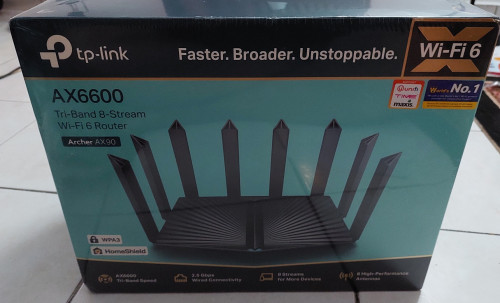 Arrived. Can't wait to test John42 liked this post
|
|
|
Aug 26 2021, 06:45 PM
Show posts by this member only | IPv6 | Post
#3751
|

Senior Member
3,836 posts Joined: Aug 2016
|
QUOTE(hazairi @ Aug 26 2021, 06:40 PM) Arrived. Can't wait to test |
|
|
Aug 26 2021, 07:58 PM
|
|
Junior Member
164 posts Joined: Sep 2015
|
Hi guys, recently my family just upgrade to 300Mbps from Unifi. We received a set of Deco M4. After setting up, we did the speedtest and we only received around 100+-mbps. We couldn't locate the 5G WiFi on our connections as they are only one connection name on our WIFI list. May i know how to troubleshoot this?
|
|
|
Aug 26 2021, 08:29 PM
|
|
Junior Member
164 posts Joined: Sep 2015
|
QUOTE(Sherman Kong @ Aug 26 2021, 07:58 PM) Hi guys, recently my family just upgrade to 300Mbps from Unifi. We received a set of Deco M4. After setting up, we did the speedtest and we only received around 100+-mbps. We couldn't locate the 5G WiFi on our connections as they are only one connection name on our WIFI list. May i know how to troubleshoot this? 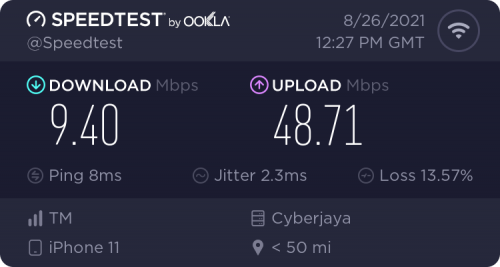 Edit: the photo attached is the speed of the second unit of M4 when I’m downstairs lol |
|
|
|
|
|
Aug 26 2021, 09:54 PM
|
|
Senior Member
2,694 posts Joined: Feb 2007 From: KL
|
QUOTE(Sherman Kong @ Aug 26 2021, 07:58 PM) Hi guys, recently my family just upgrade to 300Mbps from Unifi. We received a set of Deco M4. After setting up, we did the speedtest and we only received around 100+-mbps. We couldn't locate the 5G WiFi on our connections as they are only one connection name on our WIFI list. May i know how to troubleshoot this? go to your wifi settings. Is 'Smart Connect' enabled? Disabled it. |
|
|
Aug 26 2021, 09:58 PM
|
|
Senior Member
2,694 posts Joined: Feb 2007 From: KL
|
QUOTE(FusionXY @ Aug 26 2021, 06:45 PM) Later review ya.. Thank you. 1 word. Superb.previous old router (Unifi default archer ac1200), on the 3rd floor guest room, signal only around 10%. Using this can get 50%. Basically, the whole corner of the house can get superb connection and speed. |
|
|
Aug 26 2021, 10:03 PM
Show posts by this member only | IPv6 | Post
#3756
|
|
Senior Member
3,836 posts Joined: Aug 2016
|
QUOTE(hazairi @ Aug 26 2021, 09:58 PM) 1 word. Superb. I am glad that you like the router.previous old router (Unifi default archer ac1200), on the 3rd floor guest room, signal only around 10%. Using this can get 50%. Basically, the whole corner of the house can get superb connection and speed. Thank you for the feedback. |
|
|
Aug 26 2021, 11:57 PM
|
|
Senior Member
1,412 posts Joined: Jun 2005
|
QUOTE(szecheng @ Aug 26 2021, 11:22 AM) main unit can direct to modem onu how fast is your fiber? let you know the speedtest case scenario for 2 nodes deco x20 fiber 500mbps on 1100 square feet apartment node 1 at center of living room 500mbps node 2 at 3rd bedroom wireless backhaul - 200mbps wired backhaul - 500mbps QUOTE(haturaya @ Aug 26 2021, 01:39 PM) Yup, but if you want solid speed - use ethernet backhaul instead. solid info there, I'm asking on behalf of the friend, his sub i think is 300mbps, and he doesn't like cables much, will let him decide to go wired or wirelessAs for my house, I set my X20 in AP mode and connect both to my 10 ports Mikrotik router. 7 wired devices + at least 25 wireless devices. Works well for our needs. |
|
|
Aug 27 2021, 03:08 AM
|
|
Junior Member
366 posts Joined: Sep 2014
|
Hello guys!
I’m using a deco x90 now, and I’ve noticed especially after resetting the router that some devices will fail to obtain an IP address. No matter what I try, the device will be stuck at obtaining IP address. Inside the router logs it shows ip broadcasted to the device but failed. I saw in tplink forum it’s very common issue with deco m5 Does anyone experiencing this issue too? Any way to fix or avoid it in the future without needing to restart the whole system again ? |
|
|
Aug 27 2021, 11:20 PM
|
|
Senior Member
738 posts Joined: Oct 2006
|
Dear TP-Link
Does Archer AX50 Router still having heating issues? TQ |
|
|
Aug 27 2021, 11:24 PM
|
|
Junior Member
460 posts Joined: Jun 2008
|
QUOTE(hazairi @ Aug 26 2021, 09:54 PM) go to your wifi settings. Is 'Smart Connect' enabled? Disabled it. deco only combined ssid |
| Change to: |  0.0224sec 0.0224sec
 0.57 0.57
 6 queries 6 queries
 GZIP Disabled GZIP Disabled
Time is now: 23rd December 2025 - 07:07 PM |
 Quote
Quote