On AX20 currently all devices has no issues with connection except my office laptop thinkpad which is unable to detect the WiFi. I've tried creating Guest WiFi on 2.4 but it is still not detecting. I've no issue with previous old router...
What should I check?
My interim solution was setting up asus rtn12hp as repeater just for this laptop to connect. The Unifi dlink DIR842 can't be used as repeater unfortunately
Update the driver of the WiFi adapter on the laptop if that’s possible.
If that’s not an option, disable WiFi 6 on the router and that shall fix it.
Hi anyone knows how to connect another router to Deco M9?
The reason I want to do this is to connect other devices like smart switches/ cctv into another network (2.4) as they dont play well with M9. So I was thinking I have spare router, I can use it to run only 2.4G and connect those devices to that router and using current Deco M9 as the master router.
Hi anyone knows how to connect another router to Deco M9?
The reason I want to do this is to connect other devices like smart switches/ cctv into another network (2.4) as they dont play well with M9. So I was thinking I have spare router, I can use it to run only 2.4G and connect those devices to that router and using current Deco M9 as the master router.
Since the Deco mesh cannot set separate SSID for 5/2.4Ghz, so I ended up using DL850L as my 2.4 router and M4 as 5Ghz and the second M4 as both 2.4/5Ghz since I need the range for equipment at 1st floor.
So all my wifi accessories (smarthome) connects to DL850
If you want to use as M9 as main router then you need to configure the port PPPoE mode and then set the other port on M( for unifiTV, if you have one.
I am thinking to buy a TP-link MR600 to use with my maxis 4g multi sim card. If connection stable, I'll subscribe to their 4g home unlimited package.
The modem cost around rm 500, just wondering if it will be overkill for my usage. I just hope to get something that has a higher chance to improve the stability and speed of my 4g signal in the house. Currently on my phone, occasionally it will drop to 3g or no signal at all.. randomly. When good, the 4g speed on my iphone can get up to 30mbps.
Any advice? should i spend a bit less for smthing simpler? or just get the MR600 for higher chance of making thing works?
Since the Deco mesh cannot set separate SSID for 5/2.4Ghz, so I ended up using DL850L as my 2.4 router and M4 as 5Ghz and the second M4 as both 2.4/5Ghz since I need the range for equipment at 1st floor.
So all my wifi accessories (smarthome) connects to DL850
If you want to use as M9 as main router then you need to configure the port PPPoE mode and then set the other port on M( for unifiTV, if you have one.
see if this helps
Your smarthome very lag is it?
I was using AX50 until I started to install some smarthome switches and cameras, then I would get lag on those camera etc. These 2x2 on 2.4GHz really hurts when it comes to smarthome. I changed to Tenda AC18 and it fixed some of the lag problem. I bought a couple more used router and planning to separate both 2.4GHz and 5GHz on individual router to get the maximum range and speed. Maybe I will have some time during this weekend to try out.
Usually TP-LINK will make LAN PORT 3 as VOIP And make sure the VLAN ID for VOIP is correct
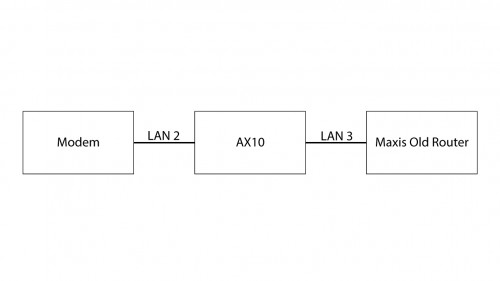
i try on LAN PORT 4 with VLASN ID 821 if not mistaken as VoIP as per the default setting by the Maxis broadband option. then plus into the old maxis router but the phone line still not working
i try on LAN PORT 4 with VLASN ID 821 if not mistaken as VoIP as per the default setting by the Maxis broadband option. then plus into the old maxis router but the phone line still not working
##For Maxis Fibre on TM (HSBB) Infrastructure VLAN ID `621` #for internet (PPPoE) `822` #for VoIP/SIP `821` #for TM management network (Maxis Fibre using TM infrastucture) `823` #for Broadband TV/IPTV service
##For Maxis Fibre on Maxis Infrastructure VLAN VID `11` #for internet (PPPoE) `14` #for VoIP/SIP `6` #for Maxis management network (Maxis's own fibre infrascructure) `17` #for Broadband TV/IPTV service
I'm thinking to have Deco M4 to improve wifi coverage in my house (1200-1300 sqf), as currently using stock router from unifi, kinda weak signal at 2nd floor, is it good enough to use only 1 unit Deco M4 as wifi router for the house. Any advice, thanks
I'm thinking to have Deco M4 to improve wifi coverage in my house (1200-1300 sqf), as currently using stock router from unifi, kinda weak signal at 2nd floor, is it good enough to use only 1 unit Deco M4 as wifi router for the house. Any advice, thanks
with the size of the house, maybe one is enough, but I suggest you take a set of 2 deco
with the size of the house, maybe one is enough, but I suggest you take a set of 2 deco
Actually how far is the coverage for 1 unit of M4 ? I get info of 3800 sqf for 2-pack. What is the difference between M4 and E4? I find out E4 is much cheaper...
I'm thinking to have Deco M4 to improve wifi coverage in my house (1200-1300 sqf), as currently using stock router from unifi, kinda weak signal at 2nd floor, is it good enough to use only 1 unit Deco M4 as wifi router for the house. Any advice, thanks
5Ghz is not able to cover 2 floor. You might get slow speed.
1 unit each floor is better for speed and stability.
E4 only have 100Mbps port while M4 has 1000Mbps. If you signed up 100Mbps and above, then take M4.
This post has been edited by jacktiew: Apr 30 2021, 11:23 PM
Actually how far is the coverage for 1 unit of M4 ? I get info of 3800 sqf for 2-pack. What is the difference between M4 and E4? I find out E4 is much cheaper...
depending on the position you place. the area for deco M4 can go over 4000sqft. while 3800sqft is the recommended area only
The only difference between M4 and E4 is on the Ethernet port.
Hi, I'm looking to share buying deco x60 or x90... 1 unit for me and 2nd or third unit to share with anyone who is interested. Buzz me if anyone is keen.
has anyone having same issue with me with the RE300 one mesh repeater? if i turn on "smart connect" in my AX73 router, my RE300 will not able to detect 5ghz wifi and only broadcast 2.4ghz wifi
This post has been edited by fuzzy007: May 2 2021, 02:32 PM
has anyone having same issue with me with the RE300 one mesh repeater? if i turn on "smart connect" in my AX73 router, my RE300 will not able to detect 5ghz wifi and only broadcast 2.4ghz wifi
Disable smart connect and use channel 44 for the 5Ghz band else the RE series will not detect the 5Ghz channel.
This is becuase TP-Link RE series does not support Ch 149 - Ch 161.
Anyway please share what is the speed you get when connected to the RE. I've not tested using a cheaper RE so I am curious how big of a difference compare to the RE505X.


 Apr 22 2021, 11:35 PM


 Quote
Quote








 0.0243sec
 1.32
1.32
 6 queries
 GZIP Disabled